







Facebook Twitter Instagram
    Trending
    • JJRC H141 2-IN-1 RC Drone Review: The Ultimate Amphibious Land-Air Toy for All Ages
    • Starting from 1999 yuan, Honor X80i is officially launched: metal frame, 7000mAh large battery, 6-year durability
    • It is Reported that Vivo Pocket is expected to be released in Q3 and will come with a combination plan for the X500 series.
    • SHRC AE20 GPS 5G RC Quadcopter Review: A High-Tech Drone for Aerial Excellence
    • NBCP 736F for PS5 Controller Wired Gamepad Review: The Ultimate Gaming Experience with Precision and Style
    • HUAWEI FreeBuds 7i TWS Bluetooth Earbuds Review: The Ultimate Blend of Performance and Convenience
    • V380PRO Tri-Lens WiFi IP Security Camera Review: The Future of Smart Surveillance
    • Maskking Somo vs Maskking Camo: Which Pod Is Better in 2026?
    Facebook YouTube
    IGeeKphone China Phone, Tablet PC, VR, RC Drone News, Reviews
    • HOME
      • NEWS
        • DeepSeek
        • ChatGPT
        • Minecraft
    • Amazon
    • PHONE
      • Top Phones For Your First Choice
      • Phone Comparison
      • Xiaomi
      • Blackview
      • Doogee
      • Black Shark
      • Geekbuying
      • Banggood
      • TEMU
      • TikTok
      • Aliexpress
      • Walmart
      • MercadoLibre
      • Lazada
    • TOP VAPE Awards for 2026
    • VAPES
      • E-CIGAR Upcoming
      • Vape News
      • Vape Deals
      • Vape Comparison
      • Vape Guide
      • Giveaway
    • BEST VAPE
      • Best Vape Stores
      • Best Starter Vape Kits
      • Best Vapes for Beginners
      • Best Disposable Vapes
      • Best Pod Systems
      • Best Pod Mod Vapes
      • Best Mods
      • Best Nicotine Pouches
      • Best Clearomizers/Tanks
      • Best E-Liquid
      • Best EGO/Pens
      • Best Vapes for Nic Salt E-Juice
      • Best Vapes to Quit Smoking
      • RDA vs. RDTA vs. RTA
    • Best Vape Brand 2026
      • VAPORESSO
      • VOOPOO
      • OXVA
      • NEXA BAR
      • ORIONBARTECH
      • MASKKING VAPE
      • MEMERS
      • SP2S
      • TODOO
      • MRFOG
      • VEIIK
    • REVIEW
      • E-cigar Review
      • Phones
      • Tablet PC
      • TV Box
      • RC Drone
      • Wearables
      • Camera
      • Accessories
      • VR Headset
    • MORE
      • TABLET
        • Chuwi
        • INNOCN
        • Teclast
        • Top Tablet for Your First Choice
        • Tablet/Laptop Comparison
      • RC DRONE
      • CAMERA
      • WEARABLES
        • OneOdio
        • BlitzWolf
        • Top Smartwatch for First Choice
      • 3D PRINTER
        • 3D Printer Review
        • Anycubic
        • FLSUN
        • Xtool
        • LONGER
        • Top 3D printer to Choose First
      • POWER STATION
        • Oukitel
        • FOSSIBOT
      • GAMING
        • Top Gaming Products
      • E-BIKE
        • Samebike
        • Happyrun
        • ENGWE
      • SMART HOME
      • TV BOX
      • ACCESSORIES
      • VR HEADSET
      • CLOTHES
      • AUTO CAR
    • DEAL
    • VAPE LAWS
    • Shop
    IGeeKphone China Phone, Tablet PC, VR, RC Drone News, Reviews
    You are at:Home»Guide»Best Service to Move Photos from Google Drive to Google Photos – MultCloud
    Guide

    Best Service to Move Photos from Google Drive to Google Photos – MultCloud

    Brady CottonBy Brady CottonMarch 8, 2026
    Facebook Twitter Pinterest LinkedIn Tumblr Email

    How do you move photos from Google Drive to Google Drive? Still by downloading them from Google Drive and then uploading them to Google Photos? It is time to try a more automatic way! In this post, we will recommend a wonderful and free cloud file transfer service, MultCloud, to you. With MultCloud, it is a piece of cake to move all your photos from Google Drive to Google Photos at once without any downloading. More details about MultCloud will be illustrated below. Let’s explore!

    Overview of Google Drive and Google Photos

    Google Drive is a cloud storage service that offers you the ability to store files securely online and makes them accessible from any device. On the other hand, Google Photos is a cloud-based photo and video storage service. It automatically backs up media from your devices, organizing them by date and location. With powerful search capabilities, you can quickly locate specific photos using keywords or visual recognition technology on Google Photos.

    Moving photos from Google Drive to Google Photos offers several benefits. Firstly, Google Photos provides unlimited storage for compressed photos and videos, whereas Google Drive storage may be limited depending on your plan. Additionally, Google Photos offers more advanced features for organizing and managing photos, such as automatic tagging, facial recognition, and the creation of albums and animations. Therefore, it may be necessary for you to do the photo migration.

    MultCloud – Best Cloud File Transfer Service

    You may have a brief impression of MultCloud from the introduction part of this post. In this part, we will specifically explain why MultCloud deserves to be used. In general, MultCloud is a cloud management service on which you can centralize all the cloud files. By far, it supports 30+ cloud drives, including Google Drive, Google Photos, Google Workspace, Dropbox, iCloud Drive, iCloud Photos, OneDrive, Box, SharePoint Online, Flickr, MEGA, FTP, pCloud, NAS, Wasabi, Amazon S3, and more.

    MultCloud offers basic functions such as Upload, Download, Share, Copy, Delete, Rename, and Cut for you to manage files in one cloud. However, if you want to connect 2 clouds, you can use their main functions – Cloud Transfer, Team Transfer, Cloud Sync, and Cloud Backup.

    • Cloud Transfer:Transfer files from one cloud to another directly without downloading.
    • Team Transfer:Match sub-accounts and the admins and transfer files correspondingly.
    • Cloud Sync:Foster easy cloud-to-cloud sync with 10 helpful sync modes.
    • Cloud Backup: Backup and restore cloud files with another cloud with versioning.

    Among the above cloud-to-cloud file transfer functions, Cloud Transfer and Cloud Sync can be used to move photos from Google Drive to Google Photos. You can choose your preferred one between them in accordance with your needs.

    How to Move Photos from Google Drive to Google Photos

    As mentioned before, both MultCloud Cloud Transfer and Cloud Sync can be used for Google Drive photos to Google Photos move. The easy-to-follow steps for using these 2 functions are shown as follows.

    Step 1: Sign up to get a free MultCloud account.

    Go to the MultCloud official site and click “Get started for free” to enter the sign-up page. You can create an account by entering your email address and password. Or, you can directly sign up with your Google Drive/Facebook/Apple accounts.

    Step 2: Add your Google Drive and Google Photos accounts to MultCloud.

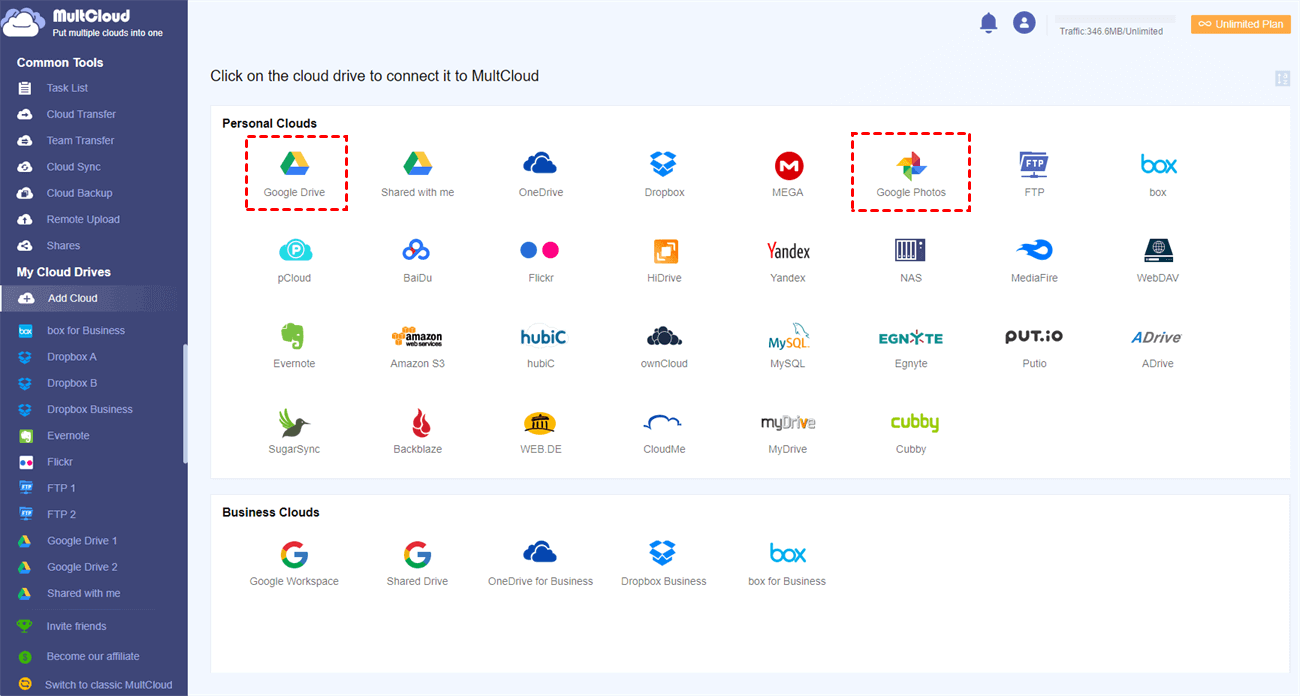
    First, click “Add Cloud” in the left bar. Then, choose the Google Drive/Google Photos logo in the right part. Next, sign in to Google Drive/Google Photos in the pop-up window and allow MultCloud to access your files.
    • If you choose to use Cloud Transfer:

    Step 3: Choose the source and target clouds.

    Click “Cloud Transfer” in the left bar to enter its page. Then, tap the FROM box, choose the Google Drive photos you want to move, and click “OK”. Also, tap the TO Box, choose a Google Photos folder to save these photos, and click “OK”.
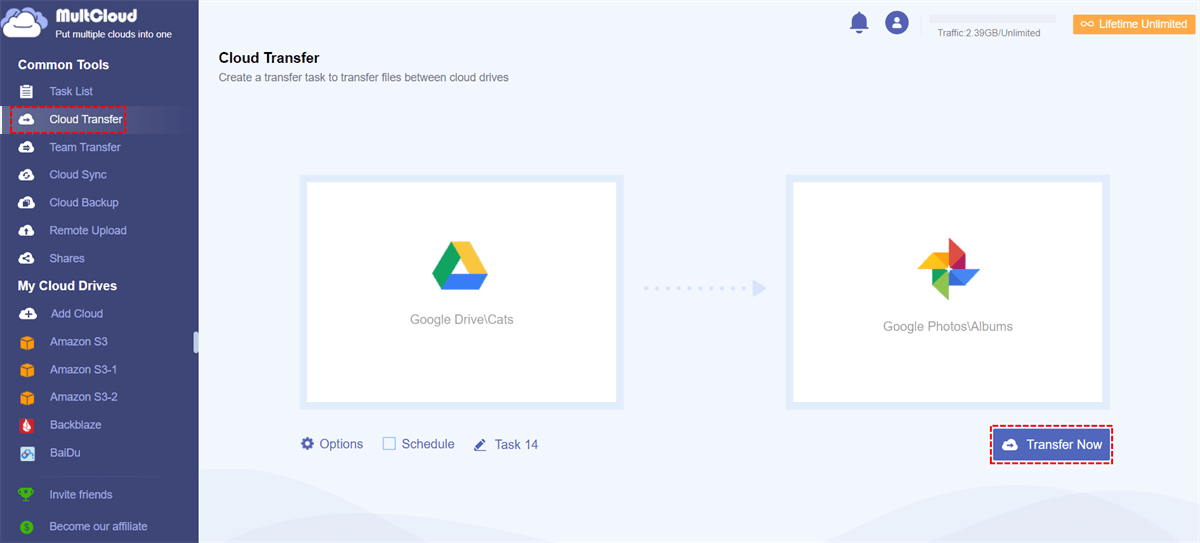
     

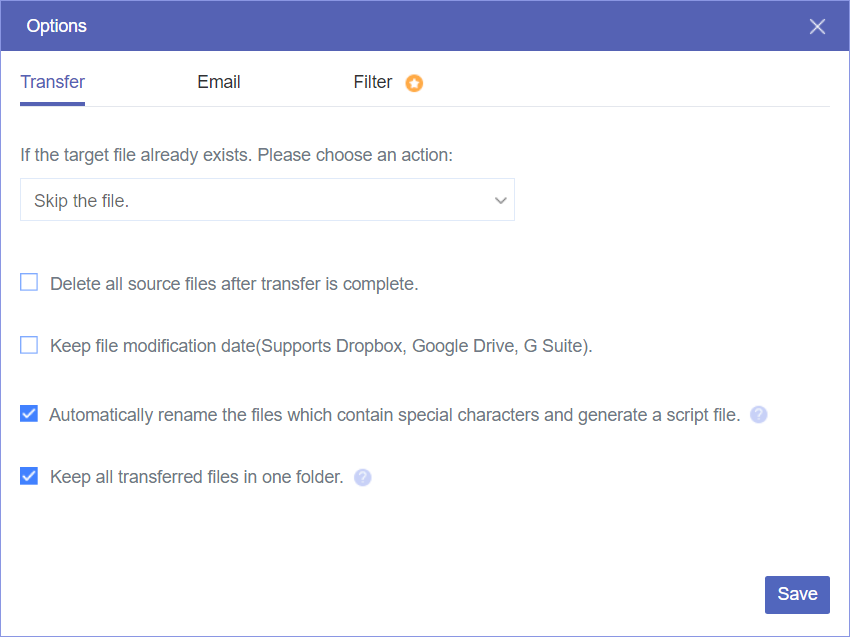
    Step 4: Open “Options” to check transfer settings and press the “Transfer Now” button to start this process.
    • If you choose to use Cloud Sync

    Step 3: Choose the source and target clouds.

    Click “Cloud Sync” in the left bar. Then, choose photos in Google Drive in the FROM box and a Google Photos folder in the TO box.
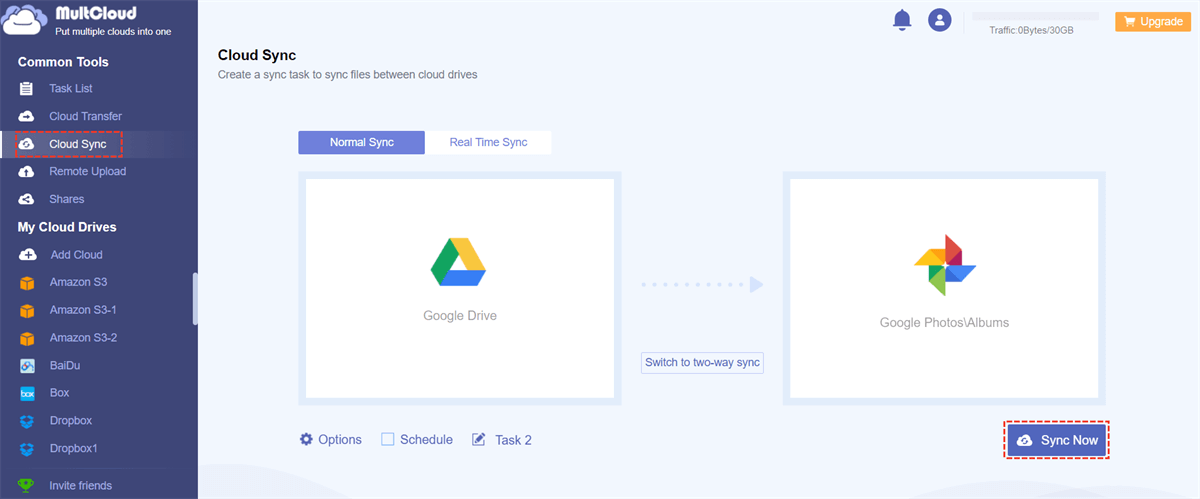
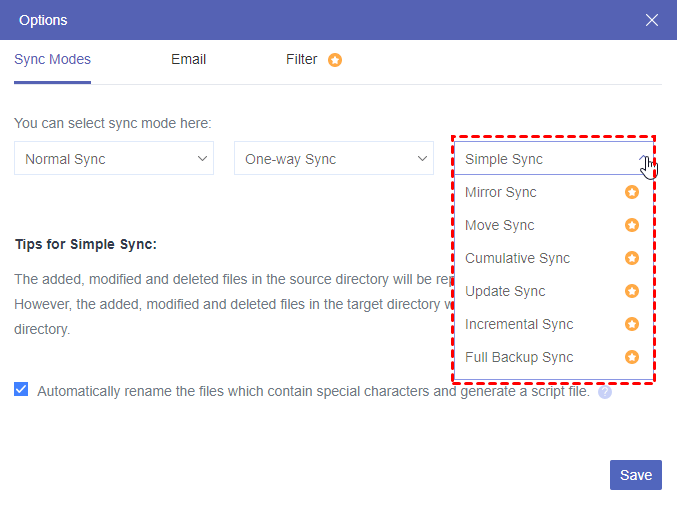
    Step 4: Open “Options” to choose sync modes if you need them. Then, press “Sync Now” to initiate the task.
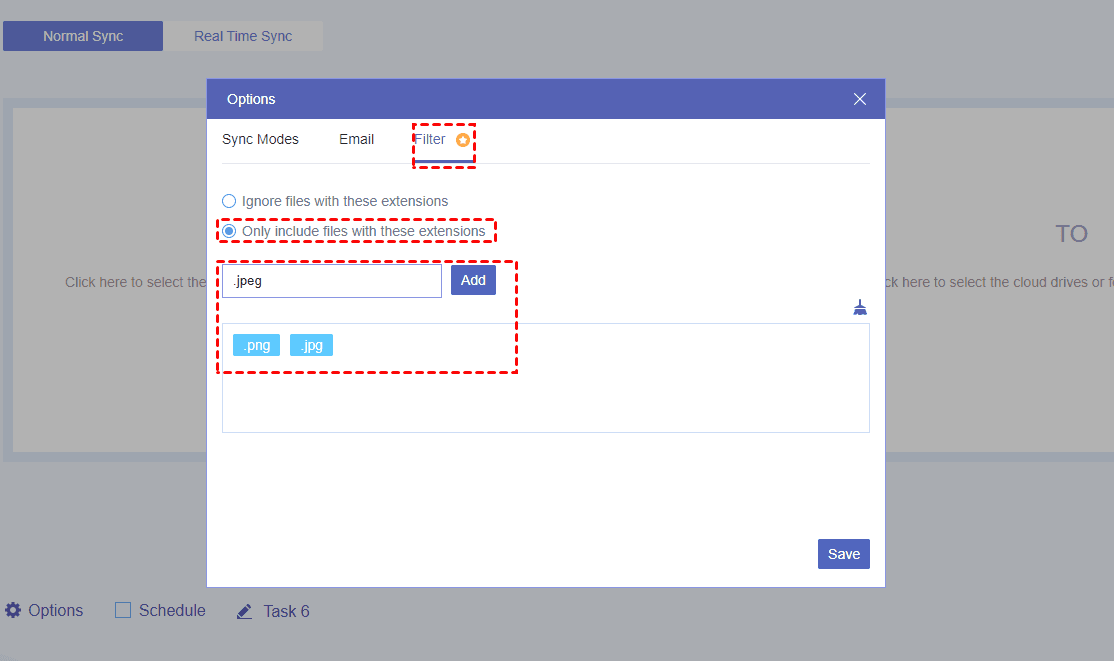
    Note: You can batch-select photos from Google Drive by their file extensions with the “Filter” feature.
     

    Conclusion

    You must know how easy using MultCloud to move photos from Google Drive to Google Photos. Whether you choose Cloud Transfer or Cloud Sync, it can help you realize the photo migration automatically. What’s more, you can use these 2 functions for other cloud file migration like transferring from Box to Dropbox. Why not give MultCloud a chance and try it now?

    Share. Facebook Twitter Pinterest LinkedIn Tumblr Email

    Related Posts

    Starting from 1999 yuan, Honor X80i is officially launched: metal frame, 7000mAh large battery, 6-year durability

    It is Reported that Vivo Pocket is expected to be released in Q3 and will come with a combination plan for the X500 series.

    Xiaomi Smart Camera 4 Max AI Zoom Edition Released: 12x zoom, supports elderly/children/pet monitoring at 799 yuan!

    Leave A Reply Cancel Reply

    You must be logged in to post a comment.

    voopoo drag 6
    oxva xlim 3 ultra
    sp2s sen x disposable vape
    • Popular
    • 3D Printer REVIEW
    • XIAOMI
    March 16, 2026

    OXVA Slimstick VS OXVA Slimstick X Vape Hands-on Review

    March 5, 2026

    OXVA XLIM PRO 3 vs XLIM Pro 2 DNA: Hands-On Review

    March 5, 2026

    OXVA XLIM PRO 3 vs XLIM GO 2: Hands-On Review

    March 2, 2026

    OXVA XLIM PRO 3 vs XLIM 3 ULTRA: Hands-On Review

    December 26, 2025

    ACMER ASCARVA 4S: Precision CNC Power for Makers, DIYers & Small Workshops

    June 23, 2024

    ACMER P2 20W Laser Engraver Fixed Focus Engraving: Hands on Review

    May 30, 2024

    xTool F1 Ultra Review: World’s First 20W Fiber & 20W Diode Laser Engraver

    May 30, 2024

    Anycubic Kobra 3 Combo Review: The Multicolor Masterpiece?

    April 1, 2026

    Xiaomi Smart Camera 4 Max AI Zoom Edition Released: 12x zoom, supports elderly/children/pet monitoring at 799 yuan!

    March 29, 2026

    Xiaomi Watch S5 Review: 316L Stainless Steel, Ultra-Long Battery Life

    March 26, 2026

    The Telephoto Lens of Xiaomi 18 Ultra has Undergone a Comprehensive Upgrade: with an Ultra-Large Sensor, LOFIC Technology

    March 26, 2026

    Xiaomi Redmi Pad 2 Pro 5G Edition is available for purchase: Supports 5G all-network and China Unicom eSIM, 8G + 256G priced at 2599 yuan.

    fc 26 coins
    New Arrivals
    • Waspe Bar 60K Disposable Vape Waspe Bar 60K Disposable Vape
    • Dojo Purex 60K Disposable Vape Dojo Purex 60K Disposable Vape
    • Geekvape Kloud Refillable Disposable Vape Geekvape Kloud Refillable Disposable Vape
    • Suonon Amber 80K Disposable Vape Kit Suonon Amber 80K Disposable Vape Kit
    • iJOY XP50000 Zero Nicotine Disposable Vape iJOY XP50000 Zero Nicotine Disposable Vape
    • OXBAR ROVOTA DTL 40K Disposable Vape OXBAR ROVOTA DTL 40K Disposable Vape
    • Pachamama 75K Disposable Vape Pachamama 75K Disposable Vape
    • Pillow Talk 50K Patriotic Edition Disposable Vape Pillow Talk 50K Patriotic Edition Disposable Vape
    • Realme P5 5G Realme P5 5G
    About
  • Igeekphone.com provides the first global tech news and reviews about smartphone, vapes, e-cigar, smart home, 3D printers, e-bike,tablets, RC drones, VR headset, and other accessories. It's the best platform to improve your brand and product.
  • Contact us: info@igeekphone.com
  • Check Our Privacy Policy Here.
  • Note: *Right now we have US editor and EU editors for review, especially for Amazon US and EU.
  • *Shop and Compare Price Here*
  • Facebook
  • Youtube
  • OUR BEST VAPE PARTNERS
  • VAPE ONLINE STORE
  • HAYATI PRO MAX PLUS
  • VAPORESSO
  • VOOPOO
  • OXVA
  • NEXA
  • MASKKING
  • TODOO
  • SP2S
  • VEIIK
  • OTHER BEST PARTNERS
  • SVBONY
  • Chuwi
  • Blackview
  • Fossibot
  • Unihertz
  • Flsun
  • Anycubic
  • Xtool
  • Oukitel
  • Mukkpet Ebike
  • Ugreen
  • Copyright © 2026 igeekphone

    Type above and press Enter to search. Press Esc to cancel.