






Facebook Twitter Instagram
    Trending
    • Xiaomi 17 Max smartphone is the first to feature a 8000mAh Jinshajiang battery. The official long video endurance test shows that it can last for over 33 hours.
    • An Informational Overview of Sub‑Ohm Vape Tanks (Including Devices Like the Z MAX) at £19.99
    • Hayati Pro Ultra Plus Shisha 30K Review at £9.99: A New Era for Shisha-Style Vaping
    • Maskking CAMO: How Modular Magnetic Design Redefines Everyday Vape Convenience
    • Discovering Hidden Gems: The Unexpected Benefits of Independent Living for Seniors
    • How to Evaluate an NFT Project for high growth rate
    • The Art of Slot Design: How Graphics and Sound Influence Your Gaming Experience
    • Eco betting: how gambling can help protect the environment
    Facebook YouTube
    IGeeKphone China Phone, Tablet PC, VR, RC Drone News, Reviews
    • HOME
      • NEWS
        • DeepSeek
        • ChatGPT
        • Minecraft
    • Amazon
    • PHONE
      • Top Phones For Your First Choice
      • Phone Comparison
      • Xiaomi
      • Blackview
      • Doogee
      • Black Shark
      • Geekbuying
      • Banggood
      • TEMU
      • TikTok
      • Aliexpress
      • Walmart
      • MercadoLibre
      • Lazada
    • TOP VAPE Awards for 2026
    • VAPES
      • E-CIGAR Upcoming
      • Vape News
      • Vape Deals
      • Vape Comparison
      • Vape Guide
      • Giveaway
    • BEST VAPE
      • Best Vape Stores
      • Best Starter Vape Kits
      • Best Vapes for Beginners
      • Best Disposable Vapes
      • Best Pod Systems
      • Best Pod Mod Vapes
      • Best Mods
      • Best Nicotine Pouches
      • Best Clearomizers/Tanks
      • Best E-Liquid
      • Best EGO/Pens
      • Best Vapes for Nic Salt E-Juice
      • Best Vapes to Quit Smoking
      • RDA vs. RDTA vs. RTA
    • Best Vape Brand 2026
      • VAPORESSO
      • VOOPOO
      • OXVA
      • NEXA BAR
      • MASKKING VAPE
      • SP2S
      • IPLAY
      • TODOO
      • MRFOG
      • LOSTVAPE
      • VEIIK
    • REVIEW
      • E-cigar Review
      • Phones
      • Tablet PC
      • TV Box
      • RC Drone
      • Wearables
      • Camera
      • Accessories
      • VR Headset
    • MORE
      • TABLET
        • Chuwi
        • INNOCN
        • Teclast
        • Top Tablet for Your First Choice
        • Tablet/Laptop Comparison
      • RC DRONE
      • CAMERA
      • WEARABLES
        • OneOdio
        • BlitzWolf
        • Top Smartwatch for First Choice
      • 3D PRINTER
        • 3D Printer Review
        • Anycubic
        • FLSUN
        • Xtool
        • LONGER
        • Top 3D printer to Choose First
      • POWER STATION
        • Oukitel
        • FOSSIBOT
      • GAMING
        • Top Gaming Products
      • E-BIKE
        • Samebike
        • Happyrun
        • ENGWE
      • SMART HOME
      • TV BOX
      • ACCESSORIES
      • VR HEADSET
      • CLOTHES
      • AUTO CAR
    • DEAL
    • VAPE LAWS
    • Shop
    IGeeKphone China Phone, Tablet PC, VR, RC Drone News, Reviews
    You are at:Home»Guide»Best Free Cloud Backup Software for Personal Use
    Guide

    Best Free Cloud Backup Software for Personal Use

    Brady CottonBy Brady CottonJanuary 13, 2026
    Facebook Twitter Pinterest LinkedIn Tumblr Email

    What Does Cloud Backup Do?

    Cloud backup, also called online backup or remote backup, is the process of transferring and storing data on a secondary offsite location, which is owned and managed by a third-party cloud service provider. You can store a copy of your data on one or more remote servers. This backup strategy can help you efficiently avoid risks from cyberattacks, as it could help you quickly restore your data if it’s compromised, lost, or corrupted.

    Best Free Cloud Backup Software for Personal Use – CBackup

    CBackup is an easy-to-use free cloud backup software that can meet all your cloud backup needs. It is compatible with Windows operating systems, including Windows 11, 10, 8.1, 8, 7, and XP. And it allows you to backup data to Google Drive, OneDrive, Dropbox, and multiple cloud storage services on a single interface.

    Let’s take a look at the useful backup features of CBackup:

    • Scheduled backup: It offers flexible automaticbackup modes, such as daily backup, weekly backup, monthly backup, and specific time backup.
    • Incremental backup: This backup method enables you to back up only changed or newly added files instead of creating full backups every time, so to save backup space and time.
    • CBackup Cloud backup: It gives 10GB of free backup space for CBackup Cloudafter registration, and provides you with cost-effective 1TB and 5TB storage plans if you need more backup space.
    • Support multiple backup devices: This software can not only help you back up computer local disks, but also supports you to back up external hard drives, SD cards, and so on.
    • Other powerful functions: This tool also offers cloud to cloud backup, cloud to cloud transfer, PC to cloud sync and more features.

    How to Perform Cloud Backups for Your Computer Files

    If you are interested in how to use the CBackup backup software to create online backups for your important data, please proceed with the following guide.

    Preparations for creating data backup to cloud using CBackup:

    • Download and install this free cloud backup software on your computer.
    • Apply for a free account for CBackup through its website.

    #1. Backup Data to CBackup Cloud

    Step 1. Run the CBackup desktop app and log in.

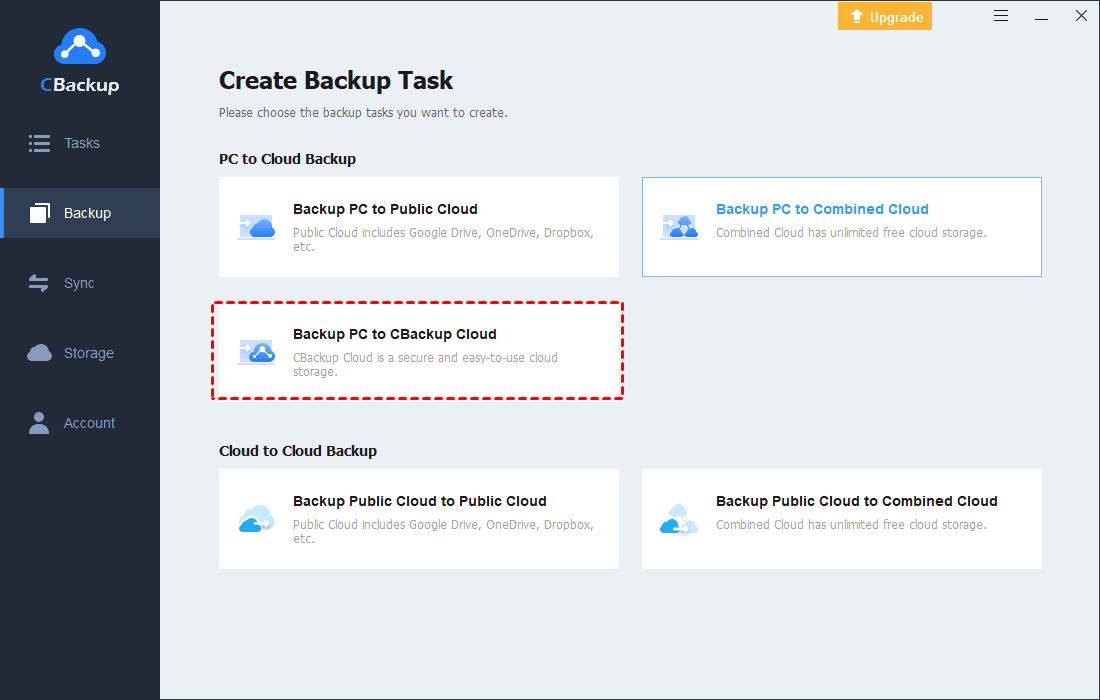
    Step 2. Click the Backup button, then choose Backup PC to CBackup Cloud.
    Step 3. Select files and folders to backup and it will determine the CBackup Cloud as the backup destination automatically. Then, click Start Backup to create backup to cloud.
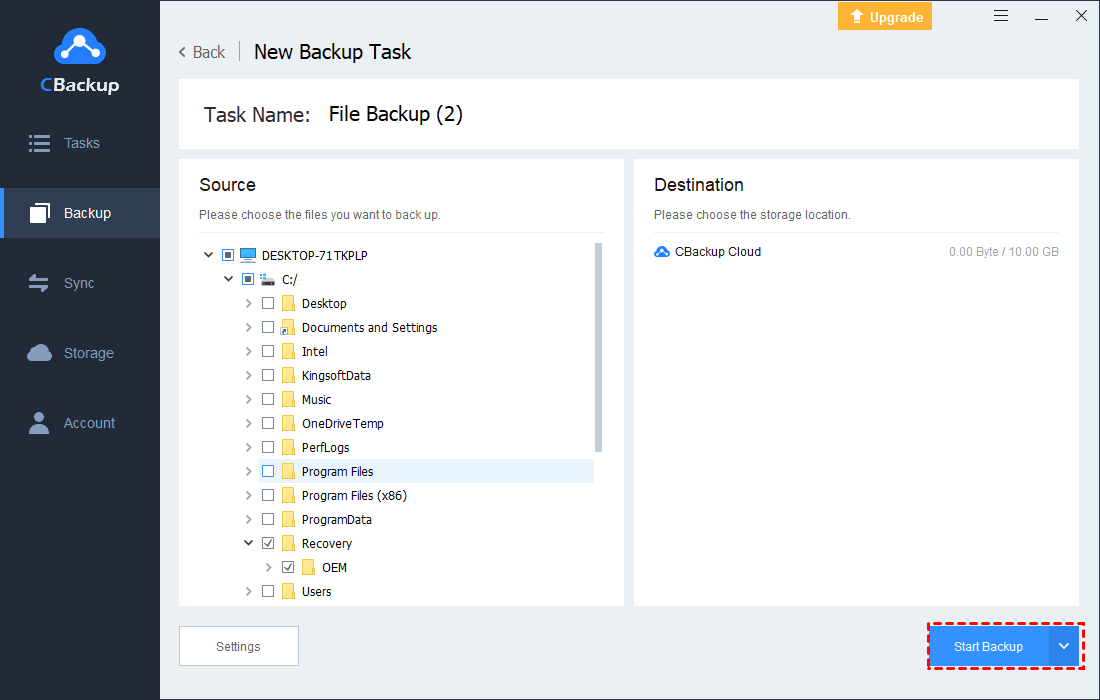
    Useful Tip: You can click Settings in the lower left corner, and set up auto backup or enable file filter to exclude files types from backup according to your needs.

    #2. Backup Files to Google Drive/OneDrive/Dropbox

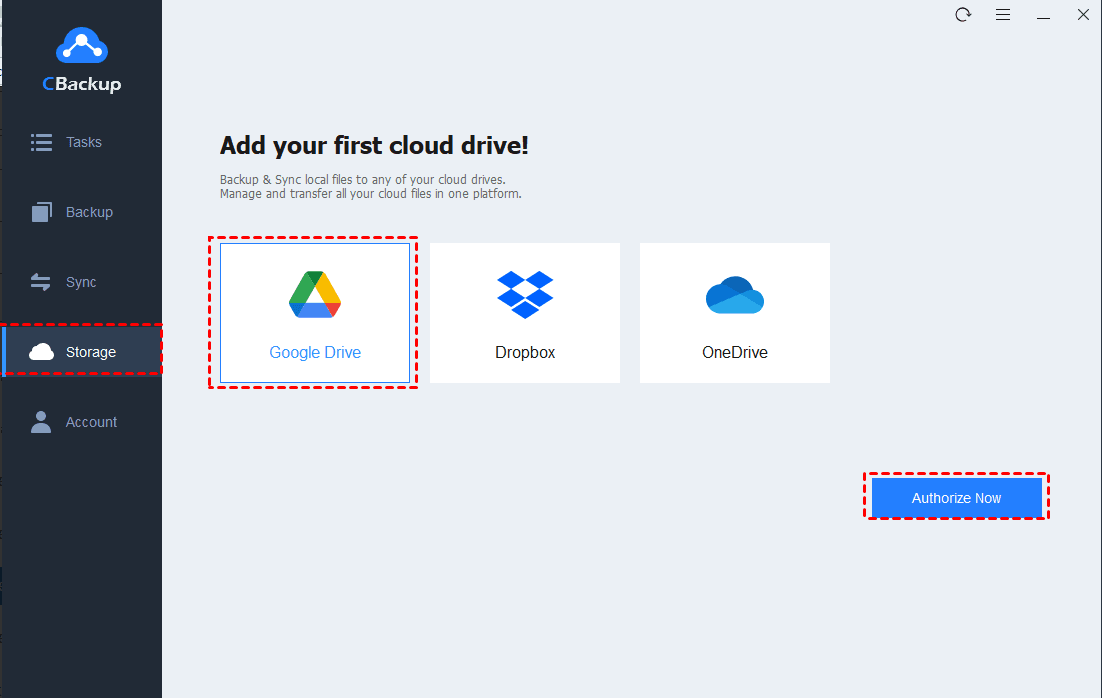
    Step 1. On the Storage page, choose the public cloud drive in which you want to save your backups, then click on Authorize Now to grant CBackup to access your cloud storage space.
    Useful Tip: If you have multiple cloud accounts, you can add them all to CBackup. In this way, you can easily manage them and backup data to the target cloud without switching accounts or using different cloud software. What’s more, CBackup offers you to combine multiple cloud storage into one to increasing cloud storage for free.

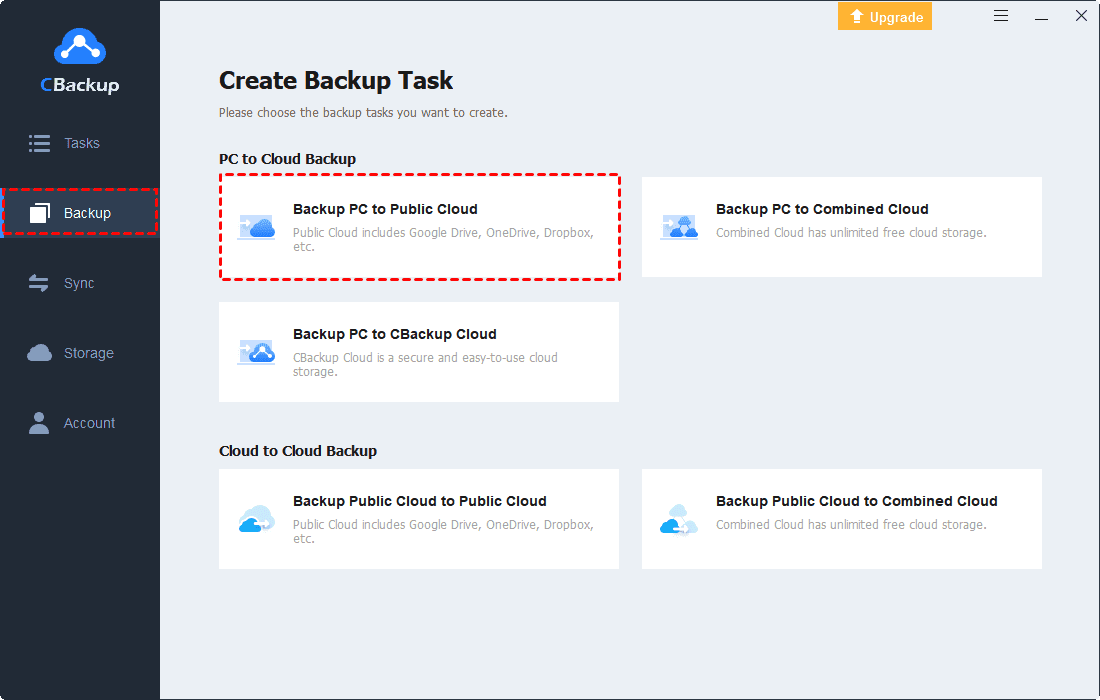
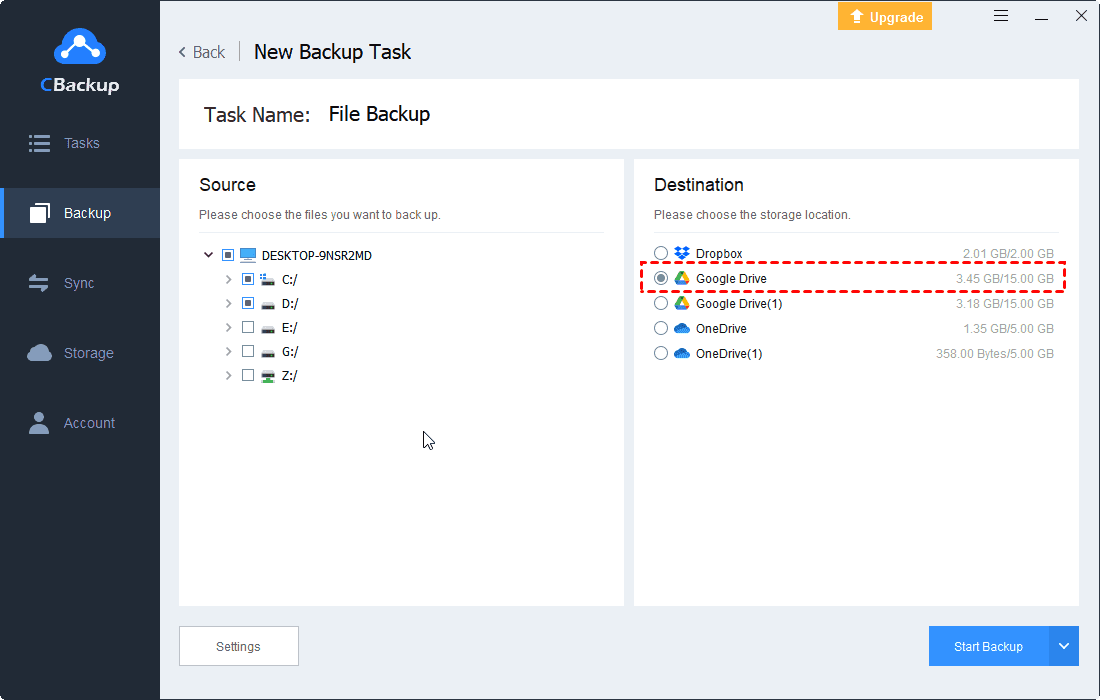
    Step 2. Go to the Backup tab and opt for the Backup PC to Public Cloud option.
    Step 3. Choose files, folders, or hard drives you plan to store online, and select the added cloud as your backup destination.

    Step 4. Finally, click the Start Backup button to initiate the cloud backup process.
    Frequently Asked Questions about Cloud Backup

    #1. What are the advantages and disadvantages of cloud backups?

    There are many benefits of cloud backup, like cost-efficient, scalable storage space, easy access with internet-connected, enhanced security.

    While it also has some drawbacks, such as the necessity for internet connectivity, the more data you store, the higher the cost, low control on data, etc.

    #2. Is Google Drive a cloud backup?

    Essentially, Google Drive is not a cloud backup solution, but a cloud synchronization tool. But with the backup function of CBackup, you can use it as a backup tool and restore your backup data when needed.

    #3. Does cloud backup space cost much money?

    Most cloud backup providers come with free storage space, like 5GB or 10GB, and you don’t need to pay for it. However, if you want to store more data than the free limit, you need to pay for it. Usually, the more data you save to the cloud, the cost may rise.

    Conclusion

    If you are seeking the best cloud backup software, CBackup is an excellent choice. It allows you to back up all kinds of files, including documents, videos, photos, and music, and enables you to perform hard drive and PC backup to CBackup Cloud, Google Drive, and more clouds with ease.

    After backup, its restore feature lets you retrieve the backup data free whenever you want. You also have the option to restore backups onto a new computer.

    Share. Facebook Twitter Pinterest LinkedIn Tumblr Email

    Related Posts

    Xiaomi 17 Max smartphone is the first to feature a 8000mAh Jinshajiang battery. The official long video endurance test shows that it can last for over 33 hours.

    Discovering Hidden Gems: The Unexpected Benefits of Independent Living for Seniors

    How to Evaluate an NFT Project for high growth rate

    Leave A Reply Cancel Reply

    You must be logged in to post a comment.

    voopoo drag 6
    oxva xlim 3 ultra
    sp2s sen x disposable vape
    • Popular
    • 3D Printer REVIEW
    • XIAOMI
    May 17, 2026

    iPlay Nova 45K Review – High Puff Performance with a Futuristic Twist

    May 17, 2026

    Vaporesso XROS 6 & XROS 6 Mini Review – The Evolution of Portable Vaping

    May 7, 2026

    OXVA Xlim Go Lite Review: Compact, Powerful, and Beginner-Friendly

    April 18, 2026

    VOOPOO DRAG 6 Hands on Review: Vape Beast with Smart Power & Premium Control

    December 26, 2025

    ACMER ASCARVA 4S: Precision CNC Power for Makers, DIYers & Small Workshops

    June 23, 2024

    ACMER P2 20W Laser Engraver Fixed Focus Engraving: Hands on Review

    May 30, 2024

    xTool F1 Ultra Review: World’s First 20W Fiber & 20W Diode Laser Engraver

    May 30, 2024

    Anycubic Kobra 3 Combo Review: The Multicolor Masterpiece?

    May 19, 2026

    Xiaomi 17 Max smartphone is the first to feature a 8000mAh Jinshajiang battery. The official long video endurance test shows that it can last for over 33 hours.

    May 19, 2026

    REDMI K100 specifications leaked: Snapdragon 8E5 + 200 million pixels – the most powerful monster of the K series

    May 18, 2026

    Pre-release information for Xiaomi 17T series: Kirin chip + Leica photography

    May 18, 2026

    Details of Xiaomi 17 Air have Emerged: Snapdragon 8E5+200 million Pixels. The Ultra-thin Flagship Dream has Shattered

    fc 26 coins
    New Arrivals
    • DOOGEE Tab E3 Max Tablet PC DOOGEE Tab E3 Max Tablet PC
    • DOOGEE V Max 2 Pro Rugged Phone DOOGEE V Max 2 Pro Rugged Phone
    • Realme P5 Pro Realme P5 Pro
    • Innokin Coolfire Z Air Pod Mod Kit Innokin Coolfire Z Air Pod Mod Kit
    • L&A Click Pro 80K Nixodine Disposable Vape Kit L&A Click Pro 80K Nixodine Disposable Vape Kit
    • Xiaomi 17 Max Xiaomi 17 Max
    • Geek Bar Burj 80K Disposable Vape Geek Bar Burj 80K Disposable Vape
    • Hellvape Vsee Neo Pod System Kit Hellvape Vsee Neo Pod System Kit
    • Lost Mary MT35000 Turbo Carnival Edition Disposable Vape Lost Mary MT35000 Turbo Carnival Edition Disposable Vape
    About
  • Igeekphone.com provides the first global tech news and reviews about smartphone, vapes, e-cigar, smart home, 3D printers, e-bike,tablets, RC drones, VR headset, and other accessories. It's the best platform to improve your brand and product.
  • Contact us: info@igeekphone.com
  • Check Our Privacy Policy Here.
  • Note: *Right now we have US editor and EU editors for review, especially for Amazon US and EU.
  • *Shop and Compare Price Here*
  • Facebook
  • Youtube
  • OUR BEST VAPE PARTNERS
  • VAPE ONLINE STORE
  • HAYATI PRO MAX PLUS
  • VAPORESSO
  • VOOPOO
  • OXVA
  • NEXA
  • MASKKING
  • SP2S
  • IPLAY
  • TODOO
  • OTHER BEST PARTNERS
  • SVBONY
  • Chuwi
  • Blackview
  • Fossibot
  • Unihertz
  • Flsun
  • Anycubic
  • Xtool
  • Oukitel
  • Mukkpet Ebike
  • Ugreen
  • Copyright © 2026 igeekphone

    Type above and press Enter to search. Press Esc to cancel.