









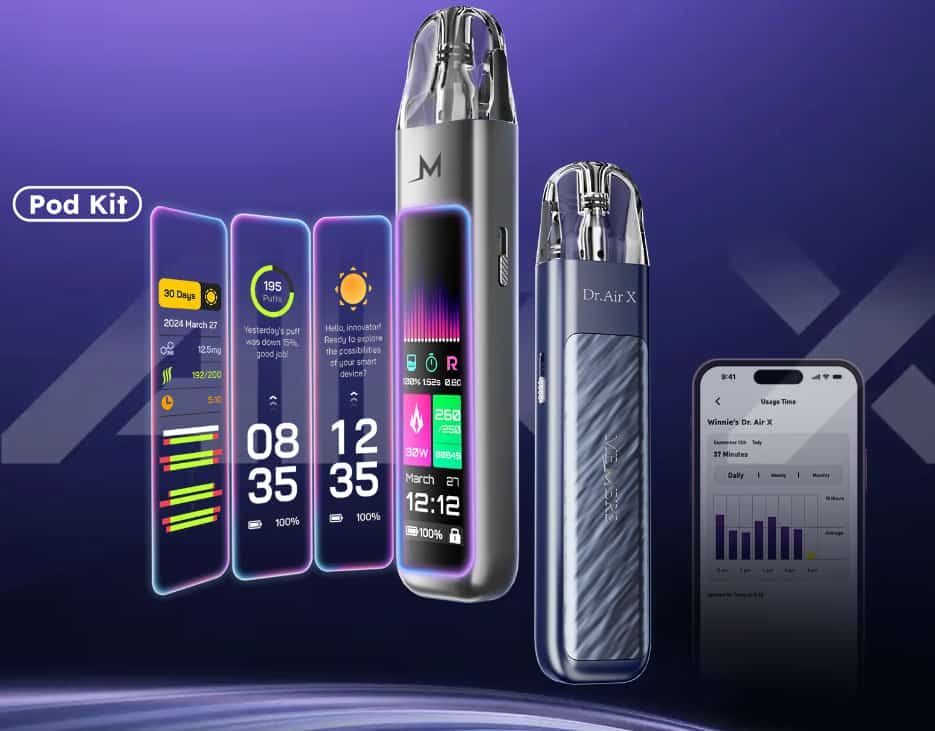
Memers Dr. Air X is a smart, feature-rich pod vape system designed for both beginners and experienced vapers. With its 2.2-inch LCD touchscreen, adjustable airflow, AI-assisted settings, and long-lasting 1000 mAh battery, it combines convenience with customization so you get consistent flavor and satisfying draws every time.
Here’s how to get started and use it correctly.
1. Unbox and Inspect Your Device
When you first open your Dr. Air X kit, make sure you have:
-
The Dr. Air X main device
-
One 0.6 Ω mesh coil pod
-
One 0.8 Ω mesh coil pod
-
A USB-C charging cable
-
User manual
Inspect the pod and device for any manufacturing stickers or protective film — peel these off before use.
2. Charge the Device Before First Use
Before vaping, plug the Dr. Air X into a power source using the included USB-C cable. The 1000 mAh battery charges fast thanks to its 2 A charging capability, and the LCD display will show your charging progress.
Tip: A full charge usually takes around 30–45 minutes depending on the remaining battery level.
3. Fill Your Pod With E-Liquid
The Dr. Air X uses refillable pods — here’s how to fill them properly:
-
Remove the pod from the device.
-
Open the silicone plug on the side filling port.
-
Slowly fill with your chosen nicotine salt e-liquid (recommended PG:VG = 50:50 or 60:40).
-
Close the plug securely to prevent leaks.
-
Wait about 5 minutes before vaping to let the coil absorb the juice (priming).
Pro tip: Avoid overfilling — leave a small air gap so the coil can wick properly.
4. Install the Pod
After filling, press the pod firmly into the top of the device until it clicks into place. The magnetic connection ensures a secure fit and proper electrical contact.
5. Turn On and Navigate the Touchscreen
Once your pod is in place, the 2.2-inch LCD touchscreen will activate. This screen lets you:
-
See battery level and wattage
-
Adjust airflow
-
Track puff count
-
Monitor nicotine intake and vaping data
-
Use AI recommendations for wattage and airflow
Swipe and tap through the menus to familiarize yourself with these options.
6. Adjust Airflow and Power
Airflow
Use the side airflow control slider to adjust how tight or loose each draw feels — tighter for a mouth-to-lung (MTL) experience or looser for a restricted direct-lung (RDTL) feel.
Wattage
Dr. Air X supports 5–30 W output. It can auto-detect the pod and recommend wattage, or you can manually set wattage based on your preference.
7. Start Vaping
Once everything is set:
-
Simply inhale through the mouthpiece — the draw-activated system makes it easy with no button needed.
Enjoy your vapor! The AI-enhanced system helps maintain consistent flavor and performance throughout your session.
8. Monitor Usage and Data
One of the Dr. Air X’s standout features is its AI tracking and analytics. Through the device screen or the Dr. Air app, you can monitor:
-
Puff count
-
Daily and monthly vape timers
-
Nicotine intake
-
Flavor analytics
-
AI airflow and wattage recommendations
This feature helps you understand your habits and tailor your experience over time.
9. Maintain Your Device
To keep your Dr. Air X performing well:
Wipe the pod connection points weekly with a soft cloth.
Replace pods after about 10 refills or when flavor decreases noticeably.
Avoid charging overnight to preserve battery health.
Store the device upright and avoid extreme temperatures.
Final Thoughts
Memers Dr. Air X pod kit is cleverly designed for anyone who wants a customizable, tech-forward vaping experience. Its LCD touchscreen, adjustable airflow, and smart AI recommendations set it apart from basic pod devices, while simple filling, magnetic pods, and draw-activated vaping make it user-friendly.
By following these steps and tips, you’ll get the most out of your Dr. Air X kit — enjoying rich flavor, consistent performance, and personalized control every time you vape.