







Facebook Twitter Instagram
    Trending
    • OXVA Nexlim 2 Mini Pod Vape Hands on Review
    • OXVA Nexlim 2 Mini Pod Vape Unboxing Review
    • OXVA Nexlim 2 Pod Vape Hands on Review
    • OXVA Nexlim 2 Pod Vape Unboxing Review
    • iPhone 20 Embodies Truly Comprehensive Screen: The Most Upgraded Apple Phone
    • Which Vaping Products Will Remain Available Following the Ban on Disposable Vapes?
    • What Your Smartphone Knows About Your Slip and Fall Accident and Why It Matters
    • How Personal Injury Claims Work When Everyday Activities Lead to Serious Physical Harm and Legal Consequences
    Facebook YouTube
    IGeeKphone China Phone, Tablet PC, VR, RC Drone News, Reviews
    • HOME
    • BREAKING NEWS
      • AI NEWS
    • Amazon
    • PHONE
      • Top Phones For Your First Choice
      • Phone Comparison
      • Xiaomi
      • Blackview
      • Doogee
      • Black Shark
      • Geekbuying
      • Banggood
      • TEMU
      • TikTok
      • Aliexpress
      • Walmart
      • MercadoLibre
      • Lazada
    • TOP VAPE Awards for 2026
    • VAPES
      • E-CIGAR Upcoming
      • Vape News
      • Vape Deals
      • Vape Comparison
      • Vape Guide
      • VAPE LAWS
      • Giveaway
    • BEST VAPE
      • Best Vape Stores
      • Best Starter Vape Kits
      • Best Vapes for Beginners
      • Best Disposable Vapes
      • Best Pod Systems
      • Best Pod Mod Vapes
      • Best Mods
      • Best Nicotine Pouches
      • Best Clearomizers/Tanks
      • Best E-Liquid
      • Best EGO/Pens
      • Best Vapes for Nic Salt E-Juice
      • Best Vapes to Quit Smoking
      • RDA vs. RDTA vs. RTA
    • Best Vape Brand 2026
      • VAPORESSO
      • VOOPOO
      • OXVA
      • NEXA BAR
      • MASKKING VAPE
      • SP2S
      • IPLAY
      • TODOO
      • MRFOG
      • LOSTVAPE
      • VEIIK
    • REVIEW
      • E-cigar Review
      • Phones
      • Tablet PC
      • TV Box
      • RC Drone
      • Wearables
      • Camera
      • Accessories
      • VR Headset
    • MORE
      • TABLET
        • Chuwi
        • INNOCN
        • Teclast
        • Top Tablet for Your First Choice
        • Tablet/Laptop Comparison
      • RC DRONE
      • CAMERA
      • WEARABLES
        • OneOdio
        • BlitzWolf
        • Top Smartwatch for First Choice
      • 3D PRINTER
        • 3D Printer Review
        • Anycubic
        • FLSUN
        • Xtool
        • LONGER
        • Top 3D printer to Choose First
      • POWER STATION
        • Oukitel
        • FOSSIBOT
      • GAMING
        • Top Gaming Products
      • E-BIKE
        • Samebike
        • Happyrun
        • ENGWE
      • SMART HOME
      • TV BOX
      • ACCESSORIES
      • VR HEADSET
      • CLOTHES
      • AUTO CAR
    • DEAL
    • Shop
    IGeeKphone China Phone, Tablet PC, VR, RC Drone News, Reviews
    You are at:Home»Guide»A Guide to Photo Repair: Reviving Damaged Pictures with Software and Tools
    Guide

    A Guide to Photo Repair: Reviving Damaged Pictures with Software and Tools

    HabibBy HabibMarch 10, 2023
    Facebook Twitter Pinterest LinkedIn Tumblr Email

    We all love to capture and preserve our precious memories through photos. Whether it’s a special occasion, a holiday, or everyday moments, thousands of images are stored on our devices, however, what happens when these photos become damaged or corrupted, and we cannot view or access them? How you can do a photo repair.

    There are many reasons why photo files can become damaged or corrupted. One of the main reasons is the degradation of the storage device, including hard drives and memory cards, over time. This can cause stored content to be destroyed, resulting in damaged photos. Other reasons include power outages during the save process, system crashes, or other unforeseen circumstances that can cause photo files to become corrupted during transfer.

    If you find yourself in a situation where your photos have become damaged or corrupted, don’t worry! There is a simple and fast method for repairing them. You only need a professional file repair tool, such as the Senior File Repair Tool. This tool supports repairing a wide range of damages, including grayed-out, blurred, pixelated, grainy, missing bytes, color loss, blank, unopenable, and other damaged photos.

    The first step is to install the software and upload your photos. Once the software is installed, select the image repair function on the left, click “Add,” or directly drag and add pictures. The tool supports adding multiple files in batches, making the process quick and easy.

    The next step is to start repairing your photos. After uploading the images, they appear in the “list to be repaired” section. You can continue to add other images or remove the added ones, and then click “Start Repair” and wait for the software to complete the automatic repair process.

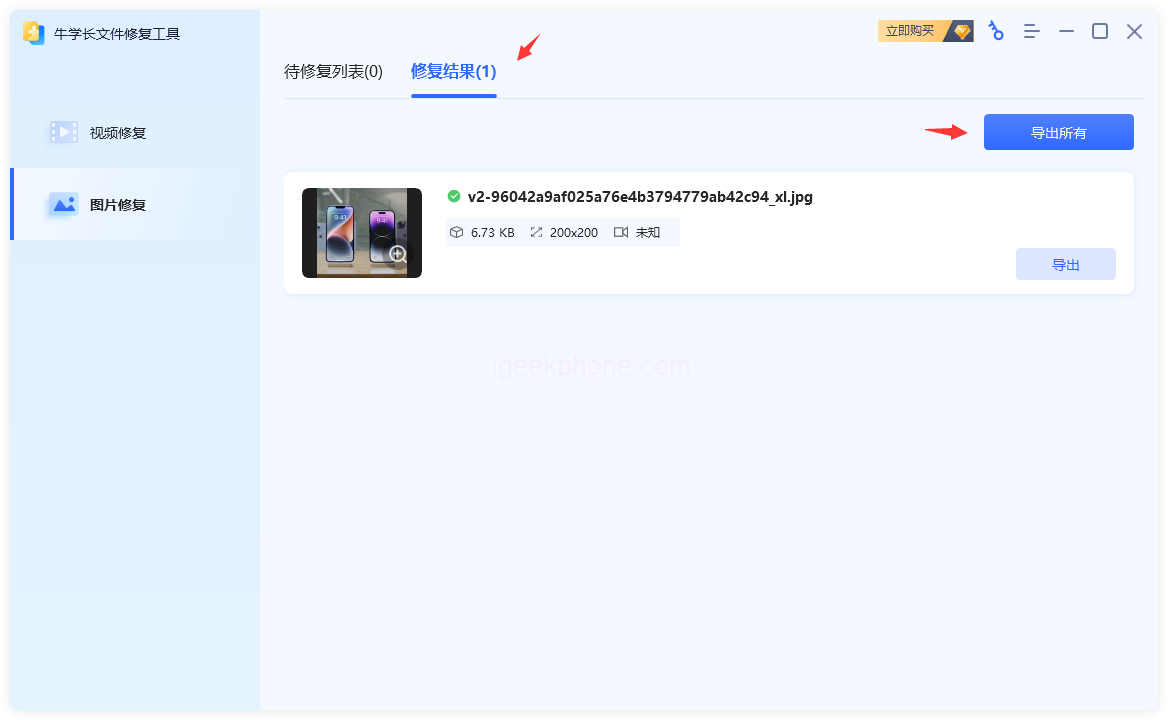
    Once the photo is successfully repaired, you can preview and export it. Click “Repair Result” to enter the list, then click the fixed image to enlarge and preview it online. After previewing, you can click the “Export” button on the right side of the picture to export a single image or click the “Export All” button on the upper right corner to export all images in the list.
    In conclusion, repairing damaged or corrupted photos is not a difficult task. With the help of a professional file repair tool, such as the Senior File Photo Repair Tool, you can quickly repair your damaged photos with just a few clicks. So, don’t panic if your photos become damaged or corrupted; follow the above method to recover them and preserve your precious memories for years.

    Read Also: The mp4 video in shooting or processing is damaged, and can not play normally, how to repair it?

    Do not forget to follow us on our Facebook group and page to keep you always aware of the latest advances, News, Updates, review, and giveaway on smartphones, tablets, gadgets, and more from the technology world of the future.

    Share. Facebook Twitter Pinterest LinkedIn Tumblr Email

    Related Posts

    What Your Smartphone Knows About Your Slip and Fall Accident and Why It Matters

    How Personal Injury Claims Work When Everyday Activities Lead to Serious Physical Harm and Legal Consequences

    From Conception to Continuity: Navigating Subscription Business Success

    Leave A Reply Cancel Reply

    You must be logged in to post a comment.

    voopoopintch
    oxva nexlim 2
    sp2s sen x disposable vape
    • Popular
    • 3D Printer REVIEW
    • XIAOMI
    June 21, 2026

    iPlay LUMO 8K Review – A Compact Prefilled Pod Kit with Big Flavor and Everyday Convenience

    June 21, 2026

    iPlay HOOLA 150K Review – A Cloud-Chasing Giant with Music, Modes & Massive Longevity

    June 21, 2026

    Vaporesso VIBE SE 2 Review – Simple on the Outside, Surprisingly Smart on the Inside

    June 21, 2026

    VOOPOO DRAG H40 Pro Review – The Return of the Pocket Powerhouse

    December 26, 2025

    ACMER ASCARVA 4S: Precision CNC Power for Makers, DIYers & Small Workshops

    June 23, 2024

    ACMER P2 20W Laser Engraver Fixed Focus Engraving: Hands on Review

    May 30, 2024

    xTool F1 Ultra Review: World’s First 20W Fiber & 20W Diode Laser Engraver

    May 30, 2024

    Anycubic Kobra 3 Combo Review: The Multicolor Masterpiece?

    July 13, 2026

    Xiaomi Mijia Display Wall Lamp 2 has been launched on the crowdfunding page at 259 yuan

    July 12, 2026

    The Core Specifications of Redmi Note 17 series have been Announced

    July 11, 2026

    Xiaomi Redmi Note 17 Series Specifications Leak Ahead of July 14 Launch: Snapdragon 4 Gen 4, Up to 9,000mAh Battery

    July 10, 2026

    Xiaomi Band 11 Series Certified Ahead of Launch, Retains 233mAh Battery Capacity

    fc 26 coins
    New Arrivals
    • Geek Bar Spark Prefilled Pod Kit Geek Bar Spark Prefilled Pod Kit
    • Vozol Switch Lite 10K Prefilled Pod Kit Vozol Switch Lite 10K Prefilled Pod Kit
    • SOFI Surge X 50K Zero Nicotine Disposable Vape SOFI Surge X 50K Zero Nicotine Disposable Vape
    • Smoant Racer Flex Pod System Kit Smoant Racer Flex Pod System Kit
    • Honor Magic 9 Honor Magic 9
    • Redmi K100 Pro Max Redmi K100 Pro Max
    • Motorola Edge 80 Motorola Edge 80
    • Nothing Phone 4a Lite Nothing Phone 4a Lite
    • Veev One Plus Pod System Kit Veev One Plus Pod System Kit
    About
  • Igeekphone.com provides the first global tech news and reviews about smartphone, vapes, e-cigar, smart home, 3D printers, e-bike,tablets, RC drones, VR headset, and other accessories. It's the best platform to improve your brand and product.
  • Contact us: info@igeekphone.com
  • Check Our Privacy Policy Here.
  • Note: *Right now we have US editor and EU editors for review, especially for Amazon US and EU.
  • *Shop and Compare Price Here*
  • Facebook
  • Youtube
  • OUR BEST VAPE PARTNERS
  • VAPE ONLINE STORE
  • HAYATI PRO MAX PLUS
  • VAPORESSO
  • VOOPOO
  • OXVA
  • NEXA
  • MASKKING
  • SP2S
  • IPLAY
  • TODOO
  • OTHER BEST PARTNERS
  • SVBONY
  • Chuwi
  • Blackview
  • Fossibot
  • Unihertz
  • Flsun
  • Anycubic
  • Xtool
  • Oukitel
  • Mukkpet Ebike
  • Ugreen
  • Copyright © 2026 igeekphone

    Type above and press Enter to search. Press Esc to cancel.