







Facebook Twitter Instagram
    Trending
    • JNR Meteorite 100K VS Maskking Camo 100K: Comparison Review
    • JNR Lila Kiss⁺ vs. IPLAY NOVA: High-Capacity Showdown
    • Spark Your Life: Join the VOOPOO Pitch Challenge and Win Big!
    • Upgrade Your Audio Setup with HiFiGo’s Summer Flash Sale
    • JNR Meteorite 100K Refillable Vape Kit Review: A Revolutionary Powerbank-Style Vaping System
    • Yocan Black Pocket Concentrate Vaporizer Review: Precision Dabbing in a Pocket-Sized Device
    • YiHi SXmini MQ Class Box Mod 60W Review: Features, Design & Technology
    • MJX H18P RTR 1/18 RC Car Review – Compact Brushless Crawler with Big Capability
    Facebook YouTube
    IGeeKphone China Phone, Tablet PC, VR, RC Drone News, Reviews
    • HOME
      • NEWS
        • DeepSeek
        • ChatGPT
        • Minecraft
    • Amazon
    • PHONE
      • Top Phones For Your First Choice
      • Phone Comparison
      • Xiaomi
      • Blackview
      • Doogee
      • Black Shark
      • Geekbuying
      • Banggood
      • TEMU
      • TikTok
      • Aliexpress
      • Walmart
      • MercadoLibre
      • Lazada
    • TOP VAPE Awards for 2026
    • VAPES
      • E-CIGAR Upcoming
      • Vape News
      • Vape Deals
      • Vape Comparison
      • Vape Guide
      • Giveaway
    • BEST VAPE
      • Best Vape Stores
      • Best Starter Vape Kits
      • Best Vapes for Beginners
      • Best Disposable Vapes
      • Best Pod Systems
      • Best Pod Mod Vapes
      • Best Mods
      • Best Nicotine Pouches
      • Best Clearomizers/Tanks
      • Best E-Liquid
      • Best EGO/Pens
      • Best Vapes for Nic Salt E-Juice
      • Best Vapes to Quit Smoking
      • RDA vs. RDTA vs. RTA
    • Best Vape Brand 2026
      • VAPORESSO
      • VOOPOO
      • OXVA
      • NEXA BAR
      • MASKKING VAPE
      • SP2S
      • IPLAY
      • TODOO
      • MRFOG
      • LOSTVAPE
      • VEIIK
    • REVIEW
      • E-cigar Review
      • Phones
      • Tablet PC
      • TV Box
      • RC Drone
      • Wearables
      • Camera
      • Accessories
      • VR Headset
    • MORE
      • TABLET
        • Chuwi
        • INNOCN
        • Teclast
        • Top Tablet for Your First Choice
        • Tablet/Laptop Comparison
      • RC DRONE
      • CAMERA
      • WEARABLES
        • OneOdio
        • BlitzWolf
        • Top Smartwatch for First Choice
      • 3D PRINTER
        • 3D Printer Review
        • Anycubic
        • FLSUN
        • Xtool
        • LONGER
        • Top 3D printer to Choose First
      • POWER STATION
        • Oukitel
        • FOSSIBOT
      • GAMING
        • Top Gaming Products
      • E-BIKE
        • Samebike
        • Happyrun
        • ENGWE
      • SMART HOME
      • TV BOX
      • ACCESSORIES
      • VR HEADSET
      • CLOTHES
      • AUTO CAR
    • DEAL
    • VAPE LAWS
    • Shop
    IGeeKphone China Phone, Tablet PC, VR, RC Drone News, Reviews
    You are at:Home»GAMING»Mastering Pokemon Go: Change Your Location with AnyGo
    GAMING

    Mastering Pokemon Go: Change Your Location with AnyGo

    Brady CottonBy Brady CottonJanuary 25, 2026
    Facebook Twitter Pinterest LinkedIn Tumblr Email

    Introduction 

    Pokemon Go is an immensely popular augmented reality game that allows players to catch virtual creatures in real-world locations. However, the game’s mechanics are heavily dependent on GPS location, making it challenging for players to explore different regions or access limited-time events. Fortunately, there are tools available, such as iFoneTool AnyGo, that enable players to fake their GPS location and unlock new opportunities in Pokemon Go. In this article, we will introduce iFoneTool AnyGo and provide a comprehensive guide on how to use it effectively to manipulate your location within the game.

    Change Your Location with AnyGo

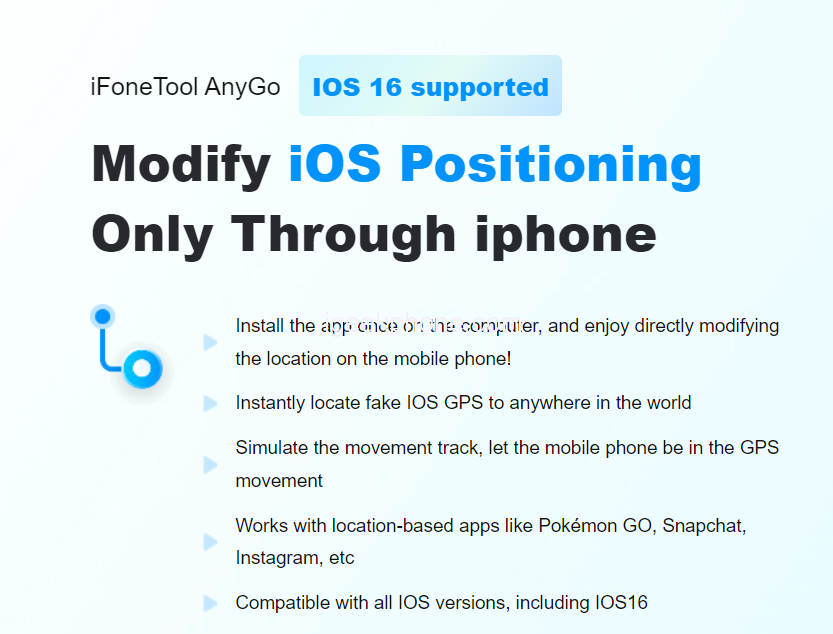
    iFoneTool AnyGo is a user-friendly software designed to simulate GPS movement on iOS devices, including iPhones and iPads. With AnyGo, players can change their virtual location to any part of the world without physically being there. Compatible with both Windows and Mac systems, AnyGo offers a hassle-free solution for Pokemon Go enthusiasts who want to explore distant regions, access region-specific Pokemon, or participate in location-based events.

    Step-by-Step Guide to Faking Your Location

    1. Download and Install iFoneTool AnyGo:

    Start by downloading iFoneTool AnyGo from its official website. Choose the appropriate version for your operating system (Windows or Mac) and follow the on-screen instructions to install the software on your computer.

    1. Connect Your iOS Device:

    Launch AnyGo and connect your iPhone or iPad to your computer using a USB cable. Ensure that you have iTunes installed on your PC, as it is necessary for the successful connection between AnyGo and your iOS device.

    1. Trust the Computer:

    If prompted on your iOS device, trust the computer by tapping “Trust” or “Allow” when the dialogue box appears. This step is essential to establish a secure connection between AnyGo and your device.

    1. Select the “Change Location” Mode:

    Once your device is connected, you will be presented with various location manipulation modes in AnyGo. Choose the “Change Location” mode to start faking your GPS location for Pokemon Go.

    1. Teleport to a Desired Location:

    In the map interface of AnyGo, search for the location you want to appear in Pokemon Go. You can input an address, city name, or specific coordinates. AnyGo provides detailed maps and an intuitive search feature to make this process easier.

    1. Set Movement Speed:

    To ensure a more realistic experience, you can adjust the movement speed of your virtual location. Slow speeds mimic walking, while faster speeds simulate driving. Experiment with different speeds depending on your preference and the desired effect.

    1. Start Faking Your Location:

    After selecting the desired location and movement speed, click on the “Start” button to activate the GPS spoofing process. AnyGo will seamlessly change your iOS device’s GPS coordinates to match the chosen location, effectively altering your location within Pokemon Go.

    1. Launch Pokemon Go and Explore:

    Once AnyGo has successfully faked your location, launch Pokemon Go on your iOS device. The game will now perceive your current location as the one you set in AnyGo. You can now explore new territories, encounter region-specific Pokemon, participate in location-based events, and access unique gameplay elements previously unavailable to you.

    1. Customize Your Location:

    AnyGo allows you to modify your GPS location in real-time. While playing Pokemon Go, you can tweak your location by simply selecting a new place on the map within AnyGo. This dynamic feature enables you to adapt your location based on the evolving needs of the game.

    Conclusion 

    iFoneTool AnyGo provides Pokemon Go players with the ability to manipulate their GPS location, opening up a world of possibilities within the game. By following the steps outlined in this guide, you can seamlessly fake your location and explore new regions, encounter different Pokemon species, and participate in location-specific events. However, it’s important to note that using GPS spoofing tools like AnyGo may violate the terms of service of Pokemon Go and could result in penalties or account suspension. Therefore, it is advisable to use these techniques responsibly and at your own risk.

    Share. Facebook Twitter Pinterest LinkedIn Tumblr Email

    Related Posts

    Beyond The Ordinary Grill: The Magic of Kamado Cookers

    Smart Homes, Safe Seniors: Leveraging Electronics to Combat Nursing Home Abuse

    Space Survival and Strategy: ‘Where Wolf’ Unleashes NFT and GameFi Elements

    Leave A Reply Cancel Reply

    You must be logged in to post a comment.

    voopoopintch
    oxva xlim go lite
    sp2s sen x disposable vape
    • Popular
    • 3D Printer REVIEW
    • XIAOMI
    June 17, 2026

    Nexa Ultra II vs Nexa Ultra 50K Disposable Vape Hands on Review

    June 17, 2026

    OXVA XLIM GO LITE VS OXVA XLIM GO 2 Vape Hands on Review

    June 13, 2026

    Vaporesso LUXE X3 & LUXE Q3 Review. Two Paths to Exceptional Flavor

    June 6, 2026

    VOOPOO ARGUS G4 & ARGUS G4 Mini Review – Smart Flavor Meets Everyday Simplicity

    December 26, 2025

    ACMER ASCARVA 4S: Precision CNC Power for Makers, DIYers & Small Workshops

    June 23, 2024

    ACMER P2 20W Laser Engraver Fixed Focus Engraving: Hands on Review

    May 30, 2024

    xTool F1 Ultra Review: World’s First 20W Fiber & 20W Diode Laser Engraver

    May 30, 2024

    Anycubic Kobra 3 Combo Review: The Multicolor Masterpiece?

    June 18, 2026

    Xiaomi’s first large-screen foldable flagship device, MIX Fold 5, has been Approved for Network Use

    June 17, 2026

    Xiaomi’s first large-screen foldable flagship device, MIX Fold 5, has been approved for network use: The first version features the self-developed chip by Xianji O3.

    June 12, 2026

    When will Redmi K40 be Released?

    June 10, 2026

    Xiaomi Hyper OS 3 Second Batch Beta Version Begins Recruitment: Covering Five Models Including Redmi K80 and Xiaomi MIX Flip2

    fc 26 coins
    New Arrivals
    • Olit Hookalit Nex 120K Disposable Vape Kit Olit Hookalit Nex 120K Disposable Vape Kit
    • Xiaomi 19 Xiaomi 19
    • Xiaomi 19 Pro Xiaomi 19 Pro
    • JNR Zpluse 42K+ Puffs Top-Fill Replaceable and Refillable Vape Kit JNR Zpluse 42K+ Puffs Top-Fill Replaceable and Refillable Vape Kit
    • Lost Vape Ursa Nano S 3 Pod System Kit Lost Vape Ursa Nano S 3 Pod System Kit
    • Honor Power 3 Honor Power 3
    • Redmi Note 17 Pro Plus Global Redmi Note 17 Pro Plus Global
    • Yocan Black Pocket Concentrate Vaporizer Yocan Black Pocket Concentrate Vaporizer
    • Loon Air Plus 6000 Disposable Loon Air Plus 6000 Disposable
    About
  • Igeekphone.com provides the first global tech news and reviews about smartphone, vapes, e-cigar, smart home, 3D printers, e-bike,tablets, RC drones, VR headset, and other accessories. It's the best platform to improve your brand and product.
  • Contact us: info@igeekphone.com
  • Check Our Privacy Policy Here.
  • Note: *Right now we have US editor and EU editors for review, especially for Amazon US and EU.
  • *Shop and Compare Price Here*
  • Facebook
  • Youtube
  • Mashable is a global, multi-platform media and entertainment company

    For more queries and news contact us on this

    Email: info@mashablepartners.com

  • OUR BEST VAPE PARTNERS
  • VAPE ONLINE STORE
  • HAYATI PRO MAX PLUS
  • VAPORESSO
  • VOOPOO
  • OXVA
  • NEXA
  • MASKKING
  • SP2S
  • IPLAY
  • TODOO
  • OTHER BEST PARTNERS
  • SVBONY
  • Chuwi
  • Blackview
  • Fossibot
  • Unihertz
  • Flsun
  • Anycubic
  • Xtool
  • Oukitel
  • Mukkpet Ebike
  • Ugreen
  • Copyright © 2026 igeekphone

    Type above and press Enter to search. Press Esc to cancel.