






Facebook Twitter Instagram
    Trending
    • JOYROOM PODIX 140W GaN Charger – Desktop Power Station for Modern Tech Setup
    • Mukiya Foldable 3-in-1 Magnetic Wireless Charging Station. One Stand, Total Apple Power!
    • Mukiya USB-C Laptop Docking Station Stand – 8-in-1 Productivity Hub with Built-In Ergonomics
    • BlitzWolf HL7 SmartWatch Now Available on Banggood at Just $39.99
    • FEXO 45000 vs Al Fakher Crown Bar: Which is Best for DTL Vaping?
    • Geek Bar CLR 50K Disposable Vape: A Comprehensive Review for Vaping Enthusiasts
    • New renderings of Google Pixel 10a smartphone unveiled: The raspberry color is eye-catching. The European version has a battery life of 53 hours and 14 minutes.
    • The detailed specifications of Nothing Phone (4a)/Pro have been revealed. The model offers the option of up to 12GB of RAM and 256GB of storage space.
    Facebook YouTube
    Login Register
    IGeeKphone China Phone, Tablet PC, VR, RC Drone News, Reviews
    • HOME
      • NEWS
        • DeepSeek
        • ChatGPT
        • Minecraft
    • Amazon
    • NEW YEAR
    • PHONE
      • Top Phones For Your First Choice
      • Phone Comparison
      • Xiaomi
      • Blackview
      • Doogee
      • Black Shark
      • Geekbuying
      • Banggood
      • TEMU
      • TikTok
      • Aliexpress
      • Walmart
      • MercadoLibre
      • Lazada
    • TOP VAPE Awards for 2026
    • VAPES
      • E-CIGAR Upcoming
      • Vape News
      • Vape Deals
      • Vape Comparison
      • Vape Guide
      • Giveaway
    • BEST VAPE
      • Best Vape Stores
      • Best Starter Vape Kits
      • Best Vapes for Beginners
      • Best Disposable Vapes
      • Best Pod Systems
      • Best Pod Mod Vapes
      • Best Mods
      • Best Nicotine Pouches
      • Best Clearomizers/Tanks
      • Best E-Liquid
      • Best EGO/Pens
      • Best Vapes for Nic Salt E-Juice
      • Best Vapes to Quit Smoking
      • RDA vs. RDTA vs. RTA
    • Best Vape Brand 2026
      • VAPORESSO
      • VOOPOO
      • OXVA
      • NEXA BAR
      • ORIONBARTECH
      • MASKKING VAPE
      • MEMERS
      • SP2S
      • JNR
      • TODOO
      • MRFOG
      • VEIIK
    • REVIEW
      • E-cigar Review
      • Phones
      • Tablet PC
      • TV Box
      • RC Drone
      • Wearables
      • Camera
      • Accessories
      • VR Headset
    • MORE
      • TABLET
        • Chuwi
        • INNOCN
        • Teclast
        • Top Tablet for Your First Choice
        • Tablet/Laptop Comparison
      • RC DRONE
      • CAMERA
      • WEARABLES
        • OneOdio
        • BlitzWolf
        • Top Smartwatch for First Choice
      • 3D PRINTER
        • 3D Printer Review
        • Anycubic
        • FLSUN
        • Xtool
        • LONGER
        • Top 3D printer to Choose First
      • POWER STATION
        • Oukitel
        • FOSSIBOT
      • GAMING
        • Top Gaming Products
      • E-BIKE
        • Samebike
        • Happyrun
        • ENGWE
      • SMART HOME
      • TV BOX
      • ACCESSORIES
      • VR HEADSET
      • CLOTHES
      • AUTO CAR
    • DEAL
    • Shop
    IGeeKphone China Phone, Tablet PC, VR, RC Drone News, Reviews
    You are at:Home»Guide»How to iPhone Repair That Keeps Crashing While Charging
    Guide

    How to iPhone Repair That Keeps Crashing While Charging

    HabibBy HabibJune 21, 2024
    Facebook Twitter Pinterest LinkedIn Tumblr Email

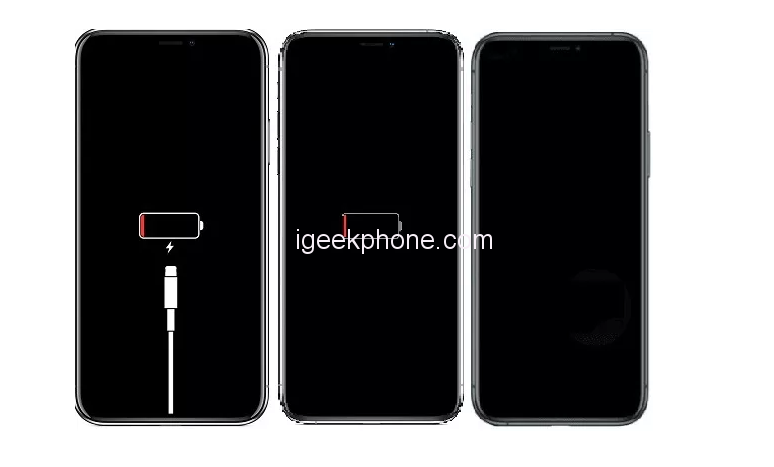
    Have you ever encountered a frozen iPhone that won’t turn on while charging? Numerous factors can cause an iPhone to freeze during charging. The following guide provides a straightforward tutorial to address the issue of iPhones (models 14/13/12/11/XR/X/8) failing to power on when connected to a charger.
    Part 1:

    Reasons Behind iPhone Charging Issues There are several common causes for an iPhone to freeze during charging and refuse to turn on. Here are the key factors:

    • Battery Depletion: A wholly drained battery may require time to accumulate enough power for a restart.
    • Hardware Problems: Issues with the charging port, battery, or other hardware components can hinder the iPhone’s ability to turn on.
    • Software Glitches: Software malfunctions or crashes can lead to an unresponsive iPhone that won’t power on.

    Part 2:

    Resolving iPhone Freezing While Charging In this section, we’ll guide you on addressing the issue of iPhones freezing during charging and failing to turn on.

    Now let’s delve into the causes and solutions for iPhones (models 12/11/XR/X/8) freezing during charging and not powering on.

    Solution 1:

    Force Restart iPhone One straightforward approach is to force restart your iPhone if it freezes during charging and doesn’t turn on. Most software-related problems can be resolved by continuing the device.

    Here’s what you need to do:

    1. Press and swiftly release the volume up button.
    2. Followed by pressing and releasing the book down button.
    3. Hold down the side button until the Apple logo appears on the screen.
    4. Repeat the process if necessary until the Apple logo displays.

    For iPhone 6 and 7, the steps vary slightly:

    • iPhone 6: Press the Power and Home buttons until the Apple logo shows.
    • iPhone 7: Hold the volume and side buttons until the Apple logo appears.

    Solution 2:

    Inspect Lightning Cable and Charger When examining your Lightning cables and chargers, consider these points:

    • Inspect the USB cable for damage and replace if necessary.
    • Test the charging head using devices like a computer USB port, car charger, or wall adapter.
    • Connect the iPhone directly to a USB port rather than a hub for better reliability.
    • If issues persist, try using another person’s Lightning cable or purchase a new one.

    Solution 3:

    Check the Charging Port If your charging port is damaged, it can lead to freezing issues while charging. To diagnose and resolve this, carefully inspect the charging cable for damage. If the charging port is damaged, replace it with a new one.

    Solution 4

    Extend Charging Time If your iPhone remains unresponsive even after following the previous steps, consider extending the charging time before exploring other methods.

    Solution 5

    Activate Recovery Mode For more challenging situations; Recovery Mode might be required. The Niu Xuechang iPhone Repair Tool simplifies this process, especially when the home button isn’t malfunctioning. Follow these steps:


    1. Download and install ReiBoot on your PC.
    2. Connect your iPhone to the computer.
    3. Allow ReiBoot to detect your device.
    4. Press “Enter” in ReiBoot to initiate recovery mode.
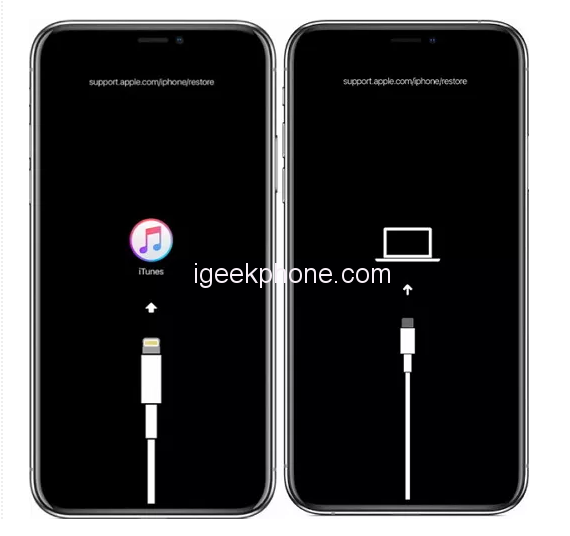
    5. Your iPhone will enter recovery mode, displaying the Connect to iTunes or Computer logo.

    Read Also: Apple’s iPhone 15 Pro Max is expected to be renamed the iPhone 15 Ultra.

    Solution 6:

    Seek Apple Support If the above solutions prove ineffective, and hardware issues or damage are suspected, it’s wise to contact Apple Support for professional assistance.

    Bonus Tip: Niu Xuechang iPhone Repair Tool For a swift solution, use the Niu Xuechang iPhone Repair Tool, which offers a one-click fix for iPhones freezing during charging and failing to turn on. This tool handles recovery mode and tackles over 150 iOS system problems without data loss. It’s compatible with all iOS versions and devices, making it the go-to option for iOS system repair.

    This article outlines a step-by-step guide to address freezing issues during iPhone charging and failure to power on. Additionally, we introduced the Niu Xuechang iPhone Repair Tool as a powerful solution for various iOS-related problems.

    Do not forget to follow us on our Facebook group and page to keep you always aware of the latest advances, News, Updates, review, and giveaway on smartphones, tablets, gadgets, and more from the technology world of the future.

    Share. Facebook Twitter Pinterest LinkedIn Tumblr Email

    Related Posts

    New renderings of Google Pixel 10a smartphone unveiled: The raspberry color is eye-catching. The European version has a battery life of 53 hours and 14 minutes.

    The detailed specifications of Nothing Phone (4a)/Pro have been revealed. The model offers the option of up to 12GB of RAM and 256GB of storage space.

    Rendering images of Apple iPhone 17e have been released: featuring the A19 chip, a 48-megapixel single camera, and supporting MagSafe technology

    Leave A Reply Cancel Reply

    You must be logged in to post a comment.

    voopoo Cyph NAVI kit
    oxva xlim 3 ultra
    sp2s sen x disposable vape
    jnr 100k
    • Popular
    • 3D Printer REVIEW
    • XIAOMI
    February 8, 2026

    VOOPOO VMATE i2 vs i3: Hands-On Comparison Review

    February 2, 2026

    Voopoo Drag X3 vs Drag X2: Hands-On Comparison Review

    January 21, 2026

    VOOPOO ARGUS P3 VS ARGUS P2: Which Square Pod Suits You?

    January 21, 2026

    VOOPOO Drag X3 vs VOOPOO Drag X2: Hands-On Comparison

    December 26, 2025

    ACMER ASCARVA 4S: Precision CNC Power for Makers, DIYers & Small Workshops

    June 23, 2024

    ACMER P2 20W Laser Engraver Fixed Focus Engraving: Hands on Review

    May 30, 2024

    xTool F1 Ultra Review: World’s First 20W Fiber & 20W Diode Laser Engraver

    May 30, 2024

    Anycubic Kobra 3 Combo Review: The Multicolor Masterpiece?

    February 9, 2026

    Xiaomi 18 is the world’s first! The cost of Qualcomm Snapdragon 8 Elite Gen 6 Pro is outrageously high

    February 6, 2026

    Xiaomi 17 Ultra will make its debut at MWC: The battery capacity of the international version has been reduced to 6000mAh.

    February 4, 2026

    Xiaomi Hyper OS 4 undergoes a major upgrade: Completely eliminates old code and boosts smoothness.

    February 2, 2026

    The new 6.59-inch mid-to-high-end model of a Certain factory is tentatively scheduled to be released in the first half of this year. It is expected to be under the brand of Xiaomi.

    fc 26 coins
    New Arrivals
    • Geek Bar CLR 50K Disposable Vape Geek Bar CLR 50K Disposable Vape
    • Redmi Turbo 5 Max Redmi Turbo 5 Max
    • OnePlus Turbo 7 OnePlus Turbo 7
    • Doogee S300 Ultra Doogee S300 Ultra
    • iQOO 15R iQOO 15R
    • VOOPOO NAVI X Cyph 80K Disposable Vape Kit VOOPOO NAVI X Cyph 80K Disposable Vape Kit
    • OXVA Slim Stick X Vape OXVA Slim Stick X Vape
    • Geek Bar Somax 80K Disposable Vape Geek Bar Somax 80K Disposable Vape
    • Geek Bar Clio Platinum 50K Disposable Vape Kit Geek Bar Clio Platinum 50K Disposable Vape Kit
    About
  • Igeekphone.com provides the first global tech news and reviews about smartphone, vapes, e-cigar, smart home, 3D printers, e-bike,tablets, RC drones, VR headset, and other accessories. It's the best platform to improve your brand and product.
  • Contact us: info@igeekphone.com
  • Check Our Privacy Policy Here.
  • Note: *Right now we have US editor and EU editors for review, especially for Amazon US and EU.
  • *Shop and Compare Price Here*
  • Facebook
  • Youtube
  • OUR BEST VAPE PARTNERS
  • VAPE ONLINE STORE
  • HAYATI PRO MAX PLUS
  • VAPORESSO
  • VOOPOO
  • OXVA
  • NEXA
  • MASKKING
  • LOSTVAPE ORIONBAR
  • MEMERS
  • TODOO
  • SP2S
  • JNR
  • VEIIK
  • OTHER BEST PARTNERS
  • SVBONY
  • Chuwi
  • Blackview
  • Fossibot
  • Unihertz
  • Flsun
  • Anycubic
  • Xtool
  • Oukitel
  • Mukkpet Ebike
  • Ugreen
  • Copyright © 2026 igeekphone

    Type above and press Enter to search. Press Esc to cancel.