










Igeekphone News, November 10th: Meizu announced the stable version of Flyme 12.4.0.0A today. The Small Window Mode 5.0 fully covers the Meizu 20 series and Meizu 21 series. Aicy has introduced a text explanation function. By selecting a word on the screen, you can quickly view its meaning within the page. This update also brings “Colorful Photo Frame Wallpapers”, adding more playability to wallpaper Settings.
Igeekphone has compiled it as follows
Apply Small Window 5.0
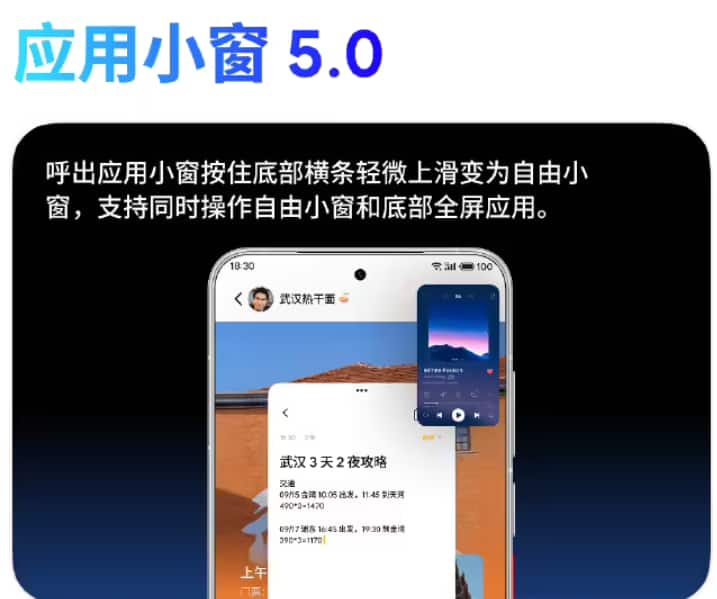
To call out the application window, hold down the horizontal bar at the bottom and gently swipe up to change it to a free window. It supports simultaneous operation of the free window and the full-screen application at the bottom.
Hold down the horizontal bar at the bottom of the free small window and drag to adjust its size. Hold down the top bar of the small window and move freely
The Mini Window app supports switching between the Lightweight Window and Free Window apps.
The corner menu of the application small window supports adding up to 6 applications.
Aicy
A new text explanation has been added. Use Aicy screen recognition or long press mBack to recognize the screen and select the word. Then, choose “Explanation” from the menu to conveniently view the meaning of the word on the current page.
Image recognition shopping supports comparing prices across multiple platforms within the shopping aggregation window. Usage method: After extracting the image through Aicy screen recognition or long-pressing mBack screen recognition, select “Search for the Same Style” in the image menu.
The real-time notification is integrated into Baidu Maps, supporting the display of real-time information for taxi-hailing, walking and cycling navigation.
System interface
Update the MEIZU Logo watermark on the camera model.
The system application desktop shortcut menu is adapted to the dark icon style.
Update the visual and dynamic effects of the shutdown interface.
System optimization
The Meizu 21 series’ dynamic halo music light effects now support Migu Music, Polka Dot Music, and Salt and Pepper Music.
The recorder has added a search function for recordings, supporting the search for recording titles, transcribed text, and summary content.
The clock has added a shift system working day alarm, supporting custom shift cycles and daily alarms.
The real-time notification of the clock and stopwatch has added a counting function.
Notes have added new themes. You can switch between over 20 different styles of themes and share them in the form of pictures.
The scene assistant found that the page has added multiple custom operation scripts and improved the usage instructions for custom operations.
Optimize the logic for saving the recording. After clicking “Save”, when you select “Cancel” in the pop-up interface, return to the recording interface. Adjust the “Cancel Recording” button to the upper left corner of the recording interface to avoid losing the recording due to accidental operations.
Optimize the experience of saving audio files. After single or multiple selections of Recordings, choose to save in the share control by default to the “Recordings” folder.
The font size adjustment for notes has been increased to 7 levels.
The number of pictures added to the notes has been increased to a maximum of 30.
Optimize the recognition of hyperlinks in the note content.
Note to-do list notification reminders support marking completed.
Optimize the visual design of the Aicy card for overview express delivery updates and commuting time consumption.
Optimize the editing experience of the scene assistant, support the selection of the called application icon as the scene icon, and the added execution actions support drag-and-drop sorting.
Optimize the execution experience of task scenarios. In the lock screen state, click on the task notification to unlock and run without opening the scene assistant application interface.
Optimize the application jump logic. Open other applications through the Aicy assistant and scene assistant without the need for secondary confirmation.
Optimize the dialing pad pasting experience and support free pasting of numbers in the dialing pad input box.
Text messages can be shared to the calendar and schedule information can be quickly extracted through AI intelligent recognition.
When non-contact call numbers are marked as fraud or harassment, they will be added to the blacklist simultaneously.
Optimize the pop-up interface design for double-clicking the power button to switch between silent/ringing/vibration.
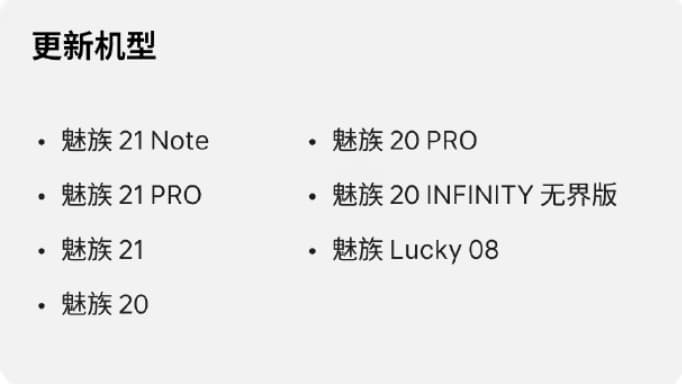
Update the model
Meizu 21 Note
Meizu 21PRO
Meizu 21
Meizu 20
Meizu 20 PRO
Meizu 20 INFINITY Boundless Edition
Meizu Lucky 08