







Facebook Twitter Instagram
    Trending
    • JNR Meteorite 100K VS Maskking Camo 100K: Comparison Review
    • JNR Lila Kiss⁺ vs. IPLAY NOVA: High-Capacity Showdown
    • Spark Your Life: Join the VOOPOO Pitch Challenge and Win Big!
    • Upgrade Your Audio Setup with HiFiGo’s Summer Flash Sale
    • JNR Meteorite 100K Refillable Vape Kit Review: A Revolutionary Powerbank-Style Vaping System
    • Yocan Black Pocket Concentrate Vaporizer Review: Precision Dabbing in a Pocket-Sized Device
    • YiHi SXmini MQ Class Box Mod 60W Review: Features, Design & Technology
    • MJX H18P RTR 1/18 RC Car Review – Compact Brushless Crawler with Big Capability
    Facebook YouTube
    IGeeKphone China Phone, Tablet PC, VR, RC Drone News, Reviews
    • HOME
      • NEWS
        • DeepSeek
        • ChatGPT
        • Minecraft
    • Amazon
    • PHONE
      • Top Phones For Your First Choice
      • Phone Comparison
      • Xiaomi
      • Blackview
      • Doogee
      • Black Shark
      • Geekbuying
      • Banggood
      • TEMU
      • TikTok
      • Aliexpress
      • Walmart
      • MercadoLibre
      • Lazada
    • TOP VAPE Awards for 2026
    • VAPES
      • E-CIGAR Upcoming
      • Vape News
      • Vape Deals
      • Vape Comparison
      • Vape Guide
      • Giveaway
    • BEST VAPE
      • Best Vape Stores
      • Best Starter Vape Kits
      • Best Vapes for Beginners
      • Best Disposable Vapes
      • Best Pod Systems
      • Best Pod Mod Vapes
      • Best Mods
      • Best Nicotine Pouches
      • Best Clearomizers/Tanks
      • Best E-Liquid
      • Best EGO/Pens
      • Best Vapes for Nic Salt E-Juice
      • Best Vapes to Quit Smoking
      • RDA vs. RDTA vs. RTA
    • Best Vape Brand 2026
      • VAPORESSO
      • VOOPOO
      • OXVA
      • NEXA BAR
      • MASKKING VAPE
      • SP2S
      • IPLAY
      • TODOO
      • MRFOG
      • LOSTVAPE
      • VEIIK
    • REVIEW
      • E-cigar Review
      • Phones
      • Tablet PC
      • TV Box
      • RC Drone
      • Wearables
      • Camera
      • Accessories
      • VR Headset
    • MORE
      • TABLET
        • Chuwi
        • INNOCN
        • Teclast
        • Top Tablet for Your First Choice
        • Tablet/Laptop Comparison
      • RC DRONE
      • CAMERA
      • WEARABLES
        • OneOdio
        • BlitzWolf
        • Top Smartwatch for First Choice
      • 3D PRINTER
        • 3D Printer Review
        • Anycubic
        • FLSUN
        • Xtool
        • LONGER
        • Top 3D printer to Choose First
      • POWER STATION
        • Oukitel
        • FOSSIBOT
      • GAMING
        • Top Gaming Products
      • E-BIKE
        • Samebike
        • Happyrun
        • ENGWE
      • SMART HOME
      • TV BOX
      • ACCESSORIES
      • VR HEADSET
      • CLOTHES
      • AUTO CAR
    • DEAL
    • VAPE LAWS
    • Shop
    IGeeKphone China Phone, Tablet PC, VR, RC Drone News, Reviews
    You are at:Home»Meizu»The stable version of Flyme 12.4.0.0A is being pushed to models such as Meizu 20
    Meizu

    The stable version of Flyme 12.4.0.0A is being pushed to models such as Meizu 20

    Brady CottonBy Brady CottonNovember 10, 2025
    Facebook Twitter Pinterest LinkedIn Tumblr Email

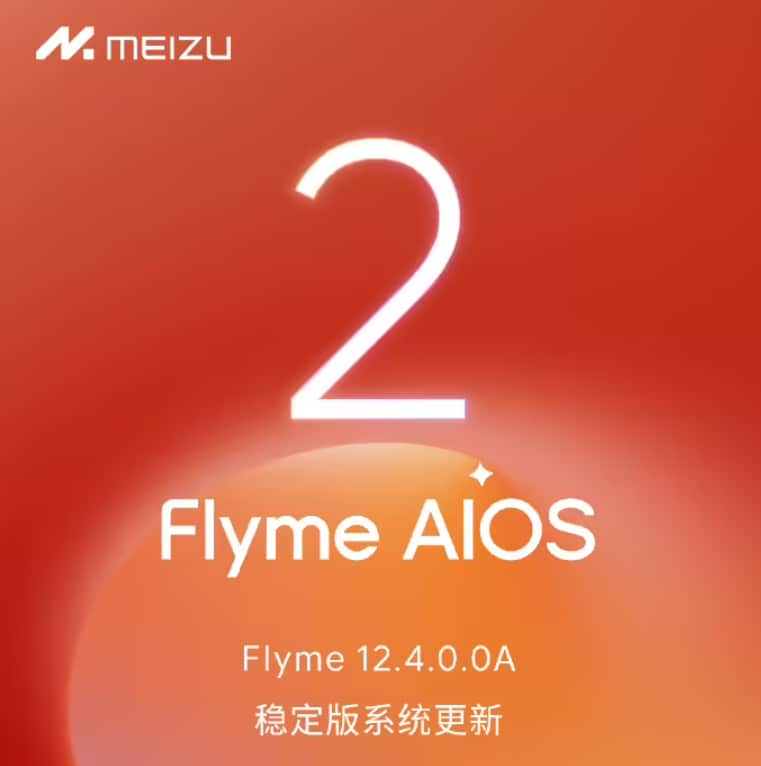
    Igeekphone News, November 10th: Meizu announced the stable version of Flyme 12.4.0.0A today. The Small Window Mode 5.0 fully covers the Meizu 20 series and Meizu 21 series. Aicy has introduced a text explanation function. By selecting a word on the screen, you can quickly view its meaning within the page. This update also brings “Colorful Photo Frame Wallpapers”, adding more playability to wallpaper Settings.

    Igeekphone has compiled it as follows

    Apply Small Window 5.0

    To call out the application window, hold down the horizontal bar at the bottom and gently swipe up to change it to a free window. It supports simultaneous operation of the free window and the full-screen application at the bottom.

    Hold down the horizontal bar at the bottom of the free small window and drag to adjust its size. Hold down the top bar of the small window and move freely

    The Mini Window app supports switching between the Lightweight Window and Free Window apps.

    The corner menu of the application small window supports adding up to 6 applications.

    Aicy

    A new text explanation has been added. Use Aicy screen recognition or long press mBack to recognize the screen and select the word. Then, choose “Explanation” from the menu to conveniently view the meaning of the word on the current page.

    Image recognition shopping supports comparing prices across multiple platforms within the shopping aggregation window. Usage method: After extracting the image through Aicy screen recognition or long-pressing mBack screen recognition, select “Search for the Same Style” in the image menu.

    The real-time notification is integrated into Baidu Maps, supporting the display of real-time information for taxi-hailing, walking and cycling navigation.

    System interface

    Update the MEIZU Logo watermark on the camera model.

    The system application desktop shortcut menu is adapted to the dark icon style.

    Update the visual and dynamic effects of the shutdown interface.

    System optimization

    The Meizu 21 series’ dynamic halo music light effects now support Migu Music, Polka Dot Music, and Salt and Pepper Music.

    The recorder has added a search function for recordings, supporting the search for recording titles, transcribed text, and summary content.

    The clock has added a shift system working day alarm, supporting custom shift cycles and daily alarms.
    The real-time notification of the clock and stopwatch has added a counting function.

    Notes have added new themes. You can switch between over 20 different styles of themes and share them in the form of pictures.

    The scene assistant found that the page has added multiple custom operation scripts and improved the usage instructions for custom operations.

    Optimize the logic for saving the recording. After clicking “Save”, when you select “Cancel” in the pop-up interface, return to the recording interface. Adjust the “Cancel Recording” button to the upper left corner of the recording interface to avoid losing the recording due to accidental operations.

    Optimize the experience of saving audio files. After single or multiple selections of Recordings, choose to save in the share control by default to the “Recordings” folder.

    The font size adjustment for notes has been increased to 7 levels.

    The number of pictures added to the notes has been increased to a maximum of 30.

    Optimize the recognition of hyperlinks in the note content.

    Note to-do list notification reminders support marking completed.

    Optimize the visual design of the Aicy card for overview express delivery updates and commuting time consumption.
    Optimize the editing experience of the scene assistant, support the selection of the called application icon as the scene icon, and the added execution actions support drag-and-drop sorting.

    Optimize the execution experience of task scenarios. In the lock screen state, click on the task notification to unlock and run without opening the scene assistant application interface.

    Optimize the application jump logic. Open other applications through the Aicy assistant and scene assistant without the need for secondary confirmation.

    Optimize the dialing pad pasting experience and support free pasting of numbers in the dialing pad input box.

    Text messages can be shared to the calendar and schedule information can be quickly extracted through AI intelligent recognition.

    When non-contact call numbers are marked as fraud or harassment, they will be added to the blacklist simultaneously.

    Optimize the pop-up interface design for double-clicking the power button to switch between silent/ringing/vibration.

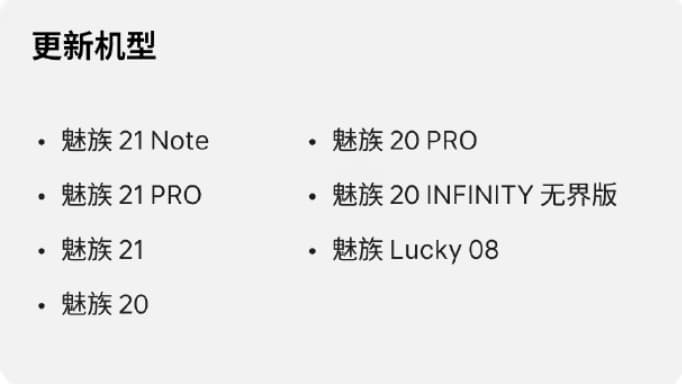
    Update the model

    Meizu 21 Note

    Meizu 21PRO

    Meizu 21

    Meizu 20

    Meizu 20 PRO

    Meizu 20 INFINITY Boundless Edition

    Meizu Lucky 08

    Share. Facebook Twitter Pinterest LinkedIn Tumblr Email

    Related Posts

    Upgrade Your Audio Setup with HiFiGo’s Summer Flash Sale

    The Biggest weakness of iPhone Air 2 has been addressed: upgraded dual cameras and 2nm chips

    The Wallpaper for Samsung Galaxy S26 FE phone has been revealed, and it is expected to use a display panel from BOE (Beijing Optronics).

    Leave A Reply Cancel Reply

    You must be logged in to post a comment.

    voopoopintch
    oxva xlim go lite
    sp2s sen x disposable vape
    • Popular
    • 3D Printer REVIEW
    • XIAOMI
    June 17, 2026

    Nexa Ultra II vs Nexa Ultra 50K Disposable Vape Hands on Review

    June 17, 2026

    OXVA XLIM GO LITE VS OXVA XLIM GO 2 Vape Hands on Review

    June 13, 2026

    Vaporesso LUXE X3 & LUXE Q3 Review. Two Paths to Exceptional Flavor

    June 6, 2026

    VOOPOO ARGUS G4 & ARGUS G4 Mini Review – Smart Flavor Meets Everyday Simplicity

    December 26, 2025

    ACMER ASCARVA 4S: Precision CNC Power for Makers, DIYers & Small Workshops

    June 23, 2024

    ACMER P2 20W Laser Engraver Fixed Focus Engraving: Hands on Review

    May 30, 2024

    xTool F1 Ultra Review: World’s First 20W Fiber & 20W Diode Laser Engraver

    May 30, 2024

    Anycubic Kobra 3 Combo Review: The Multicolor Masterpiece?

    June 18, 2026

    Xiaomi’s first large-screen foldable flagship device, MIX Fold 5, has been Approved for Network Use

    June 17, 2026

    Xiaomi’s first large-screen foldable flagship device, MIX Fold 5, has been approved for network use: The first version features the self-developed chip by Xianji O3.

    June 12, 2026

    When will Redmi K40 be Released?

    June 10, 2026

    Xiaomi Hyper OS 3 Second Batch Beta Version Begins Recruitment: Covering Five Models Including Redmi K80 and Xiaomi MIX Flip2

    fc 26 coins
    New Arrivals
    • Olit Hookalit Nex 120K Disposable Vape Kit Olit Hookalit Nex 120K Disposable Vape Kit
    • Xiaomi 19 Xiaomi 19
    • Xiaomi 19 Pro Xiaomi 19 Pro
    • JNR Zpluse 42K+ Puffs Top-Fill Replaceable and Refillable Vape Kit JNR Zpluse 42K+ Puffs Top-Fill Replaceable and Refillable Vape Kit
    • Lost Vape Ursa Nano S 3 Pod System Kit Lost Vape Ursa Nano S 3 Pod System Kit
    • Honor Power 3 Honor Power 3
    • Redmi Note 17 Pro Plus Global Redmi Note 17 Pro Plus Global
    • Yocan Black Pocket Concentrate Vaporizer Yocan Black Pocket Concentrate Vaporizer
    • Loon Air Plus 6000 Disposable Loon Air Plus 6000 Disposable
    About
  • Igeekphone.com provides the first global tech news and reviews about smartphone, vapes, e-cigar, smart home, 3D printers, e-bike,tablets, RC drones, VR headset, and other accessories. It's the best platform to improve your brand and product.
  • Contact us: info@igeekphone.com
  • Check Our Privacy Policy Here.
  • Note: *Right now we have US editor and EU editors for review, especially for Amazon US and EU.
  • *Shop and Compare Price Here*
  • Facebook
  • Youtube
  • Mashable is a global, multi-platform media and entertainment company

    For more queries and news contact us on this

    Email: info@mashablepartners.com

  • OUR BEST VAPE PARTNERS
  • VAPE ONLINE STORE
  • HAYATI PRO MAX PLUS
  • VAPORESSO
  • VOOPOO
  • OXVA
  • NEXA
  • MASKKING
  • SP2S
  • IPLAY
  • TODOO
  • OTHER BEST PARTNERS
  • SVBONY
  • Chuwi
  • Blackview
  • Fossibot
  • Unihertz
  • Flsun
  • Anycubic
  • Xtool
  • Oukitel
  • Mukkpet Ebike
  • Ugreen
  • Copyright © 2026 igeekphone

    Type above and press Enter to search. Press Esc to cancel.