






Facebook Twitter Instagram
    Trending
    • Acer has launched the AR Vision GR0 and GI0 smart glasses. The former is equipped with a Micro OLED screen.
    • It is reported that the new Honor phone has been designed with a 6.89-inch screen and a large 7-inch straight screen
    • RH-BM11 Tuya WiFi Baby Monitor Review: Smart Monitoring for Modern Parents
    • How to Remove the CPU Fan in 2026: A Safe Step-by-Step Tutorial
    • Aviator – A Virtual Round for All Risk Preferences!
    • FLASH SALE: 16% OFF ALL RAZ TN9000 FLAVORS  |  LIMITED TIME ONLY
    • Bitcoin Is Becoming Immensely Popular In The Market Of Cryptocurrency!
    • Vaporock X1 Pod System Kit Review–Stylish, Powerful & Easy to Use
    Facebook YouTube
    IGeeKphone China Phone, Tablet PC, VR, RC Drone News, Reviews
    • HOME
      • NEWS
        • DeepSeek
        • ChatGPT
        • Minecraft
    • Amazon
    • PHONE
      • Top Phones For Your First Choice
      • Phone Comparison
      • Xiaomi
      • Blackview
      • Doogee
      • Black Shark
      • Geekbuying
      • Banggood
      • TEMU
      • TikTok
      • Aliexpress
      • Walmart
      • MercadoLibre
      • Lazada
    • TOP VAPE Awards for 2026
    • VAPES
      • E-CIGAR Upcoming
      • Vape News
      • Vape Deals
      • Vape Comparison
      • Vape Guide
      • Giveaway
    • BEST VAPE
      • Best Vape Stores
      • Best Starter Vape Kits
      • Best Vapes for Beginners
      • Best Disposable Vapes
      • Best Pod Systems
      • Best Pod Mod Vapes
      • Best Mods
      • Best Nicotine Pouches
      • Best Clearomizers/Tanks
      • Best E-Liquid
      • Best EGO/Pens
      • Best Vapes for Nic Salt E-Juice
      • Best Vapes to Quit Smoking
      • RDA vs. RDTA vs. RTA
    • Best Vape Brand 2026
      • VAPORESSO
      • VOOPOO
      • OXVA
      • NEXA BAR
      • MASKKING VAPE
      • SP2S
      • IPLAY
      • TODOO
      • MRFOG
      • LOSTVAPE
      • VEIIK
    • REVIEW
      • E-cigar Review
      • Phones
      • Tablet PC
      • TV Box
      • RC Drone
      • Wearables
      • Camera
      • Accessories
      • VR Headset
    • MORE
      • TABLET
        • Chuwi
        • INNOCN
        • Teclast
        • Top Tablet for Your First Choice
        • Tablet/Laptop Comparison
      • RC DRONE
      • CAMERA
      • WEARABLES
        • OneOdio
        • BlitzWolf
        • Top Smartwatch for First Choice
      • 3D PRINTER
        • 3D Printer Review
        • Anycubic
        • FLSUN
        • Xtool
        • LONGER
        • Top 3D printer to Choose First
      • POWER STATION
        • Oukitel
        • FOSSIBOT
      • GAMING
        • Top Gaming Products
      • E-BIKE
        • Samebike
        • Happyrun
        • ENGWE
      • SMART HOME
      • TV BOX
      • ACCESSORIES
      • VR HEADSET
      • CLOTHES
      • AUTO CAR
    • DEAL
    • VAPE LAWS
    • Shop
    IGeeKphone China Phone, Tablet PC, VR, RC Drone News, Reviews
    You are at:Home»MEMERS»How to Use Your Memers Dr. Air X Pod Kit Properly: A Complete Guide
    MEMERS

    How to Use Your Memers Dr. Air X Pod Kit Properly: A Complete Guide

    Brady CottonBy Brady CottonJanuary 7, 2026
    Facebook Twitter Pinterest LinkedIn Tumblr Email

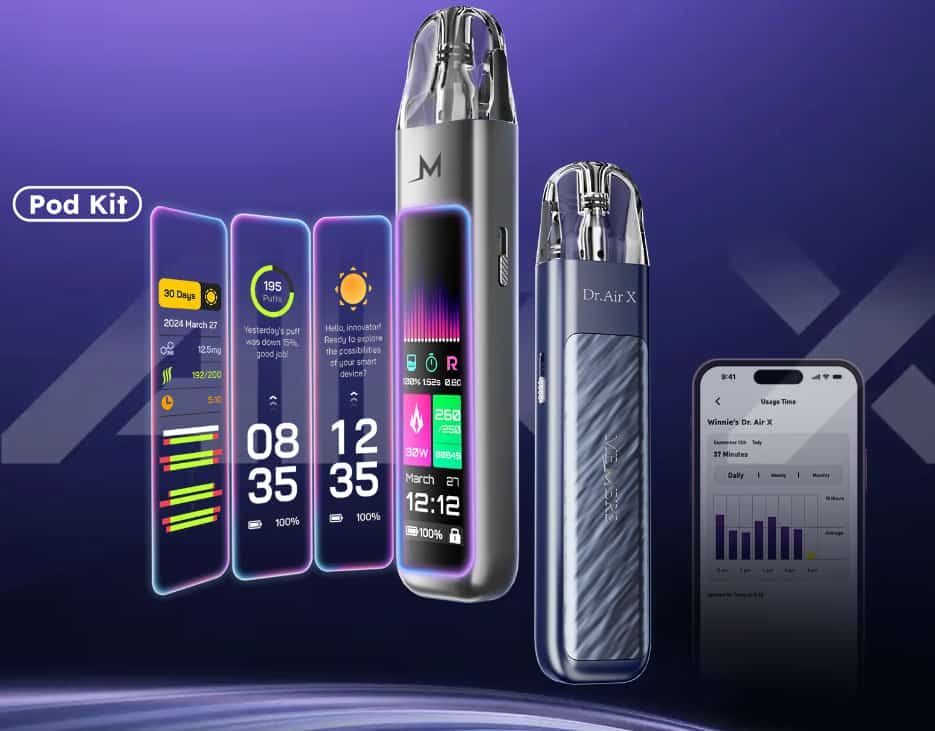
    Memers Dr. Air X is a smart, feature-rich pod vape system designed for both beginners and experienced vapers. With its 2.2-inch LCD touchscreen, adjustable airflow, AI-assisted settings, and long-lasting 1000 mAh battery, it combines convenience with customization so you get consistent flavor and satisfying draws every time.

    Here’s how to get started and use it correctly.

    1. Unbox and Inspect Your Device

    When you first open your Dr. Air X kit, make sure you have:

    • The Dr. Air X main device

    • One 0.6 Ω mesh coil pod

    • One 0.8 Ω mesh coil pod

    • A USB-C charging cable

    • User manual

    Inspect the pod and device for any manufacturing stickers or protective film — peel these off before use.

    2. Charge the Device Before First Use

    Before vaping, plug the Dr. Air X into a power source using the included USB-C cable. The 1000 mAh battery charges fast thanks to its 2 A charging capability, and the LCD display will show your charging progress.

    Tip: A full charge usually takes around 30–45 minutes depending on the remaining battery level.

    3. Fill Your Pod With E-Liquid

    The Dr. Air X uses refillable pods — here’s how to fill them properly:

    1. Remove the pod from the device.

    2. Open the silicone plug on the side filling port.

    3. Slowly fill with your chosen nicotine salt e-liquid (recommended PG:VG = 50:50 or 60:40).

    4. Close the plug securely to prevent leaks.

    5. Wait about 5 minutes before vaping to let the coil absorb the juice (priming).

    Pro tip: Avoid overfilling — leave a small air gap so the coil can wick properly.

    4. Install the Pod

    After filling, press the pod firmly into the top of the device until it clicks into place. The magnetic connection ensures a secure fit and proper electrical contact.

    5. Turn On and Navigate the Touchscreen

    Once your pod is in place, the 2.2-inch LCD touchscreen will activate. This screen lets you:

    • See battery level and wattage

    • Adjust airflow

    • Track puff count

    • Monitor nicotine intake and vaping data

    • Use AI recommendations for wattage and airflow

    Swipe and tap through the menus to familiarize yourself with these options.

    6. Adjust Airflow and Power

    Airflow

    Use the side airflow control slider to adjust how tight or loose each draw feels — tighter for a mouth-to-lung (MTL) experience or looser for a restricted direct-lung (RDTL) feel.

    Wattage

    Dr. Air X supports 5–30 W output. It can auto-detect the pod and recommend wattage, or you can manually set wattage based on your preference.

    7. Start Vaping

    Once everything is set:

    • Simply inhale through the mouthpiece — the draw-activated system makes it easy with no button needed.

    Enjoy your vapor! The AI-enhanced system helps maintain consistent flavor and performance throughout your session.

    8. Monitor Usage and Data

    One of the Dr. Air X’s standout features is its AI tracking and analytics. Through the device screen or the Dr. Air app, you can monitor:

    • Puff count

    • Daily and monthly vape timers

    • Nicotine intake

    • Flavor analytics

    • AI airflow and wattage recommendations

    This feature helps you understand your habits and tailor your experience over time.

    9. Maintain Your Device

    To keep your Dr. Air X performing well:

    Wipe the pod connection points weekly with a soft cloth.
    Replace pods after about 10 refills or when flavor decreases noticeably. 
    Avoid charging overnight to preserve battery health.
    Store the device upright and avoid extreme temperatures.

    Final Thoughts

    Memers Dr. Air X pod kit is cleverly designed for anyone who wants a customizable, tech-forward vaping experience. Its LCD touchscreen, adjustable airflow, and smart AI recommendations set it apart from basic pod devices, while simple filling, magnetic pods, and draw-activated vaping make it user-friendly.

    By following these steps and tips, you’ll get the most out of your Dr. Air X kit — enjoying rich flavor, consistent performance, and personalized control every time you vape.

    Share. Facebook Twitter Pinterest LinkedIn Tumblr Email

    Related Posts

    FLASH SALE: 16% OFF ALL RAZ TN9000 FLAVORS  |  LIMITED TIME ONLY

    Vaporock X1 Pod System Kit Review–Stylish, Powerful & Easy to Use

    Aspire Cyber G Slim Review: Sleek, Simple, and Powerful MTL Pod Vaping

    Leave A Reply Cancel Reply

    You must be logged in to post a comment.

    voopoo G4 Mini
    oxva xlim 3 ultra
    sp2s sen x disposable vape
    • Popular
    • 3D Printer REVIEW
    • XIAOMI
    May 17, 2026

    iPlay Nova 45K Review – High Puff Performance with a Futuristic Twist

    May 17, 2026

    Vaporesso XROS 6 & XROS 6 Mini Review – The Evolution of Portable Vaping

    May 7, 2026

    OXVA Xlim Go Lite Review: Compact, Powerful, and Beginner-Friendly

    April 18, 2026

    VOOPOO DRAG 6 Hands on Review: Vape Beast with Smart Power & Premium Control

    December 26, 2025

    ACMER ASCARVA 4S: Precision CNC Power for Makers, DIYers & Small Workshops

    June 23, 2024

    ACMER P2 20W Laser Engraver Fixed Focus Engraving: Hands on Review

    May 30, 2024

    xTool F1 Ultra Review: World’s First 20W Fiber & 20W Diode Laser Engraver

    May 30, 2024

    Anycubic Kobra 3 Combo Review: The Multicolor Masterpiece?

    May 29, 2026

    Xiaomi 17T/Pro overseas launch: 7000mAh battery “the largest for international versions to date”, starting at 749 euros

    May 28, 2026

    Redmi K100 Specifications Leaked: The most powerful Redmi king has arrived – two swords, large and small, strike simultaneously

    May 28, 2026

    Xiaomi Bluetooth Speaker C is now available: 3D dazzling lights, multiple units can be connected for simultaneous playback

    May 27, 2026

    Xiaomi 18 is launched! Hyper OS 4 has leaked out: A major overhaul of the underlying system, making it more smooth.

    fc 26 coins
    New Arrivals
    • Uwell Caliburn Air Pod System Kit Uwell Caliburn Air Pod System Kit
    • DotMod DotPod Max Link Pod System Kit DotMod DotPod Max Link Pod System Kit
    • Honor Magic 9 Pro Honor Magic 9 Pro
    • Lenovo Idea Tab 2 Lenovo Idea Tab 2
    • Oppo Watch X3 Mini Oppo Watch X3 Mini
    • Suonon Switch 80K Disposable Vape Kit Suonon Switch 80K Disposable Vape Kit
    • Motorola Edge 80 Fusion Motorola Edge 80 Fusion
    • Motorola Edge 80 Fusion Plus Motorola Edge 80 Fusion Plus
    • Nothing Phone 5a Pro Nothing Phone 5a Pro
    About
  • Igeekphone.com provides the first global tech news and reviews about smartphone, vapes, e-cigar, smart home, 3D printers, e-bike,tablets, RC drones, VR headset, and other accessories. It's the best platform to improve your brand and product.
  • Contact us: info@igeekphone.com
  • Check Our Privacy Policy Here.
  • Note: *Right now we have US editor and EU editors for review, especially for Amazon US and EU.
  • *Shop and Compare Price Here*
  • Facebook
  • Youtube
  • OUR BEST VAPE PARTNERS
  • VAPE ONLINE STORE
  • HAYATI PRO MAX PLUS
  • VAPORESSO
  • VOOPOO
  • OXVA
  • NEXA
  • MASKKING
  • SP2S
  • IPLAY
  • TODOO
  • OTHER BEST PARTNERS
  • SVBONY
  • Chuwi
  • Blackview
  • Fossibot
  • Unihertz
  • Flsun
  • Anycubic
  • Xtool
  • Oukitel
  • Mukkpet Ebike
  • Ugreen
  • Copyright © 2026 igeekphone

    Type above and press Enter to search. Press Esc to cancel.