







Facebook Twitter Instagram
    Trending
    • Transparent oil tank + airflow adjustment + three-dimensional flavor marking. RELX has launched a new single-use product, Diva, in South Korea
    • How to take Panoramic Photos with iPhone Air?
    • HONOR Magic V6 Certified: Supports 120W Fast Charging! The Largest Battery in Foldable Phone History
    • OPPO Find N6 to Make Debut in March: Set to Challenge the World’s Deepest-Depth Foldable Screen
    • It is Reported that OPPO K14 series is Scheduled to Launch around April
    • The promotional image of the dark blue Google Pixel 10a smartphone has been Released. It will be available for purchase on February 18th
    • It is reported that Apple will release the iPhone 17e on February 19th: featuring full-power MagSafe technology and retaining the notch display design
    • 4DRC M7 GPS 5G WiFi RC Drone Review: High-Tech Performance and Stunning Aerial Footage
    Facebook YouTube
    Login Register
    IGeeKphone China Phone, Tablet PC, VR, RC Drone News, Reviews
    • HOME
      • NEWS
        • DeepSeek
        • ChatGPT
        • Minecraft
    • Amazon
    • NEW YEAR
    • PHONE
      • Top Phones For Your First Choice
      • Phone Comparison
      • Xiaomi
      • Blackview
      • Doogee
      • Black Shark
      • Geekbuying
      • Banggood
      • TEMU
      • TikTok
      • Aliexpress
      • Walmart
      • MercadoLibre
      • Lazada
    • TOP VAPE Awards for 2026
    • VAPES
      • E-CIGAR Upcoming
      • Vape News
      • Vape Deals
      • Vape Comparison
      • Vape Guide
      • Giveaway
    • BEST VAPE
      • Best Vape Stores
      • Best Starter Vape Kits
      • Best Vapes for Beginners
      • Best Disposable Vapes
      • Best Pod Systems
      • Best Pod Mod Vapes
      • Best Mods
      • Best Nicotine Pouches
      • Best Clearomizers/Tanks
      • Best E-Liquid
      • Best EGO/Pens
      • Best Vapes for Nic Salt E-Juice
      • Best Vapes to Quit Smoking
      • RDA vs. RDTA vs. RTA
    • Best Vape Brand 2026
      • VAPORESSO
      • VOOPOO
      • OXVA
      • NEXA BAR
      • ORIONBARTECH
      • MASKKING VAPE
      • MEMERS
      • SP2S
      • JNR
      • TODOO
      • MRFOG
      • VEIIK
    • REVIEW
      • E-cigar Review
      • Phones
      • Tablet PC
      • TV Box
      • RC Drone
      • Wearables
      • Camera
      • Accessories
      • VR Headset
    • MORE
      • TABLET
        • Chuwi
        • INNOCN
        • Teclast
        • Top Tablet for Your First Choice
        • Tablet/Laptop Comparison
      • RC DRONE
      • CAMERA
      • WEARABLES
        • OneOdio
        • BlitzWolf
        • Top Smartwatch for First Choice
      • 3D PRINTER
        • 3D Printer Review
        • Anycubic
        • FLSUN
        • Xtool
        • LONGER
        • Top 3D printer to Choose First
      • POWER STATION
        • Oukitel
        • FOSSIBOT
      • GAMING
        • Top Gaming Products
      • E-BIKE
        • Samebike
        • Happyrun
        • ENGWE
      • SMART HOME
      • TV BOX
      • ACCESSORIES
      • VR HEADSET
      • CLOTHES
      • AUTO CAR
    • DEAL
    • Shop
    IGeeKphone China Phone, Tablet PC, VR, RC Drone News, Reviews
    You are at:Home»Apple»How to take Panoramic Photos with iPhone Air?
    Apple

    How to take Panoramic Photos with iPhone Air?

    Brady CottonBy Brady CottonFebruary 5, 2026
    Facebook Twitter Pinterest LinkedIn Tumblr Email

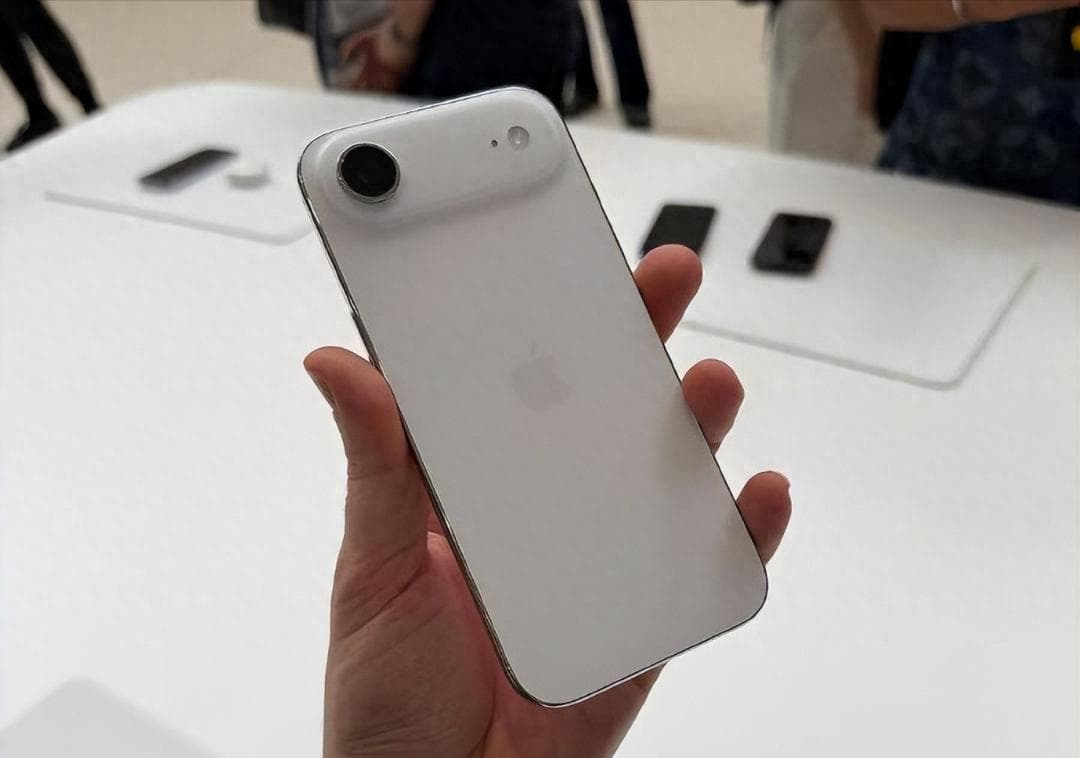
    In the field of smartphone photography, the iPhone Air series, with its powerful camera performance and intelligent algorithms, has become an excellent tool for documenting life and capturing beautiful scenes. Among them, the panorama mode, through the intelligent stitching of multiple photos, can generate images with an ultra-wide viewing angle, which is particularly suitable for shooting magnificent landscapes, grand buildings or large indoor scenes. Below, from the three dimensions of operation steps, shooting techniques and creative gameplay, we will detail the entire process of panoramic shooting on iPhone Air.

    I. Basic Operation: Three steps to activate the panoramic mode

    Enter the camera interface
    After unlocking the phone, find the “Camera” icon on the home screen and click on it. Or swipe left from the lock screen to quickly start the camera. Once inside the camera, the default mode is “Photos”. At this point, you need to slide the mode selection bar at the bottom of the screen to switch to the “Panorama” mode. In some iOS versions, the panorama mode icon may be labeled as “P” or simply display the word “Panorama”.

    2. Adjust the shooting direction

    After entering the panoramic mode, a white arrow will appear in the center of the screen, indicating that the default shooting direction is from left to right. If you want to shoot in the opposite direction (from right to left), simply tap the arrow to switch. This function is particularly useful when shooting symmetrical scenes or specific compositions.

    3. Start the shooting process

    Click the white circular shutter button at the bottom of the screen. The button will immediately change to a square shape, indicating that the shooting mode has been activated. At this point, slowly move the phone in the direction of the arrows while maintaining a constant speed and a horizontal position until the panoramic scan is completed. After the shooting is finished, there is no need to click the shutter again. The iPhone Air will automatically end the shooting and generate the photo.

    II. Advanced Techniques: The Five Core Elements for Enhancing Picture Quality

    Maintain the stability of the equipment

    During the shooting process, hand tremors are the main cause of blurry images or misaligned seams. It is recommended to hold the phone with both hands and keep the elbows close to the body to reduce shaking. If possible, using a tripod or a phone stand can further enhance stability. Some users also use fixed objects on the table or railings as support points.

    2. Control the movement speed

    Constant movement is the key to panoramic shooting. Moving too fast may cause image blurring, while moving too slowly may trigger the automatic termination mechanism. You can adjust the movement rhythm by observing the progress bar and auxiliary lines on the screen. For example, when shooting landscapes, you can slowly and smoothly move the phone in sync with your breathing rate; when shooting buildings, you need to adjust the vertical movement speed according to the height.

    3. Optimize lighting and exposure

    Lighting conditions directly affect the quality of photos. In strong light conditions, it is recommended to manually adjust the exposure compensation to avoid overexposure of the highlights; in low-light scenarios, you can enable the night mode or use a tripod to extend the exposure time. Additionally, when moving from a bright area to a dark area for shooting, it is necessary to lock the focus and exposure in advance to prevent sudden changes in the brightness of the image.

    4. Avoiding Dynamic Interference

    The panoramic mode works best for stitching static scenes. When shooting, avoid dynamic objects such as pedestrians and vehicles, or choose a period when their movement direction is perpendicular to the shooting trajectory. For example, when shooting a street panorama, wait for the traffic lights to turn red to reduce the movement elements in the picture.

    5. Expand the perspective by using vertical panoramic views

    In addition to the horizontal panorama mode, iPhone Air also supports vertical shooting. By rotating the phone 90 degrees to the horizontal mode, and entering the panorama interface, you can move the phone downward or upward from the bottom or upward from the top to capture the full view of vertical scenes such as towering buildings and waterfalls. This feature is particularly suitable for shooting iconic buildings like the Oriental Pearl Tower and the Eiffel Tower.

    III. Creative Gameplay: Unleashing the Hidden Potential of the Panoramic Mode

    Doppelgänger effect: One person playing multiple roles simultaneously

    In the panoramic mode, have the model repeatedly assume different poses in the frame to achieve the “doppelgänger” effect. The specific operation is as follows: Fix the position of the phone, start the shooting, then the model quickly moves from in front of the camera to another position and assumes a new pose. Repeat this process until the shooting is completed. In the final photo, multiple different forms of the same person will be presented, which is suitable for creating funny group photos or narrative scenes.

    2. Perspective Distortion: Creating Visual Illusions

    By controlling the shooting distance and angle, the panoramic mode can be used to create a perspective distortion effect. For example, when shooting a staircase, slowly move the phone upwards from the bottom, making the staircase appear to spiral upwards in the photo; or when shooting a tunnel, move from the entrance to the depth, enhancing the sense of space extension.

    3. Macro Panorama: Capturing Fine Texture Details

    Place the phone close to the subject (such as petals or leaves), activate the panoramic mode and move it slowly. This will generate a high-resolution macro panoramic photo. This method can simultaneously display the overall shape of the subject and its local details, making it suitable for capturing fine objects such as insects and handicrafts.

    IV. Post-processing: Making Panoramic Photos More Eye-Catching

    After the shooting is completed, basic editing can be done through the “Photos” app on your iPhone, such as adjusting brightness, contrast, and saturation, or applying filters to enhance the atmosphere. For more professional processing, you can use third-party applications like Snapseed or VSCO to perform operations like cropping, retouching, and color separation. Additionally, panoramic photos can be shared via AirDrop, social media, or cloud storage. Some platforms (such as Instagram) also offer dedicated display formats for panoramic photos.

    From basic operations to creative practices, the panoramic mode of iPhone Air offers users a vast space for expression. After mastering these techniques, one can effortlessly capture the magnificent scenery during travels or create unique artistic works.

    Share. Facebook Twitter Pinterest LinkedIn Tumblr Email

    Related Posts

    HONOR Magic V6 Certified: Supports 120W Fast Charging! The Largest Battery in Foldable Phone History

    OPPO Find N6 to Make Debut in March: Set to Challenge the World’s Deepest-Depth Foldable Screen

    It is Reported that OPPO K14 series is Scheduled to Launch around April

    Leave A Reply Cancel Reply

    You must be logged in to post a comment.

    voopoo drag s3
    oxva xlim 3 ultra
    sp2s sen x disposable vape
    jnr 100k
    • Popular
    • 3D Printer REVIEW
    • XIAOMI
    February 2, 2026

    Voopoo Drag X3 vs Drag X2: Hands-On Comparison Review

    February 2, 2026

    VOOPOO VMATE i2 vs i3: Hands-On Comparison Review

    January 21, 2026

    VOOPOO ARGUS P3 VS ARGUS P2: Which Square Pod Suits You?

    January 21, 2026

    VOOPOO Drag X3 vs VOOPOO Drag X2: Hands-On Comparison

    December 26, 2025

    ACMER ASCARVA 4S: Precision CNC Power for Makers, DIYers & Small Workshops

    June 23, 2024

    ACMER P2 20W Laser Engraver Fixed Focus Engraving: Hands on Review

    May 30, 2024

    xTool F1 Ultra Review: World’s First 20W Fiber & 20W Diode Laser Engraver

    May 30, 2024

    Anycubic Kobra 3 Combo Review: The Multicolor Masterpiece?

    February 4, 2026

    Xiaomi Hyper OS 4 undergoes a major upgrade: Completely eliminates old code and boosts smoothness.

    February 2, 2026

    The new 6.59-inch mid-to-high-end model of a Certain factory is tentatively scheduled to be released in the first half of this year. It is expected to be under the brand of Xiaomi.

    January 29, 2026

    Xiaomi Launches REDMI Monitor G25 with 200Hz High Refresh Rate for Just 609 Yuan

    January 29, 2026

    The Specifications of the Strongest Flagship Model of Redmi, Redmi K100 Pro Max, have been Released

    fc 26 coins
    New Arrivals
    • Joyetech eRoll Slim Pro Full Kit 18W Joyetech eRoll Slim Pro Full Kit 18W
    • KadoBar Drip 50K Disposable Vape KadoBar Drip 50K Disposable Vape
    • YUMI Spaceman 50K Disposable Vape Kit YUMI Spaceman 50K Disposable Vape Kit
    • Airis Neo P40K Disposable Vape Airis Neo P40K Disposable Vape
    • Maskking Extre 100K Disposable Vape Maskking Extre 100K Disposable Vape
    • SMOK Volle Pod System Kit SMOK Volle Pod System Kit
    • Lost Vape Astara Pod System Kit Lost Vape Astara Pod System Kit
    • SALT BAE 50 40K DISPOSABLE SALT BAE 50 40K DISPOSABLE
    • CRAVE X ULTRA SLIM 40K DISPOSABLE CRAVE X ULTRA SLIM 40K DISPOSABLE
    About
  • Igeekphone.com provides the first global tech news and reviews about smartphone, vapes, e-cigar, smart home, 3D printers, e-bike,tablets, RC drones, VR headset, and other accessories. It's the best platform to improve your brand and product.
  • Contact us: info@igeekphone.com
  • Check Our Privacy Policy Here.
  • Note: *Right now we have US editor and EU editors for review, especially for Amazon US and EU.
  • *Shop and Compare Price Here*
  • Facebook
  • Youtube
  • OUR BEST VAPE PARTNERS
  • VAPE ONLINE STORE
  • HAYATI PRO MAX PLUS
  • VAPORESSO
  • VOOPOO
  • OXVA
  • NEXA
  • MASKKING
  • LOSTVAPE ORIONBAR
  • MEMERS
  • TODOO
  • SP2S
  • JNR
  • VEIIK
  • OTHER BEST PARTNERS
  • SVBONY
  • Chuwi
  • Blackview
  • Fossibot
  • Unihertz
  • Flsun
  • Anycubic
  • Xtool
  • Oukitel
  • Mukkpet Ebike
  • Ugreen
  • Copyright © 2026 igeekphone

    Type above and press Enter to search. Press Esc to cancel.