Facebook Twitter Instagram
    Trending
    • ONEXPLAYER G1 Foldable Mini Gaming Laptop Review: A Powerful 3-in-1 Windows Gaming PC
    • 1212 RTR 1/12 2.4G 4WD RC Car Review: A Stunt Truck for Land and Water Adventures
    • CHUWI GTBook X Laptop: RTX 3050, 144Hz, Core 7 230H – All for $999.
    • How to Calculate Puffs per Bottle of E-Liquid: A Simple Guide
    • Vapetasia Better Salt Series E-Juice Review
    • JNR Mega Box Pro 50K Disposable Vape Review: 50,000 Puffs, Smart Screen and 32ml E-Liquid
    • How Smartphone Records and Wearable Data Can Shape Personal Injury Claims After Everyday Accidents
    • What are plummeting cost of mobile technology to the point of free
    Facebook YouTube
    IGeeKphone China Phone, Tablet PC, VR, RC Drone News, Reviews
    • HOME
    • BREAKING NEWS
      • AI NEWS
    • Amazon
    • PHONE
      • Top Phones For Your First Choice
      • Phone Comparison
      • Xiaomi
      • Blackview
      • Doogee
      • Black Shark
      • Geekbuying
      • Banggood
      • TEMU
      • TikTok
      • Aliexpress
      • Walmart
      • MercadoLibre
      • Lazada
    • TOP VAPE Awards for 2026
    • VAPES
      • E-CIGAR Upcoming
      • Vape News
      • Vape Deals
      • Vape Comparison
      • Vape Guide
      • VAPE LAWS
      • Giveaway
    • BEST VAPE
      • Best Vape Stores
      • Best Starter Vape Kits
      • Best Vapes for Beginners
      • Best Disposable Vapes
      • Best Pod Systems
      • Best Pod Mod Vapes
      • Best Mods
      • Best Nicotine Pouches
      • Best Clearomizers/Tanks
      • Best E-Liquid
      • Best EGO/Pens
      • Best Vapes for Nic Salt E-Juice
      • Best Vapes to Quit Smoking
      • RDA vs. RDTA vs. RTA
    • Best Vape Brand 2026
      • VAPORESSO
      • VOOPOO
      • OXVA
      • NEXA BAR
      • MASKKING VAPE
      • SP2S
      • IPLAY
      • TODOO
      • MRFOG
      • LOSTVAPE
      • VEIIK
    • REVIEW
      • E-cigar Review
      • Phones
      • Tablet PC
      • TV Box
      • RC Drone
      • Wearables
      • Camera
      • Accessories
      • VR Headset
    • MORE
      • TABLET
        • Chuwi
        • INNOCN
        • Teclast
        • Top Tablet for Your First Choice
        • Tablet/Laptop Comparison
      • RC DRONE
      • CAMERA
      • WEARABLES
        • OneOdio
        • BlitzWolf
        • Top Smartwatch for First Choice
      • 3D PRINTER
        • 3D Printer Review
        • Anycubic
        • FLSUN
        • Xtool
        • LONGER
        • Top 3D printer to Choose First
      • POWER STATION
        • Oukitel
        • FOSSIBOT
      • GAMING
        • Top Gaming Products
      • E-BIKE
        • Samebike
        • Happyrun
        • ENGWE
      • SMART HOME
      • TV BOX
      • ACCESSORIES
      • VR HEADSET
      • CLOTHES
      • AUTO CAR
    • DEAL
    • Shop
    IGeeKphone China Phone, Tablet PC, VR, RC Drone News, Reviews
    You are at:Home»COUPONS»ONEXPLAYER G1 Foldable Mini Gaming Laptop Review: A Powerful 3-in-1 Windows Gaming PC
    COUPONS

    ONEXPLAYER G1 Foldable Mini Gaming Laptop Review: A Powerful 3-in-1 Windows Gaming PC

    Brady CottonBy Brady CottonAugust 13, 2026
    Facebook Twitter Pinterest LinkedIn Tumblr Email

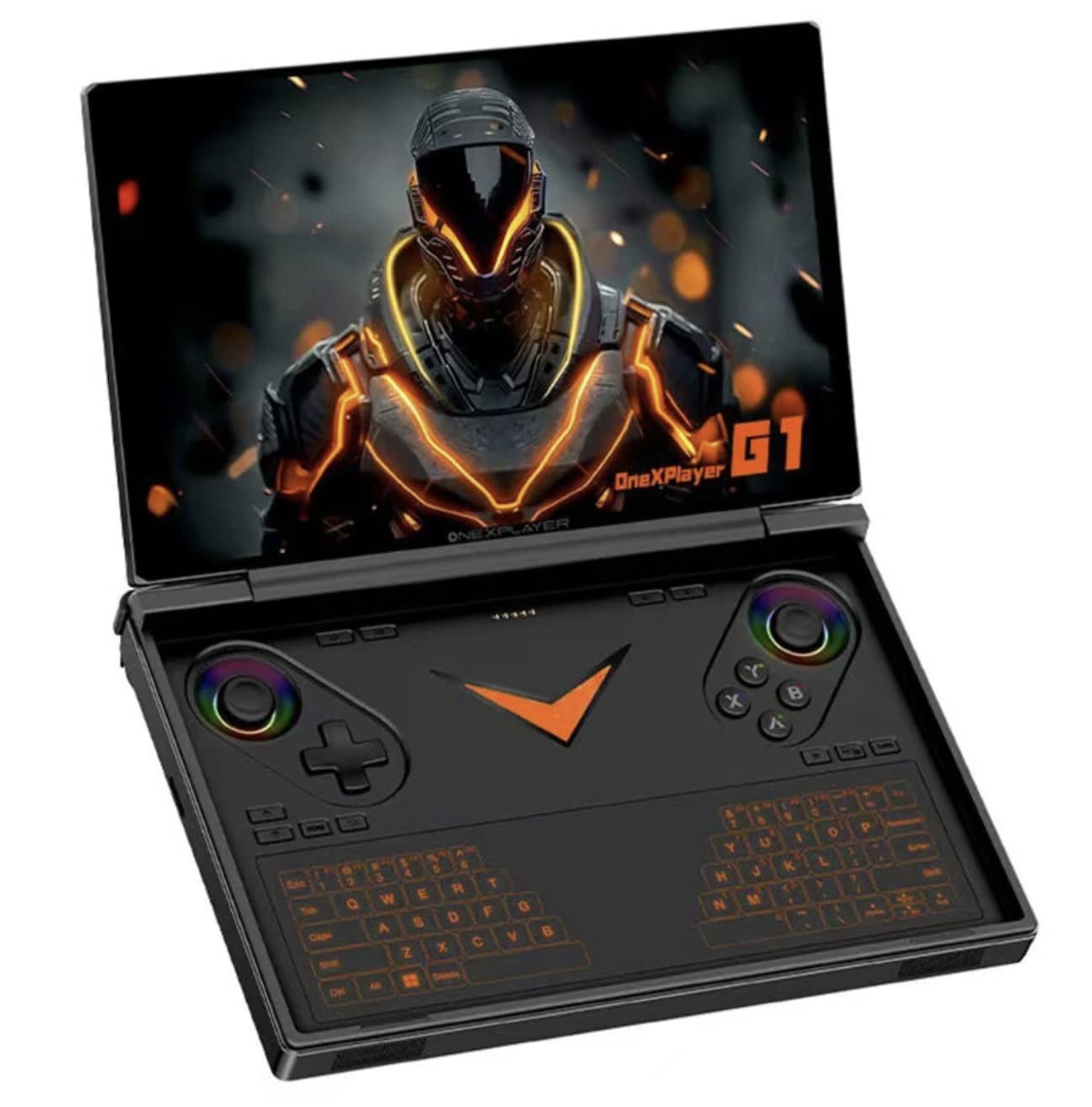
    ONEXPLAYER G1 Foldable Mini Gaming Laptop takes the idea of a portable gaming PC in a different direction. Instead of choosing between a traditional mini laptop and a handheld gaming console, the G1 combines both concepts in a compact Windows device.

    Powered by the AMD Ryzen AI 9 HX 370 processor and Radeon 890M integrated graphics, the ONEXPLAYER G1 is designed to handle PC gaming, productivity, entertainment, and demanding everyday workloads. It features an 8.8-inch 2.5K touchscreen with a 144Hz refresh rate, while its foldable design and detachable keyboard allow it to switch between laptop-style and handheld-style use.

    ONEXPLAYER G1 Key Features

    • AMD Ryzen AI 9 HX 370 processor
    • AMD Radeon 890M integrated graphics
    • 8.8-inch 2.5K touchscreen
    • 2560 × 1600 resolution
    • 144Hz refresh rate
    • 16:10 display ratio
    • Windows 11
    • LPDDR5X memory
    • PCIe 4.0 M.2 2280 SSD
    • Detachable magnetic keyboard
    • Hall-effect joysticks and triggers
    • OCuLink interface for external GPU expansion
    • Wi-Fi 6E and Bluetooth 5.2
    • 51.97Wh battery
    • Compact 3-in-1 design

    Compact Foldable Design

    The defining feature of the ONEXPLAYER G1 is its unusual foldable mini gaming laptop design.

    The device can function as a compact laptop when paired with its magnetic keyboard, while the built-in controls allow it to work as a handheld gaming device. It can also be connected to a larger display, giving it a mini-PC-style role.

    This flexibility is one of the G1’s biggest advantages. Instead of carrying a gaming laptop, tablet, and handheld separately, users can potentially use one device for several different scenarios.

    The official ONEXPLAYER specifications list the G1 at approximately 208 × 146.5 × 32mm, with the main unit weighing around 880g.

    AMD Ryzen AI 9 HX 370 Processor

    At the heart of the ONEXPLAYER G1 is the AMD Ryzen AI 9 HX 370.

    The processor uses AMD’s Zen 5/Zen 5c architecture and combines high-performance CPU cores with efficient cores. It is designed for demanding workloads while also integrating an NPU for AI-related processing.

    For a compact gaming PC, this is an important advantage because the processor combines CPU, GPU, and AI capabilities in a single mobile platform.

    The Ryzen AI 9 HX 370 is paired with AMD’s Radeon 890M integrated graphics, giving the G1 considerably more graphics capability than typical office-oriented mini laptops.

    Radeon 890M Graphics

    The Radeon 890M is based on AMD’s RDNA 3.5 graphics architecture and is designed for mobile PCs.

    Because the G1 uses integrated graphics rather than a separate discrete GPU, its compact chassis can remain relatively efficient and portable. At the same time, the Radeon 890M gives the machine enough graphical capability to target PC gaming at a level beyond basic integrated graphics solutions.

    Of course, gaming performance will vary considerably depending on the game, resolution, graphics settings, power mode, and thermal conditions. Users should not expect the same performance as a full-size gaming laptop equipped with a high-end discrete GPU.

    For users who want maximum graphics performance, the G1’s OCuLink interface provides another option.

    OCuLink for External GPU Expansion

    One of the most interesting connectivity features is the OCuLink port.

    OCuLink can be used with compatible external GPU solutions, allowing the G1 to connect to a more powerful desktop-class graphics card through an external GPU setup.

    This gives the ONEXPLAYER G1 an unusual level of flexibility. It can remain a portable handheld PC when traveling and potentially become a more powerful gaming workstation when used at home with an external GPU.

    The official specification lists an OCuLink PCIe 4.0 ×4 interface.

    8.8-Inch 2.5K 144Hz Touchscreen

    The display is another major highlight.

    The ONEXPLAYER G1 features an 8.8-inch screen with a 2560 × 1600 resolution, giving it a 16:10 aspect ratio. It also supports a 144Hz refresh rate, making animations and supported games look smoother than on conventional 60Hz displays.

    The official specifications also list approximately 500 nits brightness and 97% DCI-P3 color gamut coverage, making the display suitable not only for gaming but also for video, browsing, photo work, and general productivity.

    The touchscreen further improves flexibility. Users can interact with Windows directly through touch when they do not want to use the keyboard or built-in controls.

    Handheld Gaming Controls

    The ONEXPLAYER G1 is not simply a tiny laptop.

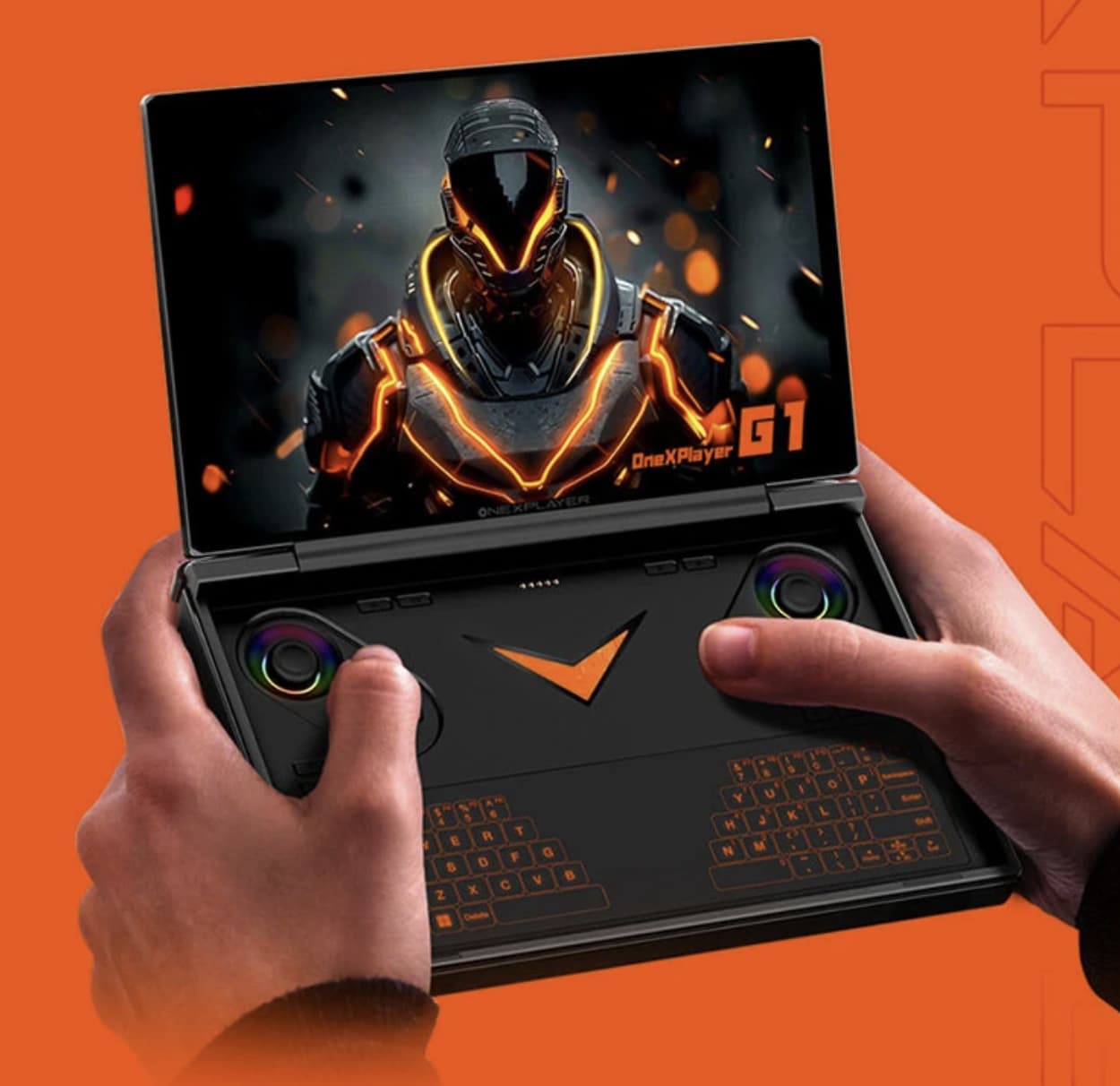
    It incorporates dedicated gaming controls, including Hall-effect joysticks, Hall-effect linear triggers, and micro-switch shoulder buttons. Hall-effect technology can reduce the mechanical wear associated with conventional analog sensing and is particularly attractive to gamers who want precise controller input.

    The official specifications also mention a 3-axis accelerometer and 3-axis gyroscope, adding motion-sensing capability to the device.

    This controller-focused design makes the G1 much more practical as a handheld gaming machine than a conventional miniature laptop.

    Detachable Magnetic Keyboard

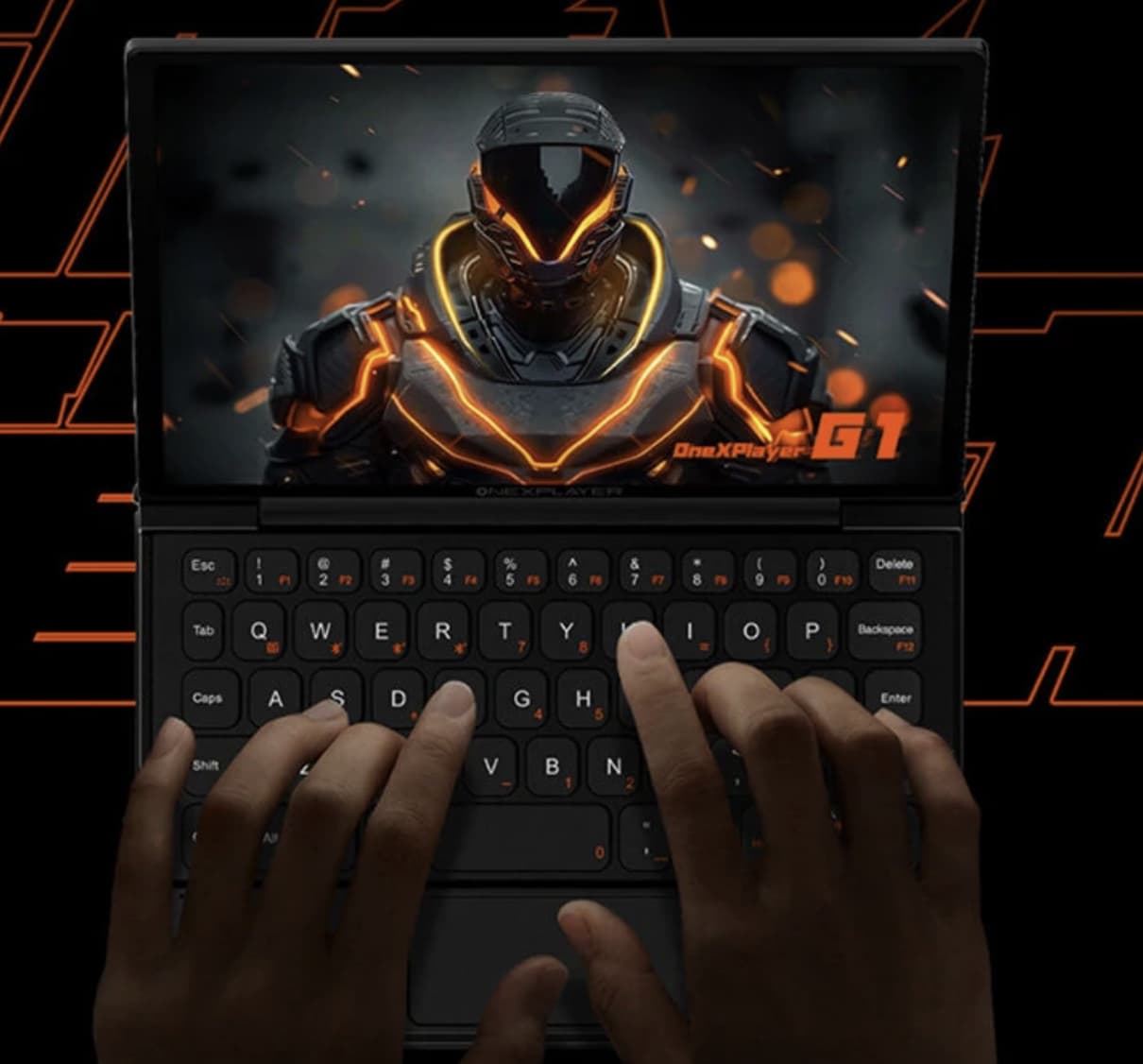
    When productivity is more important than gaming, the G1 can be paired with its magnetic detachable keyboard.

    This transforms the device into a miniature Windows laptop. Users can type documents, browse websites, manage email, edit files, and perform other desktop tasks without needing a separate computer.

    The keyboard can be removed when gaming, helping keep the handheld configuration more compact.

    This 3-in-1 approach is one of the G1’s strongest selling points: handheld gaming, mini-laptop productivity, and desktop-style use are all part of the same design.

    Memory and Storage

    The G1 supports high-speed LPDDR5X memory at up to 7500MHz, with configurations reaching up to 64GB according to the manufacturer’s specifications.

    For storage, the device uses an M.2 2280 PCIe 4.0 ×4 SSD and supports capacities of up to 4TB depending on configuration.

    This combination provides enough memory and storage for a substantial PC game library as well as productivity applications.

    The device also includes a MicroSD/TF card slot, which can be useful for expanding storage or transferring files.

    Windows 11 for Gaming and Productivity

    Unlike many dedicated gaming handhelds that use a specialized console-oriented operating system, the ONEXPLAYER G1 runs Windows 11.

    This provides access to the broader Windows PC ecosystem. Users can install PC games from different platforms, run desktop applications, browse the web, stream content, and use productivity software.

    The trade-off is that Windows can require more configuration than a dedicated console interface. However, for users who want a genuine portable PC rather than a closed gaming platform, Windows 11 is a significant advantage.

    OneXConsole Control Center

    The G1 also includes the OneXConsole control center.

    This software provides access to various device settings, including performance-related parameters, fan speed, display resolution, brightness, volume, vibration, and other controls.

    That allows users to adjust the system depending on whether they want higher performance, lower power consumption, or quieter operation.

    Battery and Charging

    The ONEXPLAYER G1 uses a 51.97Wh battery, according to the manufacturer’s specifications.

    Battery life will naturally vary depending on workload. Gaming at high performance levels and high refresh rates can consume substantially more power than light web browsing or video playback.

    The official specification also lists a 100W GaN power adapter, giving the system a high-power charging solution in a relatively compact format.

    Connectivity

    Despite its compact dimensions, the G1 offers a useful selection of ports.

    The official specifications include:

    • 2 × USB-C 4.0
    • 1 × USB-A 3.2
    • 1 × 3.5mm audio jack
    • 1 × MicroSD 4.0 slot
    • 1 × OCuLink PCIe 4.0 ×4

    Wireless connectivity includes Wi-Fi 6E and Bluetooth 5.2.

    This makes the G1 considerably more flexible than a conventional handheld console, especially when connecting external storage, peripherals, displays, or an external GPU.

    Cooling System

    High-performance hardware inside a small chassis creates an obvious challenge: heat.

    ONEXPLAYER equips the G1 with an active cooling system featuring a high-speed fan, aluminum heatsink, copper heat pipes, and multiple ventilation openings.

    The manufacturer’s specifications list a maximum fan speed of 6000 RPM and a maximum fan noise figure of approximately 44 dBA.

    Actual noise and temperature will depend on the selected performance mode and workload, but the cooling system is clearly designed to support the Ryzen AI 9 HX 370 platform under sustained loads.

    3-in-1 Usage

    Perhaps the best way to understand the ONEXPLAYER G1 is to look at its three main roles.

    1. Handheld Gaming PC

    Remove the keyboard and use the integrated controls to play Windows games directly on the 8.8-inch display.

    2. Mini Gaming Laptop

    Attach the magnetic keyboard and use the touchscreen and keyboard for Windows productivity and PC gaming.

    3. Mini Desktop PC

    Connect the G1 to an external monitor, keyboard, mouse, and other peripherals. With OCuLink, users can also build a more powerful external-GPU setup.

    This flexibility makes the G1 different from a traditional gaming laptop or handheld console.

    ONEXPLAYER G1 Specifications

    Feature ONEXPLAYER G1
    Processor AMD Ryzen AI 9 HX 370
    Graphics AMD Radeon 890M
    Display 8.8-inch touchscreen
    Resolution 2560 × 1600
    Refresh rate 144Hz
    Aspect ratio 16:10
    Memory LPDDR5X, up to 64GB
    Storage M.2 2280 PCIe 4.0 ×4, up to 4TB
    Operating system Windows 11
    Battery 51.97Wh
    Wireless Wi-Fi 6E, Bluetooth 5.2
    External GPU OCuLink PCIe 4.0 ×4
    Main unit weight Approx. 880g
    Dimensions Approx. 208 × 146.5 × 32mm

    Specifications are based primarily on ONEXPLAYER’s official product information; configurations can vary by version.

    Pros and Cons

    Pros

    • Powerful Ryzen AI 9 HX 370 processor
    • Radeon 890M integrated graphics
    • High-resolution 2.5K touchscreen
    • Smooth 144Hz refresh rate
    • Built-in gaming controls
    • Detachable magnetic keyboard
    • Compact 3-in-1 design
    • OCuLink external GPU support
    • Fast LPDDR5X memory
    • PCIe 4.0 SSD support
    • Windows 11 versatility
    • Wi-Fi 6E connectivity

    Cons

    • Nearly 900g is relatively heavy for a handheld device
    • Integrated graphics cannot match high-end discrete laptop GPUs
    • High-performance gaming can place significant demands on battery life
    • Small keyboard may require an adjustment period
    • The compact chassis can limit sustained performance compared with larger gaming laptops

    Is the ONEXPLAYER G1 Worth Buying?

    The ONEXPLAYER G1 Foldable Mini Gaming Laptop is aimed at users who don’t want to choose between a handheld gaming PC and a portable laptop.

    Its Ryzen AI 9 HX 370 + Radeon 890M platform provides a strong foundation for portable PC gaming and demanding everyday tasks, while the 8.8-inch 2.5K 144Hz touchscreen offers an unusually high-end display experience for such a compact device.

    The detachable keyboard and built-in gaming controls make the G1 particularly versatile. Add OCuLink support for external graphics and the device becomes even more flexible as a home gaming system.

    The main compromise is size versus performance. At roughly 880g before adding the keyboard, it is substantially heavier than a conventional handheld console, while its integrated GPU cannot replace a powerful discrete gaming GPU. Nevertheless, the combination of handheld gaming, laptop productivity, and desktop connectivity gives the ONEXPLAYER G1 a distinctive position.

    Final Verdict

    ONEXPLAYER G1 Foldable Mini Gaming Laptop is an ambitious portable Windows PC built around flexibility.

    With its AMD Ryzen AI 9 HX 370 processor, Radeon 890M graphics, 8.8-inch 2.5K 144Hz touchscreen, Hall-effect gaming controls, detachable keyboard, and OCuLink support, it offers much more than a traditional gaming handheld.

    For gamers who also need a portable Windows workstation, the G1’s 3-in-1 design is its biggest attraction. It can be a handheld console during a trip, a miniature laptop when working, and a desktop-style gaming PC when connected to a larger monitor and external accessories.

    If portability, PC gaming, and versatility are more important to you than having the absolute highest graphics performance, the ONEXPLAYER G1 is an impressive alternative to conventional gaming laptops and handheld consoles.

    Share. Facebook Twitter Pinterest LinkedIn Tumblr Email

    Related Posts

    1212 RTR 1/12 2.4G 4WD RC Car Review: A Stunt Truck for Land and Water Adventures

    CHUWI GTBook X Laptop: RTX 3050, 144Hz, Core 7 230H – All for $999.

    ASUS’ First Googlebook Notebook Leaked: 14-Inch Touchscreen, Up to 64GB RAM and Sub-1kg Design

    Leave A Reply Cancel Reply

    You must be logged in to post a comment.

    voopoopintch
    oxva nexlim 2
    sp2s sen x disposable vape
    • Popular
    • 3D Printer REVIEW
    • XIAOMI
    July 13, 2026

    OXVA Nexlim 2 Mini Pod Vape Hands on Review

    July 13, 2026

    OXVA Nexlim 2 Pod Vape Hands on Review

    June 21, 2026

    iPlay LUMO 8K Review – A Compact Prefilled Pod Kit with Big Flavor and Everyday Convenience

    June 21, 2026

    iPlay HOOLA 150K Review – A Cloud-Chasing Giant with Music, Modes & Massive Longevity

    December 26, 2025

    ACMER ASCARVA 4S: Precision CNC Power for Makers, DIYers & Small Workshops

    June 23, 2024

    ACMER P2 20W Laser Engraver Fixed Focus Engraving: Hands on Review

    May 30, 2024

    xTool F1 Ultra Review: World’s First 20W Fiber & 20W Diode Laser Engraver

    May 30, 2024

    Anycubic Kobra 3 Combo Review: The Multicolor Masterpiece?

    August 12, 2026

    REDMI K100 Pro Review: A 185Hz Gaming Flagship That Fits a 6.59-Inch Body

    August 12, 2026

    REDMI K100 Pro Max Review: A Gaming Powerhouse That Runs Mobile Games at Full Frame Rate

    August 12, 2026

    Xiaomi Bluetooth Speaker With Magnetic Attachment Launches for 132 Yuan With MagSafe Support

    August 10, 2026

    Global REDMI Note 17 Pro Max Spotted on Geekbench with Snapdragon 6 Gen 5 and 9,210mAh Battery Rumors

    fc 26 coins
    New Arrivals
    • Vapetasia Better Salt Series E-juice Vapetasia Better Salt Series E-juice
    • JNR Mega Box Pro 50K Disposable Vape JNR Mega Box Pro 50K Disposable Vape
    • HQD SiSA 80K Hookah Disposable Vape HQD SiSA 80K Hookah Disposable Vape
    • VOZOL SWAP 70K Disposable Vape VOZOL SWAP 70K Disposable Vape
    • Oppo Reno16 F Oppo Reno16 F
    • Oppo Reno16c Oppo Reno16c
    • RODMAN Playoffs 50K Zero Nicotine Disposable Vape RODMAN Playoffs 50K Zero Nicotine Disposable Vape
    • Vivo T5 Lite Vivo T5 Lite
    • Vivo T5e Vivo T5e
    About
  • Igeekphone.com provides the first global tech news and reviews about smartphone, vapes, e-cigar, smart home, 3D printers, e-bike,tablets, RC drones, VR headset, and other accessories. It's the best platform to improve your brand and product.
  • Contact us: info@igeekphone.com
  • Check Our Privacy Policy Here.
  • Note: *Right now we have US editor and EU editors for review, especially for Amazon US and EU.
  • *Shop and Compare Price Here*
  • Facebook
  • Youtube
  • OUR BEST VAPE PARTNERS
  • VAPE ONLINE STORE
  • VAPORESSO
  • VOOPOO
  • OXVA
  • NEXA
  • MASKKING
  • SP2S
  • IPLAY
  • TODOO
  • OTHER BEST PARTNERS
  • SVBONY
  • Chuwi
  • Blackview
  • Fossibot
  • Unihertz
  • Flsun
  • Anycubic
  • Xtool
  • Oukitel
  • Mukkpet Ebike
  • Ugreen
  • Copyright © 2026 igeekphone

    Type above and press Enter to search. Press Esc to cancel.