




Facebook Twitter Instagram
    Trending
    • The world’s first commercial 2nm mobile phone chip: Samsung Exynos 2600 has been exposed again, equipped with a 985MHz AMD GPU
    • DuelBits Promo Code “INFOTOPLIST” for the Best Rewards
    • Best Service to Move Photos from Google Drive to Google Photos – MultCloud
    • AI Dealers: The Future of Online Casinos with Artificial Intelligence
    • What are the best online betting sites in India?
    • The Transformation of the Metaverse: Cryptocurrency’s Impact on the Virtual Realm
    • Maskking Veso S Pod Vape Review: The Perfect Blend of Convenience and Flavor
    • Vaping at the Wheel: Understanding the Risks and Laws for UK Drivers
    Facebook YouTube
    Login Register
    IGeeKphone China Phone, Tablet PC, VR, RC Drone News, Reviews
    • HOME
      • NEWS
        • DeepSeek
        • ChatGPT
        • Minecraft
    • Amazon
    • CHRISTMAS
    • PHONE
      • Top Phones For Your First Choice
      • Phone Comparison
      • Xiaomi
      • Blackview
      • Unihertz
      • Doogee
      • Black Shark
      • Geekbuying
      • Banggood
      • TEMU
      • TikTok
      • Aliexpress
      • Walmart
      • Newegg
      • MercadoLibre
      • Lazada
    • TOP VAPE Awards for 2025
    • VAPES
      • E-CIGAR Upcoming
      • Vape News
      • Vape Market Trend
      • Vape Deals
      • Expo News
      • Vape Comparison
      • Vape Guide
        • Guide For Beginners
        • Guide for Best Users
      • Giveaway
    • BEST VAPE
      • Best Vape Stores
      • Best Starter Vape Kits
      • Best Vapes for Beginners
      • Best Disposable Vapes
      • Best Pod Systems
      • Best Pod Mod Vapes
      • Best Mods
      • Best Nicotine Pouches
      • Best Clearomizers/Tanks
      • Best E-Liquid
      • Best EGO/Pens
      • Best Vapes for Nic Salt E-Juice
      • Best Vapes to Quit Smoking
      • RDA vs. RDTA vs. RTA
    • Best Vape Brand 2025
      • VAPORESSO
      • VOOPOO
      • OXVA
      • NEXA BAR
      • ORIONBARTECH
      • MASKKING VAPE
      • VEIIK
      • MEMERS
      • SP2S
      • JNR
      • TODOO
      • MRFOG
    • REVIEW
      • E-cigar Review
      • Phones
      • Tablet PC
      • TV Box
      • RC Drone
      • Wearables
      • Camera
      • Accessories
      • VR Headset
    • MORE
      • 3D PRINTER
        • 3D Printer Review
        • Anycubic
        • FLSUN
        • Xtool
        • LONGER
        • Top 3D printer to Choose First
      • TREND
      • CLOTHES
      • AUTO CAR
      • POWER STATION
        • Oukitel
        • FOSSIBOT
      • GAMING
        • Top Gaming Products
      • E-BIKE
        • Samebike
        • Happyrun
        • ENGWE
      • TABLET
        • Chuwi
        • INNOCN
        • Teclast
        • Top Tablet for Your First Choice
        • Tablet/Laptop Comparison
      • WEARABLES
        • OneOdio
        • BlitzWolf
        • Top Smartwatch for First Choice
      • SMART HOME
      • TV BOX
        • Chuwi mini pc
        • Beelink
        • GMKTEC
        • MOREFINE
      • RC DRONE
        • DJI
        • MJX
        • JJRC
        • Hubsan
        • Top RC Drone
      • CAMERA
        • Gopro
        • Insta360
        • Andoer
      • ACCESSORIES
      • VR HEADSET
      • ROM
        • SAMSUNG
        • XIAOMI
        • ASUS
        • MEIZU
        • LENOVO
        • HUAWEI
        • ONEPLUS
        • ZTE
        • UMIDIGI
        • DOOGEE
        • HOMTOM
        • ELEPHONE
        • ULEFONE
        • BLACKVIEW
        • VERNEE
        • LEAGOO
        • CHUWI
        • TECLAST
        • PIPO
        • TV BOX ROM
    • DEAL
    • Shop
    IGeeKphone China Phone, Tablet PC, VR, RC Drone News, Reviews
    You are at:Home»GAMING»Choose its Official to Download Minecraft on PC and Enjoy install Tutorial 
    GAMING

    Choose its Official to Download Minecraft on PC and Enjoy install Tutorial 

    Brady CottonBy Brady CottonDecember 7, 2022
    Facebook Twitter Pinterest LinkedIn Tumblr Email

    Minecraft is a popular game for adventures, accessories and merchandise. But there are many versions appearing on the Internet, so where to install right and safe version.

    Getting the correct version of the game and setting up your account isn’t nearly as confusing these days, a decade after its original release. Although there are two versions of Minecraft, they’re now sold as a package deal and are more equivalent to one another than ever. Unlike in the past, you cannot screw things up by purchasing the wrong one. Both versions of Minecraft are compatible with the Windows operating system, despite one specifically being named Minecraft for Windows.

    Nowadays, a Microsoft account is a prerequisite for playing Minecraft, so be prepared to either use your existing account or create a new one that will handle all your Minecraft account info and any additional microtransaction purchases you make.

    Whether you’re installing Minecraft for yourself for the first time or you’re setting it up for a kid, we’ll walk you through where to buy it and how to download the version that suits your play style.

    Where to buy Minecraft on PC

    There are two official places to buy Minecraft on PC:

    • The Minecraft website
    • The Microsoft store(opens in new tab)
    • (Console players, buy through your platform’s usual digital store.)

    Minecraft costs $29.99 ($39.99CAD, £24.99) on PC and includes both versions of the game, which I’ll explain below. The important part is that you can’t screw up and buy the wrong version of Minecraft, so don’t worry. Minecraft is also included in Xbox Game Pass, so if you’re currently subscribed you do not need to buy a separate copy.

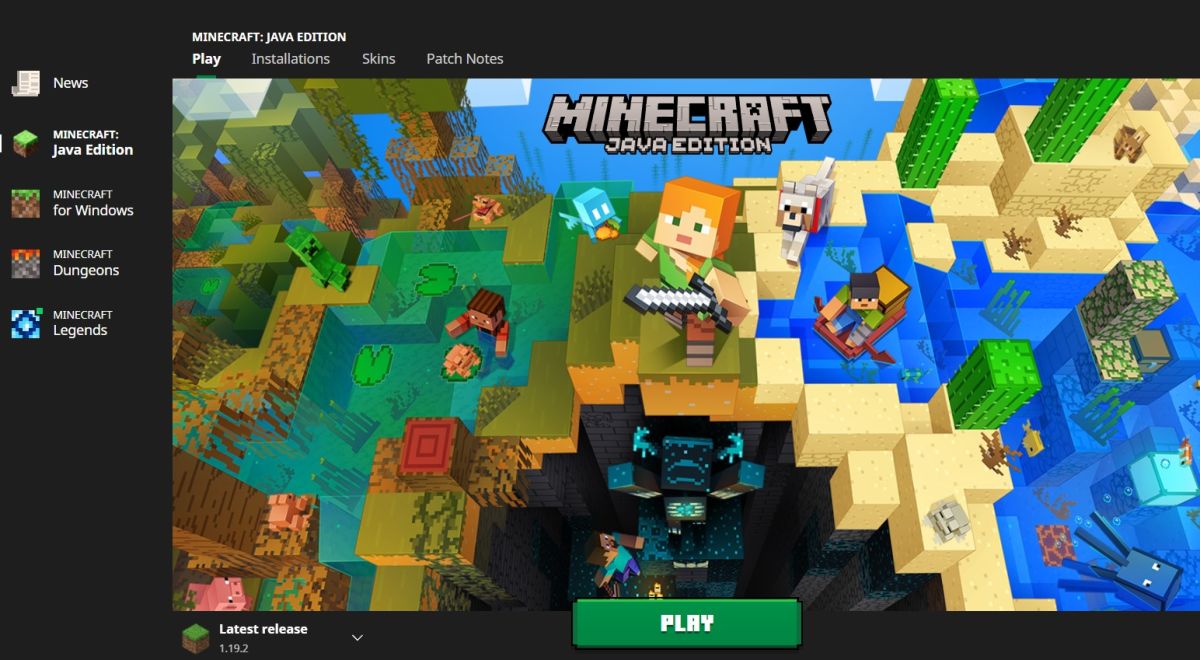
    After buying Minecraft, you will be able to download the Minecraft Launcher and log in with (or create) a Microsoft account. Other Minecraft games you’ve purchased with the same Microsoft account, including Minecraft Dungeons and the upcoming Minecraft Legends, can all be launched through this same application. The launcher also handles downloading updates, so you don’t need to worry about doing that part manually.

    How to download Minecraft on PC

    If you’re new to Minecraft, the differences between the original Minecraft Java Edition and Minecraft for Windows (also called Bedrock) aren’t obvious. The good news is that both are included with your purchase now, meaning you don’t need to sweat the purchase. As long as you buy Minecraft, you can change your mind about which version to play whenever you need to. You can even keep both installed, if you want.

    When you open the Minecraft Launcher, you should see both “Minecraft: Java Edition” and “Minecraft for Windows” in the left sidebar. To install either version, just click it in the sidebar and hit the big green “Install” button. In both cases, the launcher should default to installing the latest version of the game, no matter which Minecraft update has been released recently.

    We have a more in-depth guide to Minecraft Java vs Bedrock, but I’ll give you the short version here. Prefacing these other distinctions: If you’re downloading Minecraft for your child, you most likely want to install Minecraft for Windows. It’s the version that allows cross-platform multiplayer and is likely what they’re looking for if they intend to play with their friends.

    Minecraft Java: 

    • Also works with Windows, despite the other version’s name.
    • Allows you to install former versions of Minecraft and have multiple installations, which is required by most of our favorite Minecraft mods.
    • Allows you to install visual changes for free, like Minecraft texture packs and Minecraft skins created by other players.
    • Only allows multiplayer with other Java Edition players, but is the standard for many of our top Minecraft servers.

    Minecraft for Windows (Bedrock): 

    • Cross-platform multiplayer with players on consoles and mobile.
    • Not compatible with Mac or Linux.
    • Access to the Minecraft Marketplace with microtransactions for skins, textures, and custom maps. (For parents: The Marketplace costs money, but is curated by Microsoft unlike free-to-download mods for Java Edition).
    • Supports using a game controller to play in addition to keyboard and mouse.

    With your chosen version of Minecraft downloaded, you can press “Play” and either begin your new world offline or join a server in multiplayer.

    Source: pcgamer

    Download Minecraft 1.20 free apk

    1. Full Version: Minecraft PE 1.20.0 for Android Xbox servers.apk
    Password: n9bs

    2. Download Minecraft PE 1.20.0.20 Trails and Tales for Android with a working Xbox Live:
    password: igee

    Share. Facebook Twitter Pinterest LinkedIn Tumblr Email

    Related Posts

    The world’s first commercial 2nm mobile phone chip: Samsung Exynos 2600 has been exposed again, equipped with a 985MHz AMD GPU

    Best Service to Move Photos from Google Drive to Google Photos – MultCloud

    Xiaomi 17 Ultra will be available next week! Lu Weibing: All of Xiaomi’s main high-end flagship models will be released in the same year.

    Comments are closed.

    voopoo drag s3
    oxva slim stick
    sp2s sen x disposable vape
    jnr 100k
    • Popular
    • 3D Printer REVIEW
    • XIAOMI
    December 9, 2025

    OXVA Xlim Go vs. OXVA Xlim Go 2: Hands-On Review

    December 9, 2025

    OXVA XLIM PRO 3 VS XLIM PRO 2 Review: Hands-on Comparison

    December 9, 2025

    OXVA XLIM 3 Ultra vs. XLIM Pro 2 DNA Review: Hands-on Comparison

    December 8, 2025

    OXVA XLIM SQ PRO 2 vs XLIM SQ PRO Hands on Comparison Review

    June 23, 2024

    ACMER P2 20W Laser Engraver Fixed Focus Engraving: Hands on Review

    May 30, 2024

    xTool F1 Ultra Review: World’s First 20W Fiber & 20W Diode Laser Engraver

    May 30, 2024

    Anycubic Kobra 3 Combo Review: The Multicolor Masterpiece?

    May 15, 2024

    SCULPFUN SF-A9 40W Laser Engraver Cutting Machine: Hands On Review

    December 18, 2025

    Xiaomi 17 Ultra will be available next week! Lu Weibing: All of Xiaomi’s main high-end flagship models will be released in the same year.

    December 17, 2025

    Xiaomi 17 Ultra Leica Special Edition phone will adopt a dual brand, and in overseas markets, it will be named Leitzphone

    December 17, 2025

    The internal test activity of Background Stacking Arrangement style of Xiaomi’s HyperOS 3 has been Exposed

    December 15, 2025

    Xiaomi 17 Ultra has not been officially announced yet. Mi fans are exclaiming that Xiaomi’s confidentiality measures are too strict

    fc 26 coins
    New Arrivals
    • Realme Narzo 90 Realme Narzo 90
    • Maskking Veso S Pod Vape Maskking Veso S Pod Vape
    • SKWEZED X iJOY XP50000 Disposable Vape SKWEZED X iJOY XP50000 Disposable Vape
    • OXVA ARTIO 2 Battery Device 900mAh OXVA ARTIO 2 Battery Device 900mAh
    • Lost Vape Centaurus Ori 35 Pod System Kit Lost Vape Centaurus Ori 35 Pod System Kit
    • Oxbar Maglink 50K Disposable Vape Oxbar Maglink 50K Disposable Vape
    • Hellvape Vsee Now Pod System Kit Hellvape Vsee Now Pod System Kit
    • Hellvape Vsee One Pod System Kit Hellvape Vsee One Pod System Kit
    • JOOZY PRO 30K DISPOSABLE KIT JOOZY PRO 30K DISPOSABLE KIT
    About
  • Igeekphone.com provides the first global tech news and reviews about smartphone, vapes, e-cigar, smart home, 3D printers, e-bike,tablets, RC drones, VR headset, and other accessories. It's the best platform to improve your brand and product.
  • Contact us: info@igeekphone.com
  • Check Our Privacy Policy Here.
  • Note: *Right now we have US editor and EU editors for review, especially for Amazon US and EU.
  • *Shop and Compare Price Here*
  • Facebook
  • Youtube
  • OUR BEST VAPE PARTNERS
  • VAPE ONLINE STORE
  • HAYATI PRO MAX PLUS
  • VAPORESSO
  • VOOPOO
  • OXVA
  • NEXA
  • MASKKING
  • LOSTVAPE ORIONBAR
  • VEIIK
  • MEMERS
  • TODOO
  • SP2S
  • JNR
  • OTHER BEST PARTNERS
  • SVBONY
  • Chuwi
  • Blackview
  • Fossibot
  • Unihertz
  • Flsun
  • Anycubic
  • Xtool
  • Oukitel
  • Mukkpet Ebike
  • Ugreen
  • Copyright © 2025 igeekphone

    Type above and press Enter to search. Press Esc to cancel.