




Facebook Twitter Instagram
    Trending
    • Hellvape Vsee Now Pod System Kit Review: Compact, Convenient, and Flavorful Vaping
    • Hellvape Vsee One Pod System Kit Review: Compact, Stylish, and Performance-Driven
    • JOOZY PRO 30K Disposable Kit Review: The Ultimate Vaping Experience with 30,000 Puffs
    • Nic Salt Strengths Explained: How to Pick Between 5mg, 10mg, and 20mg
    • Airis, Kangvape and HAYATI have launched Christmas-themed Vapes, which are already on sale through online channels in the UK and the US
    • Apple iPhone 20 will be equipped with a ‘true full-screen’ without a hole and will be released in 2027 to pay tribute to the 20th anniversary of the iPhone’s birth
    • Possible iQOO Z11 Uses 6.59-inch 1.5K screen and Snapdragon 8 Gen 5 chip
    • Fourth-generation Snapdragon 7, IP69 full-level water resistance! OPPO Reno15c released: Starting from 2,899 yuan
    Facebook YouTube
    Login Register
    IGeeKphone China Phone, Tablet PC, VR, RC Drone News, Reviews
    • HOME
      • NEWS
        • DeepSeek
        • ChatGPT
        • Minecraft
    • Amazon
    • CHRISTMAS
    • PHONE
      • Top Phones For Your First Choice
      • Phone Comparison
      • Xiaomi
      • Blackview
      • Unihertz
      • Doogee
      • Black Shark
      • Geekbuying
      • Banggood
      • TEMU
      • TikTok
      • Aliexpress
      • Walmart
      • Newegg
      • MercadoLibre
      • Lazada
    • TOP VAPE Awards for 2025
    • VAPES
      • E-CIGAR Upcoming
      • Vape News
      • Vape Market Trend
      • Vape Deals
      • Expo News
      • Vape Comparison
      • Vape Guide
        • Guide For Beginners
        • Guide for Best Users
      • Giveaway
    • BEST VAPE
      • Best Vape Stores
      • Best Starter Vape Kits
      • Best Vapes for Beginners
      • Best Disposable Vapes
      • Best Pod Systems
      • Best Pod Mod Vapes
      • Best Mods
      • Best Nicotine Pouches
      • Best Clearomizers/Tanks
      • Best E-Liquid
      • Best EGO/Pens
      • Best Vapes for Nic Salt E-Juice
      • Best Vapes to Quit Smoking
      • RDA vs. RDTA vs. RTA
    • Best Vape Brand 2025
      • VAPORESSO
      • VOOPOO
      • OXVA
      • NEXA BAR
      • ORIONBARTECH
      • MASKKING VAPE
      • VEIIK
      • MEMERS
      • SP2S
      • JNR
      • TODOO
      • MRFOG
    • REVIEW
      • E-cigar Review
      • Phones
      • Tablet PC
      • TV Box
      • RC Drone
      • Wearables
      • Camera
      • Accessories
      • VR Headset
    • MORE
      • 3D PRINTER
        • 3D Printer Review
        • Anycubic
        • FLSUN
        • Xtool
        • LONGER
        • Top 3D printer to Choose First
      • TREND
      • CLOTHES
      • AUTO CAR
      • POWER STATION
        • Oukitel
        • FOSSIBOT
      • GAMING
        • Top Gaming Products
      • E-BIKE
        • Samebike
        • Happyrun
        • ENGWE
      • TABLET
        • Chuwi
        • INNOCN
        • Teclast
        • Top Tablet for Your First Choice
        • Tablet/Laptop Comparison
      • WEARABLES
        • OneOdio
        • BlitzWolf
        • Top Smartwatch for First Choice
      • SMART HOME
      • TV BOX
        • Chuwi mini pc
        • Beelink
        • GMKTEC
        • MOREFINE
      • RC DRONE
        • DJI
        • MJX
        • JJRC
        • Hubsan
        • Top RC Drone
      • CAMERA
        • Gopro
        • Insta360
        • Andoer
      • ACCESSORIES
      • VR HEADSET
      • ROM
        • SAMSUNG
        • XIAOMI
        • ASUS
        • MEIZU
        • LENOVO
        • HUAWEI
        • ONEPLUS
        • ZTE
        • UMIDIGI
        • DOOGEE
        • HOMTOM
        • ELEPHONE
        • ULEFONE
        • BLACKVIEW
        • VERNEE
        • LEAGOO
        • CHUWI
        • TECLAST
        • PIPO
        • TV BOX ROM
    • DEAL
    • Shop
    IGeeKphone China Phone, Tablet PC, VR, RC Drone News, Reviews
    You are at:Home»Guide»Fake: How to Copy Music from iPhone to Computer: Proven Fast Way
    Guide

    Fake: How to Copy Music from iPhone to Computer: Proven Fast Way

    Brady CottonBy Brady CottonJuly 1, 2024
    Facebook Twitter Pinterest LinkedIn Tumblr Email

    Why do I need to copy music from the iPhone to the computer?

    For music lovers, having a large collection of your favorite music and audio files on your iPhone is essential for comfort, education, video editing, and more.

    Over time, the device collects many important music files. You may need to transfer these files from the iPhone to the computer for various reasons. There are some situations where this may be necessary.

    Back up your music on iPhone: To avoid data loss, it is important to back up your data on your phone. By transferring your music from your iPhone to your computer, you can quickly back up your important files.

    Edit Music on iPhone: If you want to edit audio files or add music to your videos using specific software on your computer, transferring music from your iPhone to your computer is an essential step.

    Sharing music on your iPhone: If you want to share a large number of audio files with your friends, colleagues or co-workers, you can first transfer your music to your computer, and then share it via email or in other ways.

    In such a situation, you will have to transfer the music from iPhone to PC. Due to the system differences between the iPhone and Windows PC, this process may not be straightforward, but you can effectively complete the transfer using third-party software.

    Handy iPhone to PC transfer software – FoneTool

    When you need to finish iPhone transfer task, FoneTool is an excellent software choice. Its powerful features can help you efficiently complete transfers between iPhone to PC, PC to iPhone, or even iPhone to iPhone.

    Ultra-fast Transfer Speed: FoneTool boasts incredibly fast transfer speeds, far surpassing other similar software in the industry. You can transfer a large number of files in a very short time; for instance, one thousand songs can be transferred from your iPhone to your computer in just ten minutes.

    Supports Various Audio File Formats: FoneTool can easily recognize a wide range of commonly used audio files in daily life and learning, including mp3, m4a, aif, aiff, flac, wav, aac, m4b, m4p, m4r, etc. helping you locate them efficiently.

    Multiple File Transfer Types: Besides transferring music, you can use FoneTool to transfer photos, videos, and contacts to your computer.

    Preview and Select Needed Files: You can easily preview the files on your iPhone from your PC and choose the data you need to transfer according to your requirements.

    Secure and Stable USB Transfer: FoneTool relies solely on a USB connection for data transfer, ensuring none of your data is leaked and providing full security for your data.

    Wide Compatibility: FoneTool is compatible with various iPhone devices and iOS systems, including the latest versions. It also runs well on Windows 11/10/8/7 computers.

    How to copy music from iPhone to PC

    After learning about the powerful features of FoneTool, you can now understand why it is considered the best iPhone data transfer software. And you can follow the guidance below to get how to easily copy music from iPhone to computer.

    Step 1. Download FoneTool on your Windows computer > Connect your iPhone to the PC via a USB cable.

    Step 2. Launch FoneTool > Go to Phone Transfer > Choose iPhone to PC and click Get Started to continue.
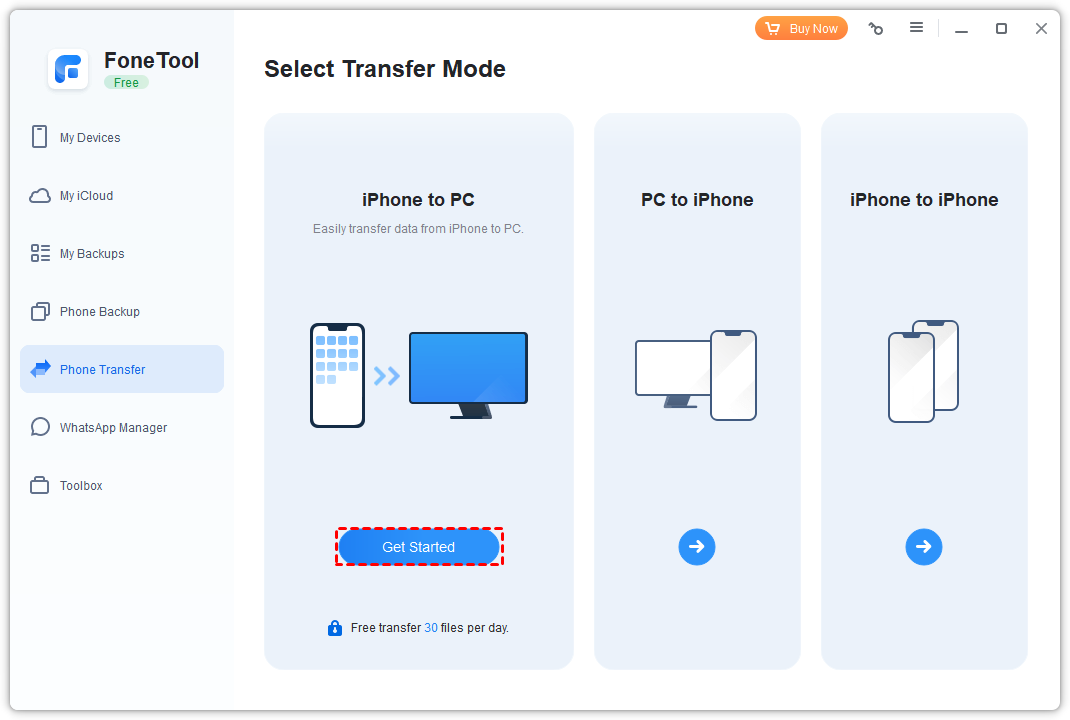
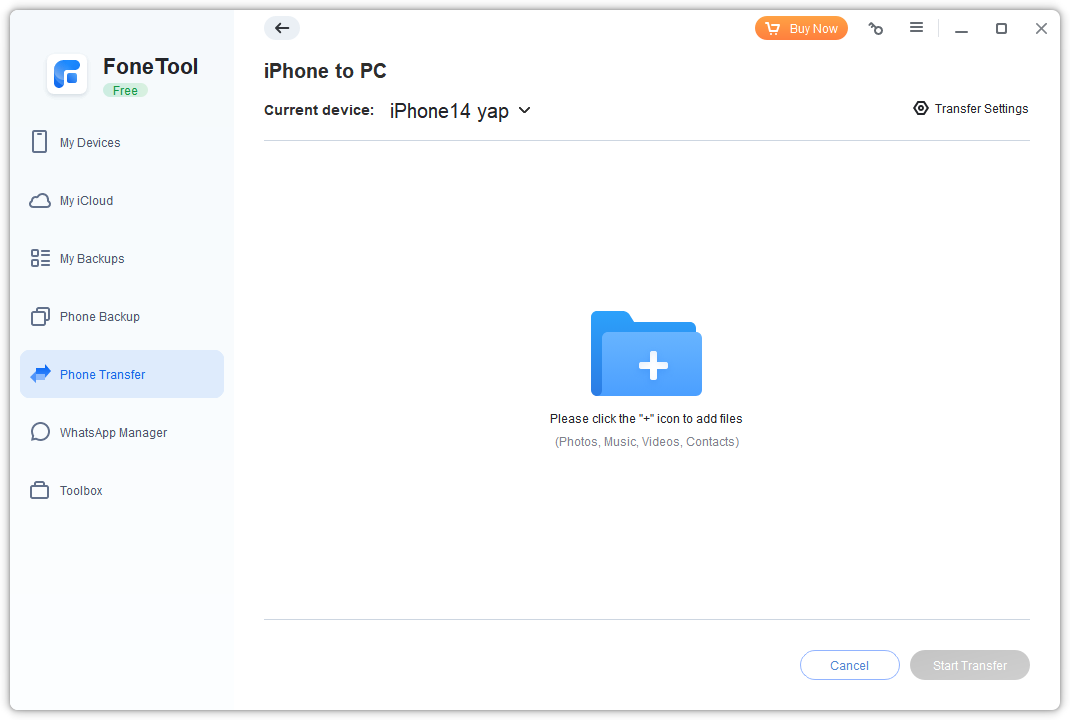
    Step 3. Click the + icon to choose the data you need.
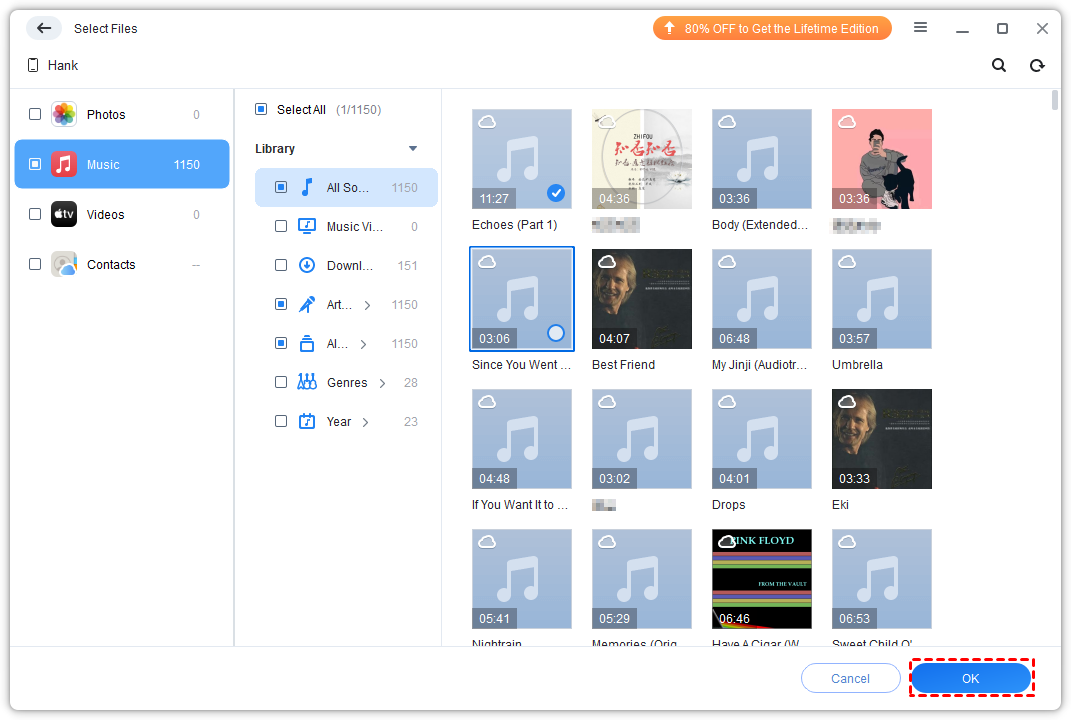
    Step 4. Click the Music icon and choose the audio you need > Tap on the OK button.
    Step 5. Confirm the music you choose > Change the storage location from the Transfer Settings option > Click Start Transfer to begin the task.
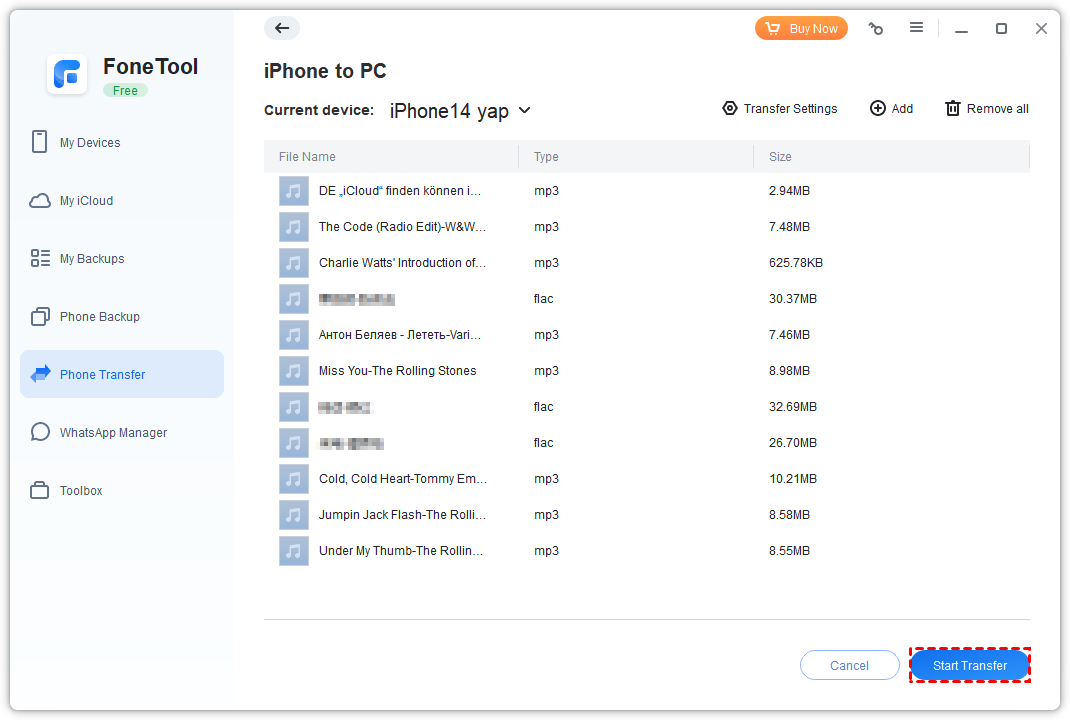
    Once the transfer is finished, you can easily view, edit or play your music from the computer.

    Except for the iPhone to PC transfer, you can also choose the PC to iPhone function to move data from PC to iPhone or choose iPhone to iPhone to efficiently transfer all old iPhone data to your new iPhone.

    Conclusion

    Now you can know how to copy music from iPhone to computer via FoneTool, you can finish the process in a few clicks. And its easy-to-use interface will save you a lot of time even if you are using it first time.

    Be Aware of Fonetool, it is Fake one.

    Share. Facebook Twitter Pinterest LinkedIn Tumblr Email

    Related Posts

    Apple iPhone 20 will be equipped with a ‘true full-screen’ without a hole and will be released in 2027 to pay tribute to the 20th anniversary of the iPhone’s birth

    Possible iQOO Z11 Uses 6.59-inch 1.5K screen and Snapdragon 8 Gen 5 chip

    Fourth-generation Snapdragon 7, IP69 full-level water resistance! OPPO Reno15c released: Starting from 2,899 yuan

    Leave A Reply Cancel Reply

    You must be logged in to post a comment.

    voopoo drag s3
    oxva xlim go 2
    sp2s sen x disposable vape
    jnr 100k
    • Popular
    • 3D Printer REVIEW
    • XIAOMI
    December 9, 2025

    OXVA Xlim Go vs. OXVA Xlim Go 2: Hands-On Review

    December 9, 2025

    OXVA XLIM PRO 3 VS XLIM PRO 2 Review: Hands-on Comparison

    December 9, 2025

    OXVA XLIM 3 Ultra vs. XLIM Pro 2 DNA Review: Hands-on Comparison

    December 8, 2025

    OXVA XLIM SQ PRO 2 vs XLIM SQ PRO Hands on Comparison Review

    June 23, 2024

    ACMER P2 20W Laser Engraver Fixed Focus Engraving: Hands on Review

    May 30, 2024

    xTool F1 Ultra Review: World’s First 20W Fiber & 20W Diode Laser Engraver

    May 30, 2024

    Anycubic Kobra 3 Combo Review: The Multicolor Masterpiece?

    May 15, 2024

    SCULPFUN SF-A9 40W Laser Engraver Cutting Machine: Hands On Review

    December 11, 2025

    Xiaomi 17 Ultra will officially announce next week: it will be the first to feature a brand-new Leica 1-inch main camera

    December 10, 2025

    The official version of Xiaomi Hyper OS 3 covers more models. MIX Fold 3 and others will start to be rolled out in gray scale and gradually from today

    December 9, 2025

    The Appearance Renderings of Xiaomi 17 Ultra are here: The classic large round lens returns without a back screen

    December 8, 2025

    Comeback: Xiaomi triple foldable screen was once aborted due to the overheating of the Snapdragon 8 Gen1

    fc 26 coins
    New Arrivals
    • Hellvape Vsee Now Pod System Kit Hellvape Vsee Now Pod System Kit
    • Hellvape Vsee One Pod System Kit Hellvape Vsee One Pod System Kit
    • JOOZY PRO 30K DISPOSABLE KIT JOOZY PRO 30K DISPOSABLE KIT
    • Vivo S50 smartphone Vivo S50 smartphone
    • Arc Hypertine 35K Zero Nicotine Disposable Vape Arc Hypertine 35K Zero Nicotine Disposable Vape
    • Oppo Reno 15c Oppo Reno 15c
    • lost vape le bar 40k lost vape le bar 40k
    • RAZ RX 50K DISPOSABLE RAZ RX 50K DISPOSABLE
    • Xiaomi Poco C85 Xiaomi Poco C85
    About
  • Igeekphone.com provides the first global tech news and reviews about smartphone, vapes, e-cigar, smart home, 3D printers, e-bike,tablets, RC drones, VR headset, and other accessories. It's the best platform to improve your brand and product.
  • Contact us: info@igeekphone.com
  • Check Our Privacy Policy Here.
  • Note: *Right now we have US editor and EU editors for review, especially for Amazon US and EU.
  • *Shop and Compare Price Here*
  • Facebook
  • Youtube
  • OUR BEST VAPE PARTNERS
  • VAPE ONLINE STORE
  • HAYATI PRO MAX PLUS
  • VAPORESSO
  • VOOPOO
  • OXVA
  • NEXA
  • MASKKING
  • LOSTVAPE ORIONBAR
  • VEIIK
  • MEMERS
  • TODOO
  • SP2S
  • JNR
  • OTHER BEST PARTNERS
  • SVBONY
  • Chuwi
  • Blackview
  • Fossibot
  • Unihertz
  • Flsun
  • Anycubic
  • Xtool
  • Oukitel
  • Mukkpet Ebike
  • Ugreen
  • Copyright © 2025 igeekphone

    Type above and press Enter to search. Press Esc to cancel.