




Facebook Twitter Instagram
    Trending
    • EA FC 26: 4 Best Goalkeepers to Build Your Ultimate Squad
    • Exploring the Science of Luck: How Chance Influences Slot Online Outcomes
    • Which Pod Vape Has the Longest-Lasting Coils?
    • The Ultimate Beginner’s Guide to Pod Vapes
    • How Digital Asset Management Software Can Transform Your Workflow
    • 4 Apps for Sports Betting Success for your life
    • How to Turn an Iphone into a New Phone
    • RAZ RX50K Batch Edition Disposable Vape Review: A Premium Vaping Experience
    Facebook YouTube
    Login Register
    IGeeKphone China Phone, Tablet PC, VR, RC Drone News, Reviews
    • HOME
      • NEWS
        • DeepSeek
        • ChatGPT
        • Minecraft
    • Amazon
    • NEW YEAR
    • PHONE
      • Top Phones For Your First Choice
      • Phone Comparison
      • Xiaomi
      • Blackview
      • Doogee
      • Black Shark
      • Geekbuying
      • Banggood
      • TEMU
      • TikTok
      • Aliexpress
      • Walmart
      • MercadoLibre
      • Lazada
    • TOP VAPE Awards for 2026
    • VAPES
      • E-CIGAR Upcoming
      • Vape News
      • Vape Deals
      • Vape Comparison
      • Vape Guide
      • Giveaway
    • BEST VAPE
      • Best Vape Stores
      • Best Starter Vape Kits
      • Best Vapes for Beginners
      • Best Disposable Vapes
      • Best Pod Systems
      • Best Pod Mod Vapes
      • Best Mods
      • Best Nicotine Pouches
      • Best Clearomizers/Tanks
      • Best E-Liquid
      • Best EGO/Pens
      • Best Vapes for Nic Salt E-Juice
      • Best Vapes to Quit Smoking
      • RDA vs. RDTA vs. RTA
    • Best Vape Brand 2026
      • VAPORESSO
      • VOOPOO
      • OXVA
      • NEXA BAR
      • ORIONBARTECH
      • MASKKING VAPE
      • MEMERS
      • SP2S
      • JNR
      • TODOO
      • MRFOG
      • VEIIK
    • REVIEW
      • E-cigar Review
      • Phones
      • Tablet PC
      • TV Box
      • RC Drone
      • Wearables
      • Camera
      • Accessories
      • VR Headset
    • MORE
      • TABLET
        • Chuwi
        • INNOCN
        • Teclast
        • Top Tablet for Your First Choice
        • Tablet/Laptop Comparison
      • RC DRONE
      • CAMERA
      • WEARABLES
        • OneOdio
        • BlitzWolf
        • Top Smartwatch for First Choice
      • 3D PRINTER
        • 3D Printer Review
        • Anycubic
        • FLSUN
        • Xtool
        • LONGER
        • Top 3D printer to Choose First
      • POWER STATION
        • Oukitel
        • FOSSIBOT
      • GAMING
        • Top Gaming Products
      • E-BIKE
        • Samebike
        • Happyrun
        • ENGWE
      • SMART HOME
      • TV BOX
      • ACCESSORIES
      • VR HEADSET
      • CLOTHES
      • AUTO CAR
    • DEAL
    • Shop
    IGeeKphone China Phone, Tablet PC, VR, RC Drone News, Reviews
    You are at:Home»Guide»How to Completely Close all Ads on Your Mobile Phone?
    Guide

    How to Completely Close all Ads on Your Mobile Phone?

    Brady CottonBy Brady CottonMay 30, 2023
    Facebook Twitter Pinterest LinkedIn Tumblr Email

    Usually when we are using the mobile phone, is not often there will be a lot of advertising, but also can not close, even a lot of times, click to close it, will still automatically jump out, so what should we do at this time? Next, follow us to learn the knowledge!
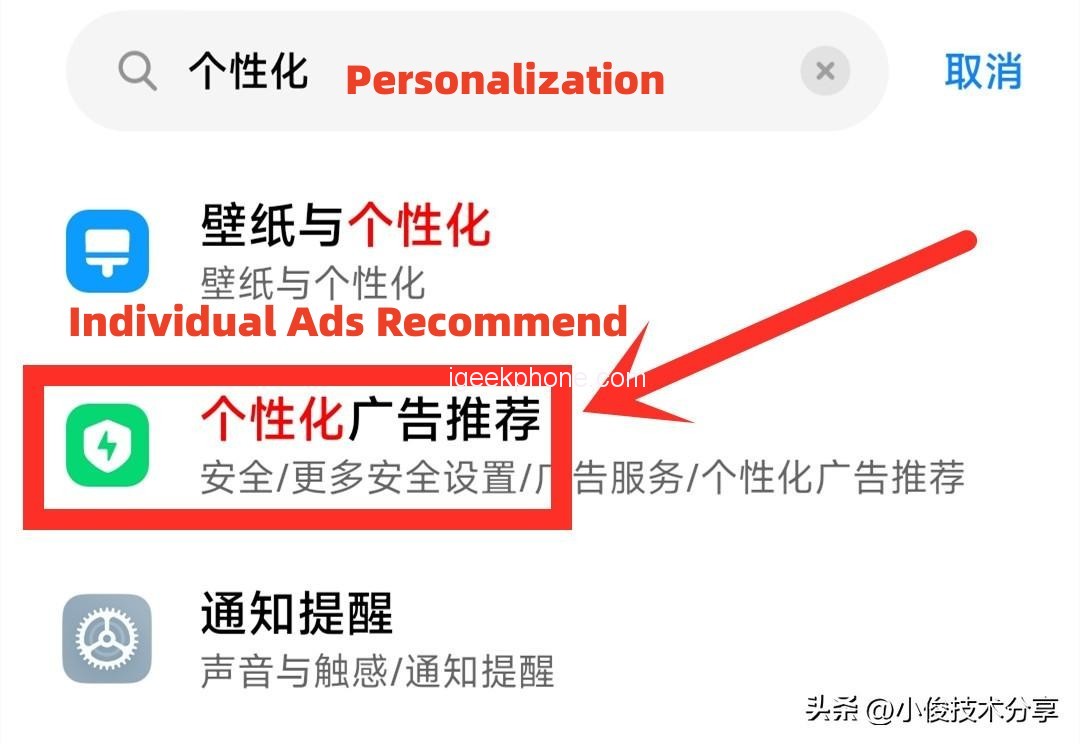
    First of all, we need to turn off the personalized advertisement recommendation in the mobile phone. Otherwise, the mobile phone will recommend a lot of advertising information to us according to our usage habits and search content. After we turn off the mobile phone, these advertisements will be reduced correspondingly. Then we select the personalized advertising recommendation below, turn it on, turn off the personalized advertising recommendation switch after opening it!
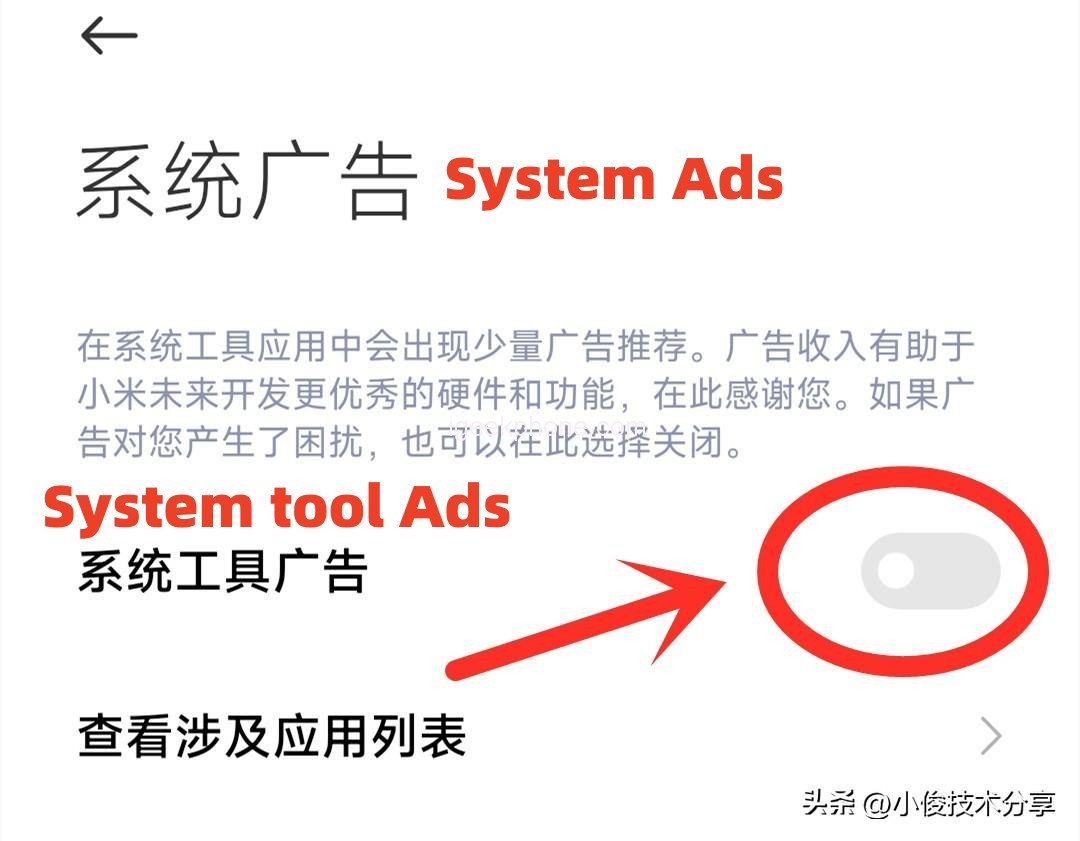
    After closing the personalized advertisement, we go back again, enter the system advertisement in the search bar, click the system advertisement, and turn off the switch of system tool advertisement. After turning off this switch, when we open the built-in application on the mobile phone, there will be no relevant advertisement information, such as when we open the calendar and weather. There will be no relevant ads in this app!
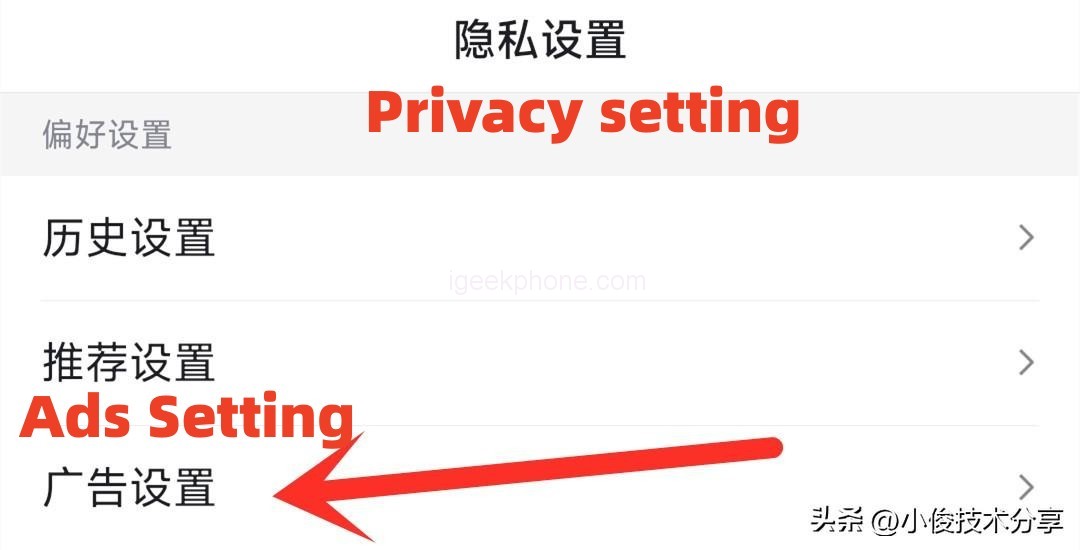
    Second, we need to close the advertisements in various apps. For example, when we open an APP to watch videos, watch videos, or read news, we will also find that these apps will automatically recommend advertisements to us. So how is this going? In fact, this is also because there is a personalized recommendation switch in these apps, through which relevant advertisements can be pushed to us. To solve this problem, we must find the Settings in these apps, then find the personalized recommendation, and turn off the personalized switch. The setting method of each APP is basically the same. We just open the APP, click Settings, and then select Privacy Settings, and in Privacy Settings, there’s an AD setting, and we open it.
    Third, we need to close the advertisement of the browser, like when we open the browser to search content or watch videos, there will be a lot of advertisements, and these advertisements, we accidentally click ah, will automatically download some applications, or some advertisements, these advertisements are very stubborn, once we click download ah, Many of them cannot be found on the surface of the phone, we need to go to the application Settings to uninstall them, especially for some third-party software, such as master key, weather forecast and so on, and some cleaning master and so on, there are a lot of malicious adplug-in, once opened to the point, it will keep popping up the window, no matter how to close it can not be closed. So we need to be in app Settings to uninstall them all!
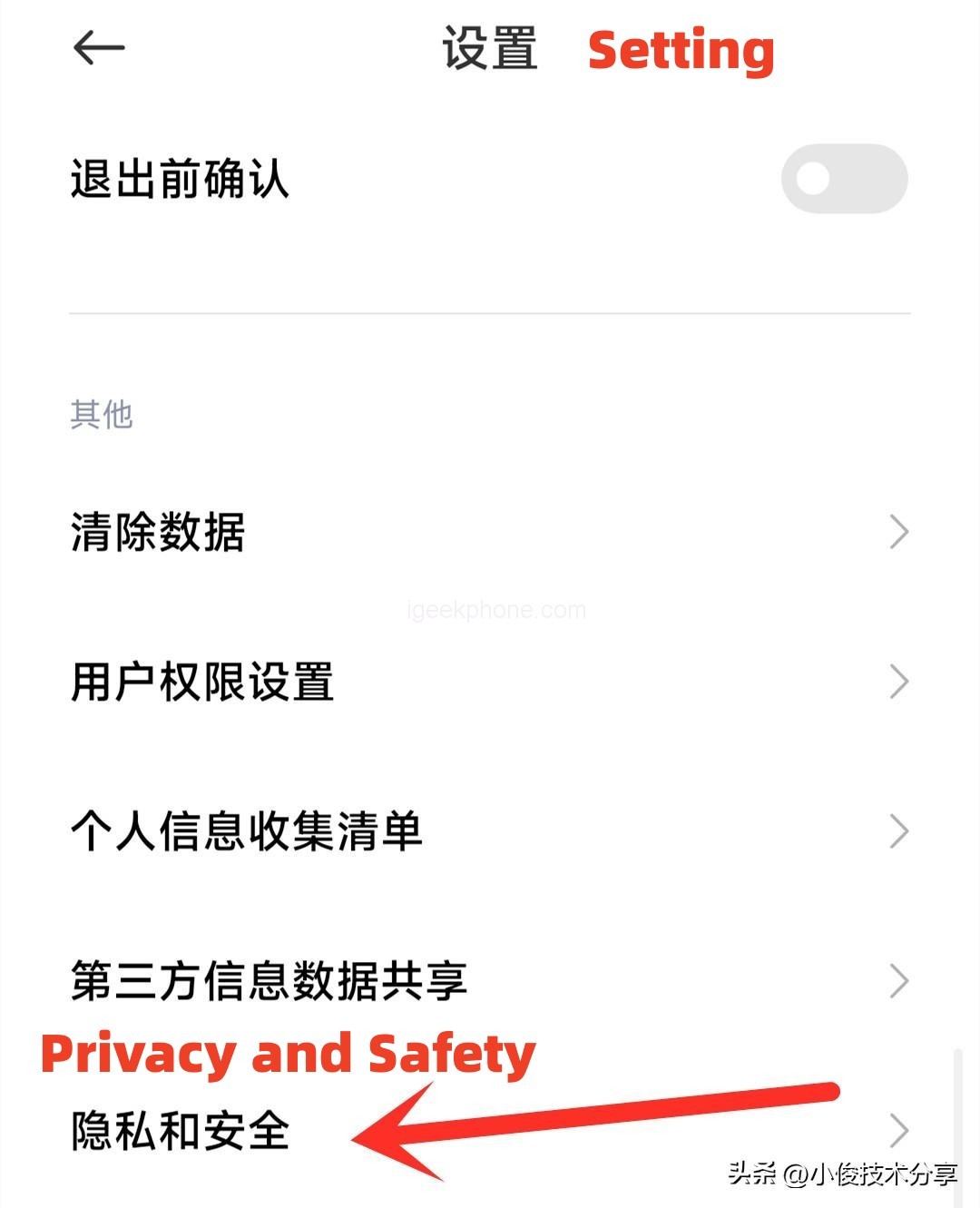
    In addition to uninstalling these malicious applications and preventing AD pop-ups, we also need to turn off the ads in the browser, otherwise when we use the browser, there will be a lot of ads, let’s open the browser Settings, and then find privacy and security.
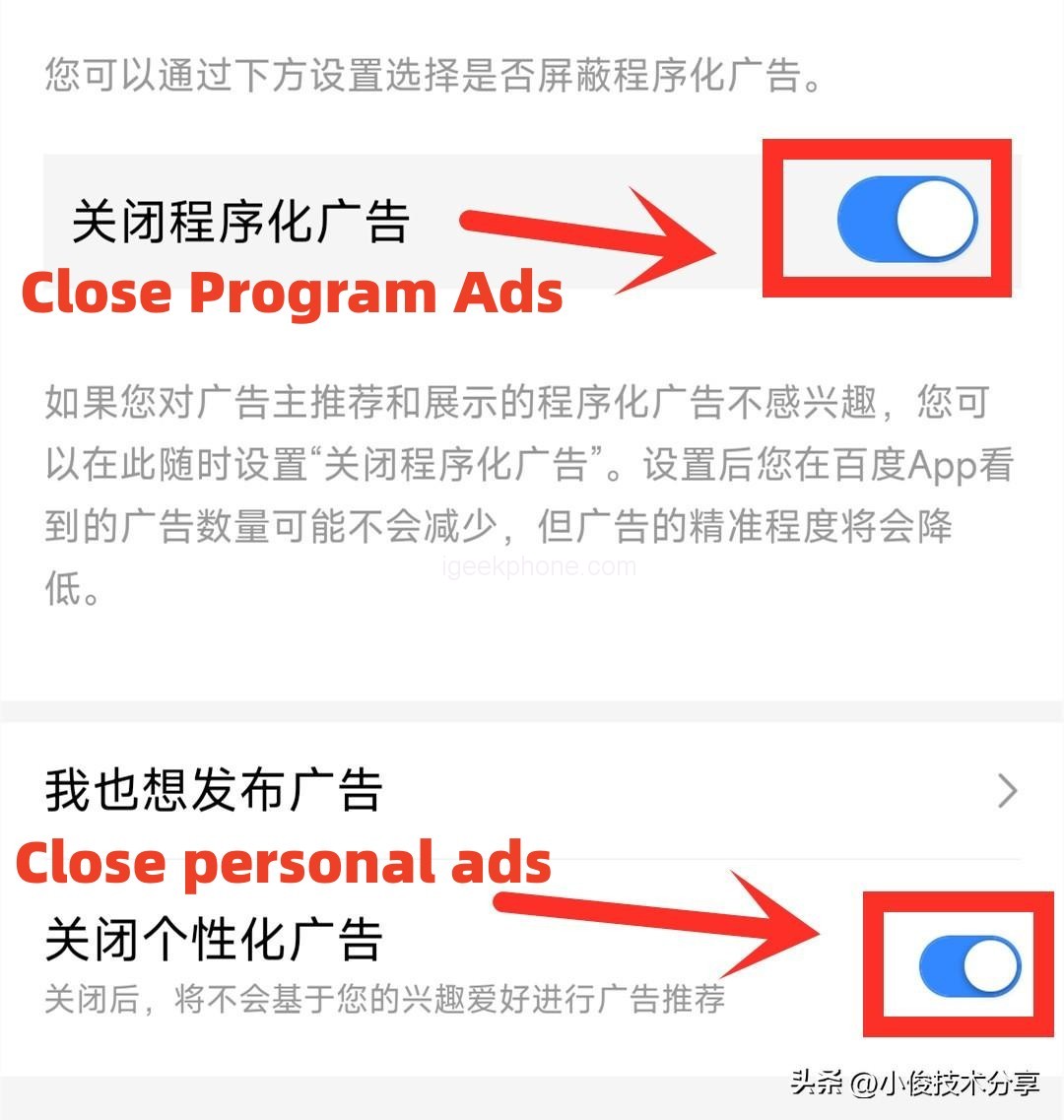
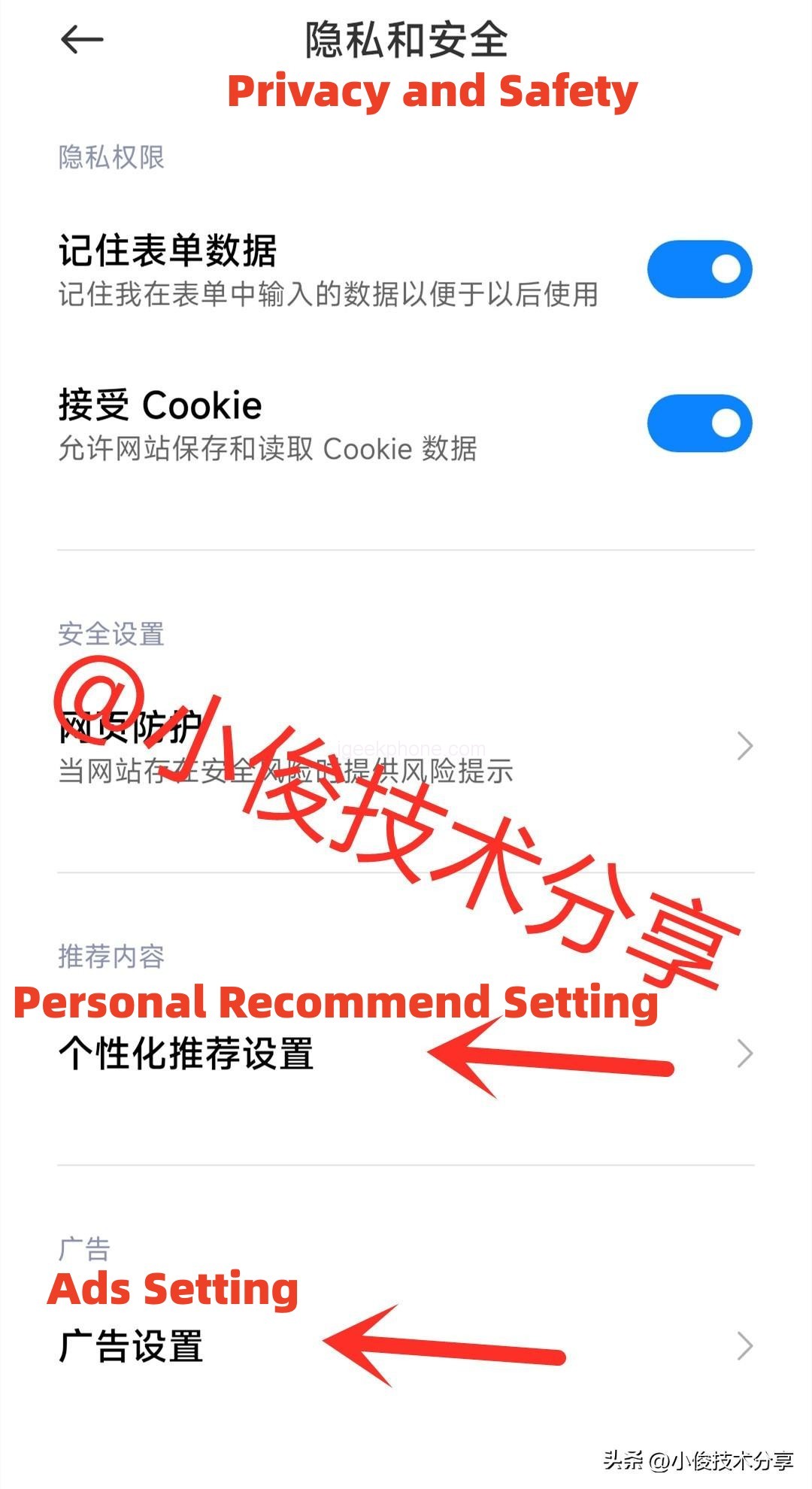
    In the privacy of the security inside, you can see below the personalized recommendation Settings and advertising Settings, so we click them respectively, the personalized content recommendation and personalized advertising recommendation, these two switches off, off, we use the browser, there will be no advertising information!
    Well, the above is how to completely close the mobile advertising method, I hope to help you, you learn, you can share and forward to your family and friends.

    Share. Facebook Twitter Pinterest LinkedIn Tumblr Email

    Related Posts

    EA FC 26: 4 Best Goalkeepers to Build Your Ultimate Squad

    How Digital Asset Management Software Can Transform Your Workflow

    How to Turn an Iphone into a New Phone

    Leave A Reply Cancel Reply

    You must be logged in to post a comment.

    voopoo Cyph NAVI kit
    oxva xlim 3 ultra
    sp2s sen x disposable vape
    jnr 100k
    • Popular
    • 3D Printer REVIEW
    • XIAOMI
    February 8, 2026

    VOOPOO VMATE i2 vs i3: Hands-On Comparison Review

    February 2, 2026

    Voopoo Drag X3 vs Drag X2: Hands-On Comparison Review

    January 21, 2026

    VOOPOO ARGUS P3 VS ARGUS P2: Which Square Pod Suits You?

    January 21, 2026

    VOOPOO Drag X3 vs VOOPOO Drag X2: Hands-On Comparison

    December 26, 2025

    ACMER ASCARVA 4S: Precision CNC Power for Makers, DIYers & Small Workshops

    June 23, 2024

    ACMER P2 20W Laser Engraver Fixed Focus Engraving: Hands on Review

    May 30, 2024

    xTool F1 Ultra Review: World’s First 20W Fiber & 20W Diode Laser Engraver

    May 30, 2024

    Anycubic Kobra 3 Combo Review: The Multicolor Masterpiece?

    February 21, 2026

    The global launch event for Xiaomi 17 series is scheduled for February 28th in Barcelona

    February 21, 2026

    The Largest Battery Phone in Xiaomi History! Xiaomi 17 Max is Equipped with an 8000mAh Battery

    February 21, 2026

    The Entry-level 4G model of Xiaomi, REDMI A7, has Passed overseas Certification

    February 21, 2026

    The Appearance of Xiaomi POCO X8 Pro series of mobile phones has been Revealed

    fc 26 coins
    New Arrivals
    • RAZ RX50K Batch Edition Disposable Vape RAZ RX50K Batch Edition Disposable Vape
    • Olit Hookalit Mega 200K Disposable Olit Hookalit Mega 200K Disposable
    • VOOPOO Drag 6 Vape Mod Kit VOOPOO Drag 6 Vape Mod Kit
    • Geek Bar CLR 50K Disposable Vape Geek Bar CLR 50K Disposable Vape
    • Redmi Turbo 5 Max Redmi Turbo 5 Max
    • OnePlus Turbo 7 OnePlus Turbo 7
    • Doogee S300 Ultra Doogee S300 Ultra
    • iQOO 15R iQOO 15R
    • VOOPOO NAVI X Cyph 80K Disposable Vape Kit VOOPOO NAVI X Cyph 80K Disposable Vape Kit
    About
  • Igeekphone.com provides the first global tech news and reviews about smartphone, vapes, e-cigar, smart home, 3D printers, e-bike,tablets, RC drones, VR headset, and other accessories. It's the best platform to improve your brand and product.
  • Contact us: info@igeekphone.com
  • Check Our Privacy Policy Here.
  • Note: *Right now we have US editor and EU editors for review, especially for Amazon US and EU.
  • *Shop and Compare Price Here*
  • Facebook
  • Youtube
  • OUR BEST VAPE PARTNERS
  • VAPE ONLINE STORE
  • HAYATI PRO MAX PLUS
  • VAPORESSO
  • VOOPOO
  • OXVA
  • NEXA
  • MASKKING
  • LOSTVAPE ORIONBAR
  • MEMERS
  • TODOO
  • SP2S
  • JNR
  • VEIIK
  • OTHER BEST PARTNERS
  • SVBONY
  • Chuwi
  • Blackview
  • Fossibot
  • Unihertz
  • Flsun
  • Anycubic
  • Xtool
  • Oukitel
  • Mukkpet Ebike
  • Ugreen
  • Copyright © 2026 igeekphone

    Type above and press Enter to search. Press Esc to cancel.