




Facebook Twitter Instagram
    Trending
    • Geek Bar Ice Prince 50K Disposable Vape Review: A Majestic Cloud of Flavor and Endurance
    • Which type of Vape is Harmless to the Human Body?
    • EA FC 26: 4 Best Goalkeepers to Build Your Ultimate Squad
    • Swedish food product manufacturer WiJo is set to establish a manufacturing base in the United States
    • The Impact of Pusoy Dos on Improving Strategic Mindset
    • The manual of Samsung’s most expensive mobile phone: Galaxy Z TriFold has been exposed
    • Online Casinos Adapting New Tech Trends
    • Xiaomi’s new phone has made an appearance at GSMA: The MIX TriFold triple foldable screen phone is expected to be released in Q3 next year
    Facebook YouTube
    Login Register
    IGeeKphone China Phone, Tablet PC, VR, RC Drone News, Reviews
    • HOME
      • NEWS
        • DeepSeek
        • ChatGPT
        • Minecraft
    • Amazon
    • CHRISTMAS
    • PHONE
      • Top Phones For Your First Choice
      • Phone Comparison
      • Xiaomi
      • Blackview
      • Unihertz
      • Doogee
      • Black Shark
      • Geekbuying
      • Banggood
      • TEMU
      • TikTok
      • Aliexpress
      • Walmart
      • Newegg
      • MercadoLibre
      • Lazada
    • TOP VAPE Awards for 2025
    • VAPES
      • E-CIGAR Upcoming
      • Vape News
      • Vape Market Trend
      • Vape Deals
      • Expo News
      • Vape Comparison
      • Vape Guide
        • Guide For Beginners
        • Guide for Best Users
      • Giveaway
    • BEST VAPE
      • Best Vape Stores
      • Best Starter Vape Kits
      • Best Vapes for Beginners
      • Best Disposable Vapes
      • Best Pod Systems
      • Best Pod Mod Vapes
      • Best Mods
      • Best Nicotine Pouches
      • Best Clearomizers/Tanks
      • Best E-Liquid
      • Best EGO/Pens
      • Best Vapes for Nic Salt E-Juice
      • Best Vapes to Quit Smoking
      • RDA vs. RDTA vs. RTA
    • Best Vape Brand 2025
      • VAPORESSO
      • VOOPOO
      • OXVA
      • NEXA BAR
      • ORIONBARTECH
      • MASKKING VAPE
      • VEIIK
      • MEMERS
      • SP2S
      • JNR
      • TODOO
      • MRFOG
    • REVIEW
      • E-cigar Review
      • Phones
      • Tablet PC
      • TV Box
      • RC Drone
      • Wearables
      • Camera
      • Accessories
      • VR Headset
    • MORE
      • 3D PRINTER
        • 3D Printer Review
        • Anycubic
        • FLSUN
        • Xtool
        • LONGER
        • Top 3D printer to Choose First
      • TREND
      • CLOTHES
      • AUTO CAR
      • POWER STATION
        • Oukitel
        • FOSSIBOT
      • GAMING
        • Top Gaming Products
      • E-BIKE
        • Samebike
        • Happyrun
        • ENGWE
      • TABLET
        • Chuwi
        • INNOCN
        • Teclast
        • Top Tablet for Your First Choice
        • Tablet/Laptop Comparison
      • WEARABLES
        • OneOdio
        • BlitzWolf
        • Top Smartwatch for First Choice
      • SMART HOME
      • TV BOX
        • Chuwi mini pc
        • Beelink
        • GMKTEC
        • MOREFINE
      • RC DRONE
        • DJI
        • MJX
        • JJRC
        • Hubsan
        • Top RC Drone
      • CAMERA
        • Gopro
        • Insta360
        • Andoer
      • ACCESSORIES
      • VR HEADSET
      • ROM
        • SAMSUNG
        • XIAOMI
        • ASUS
        • MEIZU
        • LENOVO
        • HUAWEI
        • ONEPLUS
        • ZTE
        • UMIDIGI
        • DOOGEE
        • HOMTOM
        • ELEPHONE
        • ULEFONE
        • BLACKVIEW
        • VERNEE
        • LEAGOO
        • CHUWI
        • TECLAST
        • PIPO
        • TV BOX ROM
    • DEAL
    • Shop
    IGeeKphone China Phone, Tablet PC, VR, RC Drone News, Reviews
    You are at:Home»FAQ»What’s the Best Way to Fix iPhone/iPad Won’t Restore in iTunes on iOS 16 and iPadOS16?
    FAQ

    What’s the Best Way to Fix iPhone/iPad Won’t Restore in iTunes on iOS 16 and iPadOS16?

    Brady CottonBy Brady CottonDecember 14, 2022
    Facebook Twitter Pinterest LinkedIn Tumblr Email

    Do not worry if you are experiencing any device-related issues. This helpful article will show you how to resolve the iPhone won’t restore problem. Here are several scenarios you might experience, and potential fixes, such as the tool, UltFone iOS System Repair for the iPad Won’t Restore in iTunes problem.

    Millions of users worldwide utilize Apple’s flagship iPhone series handsets. However, it occasionally experiences problems, just like any other device. All iOS hiccups or minor faults are promptly fixed without charge by restoring or updating the iPad with iTunes. Every time your iPad gets stuck, slows down, or experiences other software issues, iTunes is a fantastic option for resolving the problem. What should you do, though, if iPad Won’t Restore in iTunes? Do you have any solid suggestions?

    Read the potential solutions below to step-by-step resolve the issue if you currently have the iPad won’t restore issue.
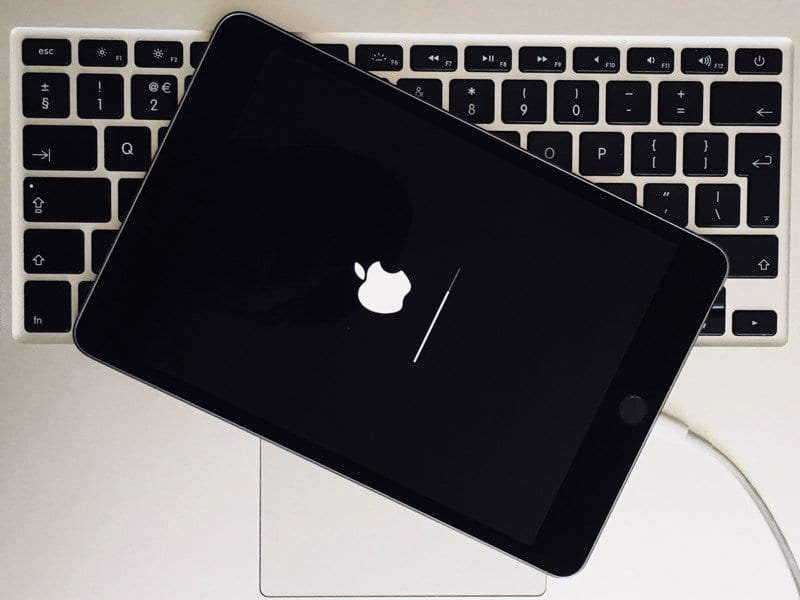
    Part 1: Why will iTunes not let me restore my iPhone 2023?

    The following are some of the problems that frequently occur while attempting to restore an iPad to its factory settings and impact the restoration process.

    • iTunes error has happened

    Numerous iPhone and iPad owners frequently report receiving the “iPad could not be restored problem.” According to the iTunes error message, the iPad cannot be restored if you attempt to restore your iPad after an update or jailbreak because iOS is unstable. There was an unidentified mistake (-1).” like iTunes error 3004, error 39, or any other error that is comparable.

    • Backup is Incompatible or Corrupt

    When the backup available on the Mac or PC is damaged or incompatible with the device, you are trying to restore it. You will get the message, “iTunes could not restore the iPad because the backup was corrupt or incompatible with the iPad being restored.” When you use iTunes to create a backup, there can be a problem.

    • After an update, the iPad cannot be restored using iTunes.

    Numerous consumers also complained that iTunes would not recover the device after updating their iPad to the most recent iOS version. The iPad won’t recognize you and will constantly request that you connect to iTunes. It indicates that an iTunes restore won’t work on an iPad.

    • The iPad Remains in Recovery Mode and Won’t Restore with iTunes

    You might also experience the “iPad won’t restore in recovery mode” problem, which occurs when an attempt to restore an iPad fails and the device becomes trapped in recovery mode.

    UltFone Christmas Celebration & New Year Deals that You Cannot Miss! Up To 75% OFF, Play Card-Flip Game 100% Win Surprises

    Part 2: How to Fix iPad Won’t Restore in iTunes Issue.

    Nothing above to help you? An easy and efficient way to fix the “iPhone cannot Restore with iTunes” problem is to restore your device using an iTunes alternative. Here, I’ll recommend UltFone iOS System Repair, a program that focuses on fixing various iOS issues by clearing the settings from the iOS device. The component that demands the most excellent focus is that it accomplishes all of this without any data loss. You can fix your gadget to stop worrying about losing your data.


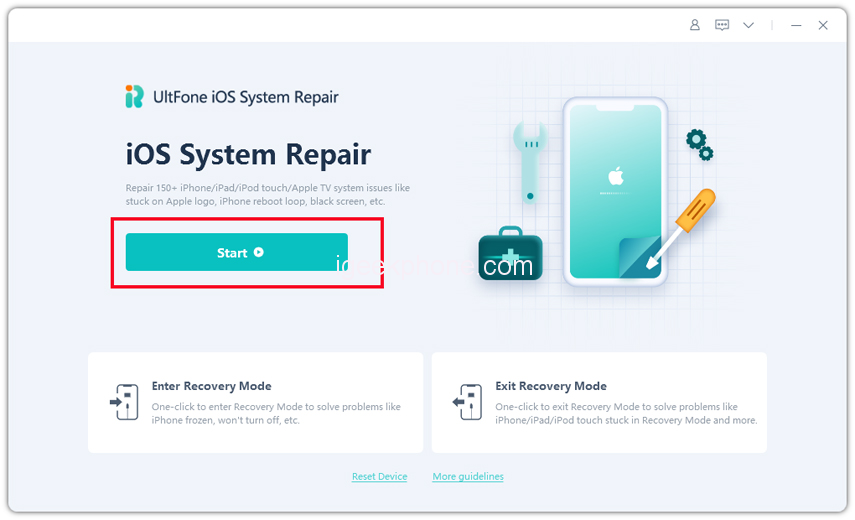
    Step 1 Connect your iPad to computer via a USB cable and click “Start” button on the main interface.
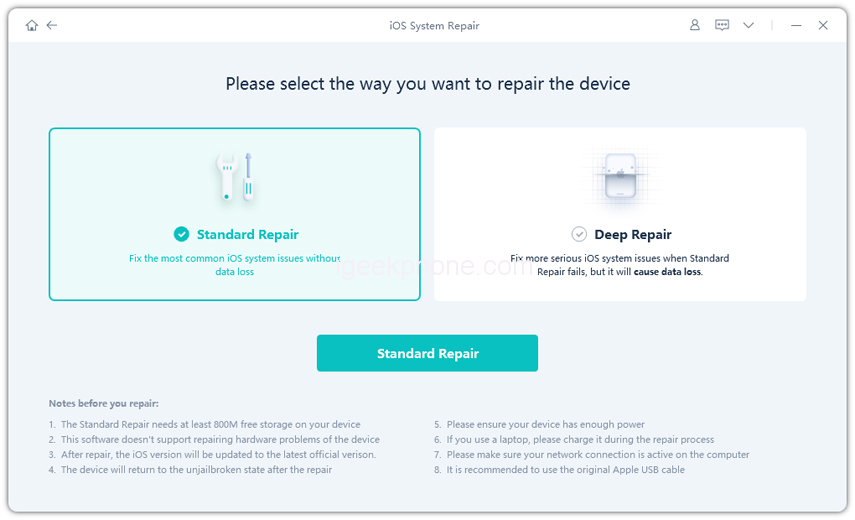
    Step 2 Next, you can choose a repair mode. The Standard Repair will fix iPad system issues such as iPad stuck in recovery, iPad black screen, spinning wheel, iPad update/restore errors. A big advantage of this repair mode is that your iPad data is kept intact. The Deep Repair will restore iPad to factory resettings by erasing all data.
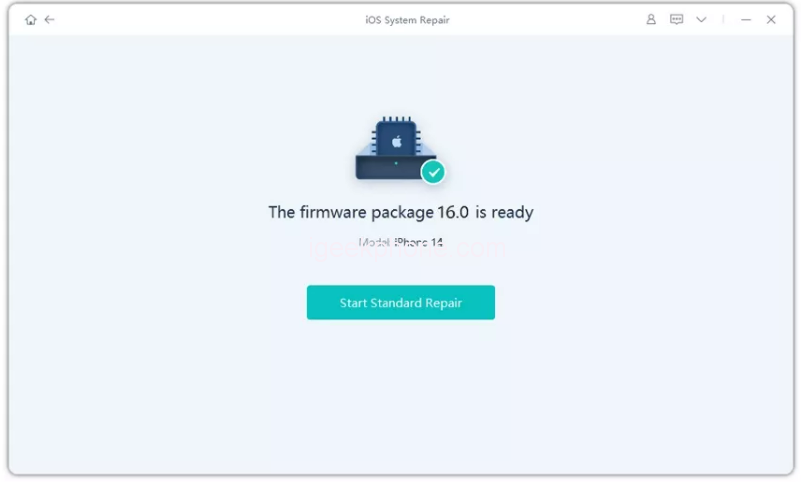
    Step 3 When your device is detected, this program will display the latest firmware package. You can click “Download” to download the matching firmware package before repair.
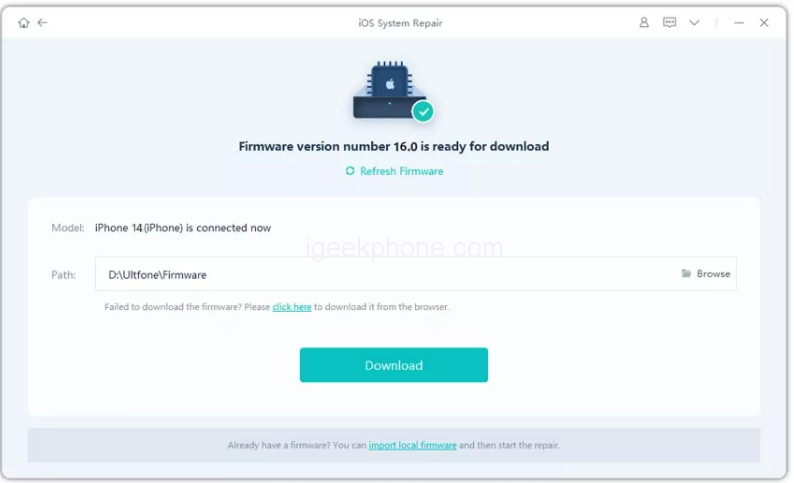
    Step 4 After the firmware package is downloaded, you can click “Start Standard Repair” to start the iPad restore. After all these, you will notice that, your iPad has been restored to the default settings.
    Part 3 Why is iPhone Restore not showing on iTunes?

    Why is my iPad not showing up in iTunes? There could be many reasons for iPad stuck on iTunes restore. Below are a few tips that you can follow to solve the issue:

    • Make sure the iPhone is fully charged.
    • Reinstall the USB driver for Apple mobile devices.
    • Utilize a specialized iTunes repair tool.
    • Windows should install the Recovery Mode Driver.

    Part 4 How long does it take to enter and exit iPhone/iPad recovery mode?

    The device, the data you have on it, and the software version you are updating all affect how long it takes to restore an iPhone in recovery mode. The duration of the process can range from 30 minutes to an hour.

    Part 5: How to Restore iPhone/iPad with iTunes (data loss)

    How do I restore my iPad using iTunes? You may use iTunes to reset your iPad or restore it from a previous backup if you already have it installed. In other words, you can back up your iPad to iTunes first, then restore it to your iPad. In this scenario, the backup material would replace the current data on your iPad. Alternatively, you can restore the iPad to factory settings through iTunes. You may use iTunes to reset an iPad by following these steps:

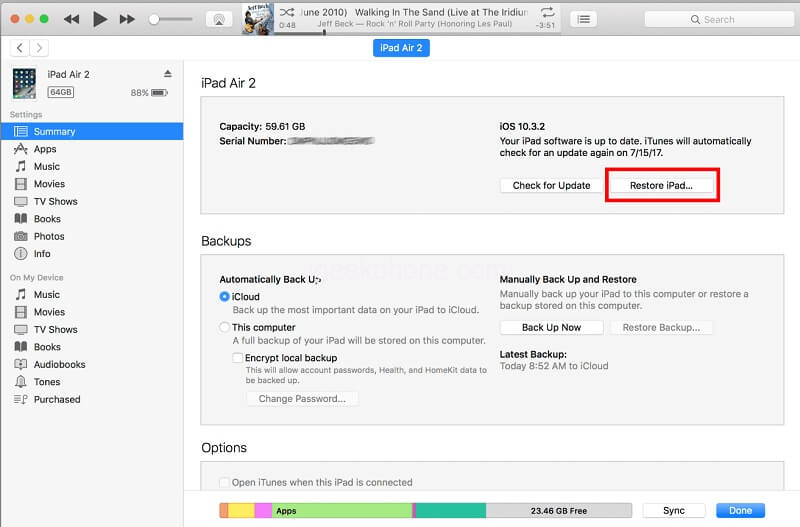
    1. Use a functional lightning cable to connect your iPad to the system first. Now open iTunes on it and wait for it to recognize your iPad. The linked iPad can be chosen by clicking on the device symbol in the top bar.
    2. Select the “Restore iPad” button (next to the “Check for Update” button) on the Summary tab in iTunes if you want to factory reset your iPad.
    3. A pop-up notice will appear informing you that doing this will restore your iPad to its factory settings. Click the “Restore” button to confirm, then wait while iTunes resets the iPad.
    4. If you had previously made a backup of your iPad, you could use that to restore your iPad using iTunes. Select “Backups” from the Summary tab and click the “Restore Backup” button. By selecting an existing backup, you may restore an iPad using an iTunes backup.
    Part 6: What’s the  IPSW Restore without iTunes on iOS 16?

    How do I put my iPad in 2023 in recovery mode? How can I update my iPhone’s IPSW file? The best way to install an IPSW file on an iPhone without iTunes, especially when it is not available. Not to worry. After downloading the IPSW files, you can view them with UltFone iOS System Repair. Thereby efficiently upgrading or downgrading the iOS version.

    Additionally, UltFone iOS System Repair makes it simple to fix various iOS system difficulties. UltFone iOS System Repair can quickly fix any issue; whether it’s an iPhone stuck on the update screen, an iPad stuck on the install now screen, an iPod touch stuck on the Apple logo, or an Apple TV stuck in recovery mode.

    Conclusion

    These straightforward suggestions will enable you to move the post to a device-related issue. You can use your phone to its total capacity now that you know how to fix the iPad Won’t Restore in iTunes issue. Choose your preferred alternatives to fix the iPhone won’t restore the problem and enhance the performance of your device.

    UltFone Christmas Celebration & New Year Deals that You Cannot Miss! Up To 75% OFF, Play Card-Flip Game 100% Win Surprises

    Share. Facebook Twitter Pinterest LinkedIn Tumblr Email

    Related Posts

    The Impact of Pusoy Dos on Improving Strategic Mindset

    Online Casinos Adapting New Tech Trends

    Exploring Vaping Products: A Guide to Types and Choices

    Comments are closed.

    voopoo drag s3
    oxva xlim go 2
    sp2s sen x disposable vape
    jnr 100k
    • Popular
    • 3D Printer REVIEW
    • XIAOMI
    November 23, 2025

    VOOPOO DRAG X3 – Big Battery, Smart Tech, Pod-Mod Powerhouse (Review)

    November 23, 2025

    VOOPOO VINCI S: Pocket-Power Pod with a 2,000 mAh Heart — Big Battery, Simple Use (Review)

    November 19, 2025

    OXVA XLIM PRO 3 Pod Vape Quick Hands-on Review (Video Test Included)

    November 19, 2025

    OXVA XLIM 3 Ultra Pod Vape: Hands-on Review (Video Test Included)

    June 23, 2024

    ACMER P2 20W Laser Engraver Fixed Focus Engraving: Hands on Review

    May 30, 2024

    xTool F1 Ultra Review: World’s First 20W Fiber & 20W Diode Laser Engraver

    May 30, 2024

    Anycubic Kobra 3 Combo Review: The Multicolor Masterpiece?

    May 15, 2024

    SCULPFUN SF-A9 40W Laser Engraver Cutting Machine: Hands On Review

    December 5, 2025

    Xiaomi’s new phone has made an appearance at GSMA: The MIX TriFold triple foldable screen phone is expected to be released in Q3 next year

    December 5, 2025

    The Prototype photos of Xiaomi 17 Ultra phone have been exposed, featuring a triple-camera layout on the back

    December 2, 2025

    Xiaomi REDMI Turbo5 Pro phone will be launched before the Spring Festival, equipped with the only flagship chip in its class

    December 2, 2025

    Xiaomi has Released REDMI TV X55/65/75 2026: Mini LED starts at only 2,499 yuan

    fc 26 coins
    New Arrivals
    • Redmi Note 15 5G Redmi Note 15 5G
    • Geek Bar Ice Prince 50K Disposable Vape Geek Bar Ice Prince 50K Disposable Vape
    • IPLAY OOKA150k Disposable vape IPLAY OOKA150k Disposable vape
    • IPLAY LUMO 8K Puffs 2+10ml Prefilled Pod Kit IPLAY LUMO 8K Puffs 2+10ml Prefilled Pod Kit
    • Uwell Caliburn G5 Lite SE Pod System Kit Uwell Caliburn G5 Lite SE Pod System Kit
    • Uwell Caliburn G5 Lite KOKO Pod System Kit Uwell Caliburn G5 Lite KOKO Pod System Kit
    • Uwell Caliburn G5 Lite Pod System Kit Uwell Caliburn G5 Lite Pod System Kit
    • Freeton Trimax 60k Disposable Vape Freeton Trimax 60k Disposable Vape
    • Smoant Pasito 3 Vape Smoant Pasito 3 Vape
    About
  • Igeekphone.com provides the first global tech news and reviews about smartphone, vapes, e-cigar, smart home, 3D printers, e-bike,tablets, RC drones, VR headset, and other accessories. It's the best platform to improve your brand and product.
  • Contact us: info@igeekphone.com
  • Check Our Privacy Policy Here.
  • Note: *Right now we have US editor and EU editors for review, especially for Amazon US and EU.
  • *Shop and Compare Price Here*
  • Facebook
  • Youtube
  • OUR BEST VAPE PARTNERS
  • VAPE ONLINE STORE
  • HAYATI PRO MAX PLUS
  • VAPORESSO
  • VOOPOO
  • OXVA
  • NEXA
  • MASKKING
  • LOSTVAPE ORIONBAR
  • VEIIK
  • MEMERS
  • TODOO
  • SP2S
  • JNR
  • OTHER BEST PARTNERS
  • SVBONY
  • Chuwi
  • Blackview
  • Fossibot
  • Unihertz
  • Flsun
  • Anycubic
  • Xtool
  • Oukitel
  • Mukkpet Ebike
  • Ugreen
  • Copyright © 2025 igeekphone

    Type above and press Enter to search. Press Esc to cancel.