Facebook Twitter Instagram
    Trending
    • OnePlus 16 to Debut Fourth-Generation BOE Oriental Screen With 185Hz Refresh Rate
    • iPhone Air 2 Rumored to Shrink to 5.2mm With Higher-Density Battery
    • RedMagic 12 Pro+ Design Revealed With Under-Display Camera Ahead of October 15 Launch
    • Lenovo M12 Review: A Simple Wired Mouse Built for Quiet Everyday Computing
    • Ortizan X10 Review: A Waterproof Bluetooth Speaker Built for Outdoor Listening
    • Srihome SH063 Review: A Dual-Lens Outdoor Security Camera That Watches More Than One Area
    • ASUS Adol T05 Gaming Headset Review: Can 50mm Drivers and 7.1 Surround Improve FPS Gaming?
    • Why High-Puff Vapes Are Adding Screens and Adjustable Modes: The Malux 50K Case Study
    Facebook YouTube
    IGeeKphone China Phone, Tablet PC, VR, RC Drone News, Reviews
    • HOME
    • BREAKING NEWS
      • AI NEWS
    • Amazon
    • PHONE
      • Top Phones For Your First Choice
      • Phone Comparison
      • Xiaomi
      • Blackview
      • Doogee
      • Black Shark
      • Geekbuying
      • Banggood
      • TEMU
      • TikTok
      • Aliexpress
      • Walmart
      • MercadoLibre
      • Lazada
    • TOP VAPE Awards for 2026
    • VAPES
      • E-CIGAR Upcoming
      • Vape News
      • Vape Deals
      • Vape Comparison
      • Vape Guide
      • VAPE LAWS
      • Giveaway
    • BEST VAPE
      • Best Vape Stores
      • Best Starter Vape Kits
      • Best Vapes for Beginners
      • Best Disposable Vapes
      • Best Pod Systems
      • Best Pod Mod Vapes
      • Best Mods
      • Best Nicotine Pouches
      • Best Clearomizers/Tanks
      • Best E-Liquid
      • Best EGO/Pens
      • Best Vapes for Nic Salt E-Juice
      • Best Vapes to Quit Smoking
      • RDA vs. RDTA vs. RTA
    • Best Vape Brand 2026
      • VAPORESSO
      • VOOPOO
      • OXVA
      • NEXA BAR
      • MASKKING VAPE
      • SP2S
      • IPLAY
      • TODOO
      • MRFOG
      • LOSTVAPE
      • VEIIK
    • REVIEW
      • E-cigar Review
      • Phones
      • Tablet PC
      • TV Box
      • RC Drone
      • Wearables
      • Camera
      • Accessories
      • VR Headset
    • MORE
      • TABLET
        • Chuwi
        • INNOCN
        • Teclast
        • Top Tablet for Your First Choice
        • Tablet/Laptop Comparison
      • RC DRONE
      • CAMERA
      • WEARABLES
        • OneOdio
        • BlitzWolf
        • Top Smartwatch for First Choice
      • 3D PRINTER
        • 3D Printer Review
        • Anycubic
        • FLSUN
        • Xtool
        • LONGER
        • Top 3D printer to Choose First
      • POWER STATION
        • Oukitel
        • FOSSIBOT
      • GAMING
        • Top Gaming Products
      • E-BIKE
        • Samebike
        • Happyrun
        • ENGWE
      • SMART HOME
      • TV BOX
      • ACCESSORIES
      • VR HEADSET
      • CLOTHES
      • AUTO CAR
    • DEAL
    • Shop
    IGeeKphone China Phone, Tablet PC, VR, RC Drone News, Reviews
    You are at:Home»NEWS»How to Cartoon Your Face with Imagetocartoon: No Skills Required
    NEWS

    How to Cartoon Your Face with Imagetocartoon: No Skills Required

    Brady CottonBy Brady CottonJune 9, 2022
    Facebook Twitter Pinterest LinkedIn Tumblr Email

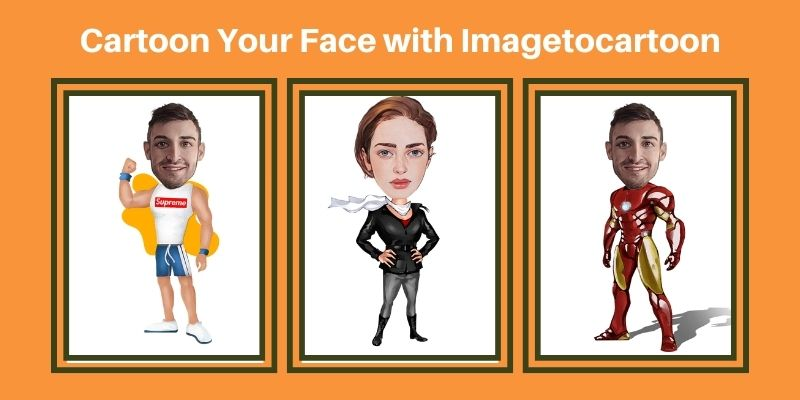
    Cartoon avatars are very popular among people. It is widely used by people for different purposes. They can be used on social media and other sites where you can create a profile. They are also used in many other places, including gaming and dating sites, as well as in chat rooms. A cartoon avatar helps you to express your feelings and emotions in a better way.
    What is Imagetocartoon?

    As the name shows, imagetocartoon is a free website to create cartoon faces from your photos. You can use this website to turn any picture into an awesome cartoon in just one click. This tool has been designed to make it easy for anyone to create their cartoon from scratch without having any knowledge of Photoshop or Illustrator.

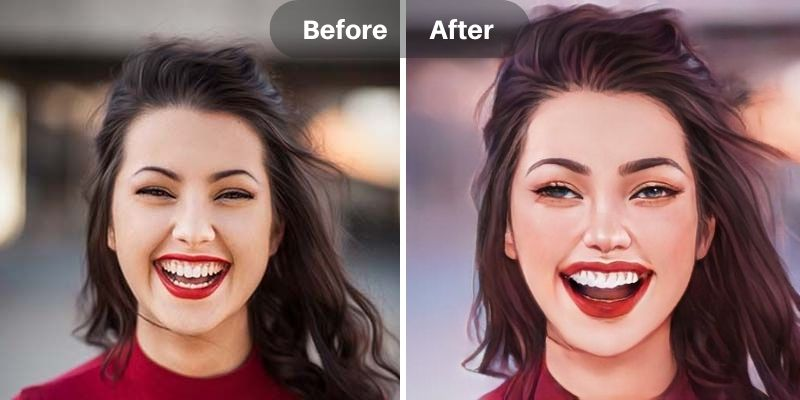
    The website offers a simple interface, which is easy to use even for people who are not familiar with the Internet. The output images are of high quality, with great color saturation and contrast. You can use this website to turn your photos into funny cartoon characters or add some fun effects to your photos.

    How to Create Cartoon Face with Imagetocartoon?

    Using imagetocartoon to cartoon your face is very simple. All you need to do is to upload an image and then wait for AI to transform your photo into cartoon results. Follow our steps and you can create a cute cartoon avatar for yourself.

    • Step 1: Open any of your browsers and go to imagetocartoon.com
    • Step 2: There will be a blue button that you can hit to upload your real portrait photograph.
    • Step 3: Once your photo gets ready, this website will convert it into interesting cartoon artwork within 15 seconds. You just enjoy a cup of coffee and wait for your new looks.
    • Step 4: Preview over 20+ cartoon faces and choose to save some of your favorite looks.

    The good news is that imagetocartoon offers free cartoon image downloading. Whether you have a free account or you have subscribed to the pro plan, you can save high-quality and free-watermark cartoon face images without any limitations. Once you have created your cartoon face, you can download it as an image file or share it on social media websites like Facebook or Twitter

    Some Highlights of Imagetocartoon:

    • You can upload up to 10 images for cartooning every week (if you have free accounts).
    • You can get over 20+ funny cartoon face images for free usage.
    • This website doesn’t save your data for any commercial purposes.
    • It offers two downloading options for generated cartoon avatars, including a standard version and a high-res version.
    • Unique and interesting dresses, body poses, and expressions. Your character will not look exactly like anyone else’s.
    • Multiple devices are supported. This cartoon face maker offers other options for you to create a cartoon avatar. You can enjoy the service on Windows, macOS, iOS, and Android.

    Enjoy Some Before and After Effects
    Imagetocartoon Frequently Asked Questions

    1. Can I Use Imagetocartoon for Free?

    Yes, you can turn your photo into cartoon styles without spending any money on imagetocartoon.com. This website can allow you to upload 10 images to make cartoon faces per week. If you like this tool and want to create more funny avatars for your friends or families, consider purchasing paid version to unlock more advanced features. There are three plans for your choice: $4.9/day, $6 /month for the premium plan, and $14/month for the pro plan. Once you buy a premium plan to a pro plan, you can get up to 300 credits, unlock amazing features, and get a free code for its app.

    1. How Can I Cartoon a Face on My Phone?

    Imagetocartoon is designed for creating cartoons from images. It has many features that help you create your cartoons quickly and easily. Luckily, you can also use imagetocartoon on your mobile devices. Go to download the app from App Store or Google Play. Install it on your photo and start your journey.

    1. Imagetocartoon Online vs. Mobile

    Both online versions and mobile apps can turn your photo into a cartoon in seconds. But the mobile version gives you more freedom to customize your cartoon avatars. You can manually apply different cute body poses and backgrounds to your images. You can use your imagination to create more distinctive avatars.

    1. What is the Uniqueness of Imagetocartoon?

    Imagetocartoon is a cloud-based drawing tool for your images. It is very similar to some of its competitors, such as cartoonizer and PhotoCartoon, but it has some features that make it more powerful than other cartoon avatar makers.

    • Multiple Cartoon Effects for Choice

    You can get over 20 high-quality cartoon face images for a single portrait. Every output image is interesting and carefully designed. According to the developer, the website will be regularly updated. That means you can get new cartoon avatar effects now and then. You will get rid of the same boring avatars forever.

    • High-quality cartoon effects, free to download

    Unlike some photo-to-cartoon software, you need to purchase credits or upgrade your account if you want to save some good avatars that you have created. Imagetocartoon’s service is free. Whether you have a free account or an upgraded one, you can download HD avatars for free. And, all avatars can be shared and edited for free.

    Why do People Use Cartoon Avatars?

    The main reason why cartoon avatars are so popular is that they make the person feel more comfortable and relaxed. The cartoons are very expressive and have interesting personalities. It is easy for people to relate to them and this makes them feel at home when they look at their cartoon avatar.

    Another reason why cartoon avatars are so popular is that they allow users to express themselves without having to feel judged by others. Cartoon avatars also allow people to show off their creativity through these avatars as well as make them feel good about themselves and their appearance on social media or other sites that require the use of cartoon avatars.

    Conclusion

    It’s often difficult to explain what your product or service is about with just a single picture. If you want to attract new clients, you need to show them who you are and what you do. You need an avatar that will help you do that without words.

    Imagetocartoon is a really good and user-friendly tool to cartoon your face online, which can help you to make unique and personalized avatars for your products or services. It doesn’t require any photo editing tips. With just one tap, you get the top-quality artwork! Come to use this website to create an amazing avatar to make your profile stand out from others.

    Share. Facebook Twitter Pinterest LinkedIn Tumblr Email

    Related Posts

    OnePlus 16 to Debut Fourth-Generation BOE Oriental Screen With 185Hz Refresh Rate

    iPhone Air 2 Rumored to Shrink to 5.2mm With Higher-Density Battery

    RedMagic 12 Pro+ Design Revealed With Under-Display Camera Ahead of October 15 Launch

    Leave A Reply Cancel Reply

    You must be logged in to post a comment.

    voopoopintch
    oxva vprime 2
    nomadz
    • Popular
    • 3D Printer REVIEW
    • XIAOMI
    October 1, 2026

    VOOPOO ARGUS Z3 Review – Flip the Pod, Change the Vape! Keep It Simple!

    September 27, 2026

    Vaporesso ARMOUR OCTA Review – Built Like a Tank, Vapes Like a Beast

    September 27, 2026

    VOOPOO ARGUS Multi-Ohm Cartridge Review – One Magic Pod, Three Completely Different Vapes

    September 18, 2026

    OXVA VPRIME 2 vs VPRIME: What’s New in the Latest Version

    December 26, 2025

    ACMER ASCARVA 4S: Precision CNC Power for Makers, DIYers & Small Workshops

    June 23, 2024

    ACMER P2 20W Laser Engraver Fixed Focus Engraving: Hands on Review

    May 30, 2024

    xTool F1 Ultra Review: World’s First 20W Fiber & 20W Diode Laser Engraver

    May 30, 2024

    Anycubic Kobra 3 Combo Review: The Multicolor Masterpiece?

    October 7, 2026

    REDMI Headphones Neo Review: Features, ANC Performance and Battery Life

    October 7, 2026

    Xiaomi 18 Pro Max Transparent Edition Review: 200MP Camera and 8500mAh Battery

    September 30, 2026

    Xiaomi Door and Window Sensor 3 Launches With Tunnel Magnetoresistance Sensor and 3-Year Battery

    September 23, 2026

    Xiaomi Pad 9 Pro Launches With 12.5-Inch 3.2K 144Hz Display and 11,000mAh Battery

    fc 26 coins
    New Arrivals
    • Vaporesso Armour GS2 Pod System Kit 80W Vaporesso Armour GS2 Pod System Kit 80W
    • iJOY XP100K Zero Nicotine Refillable Disposable Vape Kit iJOY XP100K Zero Nicotine Refillable Disposable Vape Kit
    • JNR PowerMate Pro JNR PowerMate Pro
    • MAXRAY RUSH 80K Disposable Vape MAXRAY RUSH 80K Disposable Vape
    • MERRYMI Blade 30000 Disposable Vape MERRYMI Blade 30000 Disposable Vape
    • Dip Devices Dipper Portable Vaporizer Dip Devices Dipper Portable Vaporizer
    • Exxus Vape Mini Plus Vaporizer Exxus Vape Mini Plus Vaporizer
    • JNR Lion King Shisha JNR Lion King Shisha
    • Fumot Eco 4-in-1 80K Disposable Vape Fumot Eco 4-in-1 80K Disposable Vape
    About
  • Igeekphone.com provides the first global tech news and reviews about smartphone, vapes, e-cigar, smart home, 3D printers, e-bike,tablets, RC drones, VR headset, and other accessories. It's the best platform to improve your brand and product.
  • Contact us: info@igeekphone.com
  • Check Our Privacy Policy Here.
  • Note: *Right now we have US editor and EU editors for review, especially for Amazon US and EU.
  • *Shop and Compare Price Here*
  • Facebook
  • Youtube
  • OUR BEST VAPE PARTNERS
  • VAPE ONLINE STORE
  • VAPORESSO
  • VOOPOO
  • OXVA
  • NEXA
  • MASKKING
  • SP2S
  • IPLAY
  • TODOO
  • OTHER BEST PARTNERS
  • SVBONY
  • Chuwi
  • Blackview
  • Fossibot
  • Unihertz
  • Flsun
  • Anycubic
  • Xtool
  • Oukitel
  • Mukkpet Ebike
  • Ugreen
  • Copyright © 2026 igeekphone

    Type above and press Enter to search. Press Esc to cancel.