







Facebook Twitter Instagram
    Trending
    • Why High-Puff Vapes Are Adding Screens and Adjustable Modes: The Malux 50K Case Study
    • OXVA XLIM 4 vs XLIM Pro 3 Review: Which Pod Kit Fits Your Vaping Style?
    • GT12 Smartwatch Review: A Feature-Packed Wearable with Bluetooth Calling and Built-In Flashlight
    • HXSJ X81 Mechanical Keyboard Review: A Compact 75% Keyboard with Tri-Mode Wireless and an 8000mAh Battery
    • HT30 Smartwatch Review: Large Screen, Long Battery Life and Smart Features
    • REDMI Headphones Neo Review: Features, ANC Performance and Battery Life
    • Amazfit T-Rex Dual Solar: How Dual-Sided Solar Charging Extends Battery Life
    • K90 Dual View Security Camera Review: A 2K Window Camera With Two Viewing Angles
    Facebook YouTube
    IGeeKphone China Phone, Tablet PC, VR, RC Drone News, Reviews
    • HOME
    • BREAKING NEWS
      • AI NEWS
    • Amazon
    • PHONE
      • Top Phones For Your First Choice
      • Phone Comparison
      • Xiaomi
      • Blackview
      • Doogee
      • Black Shark
      • Geekbuying
      • Banggood
      • TEMU
      • TikTok
      • Aliexpress
      • Walmart
      • MercadoLibre
      • Lazada
    • TOP VAPE Awards for 2026
    • VAPES
      • E-CIGAR Upcoming
      • Vape News
      • Vape Deals
      • Vape Comparison
      • Vape Guide
      • VAPE LAWS
      • Giveaway
    • BEST VAPE
      • Best Vape Stores
      • Best Starter Vape Kits
      • Best Vapes for Beginners
      • Best Disposable Vapes
      • Best Pod Systems
      • Best Pod Mod Vapes
      • Best Mods
      • Best Nicotine Pouches
      • Best Clearomizers/Tanks
      • Best E-Liquid
      • Best EGO/Pens
      • Best Vapes for Nic Salt E-Juice
      • Best Vapes to Quit Smoking
      • RDA vs. RDTA vs. RTA
    • Best Vape Brand 2026
      • VAPORESSO
      • VOOPOO
      • OXVA
      • NEXA BAR
      • MASKKING VAPE
      • SP2S
      • IPLAY
      • TODOO
      • MRFOG
      • LOSTVAPE
      • VEIIK
    • REVIEW
      • E-cigar Review
      • Phones
      • Tablet PC
      • TV Box
      • RC Drone
      • Wearables
      • Camera
      • Accessories
      • VR Headset
    • MORE
      • TABLET
        • Chuwi
        • INNOCN
        • Teclast
        • Top Tablet for Your First Choice
        • Tablet/Laptop Comparison
      • RC DRONE
      • CAMERA
      • WEARABLES
        • OneOdio
        • BlitzWolf
        • Top Smartwatch for First Choice
      • 3D PRINTER
        • 3D Printer Review
        • Anycubic
        • FLSUN
        • Xtool
        • LONGER
        • Top 3D printer to Choose First
      • POWER STATION
        • Oukitel
        • FOSSIBOT
      • GAMING
        • Top Gaming Products
      • E-BIKE
        • Samebike
        • Happyrun
        • ENGWE
      • SMART HOME
      • TV BOX
      • ACCESSORIES
      • VR HEADSET
      • CLOTHES
      • AUTO CAR
    • DEAL
    • Shop
    IGeeKphone China Phone, Tablet PC, VR, RC Drone News, Reviews
    You are at:Home»Guide»How to add subtitles to a video like a pro
    Guide

    How to add subtitles to a video like a pro

    Brady CottonBy Brady CottonSeptember 14, 2022
    Facebook Twitter Pinterest LinkedIn Tumblr Email

    Everyone wants to become a great video editor or a great video choreographer but it is not easy at all when you are working with software that is hard to use. We prefer you to the Wondershare Uniconverter which is the best-suited software to add subtitles to your video. It is quite easy because you can simply add subtitles to it. Now then you can just add the perfect soundtrack with it and then play your video.  This is the perfect match for it because you can now make it go transition naturally and make your video like a pro. you can even increase intro and outro videos with it.

    Among these, just simply adding subtitles through the video can sometimes be a cumbersome task but it becomes really easy when it is going out with the online auto subtitle generator. It becomes really hard when the video is long but our software automatically generates the subtitle and makes it easier for its users. This article mainly introduces how to add subtitles to your video while being online and offline quickly and easily.

    How to add subtitles to video

    Add subtitle with media.io

    Subtitle generating is a must-have tool That is used by every professional video editor or the one who loves to make movies. This tool helps the user in applying captions and subtitles TO some scenes of the movies.  this also works when you are working with a movie that is of a foreign language because you can use it to subtitle the video. when it is about the deaf audience then there is a wider area to reach them.

    Step 1: Open “online Auto Subtitle Generator” tool from the “Tools” tab. You can choose the files from local storage or insert the URL of a Youtube video directly.
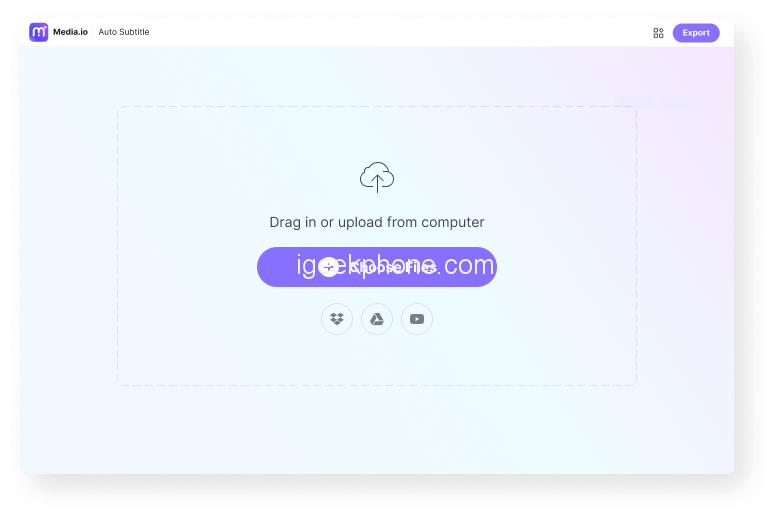
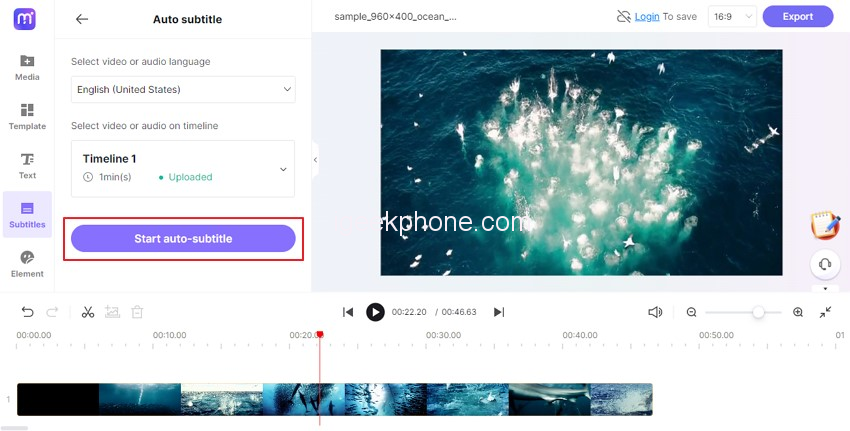
    Step 2: Start Adding Subtitles by selecting “Auto Subtitle,” or you can choose a target language and hit Start to load an audio file. Afterward, the tool will automatically start generating subtitles using the audio present in the video.
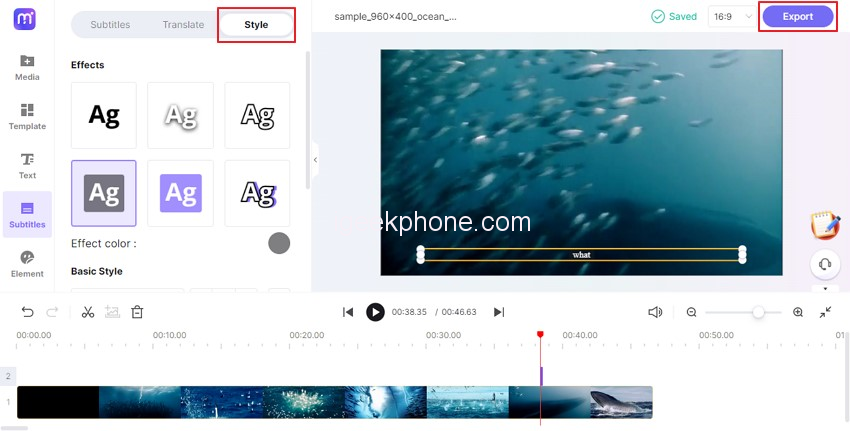
    Step 3: Editing the text from the options like font, color, size, transparency, and border and tap on the “Export” button to save the file.
    Add subtitle with Uniconverter

    When you want to add subtitles who the unique converter then you can merge it with the subtitle lines and get the automatic subtitles done in just three steps. It also generates subtitles from videos in more than 100 languages. You can even choose the font size and end color of the text and remove the title.

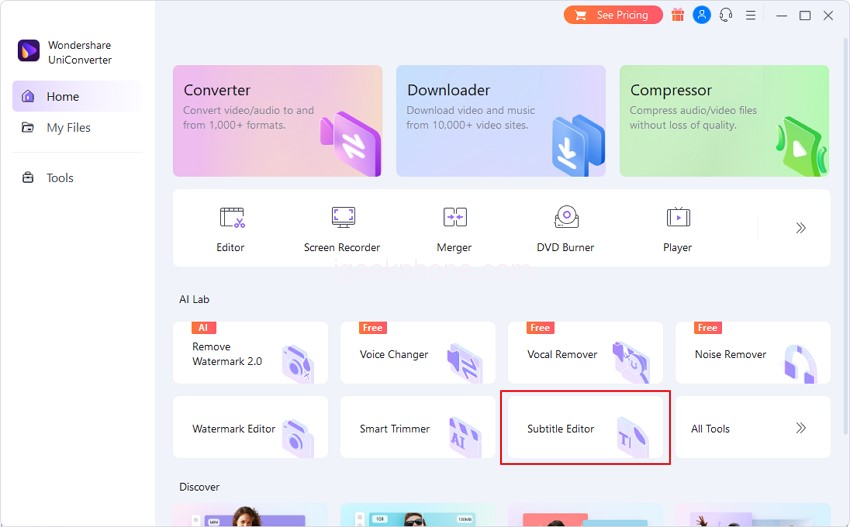
    Step 1: Select Subtitle Editor in AI lab tools.
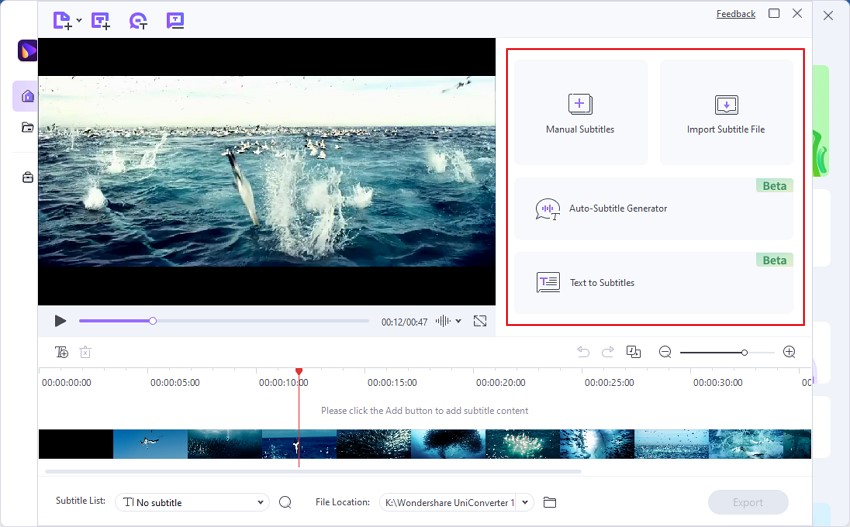
    Step 2: click on the “Add File” button to import your video file and choose the way to create subtitles. You can select the “Import Subtitle File” option, also can manually enter the subtitles, use text to create subtitles, or through an auto-generator.
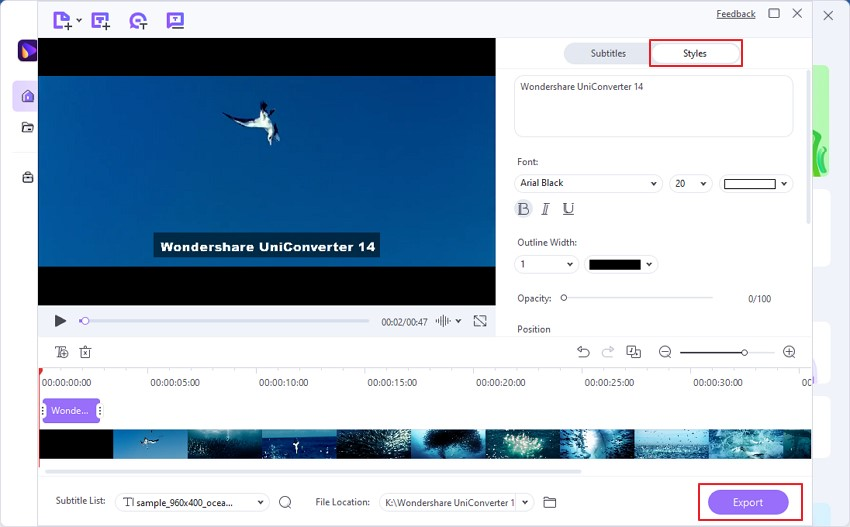
    Step 3: Finally, you can also modify the font style, alignment and opacity from the settings, then click the “Export” button to save the file.
    Other functions

    it is not like that it only add subtitle to the video but the free video converter has many of its features embedded in it which the users can use for free. It has the features of vocal remover so that you can create a karaoke since it removes every vocal sound through it. You can only get the background music and prefer it. You can even add or remove the intro and out row in any video with the help of this software.

    Wondershare Uniconverter is software that can make sure that the tools have to serve their best to the user. Therefore,  the users may easily get the help of the tools in just a few clicks and make the subtitle of the video clearer. There are more than 100 languages that are automatically converted into the subtitle format by the software. This support easy-going work and more productive feature of the software to choose the right soundtrack for the video. The transitions that are applied to the video can also be chosen naturally by the video creator. This means that you do not have to worry about most of its features of it and can get a fully finished video after that. Now you can easily create the subtitles of the videos even of a greater length in just minutes.

    The final verdict

    The best software for providing subtitles to your video is the Wondershare Uniconverte. This is the best application for making it possible for people to give a subtitle to any video like a pro. This helps create an SRT file port video that has rich subtitle font. What you have to do is just upload an audio file and let the program do everything left. Online auto subtitle generator is the best software that you can use to get the subtitles generated automatically for your current video. This is the perfect software not only for doing this job but also it edits a video to its perfection. It is a free video converter that you can use to increase the intro and outro of a single video. You can make it by your own choice and get perfection.

    Share. Facebook Twitter Pinterest LinkedIn Tumblr Email

    Related Posts

    9 Phone Security Settings to Check Before Using a Crypto Wallet

    How AI Cameras Are Changing Everyday Photography?

    Orlistat for Weight Management: How It Works and What to Know

    Comments are closed.

    voopoopintch
    oxva vprime 2
    nomadz
    • Popular
    • 3D Printer REVIEW
    • XIAOMI
    October 1, 2026

    VOOPOO ARGUS Z3 Review – Flip the Pod, Change the Vape! Keep It Simple!

    September 27, 2026

    Vaporesso ARMOUR OCTA Review – Built Like a Tank, Vapes Like a Beast

    September 27, 2026

    VOOPOO ARGUS Multi-Ohm Cartridge Review – One Magic Pod, Three Completely Different Vapes

    September 18, 2026

    OXVA VPRIME 2 vs VPRIME: What’s New in the Latest Version

    December 26, 2025

    ACMER ASCARVA 4S: Precision CNC Power for Makers, DIYers & Small Workshops

    June 23, 2024

    ACMER P2 20W Laser Engraver Fixed Focus Engraving: Hands on Review

    May 30, 2024

    xTool F1 Ultra Review: World’s First 20W Fiber & 20W Diode Laser Engraver

    May 30, 2024

    Anycubic Kobra 3 Combo Review: The Multicolor Masterpiece?

    October 7, 2026

    REDMI Headphones Neo Review: Features, ANC Performance and Battery Life

    October 7, 2026

    Xiaomi 18 Pro Max Transparent Edition Review: 200MP Camera and 8500mAh Battery

    September 30, 2026

    Xiaomi Door and Window Sensor 3 Launches With Tunnel Magnetoresistance Sensor and 3-Year Battery

    September 23, 2026

    Xiaomi Pad 9 Pro Launches With 12.5-Inch 3.2K 144Hz Display and 11,000mAh Battery

    fc 26 coins
    New Arrivals
    • Vaporesso Armour GS2 Pod System Kit 80W Vaporesso Armour GS2 Pod System Kit 80W
    • iJOY XP100K Zero Nicotine Refillable Disposable Vape Kit iJOY XP100K Zero Nicotine Refillable Disposable Vape Kit
    • JNR PowerMate Pro JNR PowerMate Pro
    • MAXRAY RUSH 80K Disposable Vape MAXRAY RUSH 80K Disposable Vape
    • MERRYMI Blade 30000 Disposable Vape MERRYMI Blade 30000 Disposable Vape
    • Dip Devices Dipper Portable Vaporizer Dip Devices Dipper Portable Vaporizer
    • Exxus Vape Mini Plus Vaporizer Exxus Vape Mini Plus Vaporizer
    • JNR Lion King Shisha JNR Lion King Shisha
    • Fumot Eco 4-in-1 80K Disposable Vape Fumot Eco 4-in-1 80K Disposable Vape
    About
  • Igeekphone.com provides the first global tech news and reviews about smartphone, vapes, e-cigar, smart home, 3D printers, e-bike,tablets, RC drones, VR headset, and other accessories. It's the best platform to improve your brand and product.
  • Contact us: info@igeekphone.com
  • Check Our Privacy Policy Here.
  • Note: *Right now we have US editor and EU editors for review, especially for Amazon US and EU.
  • *Shop and Compare Price Here*
  • Facebook
  • Youtube
  • OUR BEST VAPE PARTNERS
  • VAPE ONLINE STORE
  • VAPORESSO
  • VOOPOO
  • OXVA
  • NEXA
  • MASKKING
  • SP2S
  • IPLAY
  • TODOO
  • OTHER BEST PARTNERS
  • SVBONY
  • Chuwi
  • Blackview
  • Fossibot
  • Unihertz
  • Flsun
  • Anycubic
  • Xtool
  • Oukitel
  • Mukkpet Ebike
  • Ugreen
  • Copyright © 2026 igeekphone

    Type above and press Enter to search. Press Esc to cancel.