







Facebook Twitter Instagram
    Trending
    • HOBBY PLUS RTR 1/24 2WD RC Car Review: Compact Size, Big Performance
    • MESWAO B3 Tablet PC Review: A Massive 15.6-Inch Android Tablet for Entertainment and Productivity
    • Why do You Choose SVBONY TransAir4 4K Wireless HDMI Transmitter & Receiver?
    • NEXA Ultra II vs. APUS G 50K: The Ultimate 50,000-Puff Face-Off
    • How to Buy IPLAY Vape in Europe: The Complete 2026 Guide?
    • Foldable Smartphones: Advantages and Disadvantages
    • From Gadgets to Evidence: The Role of Technology in Modern Criminal Defense Strategies
    • Our Favourite Roulette Game Variations You can check
    Facebook YouTube
    IGeeKphone China Phone, Tablet PC, VR, RC Drone News, Reviews
    • HOME
      • NEWS
        • DeepSeek
        • ChatGPT
        • Minecraft
    • Amazon
    • PHONE
      • Top Phones For Your First Choice
      • Phone Comparison
      • Xiaomi
      • Blackview
      • Doogee
      • Black Shark
      • Geekbuying
      • Banggood
      • TEMU
      • TikTok
      • Aliexpress
      • Walmart
      • MercadoLibre
      • Lazada
    • TOP VAPE Awards for 2026
    • VAPES
      • E-CIGAR Upcoming
      • Vape News
      • Vape Deals
      • Vape Comparison
      • Vape Guide
      • Giveaway
    • BEST VAPE
      • Best Vape Stores
      • Best Starter Vape Kits
      • Best Vapes for Beginners
      • Best Disposable Vapes
      • Best Pod Systems
      • Best Pod Mod Vapes
      • Best Mods
      • Best Nicotine Pouches
      • Best Clearomizers/Tanks
      • Best E-Liquid
      • Best EGO/Pens
      • Best Vapes for Nic Salt E-Juice
      • Best Vapes to Quit Smoking
      • RDA vs. RDTA vs. RTA
    • Best Vape Brand 2026
      • VAPORESSO
      • VOOPOO
      • OXVA
      • NEXA BAR
      • MASKKING VAPE
      • SP2S
      • IPLAY
      • TODOO
      • MRFOG
      • LOSTVAPE
      • VEIIK
    • REVIEW
      • E-cigar Review
      • Phones
      • Tablet PC
      • TV Box
      • RC Drone
      • Wearables
      • Camera
      • Accessories
      • VR Headset
    • MORE
      • TABLET
        • Chuwi
        • INNOCN
        • Teclast
        • Top Tablet for Your First Choice
        • Tablet/Laptop Comparison
      • RC DRONE
      • CAMERA
      • WEARABLES
        • OneOdio
        • BlitzWolf
        • Top Smartwatch for First Choice
      • 3D PRINTER
        • 3D Printer Review
        • Anycubic
        • FLSUN
        • Xtool
        • LONGER
        • Top 3D printer to Choose First
      • POWER STATION
        • Oukitel
        • FOSSIBOT
      • GAMING
        • Top Gaming Products
      • E-BIKE
        • Samebike
        • Happyrun
        • ENGWE
      • SMART HOME
      • TV BOX
      • ACCESSORIES
      • VR HEADSET
      • CLOTHES
      • AUTO CAR
    • DEAL
    • VAPE LAWS
    • Shop
    IGeeKphone China Phone, Tablet PC, VR, RC Drone News, Reviews
    You are at:Home»NEWS»Reviews and Product Details of Tenorshare 4DDiG 2022
    NEWS

    Reviews and Product Details of Tenorshare 4DDiG 2022

    Brady CottonBy Brady CottonSeptember 28, 2022
    Facebook Twitter Pinterest LinkedIn Tumblr Email

    Have you unintentionally erased essential items, including papers, films, and photos? Unknowingly removed files from the recycle bin only to discover afterward that they were really important to you? Now, are you concerned about what to do? Well, you have come to the best place as we have the best solution to this problem. There is numerous free data recovery software. We recommend you use Tenorshare 4DDIG data recovery software in such a case.

    The Overview of Tenorshare 4DDiG

    Data recovery software called Tenorshare 4DDiG offers consumers strong information security safeguards. The tool restores files lost by viruses, damaged, or deleted accidentally. The tool can also retrieve data from partitions and portable storage units like USB sticks and external discs. It also saves time by providing a preview of the media that can be recovered before you commit to a time-consuming recovery procedure. Installation of Tenorshare 4DDiG is possible on both Windows and Mac computers. Read this Tenorshare 4DDIG review will be helpful for you!
    Special Features of Tenorshare 4DDiG:

    Below are some of the features of Tenorshare 4DDIG,

    • Files that have been harmed by viruses, documents that have been corrupted, and information that has been inadvertently deleted are all recovered by Tenorshare 4DDiG from your empty recycle bin.
    • The program makes file recovery possible for various file kinds, RAR/ZIP compressed data,and system files such as NTFS and FAT, including office documents.
    • Media recovery tools are included with this package to assist customers in restoring music, picture, and video data from corrupted storage media.
    • The application can recover data from various hardware and operating systems, including laptops, desktop computers, formatted storage media, and external media such as CDs/DVDs and USB thumb drives.
    • Before committing to time-consuming, exhaustive recovery scans, the program lets you see recovered data. As long as they haven’t been replaced with fresher data, the company promises that all files—even those completely deleted—can be recovered.

    How do I use Tenorshare 4DDiG Windows data recovery?

    With this best data recovery software tool, you may recover a wide variety of data from various IT settings, such as hard discs, partitions, and digital cameras. The application safeguards the most widely used Mac and Windows operating systems.

    You may evaluate recoverable data before committing to time-consuming recovery operations, saving you time. Tenorshare 4DDiG may be the best option for your business if you seek comprehensive data recovery software to recover files and data from your IT environment.

    Here’s how to operate Tenorshare 4DDiG on Windows in three easy steps:

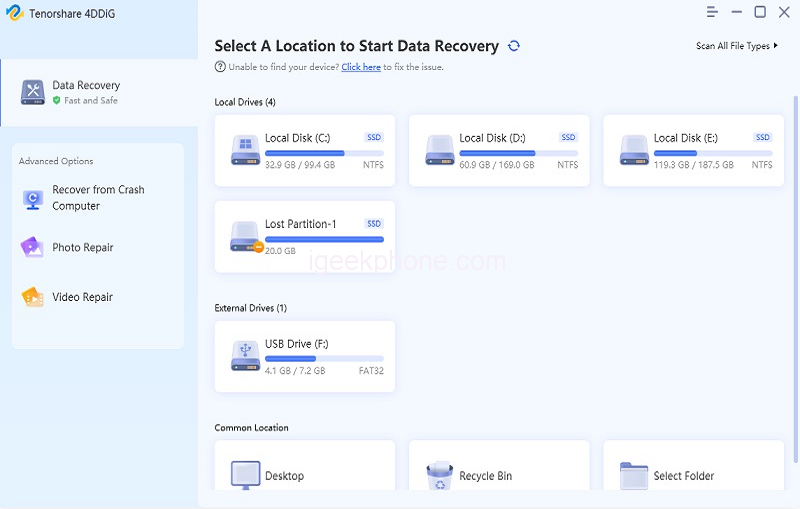
    Step 1: You will see the home interface containing Data Recovery & Advanced Options after installing and launching Tenorshare 4DDiG Data Recovery. Select the local disc where you lost your data from a list of hard discs in our case, and then click Start to get started. Before scanning, choose the target file types in the upper-right corner.
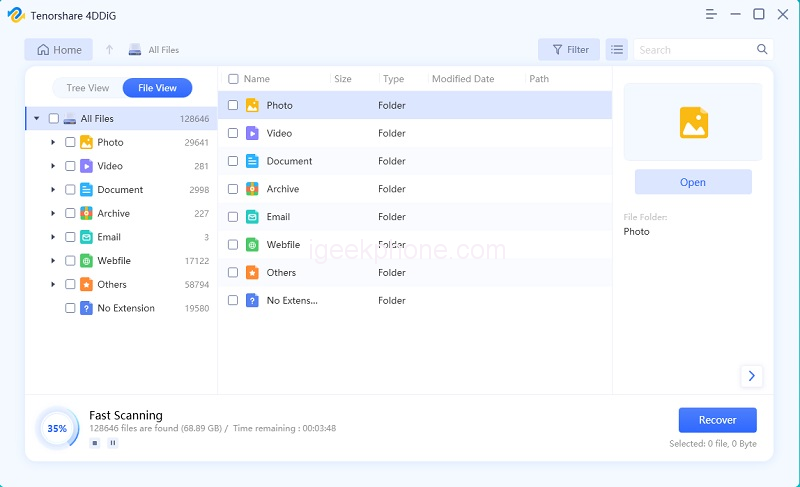
    Step 2: If you’ve found the files you wish to recover, you may pause or end the search at any moment. 4DDiG quickly scans the chosen disc all around for missing data. Below the Tree View, there’re sections for Existing Files, Deleted Files, Lost Location, RAW Files, and Tag Files. You can also switch to File View to examine file kinds like photos, videos, documents, Audio, Email, and others. Additionally, on the right side of the panel, you may utilize Filter to focus your search or search for target files.
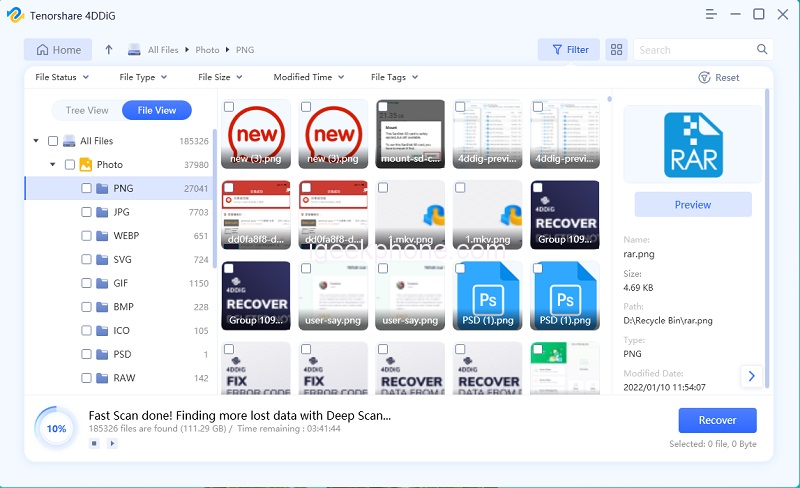
    Step 3: You may preview and restore the target files to a safe place when they have been found. Please avoid saving to the same drive or partition where you lost data in case of disc overwriting as well as permanent data loss.
    What if your computer system is Mac? Don’t worry, Tenorshare 4DDiG also supports Mac system, and unlike other data recovery software, it doesn’t need to turn off SIP.

    Pros and Cons of Tenorshare 4DDiG:

    Below are some of the pros and cons of Tenorshare 4DDIG,

    Pros:

    • Several users said that the software was simple to use and that file recovery did not interfere with the operation of any other programs.
    • Because they could recover data from every nook and cranny of their system, customers loved the program’s deep scanning features.
    • Several users agreed that the tool could very certainly retrieve any kind of lost file from their PCs.

    Cons:

    • A few users complained that they could not scan certain folders to recover lost data.
    • According to one user, recovering data greater than 3 GB proved challenging.
    • Some customers thought the device was a little pricey considering the features offered.

    FAQs about Tenorshare 4DDiG

    1. Is Tenorshare 4DDiG free?

    Users get 1GB of recoverable data for free from the seller. After that, customers can purchase the Standard, Professional, or Premium versions for a one-time license cost.

    2. How long does Tenorshare 4DDiG take to scan?

    It does not take a long time to scan like other software.

    3. Is Tenorshare 4DDiG safe to use?

    Yes, it is entirely safe to use!

    Conclusion

    Excellent recovery program, 4DDiG, can quickly locate and restore any lost file type. The greatest thing is that you can restore those data with a few clicks regardless of how you lost them. 4DDiG can recover anything, whether you mistakenly erased your data or lost them due to partition recovery, a virus assault, a formatted disc, or a damaged computer. This Tenorshare review will be very helpful to you.

    Share. Facebook Twitter Pinterest LinkedIn Tumblr Email

    Related Posts

    Xiaomi Redmi 17C mobile phone is available for purchase: 6.88-inch 120Hz large screen, 5160mAh battery, starting from 799 yuan.

    Details of Samsung Galaxy Watch Ultra2 Smartwatch Reveal: It will retain the Square and Circular-shaped Case Design.

    Redmi Game Tablet 5 Pro is launched with an Ultra-High 185Hz Refresh Rate

    Comments are closed.

    voopoopintch
    oxva xlim go lite
    sp2s sen x disposable vape
    • Popular
    • 3D Printer REVIEW
    • XIAOMI
    June 21, 2026

    iPlay LUMO 8K Review – A Compact Prefilled Pod Kit with Big Flavor and Everyday Convenience

    June 21, 2026

    iPlay HOOLA 150K Review – A Cloud-Chasing Giant with Music, Modes & Massive Longevity

    June 21, 2026

    Vaporesso VIBE SE 2 Review – Simple on the Outside, Surprisingly Smart on the Inside

    June 21, 2026

    VOOPOO DRAG H40 Pro Review – The Return of the Pocket Powerhouse

    December 26, 2025

    ACMER ASCARVA 4S: Precision CNC Power for Makers, DIYers & Small Workshops

    June 23, 2024

    ACMER P2 20W Laser Engraver Fixed Focus Engraving: Hands on Review

    May 30, 2024

    xTool F1 Ultra Review: World’s First 20W Fiber & 20W Diode Laser Engraver

    May 30, 2024

    Anycubic Kobra 3 Combo Review: The Multicolor Masterpiece?

    June 23, 2026

    Xiaomi Redmi 17C mobile phone is available for purchase: 6.88-inch 120Hz large screen, 5160mAh battery, starting from 799 yuan.

    June 23, 2026

    Xiaomi Mijia 1S 4K Cinema UST Projector Review: A Giant Home Theater in Minimal Space

    June 22, 2026

    Xiaomi 18 Pro Max camera leaks: First to feature a brand-new 200-megapixel main camera with a 1/1.28-inch large sensor + LOFIC

    June 21, 2026

    Qualcomm Snapdragon 8E6 Pro architecture leak: There are two versions. Xiaomi 18 is the global first launch.

    fc 26 coins
    New Arrivals
    • Geek Bar Meloso Max 2 Disposable Vape Geek Bar Meloso Max 2 Disposable Vape
    • OXBAR GSMART 50K Disposable Vape OXBAR GSMART 50K Disposable Vape
    • Innokin GOZEE NEX Pod Mod Kit Innokin GOZEE NEX Pod Mod Kit
    • Vivo V80e Vivo V80e
    • Vivo V80 Lite 5G Vivo V80 Lite 5G
    • Vivo iQOO Neo 12 Vivo iQOO Neo 12
    • Dovpo Flipside Squonk Bottle Dovpo Flipside Squonk Bottle
    • Reign Bar Amber 70K Disposable Vape Reign Bar Amber 70K Disposable Vape
    • Xiaomi 19T Xiaomi 19T
    About
  • Igeekphone.com provides the first global tech news and reviews about smartphone, vapes, e-cigar, smart home, 3D printers, e-bike,tablets, RC drones, VR headset, and other accessories. It's the best platform to improve your brand and product.
  • Contact us: info@igeekphone.com
  • Check Our Privacy Policy Here.
  • Note: *Right now we have US editor and EU editors for review, especially for Amazon US and EU.
  • *Shop and Compare Price Here*
  • Facebook
  • Youtube
  • Mashable is a global, multi-platform media and entertainment company

    For more queries and news contact us on this

    Email: info@mashablepartners.com

  • OUR BEST VAPE PARTNERS
  • VAPE ONLINE STORE
  • HAYATI PRO MAX PLUS
  • VAPORESSO
  • VOOPOO
  • OXVA
  • NEXA
  • MASKKING
  • SP2S
  • IPLAY
  • TODOO
  • OTHER BEST PARTNERS
  • SVBONY
  • Chuwi
  • Blackview
  • Fossibot
  • Unihertz
  • Flsun
  • Anycubic
  • Xtool
  • Oukitel
  • Mukkpet Ebike
  • Ugreen
  • Copyright © 2026 igeekphone

    Type above and press Enter to search. Press Esc to cancel.