







Facebook Twitter Instagram
    Trending
    • Best Methods to Select A Quality Smartwatch
    • What is a crypto stamp and what are its special features?
    • 3D Printing Your Smile: How Tech from the DIY World Is Revolutionizing Orthodontics
    • Find Out Why Professional Bookkeeping is Here to Stay
    • RIFBAR MIXPRO 40K Disposable Vape Review — Ultimate Long‑Lasting Vaping Experience
    • Uwell Caliburn G5 Pod System Kit Review — Powerful Performance Meets Everyday Convenience
    • Godrej Doddaballapur Launch Date – Upcoming Plots in North Bangalore
    • Geek Bar Mate 60K Disposable Vape Kit Review: Massive Puffs & Premium Performance
    Facebook YouTube
    Login Register
    IGeeKphone China Phone, Tablet PC, VR, RC Drone News, Reviews
    • HOME
      • NEWS
        • DeepSeek
        • ChatGPT
        • Minecraft
    • Amazon
    • PHONE
      • Top Phones For Your First Choice
      • Phone Comparison
      • Xiaomi
      • Blackview
      • Doogee
      • Black Shark
      • Geekbuying
      • Banggood
      • TEMU
      • TikTok
      • Aliexpress
      • Walmart
      • MercadoLibre
      • Lazada
    • TOP VAPE Awards for 2026
    • VAPES
      • E-CIGAR Upcoming
      • Vape News
      • Vape Deals
      • Vape Comparison
      • Vape Guide
      • Giveaway
    • BEST VAPE
      • Best Vape Stores
      • Best Starter Vape Kits
      • Best Vapes for Beginners
      • Best Disposable Vapes
      • Best Pod Systems
      • Best Pod Mod Vapes
      • Best Mods
      • Best Nicotine Pouches
      • Best Clearomizers/Tanks
      • Best E-Liquid
      • Best EGO/Pens
      • Best Vapes for Nic Salt E-Juice
      • Best Vapes to Quit Smoking
      • RDA vs. RDTA vs. RTA
    • Best Vape Brand 2026
      • VAPORESSO
      • VOOPOO
      • OXVA
      • NEXA BAR
      • ORIONBARTECH
      • MASKKING VAPE
      • MEMERS
      • SP2S
      • JNR
      • TODOO
      • MRFOG
      • VEIIK
    • REVIEW
      • E-cigar Review
      • Phones
      • Tablet PC
      • TV Box
      • RC Drone
      • Wearables
      • Camera
      • Accessories
      • VR Headset
    • MORE
      • TABLET
        • Chuwi
        • INNOCN
        • Teclast
        • Top Tablet for Your First Choice
        • Tablet/Laptop Comparison
      • RC DRONE
      • CAMERA
      • WEARABLES
        • OneOdio
        • BlitzWolf
        • Top Smartwatch for First Choice
      • 3D PRINTER
        • 3D Printer Review
        • Anycubic
        • FLSUN
        • Xtool
        • LONGER
        • Top 3D printer to Choose First
      • POWER STATION
        • Oukitel
        • FOSSIBOT
      • GAMING
        • Top Gaming Products
      • E-BIKE
        • Samebike
        • Happyrun
        • ENGWE
      • SMART HOME
      • TV BOX
      • ACCESSORIES
      • VR HEADSET
      • CLOTHES
      • AUTO CAR
    • DEAL
    • VAPE LAWS
    • Shop
    IGeeKphone China Phone, Tablet PC, VR, RC Drone News, Reviews
    You are at:Home»Apple»Apple phone serial number query 7 methods, “ID” verification of authenticity!
    Apple

    Apple phone serial number query 7 methods, “ID” verification of authenticity!

    Brady CottonBy Brady CottonFebruary 27, 2023
    Facebook Twitter Pinterest LinkedIn Tumblr Email

    As Apple users know, every Apple device has its own serial number.

    The serial number is a unique ID and can be used to query basic device information, such as the production date, manufacturer, color, memory size, and version.

    It can also be used to check the activation date, the remaining warranty period, and whether the Find function is turned on.
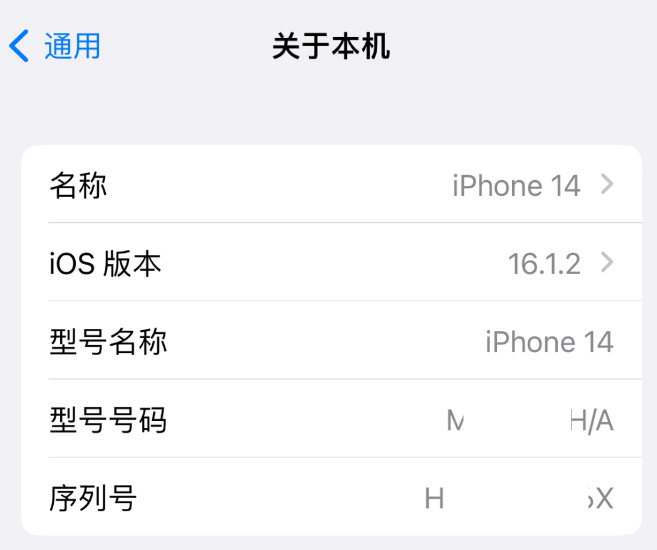
    In particular, the serial number of the iPhone purchased through unofficial channels can be used to verify the authenticity of the iOS device. Check the serial numbers of multiple methods one by one. If the serial numbers are inconsistent, it is a faulty machine.

    About the Apple phone serial number query 7 methods, cattle elder has finished, the fans remember to collect!

    Method 1: View in [Settings]

    On your iPhone, go to Settings – General and then About This device to view basic information, including the phone’s serial number.

    Method 2: View on the original box

    When it comes to checking the serial number, it’s also the easiest and quickest way to do it on the iPhone’s original box.

    The back of the box of the iPhone also contains information about the iPhone. The Serial number is labeled as Serial No. The number encoding.

    Method 3: View with Apple Tools

    You can also use some professional, free Apple data management tools, to view the iPhone serial number, such as Apple data management tool, using the data cable to connect iPhone and computer.

    Windows free download here
    Mac free download here

    If you click “Warranty period,” you will be automatically redirected to Apple’s official website and enter the serial number of the connected device.
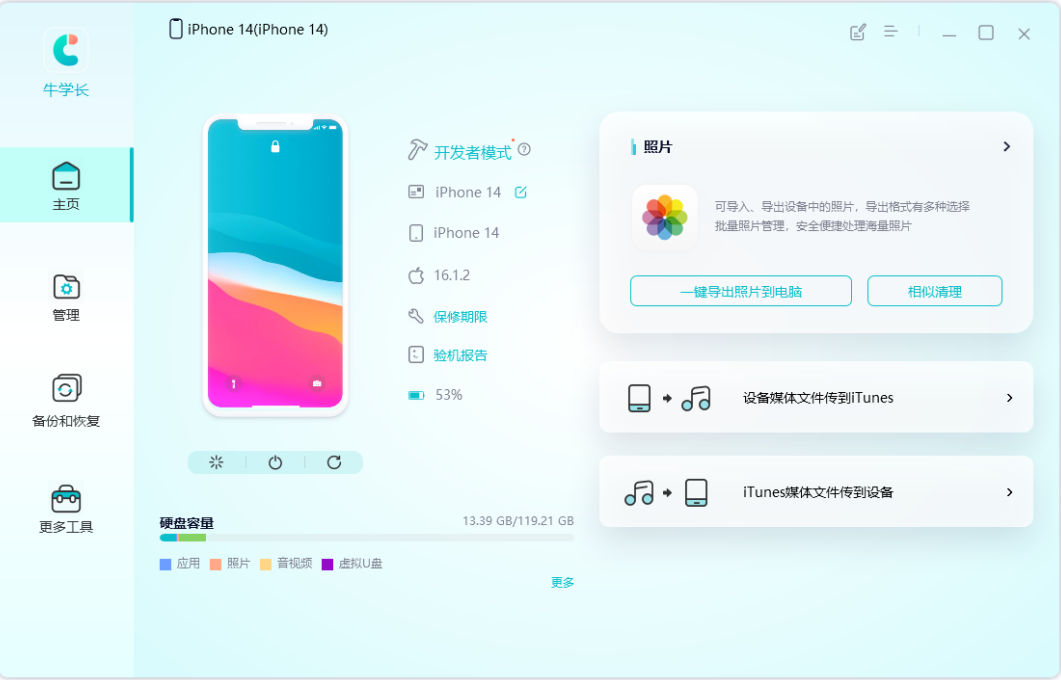
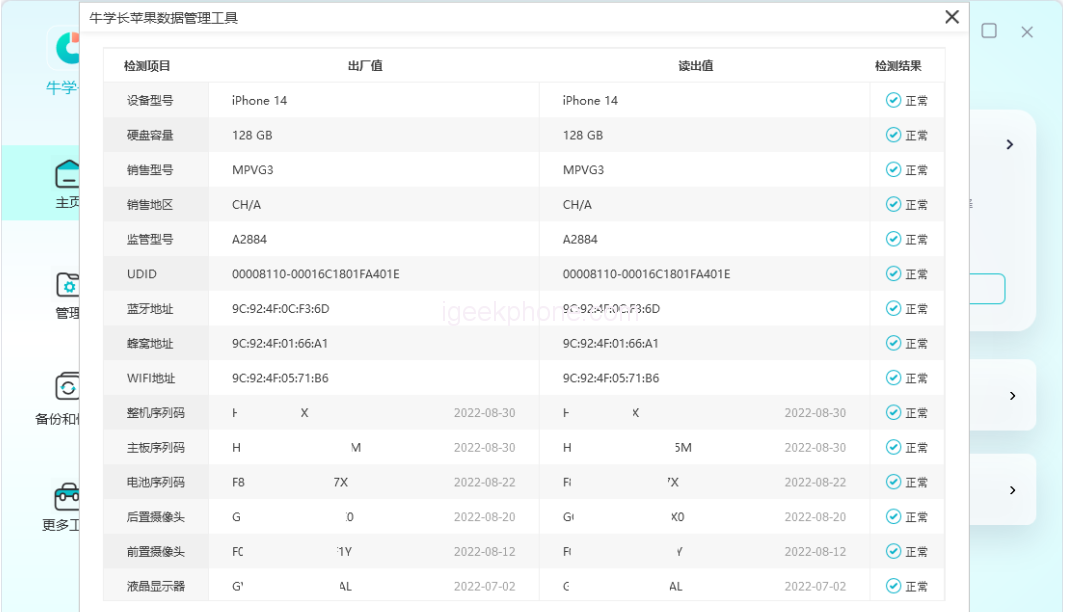
    You can also click on the “machine inspection report”, in the machine inspection report page, you can also view the “machine sequence code”, that is, the serial number of the iPhone.
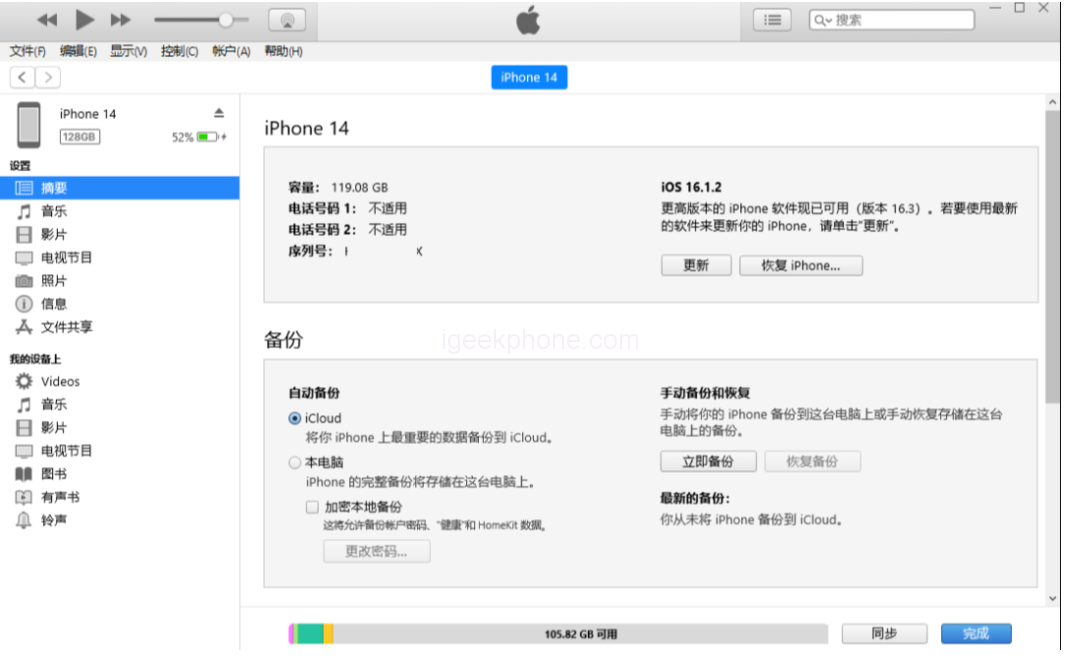
    Method 4 of 4: View it in iTunes

    After downloading and installing the latest version of iTunes, connect the device to the computer with a data cable. After the software recognizes the device normally, click the icon of the iPhone in the upper left corner of the iTunes interface to view the serial number of the iOS device and other device related information.
    Method 5: Check the Apple ID website

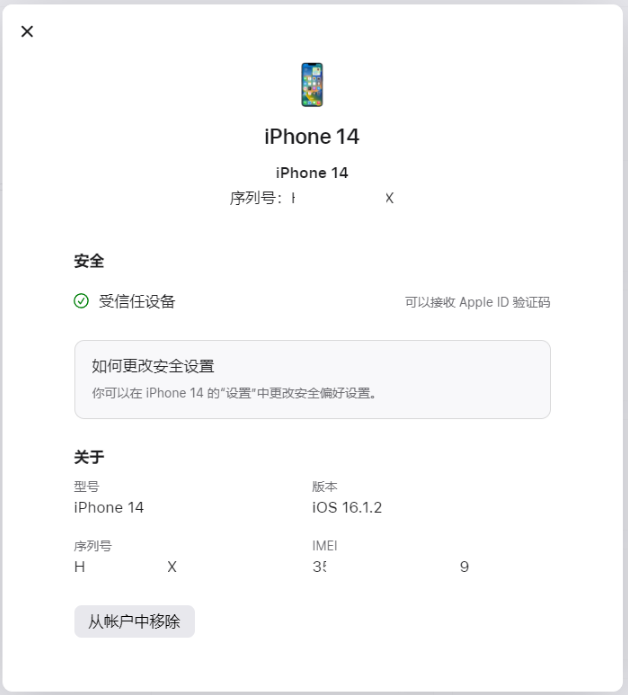
    Search for “Apple ID” in any browser and log in your Apple ID account on this webpage. After completing the two-factor authentication, you can reach the ID account interface

    Then click the Device option to see which iOS devices have logged in with that Apple ID. Find your iPhone model and click on it to see the device’s serial number.
    Method 6: Replace the serial number with the IMEI/MEID code
    The serial number is the number corresponding to the IMEI for Apple to identify its own devices. It can be regarded as the unique identification of devices within Apple.

    The IMEI or MEID code can also be used to check the production date, manufacturer, version, activation date, warranty period, etc.

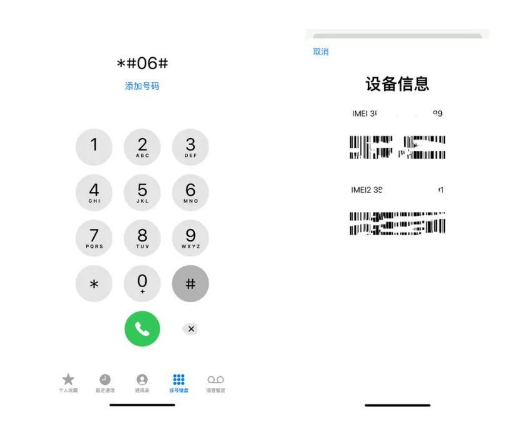
    You can view the IMEI or MEID in the same way as the serial number. You can also enter *#06# on the phone dialing screen, and the IMEI or MEID information about the local device will be displayed.
    Method 7: View in the original invoice

    Generally, Apple products purchased through the official website or official authorized channels can be found on the original receipt or invoice, the relevant serial number of the iPhone, which is also an important proof of late warranty.

    Especially when buying a used iPhone, the serial number really matters. The serial number on the box may not be real, or may not be consistent with other ways of viewing it.

    It is recommended to use multiple methods to verify the serial number of the purchased iPhone, which is one of the important methods to verify the authenticity of the purchased device.

    Share. Facebook Twitter Pinterest LinkedIn Tumblr Email

    Related Posts

    3D Printing Your Smile: How Tech from the DIY World Is Revolutionizing Orthodontics

    Godrej Doddaballapur Launch Date – Upcoming Plots in North Bangalore

    How to Convert tablespoon to cup

    Leave A Reply Cancel Reply

    You must be logged in to post a comment.

    voopoo drag 6
    oxva xlim 3 ultra
    sp2s sen x disposable vape
    jnr 100k
    • Popular
    • 3D Printer REVIEW
    • XIAOMI
    March 16, 2026

    OXVA Slimstick VS OXVA Slimstick X Vape Hands-on Review

    March 5, 2026

    OXVA XLIM PRO 3 vs XLIM Pro 2 DNA: Hands-On Review

    March 5, 2026

    OXVA XLIM PRO 3 vs XLIM GO 2: Hands-On Review

    March 2, 2026

    OXVA XLIM PRO 3 vs XLIM 3 ULTRA: Hands-On Review

    December 26, 2025

    ACMER ASCARVA 4S: Precision CNC Power for Makers, DIYers & Small Workshops

    June 23, 2024

    ACMER P2 20W Laser Engraver Fixed Focus Engraving: Hands on Review

    May 30, 2024

    xTool F1 Ultra Review: World’s First 20W Fiber & 20W Diode Laser Engraver

    May 30, 2024

    Anycubic Kobra 3 Combo Review: The Multicolor Masterpiece?

    March 16, 2026

    Co-released with SU7! Xiaomi Notebook Pro 14 and Xiaomi Smart Watch S5 are scheduled to be launched on March 19th.

    March 16, 2026

    Xiaomi 18 Camera System is like a burst of toothpaste! The standard version now features a telephoto lens, directly catching up with the Pro model

    March 16, 2026

    Xiaomi Notebook Pro 14 is Scheduled to be Released on March 19th: 50W long-lasting performance release, dual fans and three air channels for cooling.

    March 16, 2026

    Xiaomi Tag Bluetooth Tracker Key Finder Review: The Ultimate Solution for Lost Items

    fc 26 coins
    New Arrivals
    • RIFBAR MIXPRO 40K DISPOSABLE RIFBAR MIXPRO 40K DISPOSABLE
    • Uwell Caliburn G5 Pod System Kit Uwell Caliburn G5 Pod System Kit
    • Geek Bar Mate 60K Disposable Pod Geek Bar Mate 60K Disposable Pod
    • ICEBOMB 18K Disposable Vape ICEBOMB 18K Disposable Vape
    • Juice Head iFlex Nixodine 50K Disposable Vape Juice Head iFlex Nixodine 50K Disposable Vape
    • MASKKING CAMO Disposable Vape MASKKING CAMO Disposable Vape
    • Pod Salt Air 40K Disposable Vape Pod Salt Air 40K Disposable Vape
    • OXVA Xlim Go Lite Pod System Kit OXVA Xlim Go Lite Pod System Kit
    • OXVA ARTIO 2 Vape OXVA ARTIO 2 Vape
    About
  • Igeekphone.com provides the first global tech news and reviews about smartphone, vapes, e-cigar, smart home, 3D printers, e-bike,tablets, RC drones, VR headset, and other accessories. It's the best platform to improve your brand and product.
  • Contact us: info@igeekphone.com
  • Check Our Privacy Policy Here.
  • Note: *Right now we have US editor and EU editors for review, especially for Amazon US and EU.
  • *Shop and Compare Price Here*
  • Facebook
  • Youtube
  • OUR BEST VAPE PARTNERS
  • VAPE ONLINE STORE
  • HAYATI PRO MAX PLUS
  • VAPORESSO
  • VOOPOO
  • OXVA
  • NEXA
  • MASKKING
  • LOSTVAPE ORIONBAR
  • MEMERS
  • TODOO
  • SP2S
  • JNR
  • VEIIK
  • OTHER BEST PARTNERS
  • SVBONY
  • Chuwi
  • Blackview
  • Fossibot
  • Unihertz
  • Flsun
  • Anycubic
  • Xtool
  • Oukitel
  • Mukkpet Ebike
  • Ugreen
  • Copyright © 2026 igeekphone

    Type above and press Enter to search. Press Esc to cancel.