







Facebook Twitter Instagram
    Trending
    • OnePlus Ace 6 Ultra Review: A 165FPS Gaming Beast Built for FPS Players
    • Xiaomi 18 is launched! Hyper OS 4 is here: Completely Removes MIUI Code and undergoes a Complete Transformation at the Core Level
    • Blackview WAVE 7C AI Smartphone Review: A Powerful, Affordable 4G Smartphone for Everyday Use
    • How Charge Capture Software Improves Accuracy and Efficiency in Healthcare
    • Which is better, a laptop or a desktop computer? Computer purchase guide
    • Top Benefits of Using the SVBONY SVN O1 in Office and Classroom Settings
    • YLRC C6 Mini RC Drift Car Review: A Thrilling Toy for Kids and RC Enthusiasts
    • DTG9 Smartwatch Review: A Comprehensive Smart Companion for Fitness and Everyday Use
    Facebook YouTube
    IGeeKphone China Phone, Tablet PC, VR, RC Drone News, Reviews
    • HOME
      • NEWS
        • DeepSeek
        • ChatGPT
        • Minecraft
    • Amazon
    • PHONE
      • Top Phones For Your First Choice
      • Phone Comparison
      • Xiaomi
      • Blackview
      • Doogee
      • Black Shark
      • Geekbuying
      • Banggood
      • TEMU
      • TikTok
      • Aliexpress
      • Walmart
      • MercadoLibre
      • Lazada
    • TOP VAPE Awards for 2026
    • VAPES
      • E-CIGAR Upcoming
      • Vape News
      • Vape Deals
      • Vape Comparison
      • Vape Guide
      • Giveaway
    • BEST VAPE
      • Best Vape Stores
      • Best Starter Vape Kits
      • Best Vapes for Beginners
      • Best Disposable Vapes
      • Best Pod Systems
      • Best Pod Mod Vapes
      • Best Mods
      • Best Nicotine Pouches
      • Best Clearomizers/Tanks
      • Best E-Liquid
      • Best EGO/Pens
      • Best Vapes for Nic Salt E-Juice
      • Best Vapes to Quit Smoking
      • RDA vs. RDTA vs. RTA
    • Best Vape Brand 2026
      • VAPORESSO
      • VOOPOO
      • OXVA
      • NEXA BAR
      • ORIONBARTECH
      • MASKKING VAPE
      • MEMERS
      • SP2S
      • TODOO
      • MRFOG
      • VEIIK
    • REVIEW
      • E-cigar Review
      • Phones
      • Tablet PC
      • TV Box
      • RC Drone
      • Wearables
      • Camera
      • Accessories
      • VR Headset
    • MORE
      • TABLET
        • Chuwi
        • INNOCN
        • Teclast
        • Top Tablet for Your First Choice
        • Tablet/Laptop Comparison
      • RC DRONE
      • CAMERA
      • WEARABLES
        • OneOdio
        • BlitzWolf
        • Top Smartwatch for First Choice
      • 3D PRINTER
        • 3D Printer Review
        • Anycubic
        • FLSUN
        • Xtool
        • LONGER
        • Top 3D printer to Choose First
      • POWER STATION
        • Oukitel
        • FOSSIBOT
      • GAMING
        • Top Gaming Products
      • E-BIKE
        • Samebike
        • Happyrun
        • ENGWE
      • SMART HOME
      • TV BOX
      • ACCESSORIES
      • VR HEADSET
      • CLOTHES
      • AUTO CAR
    • DEAL
    • VAPE LAWS
    • Shop
    IGeeKphone China Phone, Tablet PC, VR, RC Drone News, Reviews
    You are at:Home»MIUI 14»How to Install Xiaomi MIUI 14 Stable ROM for Xiaomi Phones?
    MIUI 14

    How to Install Xiaomi MIUI 14 Stable ROM for Xiaomi Phones?

    Brady CottonBy Brady CottonMarch 10, 2023
    Facebook Twitter Pinterest LinkedIn Tumblr Email

    Before I start:
    1. Bootloader is unlocked.
    2. TWRP is setup.
    3. I am on MIUI 13 EU ROM.
    4. Download the file on to your laptop and transfer to a folder on the phone using USB.

    Steps:
    1. Go to My device.
    2. Click on MIUI 13.
    3. Click on the 3 dots on the top right.
    4. Choose the update package. Follow the instructions…
    5. 1 min later it took me to TWRP….installation hardly took a min.
    6. Reboot to system.
    7. Check everything is fine.

    Overall – Time to download the build took an hr. Time to upgrade took 2 mins.

     Download EU ROM: 
    DOWNLOAD STABLE
    https://sourceforge.net/projects/xi…files/xiaomi.eu/MIUI-STABLE-RELEASES/MIUIv14/
    Mirror
    https://androidfilehost.com/?w=files&flid=337313

    Download file:
    1. Sourceforge link was slow. So I went for the official mirror. Took almost an hr. file size is 4.5 GB. The MD5 is fbdc8ba3b53e94004369535e405f5817. The file upload date is Feb 17, 2023.
    2. For more details visit official page: https://xiaomi.eu/community/threads/miui-14-stable-release.67685/
    Note: Better download to laptop and not directly to mobile, unless you have very high speed internet connection. Also the downloaded file is a zip file. Once downloaded check that you can open the zip. This will not work if the file got corrupt during download.

     Hybrid = can be installed with either Recovery or Fastboot

    Requirements:

    • Your device’s bootloader must be unlocked.

    Installing with TWRP: (ROM Type: Recovery)
    (TWRP must be installed with Fastboot mode)

    • Download Xiaomi.eu ROM zip file
    • Reboot to TWRP
    • If installing for the first time or downgrading: Wipe -> Format Data
    • Copy the ROM zip file to the internal storage
    • Install -> Select the ROM zip file
    • Reboot to system
    • Done!

    Updating via Updater app: (ROM Type: Recovery)
    (A Xiaomi.eu ROM and TWRP must already be installed on your device)

    • Download Xiaomi.eu ROM zip file
    • Copy the ROM zip file to the internal storage
    • Updater -> Menu (…) -> Select update package
    • Select the ROM zip file
    • Confirm any dialogs
    • Done!

    Installing with Fastboot: (ROM Type: Fastboot)

    • Download Xiaomi.eu ROM zip file
    • Extract the ROM zip to a new folder
    • Power off your device
    • Boot your device in Fastboot mode (Hold volume down + power buttons)
    • Connect to PC via USB cable
    • Run one of the installation scripts (according to your PC operating system):
      – first_install_with_data_format – with data wipe, if you’re flashing Xiaomi.eu ROM for the first time or downgrading.
      – update_rom – without data wipe, if you’re updating from an older Xiaomi.eu ROM.
    • Done!

    Remember:
    If you are going from MIUI 14 (or later) Weekly ROM to MIUI 14 Stable ROM, you are doing a downgrade, so format data is mandatory!

    Translators:

    • Follow XML changes in Source of MIUI 14 here
    • Our translation guide is here
    • Check for errors in your repo here

    Give kudos to your translators. This is a huge group effort and continues to grow bigger!
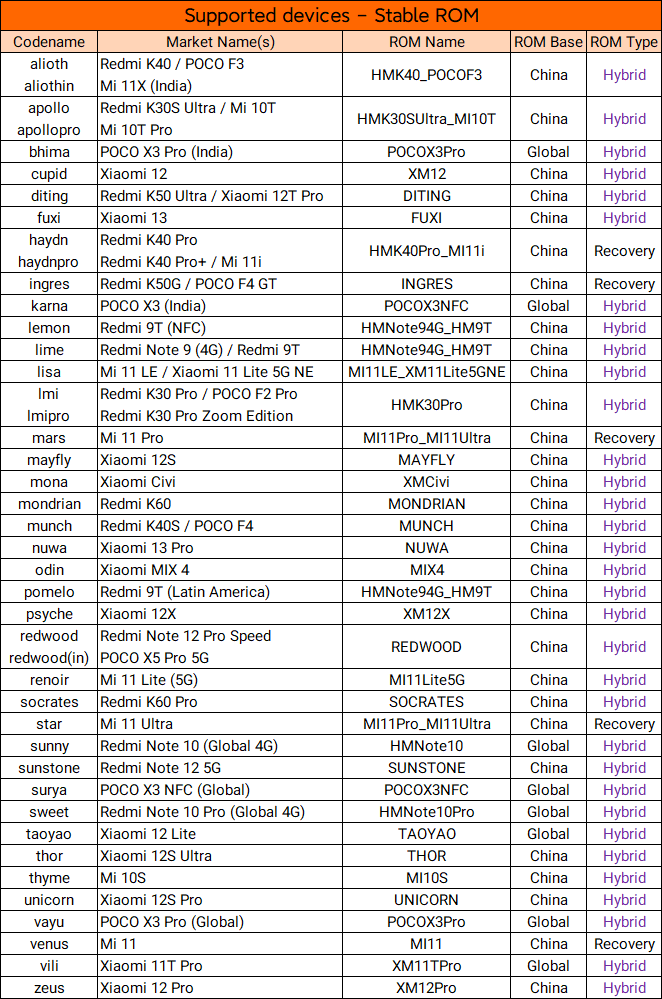
    Language included in our MIUI 14:

    • English (global.miui.com, xiaomi.eu)
    • Chinese (miui.com)
    • Polish (kacskrz, miuipolska.pl) – Report Bugs – CHANGELOG
    • Slovak (ingbrzy, miuios.cz) – Report Bugs – CHANGELOG
    • Czech (VMach3, miuios.cz) – Report Bugs – CHANGELOG
    • Bulgarian (Global)
    • Hungarian (Global)
    • French (pmspr4100) – Report Bugs – CHANGELOG
    • Swedish (Global)
    • Russian (mclaude74) – Report Bugs – CHANGELOG
    • Ukrainian (Andrex2287) – Report Bugs – CHANGELOG
    • Belarusian (BusnjukAn) – Report Bugs – CHANGELOG
    • Croatian (Masva) – Report Bugs – CHANGELOG
    • Vietnamese (Butinhi) – Report Bugs – CHANGELOG
    • Italian (BioLorenz) – Report Bugs – CHANGELOG
    • Greek (Global)
    • Norwegian (Global)
    • Dutch (Global)
    • Spanish (deivids84) – Report Bugs – CHANGELOG
    • Turkish (suatsari) – Report Bugs – CHANGELOG
    • Brazilian-Portuguese (RicardoGuariento) – Report Bugs – CHANGELOG
    • Portuguese (KcNirvana, Lippe35) – Report Bugs – CHANGELOG
    • Hebrew (Global)
    • Romanian (ashtefan) – Report Bugs – CHANGELOG
    • German (Henry2o1o, berlinux2016, MeiGuddet) – Report Bugs – CHANGELOG
    • Catalan (deivids84) – Report Bugs – CHANGELOG
    • Korean (cjhyuky, Young-uk, bradly1) – Report Bugs – CHANGELOG
    • Slovenian (bostjan2016) – Report Bugs – CHANGELOG
    • Serbian (Global)
    • Thai (Global)
    • Finnish (Global)
    • Arabic (Global)
    • Persian (Global)
    • Japanese (Global)
    • Burmese (Global)
    • Danish (Global)

    Our ROMs features (what’s not in Global):

    • Based on China/Global Stable builds
    • 3way reboot menu (in dev settings)
    • MIUI Contacts and Dialer
    • Removed ads in MIUI system apps
    • MIUI Dialer and Messages apps
    • Steps counter in Assistant screen
    • More shortcuts on left lockscreen
    • Wake up gestures for all devices
    • Option to auto-expand first notification
    • Notifications priority settings
    • More edit options in Gallery app
    • Enabled MiDrive in File Explorer
    • Google apps support integrated
    • Removed 5GHz region restrictions
    • Confirm dials from call logs
    • Morning report on alarm at morning
    • More apps supported for AOD notifications
    • More styles for AOD screen
    • Raise to wake gesture
    • AOD notification received animation
    • Tap fingerprint sensor to wake toggle
    • Double tap to lock screen
    • Battery AI scenes
    • Allowed disabling specific system apps
    • Importing theme .mtz from zhuti.xiaomi.com via ThemeManager
    • No useless Chinese bloatware apps
    • More free RAM due to less background processes
    • Mi Video, Mi Music, Mi Browser: No any useless Chinese content and ads
    • No possibility to re-lock bootloader accidentally with flash any xiaomi.eu release
    • Added real 27 languages translation made by Official MIUI Fansites and MIUI Fans
    • Added EU T9 dialer support
    • Added charging sound switch
    • Optimized GPS settings for EU
    • Optimized Battery consumption
    • Optimized RAM consumption
    • Added GSMalphabet into SMS app options
    • SafetyNet passed by default without ROOT (Google Pay)
    • Play Store Certified
    • Deodexed
    • Added automated tasks in Security app
    • Widevine L1 (for supported devices)
    • And more, and more made by our 10 years MIUI mods experience.

    Source: XDA forum and Xiaomi Forum

    Read Also: Update Daily: Latest Android 12 MIUI 14 Official ROMs Download and Install for all Xiaomi Devices

    Share. Facebook Twitter Pinterest LinkedIn Tumblr Email

    Related Posts

    Xiaomi 18 is launched! Hyper OS 4 is here: Completely Removes MIUI Code and undergoes a Complete Transformation at the Core Level

    Blackview WAVE 7C AI Smartphone Review: A Powerful, Affordable 4G Smartphone for Everyday Use

    Xiaomi’s Ultra-Large-Screen Flagship Returns: Xiaomi 17 Max Officially Enters the Market for Sale

    Leave A Reply Cancel Reply

    You must be logged in to post a comment.

    voopoo drag 6
    oxva xlim 3 ultra
    sp2s sen x disposable vape
    • Popular
    • 3D Printer REVIEW
    • XIAOMI
    May 7, 2026

    OXVA Xlim Go Lite Review: Compact, Powerful, and Beginner-Friendly

    April 18, 2026

    VOOPOO DRAG 6 Hands on Review: Vape Beast with Smart Power & Premium Control

    April 8, 2026

    OXVA NeXLIM vs XLIM Pro 2 Pod Hands-On Review (2026)

    March 16, 2026

    OXVA Slimstick VS OXVA Slimstick X Vape Hands-on Review

    December 26, 2025

    ACMER ASCARVA 4S: Precision CNC Power for Makers, DIYers & Small Workshops

    June 23, 2024

    ACMER P2 20W Laser Engraver Fixed Focus Engraving: Hands on Review

    May 30, 2024

    xTool F1 Ultra Review: World’s First 20W Fiber & 20W Diode Laser Engraver

    May 30, 2024

    Anycubic Kobra 3 Combo Review: The Multicolor Masterpiece?

    May 9, 2026

    Xiaomi 18 is launched! Hyper OS 4 is here: Completely Removes MIUI Code and undergoes a Complete Transformation at the Core Level

    May 9, 2026

    Xiaomi’s Ultra-Large-Screen Flagship Returns: Xiaomi 17 Max Officially Enters the Market for Sale

    May 7, 2026

    Redmi K100 maintains a medium-sized screen of 6.6 inches: equipped with an 8500mAh battery

    May 6, 2026

    Xiaomi 18 Ultra Mystic Ring Edition leaks out: Global debut of Mystic Ring O3 – Xiaomi’s strongest super-large model

    fc 26 coins
    New Arrivals
    • Eleaf iStick X80 Vape Mod Kit Eleaf iStick X80 Vape Mod Kit
    • Eleaf iStick XC100 Vape Mod Kit Eleaf iStick XC100 Vape Mod Kit
    • Eleaf iStick Power 2 Vape Mod Kit Eleaf iStick Power 2 Vape Mod Kit
    • Eleaf iStick Pico Plus Vape Mode Kit Eleaf iStick Pico Plus Vape Mode Kit
    • Vaporesso XROS 6 Pod System Kit Vaporesso XROS 6 Pod System Kit
    • Lost Vape Thelema Q200 Pro Mod Kit Lost Vape Thelema Q200 Pro Mod Kit
    • Honor Play 80 Pro Honor Play 80 Pro
    • Honor MagicPad 3 Pro 12.3 Honor MagicPad 3 Pro 12.3
    • Lost Mary Viz 55K Disposable Vape Lost Mary Viz 55K Disposable Vape
    About
  • Igeekphone.com provides the first global tech news and reviews about smartphone, vapes, e-cigar, smart home, 3D printers, e-bike,tablets, RC drones, VR headset, and other accessories. It's the best platform to improve your brand and product.
  • Contact us: info@igeekphone.com
  • Check Our Privacy Policy Here.
  • Note: *Right now we have US editor and EU editors for review, especially for Amazon US and EU.
  • *Shop and Compare Price Here*
  • Facebook
  • Youtube
  • OUR BEST VAPE PARTNERS
  • VAPE ONLINE STORE
  • HAYATI PRO MAX PLUS
  • VAPORESSO
  • VOOPOO
  • OXVA
  • NEXA
  • MASKKING
  • TODOO
  • SP2S
  • VEIIK
  • OTHER BEST PARTNERS
  • SVBONY
  • Chuwi
  • Blackview
  • Fossibot
  • Unihertz
  • Flsun
  • Anycubic
  • Xtool
  • Oukitel
  • Mukkpet Ebike
  • Ugreen
  • Copyright © 2026 igeekphone

    Type above and press Enter to search. Press Esc to cancel.