







Facebook Twitter Instagram
    Trending
    • Fumo Japan has added “Electric Purple” color to the IQOS ILUMA i series and will expand it to convenience store channels starting from February
    • How to Set the Time to 24 Hours on Redmi K90 Pro Max Smartphone?
    • Samsung Galaxy Buds4 Pro Preview: New peach color catches the eye, and supports reverse pairing of the earphone case with mobile devices
    • iQOO 15 Ultra has been Officially Announced to Feature a 2K Samsung QFeng Screen: its Peak Brightness has been pushed up to 8000 Nits
    • NQD M646 RC Car Review: A Miniature Racer with Big Features
    • V45 1.46-Inch HD Screen Smart Watch Review at $29.99: A Stylish and Functional Wearable for Everyday Health and Fitness
    • Blackview OSCAL MARINE 3 AI Smartphone Review: Rugged Power Meets Cutting-Edge Technology
    • XKJ K22 MAX RC Quadcopter Review at $48.99: A Blend of Innovation and Fun
    Facebook YouTube
    Login Register
    IGeeKphone China Phone, Tablet PC, VR, RC Drone News, Reviews
    • HOME
      • NEWS
        • DeepSeek
        • ChatGPT
        • Minecraft
    • Amazon
    • NEW YEAR
    • PHONE
      • Top Phones For Your First Choice
      • Phone Comparison
      • Xiaomi
      • Blackview
      • Doogee
      • Black Shark
      • Geekbuying
      • Banggood
      • TEMU
      • TikTok
      • Aliexpress
      • Walmart
      • MercadoLibre
      • Lazada
    • TOP VAPE Awards for 2026
    • VAPES
      • E-CIGAR Upcoming
      • Vape News
      • Vape Deals
      • Vape Comparison
      • Vape Guide
      • Giveaway
    • BEST VAPE
      • Best Vape Stores
      • Best Starter Vape Kits
      • Best Vapes for Beginners
      • Best Disposable Vapes
      • Best Pod Systems
      • Best Pod Mod Vapes
      • Best Mods
      • Best Nicotine Pouches
      • Best Clearomizers/Tanks
      • Best E-Liquid
      • Best EGO/Pens
      • Best Vapes for Nic Salt E-Juice
      • Best Vapes to Quit Smoking
      • RDA vs. RDTA vs. RTA
    • Best Vape Brand 2026
      • VAPORESSO
      • VOOPOO
      • OXVA
      • NEXA BAR
      • ORIONBARTECH
      • MASKKING VAPE
      • MEMERS
      • SP2S
      • JNR
      • TODOO
      • MRFOG
      • VEIIK
    • REVIEW
      • E-cigar Review
      • Phones
      • Tablet PC
      • TV Box
      • RC Drone
      • Wearables
      • Camera
      • Accessories
      • VR Headset
    • MORE
      • TABLET
        • Chuwi
        • INNOCN
        • Teclast
        • Top Tablet for Your First Choice
        • Tablet/Laptop Comparison
      • RC DRONE
      • CAMERA
      • WEARABLES
        • OneOdio
        • BlitzWolf
        • Top Smartwatch for First Choice
      • 3D PRINTER
        • 3D Printer Review
        • Anycubic
        • FLSUN
        • Xtool
        • LONGER
        • Top 3D printer to Choose First
      • POWER STATION
        • Oukitel
        • FOSSIBOT
      • GAMING
        • Top Gaming Products
      • E-BIKE
        • Samebike
        • Happyrun
        • ENGWE
      • SMART HOME
      • TV BOX
      • ACCESSORIES
      • VR HEADSET
      • CLOTHES
      • AUTO CAR
    • DEAL
    • Shop
    IGeeKphone China Phone, Tablet PC, VR, RC Drone News, Reviews
    You are at:Home»Guide»Comprehensive Guide on How To Restore Your WhatsApp Backup From Google Drive to iPhone
    Guide

    Comprehensive Guide on How To Restore Your WhatsApp Backup From Google Drive to iPhone

    Brady CottonBy Brady CottonApril 14, 2023
    Facebook Twitter Pinterest LinkedIn Tumblr Email

    WhatsApp is a great source of communication that has built a huge user base for its effective features. While the service provides prolific international connectivity, it has been readily consumed as the standard source of connecting with people from different regions. As the entire WhatsApp account is set up on a smartphone device, what if you are going to change it?

    This article will provide a composite guide on how to restore WhatsApp backup from Google Drive to iPhone. Discover the right ways to avoid the loss of data across WhatsApp.

    Part 1: What Are The Potential Reasons To Restore Your WhatsApp Backup From Google Drive to iPhone?

    Some essential reasons lead to the need to learn how to restore WhatsApp backup from Google Drive to iPhone. As we look into these reasons, you will discover why someone looks into restoring their WhatsApp data while changing their smartphone device.

    Personal Data is Secure

    WhatsApp usually holds important personal details you want to protect from unauthorized access. In such a case, iPhone devices serve much better as they come with stricter privacy policies and features, keeping your device protected.

    Phone is Damaged

    The Android device you use to manage your WhatsApp might get damaged or broken. If the screen is broken, there is no way to retrieve data from it. This leads to restore WhatsApp backup from Google Drive to iPhone.

    Problems in Chipset

    If the issues arise across the chipset of your Android, there is not much you can do to operate the device properly. In such a scenario, shifting data from Android to the iPhone seems impossible. To get hold of your WhatsApp data, you then try to access the backup files stored in Google Drive.

    Shifting For Better Experience.

    While you seek to restore WhatsApp from Google Drive iPhone, the reason for such a transition is to have a better experience with iOS devices. Instead of working with Android, many users prefer using iOS devices for a seamless experience.

    Part 2: Is There Any Official Method To Transfer WhatsApp Backup From Google Drive to iPhone?

    As far as this question is concerned, no official method is available for transferring WhatsApp backup retrieved from Google Drive. While you figure out how to restore WhatsApp backup from Google Drive, the main reason for facing such issues is the basic incompatibility of the platforms within smartphone devices.

    Although it is known that WhatsApp takes up a specific cloud platform and backs up all data against it, both services are different for Android and iOS devices. The data is backed up at Google Drive if you are an Android user.

    For an iOS user, all WhatsApp data is collected across iCloud, its dedicated cloud-based platform. Seeing this major incompatibility, the WhatsApp data in Google Drive cannot be transferred directly to the iPhone. But don’t worry, as we are going to discuss a powerful WhatsApp management tool in the next part of this article.

    Part 3: The Ultimate Tool To Restore WhatsApp From Google Drive to iPhone

    As discussed before, no direct methods are available to restore the WhatsApp backup from Google Drive to your iPhone. In such a scenario, you need to have a proper tool to help you execute specific operations without going through a lot. Wondershare MobileTrans is a service designed to restore WhatsApp from Google Drive to iPhone in the least steps.

    The platform offers support for more than 6000+ iOS and Android devices. While it dedicates an entire system to transferring WhatsApp data, its specificity makes it a highlighting platform. Along with that dedicated support for WhatsApp, you can back up and restore data from other social applications.

    Steps To Restore WhatsApp from Google Drive to iPhone

    We will now direct our discussion to figure out how to restore WhatsApp backup from Google Drive to iPhone with Wondershare MobileTrans:

    Step 1: Launch MobileTrans and Access WhatsApp Transfer

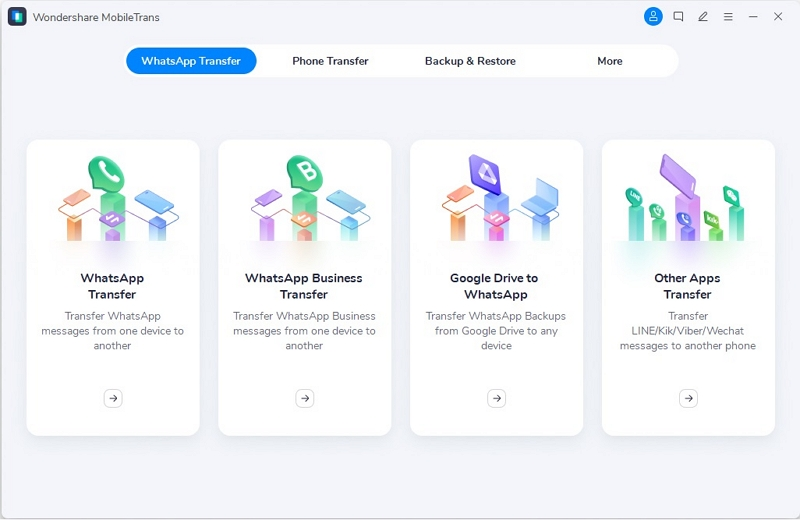
    Download and install the latest version of Wondershare MobileTrans from its official website. Continue to launch it on your computer and proceed to the “WhatsApp Transfer” section from the top. As you find a list of options appearing on the screen, click the “Google Drive to WhatsApp” option to open a new window.
    Step 2: Log In Google Account

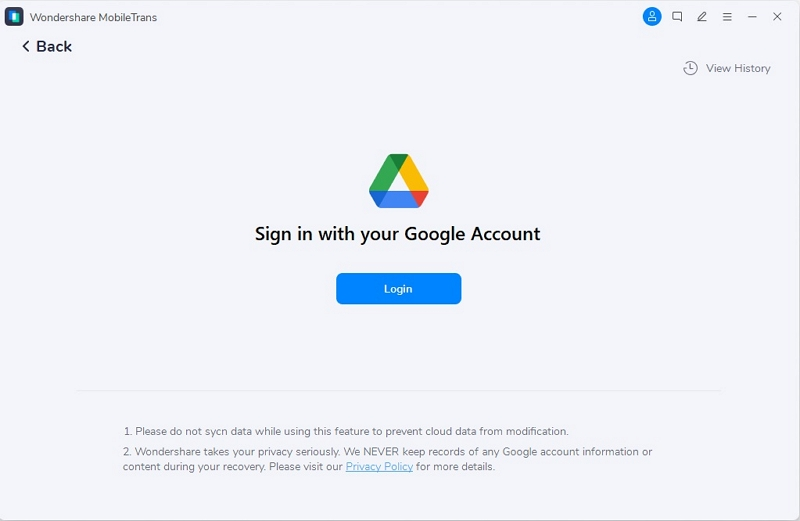
    You will be redirected to log in with your Google Account to access the WhatsApp data within Google Drive. Following this, verify your identity to proceed with the operations.
    Step 3: Download the Backup File

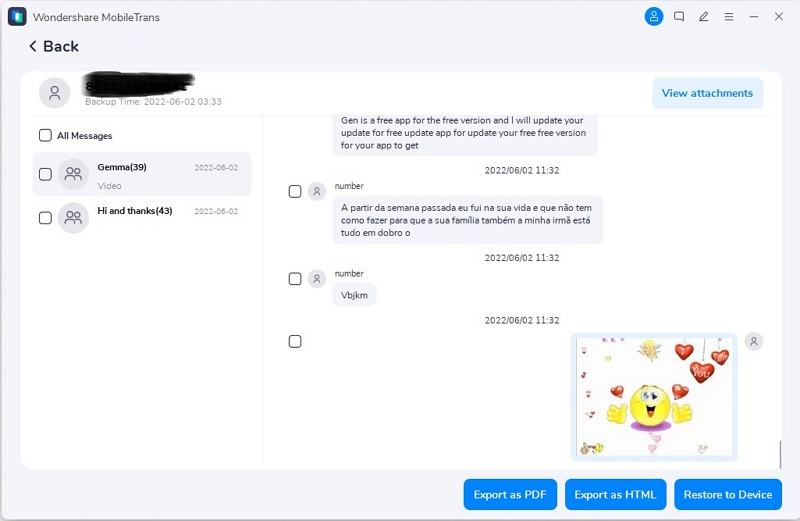
    You will have to select the backup file you wish to transfer to your iOS device and click the “Download” button against it. As it downloads and gets previewed on the next screen, continue to select the data that you wish to restore. After selecting, look for the “Restore to Device” button on the bottom right.
    Step 4: Restore WhatsApp to iPhone

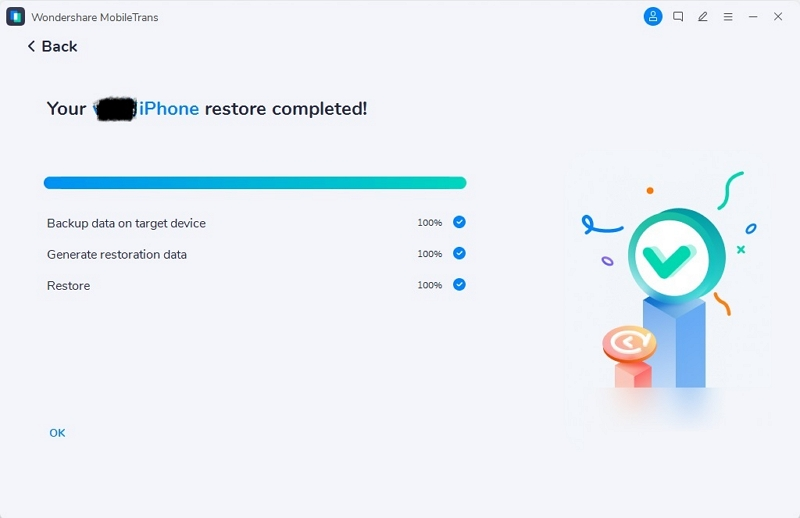
    The process initiates and is displayed under a progress bar. Once done, the window prompts for the completion of the process. Your WhatsApp data is successfully transferred to the iOS device from your Google Drive. 
    Bonus Part: How To Enable Google Drive Backup On Your Android?

    If you have not enabled Google Drive backup on your Android device and are unaware of how to do it, we’ve provided proper guidelines for such users below. Follow the steps to learn how to enable it on your Android with ease:

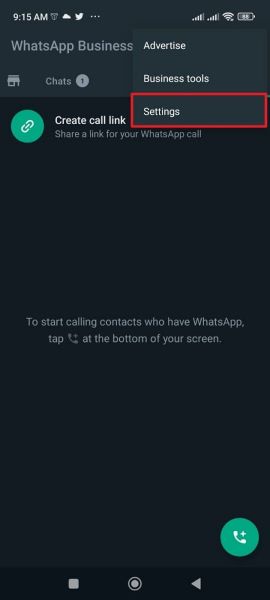
    Step 1: Open WhatsApp on your Android device and select the “Three-Dotted” icon on the top-right of the screen. Continue to select “Settings” from the drop-down.
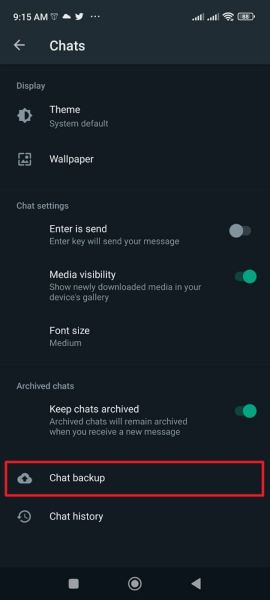
    Step 2: On the next screen, look for “Chats” and directly into the “Chat backup” option on the next window.
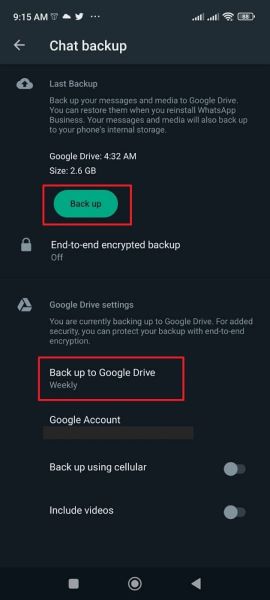
    Step 3: Here, set the settings for backing up WhatsApp on Google Drive properly. Define time parameters under the “Back up to Google Drive” option. Furthermore, tap the “Back up” button to back up WhatsApp right now.
    Conclusion

    The article has put a proper focus on how to restore WhatsApp backup from Google Drive onto an iPhone. While there is no official method available, MobileTrans offers a perfect solution in the form of its tool for restoring WhatsApp backup. Follow the guide to learn more about restoring WhatsApp backup from Google Drive to iPhone.

    Share. Facebook Twitter Pinterest LinkedIn Tumblr Email

    Related Posts

    How to Set the Time to 24 Hours on Redmi K90 Pro Max Smartphone?

    The Rise of Gamification in Education: Making Learning Fun and Engaging

    How to Take Panoramic Photos with iPhone Air?

    Leave A Reply Cancel Reply

    You must be logged in to post a comment.

    voopoo drag s3
    oxva xlim 3 ultra
    sp2s sen x disposable vape
    jnr 100k
    • Popular
    • 3D Printer REVIEW
    • XIAOMI
    January 21, 2026

    VOOPOO ARGUS P3 VS ARGUS P2: Which Square Pod Suits You?

    January 21, 2026

    VOOPOO Drag X3 vs VOOPOO Drag X2: Hands-On Comparison

    January 1, 2026

    VOOPOO ARGUS P3: The Touchscreen Pod That Feels Like a Mini Mod (Review)

    December 26, 2025

    Vaporesso XROS 5 Nano: Touchscreen Control Meets True Nano Portability (Review)

    December 26, 2025

    ACMER ASCARVA 4S: Precision CNC Power for Makers, DIYers & Small Workshops

    June 23, 2024

    ACMER P2 20W Laser Engraver Fixed Focus Engraving: Hands on Review

    May 30, 2024

    xTool F1 Ultra Review: World’s First 20W Fiber & 20W Diode Laser Engraver

    May 30, 2024

    Anycubic Kobra 3 Combo Review: The Multicolor Masterpiece?

    January 29, 2026

    Xiaomi Launches REDMI Monitor G25 with 200Hz High Refresh Rate for Just 609 Yuan

    January 29, 2026

    The Specifications of the Strongest Flagship Model of Redmi, Redmi K100 Pro Max, have been Released

    January 28, 2026

    Xiaomi’s First Outdoor 4G Camera is Released: Free data, no Speed Limit. One Unit is Equivalent to two at 379 yuan

    January 28, 2026

    Xiaomi Redmi Turbo 5 Smartphone has been officially Announced to be Equipped with MediaTek 8500-Ultra Processor

    fc 26 coins
    New Arrivals
    • Airis Neo P40K Disposable Vape Airis Neo P40K Disposable Vape
    • Maskking Extre 100K Disposable Vape Maskking Extre 100K Disposable Vape
    • SMOK Volle Pod System Kit SMOK Volle Pod System Kit
    • Lost Vape Astara Pod System Kit Lost Vape Astara Pod System Kit
    • SALT BAE 50 40K DISPOSABLE SALT BAE 50 40K DISPOSABLE
    • CRAVE X ULTRA SLIM 40K DISPOSABLE CRAVE X ULTRA SLIM 40K DISPOSABLE
    • AVOTX SPACE 3 40K DISPOSABLE AVOTX SPACE 3 40K DISPOSABLE
    • ARRO Infiniti 40K Nicotine Free Disposable Vape ARRO Infiniti 40K Nicotine Free Disposable Vape
    • GRANDFADDA 3000 DISPOSABLE E-CIGAR GRANDFADDA 3000 DISPOSABLE E-CIGAR
    About
  • Igeekphone.com provides the first global tech news and reviews about smartphone, vapes, e-cigar, smart home, 3D printers, e-bike,tablets, RC drones, VR headset, and other accessories. It's the best platform to improve your brand and product.
  • Contact us: info@igeekphone.com
  • Check Our Privacy Policy Here.
  • Note: *Right now we have US editor and EU editors for review, especially for Amazon US and EU.
  • *Shop and Compare Price Here*
  • Facebook
  • Youtube
  • OUR BEST VAPE PARTNERS
  • VAPE ONLINE STORE
  • HAYATI PRO MAX PLUS
  • VAPORESSO
  • VOOPOO
  • OXVA
  • NEXA
  • MASKKING
  • LOSTVAPE ORIONBAR
  • MEMERS
  • TODOO
  • SP2S
  • JNR
  • VEIIK
  • OTHER BEST PARTNERS
  • SVBONY
  • Chuwi
  • Blackview
  • Fossibot
  • Unihertz
  • Flsun
  • Anycubic
  • Xtool
  • Oukitel
  • Mukkpet Ebike
  • Ugreen
  • Copyright © 2026 igeekphone

    Type above and press Enter to search. Press Esc to cancel.