






Facebook Twitter Instagram
    Trending
    • ANGWATT C1 PRO Electric Scooter Review-Dual‑Motor Power Meets Long‑Range Urban Mobility
    • BlitzWolf® BW-BTS8 Lite Bluetooth Earbuds Review: The Ultimate Blend of Innovation and Performance
    • DJI LITO 1 15KM FPV RC Drone Review: 4K HDR Video, Omnidirectional Obstacle Sensing, and Long-Range Flight
    • Nexa Ultra 50K II Disposable Vape vs. Remit Solar 50K Disposable Vape Review-Which One Should You Pick?
    • VOOPOO ARGUS G3 Mini vs ARGUS Matrix: Which Pod Vape Is Right for You?
    • YLR/C YL87 YL89 RC Drone Review: A High-Flying Stunt Masterpiece
    • IPLAY NOVA 45k Disposable Pod Review-Long Lasting Power Meets Premium Performance
    • KuKirin G2 Pro Electric Scooter Review— A Balanced Ride with ABE Certification
    Facebook YouTube
    IGeeKphone China Phone, Tablet PC, VR, RC Drone News, Reviews
    • HOME
      • NEWS
        • DeepSeek
        • ChatGPT
        • Minecraft
    • Amazon
    • PHONE
      • Top Phones For Your First Choice
      • Phone Comparison
      • Xiaomi
      • Blackview
      • Doogee
      • Black Shark
      • Geekbuying
      • Banggood
      • TEMU
      • TikTok
      • Aliexpress
      • Walmart
      • MercadoLibre
      • Lazada
    • TOP VAPE Awards for 2026
    • VAPES
      • E-CIGAR Upcoming
      • Vape News
      • Vape Deals
      • Vape Comparison
      • Vape Guide
      • Giveaway
    • BEST VAPE
      • Best Vape Stores
      • Best Starter Vape Kits
      • Best Vapes for Beginners
      • Best Disposable Vapes
      • Best Pod Systems
      • Best Pod Mod Vapes
      • Best Mods
      • Best Nicotine Pouches
      • Best Clearomizers/Tanks
      • Best E-Liquid
      • Best EGO/Pens
      • Best Vapes for Nic Salt E-Juice
      • Best Vapes to Quit Smoking
      • RDA vs. RDTA vs. RTA
    • Best Vape Brand 2026
      • VAPORESSO
      • VOOPOO
      • OXVA
      • NEXA BAR
      • ORIONBARTECH
      • MASKKING VAPE
      • MEMERS
      • SP2S
      • TODOO
      • MRFOG
      • VEIIK
    • REVIEW
      • E-cigar Review
      • Phones
      • Tablet PC
      • TV Box
      • RC Drone
      • Wearables
      • Camera
      • Accessories
      • VR Headset
    • MORE
      • TABLET
        • Chuwi
        • INNOCN
        • Teclast
        • Top Tablet for Your First Choice
        • Tablet/Laptop Comparison
      • RC DRONE
      • CAMERA
      • WEARABLES
        • OneOdio
        • BlitzWolf
        • Top Smartwatch for First Choice
      • 3D PRINTER
        • 3D Printer Review
        • Anycubic
        • FLSUN
        • Xtool
        • LONGER
        • Top 3D printer to Choose First
      • POWER STATION
        • Oukitel
        • FOSSIBOT
      • GAMING
        • Top Gaming Products
      • E-BIKE
        • Samebike
        • Happyrun
        • ENGWE
      • SMART HOME
      • TV BOX
      • ACCESSORIES
      • VR HEADSET
      • CLOTHES
      • AUTO CAR
    • DEAL
    • VAPE LAWS
    • Shop
    IGeeKphone China Phone, Tablet PC, VR, RC Drone News, Reviews
    You are at:Home»Guide»Data Recovery for Mobile Hard Drives: A Step-by-Step Guide
    Guide

    Data Recovery for Mobile Hard Drives: A Step-by-Step Guide

    HabibBy HabibJune 26, 2023
    Facebook Twitter Pinterest LinkedIn Tumblr Email

    Mobile hard disks are highly sought after due to their large capacity and fast read/write speeds. However, data loss is always a risk regardless of where the data is stored. In this article, we will discuss mobile hard disk data recovery methods to prevent accidental deletion and help you avoid feeling helpless in such situations.

    Method 1: Restoring Mobile Hard Disk Data Using Commands

    Is it possible to recover files deleted from a portable hard drive? You can use commands to restore data from a mobile hard disk. Follow these steps:

    Step 1: Search for “Command Prompt” on your computer and click “Run as administrator.”

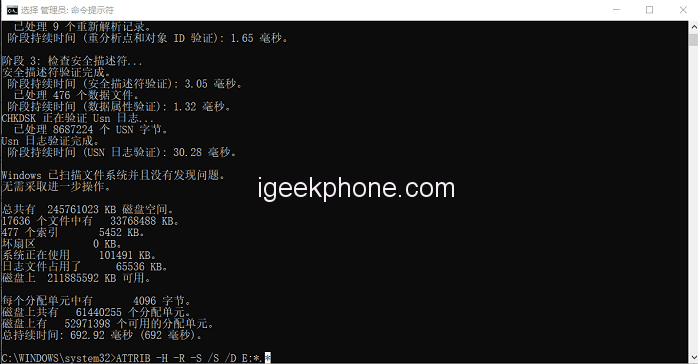
    Step 2: Enter the command “chkdsk #:” where “#” represents the drive letter assigned to your mobile hard disk. For example, if your computer displays the portable hard disk as drive E, replace “#” with E.

    Step 3: Enter the command “ATTRIB -H -R -S /S /D #:” where “#” represents the drive letter of the mobile hard disk. Press the Enter key to execute the command.
    Method 2: Recovering Mobile Hard Disk Data by Restoring to Previous Versions
    Your computer also has a feature that can help you recover data files in case of accidental deletion. However, this feature acts as a backup and recovery solution and needs to be enabled beforehand. Follow these steps:

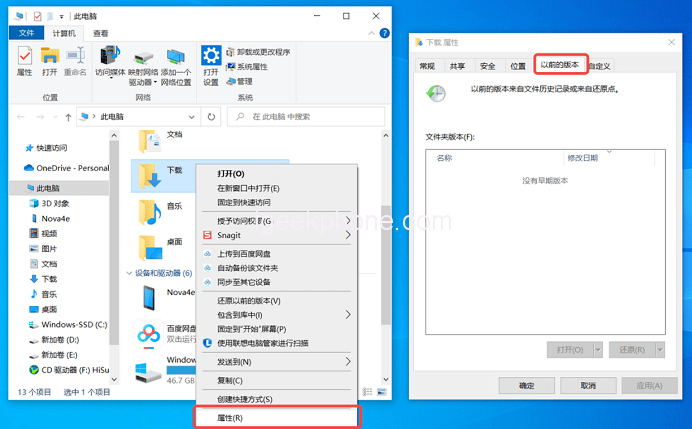
    Step 1: Double-click “This PC,” then right-click on the removable hard disk you want to restore.

    Step 2: Click the “Previous Versions” tab at the top to find various restore options below.

    Step 3: Choose an appropriate option and click “Restore.”

    Method 3: Using Data Recovery Software for Mobile Hard Disk Data Recovery
    If the above methods do not yield satisfactory results, you can use data recovery software to recover data from your mobile hard disk. We recommend using Niu Xuechang Data Recovery Tool, a professional software designed to address data loss issues in computers and storage devices. It offers simple operation, comprehensive scanning, and a high recovery success rate. Follow these steps to use Datawa Recovery Expert for mobile hard disk data recovery:

    Step 1: Download and install Tenorshare 4DDiG Windows Data Recovery Tool. On the main interface, select and save the location of the mobile hard disk where the lost files were stored. You can also choose a specific folder on the portable hard disk.

    Step 2: Scan and preview. Select the location of the mobile hard disk, choose the file types to be observed, and click the “Scan” button to initiate a thorough scan.

    Once the software completes the scan, it will list all deleted or hidden files found in the selected location. You can also organize them by file type by switching to “File View” in the right pane. Some items may have thumbnails; click “Preview” to view complete information.
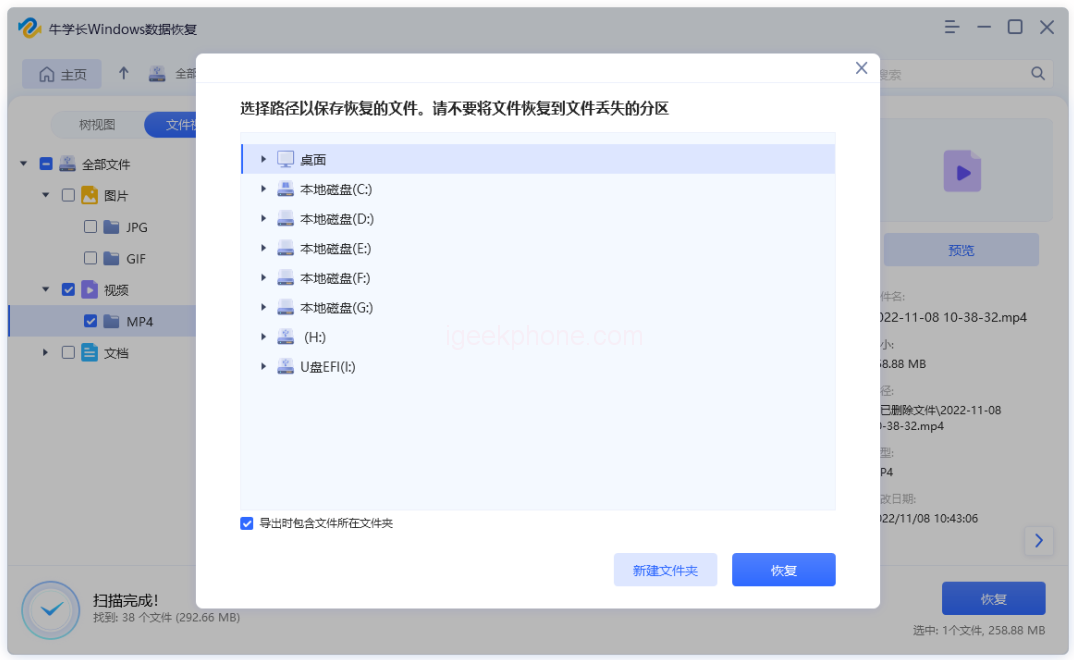
    Step 3: Select the files you wish to recover, choose a safe location for data recovery, and click the “Recover” button to save the recovered data.
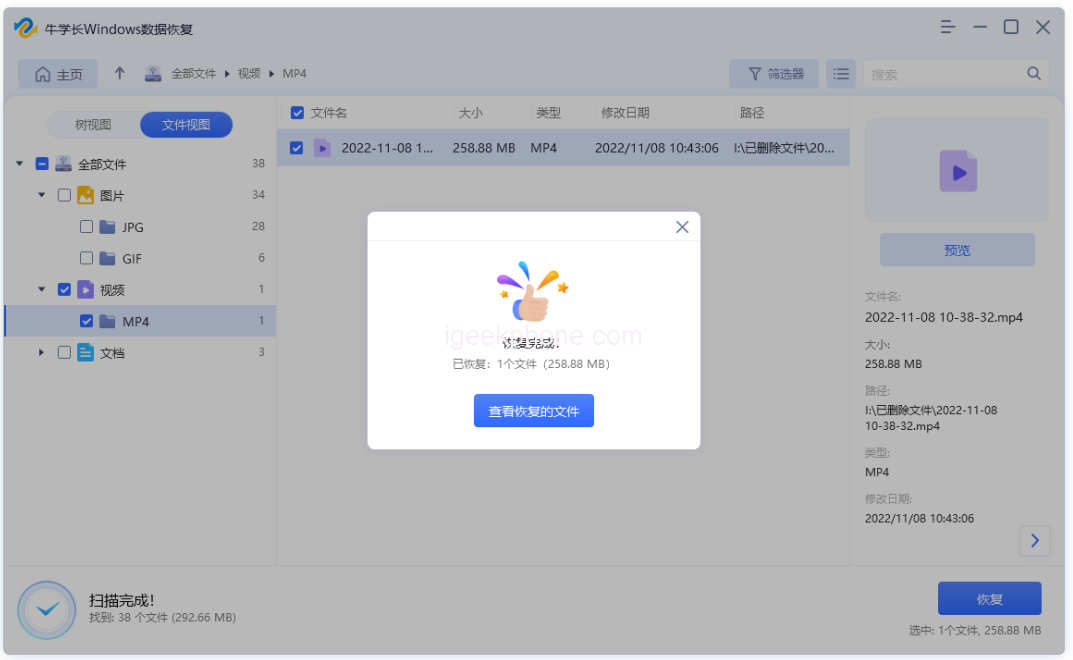
    NOTE: If the disk has been overwritten, resulting in permanent data loss, avoid saving the recovered data to the same partition.

    These are the three methods for mobile hard disk data recovery shared by the editor. They include using commands to restore data, restoring to previous versions, and employing data recovery software. Additionally, we recommend backing up all critical data in other locations on your computer to be prepared for emergencies.

    Read Also: How to Download Redmi Note 4G (dior) Global Fastboot & Recovery ROM

    Do not forget to follow us on our Facebook group and page to keep you always aware of the latest advances, News, Updates, review, and giveaway on smartphones, tablets, gadgets, and more from the technology world of the future.

    Share. Facebook Twitter Pinterest LinkedIn Tumblr Email

    Related Posts

    How Switching Providers Can Improve Your Internet Connection

    A Step-By-Step Guide on Changing the Default RDP Number

    The Growing Influence of Free Music and Video Search Tools in the Digital Era

    Leave A Reply Cancel Reply

    You must be logged in to post a comment.

    voopoo drag 6
    oxva xlim 3 ultra
    sp2s sen x disposable vape
    • Popular
    • 3D Printer REVIEW
    • XIAOMI
    April 18, 2026

    VOOPOO DRAG 6 Hands on Review: Vape Beast with Smart Power & Premium Control

    April 8, 2026

    OXVA NeXLIM vs XLIM Pro 2 Pod Hands-On Review (2026)

    March 16, 2026

    OXVA Slimstick VS OXVA Slimstick X Vape Hands-on Review

    March 5, 2026

    OXVA XLIM PRO 3 vs XLIM GO 2: Hands-On Review

    December 26, 2025

    ACMER ASCARVA 4S: Precision CNC Power for Makers, DIYers & Small Workshops

    June 23, 2024

    ACMER P2 20W Laser Engraver Fixed Focus Engraving: Hands on Review

    May 30, 2024

    xTool F1 Ultra Review: World’s First 20W Fiber & 20W Diode Laser Engraver

    May 30, 2024

    Anycubic Kobra 3 Combo Review: The Multicolor Masterpiece?

    April 30, 2026

    Xiaomi Gaming Mouse 2 officially Announced, equipped with the latest Pixart flagship sensor

    April 29, 2026

    Based on Android 17 Beta 2, the developer preview version of Xiaomi Hyper OS has been Released

    April 27, 2026

    It is Reported that a Certain Factory has Launched a 7-inch 2K Ultra-high Refresh Rate Straight Screen

    April 27, 2026

    Review: Is REDMI K90 MAX the Ultimate Gaming Phone in 2026?

    fc 26 coins
    New Arrivals
    • Lost Vape Thelema Go Pro Mod Kit Lost Vape Thelema Go Pro Mod Kit
    • Voopoo Argus Rise Vape Voopoo Argus Rise Vape
    • Lost Vape Thelema Q200 Pro Box Mod 200W Lost Vape Thelema Q200 Pro Box Mod 200W
    • Motorola Razr 70 Plus Motorola Razr 70 Plus
    • Motorola Razr Ultra 2026 Motorola Razr Ultra 2026
    • Realme 16x 5G Realme 16x 5G
    • SMOK Arco Nano Pod System Kit SMOK Arco Nano Pod System Kit
    • IPLAY SPARK 50k Disposable Pod IPLAY SPARK 50k Disposable Pod
    • vivo Y500s vivo Y500s
    About
  • Igeekphone.com provides the first global tech news and reviews about smartphone, vapes, e-cigar, smart home, 3D printers, e-bike,tablets, RC drones, VR headset, and other accessories. It's the best platform to improve your brand and product.
  • Contact us: info@igeekphone.com
  • Check Our Privacy Policy Here.
  • Note: *Right now we have US editor and EU editors for review, especially for Amazon US and EU.
  • *Shop and Compare Price Here*
  • Facebook
  • Youtube
  • OUR BEST VAPE PARTNERS
  • VAPE ONLINE STORE
  • HAYATI PRO MAX PLUS
  • VAPORESSO
  • VOOPOO
  • OXVA
  • NEXA
  • MASKKING
  • TODOO
  • SP2S
  • VEIIK
  • OTHER BEST PARTNERS
  • SVBONY
  • Chuwi
  • Blackview
  • Fossibot
  • Unihertz
  • Flsun
  • Anycubic
  • Xtool
  • Oukitel
  • Mukkpet Ebike
  • Ugreen
  • Copyright © 2026 igeekphone

    Type above and press Enter to search. Press Esc to cancel.