







Facebook Twitter Instagram
    Trending
    • Is It Legal to Buy and Use Nicotine Pouches in England?
    • EU “TPD3” Enters a New Phase as Fragmented E-Cigarette and Nicotine Pouch Rules Push Market Toward Regulatory Reconfiguration
    • From Its First Device in 2017 to a 48% Market Share in Korea: KT&G Reviews a Decade of Heated Tobacco Expansion at Seoul’s lil Archive
    • Xiaomi 18 Series Reportedly Set to Debut on September 24 With Snapdragon 8E6
    • GLM-5.3 Released: Zhishu Claims New Open-Source AI Leader With Major Gains in Coding and Agentic Tasks
    • KQ Eva In-Car Robot Launches for 799 Yuan, Featuring Type-C Power and 30+ Dynamic Expressions
    • Xiaomi 18 Rumored to Debut Snapdragon 8 Supreme Edition Gen 6, Starting Price Could Exceed 5,499 Yuan
    • Xiaomi HyperOS 4 Beta Rollout Begins: First Batch of Devices Now Receiving Update
    Facebook YouTube
    IGeeKphone China Phone, Tablet PC, VR, RC Drone News, Reviews
    • HOME
    • BREAKING NEWS
      • AI NEWS
    • Amazon
    • PHONE
      • Top Phones For Your First Choice
      • Phone Comparison
      • Xiaomi
      • Blackview
      • Doogee
      • Black Shark
      • Geekbuying
      • Banggood
      • TEMU
      • TikTok
      • Aliexpress
      • Walmart
      • MercadoLibre
      • Lazada
    • TOP VAPE Awards for 2026
    • VAPES
      • E-CIGAR Upcoming
      • Vape News
      • Vape Deals
      • Vape Comparison
      • Vape Guide
      • VAPE LAWS
      • Giveaway
    • BEST VAPE
      • Best Vape Stores
      • Best Starter Vape Kits
      • Best Vapes for Beginners
      • Best Disposable Vapes
      • Best Pod Systems
      • Best Pod Mod Vapes
      • Best Mods
      • Best Nicotine Pouches
      • Best Clearomizers/Tanks
      • Best E-Liquid
      • Best EGO/Pens
      • Best Vapes for Nic Salt E-Juice
      • Best Vapes to Quit Smoking
      • RDA vs. RDTA vs. RTA
    • Best Vape Brand 2026
      • VAPORESSO
      • VOOPOO
      • OXVA
      • NEXA BAR
      • MASKKING VAPE
      • SP2S
      • IPLAY
      • TODOO
      • MRFOG
      • LOSTVAPE
      • VEIIK
    • REVIEW
      • E-cigar Review
      • Phones
      • Tablet PC
      • TV Box
      • RC Drone
      • Wearables
      • Camera
      • Accessories
      • VR Headset
    • MORE
      • TABLET
        • Chuwi
        • INNOCN
        • Teclast
        • Top Tablet for Your First Choice
        • Tablet/Laptop Comparison
      • RC DRONE
      • CAMERA
      • WEARABLES
        • OneOdio
        • BlitzWolf
        • Top Smartwatch for First Choice
      • 3D PRINTER
        • 3D Printer Review
        • Anycubic
        • FLSUN
        • Xtool
        • LONGER
        • Top 3D printer to Choose First
      • POWER STATION
        • Oukitel
        • FOSSIBOT
      • GAMING
        • Top Gaming Products
      • E-BIKE
        • Samebike
        • Happyrun
        • ENGWE
      • SMART HOME
      • TV BOX
      • ACCESSORIES
      • VR HEADSET
      • CLOTHES
      • AUTO CAR
    • DEAL
    • Shop
    IGeeKphone China Phone, Tablet PC, VR, RC Drone News, Reviews
    You are at:Home»Apple»How to fix iPhone white apple error without losing data
    Apple

    How to fix iPhone white apple error without losing data

    HabibBy HabibAugust 3, 2024
    Facebook Twitter Pinterest LinkedIn Tumblr Email

    Due to insufficient memory on the iPhone and a lack of timely cleanup, software crashes can occur when attempting to open applications. In such instances, individuals often restart their phones to resolve the crashing issue. However, this can lead to a common problem, the “white apple” dilemma, preventing regular phone system access and hindering operations.

    iPhones displaying a white apple due to memory shortage are prevalent, ranking among the most frequent malfunctions observed with Apple devices.

    The term “white apple” denotes a situation where an iOS device experiences software and hardware failures, causing it to become stuck on a startup screen resembling the Apple logo. Depending on the iPhone’s color, the net can feature either a black apple against a white background or a white apple against a black background. This impairs the device’s ability to enter the mobile phone system and perform any functions.

    What steps should be taken when an iPhone fails to start due to insufficient memory? How can the white apple problem be resolved? To address this unique situation, consider the following two methods: the second method boasts a higher repair success rate.

    Method 1: Perform a Forced Restart
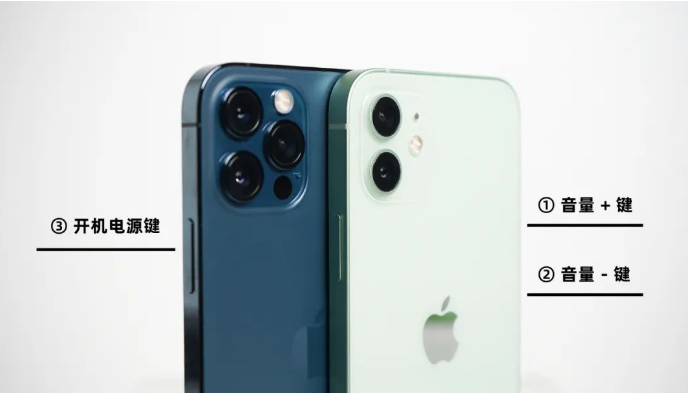
    When an iPhone experiences issues like a black screen, white apple, automatic restart, or crashes, attempting a forced restart is usually the initial step. An alternative approach can be adopted if routine booting procedures fail to rectify the problem.

    Distinct iPhone models necessitate different methods of performing a forced restart:

    Full-screen models (iPhone 8 and later): Swiftly press the volume up and volume down buttons and continue pressing the power button until the Apple logo emerges on the black iPhone screen. Then, release the buttons.
    iPhone 7, iPhone 7 Plus, and similar models: Simultaneously hold down the top (or side) button and the volume down button until the Apple logo appears on the black iPhone screen. Afterward, release the button.
    Models featuring a Home button (predating iPhone 7): Simultaneously press and hold the Home and Power buttons until the Apple logo materializes on the black iPhone screen. Subsequently, release both buttons.
    Method 2: Employ Specialized Repair Tools

    Utilizing specialized tools designed for repairing white apple issues can be highly effective. For instance, Niu Xuechang iPhone Repair Tool facilitates the resolution of black or white Apple problems and addresses over 150 other iOS system-related glitches. These include challenges like black screens, spinning black screens, recovery mode difficulties, and device loops of infinite restarts.

    Operating Instructions:

    Step 1: Launch Niu Xuechang’s Apple mobile phone repair tool and establish a connection between the device and the computer via a data cable. Click on “Fix iOS System Problems” directly.
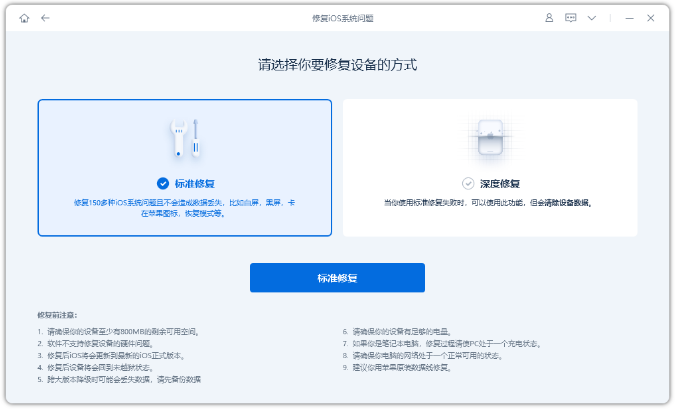
    Opt for the “Standard Repair” option initially, which preserves device data, while the “Deep Repair” alternative boasts a heightened success rate in repairs but necessitates data clearance.

    Step 2: When selecting “Standard Repair,” follow the software interface’s prompts to place the iPhone into recovery or DFU mode.
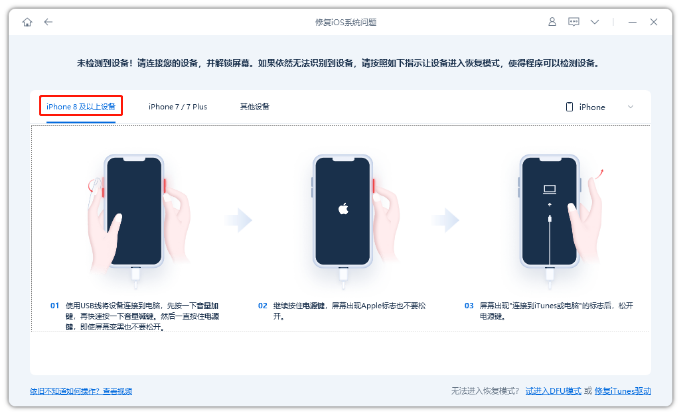
    In iPhone white Apple issues caused by memory inadequacies, DFU mode is recommended for a superior data recovery success rate.

    Step 3: After the software recognizes the device, click “Download Firmware,” then commence repairs once the firmware download concludes. The entire repair process typically takes around 10 minutes. It’s crucial not to disconnect the data cable during this period; wait for the “repair complete” notification.
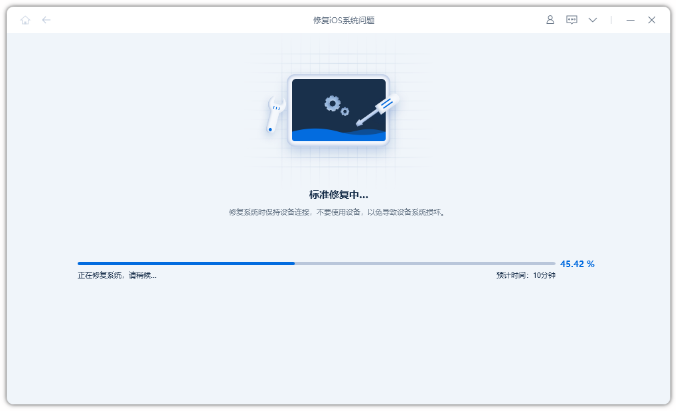
    Step 4: With the iOS system successfully repaired, if the device remains stuck on the white Apple screen and cannot initiate typically, consider performing standard repairs after entering DFU mode several times.
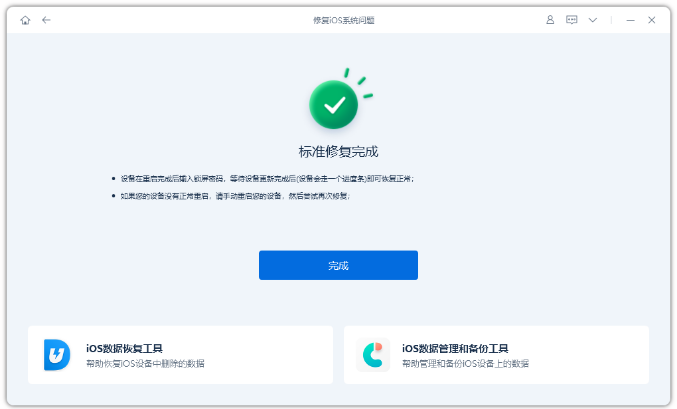
    Alternatively, you can directly proceed with a “deep repair,” which resolves the white apple issue by completely erasing the device’s data.

    Whether you own an iPhone or an iPad, encountering memory insufficiency necessitates prompt cleanup to avoid triggering inadequate memory and subsequent white Apple failures.

    Read Also: Wondering how to Unlink Your iPhone from your Apple ID

    Do not forget to follow us on our Facebook group and page to keep you always aware of the latest advances, News, Updates, review, and giveaway on smartphones, tablets, gadgets, and more from the technology world of the future.

    Share. Facebook Twitter Pinterest LinkedIn Tumblr Email

    Related Posts

    Xiaomi 18 Series Reportedly Set to Debut on September 24 With Snapdragon 8E6

    GLM-5.3 Released: Zhishu Claims New Open-Source AI Leader With Major Gains in Coding and Agentic Tasks

    KQ Eva In-Car Robot Launches for 799 Yuan, Featuring Type-C Power and 30+ Dynamic Expressions

    Leave A Reply Cancel Reply

    You must be logged in to post a comment.

    voopoopintch
    oxva nexlim 2
    sp2s sen x disposable vape
    • Popular
    • 3D Printer REVIEW
    • XIAOMI
    July 13, 2026

    OXVA Nexlim 2 Mini Pod Vape Hands on Review

    July 13, 2026

    OXVA Nexlim 2 Pod Vape Hands on Review

    June 21, 2026

    iPlay LUMO 8K Review – A Compact Prefilled Pod Kit with Big Flavor and Everyday Convenience

    June 21, 2026

    iPlay HOOLA 150K Review – A Cloud-Chasing Giant with Music, Modes & Massive Longevity

    December 26, 2025

    ACMER ASCARVA 4S: Precision CNC Power for Makers, DIYers & Small Workshops

    June 23, 2024

    ACMER P2 20W Laser Engraver Fixed Focus Engraving: Hands on Review

    May 30, 2024

    xTool F1 Ultra Review: World’s First 20W Fiber & 20W Diode Laser Engraver

    May 30, 2024

    Anycubic Kobra 3 Combo Review: The Multicolor Masterpiece?

    August 14, 2026

    Xiaomi 18 Series Reportedly Set to Debut on September 24 With Snapdragon 8E6

    August 14, 2026

    Xiaomi 18 Rumored to Debut Snapdragon 8 Supreme Edition Gen 6, Starting Price Could Exceed 5,499 Yuan

    August 14, 2026

    Xiaomi HyperOS 4 Beta Rollout Begins: First Batch of Devices Now Receiving Update

    August 13, 2026

    Xiaomi MIX Fold 5 Teased in HyperOS 4 Beta Poster, Hinting at the Company’s Next Large-Screen Foldable

    fc 26 coins
    New Arrivals
    • Pod Juice Tobacco Series E-juice Pod Juice Tobacco Series E-juice
    • Huawei Watch GT 7 Pro Huawei Watch GT 7 Pro
    • Huawei Watch GT 7 Huawei Watch GT 7
    • Vapetasia Better Salt Series E-juice Vapetasia Better Salt Series E-juice
    • JNR Mega Box Pro 50K Disposable Vape JNR Mega Box Pro 50K Disposable Vape
    • HQD SiSA 80K Hookah Disposable Vape HQD SiSA 80K Hookah Disposable Vape
    • VOZOL SWAP 70K Disposable Vape VOZOL SWAP 70K Disposable Vape
    • Oppo Reno16 F Oppo Reno16 F
    • Oppo Reno16c Oppo Reno16c
    About
  • Igeekphone.com provides the first global tech news and reviews about smartphone, vapes, e-cigar, smart home, 3D printers, e-bike,tablets, RC drones, VR headset, and other accessories. It's the best platform to improve your brand and product.
  • Contact us: info@igeekphone.com
  • Check Our Privacy Policy Here.
  • Note: *Right now we have US editor and EU editors for review, especially for Amazon US and EU.
  • *Shop and Compare Price Here*
  • Facebook
  • Youtube
  • OUR BEST VAPE PARTNERS
  • VAPE ONLINE STORE
  • VAPORESSO
  • VOOPOO
  • OXVA
  • NEXA
  • MASKKING
  • SP2S
  • IPLAY
  • TODOO
  • OTHER BEST PARTNERS
  • SVBONY
  • Chuwi
  • Blackview
  • Fossibot
  • Unihertz
  • Flsun
  • Anycubic
  • Xtool
  • Oukitel
  • Mukkpet Ebike
  • Ugreen
  • Copyright © 2026 igeekphone

    Type above and press Enter to search. Press Esc to cancel.