






Facebook Twitter Instagram
    Trending
    • JOYROOM PODIX 140W GaN Charger – Desktop Power Station for Modern Tech Setup
    • Mukiya Foldable 3-in-1 Magnetic Wireless Charging Station. One Stand, Total Apple Power!
    • Mukiya USB-C Laptop Docking Station Stand – 8-in-1 Productivity Hub with Built-In Ergonomics
    • BlitzWolf HL7 SmartWatch Now Available on Banggood at Just $39.99
    • FEXO 45000 vs Al Fakher Crown Bar: Which is Best for DTL Vaping?
    • Geek Bar CLR 50K Disposable Vape: A Comprehensive Review for Vaping Enthusiasts
    • New renderings of Google Pixel 10a smartphone unveiled: The raspberry color is eye-catching. The European version has a battery life of 53 hours and 14 minutes.
    • The detailed specifications of Nothing Phone (4a)/Pro have been revealed. The model offers the option of up to 12GB of RAM and 256GB of storage space.
    Facebook YouTube
    Login Register
    IGeeKphone China Phone, Tablet PC, VR, RC Drone News, Reviews
    • HOME
      • NEWS
        • DeepSeek
        • ChatGPT
        • Minecraft
    • Amazon
    • NEW YEAR
    • PHONE
      • Top Phones For Your First Choice
      • Phone Comparison
      • Xiaomi
      • Blackview
      • Doogee
      • Black Shark
      • Geekbuying
      • Banggood
      • TEMU
      • TikTok
      • Aliexpress
      • Walmart
      • MercadoLibre
      • Lazada
    • TOP VAPE Awards for 2026
    • VAPES
      • E-CIGAR Upcoming
      • Vape News
      • Vape Deals
      • Vape Comparison
      • Vape Guide
      • Giveaway
    • BEST VAPE
      • Best Vape Stores
      • Best Starter Vape Kits
      • Best Vapes for Beginners
      • Best Disposable Vapes
      • Best Pod Systems
      • Best Pod Mod Vapes
      • Best Mods
      • Best Nicotine Pouches
      • Best Clearomizers/Tanks
      • Best E-Liquid
      • Best EGO/Pens
      • Best Vapes for Nic Salt E-Juice
      • Best Vapes to Quit Smoking
      • RDA vs. RDTA vs. RTA
    • Best Vape Brand 2026
      • VAPORESSO
      • VOOPOO
      • OXVA
      • NEXA BAR
      • ORIONBARTECH
      • MASKKING VAPE
      • MEMERS
      • SP2S
      • JNR
      • TODOO
      • MRFOG
      • VEIIK
    • REVIEW
      • E-cigar Review
      • Phones
      • Tablet PC
      • TV Box
      • RC Drone
      • Wearables
      • Camera
      • Accessories
      • VR Headset
    • MORE
      • TABLET
        • Chuwi
        • INNOCN
        • Teclast
        • Top Tablet for Your First Choice
        • Tablet/Laptop Comparison
      • RC DRONE
      • CAMERA
      • WEARABLES
        • OneOdio
        • BlitzWolf
        • Top Smartwatch for First Choice
      • 3D PRINTER
        • 3D Printer Review
        • Anycubic
        • FLSUN
        • Xtool
        • LONGER
        • Top 3D printer to Choose First
      • POWER STATION
        • Oukitel
        • FOSSIBOT
      • GAMING
        • Top Gaming Products
      • E-BIKE
        • Samebike
        • Happyrun
        • ENGWE
      • SMART HOME
      • TV BOX
      • ACCESSORIES
      • VR HEADSET
      • CLOTHES
      • AUTO CAR
    • DEAL
    • Shop
    IGeeKphone China Phone, Tablet PC, VR, RC Drone News, Reviews
    You are at:Home»Guide»Deleted Photos Recovery on Xiaomi: A Step-by-Step Guide
    Guide

    Deleted Photos Recovery on Xiaomi: A Step-by-Step Guide

    HabibBy HabibDecember 4, 2025
    Facebook Twitter Pinterest LinkedIn Tumblr Email

    If you’ve encountered a situation where the photos on your Deleted Photos Recovery on Xiaomi may have been unintentionally deleted. However, don’t worry; there’s a chance to recover these photos. You can swiftly restore these photos to your album by locating the Xiaomi photo recycle bin. Just follow these steps on your Xiaomi mobile phone: Navigate to “Album” > “Settings” > “Recycle Bin.” This sequence will allow you to restore photos deleted within the last 30 days instantly. To restore specific photos, perform a long press on the desired images.

    What should you do if the deleted photos weren’t backed into the cloud? How can you go about retrieving deleted images in such cases? Well, you can use data recovery software to recover these lost photos.

    For instance, consider using the Niu Xuechang Android data recovery tool, which offers support for recovering data from over 6000 Android phones and tablets, including brands like Samsung, Huawei, Xiaomi, OPPO, HTC, Sony, LG, Motorola, ZTE, and Google.

    With a remarkable 90% success rate in data recovery, this tool can retrieve data lost due to various situations, including accidental file deletion, update failures, virus attacks, and more.

    Here’s a simple guide to performing Deleted Photos Recovery on Xiaomi using the Niu Xuechang Android Data Recovery Tool:
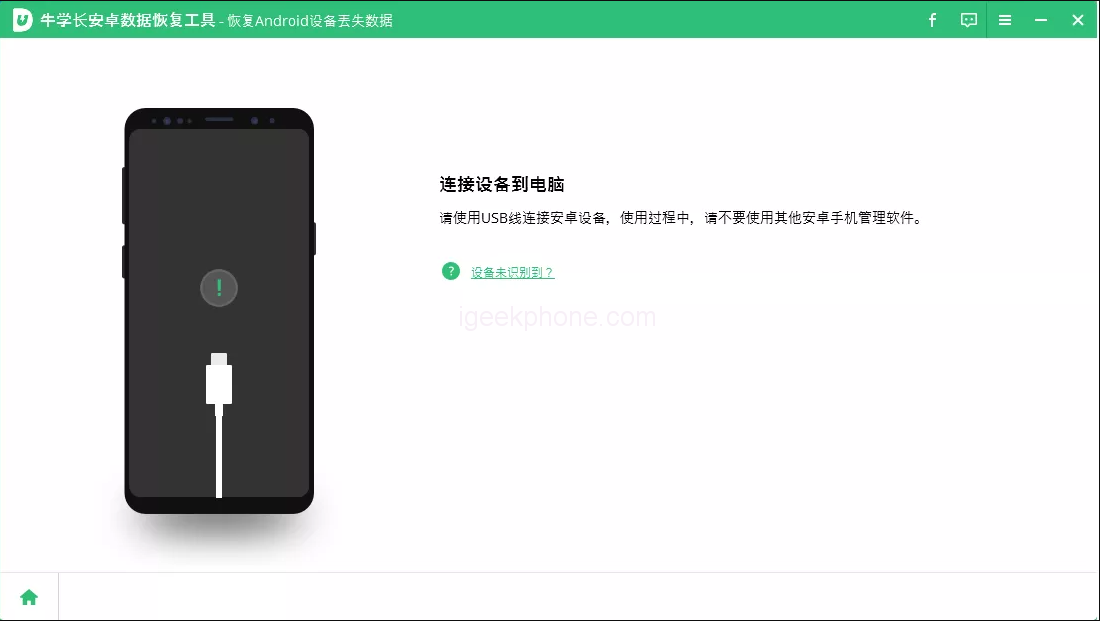

    1. Launch the Niu Xuechang Android Data Recovery Tool and choose “Recover Android Device Data” from the menu. Then, connect your Android device using a data cable.
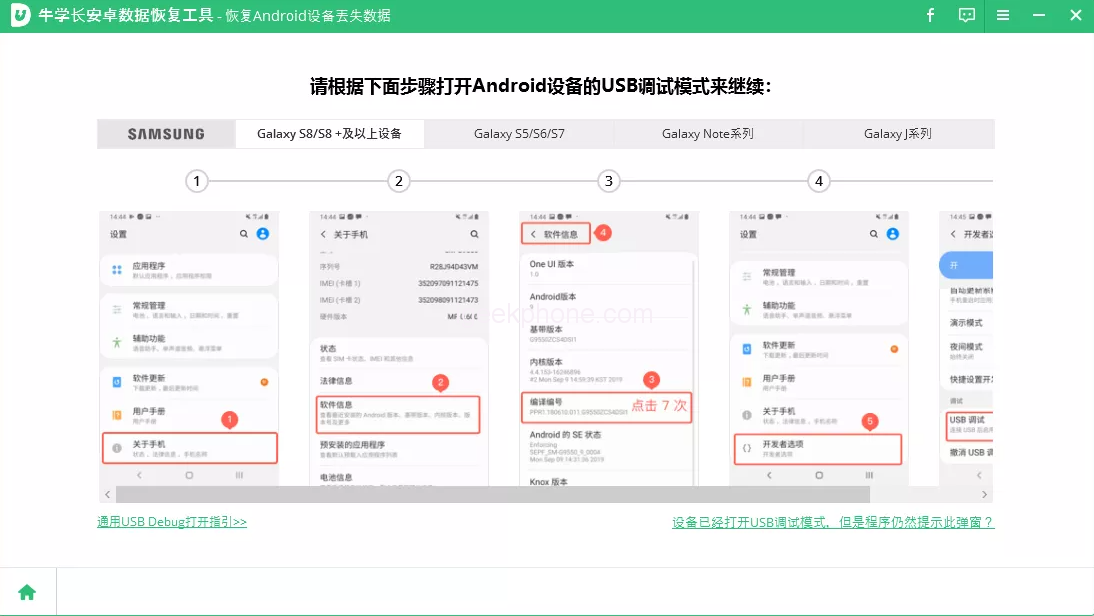
    2. Ensure that USB debugging is enabled on your Android phone. To help with USB debugging, go to Settings > USB setting > Change to “File Transfer” > Return to Settings > Search for “Version” > Tap “Version Number” seven times.
    3. If you encounter issues with enabling USB debugging or device connection, the buttons at the bottom can help. Follow the prompts provided.
    4. Once USB debugging is enabled, authenticate your device. When the authentication window appears on your device, click OK. If the window doesn’t appear, use the “Show Again” button within the program.
    5. Once your device is connected, the screen will display as shown below. Before clicking “Start” to initiate device scanning, select the types of files you wish to recover.
    6. After scanning, please review the list of files and preview any of them that interest you. This step allows you to choose the files you want to recover.
    7. Select the files you wish to recover, then click the “Recover” button to save the lost data to your computer. While contacts, text messages, and call logs will be saved as TXT, XML, and XLS files, photos, videos, and documents will retain their original formats.

    It’s incredibly straightforward to restore data on your Android phone. Suppose you’re facing data loss issues like accidentally deleted photos or missing WeChat data. In that case, the Niu Xuechang Android Data Recovery Tool can help you retrieve them with just a single click!

    Read Also: Huawei Watch GT 4 smartwatch is Bluetooth certified and preinstalled with HarmonyOS 4 system

    Do not forget to follow us on our Facebook group and page to keep you always aware of the latest advances, News, Updates, review, and giveaway on smartphones, tablets, gadgets, and more from the technology world of the future.

    Share. Facebook Twitter Pinterest LinkedIn Tumblr Email

    Related Posts

    Detect, Defend, and Secure: Leveraging ARP Inspection for Robust Network Protection

    How to Optimize Your Website

    How to Download Wallpapers for Phone with Imaget?

    Leave A Reply Cancel Reply

    You must be logged in to post a comment.

    voopoo Cyph NAVI kit
    oxva xlim 3 ultra
    sp2s sen x disposable vape
    jnr 100k
    • Popular
    • 3D Printer REVIEW
    • XIAOMI
    February 8, 2026

    VOOPOO VMATE i2 vs i3: Hands-On Comparison Review

    February 2, 2026

    Voopoo Drag X3 vs Drag X2: Hands-On Comparison Review

    January 21, 2026

    VOOPOO ARGUS P3 VS ARGUS P2: Which Square Pod Suits You?

    January 21, 2026

    VOOPOO Drag X3 vs VOOPOO Drag X2: Hands-On Comparison

    December 26, 2025

    ACMER ASCARVA 4S: Precision CNC Power for Makers, DIYers & Small Workshops

    June 23, 2024

    ACMER P2 20W Laser Engraver Fixed Focus Engraving: Hands on Review

    May 30, 2024

    xTool F1 Ultra Review: World’s First 20W Fiber & 20W Diode Laser Engraver

    May 30, 2024

    Anycubic Kobra 3 Combo Review: The Multicolor Masterpiece?

    February 9, 2026

    Xiaomi 18 is the world’s first! The cost of Qualcomm Snapdragon 8 Elite Gen 6 Pro is outrageously high

    February 6, 2026

    Xiaomi 17 Ultra will make its debut at MWC: The battery capacity of the international version has been reduced to 6000mAh.

    February 4, 2026

    Xiaomi Hyper OS 4 undergoes a major upgrade: Completely eliminates old code and boosts smoothness.

    February 2, 2026

    The new 6.59-inch mid-to-high-end model of a Certain factory is tentatively scheduled to be released in the first half of this year. It is expected to be under the brand of Xiaomi.

    fc 26 coins
    New Arrivals
    • Geek Bar CLR 50K Disposable Vape Geek Bar CLR 50K Disposable Vape
    • Redmi Turbo 5 Max Redmi Turbo 5 Max
    • OnePlus Turbo 7 OnePlus Turbo 7
    • Doogee S300 Ultra Doogee S300 Ultra
    • iQOO 15R iQOO 15R
    • VOOPOO NAVI X Cyph 80K Disposable Vape Kit VOOPOO NAVI X Cyph 80K Disposable Vape Kit
    • OXVA Slim Stick X Vape OXVA Slim Stick X Vape
    • Geek Bar Somax 80K Disposable Vape Geek Bar Somax 80K Disposable Vape
    • Geek Bar Clio Platinum 50K Disposable Vape Kit Geek Bar Clio Platinum 50K Disposable Vape Kit
    About
  • Igeekphone.com provides the first global tech news and reviews about smartphone, vapes, e-cigar, smart home, 3D printers, e-bike,tablets, RC drones, VR headset, and other accessories. It's the best platform to improve your brand and product.
  • Contact us: info@igeekphone.com
  • Check Our Privacy Policy Here.
  • Note: *Right now we have US editor and EU editors for review, especially for Amazon US and EU.
  • *Shop and Compare Price Here*
  • Facebook
  • Youtube
  • OUR BEST VAPE PARTNERS
  • VAPE ONLINE STORE
  • HAYATI PRO MAX PLUS
  • VAPORESSO
  • VOOPOO
  • OXVA
  • NEXA
  • MASKKING
  • LOSTVAPE ORIONBAR
  • MEMERS
  • TODOO
  • SP2S
  • JNR
  • VEIIK
  • OTHER BEST PARTNERS
  • SVBONY
  • Chuwi
  • Blackview
  • Fossibot
  • Unihertz
  • Flsun
  • Anycubic
  • Xtool
  • Oukitel
  • Mukkpet Ebike
  • Ugreen
  • Copyright © 2026 igeekphone

    Type above and press Enter to search. Press Esc to cancel.