







Facebook Twitter Instagram
    Trending
    • JNR Falcon-X⁺ Review: Precision, Power & Pure Convenience
    • How to Keep Your Rummy Skills Sharp
    • Uwell Caliburn G5 Lite SE Pod System Kit Review: Premium Simplicity Refined
    • Uwell Caliburn G5 Lite KOKO Pod System Kit Review: Compact Power, Uncompromised Flavor
    • Uwell Caliburn G5 Lite Pod System Kit Review: Refined Simplicity, Unmatched Flavor
    • Quantum AI App, Useful or Not?
    • How to Troubleshoot and Fix a Vape That Won’t Charge?
    • How to Troubleshoot iPhone Personal Hotspot Issues
    Facebook YouTube
    Login Register
    IGeeKphone China Phone, Tablet PC, VR, RC Drone News, Reviews
    • HOME
      • NEWS
        • DeepSeek
        • ChatGPT
        • Minecraft
    • Amazon
    • CHRISTMAS
    • PHONE
      • Top Phones For Your First Choice
      • Phone Comparison
      • Xiaomi
      • Blackview
      • Unihertz
      • Doogee
      • Black Shark
      • Geekbuying
      • Banggood
      • TEMU
      • TikTok
      • Aliexpress
      • Walmart
      • Newegg
      • MercadoLibre
      • Lazada
    • TOP VAPE Awards for 2025
    • VAPES
      • E-CIGAR Upcoming
      • Vape News
      • Vape Market Trend
      • Vape Deals
      • Expo News
      • Vape Comparison
      • Vape Guide
        • Guide For Beginners
        • Guide for Best Users
      • Giveaway
    • BEST VAPE
      • Best Vape Stores
      • Best Starter Vape Kits
      • Best Vapes for Beginners
      • Best Disposable Vapes
      • Best Pod Systems
      • Best Pod Mod Vapes
      • Best Mods
      • Best Nicotine Pouches
      • Best Clearomizers/Tanks
      • Best E-Liquid
      • Best EGO/Pens
      • Best Vapes for Nic Salt E-Juice
      • Best Vapes to Quit Smoking
      • RDA vs. RDTA vs. RTA
    • Best Vape Brand 2025
      • VAPORESSO
      • VOOPOO
      • OXVA
      • NEXA BAR
      • ORIONBARTECH
      • MASKKING VAPE
      • VEIIK
      • MEMERS
      • SP2S
      • JNR
      • TODOO
      • MRFOG
    • REVIEW
      • E-cigar Review
      • Phones
      • Tablet PC
      • TV Box
      • RC Drone
      • Wearables
      • Camera
      • Accessories
      • VR Headset
    • MORE
      • 3D PRINTER
        • 3D Printer Review
        • Anycubic
        • FLSUN
        • Xtool
        • LONGER
        • Top 3D printer to Choose First
      • TREND
      • CLOTHES
      • AUTO CAR
      • POWER STATION
        • Oukitel
        • FOSSIBOT
      • GAMING
        • Top Gaming Products
      • E-BIKE
        • Samebike
        • Happyrun
        • ENGWE
      • TABLET
        • Chuwi
        • INNOCN
        • Teclast
        • Top Tablet for Your First Choice
        • Tablet/Laptop Comparison
      • WEARABLES
        • OneOdio
        • BlitzWolf
        • Top Smartwatch for First Choice
      • SMART HOME
      • TV BOX
        • Chuwi mini pc
        • Beelink
        • GMKTEC
        • MOREFINE
      • RC DRONE
        • DJI
        • MJX
        • JJRC
        • Hubsan
        • Top RC Drone
      • CAMERA
        • Gopro
        • Insta360
        • Andoer
      • ACCESSORIES
      • VR HEADSET
      • ROM
        • SAMSUNG
        • XIAOMI
        • ASUS
        • MEIZU
        • LENOVO
        • HUAWEI
        • ONEPLUS
        • ZTE
        • UMIDIGI
        • DOOGEE
        • HOMTOM
        • ELEPHONE
        • ULEFONE
        • BLACKVIEW
        • VERNEE
        • LEAGOO
        • CHUWI
        • TECLAST
        • PIPO
        • TV BOX ROM
    • DEAL
    • Shop
    IGeeKphone China Phone, Tablet PC, VR, RC Drone News, Reviews
    You are at:Home»Guide»How to Perform iPhone to iPhone Transfer with One Click
    Guide

    How to Perform iPhone to iPhone Transfer with One Click

    Brady CottonBy Brady CottonSeptember 16, 2025
    Facebook Twitter Pinterest LinkedIn Tumblr Email

    Why Do You Want to Transfer Data from iPhone to iPhone?

    In the era of digitalization, the iPhone has become an indispensable partner. It records our life and saves a lot of files and data, at the same time, we have higher and higher expectations for data transfer and sharing. Below are several common situations that may prompt you to transfer data from one iPhone to another:

    New Device Migration: When you buy a new iPhone, you usually want to smoothly transfer old iPhone to new iPhone, so that you can continue to enjoy videos, photos, contacts and other information seamlessly.

    Important Data Sharing: In a family or team environment, you may want to share certain data, such as contacts, videos, or photos, to ensure everyone has easy access to key information.

    Multiple Devices Synchronization: For users who use multiple iOS devices, it is very important to ensure that the data on these devices remains in sync. This ensures that changes made on one device are reflected on other devices.

    Easiest and Fastest iPhone to iPhone Transfer Tool – FoneTool

    Whether it’s from an old device to a new one, or syncing data between multiple devices, performing iPhone to iPhone transfer is a fairly common and necessary operation. FoneTool, as an excellent iPhone transfer software, provides iPhone users with an effortless and seamless data transfer experience.

    Why do you choose FoneTool?

    Easy to use: It is designed with a user-friendly interface, you can share your data with a few simple clicks.

    Fast transfer speed: FoneTool offers significantly faster transfer speeds, allowing you to swiftly transition to a new iPhone.

    1-Click transfer: You can transfer everything from one iPhone to another with just one click.

    Selectively transfer: FoneTool supports you in transferring specific files from iPhone to iPhone/iPad/PC, including photos, videos, contacts, music, messages, etc.

    100% safe and reliable: With the USB cable, you can stably transfer any data without losing and damaging it.

    Wide compatibility: It supports all iOS versions, including the latest iOS, iPhone/iPad/iPod, etc.

    How to One-Click Transfer iPhone to iPhone with FoneTool

    If you switch your old iPhone to a new iPhone, install FoneTool and follow the below steps to accomplish iOS data transfer with ease.

    Step 1. Connect both iPhones to the computer by USB cables > Open FoneTool.

    Step 2. Go to Phone Transfer on the left pane > Choose iPhone to iPhone > Tap Start Transfer.
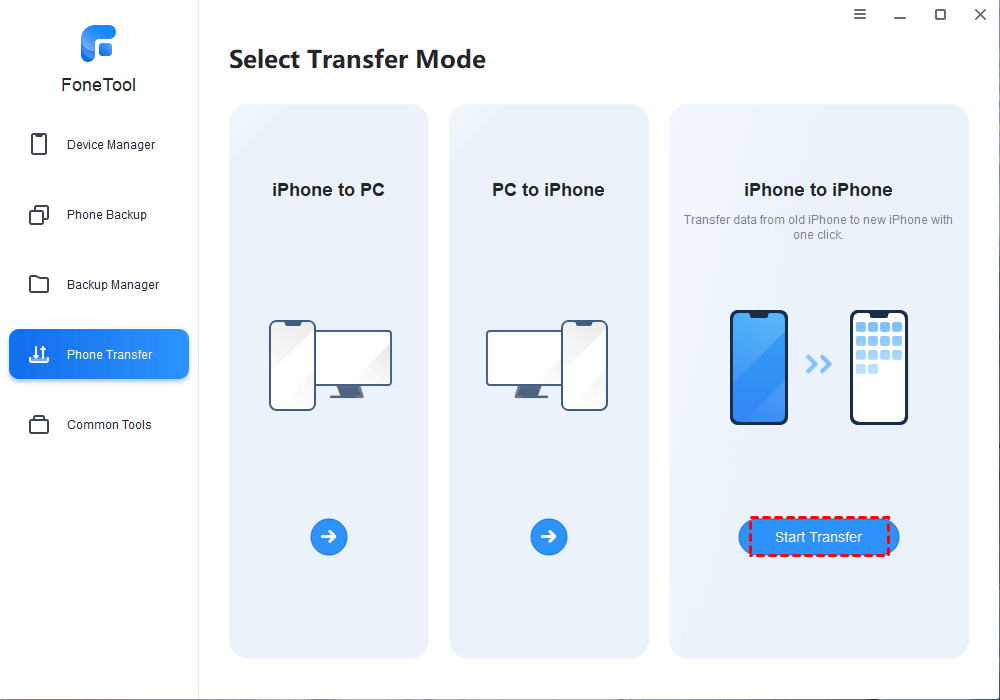
    Tip: If you want to transfer data between iPhone and PC, you can click iPhone to PC or PC ti iPhone.

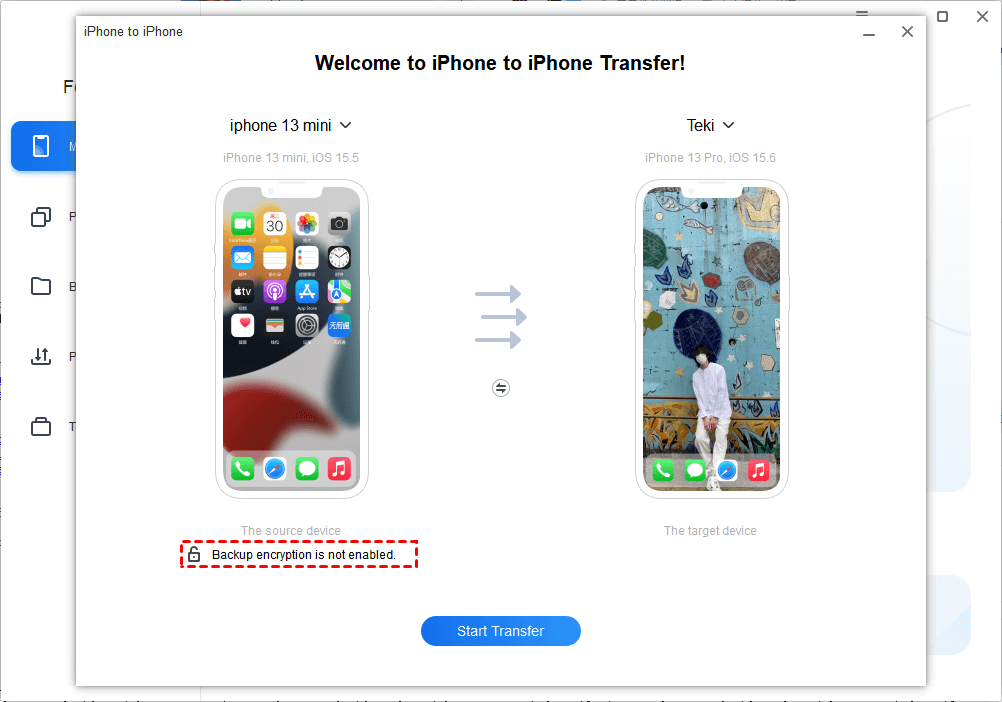
    Step 3. Then you can see the target iPhone and the source iPhone on the windows > Encrypt the transfer option if you need.
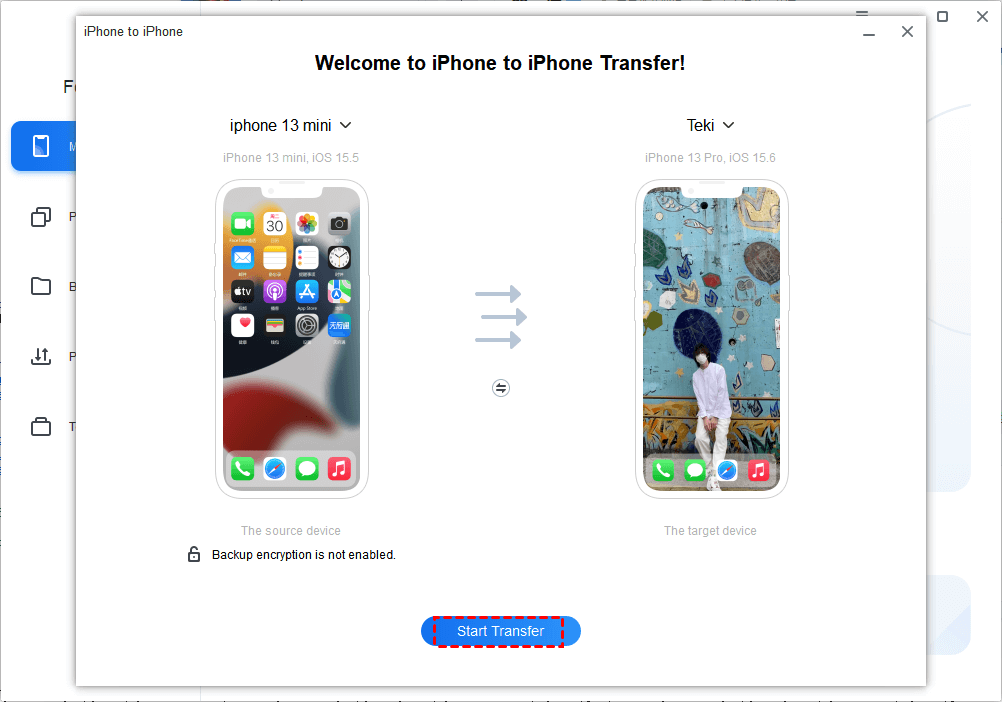
    Step 4. Click Start Transfer to make the process.
    In addition to one-click transmission, FoneTool also provides more powerful features to meet the diverse needs of users. Such as iPhone Data backup, iCloud management, iPhone data erase and other functions.

    What to do with your old iPhone?

    If you want to sell your old iPhone, you can use FoneTool to factory reset your iPhone to avoid data leaks. Only with 4 steps, you can permanently erase everything on the iPhone. Below is the Guide:

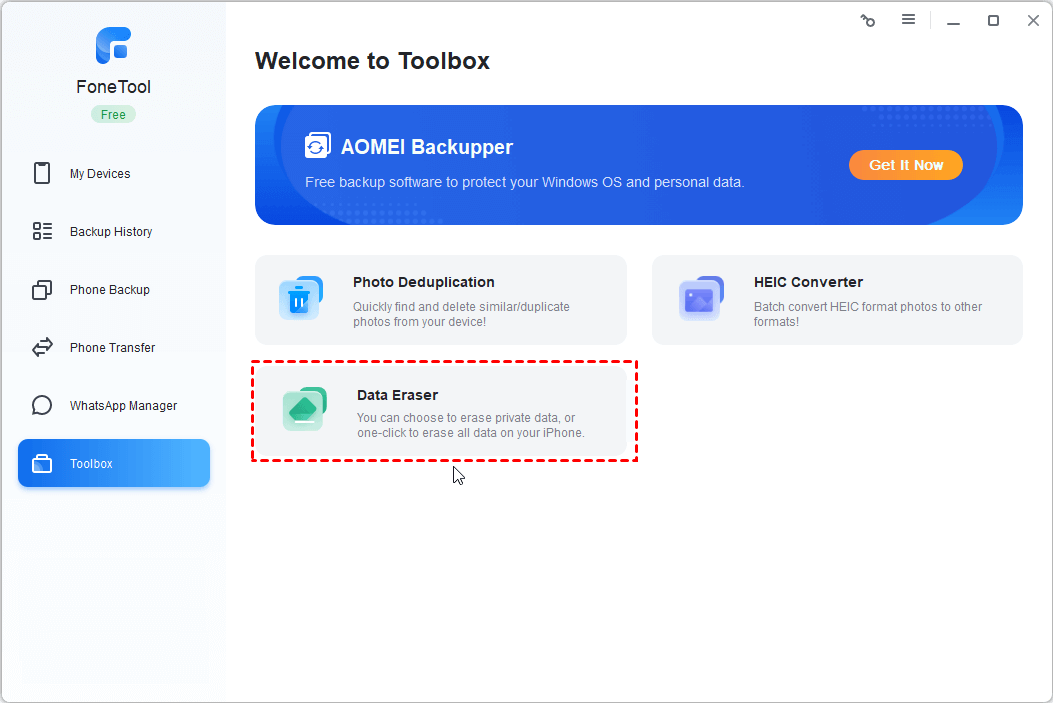
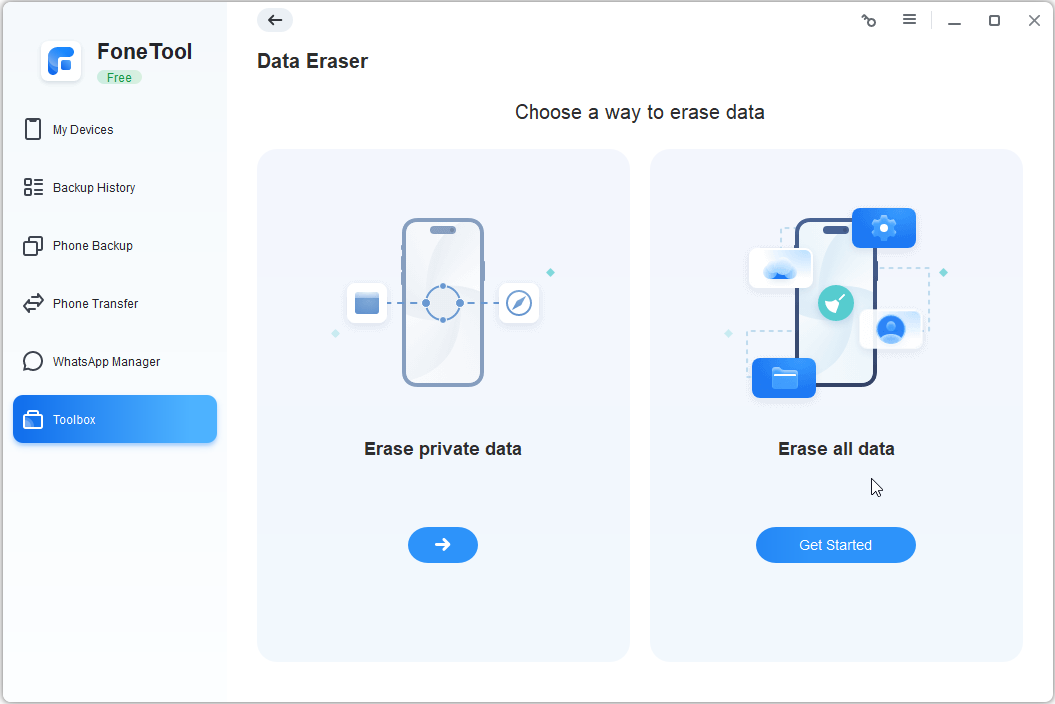
    Step 1. Launch the FoneTool and click Toolbox > Choose Data Eraser.

    Step 2. Under the Erase all data > Click Get Started. Also, FoneTool also supports you selectively Erase privacy data, like deleting photos, music, videos, contacts, messages, call history, notes, calender, Safari bookmarks,Safari history, etc.
    Step 3. Check the option “I am aware of the consequences of erasing data and I am sure I want to erase it” and “Automatically active the device and skips the setup wizard”> To make sure that the data will not be restored, you can select the “Enable DeepErase technology” to prevent data recovery.
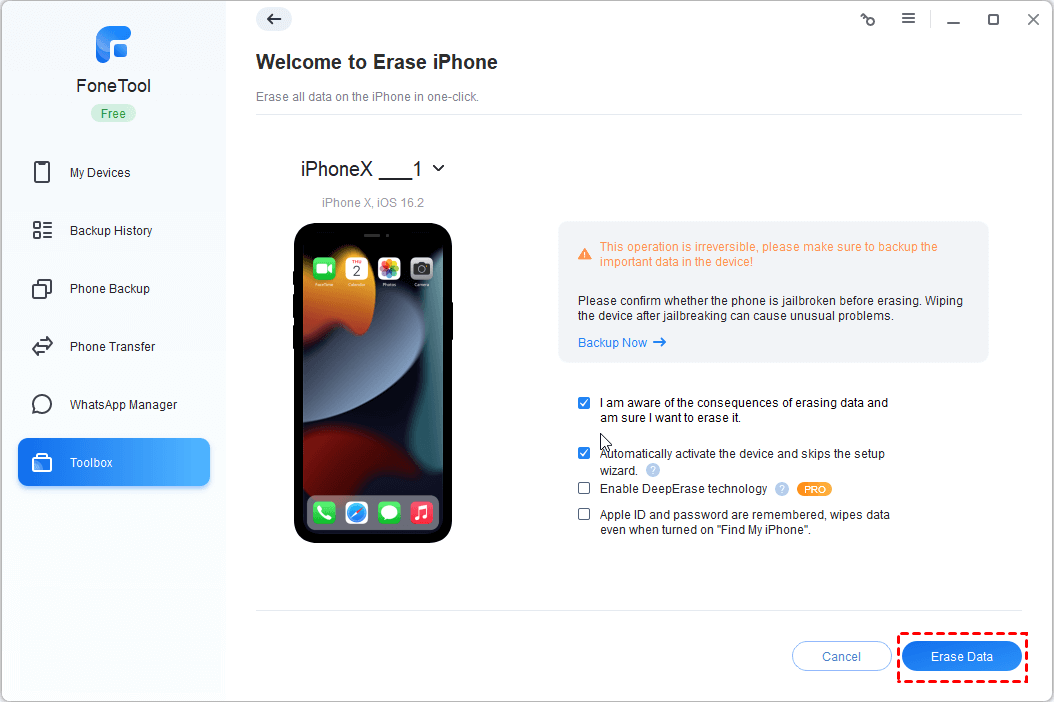
    Step 4. Click Erase Data button to confirm to erase all data and settings on your old iPhone.

    Conclusion

    When we have high requirements for data sharing and transmission between devices, an effective solution has become crucial. FoneTool, with its easy and efficient features, is an ideal choice for solving iPhone to iPhone transfer problems. No longer bother with tedious operations, you can enjoy high-speed, safe and reliable data transmission services with just one click. Choose FoneTool to take your iPhone use experience to a higher level.

    Share. Facebook Twitter Pinterest LinkedIn Tumblr Email

    Related Posts

    Quantum AI App, Useful or Not?

    How to Troubleshoot iPhone Personal Hotspot Issues

    The Battery Capacity of Samsung Galaxy Buds4/Pro Headphones has been Exposed: 42mAh and 57mAh

    Leave A Reply Cancel Reply

    You must be logged in to post a comment.

    voopoo drag s3
    oxva xlim go 2
    sp2s sen x disposable vape
    jnr 100k
    • Popular
    • 3D Printer REVIEW
    • XIAOMI
    November 23, 2025

    VOOPOO DRAG X3 – Big Battery, Smart Tech, Pod-Mod Powerhouse (Review)

    November 23, 2025

    VOOPOO VINCI S: Pocket-Power Pod with a 2,000 mAh Heart — Big Battery, Simple Use (Review)

    November 19, 2025

    OXVA XLIM PRO 3 Pod Vape Quick Hands-on Review (Video Test Included)

    November 19, 2025

    OXVA XLIM 3 Ultra Pod Vape: Hands-on Review (Video Test Included)

    June 23, 2024

    ACMER P2 20W Laser Engraver Fixed Focus Engraving: Hands on Review

    May 30, 2024

    xTool F1 Ultra Review: World’s First 20W Fiber & 20W Diode Laser Engraver

    May 30, 2024

    Anycubic Kobra 3 Combo Review: The Multicolor Masterpiece?

    May 15, 2024

    SCULPFUN SF-A9 40W Laser Engraver Cutting Machine: Hands On Review

    December 2, 2025

    Xiaomi REDMI Turbo5 Pro phone will be launched before the Spring Festival, equipped with the only flagship chip in its class

    December 2, 2025

    Xiaomi has Released REDMI TV X55/65/75 2026: Mini LED starts at only 2,499 yuan

    November 28, 2025

    The Exclusive Camera Handle of Xiaomi 17 Ultra has passed the 3C certification and can be used as a power bank

    November 27, 2025

    Code name “Nezha” : Xiaomi 17 Ultra phone exposed, with a triple rear camera setup

    fc 26 coins
    New Arrivals
    • Uwell Caliburn G5 Lite SE Pod System Kit Uwell Caliburn G5 Lite SE Pod System Kit
    • Uwell Caliburn G5 Lite KOKO Pod System Kit Uwell Caliburn G5 Lite KOKO Pod System Kit
    • Uwell Caliburn G5 Lite Pod System Kit Uwell Caliburn G5 Lite Pod System Kit
    • Freeton Trimax 60k Disposable Vape Freeton Trimax 60k Disposable Vape
    • Smoant Pasito 3 Vape Smoant Pasito 3 Vape
    • Yocan Flat 2.0 series Yocan Flat 2.0 series
    • Snowplus Swift Pod Vape Snowplus Swift Pod Vape
    • Innokin EZ LEVA PCC Pod Kit Innokin EZ LEVA PCC Pod Kit
    • VANMO VM60000 DISPOSABLE VANMO VM60000 DISPOSABLE
    About
  • Igeekphone.com provides the first global tech news and reviews about smartphone, vapes, e-cigar, smart home, 3D printers, e-bike,tablets, RC drones, VR headset, and other accessories. It's the best platform to improve your brand and product.
  • Contact us: info@igeekphone.com
  • Check Our Privacy Policy Here.
  • Note: *Right now we have US editor and EU editors for review, especially for Amazon US and EU.
  • *Shop and Compare Price Here*
  • Facebook
  • Youtube
  • OUR BEST VAPE PARTNERS
  • VAPE ONLINE STORE
  • HAYATI PRO MAX PLUS
  • VAPORESSO
  • VOOPOO
  • OXVA
  • NEXA
  • MASKKING
  • LOSTVAPE ORIONBAR
  • VEIIK
  • MEMERS
  • TODOO
  • SP2S
  • JNR
  • OTHER BEST PARTNERS
  • SVBONY
  • Chuwi
  • Blackview
  • Fossibot
  • Unihertz
  • Flsun
  • Anycubic
  • Xtool
  • Oukitel
  • Mukkpet Ebike
  • Ugreen
  • Copyright © 2025 igeekphone

    Type above and press Enter to search. Press Esc to cancel.