







Facebook Twitter Instagram
    Trending
    • Top Benefits of Using the SVBONY SVN O1 in Office and Classroom Settings
    • SP2S SEN X VS Geekvape Wenax M2 Leather Edition 2.0 Quick Comparsion
    • Dojo Purex 60K VS Maskking UCEE MAX 60K Quick Comparison Review
    • ANGWATT C1 PRO Electric Scooter Review-Dual‑Motor Power Meets Long‑Range Urban Mobility
    • BlitzWolf® BW-BTS8 Lite Bluetooth Earbuds Review: The Ultimate Blend of Innovation and Performance
    • DJI LITO 1 15KM FPV RC Drone Review: 4K HDR Video, Omnidirectional Obstacle Sensing, and Long-Range Flight
    • Nexa Ultra 50K II Disposable Vape vs. Remit Solar 50K Disposable Vape Review-Which One Should You Pick?
    • VOOPOO ARGUS G3 Mini vs ARGUS Matrix: Which Pod Vape Is Right for You?
    Facebook YouTube
    IGeeKphone China Phone, Tablet PC, VR, RC Drone News, Reviews
    • HOME
      • NEWS
        • DeepSeek
        • ChatGPT
        • Minecraft
    • Amazon
    • PHONE
      • Top Phones For Your First Choice
      • Phone Comparison
      • Xiaomi
      • Blackview
      • Doogee
      • Black Shark
      • Geekbuying
      • Banggood
      • TEMU
      • TikTok
      • Aliexpress
      • Walmart
      • MercadoLibre
      • Lazada
    • TOP VAPE Awards for 2026
    • VAPES
      • E-CIGAR Upcoming
      • Vape News
      • Vape Deals
      • Vape Comparison
      • Vape Guide
      • Giveaway
    • BEST VAPE
      • Best Vape Stores
      • Best Starter Vape Kits
      • Best Vapes for Beginners
      • Best Disposable Vapes
      • Best Pod Systems
      • Best Pod Mod Vapes
      • Best Mods
      • Best Nicotine Pouches
      • Best Clearomizers/Tanks
      • Best E-Liquid
      • Best EGO/Pens
      • Best Vapes for Nic Salt E-Juice
      • Best Vapes to Quit Smoking
      • RDA vs. RDTA vs. RTA
    • Best Vape Brand 2026
      • VAPORESSO
      • VOOPOO
      • OXVA
      • NEXA BAR
      • ORIONBARTECH
      • MASKKING VAPE
      • MEMERS
      • SP2S
      • TODOO
      • MRFOG
      • VEIIK
    • REVIEW
      • E-cigar Review
      • Phones
      • Tablet PC
      • TV Box
      • RC Drone
      • Wearables
      • Camera
      • Accessories
      • VR Headset
    • MORE
      • TABLET
        • Chuwi
        • INNOCN
        • Teclast
        • Top Tablet for Your First Choice
        • Tablet/Laptop Comparison
      • RC DRONE
      • CAMERA
      • WEARABLES
        • OneOdio
        • BlitzWolf
        • Top Smartwatch for First Choice
      • 3D PRINTER
        • 3D Printer Review
        • Anycubic
        • FLSUN
        • Xtool
        • LONGER
        • Top 3D printer to Choose First
      • POWER STATION
        • Oukitel
        • FOSSIBOT
      • GAMING
        • Top Gaming Products
      • E-BIKE
        • Samebike
        • Happyrun
        • ENGWE
      • SMART HOME
      • TV BOX
      • ACCESSORIES
      • VR HEADSET
      • CLOTHES
      • AUTO CAR
    • DEAL
    • VAPE LAWS
    • Shop
    IGeeKphone China Phone, Tablet PC, VR, RC Drone News, Reviews
    You are at:Home»Guide»How to Run Ezviv on Windows and Mac
    Guide

    How to Run Ezviv on Windows and Mac

    Brady CottonBy Brady CottonMarch 11, 2024
    Facebook Twitter Pinterest LinkedIn Tumblr Email

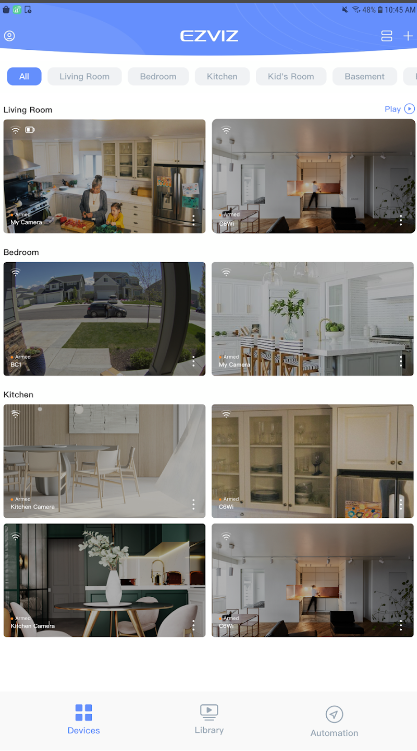
    The EZVIZ game is not a traditional game, but rather a mobile app designed for security purposes. It works with EZVIZ Security Cameras and Smart Home products. With this app, you can remotely manage your cameras and smart devices from anywhere in the world. Features include live streaming, night vision, playback of recorded videos, two-way audio communication, motion detection alerts, customization of detection zones, scheduling recordings, and device sharing with friends and family for enhanced home and business security.

    High-definition live stream viewing.

    Imagine this: you can see what your security camera sees, but in super clear detail! That’s what the first feature is all about. When you open the EZVIZ app, you get this amazing high-definition live stream. It’s like having a live window to your camera, but it’s right on your phone. You can check in on your home or business from anywhere, and everything looks so crisp and clear. It’s like bringing your camera’s view right into the palm of your hand!
    Infrared night vision with IR light.

    This feature is like magic for your camera – when it gets dark, this special thing called infrared night vision kicks in. It’s like a secret superpower for your camera, letting you see everything even in the dark. No need to worry about things going bump in the night – your camera’s got it covered with its own invisible flashlight, making sure you can still keep an eye on things when the lights are out.

    Playback of recorded videos via CloudPlay or SD card.

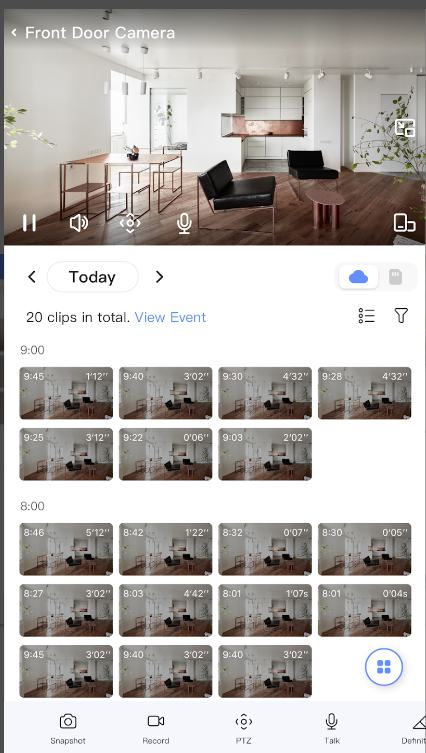
    So, this cool thing with EZVIZ is that you can watch recorded videos anytime. It’s like having a personal time machine for your security camera footage! Whether it’s CloudPlay or your trusty SD card, you can play back the moments you’ve missed. Imagine catching that funny pet moment or checking who rang your doorbell when you were away.
    Two-way audio communication.

    This feature called Two-Way Audio is pretty cool. It’s like having a mini walkie-talkie with your security camera. Imagine you can not only see what’s happening but also talk through your camera to anyone on the other side. It’s great for saying a quick hello to delivery folks or scaring away unexpected visitors.

    Instant motion detection alerts with customization options.

    I bet you might not have come across such a feature. You can customize it, so you only get alerts for the areas you care about. It’s like having an extra set of eyes on your home, giving you peace of mind. Plus, you can adjust the sensitivity to make sure you’re getting just the right amount of alerts.

    How to download Ezviv on a PC or Laptop

    Looking to enhance your Ezviz experience on a bigger screen? Well, you’re in luck! For a seamless setup, just like Ezviz download PC, make sure to download the Memu emulator from its official website. It’s your key to unlocking a more expansive view of your security setup. Follow these easy steps: download the Ezviz app, open Memu, login using your Google account, drag in the Ezviz app, double-click, and voila! Now, you can enjoy monitoring your space on a larger screen effortlessly.

    Share. Facebook Twitter Pinterest LinkedIn Tumblr Email

    Related Posts

    How Switching Providers Can Improve Your Internet Connection

    A Step-By-Step Guide on Changing the Default RDP Number

    The Growing Influence of Free Music and Video Search Tools in the Digital Era

    Leave A Reply Cancel Reply

    You must be logged in to post a comment.

    voopoo drag 6
    oxva xlim 3 ultra
    sp2s sen x disposable vape
    • Popular
    • 3D Printer REVIEW
    • XIAOMI
    April 18, 2026

    VOOPOO DRAG 6 Hands on Review: Vape Beast with Smart Power & Premium Control

    April 8, 2026

    OXVA NeXLIM vs XLIM Pro 2 Pod Hands-On Review (2026)

    March 16, 2026

    OXVA Slimstick VS OXVA Slimstick X Vape Hands-on Review

    March 5, 2026

    OXVA XLIM PRO 3 vs XLIM GO 2: Hands-On Review

    December 26, 2025

    ACMER ASCARVA 4S: Precision CNC Power for Makers, DIYers & Small Workshops

    June 23, 2024

    ACMER P2 20W Laser Engraver Fixed Focus Engraving: Hands on Review

    May 30, 2024

    xTool F1 Ultra Review: World’s First 20W Fiber & 20W Diode Laser Engraver

    May 30, 2024

    Anycubic Kobra 3 Combo Review: The Multicolor Masterpiece?

    April 30, 2026

    Xiaomi Gaming Mouse 2 officially Announced, equipped with the latest Pixart flagship sensor

    April 29, 2026

    Based on Android 17 Beta 2, the developer preview version of Xiaomi Hyper OS has been Released

    April 27, 2026

    It is Reported that a Certain Factory has Launched a 7-inch 2K Ultra-high Refresh Rate Straight Screen

    April 27, 2026

    Review: Is REDMI K90 MAX the Ultimate Gaming Phone in 2026?

    fc 26 coins
    New Arrivals
    • Lost Vape Thelema Go Pro Mod Kit Lost Vape Thelema Go Pro Mod Kit
    • Voopoo Argus Rise Vape Voopoo Argus Rise Vape
    • Lost Vape Thelema Q200 Pro Box Mod 200W Lost Vape Thelema Q200 Pro Box Mod 200W
    • Motorola Razr 70 Plus Motorola Razr 70 Plus
    • Motorola Razr Ultra 2026 Motorola Razr Ultra 2026
    • Realme 16x 5G Realme 16x 5G
    • SMOK Arco Nano Pod System Kit SMOK Arco Nano Pod System Kit
    • IPLAY SPARK 50k Disposable Pod IPLAY SPARK 50k Disposable Pod
    • vivo Y500s vivo Y500s
    About
  • Igeekphone.com provides the first global tech news and reviews about smartphone, vapes, e-cigar, smart home, 3D printers, e-bike,tablets, RC drones, VR headset, and other accessories. It's the best platform to improve your brand and product.
  • Contact us: info@igeekphone.com
  • Check Our Privacy Policy Here.
  • Note: *Right now we have US editor and EU editors for review, especially for Amazon US and EU.
  • *Shop and Compare Price Here*
  • Facebook
  • Youtube
  • OUR BEST VAPE PARTNERS
  • VAPE ONLINE STORE
  • HAYATI PRO MAX PLUS
  • VAPORESSO
  • VOOPOO
  • OXVA
  • NEXA
  • MASKKING
  • TODOO
  • SP2S
  • VEIIK
  • OTHER BEST PARTNERS
  • SVBONY
  • Chuwi
  • Blackview
  • Fossibot
  • Unihertz
  • Flsun
  • Anycubic
  • Xtool
  • Oukitel
  • Mukkpet Ebike
  • Ugreen
  • Copyright © 2026 igeekphone

    Type above and press Enter to search. Press Esc to cancel.