







Facebook Twitter Instagram
    Trending
    • Chuwi GTBook X Gaming Laptop Launches Overseas With Core i7-230H and RTX 3050 for $999
    • Lenovo ThinkBook Plus G7 Auto Twist Launches Overseas With Electric Hinge and 14-Inch OLED Display
    • Motorola Moto Pad 70 Launches in India With 12.1-Inch 2.5K Display, 5G and Android 16
    • How to Set Up a Wireless Router: A Step-by-Step Tutorial for Beginners in 2026
    • The Importance of Financial Literacy: What Schools Don’t Teach
    • OXVA NeXLIM 2 Mini vs OXVA NeXLIM GO Review: Which Compact Pod System Is Right for You?
    • Why Choose Maskking as Your Vape Wholesale Supplier?
    • RF40H 15000+ Games Handheld Console Review: Retro Gaming Power in Your Hands
    Facebook YouTube
    IGeeKphone China Phone, Tablet PC, VR, RC Drone News, Reviews
    • HOME
    • BREAKING NEWS
      • AI NEWS
    • Amazon
    • PHONE
      • Top Phones For Your First Choice
      • Phone Comparison
      • Xiaomi
      • Blackview
      • Doogee
      • Black Shark
      • Geekbuying
      • Banggood
      • TEMU
      • TikTok
      • Aliexpress
      • Walmart
      • MercadoLibre
      • Lazada
    • TOP VAPE Awards for 2026
    • VAPES
      • E-CIGAR Upcoming
      • Vape News
      • Vape Deals
      • Vape Comparison
      • Vape Guide
      • VAPE LAWS
      • Giveaway
    • BEST VAPE
      • Best Vape Stores
      • Best Starter Vape Kits
      • Best Vapes for Beginners
      • Best Disposable Vapes
      • Best Pod Systems
      • Best Pod Mod Vapes
      • Best Mods
      • Best Nicotine Pouches
      • Best Clearomizers/Tanks
      • Best E-Liquid
      • Best EGO/Pens
      • Best Vapes for Nic Salt E-Juice
      • Best Vapes to Quit Smoking
      • RDA vs. RDTA vs. RTA
    • Best Vape Brand 2026
      • VAPORESSO
      • VOOPOO
      • OXVA
      • NEXA BAR
      • MASKKING VAPE
      • SP2S
      • IPLAY
      • TODOO
      • MRFOG
      • LOSTVAPE
      • VEIIK
    • REVIEW
      • E-cigar Review
      • Phones
      • Tablet PC
      • TV Box
      • RC Drone
      • Wearables
      • Camera
      • Accessories
      • VR Headset
    • MORE
      • TABLET
        • Chuwi
        • INNOCN
        • Teclast
        • Top Tablet for Your First Choice
        • Tablet/Laptop Comparison
      • RC DRONE
      • CAMERA
      • WEARABLES
        • OneOdio
        • BlitzWolf
        • Top Smartwatch for First Choice
      • 3D PRINTER
        • 3D Printer Review
        • Anycubic
        • FLSUN
        • Xtool
        • LONGER
        • Top 3D printer to Choose First
      • POWER STATION
        • Oukitel
        • FOSSIBOT
      • GAMING
        • Top Gaming Products
      • E-BIKE
        • Samebike
        • Happyrun
        • ENGWE
      • SMART HOME
      • TV BOX
      • ACCESSORIES
      • VR HEADSET
      • CLOTHES
      • AUTO CAR
    • DEAL
    • Shop
    IGeeKphone China Phone, Tablet PC, VR, RC Drone News, Reviews
    You are at:Home»Guide»How to Run Ezviv on Windows and Mac
    Guide

    How to Run Ezviv on Windows and Mac

    Brady CottonBy Brady CottonMarch 11, 2024
    Facebook Twitter Pinterest LinkedIn Tumblr Email

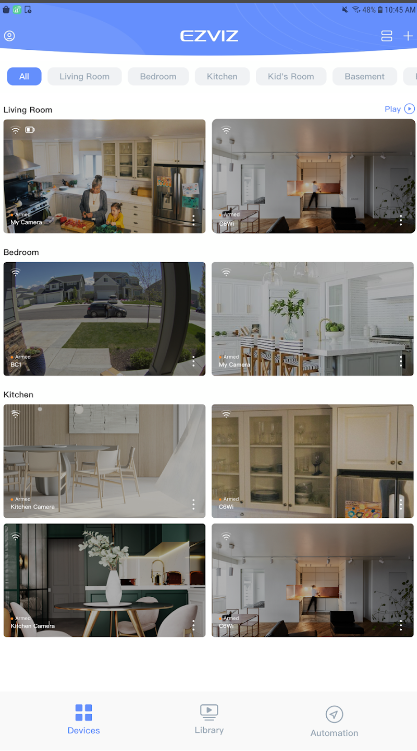
    The EZVIZ game is not a traditional game, but rather a mobile app designed for security purposes. It works with EZVIZ Security Cameras and Smart Home products. With this app, you can remotely manage your cameras and smart devices from anywhere in the world. Features include live streaming, night vision, playback of recorded videos, two-way audio communication, motion detection alerts, customization of detection zones, scheduling recordings, and device sharing with friends and family for enhanced home and business security.

    High-definition live stream viewing.

    Imagine this: you can see what your security camera sees, but in super clear detail! That’s what the first feature is all about. When you open the EZVIZ app, you get this amazing high-definition live stream. It’s like having a live window to your camera, but it’s right on your phone. You can check in on your home or business from anywhere, and everything looks so crisp and clear. It’s like bringing your camera’s view right into the palm of your hand!
    Infrared night vision with IR light.

    This feature is like magic for your camera – when it gets dark, this special thing called infrared night vision kicks in. It’s like a secret superpower for your camera, letting you see everything even in the dark. No need to worry about things going bump in the night – your camera’s got it covered with its own invisible flashlight, making sure you can still keep an eye on things when the lights are out.

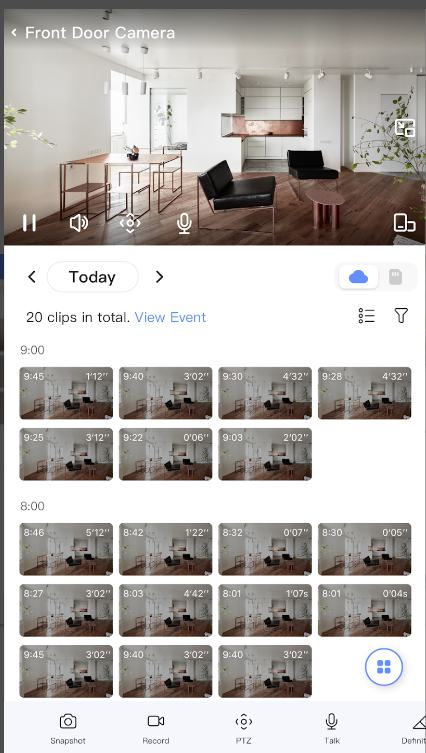
    Playback of recorded videos via CloudPlay or SD card.

    So, this cool thing with EZVIZ is that you can watch recorded videos anytime. It’s like having a personal time machine for your security camera footage! Whether it’s CloudPlay or your trusty SD card, you can play back the moments you’ve missed. Imagine catching that funny pet moment or checking who rang your doorbell when you were away.
    Two-way audio communication.

    This feature called Two-Way Audio is pretty cool. It’s like having a mini walkie-talkie with your security camera. Imagine you can not only see what’s happening but also talk through your camera to anyone on the other side. It’s great for saying a quick hello to delivery folks or scaring away unexpected visitors.

    Instant motion detection alerts with customization options.

    I bet you might not have come across such a feature. You can customize it, so you only get alerts for the areas you care about. It’s like having an extra set of eyes on your home, giving you peace of mind. Plus, you can adjust the sensitivity to make sure you’re getting just the right amount of alerts.

    How to download Ezviv on a PC or Laptop

    Looking to enhance your Ezviz experience on a bigger screen? Well, you’re in luck! For a seamless setup, just like Ezviz download PC, make sure to download the Memu emulator from its official website. It’s your key to unlocking a more expansive view of your security setup. Follow these easy steps: download the Ezviz app, open Memu, login using your Google account, drag in the Ezviz app, double-click, and voila! Now, you can enjoy monitoring your space on a larger screen effortlessly.

    Share. Facebook Twitter Pinterest LinkedIn Tumblr Email

    Related Posts

    How to Set Up a Wireless Router: A Step-by-Step Tutorial for Beginners in 2026

    Why Should Companies Obtain a Forex License?

    How to Create an Engaging Podcast for a Content creator

    Leave A Reply Cancel Reply

    You must be logged in to post a comment.

    voopoopintch
    oxva nexlim 2
    sp2s sen x disposable vape
    • Popular
    • 3D Printer REVIEW
    • XIAOMI
    July 13, 2026

    OXVA Nexlim 2 Mini Pod Vape Hands on Review

    July 13, 2026

    OXVA Nexlim 2 Pod Vape Hands on Review

    June 21, 2026

    iPlay LUMO 8K Review – A Compact Prefilled Pod Kit with Big Flavor and Everyday Convenience

    June 21, 2026

    iPlay HOOLA 150K Review – A Cloud-Chasing Giant with Music, Modes & Massive Longevity

    December 26, 2025

    ACMER ASCARVA 4S: Precision CNC Power for Makers, DIYers & Small Workshops

    June 23, 2024

    ACMER P2 20W Laser Engraver Fixed Focus Engraving: Hands on Review

    May 30, 2024

    xTool F1 Ultra Review: World’s First 20W Fiber & 20W Diode Laser Engraver

    May 30, 2024

    Anycubic Kobra 3 Combo Review: The Multicolor Masterpiece?

    August 7, 2026

    REDMI Note 17 Launches in India with 7-Inch Display, 8,000mAh Battery, and Snapdragon 8 Gen 4

    August 7, 2026

    REDMI K100 Pro Max Camera System Officially Revealed: 200MP Main Sensor, 5× Periscope Telephoto, and 50MP Ultra-Wide

    August 6, 2026

    Xiaomi 18 Design Leaks: Compact Flagship to Feature Leica 200MP Triple Camera and Snapdragon 8 Elite 6

    August 5, 2026

    REDMI K100 Pro Confirmed with 200MP Triple Camera, OIS, and 10cm Telephoto Macro Ahead of August 11 Launch

    fc 26 coins
    New Arrivals
    • VOZOL SWAP 70K Disposable Vape VOZOL SWAP 70K Disposable Vape
    • Oppo Reno16 F Oppo Reno16 F
    • Oppo Reno16c Oppo Reno16c
    • RODMAN Playoffs 50K Zero Nicotine Disposable Vape RODMAN Playoffs 50K Zero Nicotine Disposable Vape
    • Vivo T5 Lite Vivo T5 Lite
    • Vivo T5e Vivo T5e
    • Vivo X Fold 6 Vivo X Fold 6
    • Huawei MatePad Pro 2026 Huawei MatePad Pro 2026
    • VOOPOO Vmate Max 2 Pod System Kit VOOPOO Vmate Max 2 Pod System Kit
    About
  • Igeekphone.com provides the first global tech news and reviews about smartphone, vapes, e-cigar, smart home, 3D printers, e-bike,tablets, RC drones, VR headset, and other accessories. It's the best platform to improve your brand and product.
  • Contact us: info@igeekphone.com
  • Check Our Privacy Policy Here.
  • Note: *Right now we have US editor and EU editors for review, especially for Amazon US and EU.
  • *Shop and Compare Price Here*
  • Facebook
  • Youtube
  • OUR BEST VAPE PARTNERS
  • VAPE ONLINE STORE
  • VAPORESSO
  • VOOPOO
  • OXVA
  • NEXA
  • MASKKING
  • SP2S
  • IPLAY
  • TODOO
  • OTHER BEST PARTNERS
  • SVBONY
  • Chuwi
  • Blackview
  • Fossibot
  • Unihertz
  • Flsun
  • Anycubic
  • Xtool
  • Oukitel
  • Mukkpet Ebike
  • Ugreen
  • Copyright © 2026 igeekphone

    Type above and press Enter to search. Press Esc to cancel.