







Facebook Twitter Instagram
    Trending
    • Geek Bar Ice Prince 50K vs NEXA ULTRA II: Which Disposable Vape Wins?
    • Ulit Shellet Plus 60K vs. MR FOG AURA: Which 60K Disposable is Worthy
    • Disposable Vapes vs Rechargeable Cartridges Vapes: How to Choose the More Suitable Smoking Solution?
    • Hayati Pro Max Plus 6000 London Souvenir Edition Review at £8.99: The Ultimate Vaping Experience
    • Are you purchasing views for your YouTube videos?
    • Winorama Casino Online Review: A Fresh Spin on Online Gaming
    • How to Safely Use Bitcoin at Online Casinos
    • Vape Smoke Pod: IGeekPhone’s Step-by-Step Guide
    Facebook YouTube
    Login Register
    IGeeKphone China Phone, Tablet PC, VR, RC Drone News, Reviews
    • HOME
      • NEWS
        • DeepSeek
        • ChatGPT
        • Minecraft
    • Amazon
    • NEW YEAR
    • PHONE
      • Top Phones For Your First Choice
      • Phone Comparison
      • Xiaomi
      • Blackview
      • Doogee
      • Black Shark
      • Geekbuying
      • Banggood
      • TEMU
      • TikTok
      • Aliexpress
      • Walmart
      • MercadoLibre
      • Lazada
    • TOP VAPE Awards for 2026
    • VAPES
      • E-CIGAR Upcoming
      • Vape News
      • Vape Deals
      • Vape Comparison
      • Vape Guide
      • Giveaway
    • BEST VAPE
      • Best Vape Stores
      • Best Starter Vape Kits
      • Best Vapes for Beginners
      • Best Disposable Vapes
      • Best Pod Systems
      • Best Pod Mod Vapes
      • Best Mods
      • Best Nicotine Pouches
      • Best Clearomizers/Tanks
      • Best E-Liquid
      • Best EGO/Pens
      • Best Vapes for Nic Salt E-Juice
      • Best Vapes to Quit Smoking
      • RDA vs. RDTA vs. RTA
    • Best Vape Brand 2026
      • VAPORESSO
      • VOOPOO
      • OXVA
      • NEXA BAR
      • ORIONBARTECH
      • MASKKING VAPE
      • MEMERS
      • SP2S
      • JNR
      • TODOO
      • MRFOG
      • VEIIK
    • REVIEW
      • E-cigar Review
      • Phones
      • Tablet PC
      • TV Box
      • RC Drone
      • Wearables
      • Camera
      • Accessories
      • VR Headset
    • MORE
      • TABLET
        • Chuwi
        • INNOCN
        • Teclast
        • Top Tablet for Your First Choice
        • Tablet/Laptop Comparison
      • RC DRONE
      • CAMERA
      • WEARABLES
        • OneOdio
        • BlitzWolf
        • Top Smartwatch for First Choice
      • 3D PRINTER
        • 3D Printer Review
        • Anycubic
        • FLSUN
        • Xtool
        • LONGER
        • Top 3D printer to Choose First
      • POWER STATION
        • Oukitel
        • FOSSIBOT
      • GAMING
        • Top Gaming Products
      • E-BIKE
        • Samebike
        • Happyrun
        • ENGWE
      • SMART HOME
      • TV BOX
      • ACCESSORIES
      • VR HEADSET
      • CLOTHES
      • AUTO CAR
    • DEAL
    • Shop
    IGeeKphone China Phone, Tablet PC, VR, RC Drone News, Reviews
    You are at:Home»NEWS»Android 15 is expected to introduce application isolation to further improve system security
    NEWS

    Android 15 is expected to introduce application isolation to further improve system security

    Brady CottonBy Brady CottonApril 17, 2024
    Facebook Twitter Pinterest LinkedIn Tumblr Email

    On April 17, the upcoming Android 15 system may introduce a new feature: application isolation. This feature will better protect users from apps that behave erratically.

    Android has always had a strong security mechanism to protect against malicious applications. Google’s App Store security service, Play Protect, also automatically removes malicious apps that it detects. However, any security software is not perfect, and there is inevitably the possibility of miscalculation. Play Protect typically takes a cautious approach, asking users if they want to remove suspicious apps when they encounter them. To help users better deal with suspicious apps, the possible addition of Android 15’s “app isolation” feature may provide a better solution.

    Users who are familiar with anti-virus software for desktop operating systems such as Windows may be familiar with the concept of quarantine. When anti-virus software quarantines a file, it is usually because it suspects malicious behavior in the file, but because it cannot delete the file or has doubts about the malicious nature of the file, it leaves the decision to the user. The quarantined files are isolated from the rest of the system and cannot be executed, ensuring that potential malware cannot do evil.
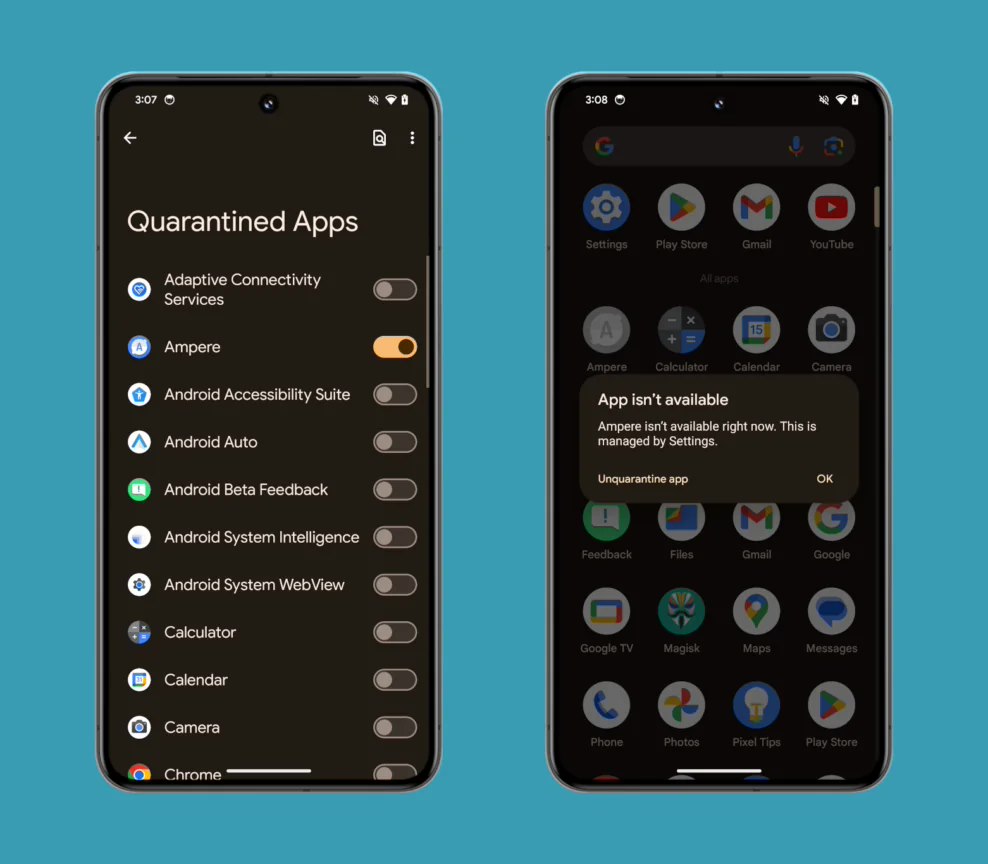
    Application isolation in the traditional sense does not exist in Android, mainly because Android was designed with system security in mind. Android apps do not gain system-level access, are sandboxed by default, can only communicate with other apps through predefined apis, and can only access those apis with explicit permissions. Because of these limitations, there is essentially no need to download third-party antivirus or anti-malware software for Android devices. Due to the different operating mechanism of Android and Windows, the application isolation function of Android is also slightly different from Windows.

    How does Android 15’s app isolation function work?

    When an app is quarantined in Android 15, it will behave differently than a normal app. It will still show up in the user’s home screen and Android Settings, but with some restrictions:

    Notifications for quarantined applications will not be displayed

    All Windows will be hidden and running activities will be stopped

    Unable to control device ringtones

    Other apps can’t query their services (but they can query their activities)

    Cannot bind to systems or other applications and cannot receive broadcasts from them

    Cannot be resolved

    Igeekphone notes that from these restrictions, quarantined apps are similar to disabled apps, but still appear on the home screen. At the same time, application isolation is similar to the “suspend application” feature in Digital Health services, but the isolation feature can restrict the components of a single application. All in all, app isolation is somewhere between “Disable App” and “pause app.”

    However, it is unclear when Google will officially launch the new feature. Signs of app isolation were first spotted in Android 14 QPR2 Beta 1 last November, but the developer page for quarantined apps has now been removed. While the function tag to enable OS level application isolation still exists, users cannot currently isolate applications manually, even from the command line. In addition, neither the Google App Store nor the Google Mobile Services apps currently request quarantined app permissions. As a result, it’s entirely possible that this feature won’t be available in Android 15 and could instead be delayed to a future release.

    Share. Facebook Twitter Pinterest LinkedIn Tumblr Email

    Related Posts

    Vape Smoke Pod: IGeekPhone’s Step-by-Step Guide

    Xiaomi MIX 5-AI Rendering Video of the Appearance: Rear Round Design with Deco Support for External Lenses

    The Shooting Samples of Honor Magic V6 have been Released

    Leave A Reply Cancel Reply

    You must be logged in to post a comment.

    voopoo Cyph NAVI kit
    oxva xlim 3 ultra
    sp2s sen x disposable vape
    jnr 100k
    • Popular
    • 3D Printer REVIEW
    • XIAOMI
    February 8, 2026

    VOOPOO VMATE i2 vs i3: Hands-On Comparison Review

    February 2, 2026

    Voopoo Drag X3 vs Drag X2: Hands-On Comparison Review

    January 21, 2026

    VOOPOO ARGUS P3 VS ARGUS P2: Which Square Pod Suits You?

    January 21, 2026

    VOOPOO Drag X3 vs VOOPOO Drag X2: Hands-On Comparison

    December 26, 2025

    ACMER ASCARVA 4S: Precision CNC Power for Makers, DIYers & Small Workshops

    June 23, 2024

    ACMER P2 20W Laser Engraver Fixed Focus Engraving: Hands on Review

    May 30, 2024

    xTool F1 Ultra Review: World’s First 20W Fiber & 20W Diode Laser Engraver

    May 30, 2024

    Anycubic Kobra 3 Combo Review: The Multicolor Masterpiece?

    February 23, 2026

    Xiaomi MIX 5-AI Rendering Video of the Appearance: Rear Round Design with Deco Support for External Lenses

    February 23, 2026

    Xiaomi Tag Organ Tracking Device will be Released on February 28th: Compatible with Android and iOS Systems

    February 21, 2026

    The global launch event for Xiaomi 17 series is scheduled for February 28th in Barcelona

    February 21, 2026

    The Largest Battery Phone in Xiaomi History! Xiaomi 17 Max is Equipped with an 8000mAh Battery

    fc 26 coins
    New Arrivals
    • Zooy Mega Shisha 60K Disposable Vape Zooy Mega Shisha 60K Disposable Vape
    • RAZ RX50K Batch Edition Disposable Vape RAZ RX50K Batch Edition Disposable Vape
    • Olit Hookalit Mega 200K Disposable Olit Hookalit Mega 200K Disposable
    • VOOPOO Drag 6 Vape Mod Kit VOOPOO Drag 6 Vape Mod Kit
    • Geek Bar CLR 50K Disposable Vape Geek Bar CLR 50K Disposable Vape
    • Redmi Turbo 5 Max Redmi Turbo 5 Max
    • OnePlus Turbo 7 OnePlus Turbo 7
    • Doogee S300 Ultra Doogee S300 Ultra
    • iQOO 15R iQOO 15R
    About
  • Igeekphone.com provides the first global tech news and reviews about smartphone, vapes, e-cigar, smart home, 3D printers, e-bike,tablets, RC drones, VR headset, and other accessories. It's the best platform to improve your brand and product.
  • Contact us: info@igeekphone.com
  • Check Our Privacy Policy Here.
  • Note: *Right now we have US editor and EU editors for review, especially for Amazon US and EU.
  • *Shop and Compare Price Here*
  • Facebook
  • Youtube
  • OUR BEST VAPE PARTNERS
  • VAPE ONLINE STORE
  • HAYATI PRO MAX PLUS
  • VAPORESSO
  • VOOPOO
  • OXVA
  • NEXA
  • MASKKING
  • LOSTVAPE ORIONBAR
  • MEMERS
  • TODOO
  • SP2S
  • JNR
  • VEIIK
  • OTHER BEST PARTNERS
  • SVBONY
  • Chuwi
  • Blackview
  • Fossibot
  • Unihertz
  • Flsun
  • Anycubic
  • Xtool
  • Oukitel
  • Mukkpet Ebike
  • Ugreen
  • Copyright © 2026 igeekphone

    Type above and press Enter to search. Press Esc to cancel.