






Facebook Twitter Instagram
    Trending
    • MAXRAY RUSH 80K Review: Does Its Leak-Control Design Make High-Capacity Vaping Better?
    • Hyper Bar MX 120K Review: Does a 120,000-Puff Disposable Actually Make Sense?
    • VAPSOLO MARS 50K Review: A High-Puff Disposable Built Around Control and Visibility
    • California Legislature Passes Bill Targeting Disposable Nicotine Vapes, Sales Ban Could Begin in 2028
    • VOOPOO ARGUS Multi-Ohm Cartridge: Vaping’s Real Magic, Not Just Hype
    • Samsung Galaxy S26 FE Launches at $699.99 With 3nm Exynos 2500 and Enhanced Camera Features
    • Huawei Pura X View Confirmed With Kirin 9030S, 16:9.5 Wide Display and 7,000mAh Battery
    • MT200 Smart Watch: What Do Its ECG, AMOLED and Health Features Actually Offer?
    Facebook YouTube
    IGeeKphone China Phone, Tablet PC, VR, RC Drone News, Reviews
    • HOME
    • BREAKING NEWS
      • AI NEWS
    • Amazon
    • PHONE
      • Top Phones For Your First Choice
      • Phone Comparison
      • Xiaomi
      • Blackview
      • Doogee
      • Black Shark
      • Geekbuying
      • Banggood
      • TEMU
      • TikTok
      • Aliexpress
      • Walmart
      • MercadoLibre
      • Lazada
    • TOP VAPE Awards for 2026
    • VAPES
      • E-CIGAR Upcoming
      • Vape News
      • Vape Deals
      • Vape Comparison
      • Vape Guide
      • VAPE LAWS
      • Giveaway
    • BEST VAPE
      • Best Vape Stores
      • Best Starter Vape Kits
      • Best Vapes for Beginners
      • Best Disposable Vapes
      • Best Pod Systems
      • Best Pod Mod Vapes
      • Best Mods
      • Best Nicotine Pouches
      • Best Clearomizers/Tanks
      • Best E-Liquid
      • Best EGO/Pens
      • Best Vapes for Nic Salt E-Juice
      • Best Vapes to Quit Smoking
      • RDA vs. RDTA vs. RTA
    • Best Vape Brand 2026
      • VAPORESSO
      • VOOPOO
      • OXVA
      • NEXA BAR
      • MASKKING VAPE
      • SP2S
      • IPLAY
      • TODOO
      • MRFOG
      • LOSTVAPE
      • VEIIK
    • REVIEW
      • E-cigar Review
      • Phones
      • Tablet PC
      • TV Box
      • RC Drone
      • Wearables
      • Camera
      • Accessories
      • VR Headset
    • MORE
      • TABLET
        • Chuwi
        • INNOCN
        • Teclast
        • Top Tablet for Your First Choice
        • Tablet/Laptop Comparison
      • RC DRONE
      • CAMERA
      • WEARABLES
        • OneOdio
        • BlitzWolf
        • Top Smartwatch for First Choice
      • 3D PRINTER
        • 3D Printer Review
        • Anycubic
        • FLSUN
        • Xtool
        • LONGER
        • Top 3D printer to Choose First
      • POWER STATION
        • Oukitel
        • FOSSIBOT
      • GAMING
        • Top Gaming Products
      • E-BIKE
        • Samebike
        • Happyrun
        • ENGWE
      • SMART HOME
      • TV BOX
      • ACCESSORIES
      • VR HEADSET
      • CLOTHES
      • AUTO CAR
    • DEAL
    • Shop
    IGeeKphone China Phone, Tablet PC, VR, RC Drone News, Reviews
    You are at:Home»Guide»How to Solve the Issue of Huawei mobile phone Stuck?
    Guide

    How to Solve the Issue of Huawei mobile phone Stuck?

    Brady CottonBy Brady CottonJune 4, 2024
    Facebook Twitter Pinterest LinkedIn Tumblr Email

    With the popularity of smart phones, almost everyone of us can not live without this small palm treasure. But have you found that the new mobile phone bought home, after using it for a period of time, it began to become congested, and even serious fever? Don’t worry, today the tech bear will give you some tips to let your Huawei mobile phone return to the peak state of smooth power saving!

    Step 1: Optimize the animation scaling to make the phone smooth as flying

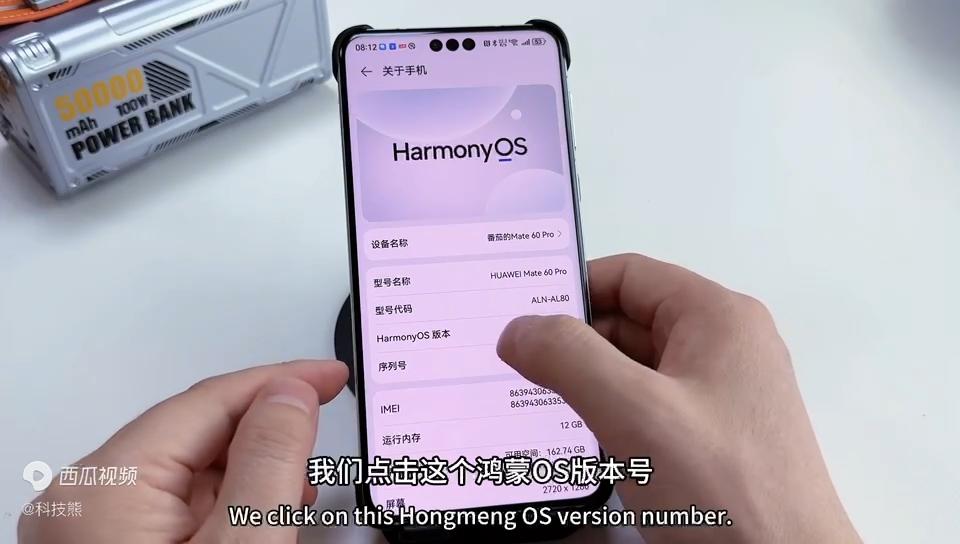
    Open the “Settings” option on your phone and tap “About your Phone.” Here, there is a hidden “developer option” that can be easily unlocked by clicking “Hongmeng OS Version number” 6 times in a row. Next, go to “System and Updates” and open “Developer Options.”
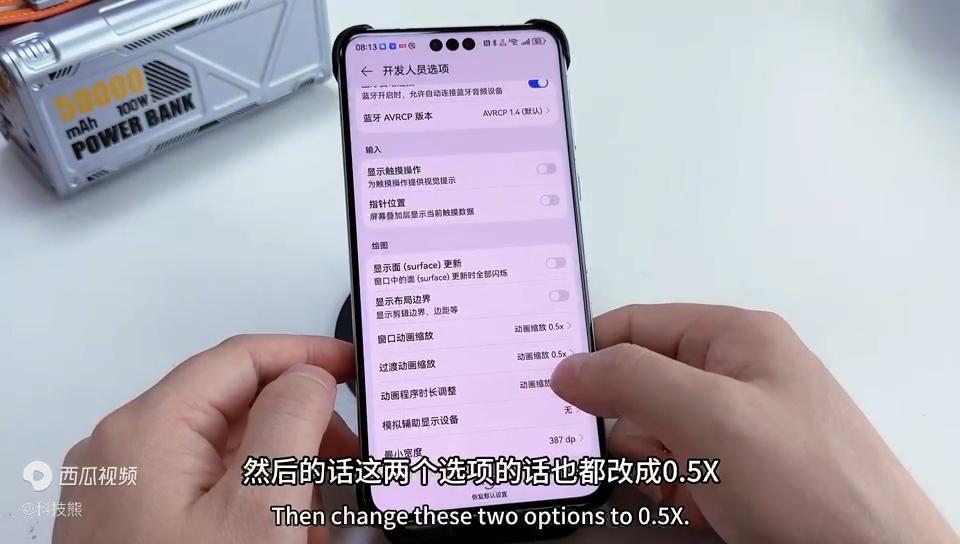
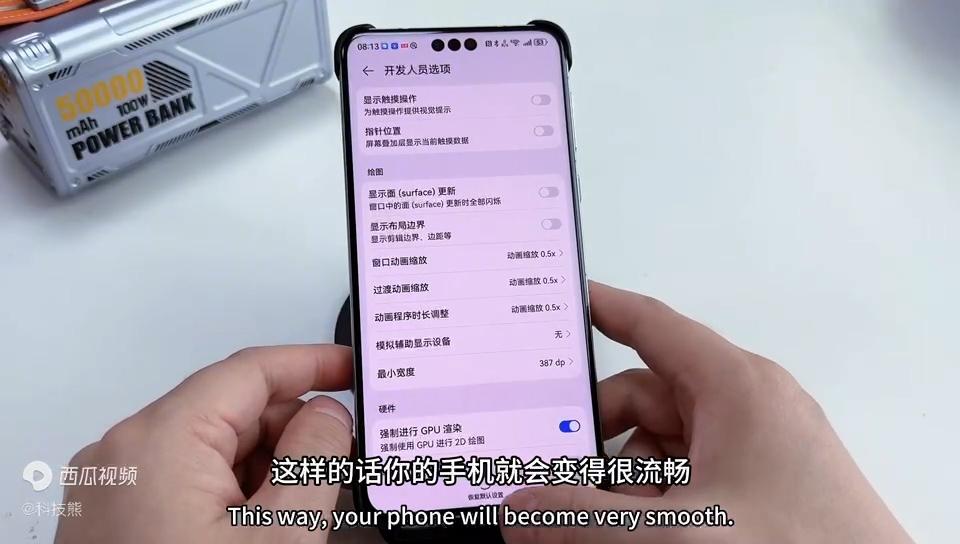
    Here, we focus on the “animation zoom” setting. The default “Window animation scaling” is 1X, we changed it to 0.5X, and the other two animation scaling options are also adjusted to 0.5X. After setting this up, you will find that the interface of the phone becomes faster and smoother.
    Also, don’t forget to turn on the “Force GPU rendering” option. This setting allows the GPU to render the phone interface, reducing the burden on the CPU and further improving the smoothness of the phone.
    Step 2: Turn off the advertising push and say goodbye to annoying interruptions
    AD feeds are not only annoying, they also eat up your phone’s memory and traffic. Search for “Ads” in “Settings” to find the options for “Huawei Ads” and “Personalized Ads.” First, turn off “Intelligent Recommendation Service” in “Huawei Ads”, then go back to the previous level, click on “Personalized ads” to turn off all advertising options.
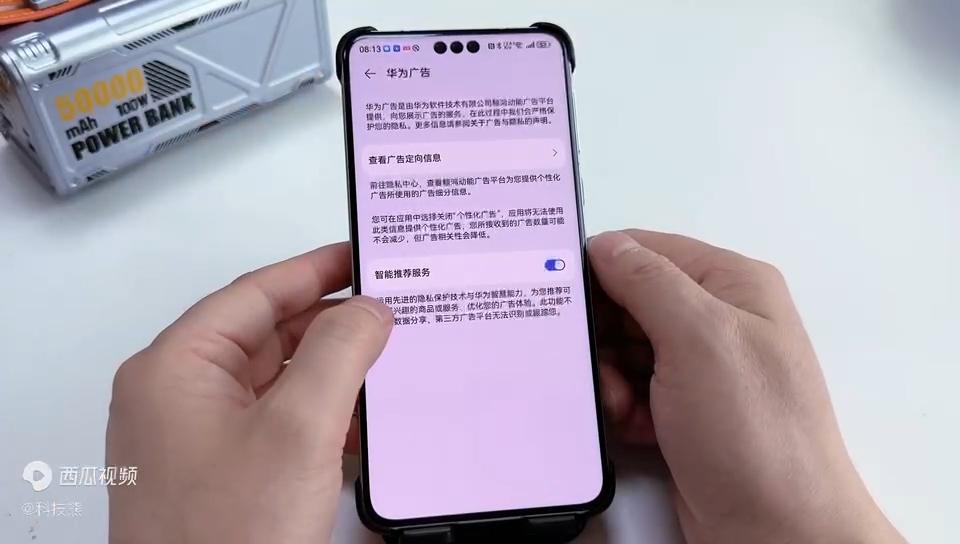
    In this way, your phone says goodbye to the annoying advertising push and is more refreshing to use.

    Step 3: Manage application startup to save memory resources
    Open the “mobile Butler” app on your phone and click “App Startup Management”. Here, you’ll find that many apps are turned on automatically by default. These apps start automatically when the phone is turned on or unlocked, taking up memory and CPU resources.
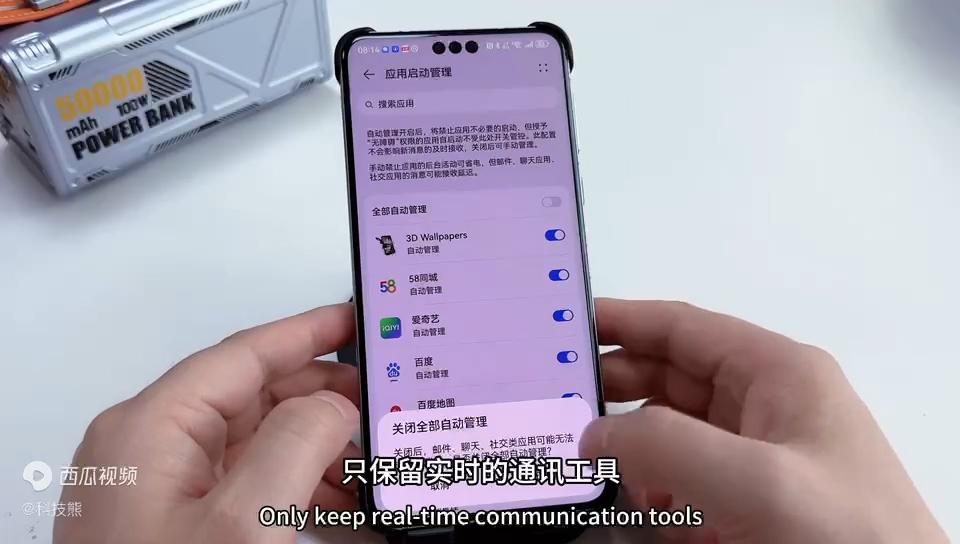
    In order to save resources, we can selectively turn off automatic startup for some applications. Keep only those applications that require real-time notification, such as messaging tools, social software, etc. Other applications can be set to start manually or disable.

    Bonus tip: Turn on smart charging mode to protect battery health

    Find the “Battery” option in “Settings” and click on “Battery Health.” Here, turn on “Smart Charging Mode”. This mode can intelligently adjust the charging strategy of the mobile phone to reduce battery loss and aging. At the same time, it can also reduce the heat of the phone while charging, extending the battery life.

    Conclusion
    After the above three steps, your Huawei mobile phone will be able to take on a new look and return to the peak state of smooth power saving. Whether it is a new phone or an old phone, as long as you follow these steps to set up and optimize, you can make your phone better. Come and try it!

    Share. Facebook Twitter Pinterest LinkedIn Tumblr Email

    Related Posts

    Samsung Galaxy S26 FE Launches at $699.99 With 3nm Exynos 2500 and Enhanced Camera Features

    Huawei Pura X View Confirmed With Kirin 9030S, 16:9.5 Wide Display and 7,000mAh Battery

    Xiaomi 18 Fold Reportedly Gains Strong Early Interest Ahead of Launch With Xring O3 Chip

    Leave A Reply Cancel Reply

    You must be logged in to post a comment.

    voopoopintch
    oxva nexlim 2
    shopify
    • Popular
    • 3D Printer REVIEW
    • XIAOMI
    July 13, 2026

    OXVA Nexlim 2 Mini Pod Vape Hands on Review

    July 13, 2026

    OXVA Nexlim 2 Pod Vape Hands on Review

    June 21, 2026

    iPlay LUMO 8K Review – A Compact Prefilled Pod Kit with Big Flavor and Everyday Convenience

    June 21, 2026

    iPlay HOOLA 150K Review – A Cloud-Chasing Giant with Music, Modes & Massive Longevity

    December 26, 2025

    ACMER ASCARVA 4S: Precision CNC Power for Makers, DIYers & Small Workshops

    June 23, 2024

    ACMER P2 20W Laser Engraver Fixed Focus Engraving: Hands on Review

    May 30, 2024

    xTool F1 Ultra Review: World’s First 20W Fiber & 20W Diode Laser Engraver

    May 30, 2024

    Anycubic Kobra 3 Combo Review: The Multicolor Masterpiece?

    August 28, 2026

    Xiaomi 18 Fold Reportedly Gains Strong Early Interest Ahead of Launch With Xring O3 Chip

    August 28, 2026

    Xiaomi Pad 9 Pro Rumored to Feature 12.5-Inch 3.2K 144Hz LCD and Snapdragon 8 Gen 5

    August 28, 2026

    REDMI K100 Pro Max Gaming Test: Does 185Hz Really Improve Performance?

    August 27, 2026

    Xiaomi 18 Pro Max Could Match Ultra-Level Features With Flagship Chip and Camera Algorithms

    fc 26 coins
    New Arrivals
    • MAXRAY RUSH 80K Disposable Vape MAXRAY RUSH 80K Disposable Vape
    • Hyper Bar MX 120K Disposable Vape Hyper Bar MX 120K Disposable Vape
    • Vapsolo Mars 50K Disposable Vape Vapsolo Mars 50K Disposable Vape
    • Orca Vape San Dynasty Pro Pod System Kit Orca Vape San Dynasty Pro Pod System Kit
    • RELX Prime Pro x TJuice Pod System Kit RELX Prime Pro x TJuice Pod System Kit
    • IPLAY Pure 60K Disposable Vape IPLAY Pure 60K Disposable Vape
    • Uwin Shisha 300K Disposable Vape Uwin Shisha 300K Disposable Vape
    • HOPO Prism 50K Hookah Vape HOPO Prism 50K Hookah Vape
    • JNR Crown Shisha 100K Disposable Vape JNR Crown Shisha 100K Disposable Vape
    About
  • Igeekphone.com provides the first global tech news and reviews about smartphone, vapes, e-cigar, smart home, 3D printers, e-bike,tablets, RC drones, VR headset, and other accessories. It's the best platform to improve your brand and product.
  • Contact us: info@igeekphone.com
  • Check Our Privacy Policy Here.
  • Note: *Right now we have US editor and EU editors for review, especially for Amazon US and EU.
  • *Shop and Compare Price Here*
  • Facebook
  • Youtube
  • OUR BEST VAPE PARTNERS
  • VAPE ONLINE STORE
  • VAPORESSO
  • VOOPOO
  • OXVA
  • NEXA
  • MASKKING
  • SP2S
  • IPLAY
  • TODOO
  • OTHER BEST PARTNERS
  • SVBONY
  • Chuwi
  • Blackview
  • Fossibot
  • Unihertz
  • Flsun
  • Anycubic
  • Xtool
  • Oukitel
  • Mukkpet Ebike
  • Ugreen
  • Copyright © 2026 igeekphone

    Type above and press Enter to search. Press Esc to cancel.