







Facebook Twitter Instagram
    Trending
    • Geek Bar Ice Prince 50K Disposable Vape Review: A Majestic Cloud of Flavor and Endurance
    • Which type of Vape is Harmless to the Human Body?
    • EA FC 26: 4 Best Goalkeepers to Build Your Ultimate Squad
    • Swedish food product manufacturer WiJo is set to establish a manufacturing base in the United States
    • The Impact of Pusoy Dos on Improving Strategic Mindset
    • The manual of Samsung’s most expensive mobile phone: Galaxy Z TriFold has been exposed
    • Online Casinos Adapting New Tech Trends
    • Xiaomi’s new phone has made an appearance at GSMA: The MIX TriFold triple foldable screen phone is expected to be released in Q3 next year
    Facebook YouTube
    Login Register
    IGeeKphone China Phone, Tablet PC, VR, RC Drone News, Reviews
    • HOME
      • NEWS
        • DeepSeek
        • ChatGPT
        • Minecraft
    • Amazon
    • CHRISTMAS
    • PHONE
      • Top Phones For Your First Choice
      • Phone Comparison
      • Xiaomi
      • Blackview
      • Unihertz
      • Doogee
      • Black Shark
      • Geekbuying
      • Banggood
      • TEMU
      • TikTok
      • Aliexpress
      • Walmart
      • Newegg
      • MercadoLibre
      • Lazada
    • TOP VAPE Awards for 2025
    • VAPES
      • E-CIGAR Upcoming
      • Vape News
      • Vape Market Trend
      • Vape Deals
      • Expo News
      • Vape Comparison
      • Vape Guide
        • Guide For Beginners
        • Guide for Best Users
      • Giveaway
    • BEST VAPE
      • Best Vape Stores
      • Best Starter Vape Kits
      • Best Vapes for Beginners
      • Best Disposable Vapes
      • Best Pod Systems
      • Best Pod Mod Vapes
      • Best Mods
      • Best Nicotine Pouches
      • Best Clearomizers/Tanks
      • Best E-Liquid
      • Best EGO/Pens
      • Best Vapes for Nic Salt E-Juice
      • Best Vapes to Quit Smoking
      • RDA vs. RDTA vs. RTA
    • Best Vape Brand 2025
      • VAPORESSO
      • VOOPOO
      • OXVA
      • NEXA BAR
      • ORIONBARTECH
      • MASKKING VAPE
      • VEIIK
      • MEMERS
      • SP2S
      • JNR
      • TODOO
      • MRFOG
    • REVIEW
      • E-cigar Review
      • Phones
      • Tablet PC
      • TV Box
      • RC Drone
      • Wearables
      • Camera
      • Accessories
      • VR Headset
    • MORE
      • 3D PRINTER
        • 3D Printer Review
        • Anycubic
        • FLSUN
        • Xtool
        • LONGER
        • Top 3D printer to Choose First
      • TREND
      • CLOTHES
      • AUTO CAR
      • POWER STATION
        • Oukitel
        • FOSSIBOT
      • GAMING
        • Top Gaming Products
      • E-BIKE
        • Samebike
        • Happyrun
        • ENGWE
      • TABLET
        • Chuwi
        • INNOCN
        • Teclast
        • Top Tablet for Your First Choice
        • Tablet/Laptop Comparison
      • WEARABLES
        • OneOdio
        • BlitzWolf
        • Top Smartwatch for First Choice
      • SMART HOME
      • TV BOX
        • Chuwi mini pc
        • Beelink
        • GMKTEC
        • MOREFINE
      • RC DRONE
        • DJI
        • MJX
        • JJRC
        • Hubsan
        • Top RC Drone
      • CAMERA
        • Gopro
        • Insta360
        • Andoer
      • ACCESSORIES
      • VR HEADSET
      • ROM
        • SAMSUNG
        • XIAOMI
        • ASUS
        • MEIZU
        • LENOVO
        • HUAWEI
        • ONEPLUS
        • ZTE
        • UMIDIGI
        • DOOGEE
        • HOMTOM
        • ELEPHONE
        • ULEFONE
        • BLACKVIEW
        • VERNEE
        • LEAGOO
        • CHUWI
        • TECLAST
        • PIPO
        • TV BOX ROM
    • DEAL
    • Shop
    IGeeKphone China Phone, Tablet PC, VR, RC Drone News, Reviews
    You are at:Home»Guide»Get Rid of iOS 18 Beta Bugs with Wondershare Dr.Fone
    Guide

    Get Rid of iOS 18 Beta Bugs with Wondershare Dr.Fone

    Brady CottonBy Brady CottonJuly 11, 2024
    Facebook Twitter Pinterest LinkedIn Tumblr Email

    After the release of iOS 18 Beta, many iPhone users are upgrading to this latest operating system to benefit from its advanced features. As this OS is still in the Beta testing phase, many users are complaining about bugs associated with it. Most users have complained about performance issues and app crashing problems until now.

    Users who regret updating to the latest iOS version can take help from this article. Here, we will introduce you to the best iOS system repair tool, Wondershare Dr.Fone, to help you get rid of all the bugs caused by this latest iOS 18.
    Part 1. Bugs Associated with the iOS 18 Beta Version

    As we have discussed, many users face problems after upgrading to the latest version of iOS. Apple is trying to test the functionality and usability of the latest features, so they are still not fully optimized for better performance. After updating your iPhone to the latest operating system, let’s analyze all the problems you may face.

    • Overheating:Many users experienced overheating upon installing this beta version. You may also experience this problem due to the advanced features running in the background.
    • Wi-Fi Not Working: Another frustrating iOS 18 bug is the inability to connect to the internet. Some annoying glitches cause this problem after the system update, ruining the user experience.
    • Laggy Performance:Users who try out different features and applications on this latest OS can experience lag in the iPhone’s operation. Due to this problem, many users hesitate to upgrade to the latest operating system.
    • Battery Drain: After updating their iOS version, many users experience battery timing issues. As the features in iOS 18 have been updated, they are consuming more battery than normal.
    • Notification Not Showing: You may also be unable to see notifications on the lock screen after updating to the latest iOS 18. Users of Beta 1 and 2 versions of this OS are facing this annoying problem due to some glitch.
    • Math Notes Not Working:Most users were excited about this latest added feature to the calculator app. However, you may not be able to utilize these advanced math notes features due to bugs in the system.

    Part 2. Resolve iOS 18 Related Bugs with Wondershare Dr.Fone – System Repair

    All the bugs and glitches associated with this latest operating system raise the need for an advanced system repair tool. Wondershare Dr.Fone can help you in this regard with its system repair tool, which supports the iOS 18 Beta version. Using this tool, you can solve any iPhone-related problem with a few clicks. You don’t have to reset your device to resolve any issue, including app crashing and system lagging.

    With the help of this system repair tool, you can also upgrade or downgrade the operating system without needing iTunes. This software also offers more than one system repair mode to meet the needs of different users. Utilizing its standard mode, you can fix issues, such as system stuck, without data loss. Moreover, it provides an advanced repair mode to factory reset your device to solve complex problems with it.

    Benefits of Using Wondershare Dr.Fone

    • This tool supports almost all the iOS versions for system repair, including the latest iOS 18 beta version.
    • The interface of this system repair software is pretty simple, allowing even beginners to carry out the repairing task.
    • You get the ability to resolve over 150 iOS system-related issues with the help of this tool.
    • Users can utilize this tool to repair iPhones, iPads, and even iPods running on old iOS systems.

    Simplified Steps to Repair iOS 18 Beta Version Issues Using Wondershare Dr.Fone

    After getting to know about the functionality of this iOS system repair tool, let’s talk about the steps you need to follow to resolve iOS 18-related bugs.

    Step 1. Access the System Repair Tool from the Main Interface

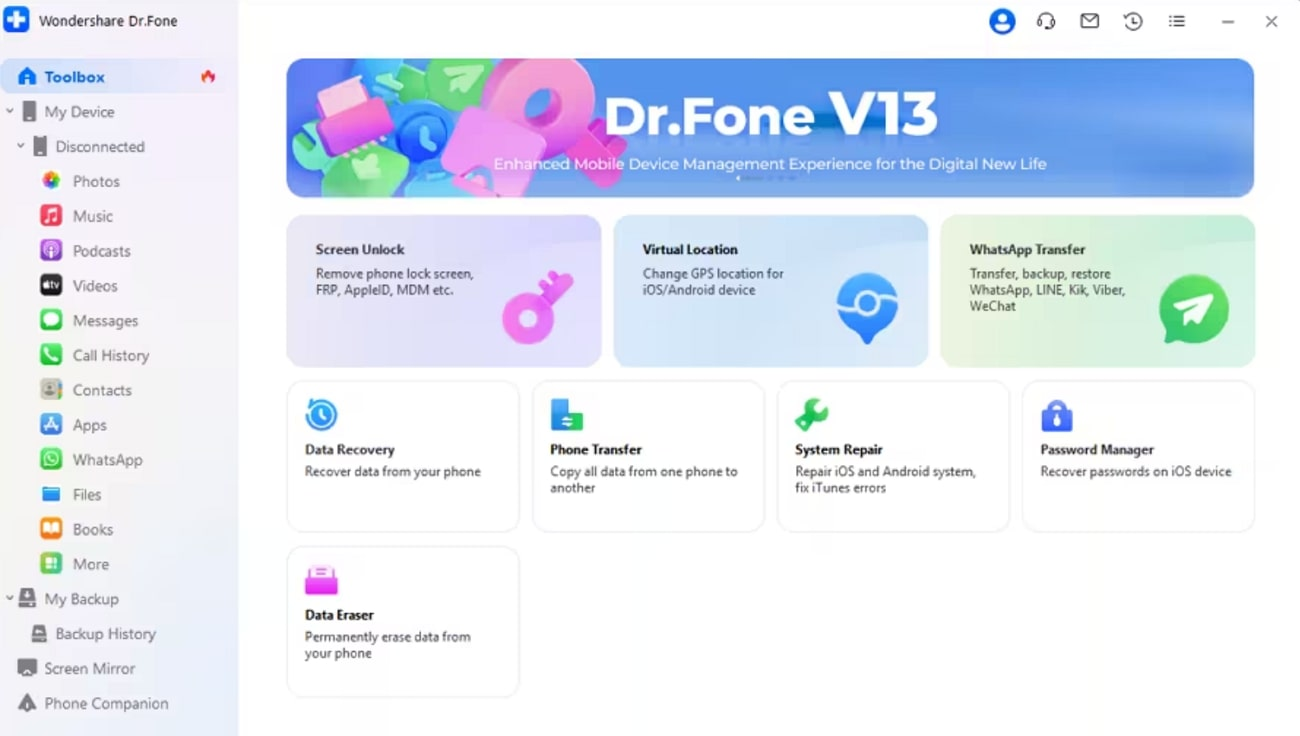
    Start the process by downloading and launching this advanced iPhone repair toolbox on your system to access all the features. From its main interface, access the “Toolbox” tab and enter the “System Repair” tool.
    Step 2. Enter the iOS Repair Feature

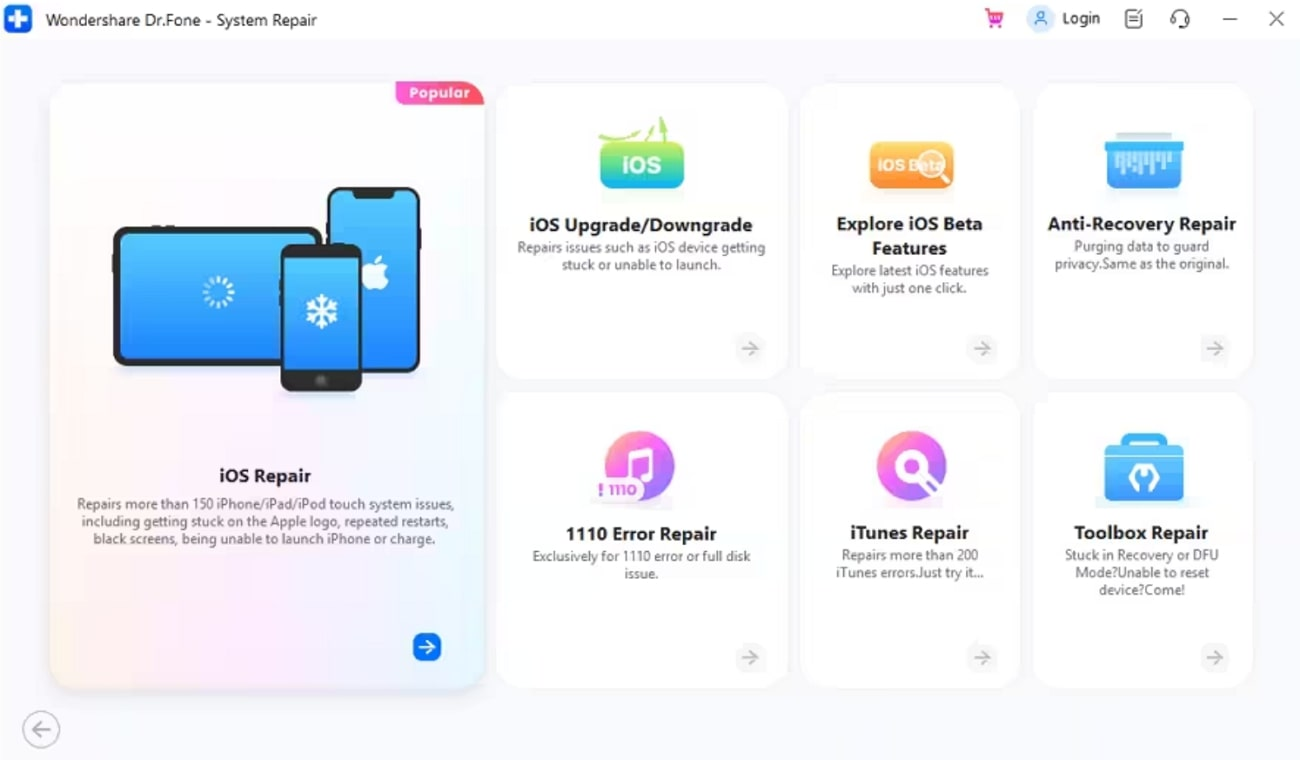
    Upon entering this tool, you will have to choose the “iPhone” option to reveal various features related to the iOS system. Now, you have to enter the “iOS Repair” feature to fix any bugs and glitches ruining your device’s performance.
    Step 3. Select the Standard Repair Option and Enter Recovery Mode

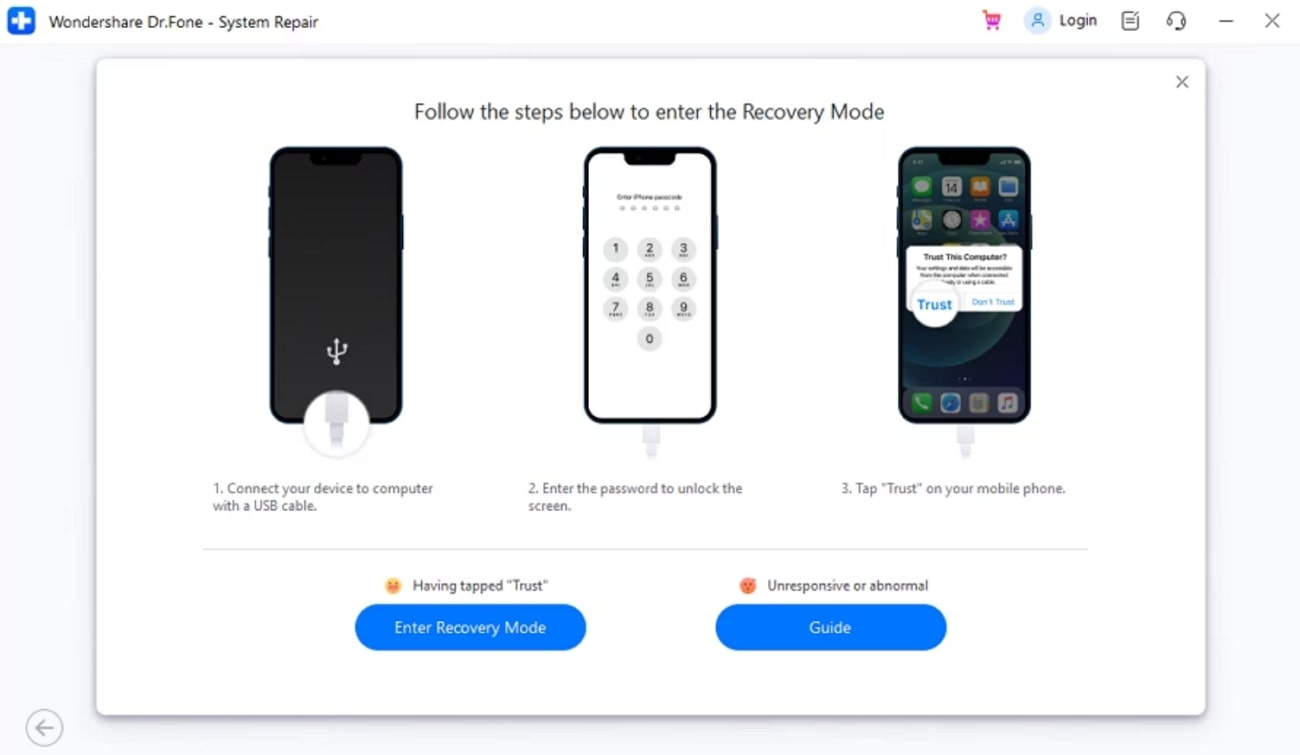
    Moving forward, access the “Standard Repair” feature to resolve any issue without losing your data. Now, connect your iOS device and trust the computer to establish a connection before pressing the “Enter Recovery Mode” button on this software.
    Step 4. Download iOS Firmware for System Repair

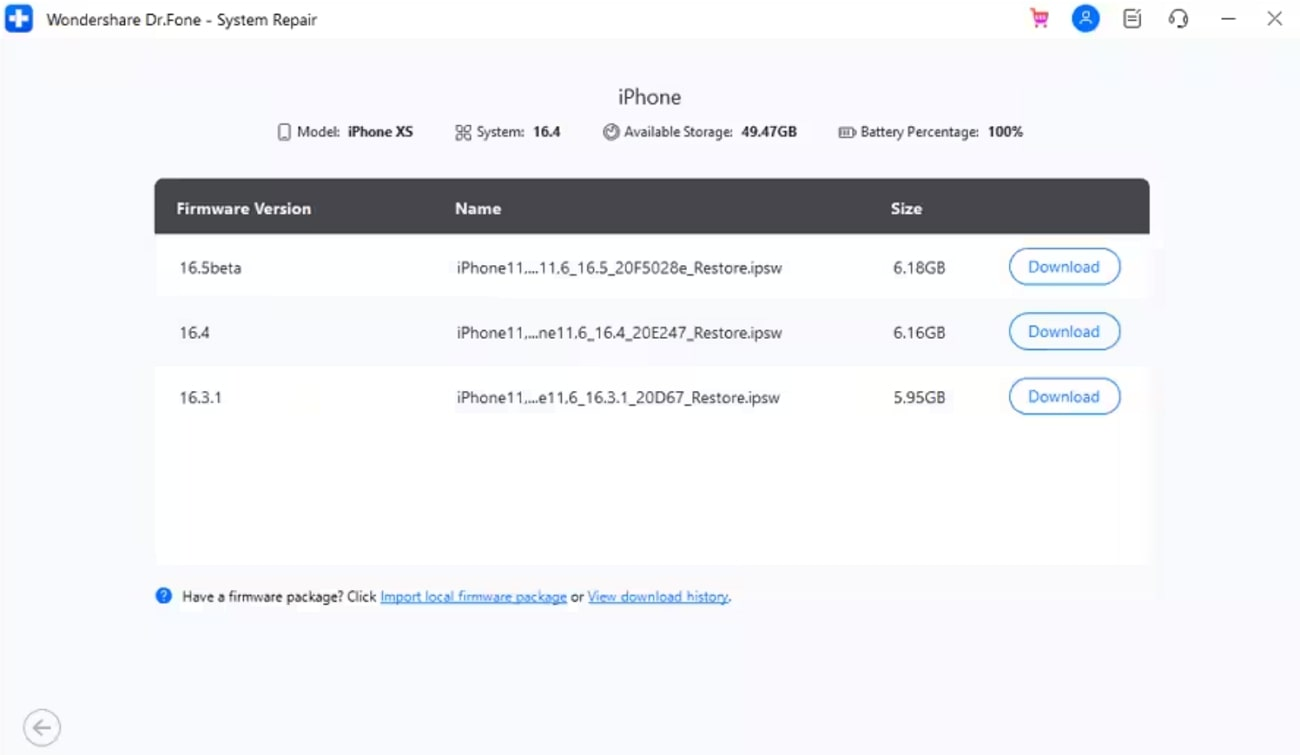
    Once you enter the recovery mode, this tool will find the relevant firmware you can install to repair the system. From the available options, identify the best one and hit the “Download” button to let the tool install this firmware.
    Step 5. Repair Your iOS 18 Device

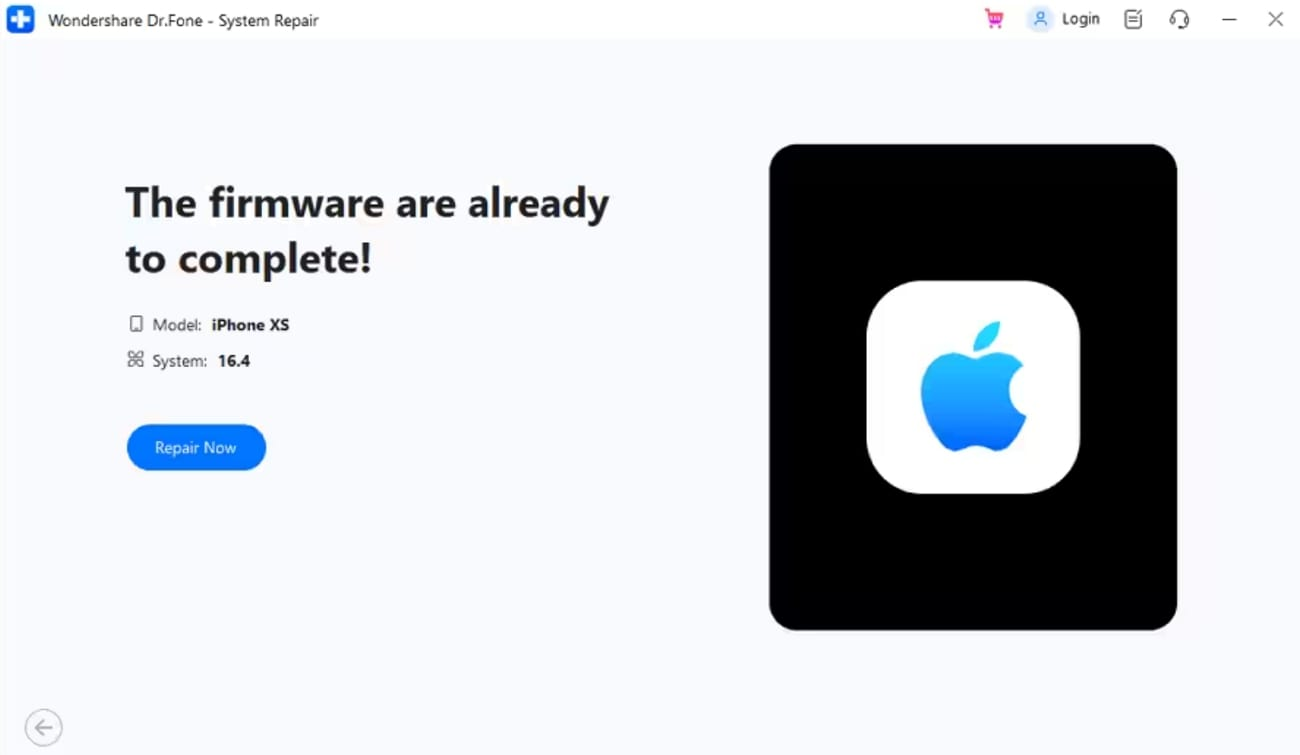
    After the firmware is installed, a new screen will appear on which you need to press the “Repair Now” button. Finally, this tool will start to repair your device and put forward the “Repair Complete” screen when the process is completed.
    Conclusion

    Throughout this article, we have discussed multiple issues you can face after upgrading to the latest iOS 18 Beta version. So, you have to be pretty careful before updating the operating system to avoid any glitches. Users who have already upgraded their OS can make use of Wondershare Dr.Fone – System Recovery tool to get rid of bugs and glitches.

    Share. Facebook Twitter Pinterest LinkedIn Tumblr Email

    Related Posts

    EA FC 26: 4 Best Goalkeepers to Build Your Ultimate Squad

    The manual of Samsung’s most expensive mobile phone: Galaxy Z TriFold has been exposed

    Xiaomi’s new phone has made an appearance at GSMA: The MIX TriFold triple foldable screen phone is expected to be released in Q3 next year

    Leave A Reply Cancel Reply

    You must be logged in to post a comment.

    voopoo drag s3
    oxva xlim go 2
    sp2s sen x disposable vape
    jnr 100k
    • Popular
    • 3D Printer REVIEW
    • XIAOMI
    November 23, 2025

    VOOPOO DRAG X3 – Big Battery, Smart Tech, Pod-Mod Powerhouse (Review)

    November 23, 2025

    VOOPOO VINCI S: Pocket-Power Pod with a 2,000 mAh Heart — Big Battery, Simple Use (Review)

    November 19, 2025

    OXVA XLIM PRO 3 Pod Vape Quick Hands-on Review (Video Test Included)

    November 19, 2025

    OXVA XLIM 3 Ultra Pod Vape: Hands-on Review (Video Test Included)

    June 23, 2024

    ACMER P2 20W Laser Engraver Fixed Focus Engraving: Hands on Review

    May 30, 2024

    xTool F1 Ultra Review: World’s First 20W Fiber & 20W Diode Laser Engraver

    May 30, 2024

    Anycubic Kobra 3 Combo Review: The Multicolor Masterpiece?

    May 15, 2024

    SCULPFUN SF-A9 40W Laser Engraver Cutting Machine: Hands On Review

    December 5, 2025

    Xiaomi’s new phone has made an appearance at GSMA: The MIX TriFold triple foldable screen phone is expected to be released in Q3 next year

    December 5, 2025

    The Prototype photos of Xiaomi 17 Ultra phone have been exposed, featuring a triple-camera layout on the back

    December 2, 2025

    Xiaomi REDMI Turbo5 Pro phone will be launched before the Spring Festival, equipped with the only flagship chip in its class

    December 2, 2025

    Xiaomi has Released REDMI TV X55/65/75 2026: Mini LED starts at only 2,499 yuan

    fc 26 coins
    New Arrivals
    • Redmi Note 15 5G Redmi Note 15 5G
    • Geek Bar Ice Prince 50K Disposable Vape Geek Bar Ice Prince 50K Disposable Vape
    • IPLAY OOKA150k Disposable vape IPLAY OOKA150k Disposable vape
    • IPLAY LUMO 8K Puffs 2+10ml Prefilled Pod Kit IPLAY LUMO 8K Puffs 2+10ml Prefilled Pod Kit
    • Uwell Caliburn G5 Lite SE Pod System Kit Uwell Caliburn G5 Lite SE Pod System Kit
    • Uwell Caliburn G5 Lite KOKO Pod System Kit Uwell Caliburn G5 Lite KOKO Pod System Kit
    • Uwell Caliburn G5 Lite Pod System Kit Uwell Caliburn G5 Lite Pod System Kit
    • Freeton Trimax 60k Disposable Vape Freeton Trimax 60k Disposable Vape
    • Smoant Pasito 3 Vape Smoant Pasito 3 Vape
    About
  • Igeekphone.com provides the first global tech news and reviews about smartphone, vapes, e-cigar, smart home, 3D printers, e-bike,tablets, RC drones, VR headset, and other accessories. It's the best platform to improve your brand and product.
  • Contact us: info@igeekphone.com
  • Check Our Privacy Policy Here.
  • Note: *Right now we have US editor and EU editors for review, especially for Amazon US and EU.
  • *Shop and Compare Price Here*
  • Facebook
  • Youtube
  • OUR BEST VAPE PARTNERS
  • VAPE ONLINE STORE
  • HAYATI PRO MAX PLUS
  • VAPORESSO
  • VOOPOO
  • OXVA
  • NEXA
  • MASKKING
  • LOSTVAPE ORIONBAR
  • VEIIK
  • MEMERS
  • TODOO
  • SP2S
  • JNR
  • OTHER BEST PARTNERS
  • SVBONY
  • Chuwi
  • Blackview
  • Fossibot
  • Unihertz
  • Flsun
  • Anycubic
  • Xtool
  • Oukitel
  • Mukkpet Ebike
  • Ugreen
  • Copyright © 2025 igeekphone

    Type above and press Enter to search. Press Esc to cancel.