










In recent years, the AI music industry has been booming, with AI technology revolutionizing everything from melody creation to automatic mixing. Whether providing background music for short video creators or generating inspiration for musicians, AI music platforms have become the ultimate “secret weapon” for creators. Amid this wave of innovation, Mureka stands out, offering an all-in-one platform with outstanding performance, delivering an unmatched experience for creators.
What is Mureka?
Have you ever experienced a moment when inspiration just isn’t flowing, and you’re not sure where to begin with your music? Mureka is the platform designed to solve that exact problem. The name Mureka comes from the combination of “Music” and “Eureka,” symbolizing the ability to capture fleeting moments of inspiration and transform them into high-quality music through AI technology. Whether you’re a professional musician or an occasional hobbyist, Mureka makes music creation simple, fun, and efficient with its AI-driven music generation and editing features.
Mureka stands out with its self-developed AI model, delivering original music fast and letting you easily adjust style, tone, and rhythm. Whether it’s creating a song that fits the atmosphere for a short video, composing a holiday-themed track, or making a personalized diss track for a friend, Mureka handles it all with ease. It is also a playground for tech enthusiasts — offering unlimited possibilities, from voice selection to reference audio input. If you’re a musician, you can also use it to generate commercially-grade tracks directly. Creativity knows no bounds, and Mureka is your most reliable companion on your musical journey.
Why Choose Mureka?
Mureka makes AI music generation and editing fun and easy! In just a few minutes, you can create a high-quality original track. Its fast and reliable generation capabilities set it apart in the market. Whether you’re a music enthusiast or a professional producer, Mureka meets all your creative needs. With continuously optimized AI models, it stays at the forefront of technology. With amazing mixing, catchy melodies, and reliable song structures, it’s the go-to tool for music production. Mureka’s commitment to innovation and quality has made it the top choice for creators worldwide.
Mureka Key Features and Enhancements
Recent updates have made Mureka one of the most polished AI music platforms. Key improvements include:
Vocal Quality: The new model significantly enhances vocal clarity, reducing issues with distortion and muffled sounds.
Mixing Quality: The mixing design is more polished and professional, addressing previous issues with spatial clarity and volume balance.
Melodic Motivation: Melodies generated by the new model are more captivating, cohesive, and harmonically sound, improving upon past issues of scattered motifs and lack of thematic focus.
Song Structure: The model now delivers enhanced dynamics and a more fitting song structure.
Output Quality: The rate of high-quality output is significantly improved, increasing the likelihood of producing music that meets professional standards.
Multilingual support: Currently supports English, Chinese, Spanish, Portuguese, Japanese, and Korean, with full adaptation from the product page to text input and output.
Who is Mureka Best For?
For Comedy Type Creators: Mureka helps add humor with custom tracks for any occasion—whether it’s outshining a friend’s music taste, creating a last-minute anniversary gift, or writing a diss track after a fallout.
For Music Type Creators: Perfect for musicians and producers to create original tracks, add vocals, and release music.
For Tech Type Creators: Ideal for those exploring AI music tools, offering unique features like vocal selection and reference audio input for detailed reviews.
Mureka is designed for a wide range of creators, streamlining music production and enhancing creativity across genres.
Free Trial and Access
Mureka offers new users a free trial, allowing users to experience the platform’s features before subscribing and fully explore the potential of the AI music generator. Simply register to start creating music right away. If the free trial doesn’t meet your needs, you can subscribe to the Basic or Pro plans, with an average cost of less than 2 cents per song.
How to Use Mureka to Generate Music
Mureka provides a simple and intuitive process for new users to easily create high-quality AI music. Here’s how to use Mureka’s AI tools to create professional music:
Mureka offers two versions: Basic and Advanced. The following steps describe the features and functionality of the Advanced version.
Discover the incredible capabilities of this music maker by visiting Mureka’s official website.
Step 1: Create an Account
First, register and log in to the Mureka platform. After signing up on the official website, users usually get free trial opportunities to experience the platform’s features.
Step 2: Input Lyrics and Generate Music Style
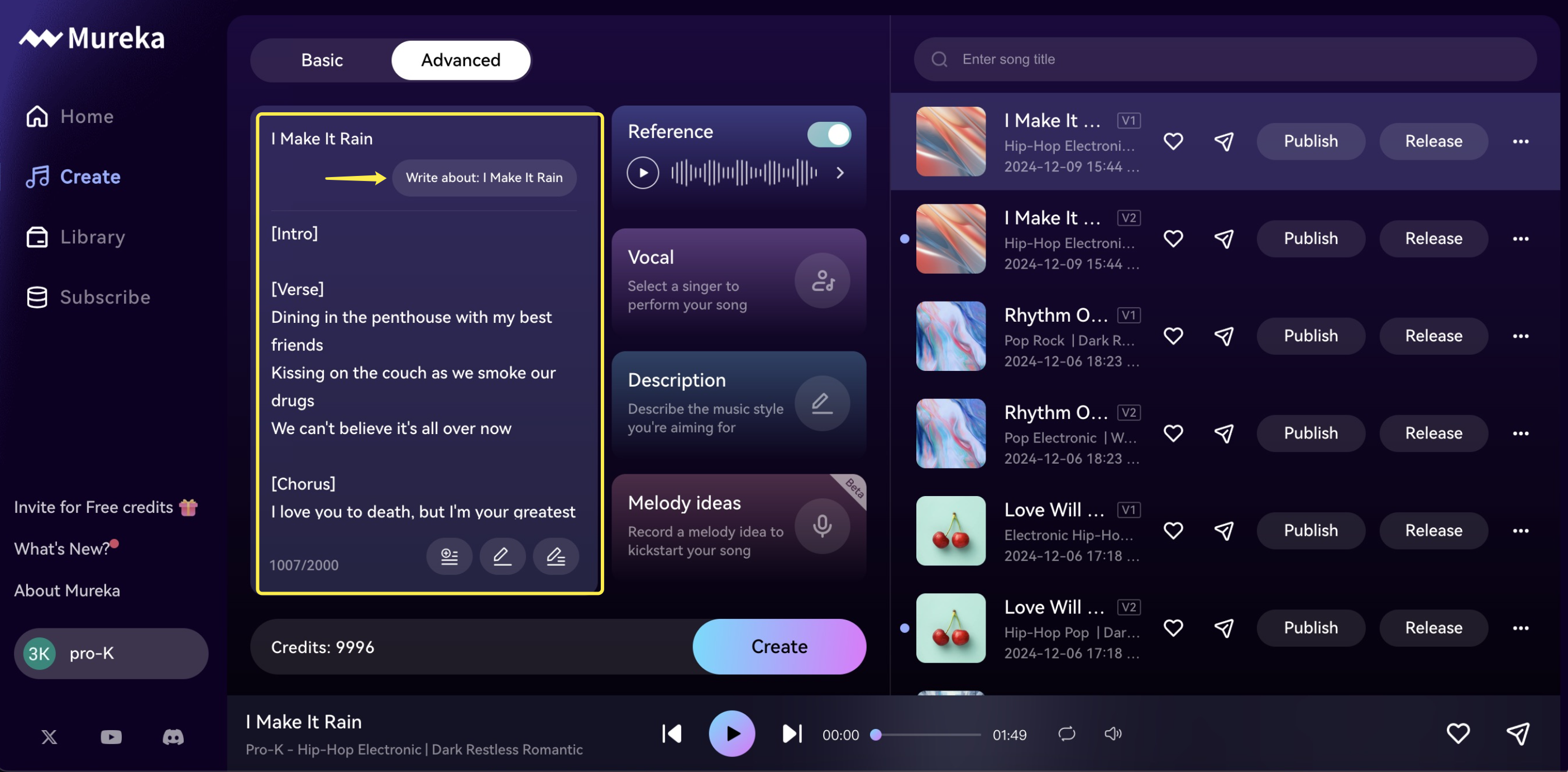
Users can input lyrics or describe the theme of the song, and Mureka will generate a suitable music style based on this input.
Step 3: Customize Your Track and Style Reference
If users have their own unique music style, Mureka’s “Style Reference” feature allows them to generate music that perfectly matches their style and artistic vision. By analyzing the audio samples provided by the user, Mureka’s AI identifies key elements such as genre, rhythm, instrumentation, and mood, then creates music that reflects the user’s distinctive style.
Step 4: Edit the Melody
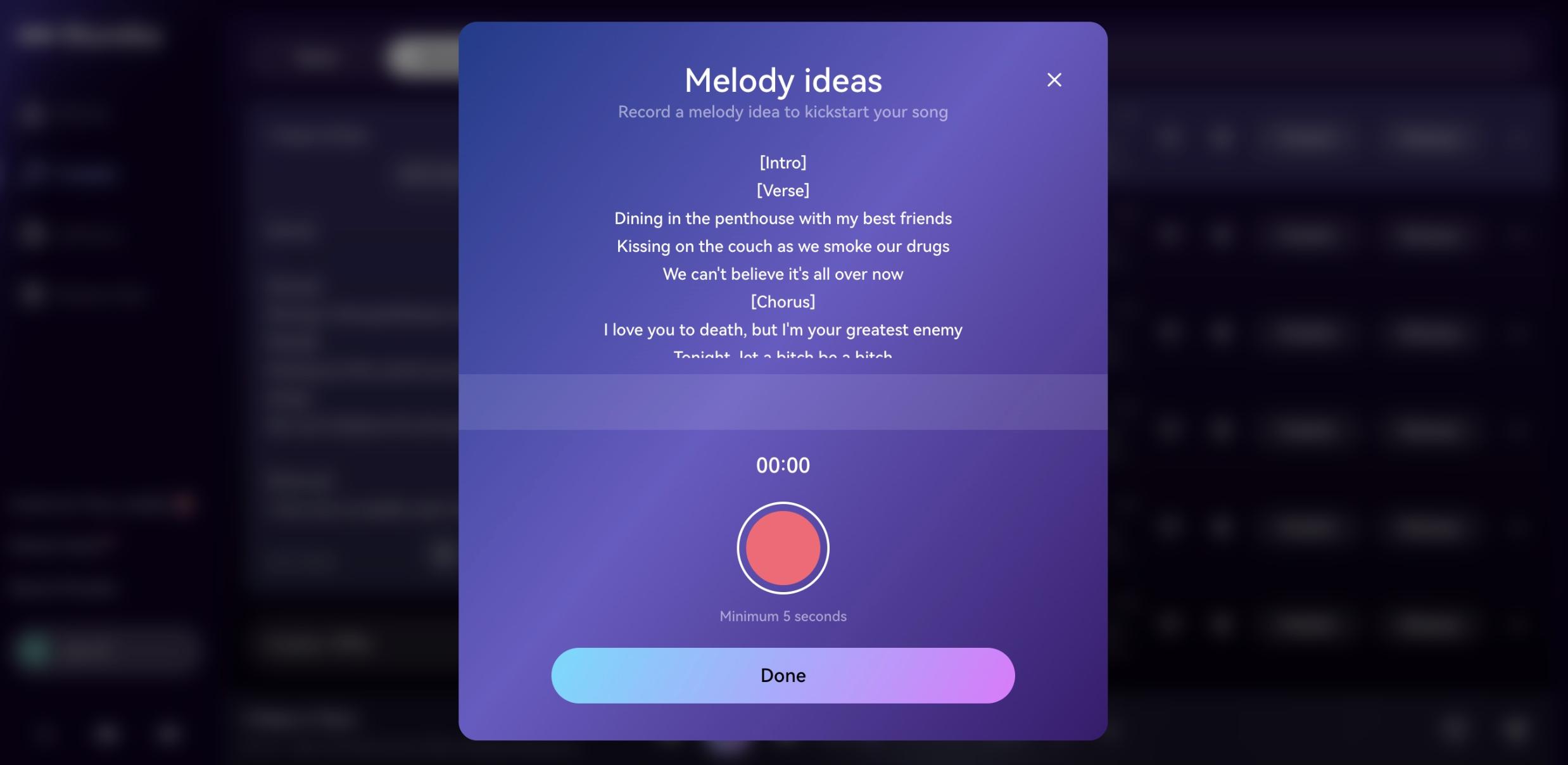
Users can input their inspiration and hummed melodies into Mureka, and the AI will analyze the melody and generate a complete song based on the user’s input.
Step 5: Choose a Vocal Style
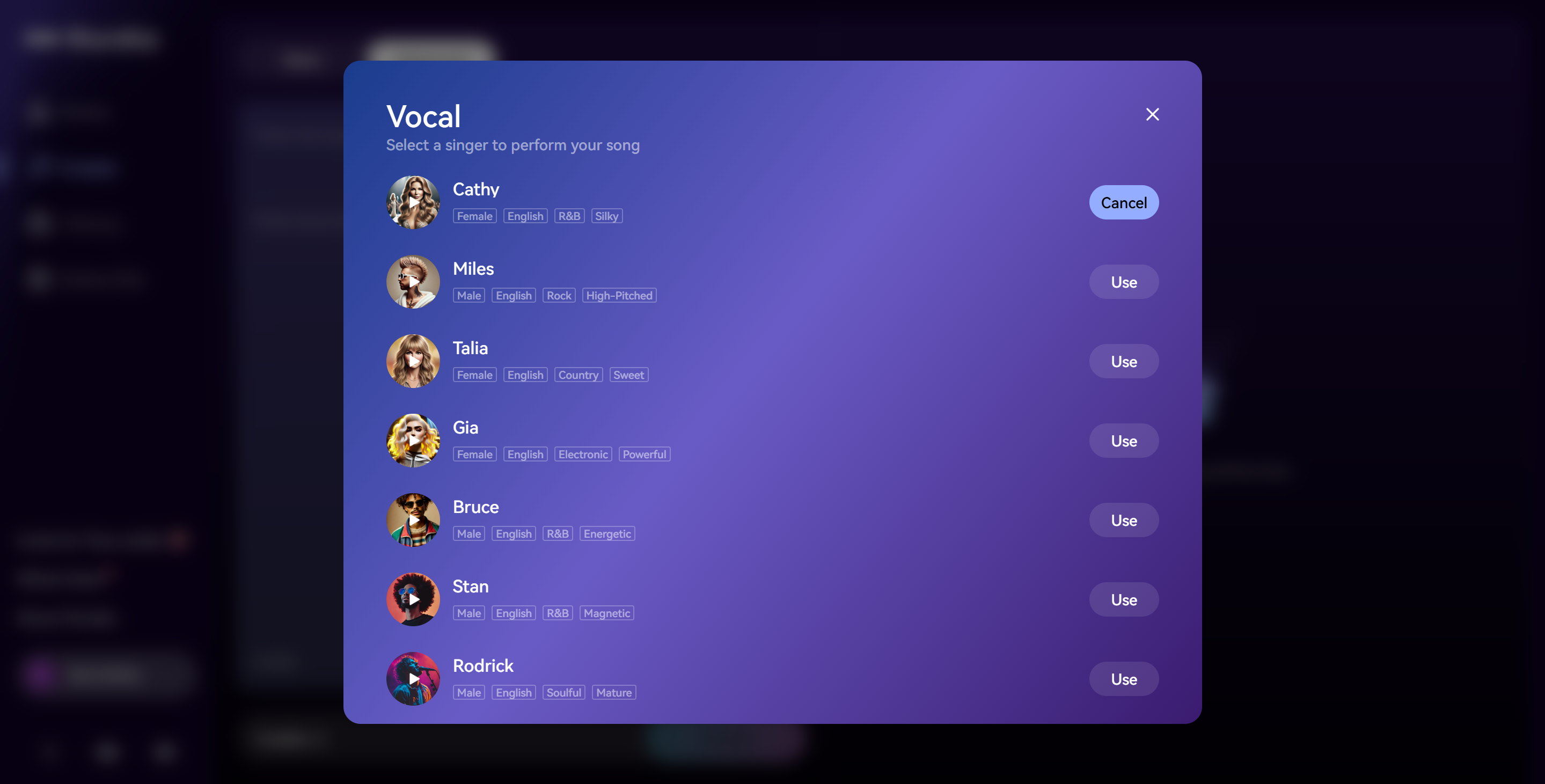
Before generating a track, users simply select their desired vocal tone, which remains consistent throughout the song. Mureka offers a variety of vocal options, including male and female voices, as well as styles like pop, R&B, and rap. Users can preview and choose their preferred tone, and the AI seamlessly integrates it into the music.
Step 6: Export the Track
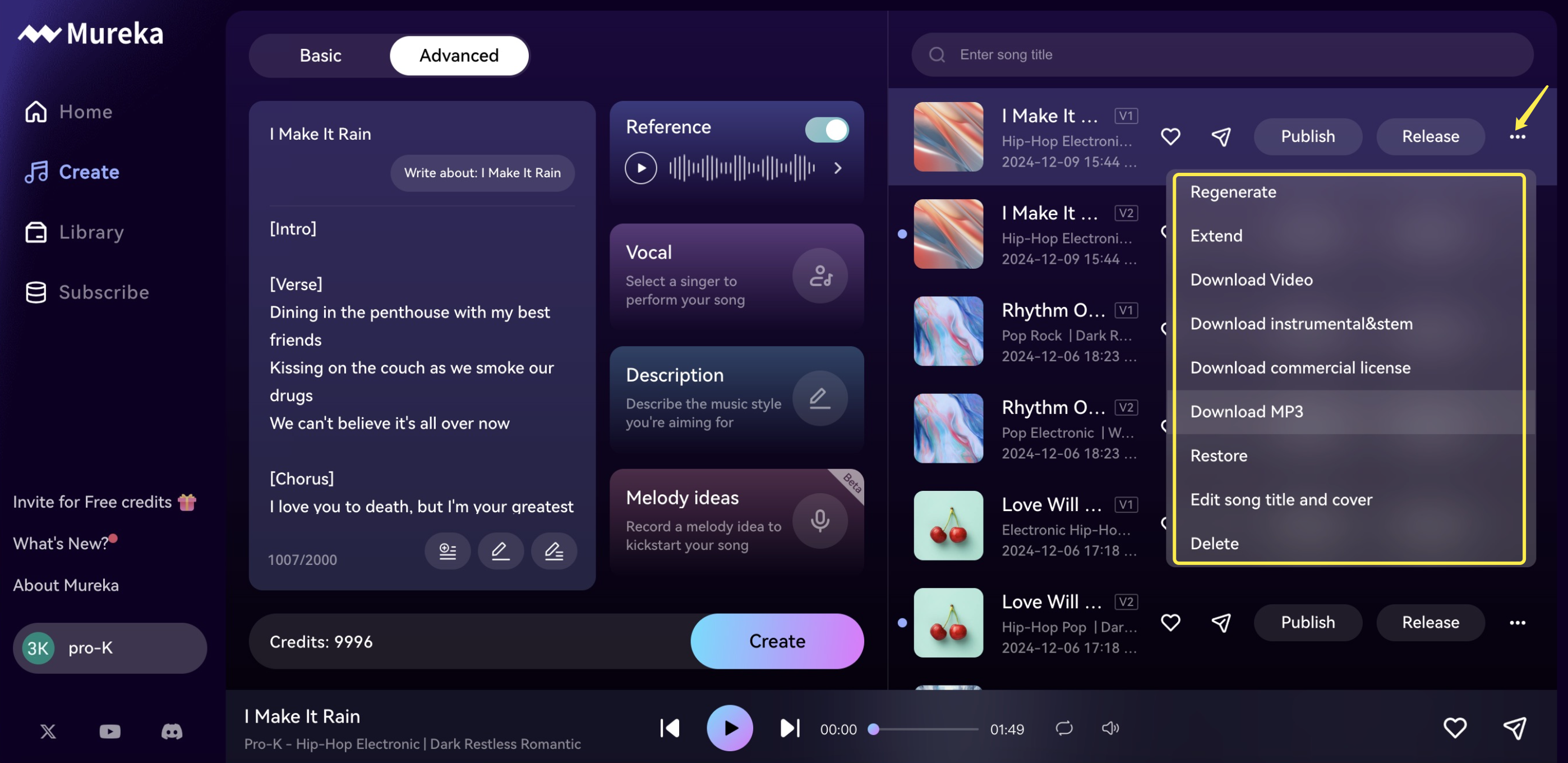
Once satisfied with the creation, users can export the track in various formats, ready to be published on any platform or used in other projects.
By following these steps, Mureka enables creators to quickly and efficiently produce high-quality music, whether for commercial use, personal projects, or as a foundation for further production.
Mureka’s advanced AI music maker simplifies the process of creating professional music in minutes. Whether you’re a beginner or an experienced producer, Mureka’s platform makes music creation accessible, fast, and enjoyable.
For more information about Mureka or to try it out, please visit Mureka’s official website.