









Once your Android phone is lost, don’t panic. All current Android phones have a positioning function. This positioning refers to the positioning through the phone’s own GPS or mobile network. If you are not sure whether this function in your phone is enabled, you might as well try it out in practice. Maybe it can help you find your phone. Now, I’ll share with you how to use the device manager function of an Android phone for positioning.
The built-in positioning function of the Android system
This method is applicable to Android phones with the complete Google Services framework installed. Some domestic version phones may not work properly. Google comes with built-in functions such as data backup, location, and anti-theft (ringing, locking, clearing). To use this service, you need to install the Google Services Framework on your mobile phone (you can search for it in the app store) and log in to your Google account.
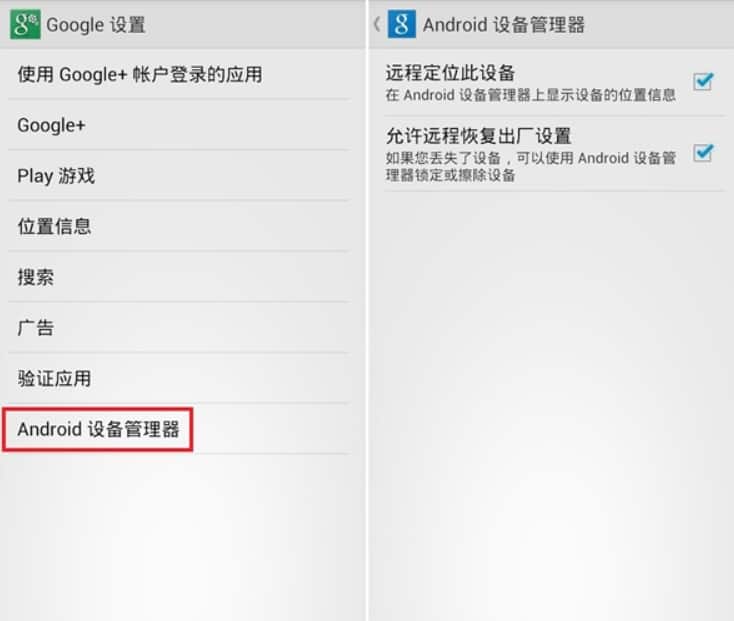
In the Google Services app, find the “Google Settings” app, select “Android Device Manager” within it, and check “Remotely Locate this Device” and “Allow Remote Restoration to Factory Settings”.
Mobile phone once lost, open the Android device manager web page: https://www.google.com/android/devicemanager, you can see white square in the top right corner of the “localization”, and at the bottom of the “ring” locking and empty “function”, click on the corresponding button to perform the corresponding operation. The prerequisite for the corresponding response of the mobile phone is that it can access the Internet normally through Wi-Fi or mobile data connection. Therefore, if the mobile phone is offline, the relevant operation will continue to be executed after the mobile phone is online.

Click the ring button and the phone will ring at its maximum for 5 minutes continuously. However, users can turn it off by clicking the power button. It would be even better if this setting could force the bell to ring.
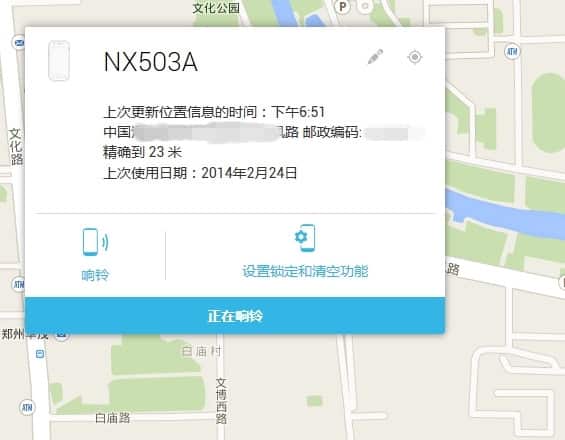
By using the remote lock feature of the Android Device Manager, it will overwrite all existing passwords on your phone, preventing thieves from accessing the system. The “Clear” option will delete the phone’s contacts and other information to prevent privacy leakage.
Since most domestic mobile phones are not equipped with Google’s relevant services, the above-mentioned positioning function may not be applicable to all Android phones.