






Facebook Twitter Instagram
    Trending
    • Samsung Galaxy Z Fold8 Renders Reveal Flex Titanium Folding Design and Four Color Options
    • Huawei Mate 90 Series Reportedly Set for September Debut, Expected to Introduce Kirin 9050 Chip
    • DJI Osmo 360 II Leaks in Real-World Testing with NFC Support and Larger Battery
    • Kimi Responds to Musk’s AI Challenge: “Welcome to the 2 Trillion+ Club”
    • Nexa Ultra II vs Nexa Flex Review: Which Disposable Vape Is the Better Choice?
    • Vaporesso XROS 6 vs XROS Pro 2 Review: Which XROS Pod Kit Is Right for You?
    • Blackview Unveils LINK 5, the World’s First Smart Tablet Powered by Android 17
    • Breeze Pro Disposable Vape Review: A Compact 2,000-Puff Disposable with Rich Flavor and Hassle-Free Performance
    Facebook YouTube
    IGeeKphone China Phone, Tablet PC, VR, RC Drone News, Reviews
    • HOME
    • BREAKING NEWS
      • AI NEWS
    • Amazon
    • PHONE
      • Top Phones For Your First Choice
      • Phone Comparison
      • Xiaomi
      • Blackview
      • Doogee
      • Black Shark
      • Geekbuying
      • Banggood
      • TEMU
      • TikTok
      • Aliexpress
      • Walmart
      • MercadoLibre
      • Lazada
    • TOP VAPE Awards for 2026
    • VAPES
      • E-CIGAR Upcoming
      • Vape News
      • Vape Deals
      • Vape Comparison
      • Vape Guide
      • VAPE LAWS
      • Giveaway
    • BEST VAPE
      • Best Vape Stores
      • Best Starter Vape Kits
      • Best Vapes for Beginners
      • Best Disposable Vapes
      • Best Pod Systems
      • Best Pod Mod Vapes
      • Best Mods
      • Best Nicotine Pouches
      • Best Clearomizers/Tanks
      • Best E-Liquid
      • Best EGO/Pens
      • Best Vapes for Nic Salt E-Juice
      • Best Vapes to Quit Smoking
      • RDA vs. RDTA vs. RTA
    • Best Vape Brand 2026
      • VAPORESSO
      • VOOPOO
      • OXVA
      • NEXA BAR
      • MASKKING VAPE
      • SP2S
      • IPLAY
      • TODOO
      • MRFOG
      • LOSTVAPE
      • VEIIK
    • REVIEW
      • E-cigar Review
      • Phones
      • Tablet PC
      • TV Box
      • RC Drone
      • Wearables
      • Camera
      • Accessories
      • VR Headset
    • MORE
      • TABLET
        • Chuwi
        • INNOCN
        • Teclast
        • Top Tablet for Your First Choice
        • Tablet/Laptop Comparison
      • RC DRONE
      • CAMERA
      • WEARABLES
        • OneOdio
        • BlitzWolf
        • Top Smartwatch for First Choice
      • 3D PRINTER
        • 3D Printer Review
        • Anycubic
        • FLSUN
        • Xtool
        • LONGER
        • Top 3D printer to Choose First
      • POWER STATION
        • Oukitel
        • FOSSIBOT
      • GAMING
        • Top Gaming Products
      • E-BIKE
        • Samebike
        • Happyrun
        • ENGWE
      • SMART HOME
      • TV BOX
      • ACCESSORIES
      • VR HEADSET
      • CLOTHES
      • AUTO CAR
    • DEAL
    • Shop
    IGeeKphone China Phone, Tablet PC, VR, RC Drone News, Reviews
    You are at:Home»Guide»What Should I do if I Lose My Android Phone? How to Conduct Positioning and Remote Control
    Guide

    What Should I do if I Lose My Android Phone? How to Conduct Positioning and Remote Control

    Brady CottonBy Brady CottonMay 12, 2026
    Facebook Twitter Pinterest LinkedIn Tumblr Email

    Once your Android phone is lost, don’t panic. All current Android phones have a positioning function. This positioning refers to the positioning through the phone’s own GPS or mobile network. If you are not sure whether this function in your phone is enabled, you might as well try it out in practice. Maybe it can help you find your phone. Now, I’ll share with you how to use the device manager function of an Android phone for positioning.

    The built-in positioning function of the Android system

    This method is applicable to Android phones with the complete Google Services framework installed. Some domestic version phones may not work properly. Google comes with built-in functions such as data backup, location, and anti-theft (ringing, locking, clearing). To use this service, you need to install the Google Services Framework on your mobile phone (you can search for it in the app store) and log in to your Google account.

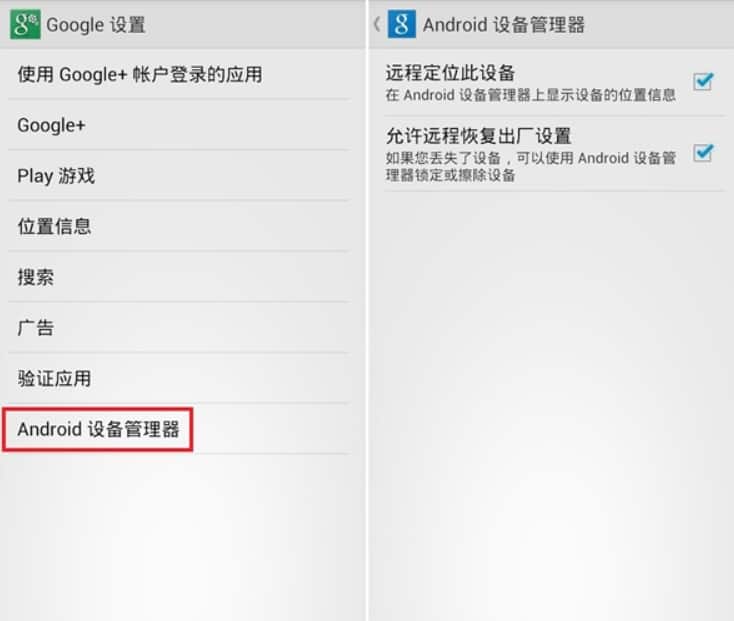
    In the Google Services app, find the “Google Settings” app, select “Android Device Manager” within it, and check “Remotely Locate this Device” and “Allow Remote Restoration to Factory Settings”.
    Mobile phone once lost, open the Android device manager web page: https://www.google.com/android/devicemanager, you can see white square in the top right corner of the “localization”, and at the bottom of the “ring” locking and empty “function”, click on the corresponding button to perform the corresponding operation. The prerequisite for the corresponding response of the mobile phone is that it can access the Internet normally through Wi-Fi or mobile data connection. Therefore, if the mobile phone is offline, the relevant operation will continue to be executed after the mobile phone is online.

    Click the ring button and the phone will ring at its maximum for 5 minutes continuously. However, users can turn it off by clicking the power button. It would be even better if this setting could force the bell to ring.
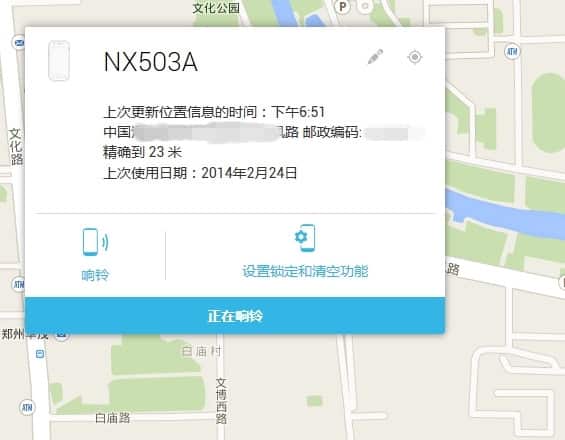
    By using the remote lock feature of the Android Device Manager, it will overwrite all existing passwords on your phone, preventing thieves from accessing the system. The “Clear” option will delete the phone’s contacts and other information to prevent privacy leakage.

    Since most domestic mobile phones are not equipped with Google’s relevant services, the above-mentioned positioning function may not be applicable to all Android phones.

    Share. Facebook Twitter Pinterest LinkedIn Tumblr Email

    Related Posts

    Samsung Galaxy Z Fold8 Renders Reveal Flex Titanium Folding Design and Four Color Options

    Huawei Mate 90 Series Reportedly Set for September Debut, Expected to Introduce Kirin 9050 Chip

    What Should I Do If the Camera of Redmi Note 14 Is Slow? Camera Optimization Guide for Redmi Note 14

    Leave A Reply Cancel Reply

    You must be logged in to post a comment.

    voopoopintch
    oxva nexlim 2
    sp2s sen x disposable vape
    • Popular
    • 3D Printer REVIEW
    • XIAOMI
    July 13, 2026

    OXVA Nexlim 2 Mini Pod Vape Hands on Review

    July 13, 2026

    OXVA Nexlim 2 Pod Vape Hands on Review

    June 21, 2026

    iPlay LUMO 8K Review – A Compact Prefilled Pod Kit with Big Flavor and Everyday Convenience

    June 21, 2026

    iPlay HOOLA 150K Review – A Cloud-Chasing Giant with Music, Modes & Massive Longevity

    December 26, 2025

    ACMER ASCARVA 4S: Precision CNC Power for Makers, DIYers & Small Workshops

    June 23, 2024

    ACMER P2 20W Laser Engraver Fixed Focus Engraving: Hands on Review

    May 30, 2024

    xTool F1 Ultra Review: World’s First 20W Fiber & 20W Diode Laser Engraver

    May 30, 2024

    Anycubic Kobra 3 Combo Review: The Multicolor Masterpiece?

    July 19, 2026

    Xiaomi 17 Max Becomes One of the First Smartphones to Receive China’s Highest AI L3 Certification

    July 18, 2026

    The new Xiaomi 18 series phones are suspected to have been put on the market, and they support UWB (Ultra-Wideband) technology.

    July 18, 2026

    Xiaomi Redmi K Pad 2 Adds New 16GB+256GB Model with 8.8-inch 3K Display and Flagship Performance

    July 17, 2026

    Xiaomi 18 Pro Leak Reveals Signature Full-Width Rear Display, Powered by Next-Generation Snapdragon 8 Elite 6

    fc 26 coins
    New Arrivals
    • Breeze Pro Disposable Vape Breeze Pro Disposable Vape
    • Vaporesso Armour OCTA Vape Mod Kit Vaporesso Armour OCTA Vape Mod Kit
    • Redmi 16C 5G Redmi 16C 5G
    • Redmi 16C 4G Redmi 16C 4G
    • Honor GT 2 Honor GT 2
    • Mellow Fellow Fillable Vaporizer Mellow Fellow Fillable Vaporizer
    • Vivo V80 Vivo V80
    • Vivo V80 Pro Vivo V80 Pro
    • RELX Creator Pro Battery Device World Cup Limited Edition RELX Creator Pro Battery Device World Cup Limited Edition
    About
  • Igeekphone.com provides the first global tech news and reviews about smartphone, vapes, e-cigar, smart home, 3D printers, e-bike,tablets, RC drones, VR headset, and other accessories. It's the best platform to improve your brand and product.
  • Contact us: info@igeekphone.com
  • Check Our Privacy Policy Here.
  • Note: *Right now we have US editor and EU editors for review, especially for Amazon US and EU.
  • *Shop and Compare Price Here*
  • Facebook
  • Youtube
  • *Yahoo Finance is a platform that provides financial news, press releases, market data, and useful tools to help users make informed investment decisions.*

    For inquiries, please contact:
    financeyahoocompany@gmail.com

    OUR BEST VAPE PARTNERS
  • VAPE ONLINE STORE
  • HAYATI PRO MAX PLUS
  • VAPORESSO
  • VOOPOO
  • OXVA
  • NEXA
  • MASKKING
  • SP2S
  • IPLAY
  • TODOO
  • OTHER BEST PARTNERS
  • SVBONY
  • Chuwi
  • Blackview
  • Fossibot
  • Unihertz
  • Flsun
  • Anycubic
  • Xtool
  • Oukitel
  • Mukkpet Ebike
  • Ugreen
  • Copyright © 2026 igeekphone

    Type above and press Enter to search. Press Esc to cancel.