










A carefully selected photo for a social media profile looks almost perfect. However, the eyes appear slightly closed, making the expression look tired. Posting the image may not give the best impression. Small details like eye expressions matter in profile pictures.
An open eyes app can quickly solve this issue in no time. Modern AI tools analyze facial features and reopen closed eyes naturally. The edit usually takes just a few taps. These apps can also enhance brightness and facial sharpness. In this article, several open eyes app options are introduced to help improve portraits and create better profile photos.
Part 1. Why is an Open Eyes App Useful in an AI Editing App Today?
With the rapid growth of smart photo tools, an AI editing app now offers far more than simple filters. Features like eye correction help users quickly fix common photo mistakes. Here is why the app is being used widely today:
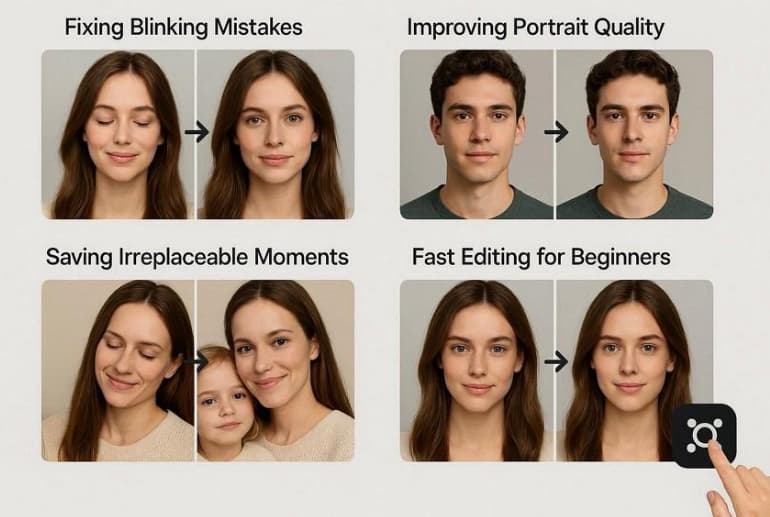
- Fixing Blinking Mistakes: Blinking at the wrong moment often results in closed eyes in photos. An open eyes feature can automatically detect and correct this issue within seconds.
- Improving Portrait Quality: Eye expressions play a major role in portrait photography. AI tools reopen eyes naturally and enhance facial details for a more polished result.
- Saving Irreplaceable Moments: Some photos cannot be retaken, such as wedding or travel memories. An open eyes feature helps restore these moments by correcting small but noticeable flaws.
- Fast Editing for Beginners: Traditional photo editing requires advanced skills and manual adjustments. An AI-powered open eyes tool simplifies the process and completes the edit automatically.
Part 2. Key Features That Make a Photo Enhancer App Best for Eye Fix
A modern photo enhancer app does more than adjust brightness or apply filters. Advanced AI tools now include smart facial recognition and eye correction features. When choosing a reliable app for eye fixing, look for the following key features:
- AI Eye Detection: The app should automatically detect closed or partially closed eyes in portraits. AI detection ensures the correction targets the exact facial area without affecting the rest of the photo.
- Natural Eye Reconstruction: A good tool recreates eyes that match the person’s facial expression. This feature ensures the edited result looks realistic instead of artificial.
- Automatic Face Enhancement: Many apps enhance skin texture, lighting, and facial details, along with eye correction. This creates a more balanced and polished portrait after fixing the eyes.
- High-Resolution Image Processing: Maintaining image quality is essential when editing facial features. A strong enhancer processes photos without reducing sharpness or clarity.
- Simple One-Tap Editing: The best apps provide quick fixes with minimal effort. One-tap editing allows users to correct closed eyes instantly without advanced editing skills.
Part 3. Best Open Eyes App Tools: AI Editing App Top 5 List
After understanding the benefits and key features, the next step is choosing the right tool. The following list highlights the top open eyes app tools that stand out for their AI editing features:
1. Relumi App [Android/iOS]
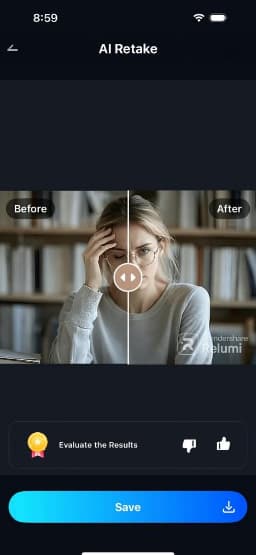
One of the most reliable AI photo tools for fixing imperfect pictures is the Relumi app. Designed as an all-in-one AI photo editor, Relumi focuses on repairing photos that are almost perfect but slightly flawed. Its standout feature is AI Retake, which intelligently analyzes facial details and corrects issues such as closed eyes and awkward expressions.
Instead of pasting generic eyes, the tool recreates natural eye shapes and expressions based on the original face and lighting conditions. With just a few taps, the app scans the photo and generates a corrected version that looks natural and realistic. Beyond eye correction, Relumi also includes tools for enhancing portrait details and improving image clarity.
Key Features Offered by Relumi
- Before and After Comparison: The app shows a side-by-side preview, which helps users easily compare the original image with the edited result in the AI editing app.
- Smile and Laugh Enhancement: This feature improves facial expressions by enhancing smiles or laughter. As a result, portraits appear livelier and more natural.
- Restoration of Old Photos: The tool repairs faded or damaged images. It improves clarity, colors, and facial details in old photographs.
Steps for Opening Eyes in Images with the Relumi App
Correcting closed eyes is simple with an AI face editor. Follow these steps to reopen eyes in your photos with the Relumi App:
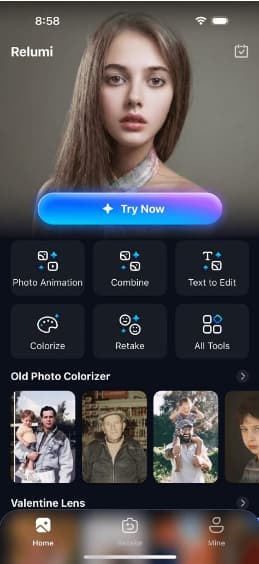
Step 1. Launch AI Retake and Import Photo
Open the Relumi app and tap the “Retake” option on the homepage. Then, select the photo with closed eyes from your device.
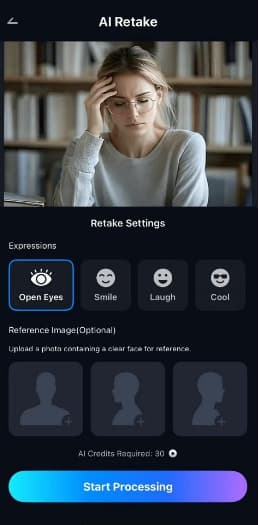
Step 2. Select Open Eyes and Process
After importing, choose the “Open Eyes” feature and tap “Start Processing” to let the app automatically fix the eyes.
Step 3. Preview and Save
Once finished, swipe to compare the before and after results. If satisfied, tap “Save” to export the edited image to your phone.
Pros
- Users can animate their static images with the Animate feature offered by the app.
- The AI Combine feature lets you combine multiple images into one photo.
2. AirBrush [Android/iOS]
Recognized as a reliable AI editing app, AirBrush focuses on instant portrait enhancement. It automatically smooths skin, removes blemishes, and adjusts colors. Tools like red‑eye fixing and teeth whitening make it ideal for quick photo retouching and flawless selfies. Follow the instructions mentioned below to learn how to use this app for opening eyes:
Instructions. After opening the app, press “+” to add a photo. Choose the “Face Fix” option from the toolbar below. Now, insert a reference image and press “Apply” to let the app begin the process.
Cons
- Ads and in‑app purchases in the free version can interrupt editing.
- Some users lose access to paid features after app updates.
3. BeautyPlus [Android/iOS]
A versatile photo enhancer app, BeautyPlus is trusted by millions for selfie and portrait edits. It offers dozens of AI‑powered tools to smooth skin, brighten eyes, and remove blemishes. With creative filters, makeup effects, and background edits, BeautyPlus helps transform ordinary photos into polished, eye‑catching images with ease. To learn how to open eyes in a photo with this app, read the instructions below:
Instructions. Import the image by tapping on the “Camera” icon at the bottom. Next, select the “Expressions” option from the toolbar and tap on “Reface” to add a reference open-eye image. Once done, press the “Tick” icon to execute the process.
Cons
- Frequent subscription prompts make free features harder to access.
- The app sometimes crashes or fails to save edited photos.
4. FaceApp [Android/iOS]
FaceApp is a popular open eyes app that uses neural networks to realistically retouch faces. It includes features to add smiles, change age, or subtly adjust facial expressions. By applying sophisticated transformations, this app brings professional‑level edits to casual users. Read the instructions mentioned next to learn how to open eyes with this app:
Instructions. Once the image is imported, choose the “Sizes” option from the bottom. Now, select the “Big Eyes” option and press “Apply” to open eyes in images.
Cons
- Photos are uploaded to cloud servers, raising privacy concerns.
- The free version limits edits and filter options.
5. RetouchMe [Android/iOS]
A comprehensive photo enhancer app, Retouch Me specializes in in‑depth body and face retouching. It smooths skin, reshapes facial features, and whitens teeth in no time. Whether correcting small imperfections or refining portraits, RetouchMe adds a tailored touch to every image. To learn how to use this app, read the instructions provided next:
Instructions. After importing the image, tap on the “Face” option and then select “Enlarge Eyes” under the “Eyes” section. Next, tap on “Add to Order” to let the app process it.
Cons
- Results can be inconsistent because edits depend on designers.
- Photo uploads to external servers may raise privacy concerns.
Comparing the Best Open Eyes Apps
Choosing the right open eyes app can make a huge difference in how natural and polished your photos look. The table below highlights key aspects for each option available:
| Relumi | AirBrush | BeautyPlus | FaceApp | RetouchMe | |
| Key Features | AI Retake, Colorize Photos, Portrait Enhancement | Red-eye & skin smoothing | Skin smoothing & eye brightening | Neural network retouch | Designer-based edits |
| Eye Fix Accuracy | Very High | High | Medium | Medium | Medium |
| Ease of Use | Simple, beginner-friendly | Easy | Moderate | Easy | Moderate |
| Other Editing Features | Animate, AI Combine, Restore Old Photos | Teeth whitening, color adjustment | Filters, makeup, background edits | Age, smile, expression changes | Body/face retouch |
Conclusion
To sum it up, this article provided a detailed review of different open eyes apps that you can try. Among them, the Relumi app stands out for its AI Retake feature, natural eye corrections, and extra enhancement tools. It’s the best choice for effortless, realistic, and professional-looking photo edits.