










Igeekphone reported on June 24th that last week marked an important milestone in the Android system version update: Android 17 was officially released with a stable version and began to be rolled out to all Google Pixel models. Meanwhile, testers have been engaged in the testing of the next major version update – the Android 17 QPR1 test version has previewed various new changes in the feature update package that will be launched in September. Two weeks ago, Google released QPR1 Beta 4, and now the official has started to push the Beta 5 version.
Google employee Mashar Rahman announced this news on the social platform X, confirming that the compilation version number CP31.260608.007 will be pushed to the test users of Pixel 6 and newer models. This update is of great significance. The previous test package clearly excluded Pixel 6 and Pixel 6 Pro, but Google had promised at that time that the new version would restore support for these two older models.
Igeekphone has noticed that Google’s current main focus is mainly on finalization and optimization, with the core content being mainly focused on numerous bug fixes. The official announced fixes are as follows:
The game control panel is malfunctioning, preventing users from stopping the screen recording or saving the recorded video files (Issue numbers: #296368569, #328539170)
2. After the equipment is idle, if you open the camera application, there will be a brief lag and the screen will freeze (Issue Number: #330488811)
3. When the phone is awakened from the always-on screen interface, the screen freezes and the bottom navigation bar displays a pixelated screen glitch (Issue ID: #515393542, #515497396)
4. Download Manager Error: After the device disconnects from the VPN network, the download tasks time out and fail to complete (Issue Number: #475985649)
5. The display time of the lock screen interface and the charging screen saver does not match the estimated duration (Issue Number: #489503595)
6. The privacy space interface crashed. The locked private application appeared incorrectly in the desktop search results (Issue Number: #515631415)
7. When downloading the game, there were system crashes and the entire machine froze (Problem ID: #515364954)
In the right-click menu of the archived application, the floating window switch is wrongly displayed as unusable (Issue Number: #514585702)
9. The performance of the system web rendering core WebView has deteriorated. When launching the “Monopoly GO” mini-game, the screen freezes and the application crashes (Issue ID: #516576731)
After restarting the mobile phone, the desktop widgets disappeared and they could not be found in the component selection list (Issue numbers: #488125748, #505117543, #505671079, #497140330, #506685943, #510967059)
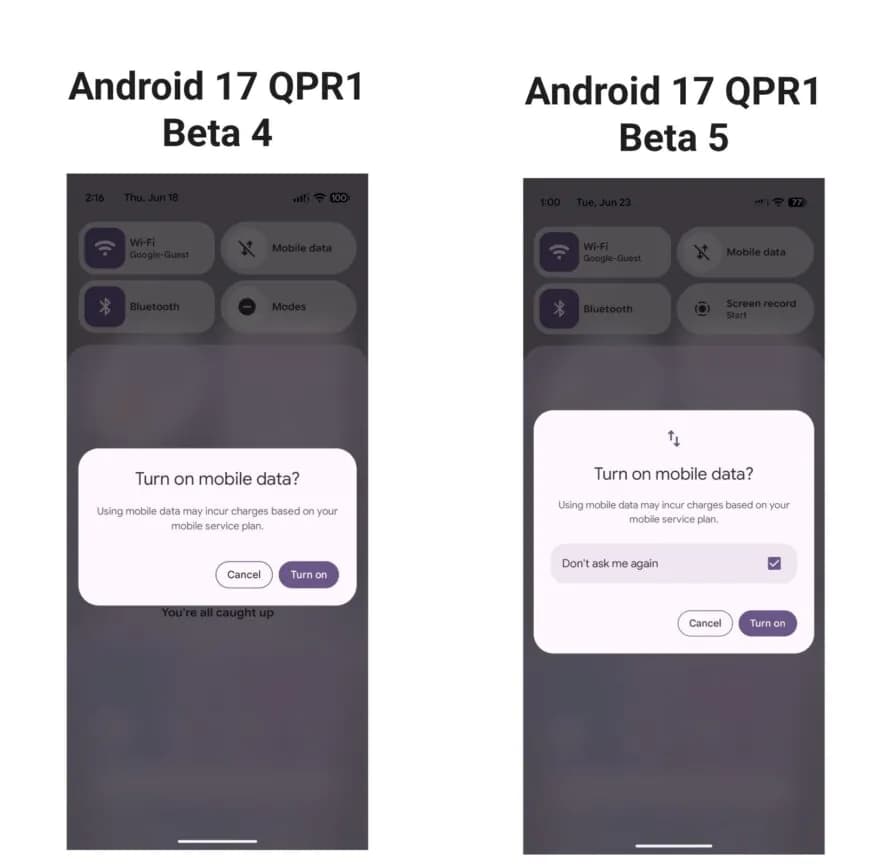
Rahman also disclosed a practical new feature: When mobile data is enabled, a pop-up window now includes a “Don’t Ask Again” switch.
If this is your first time experiencing the QPR1 update, simply register your Pixel device to the Google Android Testing Program and you can participate in the test.
Furthermore, if you are using the Android 17 beta version and want to directly upgrade to the stable version while retaining all your phone’s data, Google reminds you not to install QPR1 Beta 5. The correct procedure is to exit the Android testing program.