









1. Introduction: A 9-Inch Tablet That Packs Your Entire Steam Library
Before getting my hands on the RedMagic Gaming Tablet 5 Pro, I wasn’t expecting much. It’s a routine update, right? A brighter screen, slightly higher frame rates, maybe a bit better cooling. The usual incremental stuff.
But after actually using it, I’ve completely changed my mind. This isn’t a minor upgrade; it’s genuinely impressive.
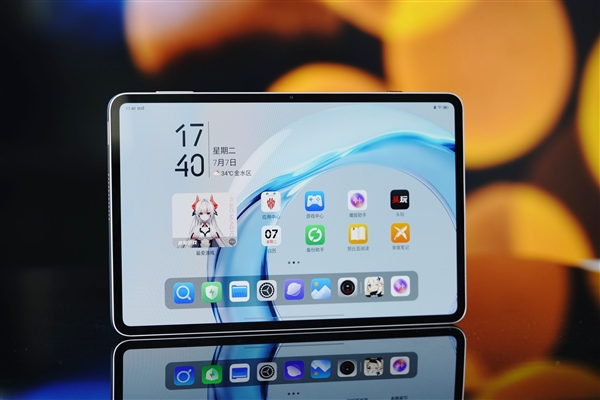
Steam Direct Connect was available on the RedMagic Gaming Tablet 3 Pro, but back then, it felt more like a functional novelty. With the 5 Pro, RedMagic has leveraged three key advantages—liquid cooling, a 185Hz display, and the Snapdragon 8 Gen 5—to elevate the Steam Direct Connect experience from merely usable to genuinely enjoyable. Check out our RedMagic Gaming Tablet 3 Pro review.
The First Key Feature: Liquid Cooling System
RedMagic has done something unprecedented by integrating a liquid cooling solution, typically found in servers and desktops, into a chassis just 6.9mm thin. Combined with Liquid Metal 3.0 and a large VC vapor chamber, this system improves chip heat dissipation efficiency by up to 28% and reduces core temperatures by as much as 8°C.
The cooling module even houses 11 custom RGB LEDs, creating a striking ambient glow in low-light conditions.

The Second Key Feature: 185Hz Display
The 9.06-inch OLED panel utilizes an industry-first X10 luminescent material, boasting a local peak brightness of 1600 nits and a dynamic contrast ratio of 1,000,000:1.
Coupled with the tablet’s industry-first 185Hz refresh rate, a new Synaptics S3930 touch controller, and a 2000Hz instantaneous touch sampling rate, the improved responsiveness is immediately noticeable. FPS gamers, in particular, will appreciate the difference.
The Third Key Feature: Next-Level Performance
Powered by the Snapdragon 8 Gen 5 and paired with RedMagic’s in-house R4 gaming chip, this tablet achieves an impressive AnTuTu score of 4.57 million. This dual-chip setup is rare in compact tablets and provides the backbone needed for sustained, high-performance Steam Direct Connect gaming and demanding AAA titles. See our Snapdragon 8 Gen 5 performance guide.
The RedMagic Gaming Tablet 5 Pro inherently supports external controllers, keyboards, mice, and display output. With a controller connected, it transforms into a powerful handheld console; mirrored to a TV, it delivers a big-screen experience. Steam Direct Connect expands its library from mobile games to a vast PC catalog, drastically increasing its versatility.
A robust 8300mAh battery paired with dual USB-C ports supporting 80W fast charging ensures all-day play. The thoughtful dual-C port design and the unique flush back panel prevent cables from interfering with your grip during landscape gaming, making the “play-and-charge” experience seamless.
2. Design & Aesthetics: Liquid Cooling Lighting + Flush Back Plate – A Visual Delight
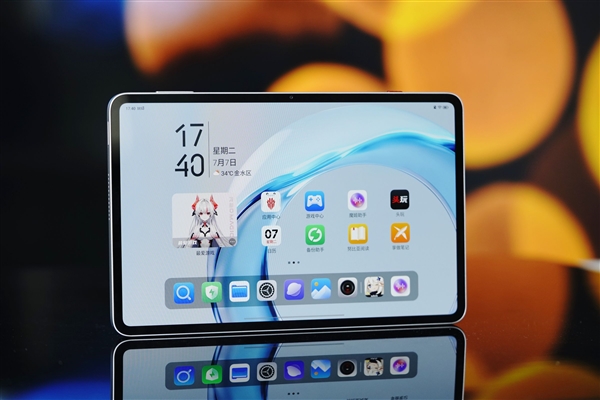
The first thing that strikes you is the 9.06-inch OLED display. Its 4.9mm ultra-narrow bezels achieve a 90.1% screen-to-body ratio, making the front look almost entirely like a display and offering great visual immersion.
The screen resolution is 2400 x 1504. Utilizing the new X10 luminescent material, it delivers a 1,000,000:1 dynamic contrast ratio, 1100 nits of global peak brightness, and 1600 nits locally.
At the top-left corner, you’ll notice the 185Hz refresh rate badge—the highest currently available on any tablet. The 16:10 aspect ratio is well-balanced, minimizing black bars whether you’re gaming in landscape or browsing content vertically.
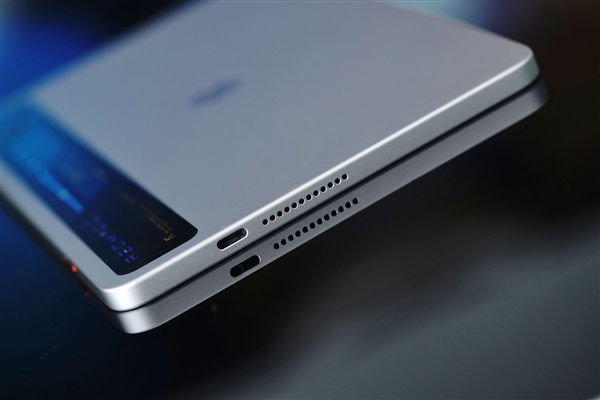
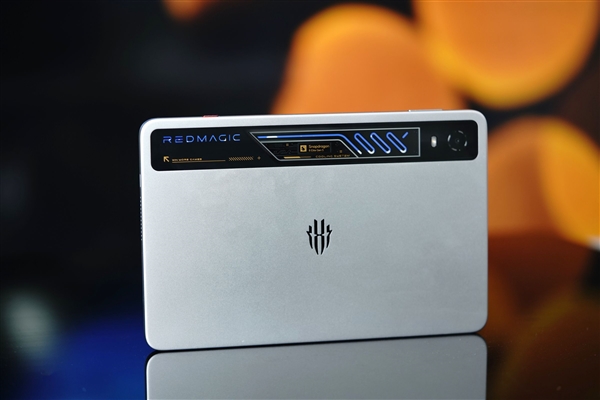
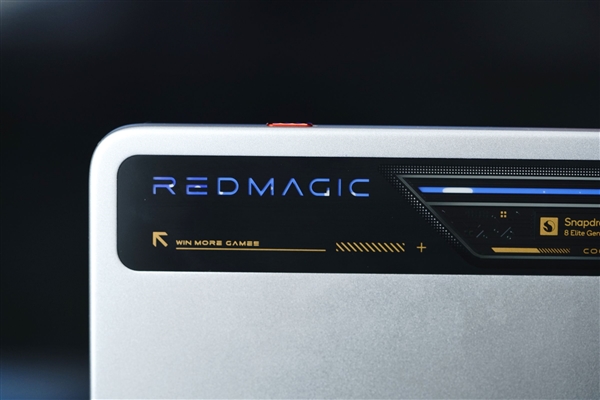
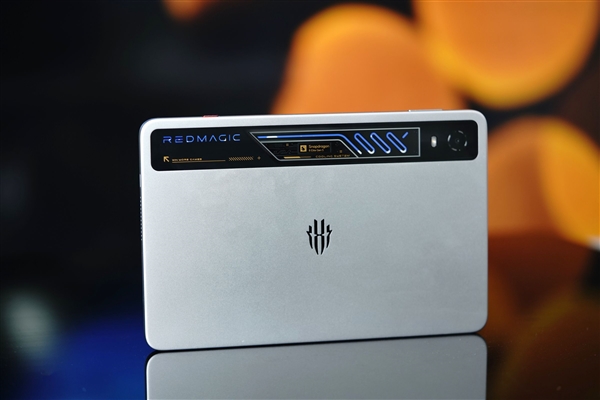
We reviewed the “Dew Transparent Silver Wing” color variant. Its back features a dual-texture design: the top half is a transparent horizontal strip revealing the REDMAGIC branding, the Snapdragon 8 Elite Gen 5 logo, and—most importantly—the liquid cooling pipes and dynamic lighting. The lower half boasts a silver-white matte finish with the RedMagic logo at the center.
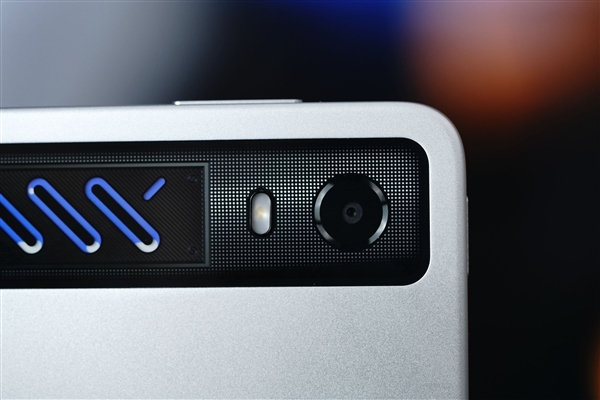
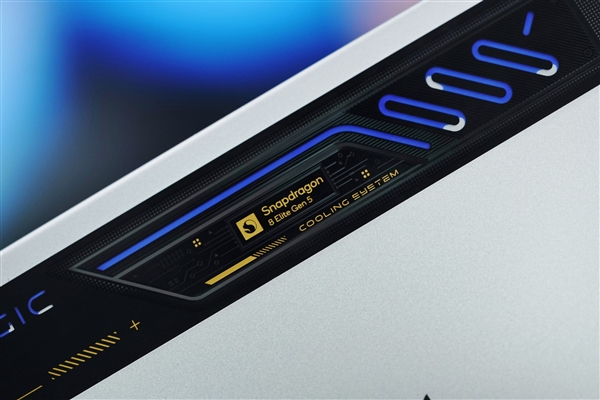
This transparent window at the top is the tablet’s most distinctive design feature. Through the glass, you can see the internal liquid cooling loop, with blue lighting pulsing along the tubes, creating a visual cue of the cooling fluid in motion. The area also features “Snapdragon 8 Elite Gen 5” and “COOLING SYSTEM” text, along with a blue light strip. When active, the cooling module resembles a high-end PC’s liquid cooling setup, exuding a powerful tech aesthetic. In dim environments, the blue-cyan glow creates a striking visual impact.
The 13MP rear camera is completely flush with the back, blending seamlessly with the cooling window. This flush back panel not only looks sleek but also provides a stable surface, preventing wobbling on flat surfaces—crucial for rhythm games and FPS titles requiring multi-finger inputs.
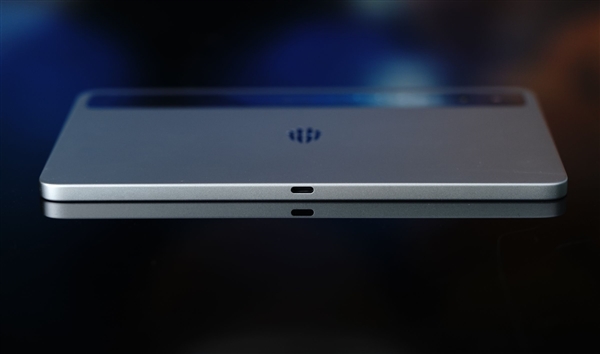
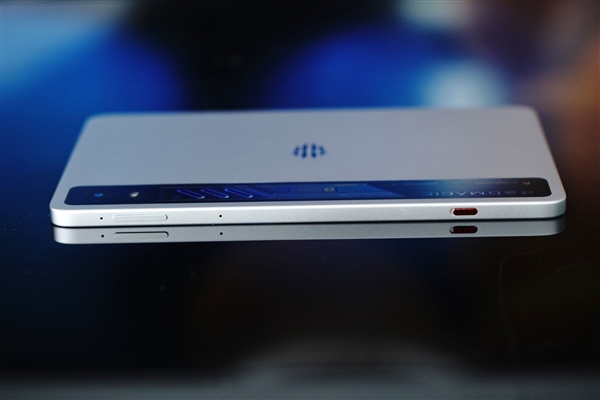
On the left edge are the power button (with an integrated fingerprint sensor) and one of the stereo speakers.
On the right side is a full-featured USB 3.2 Gen 2 port (10Gbps) for high-speed data transfer, external displays, docks, or SSDs. Next to it sits the corresponding stereo speaker.
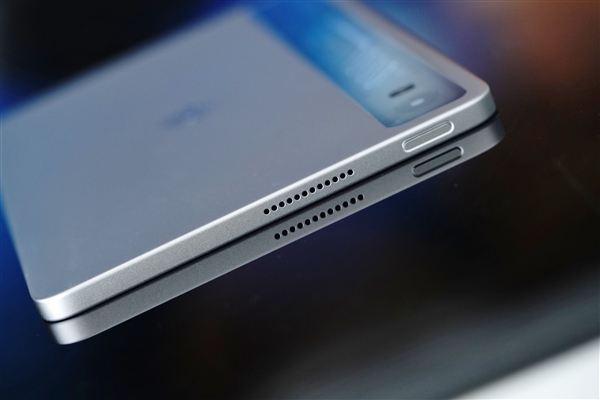
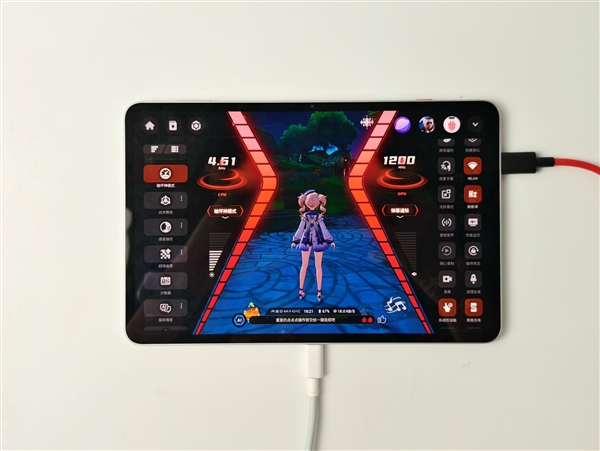
The top edge houses the volume rocker and a red “Game Space” switch. Flicking this switch instantly launches the dedicated gaming mode interface. The bottom features a USB 2.0 Type-C port designed primarily for charging. Its placement ensures the cable doesn’t obstruct your hands during landscape gaming. Both USB-C ports support 80W fast charging and bypass charging, powering the motherboard directly to reduce battery heat during extended play sessions. Read our guide to gaming mode features.
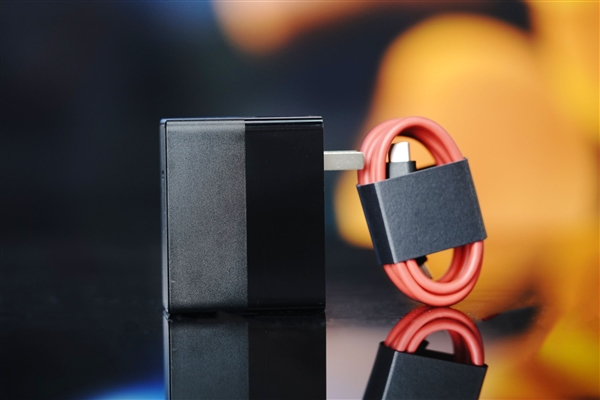
Inside the box, you’ll find a 100W fast charging adapter (with PPS protocol support) and a red C-to-C cable.
3. Performance Testing: Snapdragon 8 Gen 5 + Liquid Cooling – Consistent, High-Frame-Rate Gaming
Packing flagship-tier performance into a 9.06-inch body, the RedMagic Gaming Tablet 5 Pro is equipped with the Snapdragon 8 Gen 5. Built on TSMC’s 3nm process, it features two ultra-high-performance cores clocked at 4.6GHz and six performance cores at 3.62GHz. Combined with the RedMagic R4 gaming chip and the CUBE Game Engine 3.0, it’s a powerhouse.
The integrated liquid cooling system, Liquid Metal 3.0, and large VC chamber ensure the chip maintains peak performance, improving heat dissipation efficiency by up to 28% and reducing core temps by up to 8°C.
We tested the tablet’s performance using four representative titles.
1. Honor of Kings
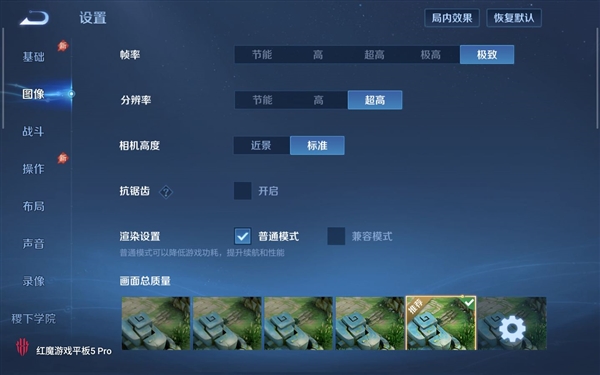
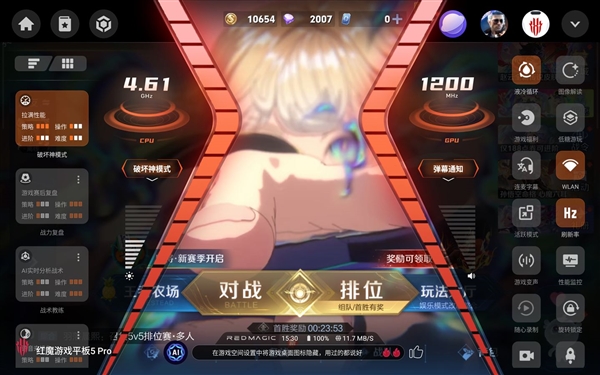
We activated “Devil Mode” (Performance Mode) and set graphics to ‘Ultra’ for max performance.
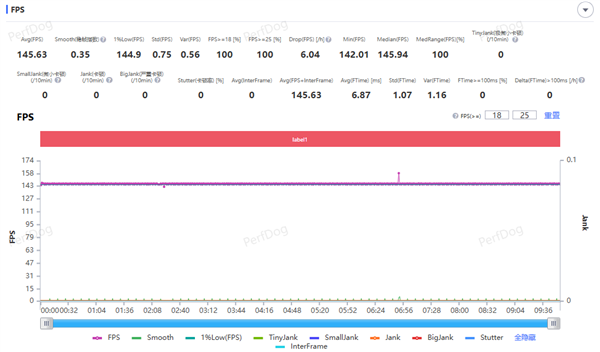
During a 5v5 match, the frame rate remained stable at 145fps with virtually no drops.
The 9.06-inch screen provides a natural advantage in MOBA games, offering a clearer view of the map and more room for precise skill targeting and multi-finger maneuvers.
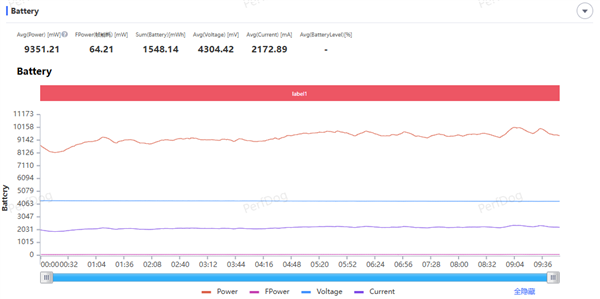
Average power consumption during gameplay was 9.35W, with an energy cost of 64.21mW per frame.
2. Genshin Impact
Devil Mode was enabled with max graphics, and we ran a ten-minute test by running through Sumeru City.
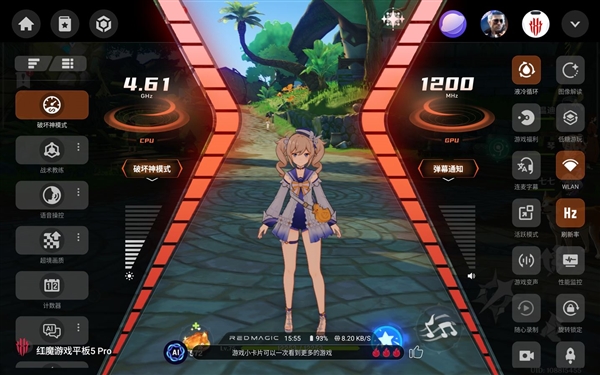
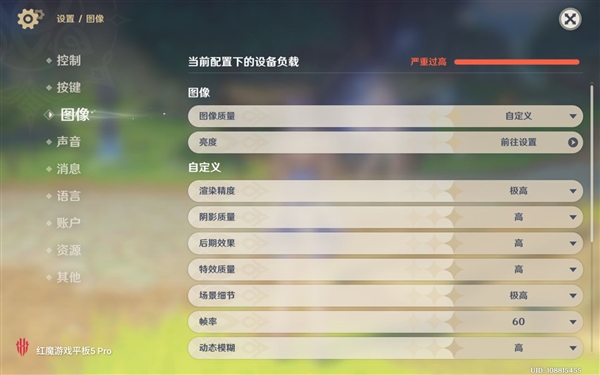
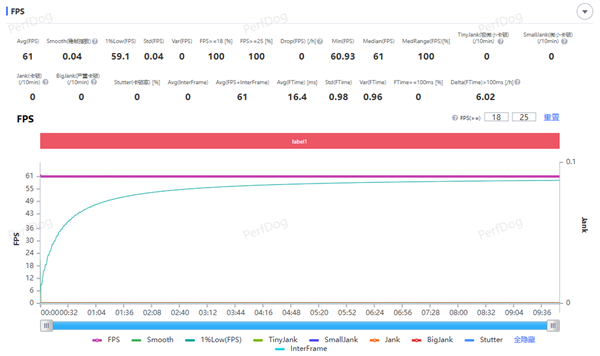
The game maintained a steady 61fps throughout, running at full capacity. Thanks to the liquid cooling, the tablet managed heat remarkably well, with no thermal throttling or noticeable frame drops.
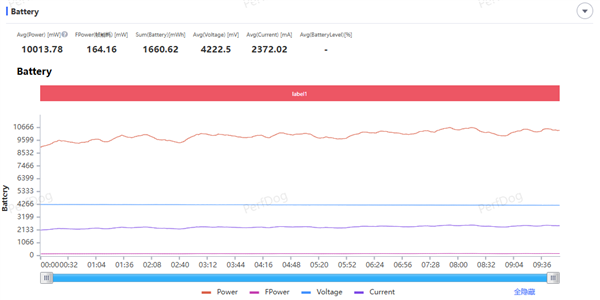
Average power consumption was 10.01W, with an energy cost of 164.16mW per frame.
3. CrossFire: Gunfighter
With Devil Mode active, graphics set to ‘High’, and the frame rate limit set to the 185Hz mode, we tested the game.
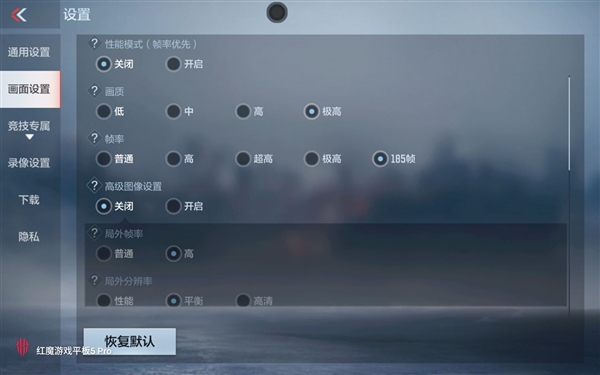
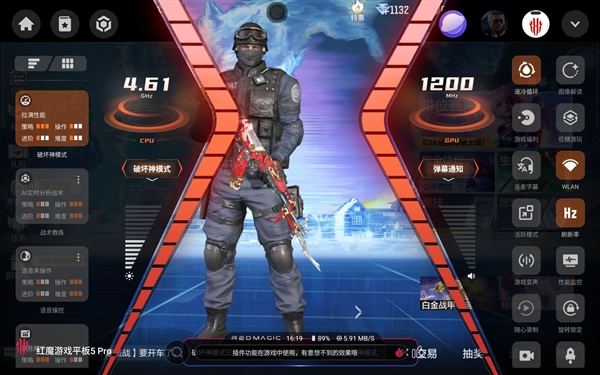
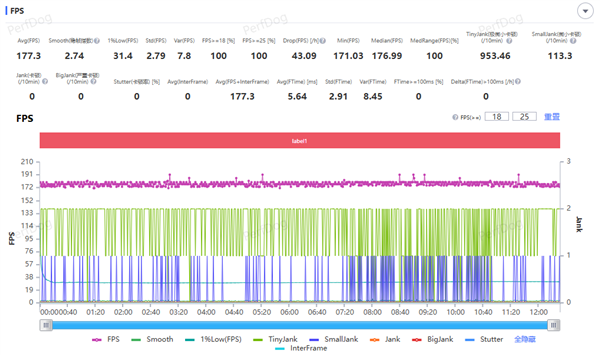
In a Biohazard mode match on the ‘Lost City’ map, the average frame rate held steady around 177fps.
This game truly showcases the 185Hz display’s value. The fluidity is perceptible when aiming, turning, and tracking targets. The large screen offers a better view of the battlefield. The Synaptics S3930 controller’s 2000Hz polling rate delivers lightning-fast touch response.
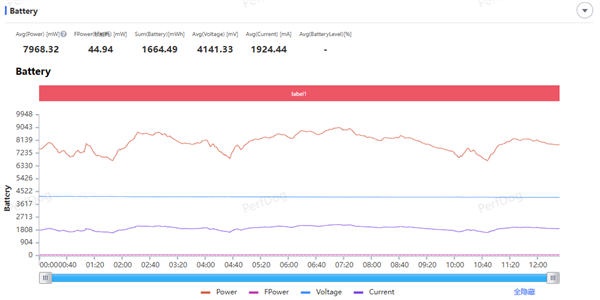
Average power consumption was 7.97W, with an energy cost of 44.94mW per frame.
4. Delta Force
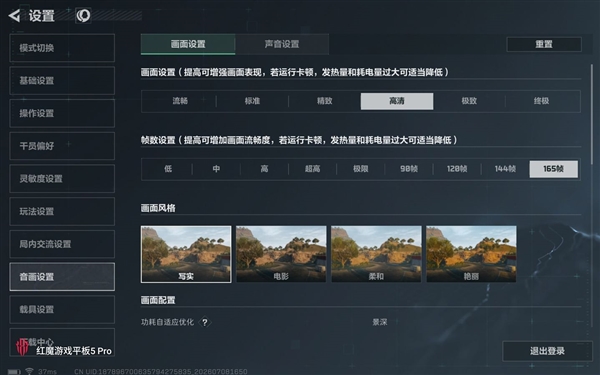
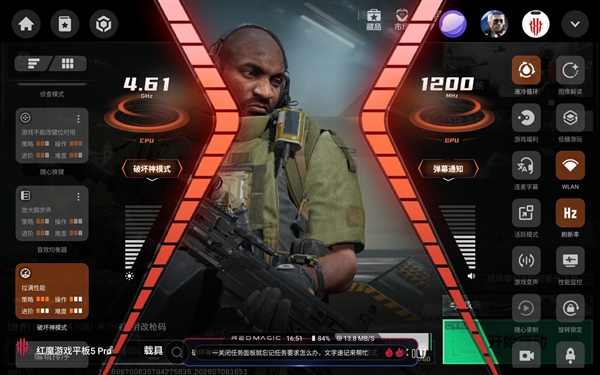
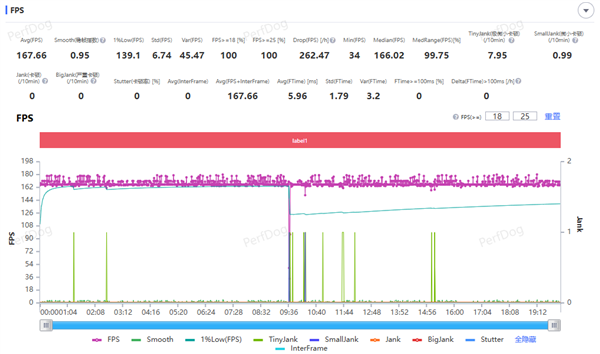
We selected the 165Hz mode with HD graphics and activated Devil Mode.
The game ran at a steady 167fps, providing excellent smoothness.
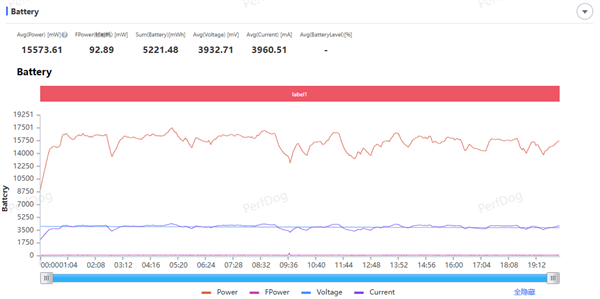
Average power consumption was 15.57W, with an energy cost of 92.89mW per frame.
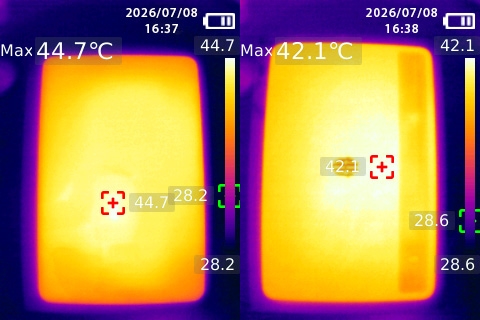
After 20 minutes of Delta Force in Devil Mode (165Hz, HD), thermal imaging showed a maximum front-facing screen temperature of 44.7°C and a peak back panel temperature of 42.1°C.
Heat was concentrated around the center of the screen and back, but the areas where hands naturally rest remained relatively cool. The combination of liquid cooling, Liquid Metal 3.0, and the VC chamber effectively spreads thermal load, resulting in impressive overall temperature management.
4. PC Emulation & Multi-Form Factor Setup: Steam Direct Connect
RedMagic’s proprietary translation engine bridges the gap between x86 PC game code and the ARM architecture, essentially providing a built-in PC gaming environment on the tablet—no complicated tinkering required.
1. Steam Direct Connect Mode
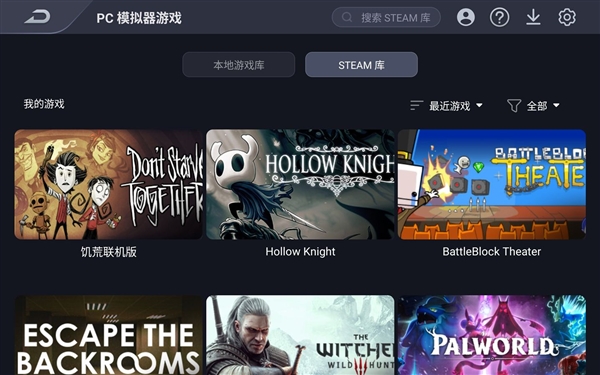
Within the Game Space, you’ll find the PC emulator entrance. Simply log in to your Steam account via QR code, and your game library syncs instantly. Dozens of titles are currently compatible, playable right after downloading. Your save files are synced with your PC, allowing you to continue a session started on your phone or PC seamlessly.
2. PC Game Performance Tests
We tested four games of varying scales and genres on the default 1280×720 resolution.
-
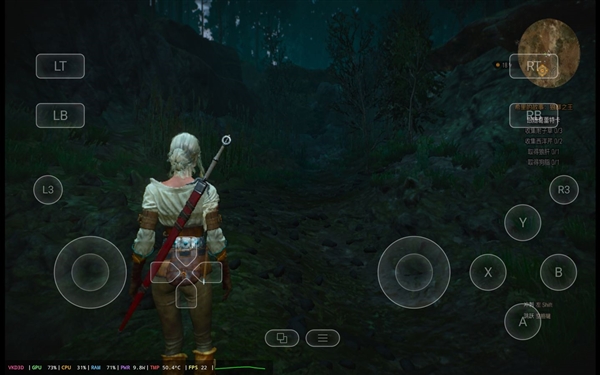
The Witcher 3: Wild Hunt: A well-optimized AAA title, it runs on the tablet with virtual button controls. Frame rates hover around 20fps. Suitable for exploring and light questing, but action-packed sequences can cause stuttering. It offers a taste of the game’s story on the go, but serious sessions are best reserved for a PC.
-
Watch Dogs: This performed surprisingly well. Most scenes ran smoothly, with frame rates stabilizing around 50-60fps. Exploring the city and high-speed driving felt fluid. Performance could dip to 40-50fps in complex, dense environments, but overall playability was solid. Running an open-world title on a 9.06-inch screen is quite an experience.
-
BattleBlock Theater: This 2D side-scroller performed flawlessly, hitting a stable 60fps with responsive controls and consuming only around 3W of power. Ideal for extended play sessions, it feels more convenient than playing on a PC.
-
Pick Love: This lightweight narrative game ran without a hitch, also maintaining 60fps with ~3W power consumption. The tablet’s screen and dual speakers actually enhance the immersive experience for story-driven titles, perfect for winding down in bed.
In Summary: The PC emulation solution makes a significant leap from “unplayable” to “playable.” Indie games and well-optimized mid-tier titles run exceptionally smoothly with low power and heat. While AAA gaming shouldn’t be the primary expectation, it’s a fantastic way to sample PC titles or continue your game saves when away from your desktop.

3. All-Scenario Connectivity
The RedMagic Gaming Tablet 5 Pro supports external controllers, keyboards, mice, and TV mirroring, effectively transforming between a handheld console, gaming laptop, console, and desktop.
We tested it with a keyboard and mouse in Watch Dogs. Controls felt responsive and natural, similar to the PC experience. While the 9.06-inch screen can’t replace a monitor, it offers a significantly broader view than a phone, making it perfectly suitable for portable PC gaming with peripherals.
4. RedMagic Screen Mirroring Assistant
Via the USB 3.2 Gen 2 port, the tablet supports 4K/144Hz output. Both wired and wireless mirroring are supported, including audio separation—a useful feature for streaming or recording gameplay on a larger display.
5. Special Features: RGB Lighting, AI Assistant & Dual USB-C Ports
The RedMagic Gaming Tablet 5 Pro boasts thoughtful features beyond raw performance.
1. RGB Liquid Cooling Lighting
RedMagic integrates RGB lighting directly into the cooling module. The transparent area houses 11 custom RGB LEDs, with custom light-guiding material for uniform illumination.
It’s not just a glowing logo; the cooling system is visually prominent. The customizable blue-cyan glow emanating from the cooling pipes creates a compelling “battle station” aesthetic on your desk. Brightness and color effects are fully customizable, adding a tangible sense of premium gear. See our RGB gaming gear guide.
2. RedMagic Assistant Mora AI
This built-in AI is genuinely useful in gaming scenarios.
-
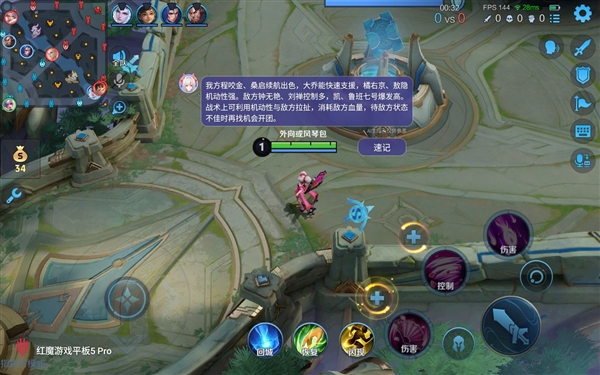
Tactical Coach: Mora can act as a real-time tactical advisor, offering suggestions based on the match situation. You can even strategize with it, potentially providing clearer tactical insights.
-
Mora Reply: Leveraging a large language model, Mora can auto-reply to in-game messages. You can choose reply styles like “Cute & Sweet,” “Sarcastic & Playful,” or “Standard.” Supporting both the Mofang and Deepseek-R1 AI models, it can be set to manual or auto-reply. With the “Enhanced Conversation Understanding” feature, it can even understand chat text and provide voice responses—useful for quipping back at opponents.
Mora also offers “Performance Review,” automatically generating a summary with insights after each match to help you improve.

3. Smart Workstation Suite
Beyond gaming, the tablet includes features for productivity.
-
AI Circle to Search: Circle any on-screen element for instant information. Circle a character’s ability to learn its details while gaming, or circle text/objects in social media posts or documents for translation, search, or context.
-
AI Object Removal: Select or circle unwanted elements in screenshots or photos (like a character in a game shot) and the AI removes them, intelligently filling the background for a clean result.
-
AI Voice Assistant/Translation: These tools are readily available for daily tasks, covering a wide range of common needs.
4. Dual USB-C Ports
The dual C-port design is a practical boon. Both ports support 80W fast charging and bypass charging, allowing you to choose a cable position that doesn’t obstruct your hands during landscape gaming. This direct motherboard powering helps lower charging heat. The tablet also supports reverse charging, letting you top up other devices in a pinch.
5. Additional Details
-
Versatile Unlock: The integrated fingerprint sensor on the power button is fast, and face unlock works instantly even in low light.
-
Wet Touch Control: Ensures stable touch input even when hands are sweaty or the screen is slightly damp—a key feature for FPS players.
-
Eye Protection: Sky Shield 2.0 technology, combined with AI ambient light sensing, reduces blue light by 68% and visual fatigue by 22%. It’s certified by SGS for low blue light and flicker-free viewing, helping reduce eye strain during long sessions.
6. Battery & Charging: 8300mAh Battery, 67-Minute Full Charge
Despite its slim 6.9mm build, the RedMagic Gaming Tablet 5 Pro packs an 8300mAh battery—top-tier for a compact gaming tablet.
1. Battery Life Test
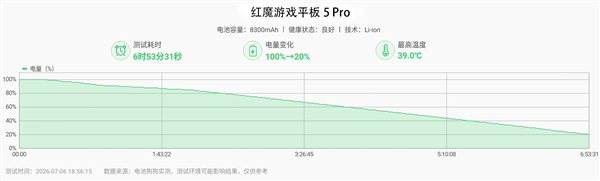
Using the “Battery Dog” test suite, which simulates a range of mixed usage scenarios (CPU load, image browsing, video playback, web browsing, etc.) under controlled conditions (50% brightness, 30% volume), we started the test at 100% battery.
After 6 hours and 53 minutes, the battery was down to 20%, which projects to approximately 8 hours and 36 minutes of total usage time. For a device with flagship silicon, a 185Hz high-refresh screen, and liquid cooling, this is remarkably efficient.
Interestingly, the liquid cooling system likely contributes to this endurance by maintaining chip efficiency under load, preventing thermal throttling and the associated power spikes.
2. Charging Test
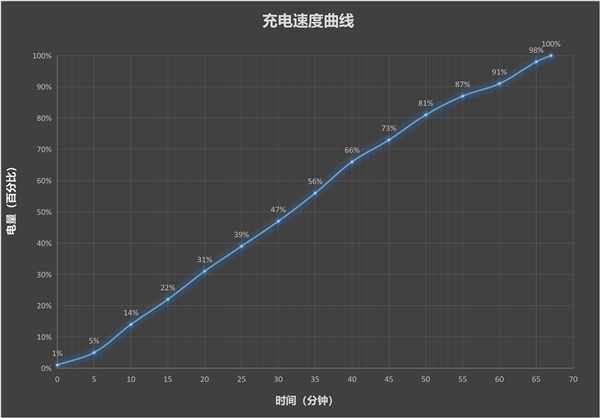
Charging from 1% with the screen off:
-
10 minutes: 14%
-
30 minutes: 47%
-
1 hour: 91%
-
Full charge time: ~67 minutes.
The liquid cooling also proves beneficial during charging, especially for pass-through charging, as it helps manage heat buildup and maintains optimal charging speeds.
7. Conclusion: Setting a New Standard for Steam on Tablets
After thoroughly testing the RedMagic Gaming Tablet 5 Pro, I have to admit my initial skepticism was unfounded. I didn’t expect much from Steam Direct Connect on a 9-inch tablet, assuming it would be a compromise. But it turned out to be far more usable than I could have imagined.
The Steam Direct Connect is the standout feature. Running Watch Dogs at 50+ fps, indie games at a perfect 60fps while sipping just 3W of power—it genuinely feels like a PC gaming experience you can take anywhere. Lying in bed playing for a couple of hours with a controller feels natural. When I pulled it out at the office and started playing Watch Dogs with a controller, a colleague was genuinely surprised. “Wait, your tablet can play that?”
Sure, The Witcher 3 runs at around 20fps—more of a visual showcase than a fully playable experience, but it’s arguably the best Steam Direct Connect performance you can currently get on a 9-inch slate.
The liquid cooling is a game-changer. After 20 minutes of Delta Force, the back panel peaked at just 42.1°C. Packing a liquid cooling loop, liquid metal, and a VC chamber into a 6.9mm chassis is engineering, and it shows. A 30-minute Genshin session left the tablet warm, not scorching hot.
The 185Hz display and 2000Hz touch sampling rate make a tangible difference in FPS games. It’s something you feel the moment you start playing, not just a stat on a spec sheet.
With a 4.57 million AnTuTu score from the Snapdragon 8 Gen 5 and R4 chip combo, performance is a non-issue. The 8300mAh battery paired with 80W fast charging means a quick top-up before heading out easily lasts most of the day. Backed by five major esports certifications and partnerships with pro teams (Q9 and KZ), it’s clear that the professional scene respects this tablet’s potential.
The main caveat is that the Steam Direct Connect game compatibility list is still growing. Some games designed for precise keyboard/mouse control don’t translate perfectly to touch input—for those, you’ll definitely want to connect peripherals.
I now slip this tablet into my bag whenever I leave the house. My Steam saves are finally portable.
If you have a decent Steam library and don’t want to invest in a separate handheld PC, the RedMagic Gaming Tablet 5 Pro is currently the most compelling option available.