










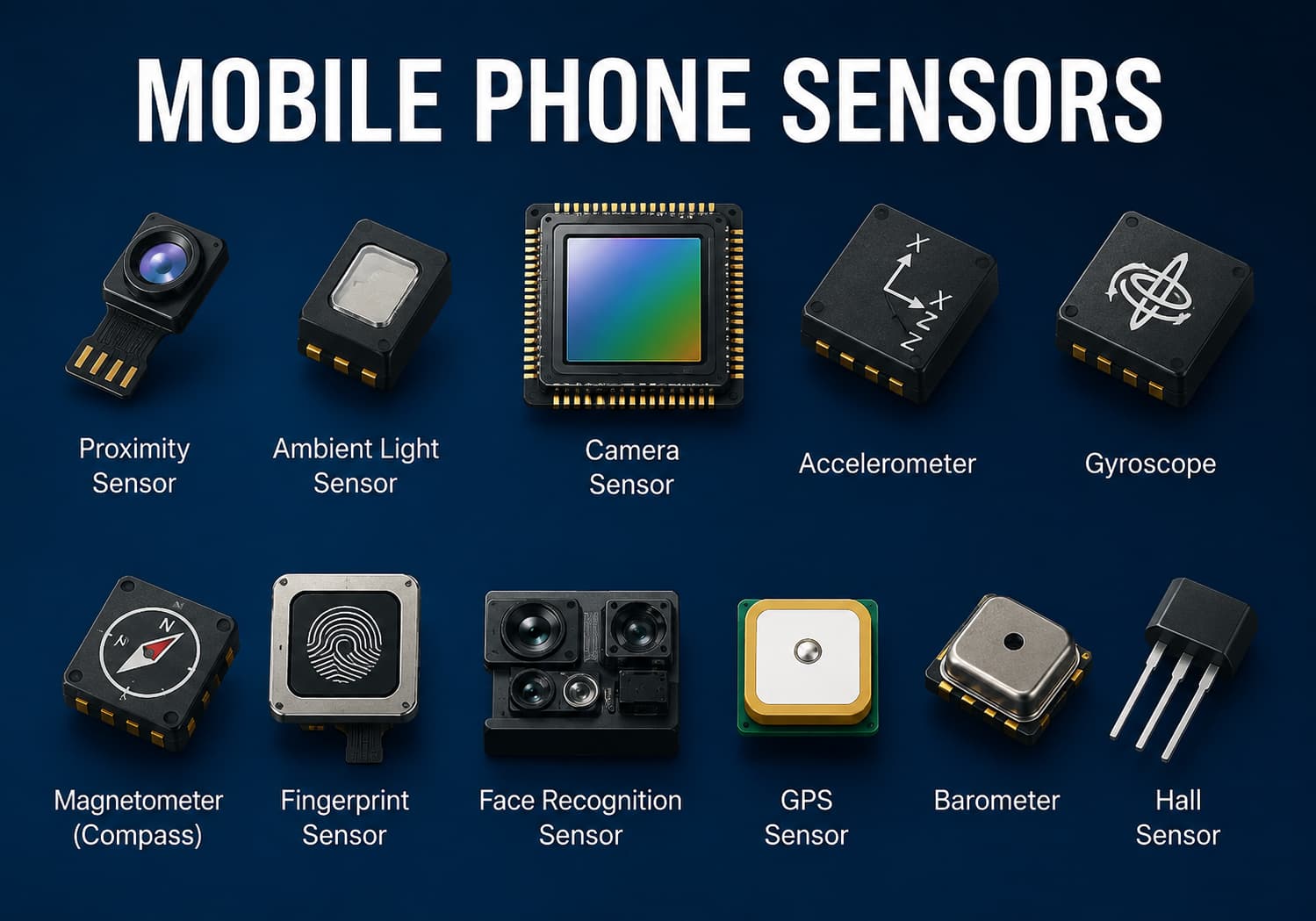
Modern smartphones rely on a wide range of sensors to deliver seamless user experiences. From automatically adjusting screen brightness to enabling facial recognition, navigation, and fitness tracking, sensors play a crucial role in everyday smartphone use. However, like any hardware component, they require proper care to maintain optimal performance.
In this guide, we’ll explore the most important mobile phone sensors, common issues that affect them, and practical maintenance methods to keep your device functioning accurately for years.
Why Mobile Phone Sensors Matter
A smartphone contains multiple sensors working together behind the scenes. These components help the device understand its surroundings, detect movement, and respond intelligently to user actions.
Common smartphone sensors include:
- Proximity sensor
- Ambient light sensor
- Accelerometer
- Gyroscope
- Magnetometer (digital compass)
- Fingerprint sensor
- Face recognition sensor
- Barometer
- GPS receiver
- Hall sensor
- Camera sensors
When these sensors become dirty, damaged, or improperly calibrated, they may produce inaccurate readings that affect your phone’s performance.
1. Keep the Screen and Sensor Area Clean
Many sensors are located near the top of the display, especially the proximity sensor, ambient light sensor, and front camera.
Dust, fingerprints, makeup, or pocket lint can block these sensors and cause problems such as:
- Screen not turning off during calls
- Automatic brightness behaving incorrectly
- Face Unlock failing
- Reduced selfie image quality
Best Practice
- Use a microfiber cloth to clean the display regularly.
- Avoid using paper towels or rough fabrics.
- Remove oily fingerprints gently.
- Clean around the earpiece where the proximity sensor is usually located.
Avoid spraying liquids directly onto the phone.
2. Use a Compatible Screen Protector
Poor-quality tempered glass or privacy screen protectors can interfere with sensor performance.
Common problems include:
- Fingerprint sensor failures
- Face recognition issues
- Proximity sensor malfunction
- Reduced touch sensitivity
Best Practice
Choose screen protectors specifically designed for your smartphone model and ensure they include cutouts or transparent areas for front-facing sensors if required.
3. Keep Camera Lenses Clean
Rear and front camera sensors collect light through the lenses. Dirty lenses reduce image quality regardless of how advanced the sensor is.
Signs of dirty lenses include:
- Blurry photos
- Hazy images
- Lens flare
- Poor night photography
Best Practice
Clean camera lenses using:
- Microfiber cloth
- Lens cleaning wipes
- Air blower (optional)
Avoid using alcohol excessively or abrasive materials.
4. Protect Your Phone from Drops
Many sensors rely on precise alignment.
A hard drop can affect:
- Camera stabilization
- Gyroscope calibration
- Compass accuracy
- Optical Image Stabilization (OIS)
- Face recognition components
Best Practice
Use:
- Shockproof protective case
- Raised camera protection
- Screen protector
These accessories reduce the chance of internal sensor damage.
5. Avoid Extreme Temperatures
High temperatures can affect electronic components, while freezing conditions may temporarily reduce sensor responsiveness.
Avoid leaving your phone:
- Inside a parked car
- Under direct sunlight
- Near heaters
- In freezing outdoor conditions for extended periods
Most smartphones operate best between 0°C and 35°C (32°F–95°F).
6. Calibrate Motion Sensors Occasionally
Accelerometers, gyroscopes, and compasses may drift over time.
Symptoms include:
- Incorrect screen rotation
- Navigation pointing the wrong direction
- Poor gaming controls
- Fitness tracking inaccuracies
Best Practice
You can recalibrate these sensors by:
- Performing the figure-eight motion for the compass
- Using your phone’s built-in calibration tools (if available)
- Restarting the device after software updates
Some third-party diagnostic apps can also check sensor accuracy.
7. Keep Software Updated
Manufacturers frequently release software updates that improve sensor performance.
Updates may include:
- Camera optimization
- Better fingerprint recognition
- Improved face unlock
- Enhanced AI processing
- Motion sensor calibration improvements
Installing official firmware helps maintain reliable sensor performance.
8. Protect the Charging Port and Openings
Dust and moisture entering the charging port or speaker openings can sometimes affect nearby sensors or related hardware.
Best Practice
- Clean ports gently with compressed air or a soft brush.
- Avoid inserting metal objects.
- Keep the phone dry.
If your phone has an IP68 rating, remember that water resistance can decrease over time due to wear and accidental damage.
9. Avoid Strong Magnetic Fields
Powerful magnets may interfere with:
- Compass sensor
- Hall sensor
- Wireless charging components
Avoid placing your phone directly on:
- Large speakers
- Industrial magnets
- Magnetic tools
Magnetic phone mounts are generally safe if designed for smartphones, but prolonged exposure to very strong magnets should be avoided.
10. Handle Fingerprint Sensors Carefully
Fingerprint sensors work best when both the sensor and your fingers are clean.
For reliable unlocking:
- Wipe the sensor regularly.
- Keep fingers dry.
- Re-register fingerprints if recognition becomes inconsistent.
- Remove heavy dirt or grease before unlocking.
If using an ultrasonic in-display fingerprint sensor, ensure your screen protector is compatible.
11. Prevent Moisture Damage
Although many flagship phones are water-resistant, prolonged exposure to moisture can still affect sensors.
Avoid:
- Saltwater exposure
- Hot showers
- Steam rooms
- Chlorinated pools
After accidental exposure:
- Dry the phone with a soft cloth.
- Let moisture evaporate naturally.
- Avoid charging until the device is completely dry.
12. Use Official Diagnostic Tools
Most smartphone brands provide built-in diagnostic features.
These tools can test:
- Accelerometer
- Gyroscope
- Proximity sensor
- Light sensor
- Fingerprint reader
- GPS
- Vibration motor
Running diagnostics periodically can identify sensor issues before they become serious.
Signs Your Phone Sensors May Need Attention
Watch for these warning signs:
- Screen stays on during phone calls
- Auto-brightness behaves erratically
- Compass points in the wrong direction
- GPS frequently loses location
- Camera struggles to focus
- Face Unlock becomes unreliable
- Fingerprint sensor fails repeatedly
- Screen rotation stops working
If these issues persist after cleaning and recalibration, professional servicing may be required.
Final Thoughts
Mobile phone sensors are among the most important yet often overlooked components of a smartphone. Keeping them clean, protecting the device from physical damage, updating software, and using quality accessories can significantly improve their reliability and lifespan.
Regular maintenance not only ensures accurate sensor performance but also enhances your overall smartphone experience—from smoother navigation and more responsive screen rotation to sharper photos and more secure biometric authentication. By following these simple maintenance practices, you can help your smartphone continue performing at its best for years to come.