









Flying an RC quadcopter looks simple when an experienced pilot makes it hover smoothly, turn in place, or glide across an open field. For a beginner, however, the first few minutes can feel surprisingly difficult. The aircraft may drift when you expect it to stop, rotate in an unexpected direction, or climb higher than intended with a small movement of the controls.
The good news is that quadcopter flight becomes much easier when you learn one skill at a time. You do not need to master fast turns, aerial photography, or advanced maneuvers on your first day. Start by understanding the controls, choosing a suitable practice area, and learning to take off, hover, turn, and land safely.
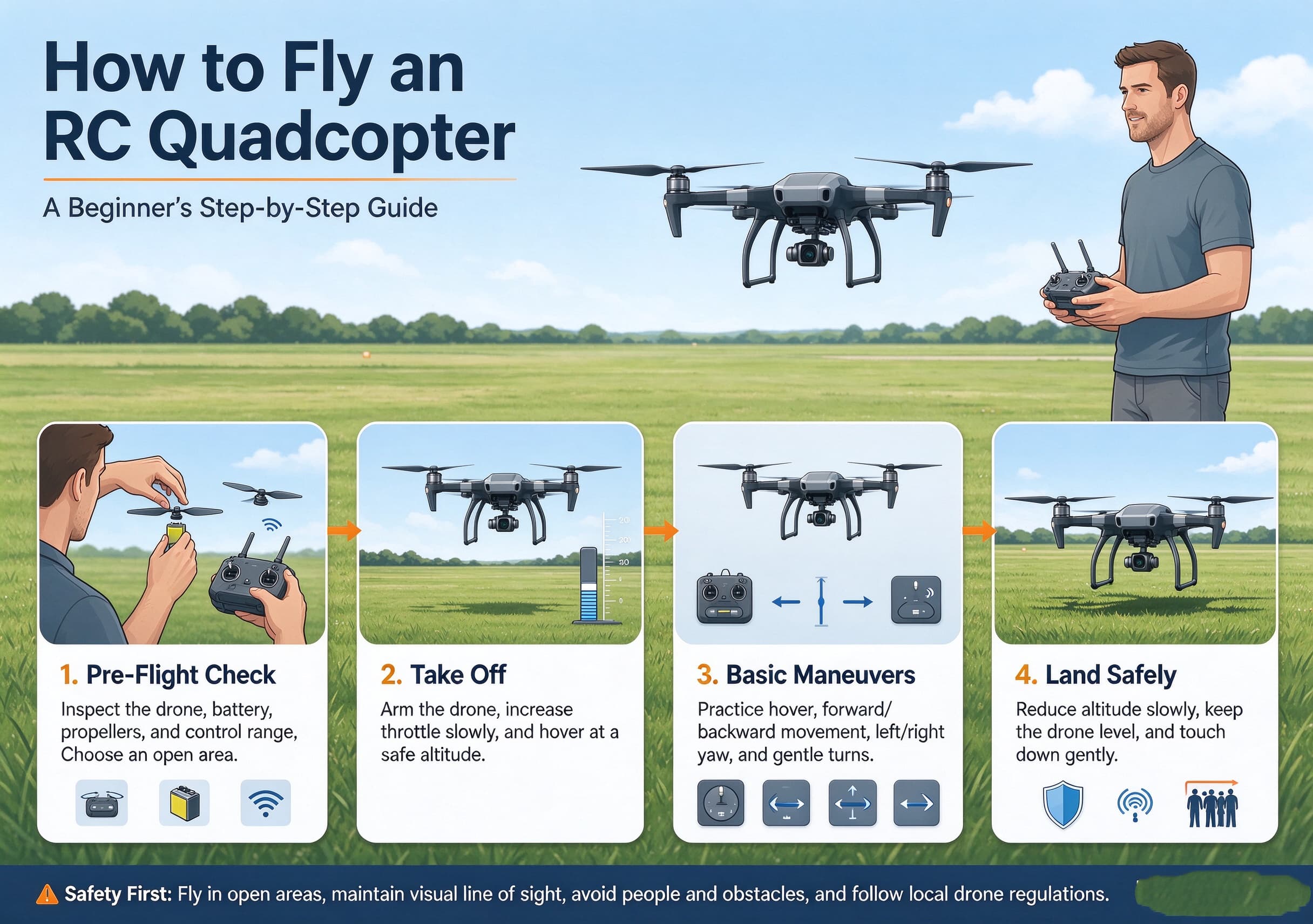
This guide explains how to fly an RC quadcopter step by step, including common beginner mistakes, basic flight techniques, and practical tips for building confidence.
1. Understand How an RC Quadcopter Moves
A quadcopter uses four motors and propellers to control its movement. By changing the speed of individual motors, the flight controller can adjust the aircraft’s position, direction, and altitude.
Most conventional RC quadcopters use four basic flight controls:
- Throttle: Controls the aircraft’s climb or descent.
- Yaw: Rotates the quadcopter left or right.
- Pitch: Tilts the aircraft forward or backward.
- Roll: Tilts the aircraft sideways.
These controls work together. For example, a small forward pitch makes the quadcopter move forward, while a yaw input changes which direction its front faces.
A beginner should learn the difference between moving the aircraft and rotating it. A quadcopter can point toward the left while moving forward in a different direction. Understanding this relationship is essential for controlled flight.
2. Learn Your Transmitter Before Starting the Motors
Before flying, identify the sticks, switches, and buttons on your controller. Their functions can vary by transmitter, flight mode, and manufacturer, so consult the manual for your exact model.
Many hobby RC transmitters use Mode 2, where the left stick controls throttle and yaw, while the right stick controls pitch and roll. Other configurations are available, and some toy-grade quadcopters use simplified controls.
With the aircraft powered off, practice moving each stick separately.
| Control input | Typical Mode 2 function | What the quadcopter does |
|---|---|---|
| Left stick up/down | Throttle | Climbs or descends |
| Left stick left/right | Yaw | Rotates left or right |
| Right stick up/down | Pitch | Moves forward or backward |
| Right stick left/right | Roll | Moves sideways |
Do not assume every switch is safe to operate during flight. Some switches may change flight modes, enable advanced functions, or trigger an emergency motor-stop procedure. Know what each one does before taking off.
3. Choose the Right Quadcopter for Learning
Not all RC quadcopters behave the same way. A small indoor trainer, a brushless freestyle quad, and a camera drone can have very different handling characteristics.
For a first aircraft, look for features that make mistakes easier to manage, such as:
- A stable beginner or low-speed mode
- A manageable size and weight
- Clearly documented controls
- Propeller guards, where appropriate
- Replaceable propellers and accessible spare parts
- A reliable low-battery warning
- An easy-to-understand setup procedure
Some GPS-equipped camera drones can hold their position in suitable conditions, while small indoor quadcopters may drift continuously and require frequent corrections. Neither behavior necessarily indicates a fault; the aircraft’s design and flight mode make a difference.
If you plan to fly a more advanced hobby quadcopter, consider practicing with a simulator first. A simulator lets you develop stick coordination without risking damage to the aircraft.
If you’re choosing your first aircraft, our JJRC H136 RC drone review looks at beginner-oriented features such as headless mode, 6-axis gyro stabilization, and simplified flight controls.
4. Prepare the Aircraft and Flight Area
A successful first flight begins before the propellers spin. A quick preflight check can prevent common problems such as unexpected drifting, weak power, or loss of control.
Check the aircraft
Inspect the frame for cracks and make sure the propellers are undamaged and installed in the correct positions. Confirm that the battery is secure and adequately charged, and check for loose wires or components.
If the quadcopter has a compass, GPS, or other sensors, follow the manufacturer’s instructions for initialization and calibration. Do not perform calibration procedures automatically unless the manual calls for them.
Check the controller
Make sure the transmitter has sufficient battery power and is correctly bound to the aircraft. Confirm the selected control mode and beginner settings before arming the motors.
Select a safe location
Choose a spacious, open area away from people, traffic, buildings, power lines, and trees. Avoid crowded parks, busy paths, and areas where an unexpected landing could injure someone.
Wind matters, too. Even a light breeze can push a lightweight quadcopter away from a beginner, especially during landing. On your first outing, choose calm conditions and remain within a comfortable distance.
Follow local drone rules, including restrictions on where you may fly, maximum altitude, registration, and visual-line-of-sight requirements. If your aircraft has a camera, respect other people’s privacy.
5. Step One: Practice a Gentle Takeoff
Once the aircraft and controller are ready, place the quadcopter on a level surface with enough clear space around it. Keep your hands, clothing, and other objects away from the propellers.
Follow the manufacturer’s arming procedure. Increase the throttle gradually until the aircraft lifts off. Avoid pushing the throttle abruptly, which can make the quadcopter climb too quickly.
For a first flight, aim for a low, controlled hover rather than a dramatic climb. A height of roughly one to two metres may be suitable for some outdoor beginner aircraft, but use the altitude recommended for your particular model and environment.
Once airborne, make small corrections instead of repeatedly moving the sticks from one extreme to another. The goal is to establish a stable starting point.
Beginner tip: Do not try to correct every tiny movement. Make a small input, observe the result, and allow the aircraft time to respond before making another correction.
6. Step Two: Learn to Hover in Place
Hovering is one of the most useful skills a beginner can develop. It teaches you to manage altitude, correct drift, and avoid overcontrolling the aircraft.
Start by maintaining a consistent throttle position. If the quadcopter rises, reduce the throttle slightly; if it descends, add a small amount. The precise response depends on the aircraft and its flight mode.
Next, practice correcting sideways or forward drift. Use brief, gentle pitch or roll inputs to bring the aircraft back toward your intended position.
Do not expect every quadcopter to remain perfectly still. A model without GPS position hold may drift even when you release the sticks. In that case, controlled hovering means continually making small adjustments.
Try holding a hover for five seconds, then ten seconds, before attempting longer periods. Repeat the exercise until you can maintain a reasonably steady position without making large, hurried corrections.
7. Step Three: Understand Orientation and Direction
One of the biggest challenges for new pilots occurs when the quadcopter turns around. When the aircraft faces away from you, the controls may feel intuitive. When it faces toward you, left and right can appear reversed from your viewpoint.
This is an orientation problem rather than a motor problem.
Practice yawing slowly while hovering. Rotate the aircraft a small amount, pause, and identify which way its front is pointing. Then make a small movement in one direction and observe how it responds.
A useful progression is:
- Hover with the front of the aircraft facing away from you.
- Rotate approximately 45 degrees and hold position.
- Turn to face sideways and practice small corrections.
- Rotate until the front faces you.
- Return to the original orientation and land.
Repeat these movements in calm conditions. Do not add fast forward flight until you can maintain control in different orientations.
8. Step Four: Practice Short Forward, Backward, and Sideways Flights
Once you can hover and recognize the aircraft’s orientation, introduce short movements.
Begin with a gentle forward pitch. Allow the quadcopter to move a short distance, then apply the opposite input to reduce its forward motion. Depending on the aircraft, you may need to make another small correction to stop it from drifting.
Repeat the exercise backward, left, and right. Keep each movement short enough that you can comfortably regain control.
Remember that pitch and roll tilt the aircraft. A quadcopter often needs to tilt to accelerate, and it may continue moving after the stick returns to its centre position. Releasing the stick does not always mean the aircraft will stop immediately.
Practice this sequence:
- Hover in place.
- Move forward a short distance.
- Reduce forward motion and stabilize.
- Return toward the starting point.
- Hover again before trying another direction.
These simple movements build the control skills needed for more complex flight paths.
9. Step Five: Learn to Turn Without Losing Control
Turning combines yaw with pitch and roll. Beginners often rotate the aircraft too quickly, then struggle to work out which direction it is moving.
Start with yaw-only turns while maintaining a hover. Once you can rotate smoothly, try a broad turn while moving slowly. Avoid sharp, aggressive stick movements until you understand how your aircraft responds.
For camera drones, smooth turns also help produce more watchable footage. Gradual inputs generally create less abrupt movement than sudden changes in direction.
For freestyle or racing quadcopters, turning techniques can be more demanding because the aircraft may respond quickly and may not have position-hold assistance. Build basic coordination first, and use a simulator or a suitable training area before attempting fast maneuvers.
10. Step Six: Land Smoothly and Safely
Landing deserves as much practice as takeoff. A controlled landing protects the propellers, frame, battery, and surrounding area.
Bring the quadcopter back over a clear, level landing surface. Reduce horizontal movement before descending. Lower the throttle gradually so the aircraft approaches the ground without dropping abruptly.
When the quadcopter touches down, follow the manufacturer’s instructions to disarm the motors. Do not reach toward the aircraft while its propellers are still spinning.
Avoid landing in tall grass, loose gravel, wet areas, or places where the aircraft could tip over. If you cannot make a safe landing at your intended spot, prioritize a clear nearby area rather than forcing the aircraft to return to an unsuitable surface.
After landing, check the battery level and inspect the propellers and frame before the next flight.
11. Common Beginner Mistakes and How to Avoid Them
Many early crashes happen because a pilot tries to do too much before learning the basic controls.
| Beginner mistake | Why it causes problems | Better approach |
|---|---|---|
| Applying too much throttle | The quadcopter climbs rapidly | Use small throttle adjustments |
| Moving both sticks aggressively | Several movements happen at once | Practice one control at a time |
| Ignoring aircraft orientation | Left and right can feel reversed | Train with slow yaw rotations |
| Flying in strong wind | The aircraft may drift beyond easy control | Practice in calm conditions |
| Flying too far away | The aircraft becomes harder to orient | Keep it within clear visual range |
| Waiting too long to land | Battery reserves may become inadequate | Land with a sensible safety margin |
| Ignoring propeller damage | Damaged blades can affect stability | Inspect the aircraft before each flight |
| Assuming GPS is always reliable | Position hold depends on the system and conditions | Learn the model’s limitations and backup controls |
The best response to a mistake is usually to reduce the complexity of the flight. Return to a stable hover if possible, create enough space, and land safely rather than trying an unfamiliar recovery maneuver.
12. Should Beginners Use an RC Flight Simulator?
A simulator can be a valuable training tool, especially for hobby-grade quadcopters that require continuous manual control.
It lets you practice throttle management, yaw coordination, turns, and recovery without risking the cost of broken propellers or a damaged frame. A compatible transmitter can also help develop the muscle memory used during real flights.
A simulator does not completely reproduce real-world conditions. Wind, visibility, battery behavior, and the handling characteristics of your actual aircraft can differ. Treat simulation as preparation, not a substitute for safe real-world practice.
For beginners who find orientation particularly difficult, repeated simulator sessions can help make left-right corrections feel more natural.
Once you’re comfortable with basic controls, explore our JJRC H115 PRO quadcopter review to learn about a camera-equipped model with Wi-Fi FPV and additional flight-assistance features.
13. A Simple Three-Session Practice Plan
Rather than trying to master everything in one outing, divide your training into short sessions. The following plan provides a starting point; adjust it to your aircraft and the conditions.
Session 1: Basic control
- Identify every stick and switch.
- Practice takeoff and landing.
- Hold a low hover for several seconds at a time.
- Stop if you feel rushed or lose track of the aircraft’s position.
Session 2: Orientation and movement
- Repeat controlled hovering.
- Practice slow yaw turns.
- Make short forward, backward, and sideways movements.
- Return to a stable hover between exercises.
Session 3: Combining skills
- Fly a simple rectangular path at low speed.
- Practice wide turns and controlled stops.
- Return to the starting area.
- Complete several smooth landings.
Progress depends on the aircraft and the pilot. Move on only when the previous skill feels manageable, and repeat easier exercises whenever control starts to deteriorate.
Frequently Asked Questions
Is an RC quadcopter difficult for a complete beginner?
It can be challenging at first because the pilot must coordinate altitude, direction, and orientation. A stable beginner model, calm conditions, and short practice sessions make the learning process easier.
Can I learn to fly a quadcopter without GPS?
Yes. Many small and hobby-grade quadcopters fly without GPS. However, they may not hold their position automatically, so the pilot must make more frequent corrections to maintain a hover.
How high should a beginner fly?
Start at a low, manageable height appropriate for the aircraft and location. There is no universal ideal altitude. Follow the manufacturer’s guidance and local flight restrictions, and avoid flying so high that you lose clear visual awareness of the aircraft.
Why does my quadcopter drift when I release the controls?
Some models lack automatic position holding, and even stabilized aircraft can drift because of wind or sensor limitations. Small corrective inputs may be necessary. If the drift is unusual or severe, land and inspect the aircraft and setup.
What should I do if the quadcopter starts moving away unexpectedly?
Keep the aircraft in sight, use the controls you have practiced, and avoid making large, unfamiliar corrections. If it is safe to do so, reduce movement and land in a clear area. Learn the model’s return-to-home and failsafe behavior before relying on those features.
Final Thoughts
Learning how to fly an RC quadcopter is less about making impressive movements and more about controlling small movements consistently. Takeoffs, hovering, orientation, short directional flights, turns, and landings form the foundation for nearly every advanced skill.
Choose a suitable practice area, check your aircraft before each flight, and build confidence through repetition. Once you can hover steadily and move in different directions without losing orientation, more advanced flying becomes much easier to approach safely.
The most useful goal for your first flights is simple: stay in control, maintain enough space to react, and finish with a safe landing.