






Facebook Twitter Instagram
    Trending
    • Lenovo YOGA Pro 15 Spark Teased With NVIDIA RTX Spark N1X Superchip
    • Xiaomi Smart Humidity and Temperature Meter 3 Pro Adds CO₂ Monitoring, Starts at 114 Yuan
    • iQOO Pad Ultra to be released on September 29th: Equipped with PC-level cooling fans
    • Android 17 QPR1 Stable Update Rolls Out to Pixel Phones With New UI and Pixel Features
    • Lenovo Googlebook 15: What the 120Hz OLED and Core Ultra 5 325 Mean for Users
    • Xiaomi Watch S5 41mm: 14-Day Battery, 36g Body and HyperOS 4 Features
    • MONSTER M100 Earbuds Review: Earclip Fit, 23-Hour Battery and Bluetooth 5.4
    • How to Turn Off Location Services for Apps on iPhone
    Facebook YouTube
    IGeeKphone China Phone, Tablet PC, VR, RC Drone News, Reviews
    • HOME
    • BREAKING NEWS
      • AI NEWS
    • Amazon
    • PHONE
      • Top Phones For Your First Choice
      • Phone Comparison
      • Xiaomi
      • Blackview
      • Doogee
      • Black Shark
      • Geekbuying
      • Banggood
      • TEMU
      • TikTok
      • Aliexpress
      • Walmart
      • MercadoLibre
      • Lazada
    • TOP VAPE Awards for 2026
    • VAPES
      • E-CIGAR Upcoming
      • Vape News
      • Vape Deals
      • Vape Comparison
      • Vape Guide
      • VAPE LAWS
      • Giveaway
    • BEST VAPE
      • Best Vape Stores
      • Best Starter Vape Kits
      • Best Vapes for Beginners
      • Best Disposable Vapes
      • Best Pod Systems
      • Best Pod Mod Vapes
      • Best Mods
      • Best Nicotine Pouches
      • Best Clearomizers/Tanks
      • Best E-Liquid
      • Best EGO/Pens
      • Best Vapes for Nic Salt E-Juice
      • Best Vapes to Quit Smoking
      • RDA vs. RDTA vs. RTA
    • Best Vape Brand 2026
      • VAPORESSO
      • VOOPOO
      • OXVA
      • NEXA BAR
      • MASKKING VAPE
      • SP2S
      • IPLAY
      • TODOO
      • MRFOG
      • LOSTVAPE
      • VEIIK
    • REVIEW
      • E-cigar Review
      • Phones
      • Tablet PC
      • TV Box
      • RC Drone
      • Wearables
      • Camera
      • Accessories
      • VR Headset
    • MORE
      • TABLET
        • Chuwi
        • INNOCN
        • Teclast
        • Top Tablet for Your First Choice
        • Tablet/Laptop Comparison
      • RC DRONE
      • CAMERA
      • WEARABLES
        • OneOdio
        • BlitzWolf
        • Top Smartwatch for First Choice
      • 3D PRINTER
        • 3D Printer Review
        • Anycubic
        • FLSUN
        • Xtool
        • LONGER
        • Top 3D printer to Choose First
      • POWER STATION
        • Oukitel
        • FOSSIBOT
      • GAMING
        • Top Gaming Products
      • E-BIKE
        • Samebike
        • Happyrun
        • ENGWE
      • SMART HOME
      • TV BOX
      • ACCESSORIES
      • VR HEADSET
      • CLOTHES
      • AUTO CAR
    • DEAL
    • Shop
    IGeeKphone China Phone, Tablet PC, VR, RC Drone News, Reviews
    You are at:Home»Google»Android 17 QPR1 Stable Update Rolls Out to Pixel Phones With New UI and Pixel Features
    Google

    Android 17 QPR1 Stable Update Rolls Out to Pixel Phones With New UI and Pixel Features

    Brady CottonBy Brady CottonSeptember 16, 2026
    Facebook Twitter Pinterest LinkedIn Tumblr Email

    Google has started rolling out the Android 17 QPR1 stable update to compatible Pixel devices, building on the features introduced with Android 17 while adding new animations, Quick Settings changes, multitasking improvements and additional health features.

    The update covers a wide range of Pixel phones and tablets, extending from the Pixel 6 generation through the newly released Pixel 11 family. For users coming from the Android 17 QPR1 beta program, the final release is also arriving as a relatively small update rather than requiring a complete system reset.

    Android 17 QPR1 Gives the System UI a More Expressive Look

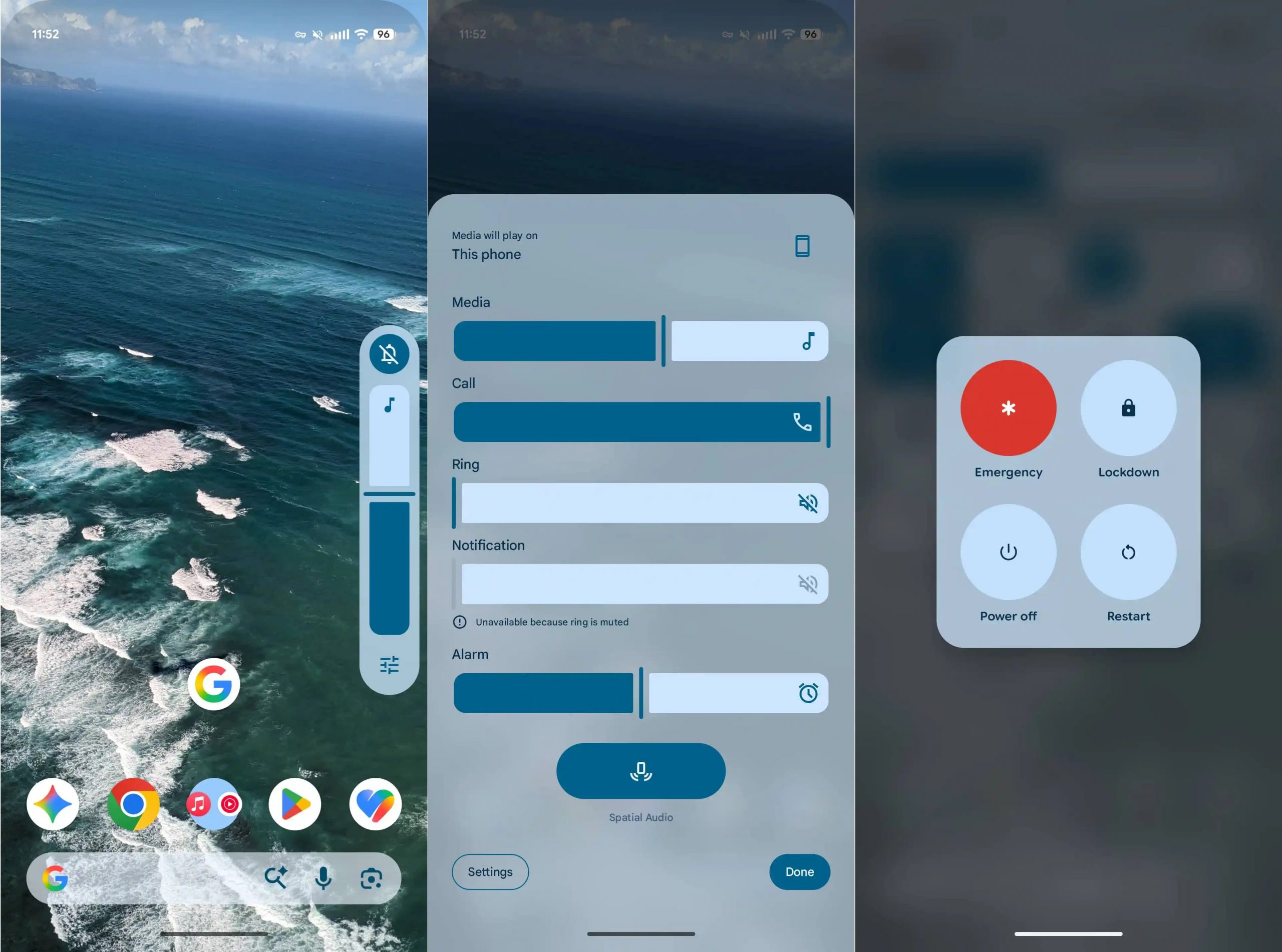
    One of the most obvious changes in Android 17 QPR1 is the increased use of blur and transparency throughout the system interface.
    The volume panel now uses a semi-transparent design with dynamic colors, while the expanded volume interface has received a visual update. Google has also added background blur to the power menu, giving system controls a more layered appearance.

    These changes make the interface feel less static and put more emphasis on depth, transparency and animated transitions.

    New Material 3 Multitasking Interface

    These changes are part of Google’s broader Material 3 design direction, which emphasizes more expressive motion, adaptive colors and updated interface components.

    When several apps are open, the system media and multitasking interface now uses a Material 3-style carousel. Instead of displaying a row of simple dots at the bottom, the interface provides previews of other open applications.

    The active app card can also shrink to make room for additional previews, making it easier to recognize and switch between recently used apps.
    Quick Settings Get New Animations and Controls

    The Quick Settings panel receives several practical changes in this release.

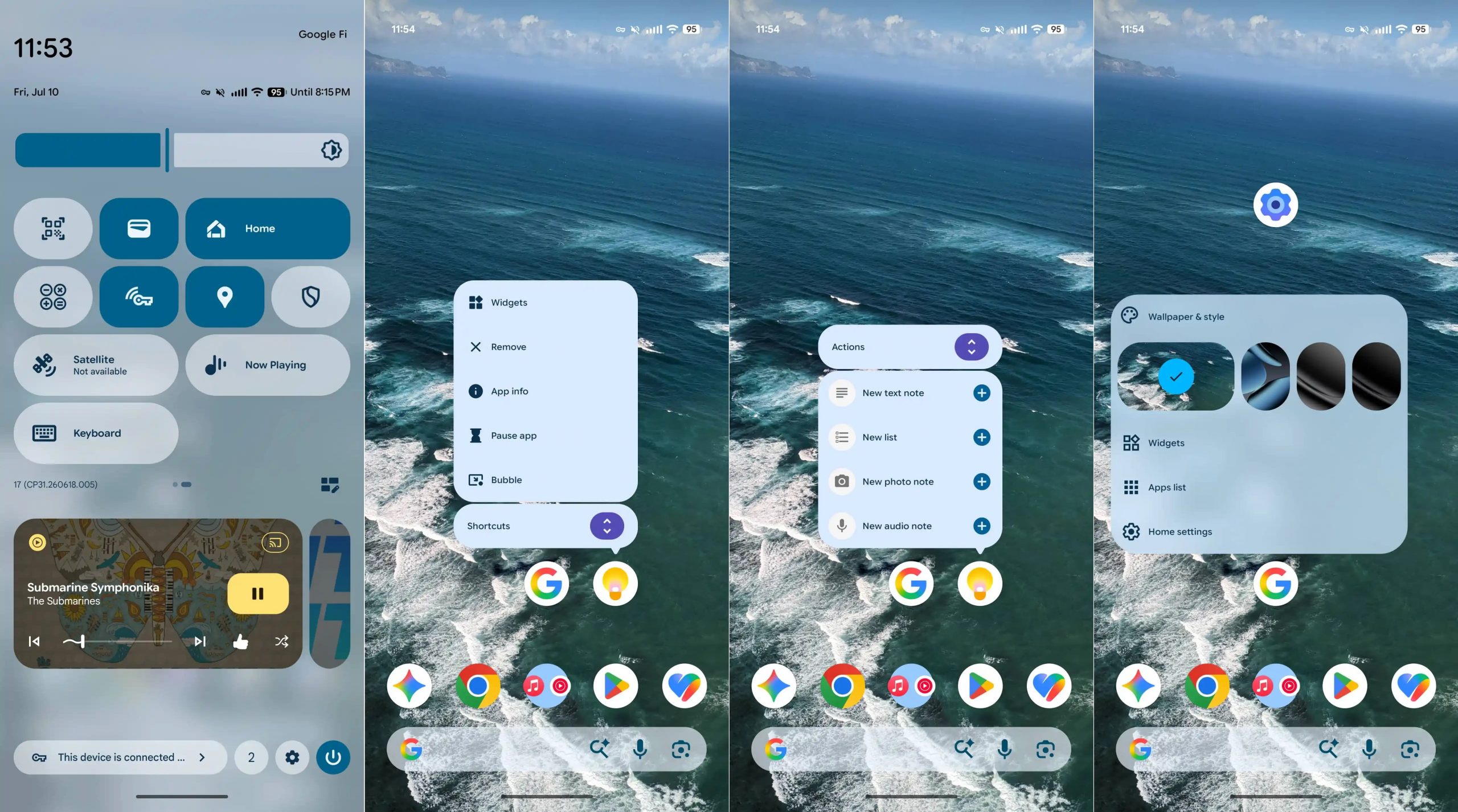
    Google has introduced new elastic-style animations when opening Quick Settings, while an edit button is now displayed in the lower-right area for easier customization.

    The mobile data tile also gains a “Don’t ask me again” option. Another new addition is a dedicated Keyboard Quick Settings tile, which provides faster access to the system keyboard switcher.

    Screen recording has also been adjusted. The tool now defaults to the application that was used for the previous screen recording session, potentially reducing the number of steps needed to start another recording.

    Home Screen Menus Are More Clearly Organized

    Android 17 QPR1 changes several interactions on the Pixel home screen.

    Long-pressing an app icon now separates app-specific shortcuts from system-level actions such as widgets and bubbles. This creates a clearer distinction between functions provided by the app and Android’s own controls.

    Long-pressing an empty area of the home screen also opens an updated wallpaper switching interface. The new design uses more noticeable rounded corners and a cleaner arrangement of menu options.

    Settings Gets New Material 3 Expressive Icons

    The Settings application is another area receiving a visual update.

    Android 17 QPR1 introduces new Material 3 Expressive icons in Settings. The design language was previously seen on Pixel Watch devices and is now being brought more prominently to the phone experience.

    Google has also added a new animation when users double-click the power button from the lock screen to launch the camera.

    Health Connect Tracks More Activity Data

    Health-related tracking also gets an expansion in Android 17 QPR1.

    Health Connect can now track additional activity measurements, including distance traveled and calories burned, alongside existing step information.

    This gives Pixel users more data points for monitoring everyday movement without requiring every activity metric to be handled by a separate application.

    Android 17 QPR1 Compatible Pixel Devices

    The stable update is available across a broad range of Google Pixel phones and tablets, covering several generations from the Pixel 6 series onward:

    • Pixel 6 and Pixel 6 Pro
    • Pixel 6a
    • Pixel 7, Pixel 7 Pro and Pixel 7a
    • Pixel Tablet
    • Pixel Fold
    • Pixel 8, Pixel 8 Pro and Pixel 8a
    • Pixel 9, Pixel 9 Pro, Pixel 9 Pro XL, Pixel 9 Pro Fold and Pixel 9a
    • Pixel 10, Pixel 10 Pro, Pixel 10 Pro XL, Pixel 10 Pro Fold and Pixel 10a
    • Pixel 11, Pixel 11 Pro, Pixel 11 Pro XL and Pixel 11 Pro Fold

    The inclusion of the latest Pixel 11 series means the QPR1 release covers Google’s recent Pixel generations as well as several older devices.

    What Beta Users Need to Know

    Users who are currently running Android 17 QPR1 Beta 9 should receive a relatively small update to move to the stable release.

    However, users participating in the Android Beta Program may need to exit the beta program before receiving the stable OTA update, depending on their current enrollment status.

    The stable update is being distributed over the air and does not require users to erase their device data as part of the normal upgrade process.

    Android 17 QPR1 Is More Than a Visual Update

    While the new blur effects and Material 3 styling are among the most visible changes, Android 17 QPR1 also improves everyday interactions through redesigned multitasking, Quick Settings controls, home screen menus and additional Health Connect measurements.

    For Pixel owners, the update therefore represents a combination of visual refinement and practical interface changes, rather than simply another maintenance release. The continued Android Beta Program will also allow Google to test future QPR releases and feature updates on supported devices.

    Share. Facebook Twitter Pinterest LinkedIn Tumblr Email

    Related Posts

    Lenovo YOGA Pro 15 Spark Teased With NVIDIA RTX Spark N1X Superchip

    Xiaomi Smart Humidity and Temperature Meter 3 Pro Adds CO₂ Monitoring, Starts at 114 Yuan

    iQOO Pad Ultra to be released on September 29th: Equipped with PC-level cooling fans

    Leave A Reply Cancel Reply

    You must be logged in to post a comment.

    voopoopintch
    oxva nexlim 2
    shopify
    • Popular
    • 3D Printer REVIEW
    • XIAOMI
    July 13, 2026

    OXVA Nexlim 2 Mini Pod Vape Hands on Review

    July 13, 2026

    OXVA Nexlim 2 Pod Vape Hands on Review

    June 21, 2026

    iPlay LUMO 8K Review – A Compact Prefilled Pod Kit with Big Flavor and Everyday Convenience

    June 21, 2026

    iPlay HOOLA 150K Review – A Cloud-Chasing Giant with Music, Modes & Massive Longevity

    December 26, 2025

    ACMER ASCARVA 4S: Precision CNC Power for Makers, DIYers & Small Workshops

    June 23, 2024

    ACMER P2 20W Laser Engraver Fixed Focus Engraving: Hands on Review

    May 30, 2024

    xTool F1 Ultra Review: World’s First 20W Fiber & 20W Diode Laser Engraver

    May 30, 2024

    Anycubic Kobra 3 Combo Review: The Multicolor Masterpiece?

    September 16, 2026

    Xiaomi Watch S5 41mm: 14-Day Battery, 36g Body and HyperOS 4 Features

    September 15, 2026

    Xiaomi 18 Pro Series Launch Confirmed for September With Major Upgrades

    September 14, 2026

    Xiaomi Smart Door Lock 5 Max Starts Pre-Sale at 3,699 Yuan With AI and UWB Unlocking

    September 14, 2026

    Mijia Mop and Vacuum Robot 7 Max Uses AI to Recognize Dirt and Adjust Cleaning Automatically

    fc 26 coins
    New Arrivals
    • iPhone 18 Pro iPhone 18 Pro
    • Apple iPhone 18 Pro Max Apple iPhone 18 Pro Max
    • Apple iPhone Fold Apple iPhone Fold
    • WASPE 10-in-1 Quinton 500K Disposable Vape WASPE 10-in-1 Quinton 500K Disposable Vape
    • Google Pixel 11 Pro Fold Google Pixel 11 Pro Fold
    • Google Pixel 11 Pro XL Google Pixel 11 Pro XL
    • EVO Switch Pro 50K Disposable Vape EVO Switch Pro 50K Disposable Vape
    • Lost Mary MT35000 Turbo Disposable Vape Lost Mary MT35000 Turbo Disposable Vape
    • Lost Vape Centaurus M120 S Vape Mod Kit Lost Vape Centaurus M120 S Vape Mod Kit
    About
  • Igeekphone.com provides the first global tech news and reviews about smartphone, vapes, e-cigar, smart home, 3D printers, e-bike,tablets, RC drones, VR headset, and other accessories. It's the best platform to improve your brand and product.
  • Contact us: info@igeekphone.com
  • Check Our Privacy Policy Here.
  • Note: *Right now we have US editor and EU editors for review, especially for Amazon US and EU.
  • *Shop and Compare Price Here*
  • Facebook
  • Youtube
  • OUR BEST VAPE PARTNERS
  • VAPE ONLINE STORE
  • VAPORESSO
  • VOOPOO
  • OXVA
  • NEXA
  • MASKKING
  • SP2S
  • IPLAY
  • TODOO
  • OTHER BEST PARTNERS
  • SVBONY
  • Chuwi
  • Blackview
  • Fossibot
  • Unihertz
  • Flsun
  • Anycubic
  • Xtool
  • Oukitel
  • Mukkpet Ebike
  • Ugreen
  • Copyright © 2026 igeekphone

    Type above and press Enter to search. Press Esc to cancel.