






Facebook Twitter Instagram
    Trending
    • Redmi K100 Pro Review: 185Hz Display, Snapdragon Performance & Gaming Test
    • OPPO K15 Review: 8000mAh Battery, Active Cooling Fan & 1.5K 120Hz Display
    • Vivo V80 Lite Debuts With 10,000mAh Battery, Malaysia Launch Set for September 3
    • AGM PAD P3 Compact Review: An 8.68-Inch Rugged Tablet Built for Work and Everyday Use
    • Artery CT3 45K Battery Test: Turbo Mode vs. Normal Mode in Real-World Use
    • What Is Nixodine? Understanding the Geek Labs Switch Pro 60K Formula
    • The Flavor Fatigue Fix: Why the JNR HexaFuse 6in1 Changes the Game for Multi-Flavor Vaping
    • Malaysia Withdraws Appeal in Liquid Nicotine Case as Vape Regulation Enters New Review Phase
    Facebook YouTube
    IGeeKphone China Phone, Tablet PC, VR, RC Drone News, Reviews
    • HOME
    • BREAKING NEWS
      • AI NEWS
    • Amazon
    • PHONE
      • Top Phones For Your First Choice
      • Phone Comparison
      • Xiaomi
      • Blackview
      • Doogee
      • Black Shark
      • Geekbuying
      • Banggood
      • TEMU
      • TikTok
      • Aliexpress
      • Walmart
      • MercadoLibre
      • Lazada
    • TOP VAPE Awards for 2026
    • VAPES
      • E-CIGAR Upcoming
      • Vape News
      • Vape Deals
      • Vape Comparison
      • Vape Guide
      • VAPE LAWS
      • Giveaway
    • BEST VAPE
      • Best Vape Stores
      • Best Starter Vape Kits
      • Best Vapes for Beginners
      • Best Disposable Vapes
      • Best Pod Systems
      • Best Pod Mod Vapes
      • Best Mods
      • Best Nicotine Pouches
      • Best Clearomizers/Tanks
      • Best E-Liquid
      • Best EGO/Pens
      • Best Vapes for Nic Salt E-Juice
      • Best Vapes to Quit Smoking
      • RDA vs. RDTA vs. RTA
    • Best Vape Brand 2026
      • VAPORESSO
      • VOOPOO
      • OXVA
      • NEXA BAR
      • MASKKING VAPE
      • SP2S
      • IPLAY
      • TODOO
      • MRFOG
      • LOSTVAPE
      • VEIIK
    • REVIEW
      • E-cigar Review
      • Phones
      • Tablet PC
      • TV Box
      • RC Drone
      • Wearables
      • Camera
      • Accessories
      • VR Headset
    • MORE
      • TABLET
        • Chuwi
        • INNOCN
        • Teclast
        • Top Tablet for Your First Choice
        • Tablet/Laptop Comparison
      • RC DRONE
      • CAMERA
      • WEARABLES
        • OneOdio
        • BlitzWolf
        • Top Smartwatch for First Choice
      • 3D PRINTER
        • 3D Printer Review
        • Anycubic
        • FLSUN
        • Xtool
        • LONGER
        • Top 3D printer to Choose First
      • POWER STATION
        • Oukitel
        • FOSSIBOT
      • GAMING
        • Top Gaming Products
      • E-BIKE
        • Samebike
        • Happyrun
        • ENGWE
      • SMART HOME
      • TV BOX
      • ACCESSORIES
      • VR HEADSET
      • CLOTHES
      • AUTO CAR
    • DEAL
    • Shop
    IGeeKphone China Phone, Tablet PC, VR, RC Drone News, Reviews
    You are at:Home»Apple»Apple Vision Pro Hands-on Experience: Worth the Hype?
    Apple

    Apple Vision Pro Hands-on Experience: Worth the Hype?

    Habib QaziBy Habib QaziMarch 14, 2024
    Facebook Twitter Pinterest LinkedIn Tumblr Email

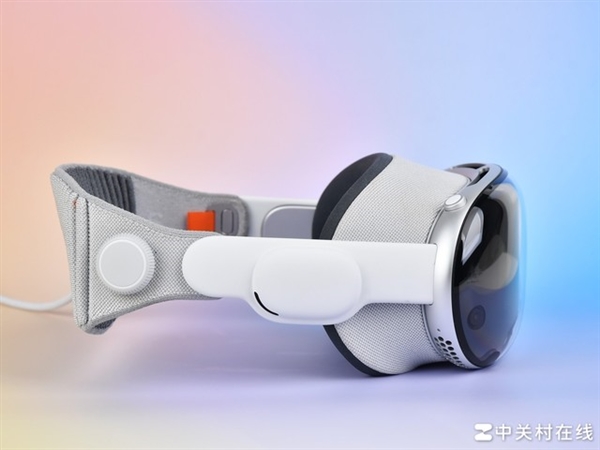
    We recently had the chance to try out the highly anticipated cyber product, Apple Vision Pro. Although touted as groundbreaking, our experience revealed it’s still a work in progress, suitable for average consumers.Apple Vision Pro
    Now, let’s delve into our firsthand encounter with this potentially revolutionary device.

    Appearance
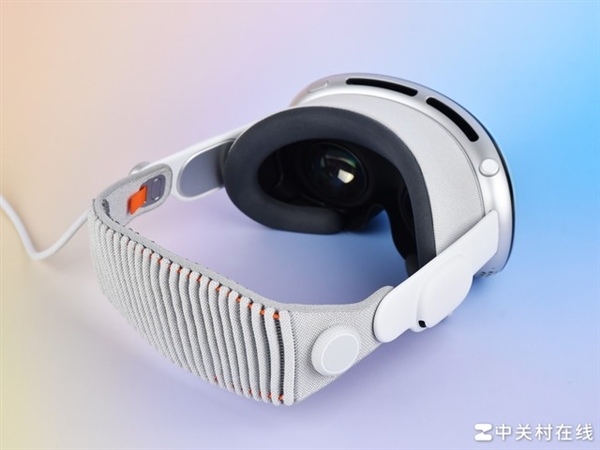
    Upon unboxing the Vision Pro, it’s evident that it follows Apple’s iconic design language, using their favored materials like glass, aluminum, and fabric.

    The eyecup of Vision Pro attaches magnetically for easy replacement. However, the connection isn’t very secure; if you only hold the eyecup, the main body might detach, risking a fall.
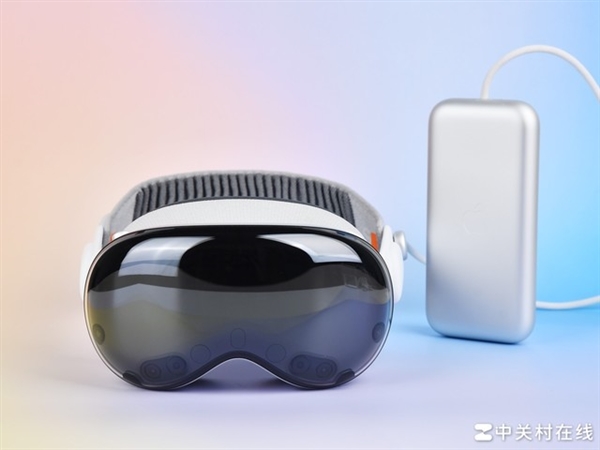
    The power interface of Vision Pro resembles a knob structure, requiring alignment and rotation for installation, similar to a camera’s bayonet mount. The power cord features the same braided material as the iPhone 15 series.

    Vision Pro’s straps feature a unique elasticity adjustment mechanism, eliminating the need for length adjustments. Simply turning the knob adjusts the strap tightness, enhancing the user experience.
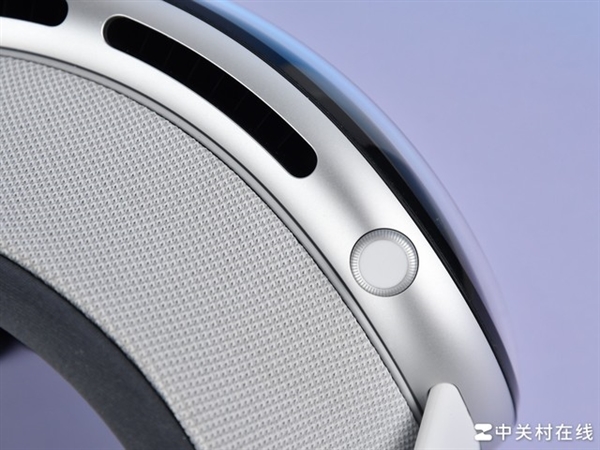
    The front of Vision Pro sports a familiar curved glass covering, concealing the facial display OLED screen and camera underneath.
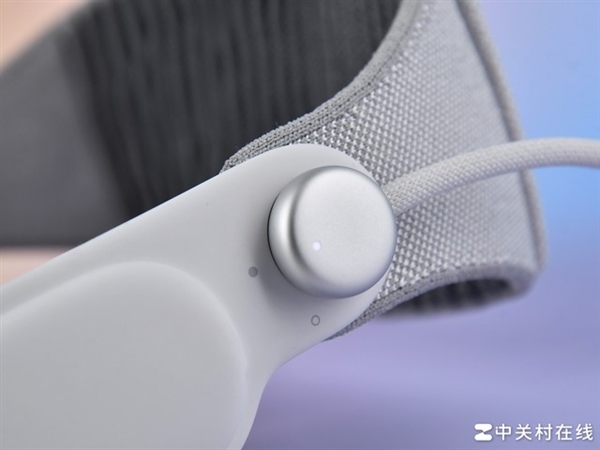
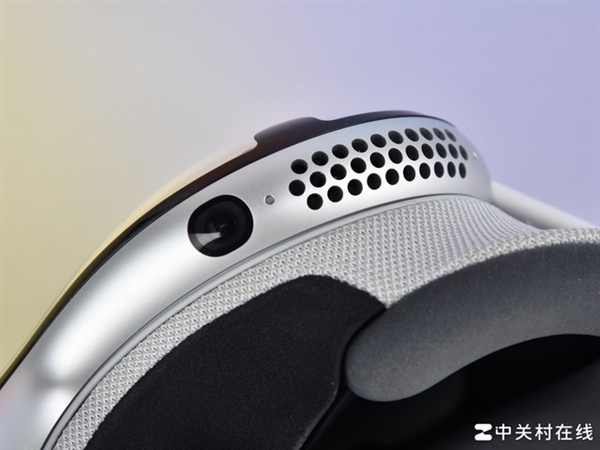
    Directly atop the Vision Pro body, there’s a conspicuous fan opening without any dust protection, raising concerns about long-term dust accumulation. Additionally, underneath the device, there’s a camera and an air outlet.

    Vision Pro Experience Analysis

    Upon wearing Vision Pro, beyond the initial activation steps, users can simply put it on and utilize it without further actions. However, there are some exceptions. For instance, if you lend your Vision Pro to someone else, it automatically adjusts to their interpupillary distance, necessitating recalibration upon re-wearing it. Moreover, if you opt for a password over eye recognition, you’ll still need to input the password to access the virtual world.

    Transitioning to its functionality, Vision Pro operates seamlessly without requiring manual spatial scanning or safety boundary setup. These tasks are handled automatically. For instance, in color penetration mode, users experience clear vision without the need for safety boundaries.

    In immersive mode, the system alerts users to nearby obstacles and releases the immersive mode when someone or something approaches.

    Starting with Apple’s Vision Pro
    A major advantage of Vision Pro lies in its exceptional display quality, ranking at the top among current head-mounted all-in-one devices. The color-through feature offers significant advantages, despite minor noise and limited POV viewing angles.

    Though the field of view is small and there’s a slight periscope effect, these issues have minimal impact in practical use. The color penetration delay is low, providing a reliable spatial sense, and enabling normal phone and computer usage while wearing it.

    However, there are shortcomings. Reading text in the real world through Vision Pro can be challenging, with letters like ‘l’ and ‘i’ indistinguishable. Additionally, the color-through images appear darker and grayer compared to reality.

    The core innovation of Vision Pro lies in its gaze and gesture interaction. While this interaction logic effectively facilitates virtual interaction without a controller, there are some drawbacks.

    Alignment issues and misjudgments occur with eye control, particularly when buttons are close together or viewed from low angles.

    Gestures, particularly pinching, offer an impressive initial experience with a wide recognition range, but misjudgments arise when fingers are close together, triggering unintended actions.

    APP Experience
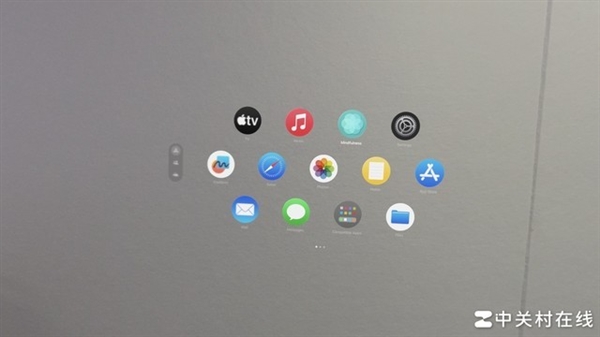
    Let’s delve into the application aspect now. Vision Pro boasts several native applications, each one remarkable. People often quip that they “match my vision of the future.”

    With its immersive display and spatial computing, Vision Pro delivers a gaming experience close to reality. Unlike previous XR products, Vision Pro’s display and gesture recognition are more natural, aligning with human intuition.

    In gaming, players can directly use their hands, departing from traditional controllers. While current XR games showcase Vision Pro’s capabilities, there’s a shortage of truly engaging content.

    Additionally, Vision Pro supports native XR applications, offering an exceptional user experience. In terms of audio and video, Vision Pro excels. Users can enjoy high-quality VR content from Apple and Disney, and store 2D videos for playback.
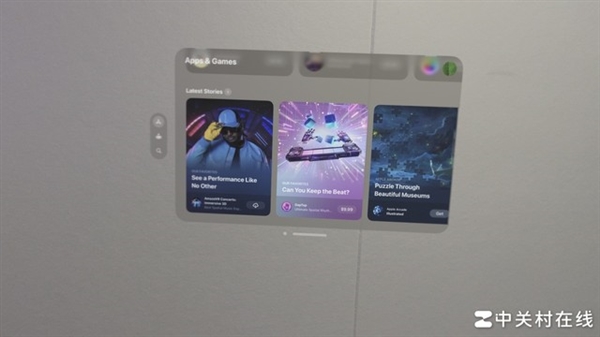
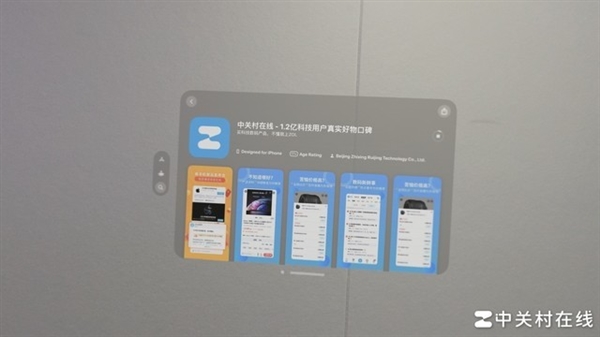
    Moreover, Vision Pro taps into the iOS app ecosystem. For instance, the ZOL APP can be downloaded from the app store. Notably, in Vision Pro, interaction varies based on window proximity: distant windows require eye control, while closer ones allow familiar gestures.

    Spatial video on Vision Pro offers a near-real scene experience, truly magical. However, it’s essential to note that Vision Pro is highly personalized. Sharing experiences is challenging due to individual eye conditions, requiring calibration for smooth usage.

    Verdict

    Vision Pro is expected to replace products like the iPad and Mac in future development, but it won’t replace smartphones. Transitioning to the product experience, Apple Vision Pro boasts a high degree of completion and is user-friendly out of the box, with minimal learning costs. As the premier product in the current head-mounted all-in-one category, Vision Pro excels. However, in terms of actual user experience, it suffers from a significant lack of content. Despite its native content, Vision Pro’s usage experience is limited, particularly in comparison to mobile phones.

    Read Also: Vivo X Fold3 Vision: The world’s first Snapdragon 8 Gen3 folding screen

    Share. Facebook Twitter Pinterest LinkedIn Tumblr Email

    Related Posts

    Redmi K100 Pro Review: 185Hz Display, Snapdragon Performance & Gaming Test

    OPPO K15 Review: 8000mAh Battery, Active Cooling Fan & 1.5K 120Hz Display

    Vivo V80 Lite Debuts With 10,000mAh Battery, Malaysia Launch Set for September 3

    Leave A Reply Cancel Reply

    You must be logged in to post a comment.

    voopoopintch
    oxva nexlim 2
    sp2s sen x disposable vape
    • Popular
    • 3D Printer REVIEW
    • XIAOMI
    July 13, 2026

    OXVA Nexlim 2 Mini Pod Vape Hands on Review

    July 13, 2026

    OXVA Nexlim 2 Pod Vape Hands on Review

    June 21, 2026

    iPlay LUMO 8K Review – A Compact Prefilled Pod Kit with Big Flavor and Everyday Convenience

    June 21, 2026

    iPlay HOOLA 150K Review – A Cloud-Chasing Giant with Music, Modes & Massive Longevity

    December 26, 2025

    ACMER ASCARVA 4S: Precision CNC Power for Makers, DIYers & Small Workshops

    June 23, 2024

    ACMER P2 20W Laser Engraver Fixed Focus Engraving: Hands on Review

    May 30, 2024

    xTool F1 Ultra Review: World’s First 20W Fiber & 20W Diode Laser Engraver

    May 30, 2024

    Anycubic Kobra 3 Combo Review: The Multicolor Masterpiece?

    August 22, 2026

    Redmi K100 Pro Review: 185Hz Display, Snapdragon Performance & Gaming Test

    August 18, 2026

    Xiaomi 18 Series: First to Feature 2nm Snapdragon 8 Elite Gen 6 Pro, Dedicated AI Button, and 8000mAh Battery

    August 18, 2026

    Xiaomi 18 Ultra International Cancelled? OPPO and Vivo Also Pull Back Ultra Phones Overseas – Report

    August 15, 2026

    Xiaomi MIX Fold 5 Rumors: XRing O3, HyperOS 4 and Major Upgrade Expected

    fc 26 coins
    New Arrivals
    • Artery Vapor CT3 45K Disposable Vape Artery Vapor CT3 45K Disposable Vape
    • Geek Labs Switch Pro 60K Nixodine Disposable Vape Geek Labs Switch Pro 60K Nixodine Disposable Vape
    • JNR HexaFuse 6in1 120K Disposable Vape JNR HexaFuse 6in1 120K Disposable Vape
    • KUMI Six Oro 40K Disposable Vape KUMI Six Oro 40K Disposable Vape
    • SBX 75K Disposable Vape SBX 75K Disposable Vape
    • Al Fakher Crown Bar Cloud Force Max 50K Disposable Vape Al Fakher Crown Bar Cloud Force Max 50K Disposable Vape
    • Vaporesso Prix Pod System Kit Vaporesso Prix Pod System Kit
    • Royal Tobacco Extracts x Pod Juice E-juice Royal Tobacco Extracts x Pod Juice E-juice
    • Geek Vape Go Pod System Kit Geek Vape Go Pod System Kit
    About
  • Igeekphone.com provides the first global tech news and reviews about smartphone, vapes, e-cigar, smart home, 3D printers, e-bike,tablets, RC drones, VR headset, and other accessories. It's the best platform to improve your brand and product.
  • Contact us: info@igeekphone.com
  • Check Our Privacy Policy Here.
  • Note: *Right now we have US editor and EU editors for review, especially for Amazon US and EU.
  • *Shop and Compare Price Here*
  • Facebook
  • Youtube
  • OUR BEST VAPE PARTNERS
  • VAPE ONLINE STORE
  • VAPORESSO
  • VOOPOO
  • OXVA
  • NEXA
  • MASKKING
  • SP2S
  • IPLAY
  • TODOO
  • OTHER BEST PARTNERS
  • SVBONY
  • Chuwi
  • Blackview
  • Fossibot
  • Unihertz
  • Flsun
  • Anycubic
  • Xtool
  • Oukitel
  • Mukkpet Ebike
  • Ugreen
  • Copyright © 2026 igeekphone

    Type above and press Enter to search. Press Esc to cancel.