







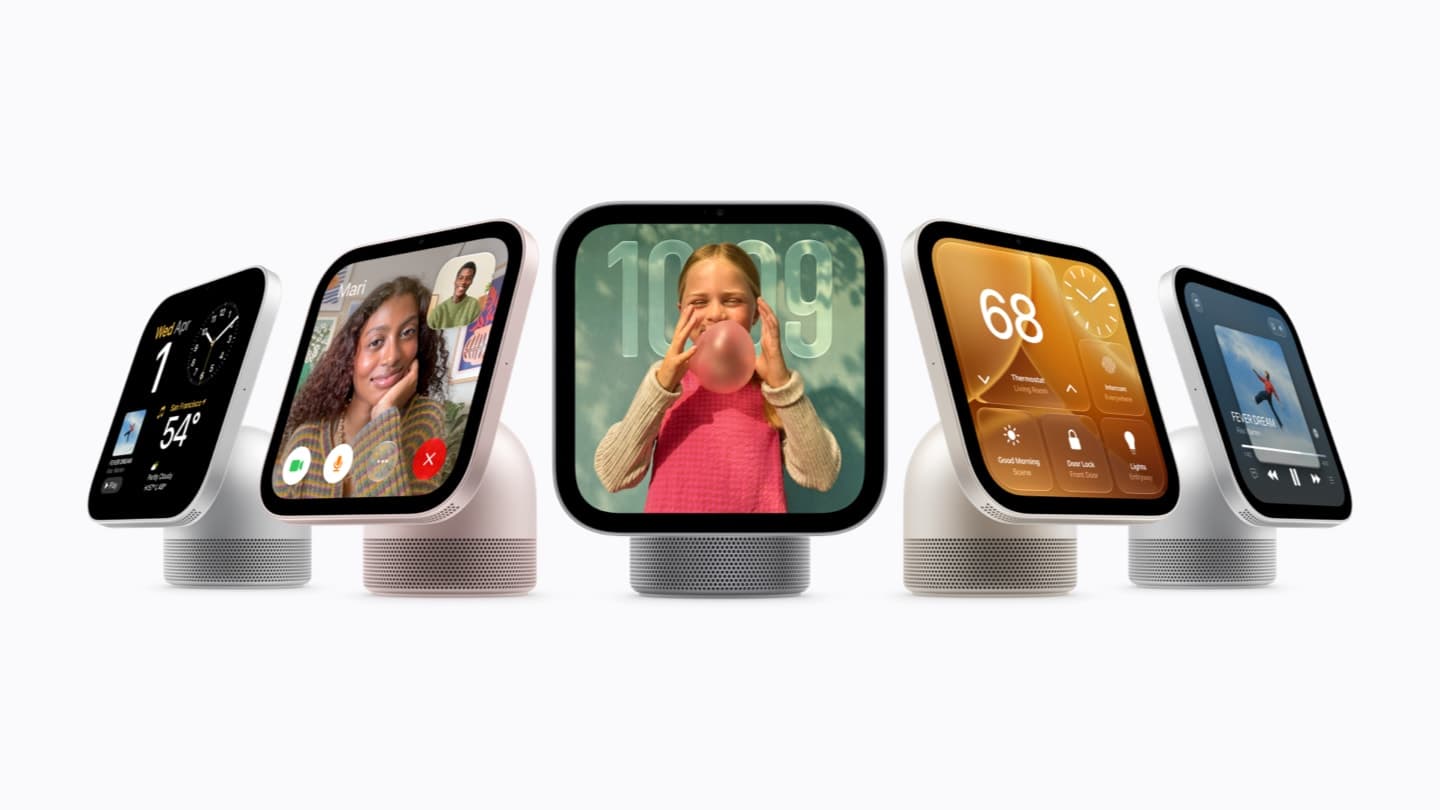
Apple’s upcoming smart home hub, reportedly called HomeView, could offer more than a central control point for connected household devices. According to a new leak, the device may also function as a HomeKit-compatible security camera, allowing family members to monitor their homes through live video and recorded footage. Here is Apple’s HomePod with a screen.
A report from AppleInsider, cited by IT Home, reveals that Apple appears to be testing several camera-related features for HomeView. The information reportedly comes from localization files found in HomeView Software 27.2, suggesting that Apple is exploring different ways to turn the device into part of a home security system.
Although the feature sounds promising, Apple has not officially confirmed the product or announced a release date.
HomeView Could Offer Built-In Home Security Monitoring
According to the leaked software information, the camera integrated into HomeView’s display could be used to monitor indoor environments.
Once activated, authorized household members would reportedly be able to access the camera’s live feed or review previously recorded videos. This would allow HomeView to serve two purposes: controlling smart home accessories and providing an additional layer of home surveillance.
The feature could be particularly useful for people who want to monitor indoor activity without purchasing a separate security camera. How about Apple’s HomeKit updates and smart home features?
The leaked settings reportedly include four different camera operating modes, giving users control over how the device monitors their homes.
Four Camera Modes Could Give Users More Control
The localization files reportedly describe four operating options for the HomeView camera.
1. Off Mode
When this setting is selected, HomeView will not detect movement, record video, or provide a live camera feed.
This option effectively disables the camera’s monitoring functions and may appeal to users who do not want indoor surveillance running continuously.
2. Activity Detection Mode
In this mode, HomeView can detect movement and send notifications to household members.
However, the device will not record video or allow users to access a live camera stream. This setting is designed primarily for activity alerts rather than continuous visual monitoring.
3. Live Video Mode
Live Video mode allows authorized family members to view the camera feed remotely.
Unlike a recording-enabled configuration, this option does not automatically save video footage. It is intended for users who want to check what is happening at home without keeping a video archive.
4. Live Video With Recording
The most comprehensive option combines real-time monitoring with automatic video recording.
Household members can reportedly open the live camera feed whenever needed and review previously captured footage. This mode could make HomeView more useful as a basic indoor security monitoring solution.
Scheduled Camera Controls Could Improve Privacy
Another potentially useful feature is the ability to schedule when the HomeView camera becomes active.
According to the leaked information, users may be able to configure specific operating times based on their household routines. For example, the camera could stop recording when family members are at home and activate live monitoring or recording when everyone leaves.
This type of scheduling could make the device more convenient for everyday use while helping households avoid unnecessary indoor recording.
Privacy will likely be an important consideration if Apple introduces this functionality. Since HomeView is expected to operate in shared living spaces, users will want clear controls over when the camera detects movement, streams video, and stores recordings.
The exact privacy settings, storage options, and access permissions have not yet been confirmed.
Apple’s HomeView Launch Date Remains Unknown
Despite the new leak, Apple’s smart home hub is still reportedly under development. The camera features described in the localization files appear to be part of ongoing software testing rather than confirmation of a finalized commercial product.
This means the four camera modes and scheduling options could still change before launch. Apple may also adjust the software experience or remove certain functions during development.
For now, there is no confirmed release date for HomeView. The current testing status also suggests that an immediate launch is unlikely.
Final Thoughts
If Apple brings these features to the finished product, HomeView could become more than a conventional smart home display. Its potential combination of HomeKit controls, motion detection, live video, and automatic recording could make it a useful addition to Apple’s connected-home ecosystem.
The four camera modes are particularly interesting because they offer different levels of monitoring rather than forcing users to choose between completely disabling the camera and recording everything.
However, the product’s actual usefulness will depend on its final hardware, privacy protections, recording options, and compatibility with existing Apple Home devices.
Until Apple makes an official announcement, HomeView and its reported security camera capabilities should be treated as unconfirmed.