





Facebook Twitter Instagram
    Trending
    • Flash Sale: Vaporesso XROS Mini Pod Kit at £11.99 – Compact, Powerful, and Stylish!
    • Bash Vape Echo Pro 10K Prefilled Pod Kit Review at £8.99: A High-Performance Vaping Experience
    • Joyetech eRoll Slim Pro Full Kit Review: The Ultimate Vaping Experience for Beginners
    • Navigating the High: Understanding How Many Hits It Takes from a Vape Pen
    • Unveiling the Social and Cultural Impact of Online Casino Gambling
    • The New VOZOL GEAR series products featuring a 2.1-inch color screen and incorporating audio interaction are now available in the UK and the UAE
    • How AI is Changing the Way We Live Our Lives
    • Xiaomi Hyper OS 4 undergoes a major upgrade: Completely eliminates old code and boosts smoothness.
    Facebook YouTube
    Login Register
    IGeeKphone China Phone, Tablet PC, VR, RC Drone News, Reviews
    • HOME
      • NEWS
        • DeepSeek
        • ChatGPT
        • Minecraft
    • Amazon
    • NEW YEAR
    • PHONE
      • Top Phones For Your First Choice
      • Phone Comparison
      • Xiaomi
      • Blackview
      • Doogee
      • Black Shark
      • Geekbuying
      • Banggood
      • TEMU
      • TikTok
      • Aliexpress
      • Walmart
      • MercadoLibre
      • Lazada
    • TOP VAPE Awards for 2026
    • VAPES
      • E-CIGAR Upcoming
      • Vape News
      • Vape Deals
      • Vape Comparison
      • Vape Guide
      • Giveaway
    • BEST VAPE
      • Best Vape Stores
      • Best Starter Vape Kits
      • Best Vapes for Beginners
      • Best Disposable Vapes
      • Best Pod Systems
      • Best Pod Mod Vapes
      • Best Mods
      • Best Nicotine Pouches
      • Best Clearomizers/Tanks
      • Best E-Liquid
      • Best EGO/Pens
      • Best Vapes for Nic Salt E-Juice
      • Best Vapes to Quit Smoking
      • RDA vs. RDTA vs. RTA
    • Best Vape Brand 2026
      • VAPORESSO
      • VOOPOO
      • OXVA
      • NEXA BAR
      • ORIONBARTECH
      • MASKKING VAPE
      • MEMERS
      • SP2S
      • JNR
      • TODOO
      • MRFOG
      • VEIIK
    • REVIEW
      • E-cigar Review
      • Phones
      • Tablet PC
      • TV Box
      • RC Drone
      • Wearables
      • Camera
      • Accessories
      • VR Headset
    • MORE
      • TABLET
        • Chuwi
        • INNOCN
        • Teclast
        • Top Tablet for Your First Choice
        • Tablet/Laptop Comparison
      • RC DRONE
      • CAMERA
      • WEARABLES
        • OneOdio
        • BlitzWolf
        • Top Smartwatch for First Choice
      • 3D PRINTER
        • 3D Printer Review
        • Anycubic
        • FLSUN
        • Xtool
        • LONGER
        • Top 3D printer to Choose First
      • POWER STATION
        • Oukitel
        • FOSSIBOT
      • GAMING
        • Top Gaming Products
      • E-BIKE
        • Samebike
        • Happyrun
        • ENGWE
      • SMART HOME
      • TV BOX
      • ACCESSORIES
      • VR HEADSET
      • CLOTHES
      • AUTO CAR
    • DEAL
    • Shop
    IGeeKphone China Phone, Tablet PC, VR, RC Drone News, Reviews
    You are at:Home»Guide»Force Restart iPad to Fix Black Screen or White Screen
    Guide

    Force Restart iPad to Fix Black Screen or White Screen

    HabibBy HabibJuly 31, 2024
    Facebook Twitter Pinterest LinkedIn Tumblr Email

    Dealing with an accidentally Force Restart iPad causing a black screen and a white apple or encountering issues like automatic restarts, freezing, and crashes without apparent reason—what steps should you take?

    Whether it’s an iPhone or an iPad, it’s often advised to begin with a forced shutdown and restart in the face of a general system failure. If normalcy isn’t regained, then an alternative approach is warranted.

    Consequently, when an iPad encounters general iPadOS system glitches, how should you properly perform a forced restart? Allow Senior Niu to guide you!

    Executing a Proper Forced Restart on iPad
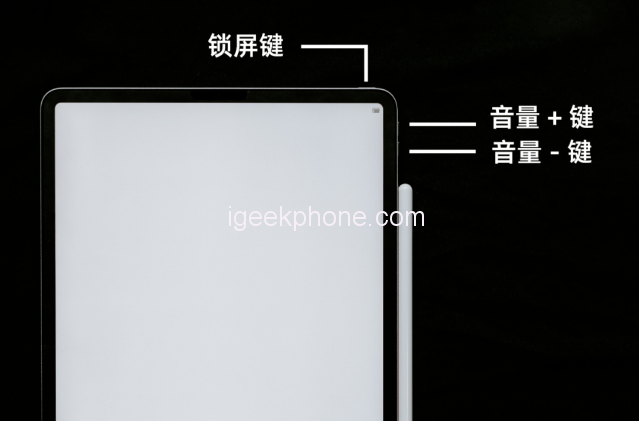
    If your iPad is stuck, unresponsive to shutdown, restarts unexpectedly, experiences app crashes, or gets stuck on a white screen, a forced restart can directly salvage your device.

    Follow the steps based on your iPad model:

    Full-screen models: Rapidly press the volume up and down buttons, then hold the power button until the Apple logo appears after the black screen. Release the button and wait for the restart.

    Models with a Home button: Simultaneously hold the Home and power buttons until the Apple logo emerges after the black screen. Release the buttons and await the restart.

    For fundamental system failures, a forced restart can rescue your iPad.

    However, Force Restart iPad issues like inexplicable black or white screens and white apples often stem from diverse causes and intricate problems. For severe iPadOS system failures, the efficacy of recovery through forced restart is relatively limited.

    Should you encounter an iPadOS system failure resistant to forced restart, delve into the following.

    Unresolved Failures Post Forced Restart

    Beyond memory limitations, most faults, such as black or white screens and white apples, are linked to iPadOS system glitches. Complex system glitches demand professional system repair tools.

    For instance, Niu Xuechang’s Apple mobile phone repair tool can rectify 150+ iPadOS system faults. Utilizing the “standard repair” mode ensures data retention and boasts an 80% success rate.

    Operational Steps:

    Step 1: Install and launch Niu Xuechang’s iPhone repair tool. Connect the iPad to the computer via a data cable and select “Fix iOS System Problems.”

    Step 2: Two repair modes are offered; opt for the “Standard Repair” mode due to its non-data loss feature.
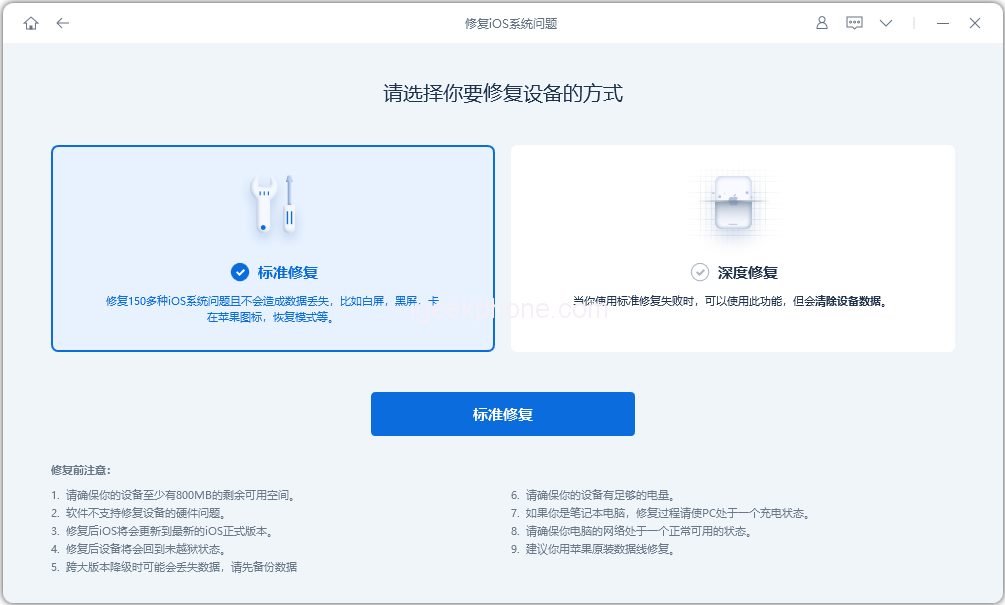
    Step 3: Once the software identifies the device, click “Download Firmware” to obtain the latest official firmware version, followed by initiating the repair after a successful download.
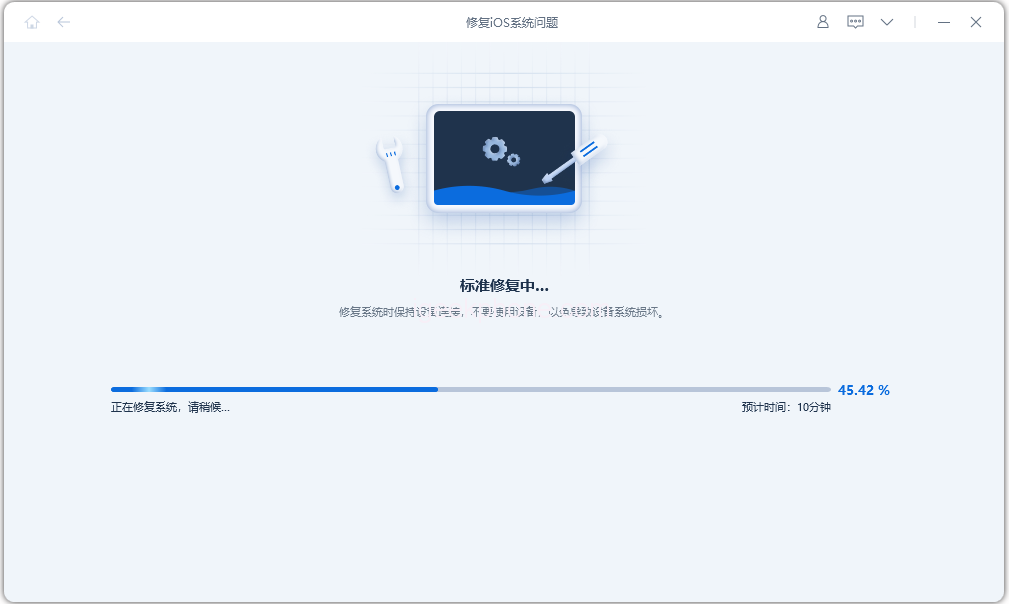
    The entire upgrading process spans roughly 10 minutes. Ensure the data cable remains connected throughout the operation and wait for the “repair complete” notification, signifying successful completion.
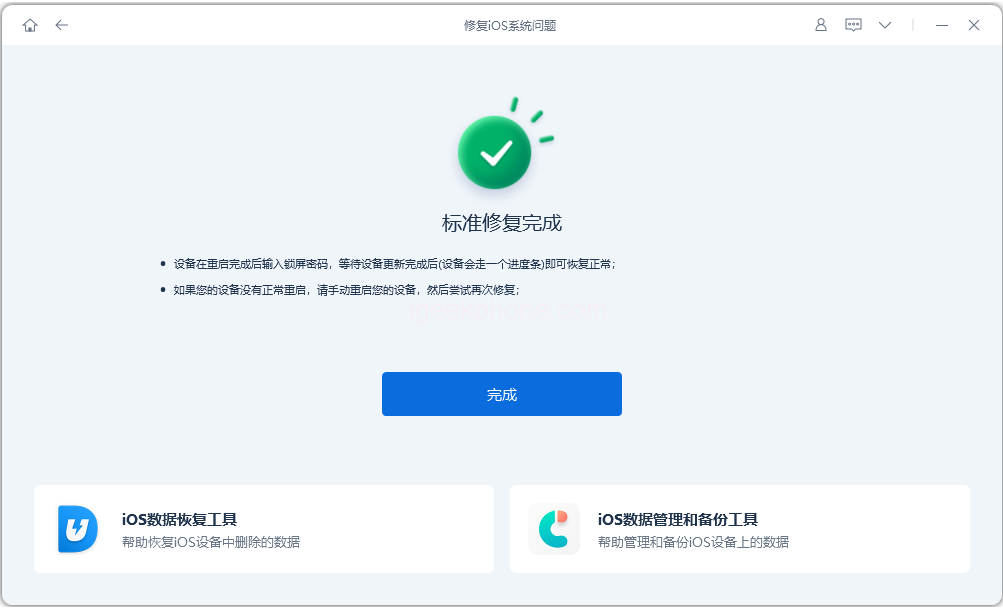
    A hardware malfunction could be at play when forced restarts and iPadOS system repairs fall short of resolving black screen, white screen, or white apple issues. In such cases, it’s advised to seek Apple’s repair services.

    Read Also: How to Bypass Screen Time Passcode on iPhone and iPad?

    Do not forget to follow us on our Facebook group and page to keep you always aware of the latest advances, News, Updates, review, and giveaway on smartphones, tablets, gadgets, and more from the technology world of the future.

    Share. Facebook Twitter Pinterest LinkedIn Tumblr Email

    Related Posts

    How AI is Changing the Way We Live Our Lives

    Xiaomi Hyper OS 4 undergoes a major upgrade: Completely eliminates old code and boosts smoothness.

    Sony Xperia 1 VIII Unveiled: Sony’s Most Powerful Flagship Has Arrived

    Leave A Reply Cancel Reply

    You must be logged in to post a comment.

    voopoo drag s3
    oxva xlim 3 ultra
    sp2s sen x disposable vape
    jnr 100k
    • Popular
    • 3D Printer REVIEW
    • XIAOMI
    February 2, 2026

    Voopoo Drag X3 vs Drag X2: Hands-On Comparison Review

    February 2, 2026

    VOOPOO VMATE i2 vs i3: Hands-On Comparison Review

    January 21, 2026

    VOOPOO ARGUS P3 VS ARGUS P2: Which Square Pod Suits You?

    January 21, 2026

    VOOPOO Drag X3 vs VOOPOO Drag X2: Hands-On Comparison

    December 26, 2025

    ACMER ASCARVA 4S: Precision CNC Power for Makers, DIYers & Small Workshops

    June 23, 2024

    ACMER P2 20W Laser Engraver Fixed Focus Engraving: Hands on Review

    May 30, 2024

    xTool F1 Ultra Review: World’s First 20W Fiber & 20W Diode Laser Engraver

    May 30, 2024

    Anycubic Kobra 3 Combo Review: The Multicolor Masterpiece?

    February 4, 2026

    Xiaomi Hyper OS 4 undergoes a major upgrade: Completely eliminates old code and boosts smoothness.

    February 2, 2026

    The new 6.59-inch mid-to-high-end model of a Certain factory is tentatively scheduled to be released in the first half of this year. It is expected to be under the brand of Xiaomi.

    January 29, 2026

    Xiaomi Launches REDMI Monitor G25 with 200Hz High Refresh Rate for Just 609 Yuan

    January 29, 2026

    The Specifications of the Strongest Flagship Model of Redmi, Redmi K100 Pro Max, have been Released

    fc 26 coins
    New Arrivals
    • Joyetech eRoll Slim Pro Full Kit 18W Joyetech eRoll Slim Pro Full Kit 18W
    • KadoBar Drip 50K Disposable Vape KadoBar Drip 50K Disposable Vape
    • YUMI Spaceman 50K Disposable Vape Kit YUMI Spaceman 50K Disposable Vape Kit
    • Airis Neo P40K Disposable Vape Airis Neo P40K Disposable Vape
    • Maskking Extre 100K Disposable Vape Maskking Extre 100K Disposable Vape
    • SMOK Volle Pod System Kit SMOK Volle Pod System Kit
    • Lost Vape Astara Pod System Kit Lost Vape Astara Pod System Kit
    • SALT BAE 50 40K DISPOSABLE SALT BAE 50 40K DISPOSABLE
    • CRAVE X ULTRA SLIM 40K DISPOSABLE CRAVE X ULTRA SLIM 40K DISPOSABLE
    About
  • Igeekphone.com provides the first global tech news and reviews about smartphone, vapes, e-cigar, smart home, 3D printers, e-bike,tablets, RC drones, VR headset, and other accessories. It's the best platform to improve your brand and product.
  • Contact us: info@igeekphone.com
  • Check Our Privacy Policy Here.
  • Note: *Right now we have US editor and EU editors for review, especially for Amazon US and EU.
  • *Shop and Compare Price Here*
  • Facebook
  • Youtube
  • OUR BEST VAPE PARTNERS
  • VAPE ONLINE STORE
  • HAYATI PRO MAX PLUS
  • VAPORESSO
  • VOOPOO
  • OXVA
  • NEXA
  • MASKKING
  • LOSTVAPE ORIONBAR
  • MEMERS
  • TODOO
  • SP2S
  • JNR
  • VEIIK
  • OTHER BEST PARTNERS
  • SVBONY
  • Chuwi
  • Blackview
  • Fossibot
  • Unihertz
  • Flsun
  • Anycubic
  • Xtool
  • Oukitel
  • Mukkpet Ebike
  • Ugreen
  • Copyright © 2026 igeekphone

    Type above and press Enter to search. Press Esc to cancel.