







Facebook Twitter Instagram
    Trending
    • JNR ShishaSip 35K Prefilled Pod Kit Review-Premium High Capacity Vaping with Dual Pod Technology
    • 5 Casino Games Every Beginner Should Try
    • VoIP Numbers: A Business Fad Or Should You Really Use One?
    • From London Apps to Desert Maps: Tech-Driven Road Trips in Dubai
    • JNR Gorilla X 43K Refillable Pod Kit Review– High‑Capacity, Replaceable Pods for Long‑Lasting Vaping
    • Seven global locations where vaping is a terrible idea
    • The ABCs of Bitcoin: Getting Started with Cryptocurrency
    • Unlock your iPhone in 3 Different Ways
    Facebook YouTube
    IGeeKphone China Phone, Tablet PC, VR, RC Drone News, Reviews
    • HOME
      • NEWS
        • DeepSeek
        • ChatGPT
        • Minecraft
    • Amazon
    • PHONE
      • Top Phones For Your First Choice
      • Phone Comparison
      • Xiaomi
      • Blackview
      • Doogee
      • Black Shark
      • Geekbuying
      • Banggood
      • TEMU
      • TikTok
      • Aliexpress
      • Walmart
      • MercadoLibre
      • Lazada
    • TOP VAPE Awards for 2026
    • VAPES
      • E-CIGAR Upcoming
      • Vape News
      • Vape Deals
      • Vape Comparison
      • Vape Guide
      • Giveaway
    • BEST VAPE
      • Best Vape Stores
      • Best Starter Vape Kits
      • Best Vapes for Beginners
      • Best Disposable Vapes
      • Best Pod Systems
      • Best Pod Mod Vapes
      • Best Mods
      • Best Nicotine Pouches
      • Best Clearomizers/Tanks
      • Best E-Liquid
      • Best EGO/Pens
      • Best Vapes for Nic Salt E-Juice
      • Best Vapes to Quit Smoking
      • RDA vs. RDTA vs. RTA
    • Best Vape Brand 2026
      • VAPORESSO
      • VOOPOO
      • OXVA
      • NEXA BAR
      • ORIONBARTECH
      • MASKKING VAPE
      • MEMERS
      • SP2S
      • TODOO
      • MRFOG
      • VEIIK
    • REVIEW
      • E-cigar Review
      • Phones
      • Tablet PC
      • TV Box
      • RC Drone
      • Wearables
      • Camera
      • Accessories
      • VR Headset
    • MORE
      • TABLET
        • Chuwi
        • INNOCN
        • Teclast
        • Top Tablet for Your First Choice
        • Tablet/Laptop Comparison
      • RC DRONE
      • CAMERA
      • WEARABLES
        • OneOdio
        • BlitzWolf
        • Top Smartwatch for First Choice
      • 3D PRINTER
        • 3D Printer Review
        • Anycubic
        • FLSUN
        • Xtool
        • LONGER
        • Top 3D printer to Choose First
      • POWER STATION
        • Oukitel
        • FOSSIBOT
      • GAMING
        • Top Gaming Products
      • E-BIKE
        • Samebike
        • Happyrun
        • ENGWE
      • SMART HOME
      • TV BOX
      • ACCESSORIES
      • VR HEADSET
      • CLOTHES
      • AUTO CAR
    • DEAL
    • VAPE LAWS
    • Shop
    IGeeKphone China Phone, Tablet PC, VR, RC Drone News, Reviews
    You are at:Home»Guide»Online Free Photo Restoration: Renew Old Photos with AI
    Guide

    Online Free Photo Restoration: Renew Old Photos with AI

    Brady CottonBy Brady CottonMarch 25, 2026
    Facebook Twitter Pinterest LinkedIn Tumblr Email
    guide to online free photo restoration
    guide to online free photo restoration

    You open a dusty photo album and notice that many cherished pictures have faded or torn edges. The joy of reliving old memories turns into disappointment when images appear blurry, scratched, or discolored. Fortunately, modern technology allows you to restore photos online without expensive software or professional help.

    AI-powered tools can intelligently reconstruct missing details, adjust colors, and remove damage automatically. By using online free photo restoration solutions, you can breathe new life into treasured photographs. This article explores why images deteriorate, common restoration mistakes, and provides a step-by-step guide to renew old photo memories effectively.

    Part 1. Understanding Photo Damage: Why Your Old Images Deteriorate

    Before attempting to renew old photos, it’s important to understand the factors causing their deterioration. Recognizing these helps in choosing the right restoration method or tool.

    • Physical Wear and Tear: Repeated handling, folding, or exposure to air and dust can cause scratches, tears, or fading. These damages make the image appear blurred or incomplete over time.
    • Environmental Effects: Humidity, temperature fluctuations, and sunlight exposure accelerate chemical reactions in photo paper. This often leads to discoloration, yellowing, or brittleness.
    • Improper Storage: Storing photos in non-archival materials or near magnetic sources can affect image integrity. Over time, even slight chemical reactions degrade the photo quality.
    • Aging of Photographic Materials: Ink, dyes, and emulsions naturally deteriorate with time. Older photos are more prone to fading, color shifts, and loss of detail.
    • Digital Scanning or Conversion Errors: When old photos are scanned or digitized, improper settings or low-resolution captures can reduce clarity. This often introduces pixelation, noise, or color distortion.

    Part 2. Restoring Old Photos Online? Watch Out for These Mistakes

    Even when using AI photo restoration, beginners can make mistakes that reduce effectiveness. Avoiding these ensures better results.

    • Over-Reliance on Automatic Filters: Some online tools over-enhance images, making them look unnatural. Excessive sharpening or color correction can distort original features.
    • Ignoring File Format Compatibility: Uploading unsupported or low-quality images can prevent restoration tools from fully repairing them. Always check format guidelines before restoring your photos.
    • Neglecting Backup Copies: Working directly on the original file may result in permanent changes. Always keep a backup before restoration attempts.
    • Skipping Advanced Repair Options: Many online tools offer reference-based or AI-guided advanced repairs. Ignoring these can leave severe damage unrepaired.
    • Using Low-Quality Tools: Free tools with limited AI capabilities may fail to reconstruct damaged areas properly. This often produces incomplete or pixelated results.

    Part 3. Step-by-Step Guide: Restore Old Photos for Free Online with Repairit Online 

    Online photo restoration has never been easier thanks to AI-driven solutions. Repairit Online is designed to restore old, damaged images efficiently while preserving original quality. Users can upload faded, torn, or partially corrupted images, and the tool quickly analyzes pixels, colors, and textures. 

    Its AI technology intelligently reconstructs missing or broken elements, ensuring a natural appearance. Supported formats include JPG, PNG, and RAW. For complex cases, an advanced mode uses a reference image to accurately recover lost details. Users can download the repaired images instantly.

    Coherent Features of Repairit Online

    • Multiple Restoration Models: Repairit provides various restoration AI models depending on the type of damage that occurred to the image.
    • Repair History: The platform maintains a record of all restored photos for easy reference and organization.
    • Preview Before Saving: Users can examine repaired images before downloading to confirm the restoration meets expectations.

    Step-by-Step Guide on How to Repair Images With Repairit Online

    As mentioned, Repairit Online provides comprehensive AI photo restoration for images and other file types. The following steps show how to fix corrupted photos with this tool:

    Step 1. Begin By Uploading Old Damaged Photos
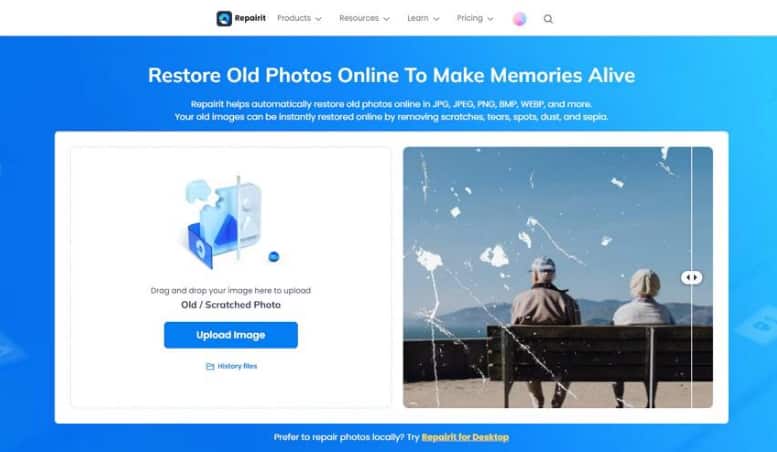
    start by uploading old photos
    start by uploading old photos

    Open Repairit Online on your browser and go to the old photo restoration section. Then click the “Upload Image” button to upload your corrupted images to the interface.

    Step 2. Start with the Repair Process
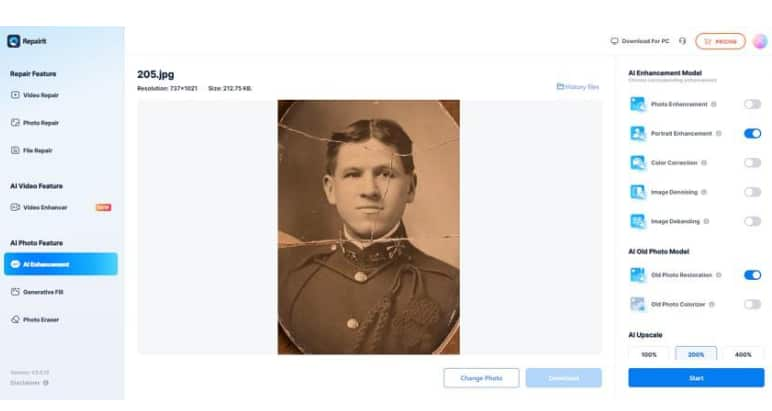
    choose ai model press start
    choose ai model press start

    After uploading, select the restoration model from the options on the right. Click the “Start” button at the bottom and wait a few seconds for completion.

    Step 3. Preview and Save Photos
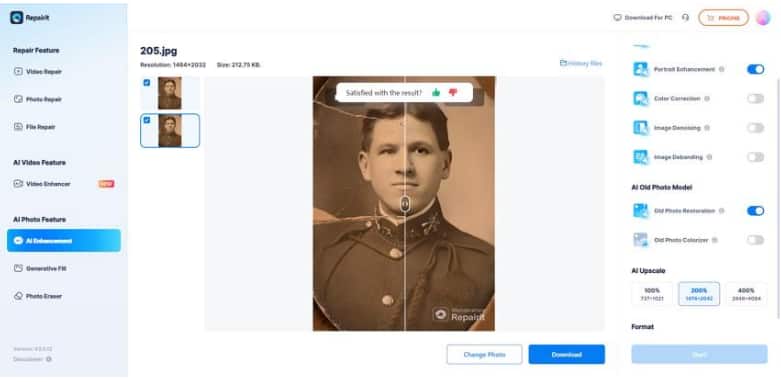
    preview and save photos 
    preview and save photos

    Once the restoration finishes, preview the restored images within the interface. When satisfied with the results, click the “Download” button to save them to your device.

    Part 4. Repairit Online vs. Other Tools: Why It’s the Best Option

    When comparing online photo restoration tools, Repairit Online stands out for its AI capabilities. Provided next is a comparison table between Repairit Online and other online tools available across the internet:

    Feature Repairit Online Other Tools
    AI-Powered Repair Uses advanced AI to reconstruct damaged pixels accurately Limited AI or manual fixes
    Supported Formats JPG, PNG, RAW, and many more Often limited to JPG or PNG
    Batch Repair Repair multiple images at once Rarely available
    Repair History Keeps a record of all repaired photos Not included
    Preview Before Saving Allows users to check restored images before downloading Limited or unavailable
    Ease of Use Intuitive interface suitable for beginners Medium to complex

    Conclusion 

    To sum it up, this article provided a detailed guide on restoring old photos using AI technology. Repairit Online is highly recommended for anyone looking for online free photo restoration. Its AI-powered features, reference-based repair, and secure processing make renewing old photo memories simple and reliable. By choosing Repairit Online, users can restore image quality, recover details, and preserve cherished moments efficiently.

    Share. Facebook Twitter Pinterest LinkedIn Tumblr Email

    Related Posts

    VoIP Numbers: A Business Fad Or Should You Really Use One?

    From London Apps to Desert Maps: Tech-Driven Road Trips in Dubai

    Unlock your iPhone in 3 Different Ways

    Leave A Reply Cancel Reply

    You must be logged in to post a comment.

    voopoo drag 6
    oxva xlim 3 ultra
    sp2s sen x disposable vape
    • Popular
    • 3D Printer REVIEW
    • XIAOMI
    April 18, 2026

    VOOPOO DRAG 6 Hands on Review: Vape Beast with Smart Power & Premium Control

    April 8, 2026

    OXVA NeXLIM vs XLIM Pro 2 Pod Hands-On Review (2026)

    March 16, 2026

    OXVA Slimstick VS OXVA Slimstick X Vape Hands-on Review

    March 5, 2026

    OXVA XLIM PRO 3 vs XLIM GO 2: Hands-On Review

    December 26, 2025

    ACMER ASCARVA 4S: Precision CNC Power for Makers, DIYers & Small Workshops

    June 23, 2024

    ACMER P2 20W Laser Engraver Fixed Focus Engraving: Hands on Review

    May 30, 2024

    xTool F1 Ultra Review: World’s First 20W Fiber & 20W Diode Laser Engraver

    May 30, 2024

    Anycubic Kobra 3 Combo Review: The Multicolor Masterpiece?

    April 23, 2026

    The largest battery-powered Xiaomi flagship of all time is here! Xiaomi 17 Max will be unveiled in May: A versatile large-screen flagship.

    April 22, 2026

    Starting from 3399 yuan! Redmi K Pad 2 Released: 8.8-inch + Dimensity 950

    April 22, 2026

    Redmi Buds 8 Released: 50dB deep noise reduction, supports location tracking and loss prevention

    April 22, 2026

    Xiaomi S Mini LED 2026 Series Released: 2000nits Anti-Reflection Screen + 288Hz Ultra-High Refresh Rate

    fc 26 coins
    New Arrivals
    • Tomoro D15 35K Disposable Vape Tomoro D15 35K Disposable Vape
    • Ploox Mini Hookah 25K Disposable Vape Kit Ploox Mini Hookah 25K Disposable Vape Kit
    • Lost Vape Thelema Solo 100 Pro Vape Mod Kit Lost Vape Thelema Solo 100 Pro Vape Mod Kit
    • SMOK Vaporock X1 Pod System Kit SMOK Vaporock X1 Pod System Kit
    • WASPE 4-in-1 100K Disposable Vape WASPE 4-in-1 100K Disposable Vape
    • SMOK Alpha Mix Pod System Kit SMOK Alpha Mix Pod System Kit
    • VOOPOO Argus G4 Mini Pod System Kit VOOPOO Argus G4 Mini Pod System Kit
    • IPLAY NEXUS 45k Disposable Pod IPLAY NEXUS 45k Disposable Pod
    • IPLAY NOVA 45k Disposable Pod IPLAY NOVA 45k Disposable Pod
    About
  • Igeekphone.com provides the first global tech news and reviews about smartphone, vapes, e-cigar, smart home, 3D printers, e-bike,tablets, RC drones, VR headset, and other accessories. It's the best platform to improve your brand and product.
  • Contact us: info@igeekphone.com
  • Check Our Privacy Policy Here.
  • Note: *Right now we have US editor and EU editors for review, especially for Amazon US and EU.
  • *Shop and Compare Price Here*
  • Facebook
  • Youtube
  • OUR BEST VAPE PARTNERS
  • VAPE ONLINE STORE
  • HAYATI PRO MAX PLUS
  • VAPORESSO
  • VOOPOO
  • OXVA
  • NEXA
  • MASKKING
  • TODOO
  • SP2S
  • VEIIK
  • OTHER BEST PARTNERS
  • SVBONY
  • Chuwi
  • Blackview
  • Fossibot
  • Unihertz
  • Flsun
  • Anycubic
  • Xtool
  • Oukitel
  • Mukkpet Ebike
  • Ugreen
  • Copyright © 2026 igeekphone

    Type above and press Enter to search. Press Esc to cancel.