







Facebook Twitter Instagram
    Trending
    • How to Change Your Router Password in 2026: A Step-by-Step Guide
    • The new Sky Blue Color for Redmi K90 Max has been Unveiled: a Low-saturation blue tone that is highly durable and Eye-catching
    • Huawei Pura 90 series real phone is unveiled: Gradient color returns! Unique rear camera design
    • It is Reported that the New Snapdragon 8 Elite Gen6 Pro Model of a Certain Factory has a 6.9-inch Straight Screen
    • OnePlus Ace6 Supreme Edition Phone has been Officially Announced to be Released on April 28th
    • MONSTER C01 Gen2 TWS Earbuds Review at $17.99: The Future of Wireless Audio and Translation
    • YCRC A189 GPS 5G WiFi FPV RC Drone Review at $59.99: The Ultimate Foldable Drone for Aerial Adventures
    • JXC SP4301 Official Licensed Supra RTR 1/43 4WD Drift RC Car Review: A Mini Racing Beast for Hobbyists and Collectors
    Facebook YouTube
    IGeeKphone China Phone, Tablet PC, VR, RC Drone News, Reviews
    • HOME
      • NEWS
        • DeepSeek
        • ChatGPT
        • Minecraft
    • Amazon
    • PHONE
      • Top Phones For Your First Choice
      • Phone Comparison
      • Xiaomi
      • Blackview
      • Doogee
      • Black Shark
      • Geekbuying
      • Banggood
      • TEMU
      • TikTok
      • Aliexpress
      • Walmart
      • MercadoLibre
      • Lazada
    • TOP VAPE Awards for 2026
    • VAPES
      • E-CIGAR Upcoming
      • Vape News
      • Vape Deals
      • Vape Comparison
      • Vape Guide
      • Giveaway
    • BEST VAPE
      • Best Vape Stores
      • Best Starter Vape Kits
      • Best Vapes for Beginners
      • Best Disposable Vapes
      • Best Pod Systems
      • Best Pod Mod Vapes
      • Best Mods
      • Best Nicotine Pouches
      • Best Clearomizers/Tanks
      • Best E-Liquid
      • Best EGO/Pens
      • Best Vapes for Nic Salt E-Juice
      • Best Vapes to Quit Smoking
      • RDA vs. RDTA vs. RTA
    • Best Vape Brand 2026
      • VAPORESSO
      • VOOPOO
      • OXVA
      • NEXA BAR
      • ORIONBARTECH
      • MASKKING VAPE
      • MEMERS
      • SP2S
      • TODOO
      • MRFOG
      • VEIIK
    • REVIEW
      • E-cigar Review
      • Phones
      • Tablet PC
      • TV Box
      • RC Drone
      • Wearables
      • Camera
      • Accessories
      • VR Headset
    • MORE
      • TABLET
        • Chuwi
        • INNOCN
        • Teclast
        • Top Tablet for Your First Choice
        • Tablet/Laptop Comparison
      • RC DRONE
      • CAMERA
      • WEARABLES
        • OneOdio
        • BlitzWolf
        • Top Smartwatch for First Choice
      • 3D PRINTER
        • 3D Printer Review
        • Anycubic
        • FLSUN
        • Xtool
        • LONGER
        • Top 3D printer to Choose First
      • POWER STATION
        • Oukitel
        • FOSSIBOT
      • GAMING
        • Top Gaming Products
      • E-BIKE
        • Samebike
        • Happyrun
        • ENGWE
      • SMART HOME
      • TV BOX
      • ACCESSORIES
      • VR HEADSET
      • CLOTHES
      • AUTO CAR
    • DEAL
    • VAPE LAWS
    • Shop
    IGeeKphone China Phone, Tablet PC, VR, RC Drone News, Reviews
    You are at:Home»Apple»How to Adjust the Stabilization Function of iPhone 17 Pro?
    Apple

    How to Adjust the Stabilization Function of iPhone 17 Pro?

    Brady CottonBy Brady CottonJanuary 4, 2026
    Facebook Twitter Pinterest LinkedIn Tumblr Email

    The imaging system of iPhone 17 Pro has once again pushed the boundaries of technology. Its anti-shake function not only covers all scenarios of photography and video shooting, but also builds a multi-level stabilization system through hardware upgrades and algorithm optimizations. Whether it is for daily snapshots or professional creation, users can unleash the potential of anti-shake through system settings and operational techniques. The following will provide detailed explanations from three dimensions: hardware principles, parameter adjustments, and scene adaptation.
    1. Hardware-level stabilization: A hidden layer of support that doesn’t require activation

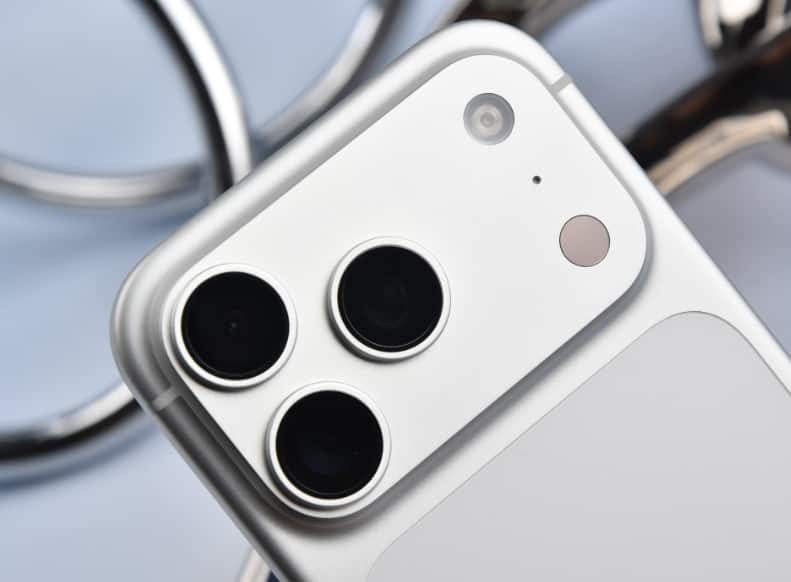
    The triple camera system of iPhone 17 Pro all feature optical image stabilization (OIS) modules. However, the stabilization structures of different lenses have distinct designs: The main camera adopts a dual-axis suspended lens group, which can simultaneously counteract both lateral and longitudinal vibrations, and can extend the exposure time to 1/8 second while still maintaining a clear image in low-light conditions; The ultra-wide-angle and telephoto lenses use single-axis OIS, precisely compensating for specific directional vibrations. This hardware-level stabilization is automatically activated by the system, and users can enjoy basic stability effects without having to manually turn it on. For example, when shooting moving objects in bright daylight, OIS can reduce the risk of blurring at a shutter speed of 1/30 second; Combined with a ?/1.6 large aperture lens, the light intake increases by 40%, further weakening the impact of hand shake on the image quality.

    II. Parameter Adjustment: Precise Control of Shutter Stability Performance

    Although the hardware image stabilization operates automatically, its performance can be further optimized through system settings:
    Maintain normal exposure: Go to “Settings – Camera”, enable this option. In low-light conditions, the camera will prioritize adjusting the ISO rather than the shutter speed to prevent image jitter caused by insufficient exposure. The actual test shows that at an illuminance of 200 lux, after enabling this option, the shutter speed can remain above 1/30 second, and the image capture rate increases by 65%.
    2. Close-up Control: When shooting objects at close range, enabling this function will automatically switch to an ultra-wide-angle lens and activate the close-up mode. The algorithm will eliminate the ghosting and shaking caused by the lens switch. When shooting at a distance of 10 cm, the distortion rate at the edge of the image is reduced to 0.3%, and the stability is improved by three times.

    3. Video Stabilization Mode: When recording a video, long press the screen and swipe left to enter the stabilization menu. You can choose between the ‘Standard’ or ‘Enhanced’ mode. The Enhanced mode achieves more aggressive stabilization by dynamically cropping the edges of the screen, which is suitable for motion scenes but will sacrifice approximately 15% of the viewing angle. In actual tests, when following a runner, the Enhanced mode reduced the video shake by 82%, achieving the same level of stability as a professional gimbal at 80%.

    III. Scene Adaptation: Comprehensive Coverage from Daily Life to Extreme Conditions
    The stabilization system of iPhone 17 Pro is deeply integrated with the shooting mode, forming a scenario-based solution:
    1. Motion Mode: Click the “person icon” in the top left corner of the video interface to activate the motion mode. The system will automatically switch to 60fps shooting at 2.8K resolution, and use AI algorithms to simulate the movement trajectory of a professional camera pan. When shooting the lead singer in the sea of people at the concert, the motion mode can eliminate over 90% of high-frequency jitter, and the smoothness of the picture is comparable to that of a track shot.
    2. Film Effect Mode: When this mode is enabled, the system not only intelligently blurs the background but also predicts the movement trajectory of the main subject through deep learning, and adjusts the anti-shake parameters in advance. When shooting follow-up shots of cycling, the focus switching delay is reduced to 0.2 seconds, the anti-shake compensation accuracy reaches pixel level, and the transition naturalness is improved by 50%.
    3. Front camera stabilization: The 18-megapixel Center Stage front camera is pre-set to use 4K ultra-stable stabilization. It achieves dynamic compensation for the edges of the image through sensor scanning of the area. When switching between portrait and landscape modes, the system automatically adjusts the framing range to ensure the subject remains centered. When shooting vlogs while walking, the front camera stabilization can eliminate over 85% of walking tremors, resulting in a picture stability close to that of a professional stabilizer.

    IV. Physical Assistance: The Key to Unleashing the Potential of Stabilization

    For users who are seeking the utmost stability, physical assistive tools can further unlock the stabilization potential of the iPhone 17 Pro:

    Magnetic mounting bracket: When using the Moft magnetic mounting bracket to fix the mobile phone, its 360° rotation design can be adapted to various flat surfaces such as desktops, railings, and car windows. When shooting time-lapse photography, the bracket can completely eliminate the interference caused by hand tremors, ensuring that the error in the star track trajectory is within 0.5 pixels.

    2. Grid Line Assistance: Enable the “Grid Lines” function in the camera interface. Use the 3×3 auxiliary lines to keep the phone level. When shooting buildings, the grid lines can reduce the perspective distortion caused by angle inclination, minimizing the vertical error of the image to within 1°.

    3. Continuous Shooting Mode: Once enabled, the system will continuously capture images at a rate of 10 frames per second, and automatically select the clearest photos using AI algorithms. When shooting scenes involving children running, this mode can increase the image capture rate from 30% to 85%, effectively avoiding blurriness caused by improper timing of a single shot.

    From the hardware architecture to the software algorithms, from the system settings to the scene adaptation, the image stabilization system of iPhone 17 Pro has formed a complete technical loop. Users can obtain the basic image stabilization effect through the default settings, and can also unlock the professional-level shooting experience by fine-tuning parameters and using auxiliary tools. This design logic of “combining ease of use with professionalism” is precisely the core competitiveness of its imaging system.

    Share. Facebook Twitter Pinterest LinkedIn Tumblr Email

    Related Posts

    How to Change Your Router Password in 2026: A Step-by-Step Guide

    Mureka: An Innovative Song Maker Empowering Music Creators Everywhere

    Forex Trading Apps for iOS – Top Picks to Consider

    Leave A Reply Cancel Reply

    You must be logged in to post a comment.

    voopoo drag 6
    oxva xlim 3 ultra
    sp2s sen x disposable vape
    • Popular
    • 3D Printer REVIEW
    • XIAOMI
    April 18, 2026

    VOOPOO DRAG 6 Hands on Review: Vape Beast with Smart Power & Premium Control

    April 8, 2026

    OXVA NeXLIM vs XLIM Pro 2 Pod Hands-On Review (2026)

    March 16, 2026

    OXVA Slimstick VS OXVA Slimstick X Vape Hands-on Review

    March 5, 2026

    OXVA XLIM PRO 3 vs XLIM Pro 2 DNA: Hands-On Review

    December 26, 2025

    ACMER ASCARVA 4S: Precision CNC Power for Makers, DIYers & Small Workshops

    June 23, 2024

    ACMER P2 20W Laser Engraver Fixed Focus Engraving: Hands on Review

    May 30, 2024

    xTool F1 Ultra Review: World’s First 20W Fiber & 20W Diode Laser Engraver

    May 30, 2024

    Anycubic Kobra 3 Combo Review: The Multicolor Masterpiece?

    April 20, 2026

    The new Sky Blue Color for Redmi K90 Max has been Unveiled: a Low-saturation blue tone that is highly durable and Eye-catching

    April 20, 2026

    It is Reported that the New Snapdragon 8 Elite Gen6 Pro Model of a Certain Factory has a 6.9-inch Straight Screen

    April 16, 2026

    Rendering images of Xiaomi 18 Pro smartphone have been Released: A new AI button has been added, which can control cars / smart home devices.

    April 16, 2026

    The Largest Battery Phone in Xiaomi’s History has Arrived! Xiaomi 17 Max has been Approved for Sale

    fc 26 coins
    New Arrivals
    • Oppo Watch X3 Oppo Watch X3
    • Uwell Caliburn G5 Pod System Kit Uwell Caliburn G5 Pod System Kit
    • Justfog Glent Pro Pod Mod Kit 1500mAh Justfog Glent Pro Pod Mod Kit 1500mAh
    • IPLAY NEXUS 45k Disposable Pod IPLAY NEXUS 45k Disposable Pod
    • Cloud King CK50000 Disposable Cloud King CK50000 Disposable
    • Air Factory 50K Disposable Air Factory 50K Disposable
    • Alibarbar Swirl 50K Disposable Vape Alibarbar Swirl 50K Disposable Vape
    • Dotmod DotAIO V3 AIO Kit Dotmod DotAIO V3 AIO Kit
    • Honor Magic9 Pro Air Honor Magic9 Pro Air
    About
  • Igeekphone.com provides the first global tech news and reviews about smartphone, vapes, e-cigar, smart home, 3D printers, e-bike,tablets, RC drones, VR headset, and other accessories. It's the best platform to improve your brand and product.
  • Contact us: info@igeekphone.com
  • Check Our Privacy Policy Here.
  • Note: *Right now we have US editor and EU editors for review, especially for Amazon US and EU.
  • *Shop and Compare Price Here*
  • Facebook
  • Youtube
  • OUR BEST VAPE PARTNERS
  • VAPE ONLINE STORE
  • HAYATI PRO MAX PLUS
  • VAPORESSO
  • VOOPOO
  • OXVA
  • NEXA
  • MASKKING
  • TODOO
  • SP2S
  • VEIIK
  • OTHER BEST PARTNERS
  • SVBONY
  • Chuwi
  • Blackview
  • Fossibot
  • Unihertz
  • Flsun
  • Anycubic
  • Xtool
  • Oukitel
  • Mukkpet Ebike
  • Ugreen
  • Copyright © 2026 igeekphone

    Type above and press Enter to search. Press Esc to cancel.