Facebook Twitter Instagram
    Trending
    • JNR Falcon-X⁺ 28K: The Christmas Countdown Deal: Precision, Power & Pure Convenience
    • How to Keep Your Rummy Skills Sharp
    • Uwell Caliburn G5 Lite SE Pod System Kit Review: Premium Simplicity Refined
    • Uwell Caliburn G5 Lite KOKO Pod System Kit Review: Compact Power, Uncompromised Flavor
    • Uwell Caliburn G5 Lite Pod System Kit Review: Refined Simplicity, Unmatched Flavor
    • Quantum AI App, Useful or Not?
    • How to Troubleshoot and Fix a Vape That Won’t Charge?
    • How to Troubleshoot iPhone Personal Hotspot Issues
    Facebook YouTube
    Login Register
    IGeeKphone China Phone, Tablet PC, VR, RC Drone News, Reviews
    • HOME
      • NEWS
        • DeepSeek
        • ChatGPT
        • Minecraft
    • Amazon
    • CHRISTMAS
    • PHONE
      • Top Phones For Your First Choice
      • Phone Comparison
      • Xiaomi
      • Blackview
      • Unihertz
      • Doogee
      • Black Shark
      • Geekbuying
      • Banggood
      • TEMU
      • TikTok
      • Aliexpress
      • Walmart
      • Newegg
      • MercadoLibre
      • Lazada
    • TOP VAPE Awards for 2025
    • VAPES
      • E-CIGAR Upcoming
      • Vape News
      • Vape Market Trend
      • Vape Deals
      • Expo News
      • Vape Comparison
      • Vape Guide
        • Guide For Beginners
        • Guide for Best Users
      • Giveaway
    • BEST VAPE
      • Best Vape Stores
      • Best Starter Vape Kits
      • Best Vapes for Beginners
      • Best Disposable Vapes
      • Best Pod Systems
      • Best Pod Mod Vapes
      • Best Mods
      • Best Nicotine Pouches
      • Best Clearomizers/Tanks
      • Best E-Liquid
      • Best EGO/Pens
      • Best Vapes for Nic Salt E-Juice
      • Best Vapes to Quit Smoking
      • RDA vs. RDTA vs. RTA
    • Best Vape Brand 2025
      • VAPORESSO
      • VOOPOO
      • OXVA
      • NEXA BAR
      • ORIONBARTECH
      • MASKKING VAPE
      • VEIIK
      • MEMERS
      • SP2S
      • JNR
      • TODOO
      • MRFOG
    • REVIEW
      • E-cigar Review
      • Phones
      • Tablet PC
      • TV Box
      • RC Drone
      • Wearables
      • Camera
      • Accessories
      • VR Headset
    • MORE
      • 3D PRINTER
        • 3D Printer Review
        • Anycubic
        • FLSUN
        • Xtool
        • LONGER
        • Top 3D printer to Choose First
      • TREND
      • CLOTHES
      • AUTO CAR
      • POWER STATION
        • Oukitel
        • FOSSIBOT
      • GAMING
        • Top Gaming Products
      • E-BIKE
        • Samebike
        • Happyrun
        • ENGWE
      • TABLET
        • Chuwi
        • INNOCN
        • Teclast
        • Top Tablet for Your First Choice
        • Tablet/Laptop Comparison
      • WEARABLES
        • OneOdio
        • BlitzWolf
        • Top Smartwatch for First Choice
      • SMART HOME
      • TV BOX
        • Chuwi mini pc
        • Beelink
        • GMKTEC
        • MOREFINE
      • RC DRONE
        • DJI
        • MJX
        • JJRC
        • Hubsan
        • Top RC Drone
      • CAMERA
        • Gopro
        • Insta360
        • Andoer
      • ACCESSORIES
      • VR HEADSET
      • ROM
        • SAMSUNG
        • XIAOMI
        • ASUS
        • MEIZU
        • LENOVO
        • HUAWEI
        • ONEPLUS
        • ZTE
        • UMIDIGI
        • DOOGEE
        • HOMTOM
        • ELEPHONE
        • ULEFONE
        • BLACKVIEW
        • VERNEE
        • LEAGOO
        • CHUWI
        • TECLAST
        • PIPO
        • TV BOX ROM
    • DEAL
    • Shop
    IGeeKphone China Phone, Tablet PC, VR, RC Drone News, Reviews
    You are at:Home»Guide»How to Keep Your iPhone Secure with Face ID and a Passcode
    Guide

    How to Keep Your iPhone Secure with Face ID and a Passcode

    HabibBy HabibSeptember 29, 2025
    Facebook Twitter Pinterest LinkedIn Tumblr Email

    The iPhone has a distinctive feature known as Face ID, a feature that numerous users activate to streamline the process of unlocking their phones. However, encountering a situation where something affects your iPhone can be rather vexing. It can indeed be a frustrating experience when your iPhone continually demands your passcode to activate Face ID each time you attempt to unlock it.

    Let’s delve into two main sections to address this issue and provide effective solutions:

    Part 1: Reasons for Requiring a Passcode to Activate Face ID

    There exist several reasons why your iPhone might necessitate a passcode to activate Face ID:

    Upon powering on your iPhone after a span of 48 hours.
    When you initiate a restart on your new iPhone for the first time.
    During the activation of the SOS emergency feature.
    In instances where your iPhone fails to recognize your face.
    After a period of 6.5 days of not using your passcode.
    Following five unsuccessful attempts to unlock your iPhone with Face ID.
    When utilizing the Find My iPhone feature on an alternate device to unlock your iPhone.
    Part 2: Four Effective Methods to Resolve the Passcode Requirement for Activating Face ID

    Within the subsequent paragraphs, we will present four validated approaches to rectify the issue of requiring a passcode to enable Face ID:

    Tip 1: Check for iOS Updates

    Begin by checking if there are any available iOS updates, as Apple frequently releases updates to address minor bugs present in prior versions. Failing to keep your iPhone updated can lead to various errors. To perform this check:

    • Navigate to Settings > General > Software Update.
    • Allow the system to search for any pending iOS updates.

    If updates are found, download and install them, then observe whether the problem persists.

    Tip 2: Reset and Reconfigure Face ID Settings

    If your iPhone continues to prompt you for a passcode despite updating it, consider resetting Face ID settings and setting it up anew:

    • Go to Settings > Face ID & Passcode and select the Reset Face ID option.
    • Proceed to tap “Set Up Face ID” to reconfigure it.

    Tip 3: Configure an Alternate Appearance

    As people’s faces can change over time, it might be necessary to establish an alternative appearance if significant changes, such as growing a beard, have occurred. Follow these steps:

    Access Settings > Face ID & Passcode and enter your passcode if prompted.
    Click on “Set Alternate Appearance.”
    Align your face within the iPhone frame and move gradually to complete the circle.
    Once the scan is complete, tap Continue and confirm by completing the circle once again.
    Conclude the process by tapping “Done.”

    Tip 4: Clean the True Depth Camera

    Ensure the TrueDepth camera on the front of your iPhone is devoid of dust or grime, which can hinder accurate facial recognition and prompt the passcode requirement error. Also, verify that neither the camera nor the camera’s focus is obstructed by a screen protector or your hand.

    Bonus Tip: How to Bypass Face ID Passcode Requirement If Forgotten

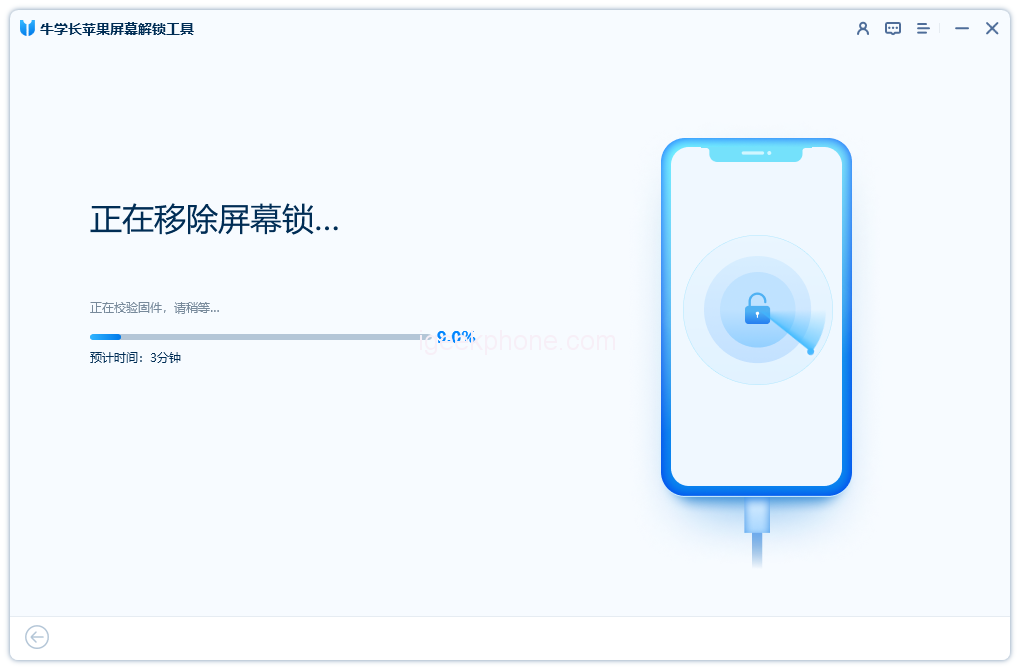
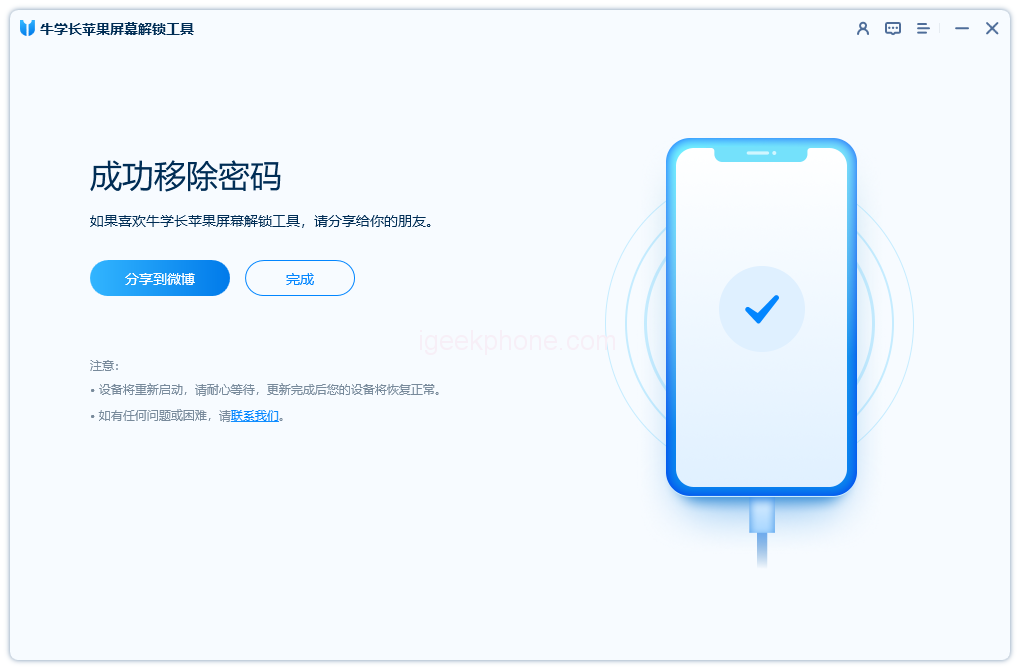
    If your iPhone demands a passcode to enable Face ID and you’ve forgotten it, you can resolve this situation using the Niu Xuechang Apple Screen Unlock tool:

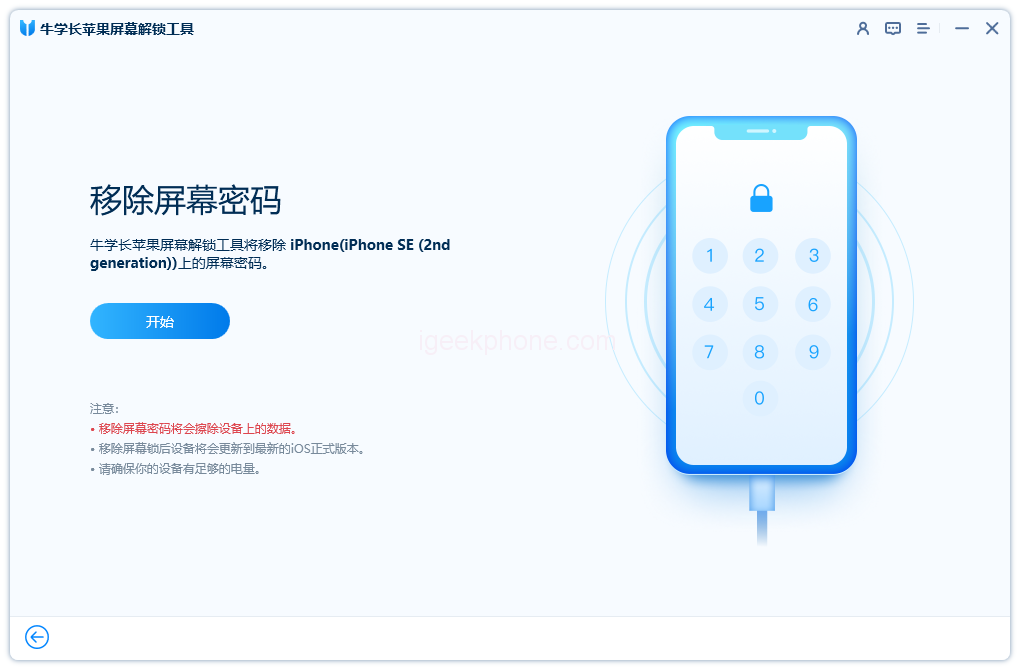
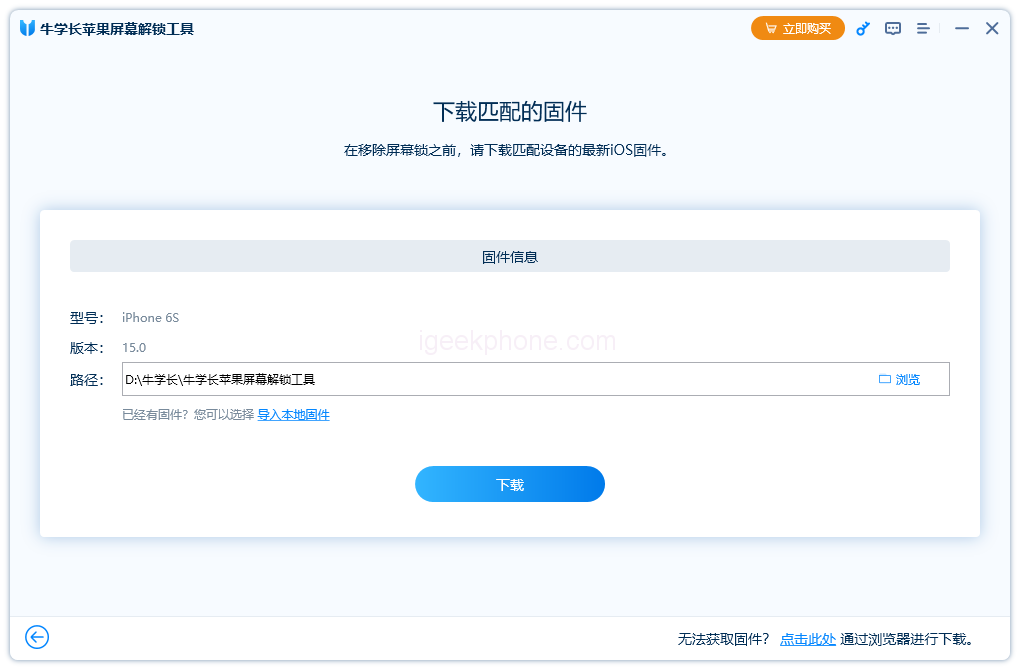
    • Download and launch the 4uKey software on your computer.
    • Connect your iPhone via a cable, and click “Start” on the home screen.
    • Install the Apple Screen Unlock Tool and select “Start” after the software detects your iPhone.
    • Choose the firmware package that matches your iPhone model, download it, and commence the screen unlock process.
    • Wait for the process to finish; don’t disconnect your iPhone during repair.
    • Upon completion, click Finish to regain access to your iPhone.

    In conclusion, this article has addressed the common issue of needing a passcode to enable Face ID. With the methods outlined above, you can effectively resolve this problem within minutes. Additionally, if you’ve forgotten your passcode and need to bypass it, the Niu Xuechang Apple Screen Unlock Tool provides a quick solution with just a few clicks.

    Read Also: Unlock a Disabled iPhone X/iPhone 13 with a Third-Party Tool

    Do not forget to follow us on our Facebook group and page to keep you always aware of the latest advances, News, Updates, reviews, and giveaways on smartphones, tablets, gadgets, and more from the technology world of the future.

    Share. Facebook Twitter Pinterest LinkedIn Tumblr Email

    Related Posts

    Quantum AI App, Useful or Not?

    How to Troubleshoot iPhone Personal Hotspot Issues

    The Battery Capacity of Samsung Galaxy Buds4/Pro Headphones has been Exposed: 42mAh and 57mAh

    Leave A Reply Cancel Reply

    You must be logged in to post a comment.

    voopoo drag s3
    oxva xlim go 2
    sp2s sen x disposable vape
    jnr 100k
    • Popular
    • 3D Printer REVIEW
    • XIAOMI
    November 23, 2025

    VOOPOO DRAG X3 – Big Battery, Smart Tech, Pod-Mod Powerhouse (Review)

    November 23, 2025

    VOOPOO VINCI S: Pocket-Power Pod with a 2,000 mAh Heart — Big Battery, Simple Use (Review)

    November 19, 2025

    OXVA XLIM PRO 3 Pod Vape Quick Hands-on Review (Video Test Included)

    November 19, 2025

    OXVA XLIM 3 Ultra Pod Vape: Hands-on Review (Video Test Included)

    June 23, 2024

    ACMER P2 20W Laser Engraver Fixed Focus Engraving: Hands on Review

    May 30, 2024

    xTool F1 Ultra Review: World’s First 20W Fiber & 20W Diode Laser Engraver

    May 30, 2024

    Anycubic Kobra 3 Combo Review: The Multicolor Masterpiece?

    May 15, 2024

    SCULPFUN SF-A9 40W Laser Engraver Cutting Machine: Hands On Review

    December 2, 2025

    Xiaomi REDMI Turbo5 Pro phone will be launched before the Spring Festival, equipped with the only flagship chip in its class

    December 2, 2025

    Xiaomi has Released REDMI TV X55/65/75 2026: Mini LED starts at only 2,499 yuan

    November 28, 2025

    The Exclusive Camera Handle of Xiaomi 17 Ultra has passed the 3C certification and can be used as a power bank

    November 27, 2025

    Code name “Nezha” : Xiaomi 17 Ultra phone exposed, with a triple rear camera setup

    fc 26 coins
    New Arrivals
    • IPLAY LUMO 8K Puffs 2+10ml Prefilled Pod Kit IPLAY LUMO 8K Puffs 2+10ml Prefilled Pod Kit
    • Uwell Caliburn G5 Lite SE Pod System Kit Uwell Caliburn G5 Lite SE Pod System Kit
    • Uwell Caliburn G5 Lite KOKO Pod System Kit Uwell Caliburn G5 Lite KOKO Pod System Kit
    • Uwell Caliburn G5 Lite Pod System Kit Uwell Caliburn G5 Lite Pod System Kit
    • Freeton Trimax 60k Disposable Vape Freeton Trimax 60k Disposable Vape
    • Smoant Pasito 3 Vape Smoant Pasito 3 Vape
    • Yocan Flat 2.0 series Yocan Flat 2.0 series
    • Snowplus Swift Pod Vape Snowplus Swift Pod Vape
    • Innokin EZ LEVA PCC Pod Kit Innokin EZ LEVA PCC Pod Kit
    About
  • Igeekphone.com provides the first global tech news and reviews about smartphone, vapes, e-cigar, smart home, 3D printers, e-bike,tablets, RC drones, VR headset, and other accessories. It's the best platform to improve your brand and product.
  • Contact us: info@igeekphone.com
  • Check Our Privacy Policy Here.
  • Note: *Right now we have US editor and EU editors for review, especially for Amazon US and EU.
  • *Shop and Compare Price Here*
  • Facebook
  • Youtube
  • OUR BEST VAPE PARTNERS
  • VAPE ONLINE STORE
  • HAYATI PRO MAX PLUS
  • VAPORESSO
  • VOOPOO
  • OXVA
  • NEXA
  • MASKKING
  • LOSTVAPE ORIONBAR
  • VEIIK
  • MEMERS
  • TODOO
  • SP2S
  • JNR
  • OTHER BEST PARTNERS
  • SVBONY
  • Chuwi
  • Blackview
  • Fossibot
  • Unihertz
  • Flsun
  • Anycubic
  • Xtool
  • Oukitel
  • Mukkpet Ebike
  • Ugreen
  • Copyright © 2025 igeekphone

    Type above and press Enter to search. Press Esc to cancel.