






Facebook Twitter Instagram
    Trending
    • Rendering images of Sony Xperia 1 VIII flagship phone have been released: a punch-hole display and a square-shaped camera module on the rear.
    • Motorola Razr 70 small foldable phone leak: 3 colors, 50 million main camera
    • OPPO Enco Clip2 is scheduled for Release on April 21st: It Supports LHDC and is claimed to be ‘the industry’s first Denon-tuned open-air headphones’.
    • How to Install a Memory Module: A Step-by-Step Guide for Upgrading Your Computer (2026)
    • JJRC H141 2-IN-1 RC Drone Review: The Ultimate Amphibious Land-Air Toy for All Ages
    • Starting from 1999 yuan, Honor X80i is officially launched: metal frame, 7000mAh large battery, 6-year durability
    • It is Reported that Vivo Pocket is expected to be released in Q3 and will come with a combination plan for the X500 series.
    • SHRC AE20 GPS 5G RC Quadcopter Review: A High-Tech Drone for Aerial Excellence
    Facebook YouTube
    IGeeKphone China Phone, Tablet PC, VR, RC Drone News, Reviews
    • HOME
      • NEWS
        • DeepSeek
        • ChatGPT
        • Minecraft
    • Amazon
    • PHONE
      • Top Phones For Your First Choice
      • Phone Comparison
      • Xiaomi
      • Blackview
      • Doogee
      • Black Shark
      • Geekbuying
      • Banggood
      • TEMU
      • TikTok
      • Aliexpress
      • Walmart
      • MercadoLibre
      • Lazada
    • TOP VAPE Awards for 2026
    • VAPES
      • E-CIGAR Upcoming
      • Vape News
      • Vape Deals
      • Vape Comparison
      • Vape Guide
      • Giveaway
    • BEST VAPE
      • Best Vape Stores
      • Best Starter Vape Kits
      • Best Vapes for Beginners
      • Best Disposable Vapes
      • Best Pod Systems
      • Best Pod Mod Vapes
      • Best Mods
      • Best Nicotine Pouches
      • Best Clearomizers/Tanks
      • Best E-Liquid
      • Best EGO/Pens
      • Best Vapes for Nic Salt E-Juice
      • Best Vapes to Quit Smoking
      • RDA vs. RDTA vs. RTA
    • Best Vape Brand 2026
      • VAPORESSO
      • VOOPOO
      • OXVA
      • NEXA BAR
      • ORIONBARTECH
      • MASKKING VAPE
      • MEMERS
      • SP2S
      • TODOO
      • MRFOG
      • VEIIK
    • REVIEW
      • E-cigar Review
      • Phones
      • Tablet PC
      • TV Box
      • RC Drone
      • Wearables
      • Camera
      • Accessories
      • VR Headset
    • MORE
      • TABLET
        • Chuwi
        • INNOCN
        • Teclast
        • Top Tablet for Your First Choice
        • Tablet/Laptop Comparison
      • RC DRONE
      • CAMERA
      • WEARABLES
        • OneOdio
        • BlitzWolf
        • Top Smartwatch for First Choice
      • 3D PRINTER
        • 3D Printer Review
        • Anycubic
        • FLSUN
        • Xtool
        • LONGER
        • Top 3D printer to Choose First
      • POWER STATION
        • Oukitel
        • FOSSIBOT
      • GAMING
        • Top Gaming Products
      • E-BIKE
        • Samebike
        • Happyrun
        • ENGWE
      • SMART HOME
      • TV BOX
      • ACCESSORIES
      • VR HEADSET
      • CLOTHES
      • AUTO CAR
    • DEAL
    • VAPE LAWS
    • Shop
    IGeeKphone China Phone, Tablet PC, VR, RC Drone News, Reviews
    You are at:Home»Guide»Unlock a Disabled iPhone X/iPhone 13 with a Third-Party Tool
    Guide

    Unlock a Disabled iPhone X/iPhone 13 with a Third-Party Tool

    HabibBy HabibJuly 29, 2024
    Facebook Twitter Pinterest LinkedIn Tumblr Email

    Encountering the issue of a disabled iPhone, whether it’s an iPhone X or iPhone 13, due to repeated wrong passcode entries can be quite distressing. However, there’s no need for concern any longer. This guide presents effective solutions for Unlocking a Disabled iPhone X/13, ensuring you can swiftly regain access to your device.

    To begin with, here are four proven methods to unlock a disabled iPhone X/13:

    Method 1: Repairing a Disabled iPhone X without iTunes

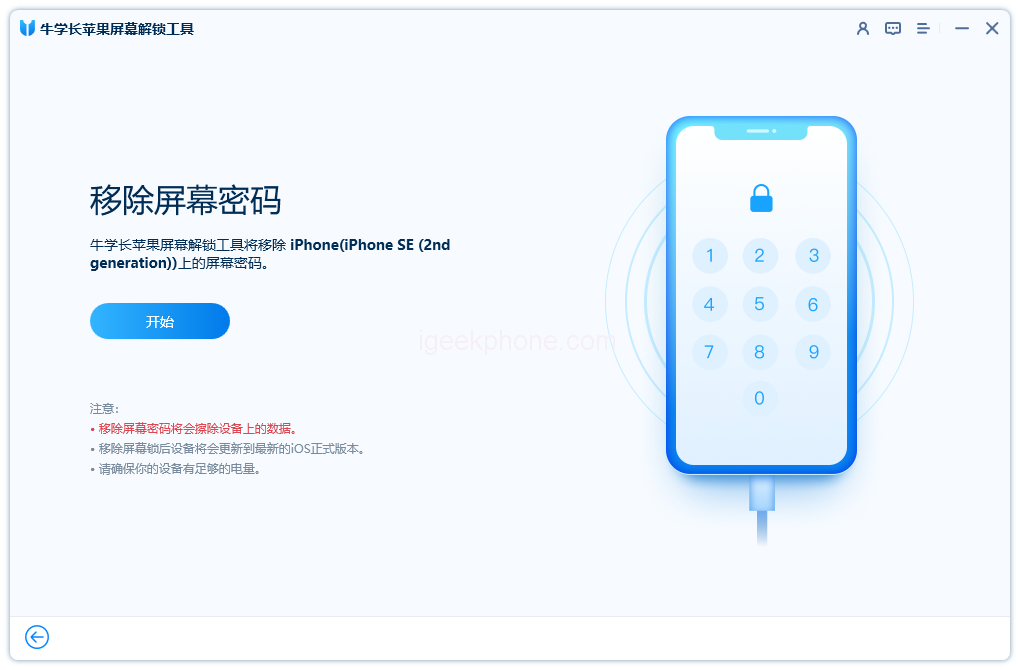
    One of the primary and most vital methods for unlocking your iPhone X involves using the Niu Xuechang Apple Screen Unlock Tool. This comprehensive unlocking tool offers a seamless solution to bypass the disabled state of your iPhone. This tool is incredibly versatile, capable of eliminating 4- or 6-digit passcodes, Touch ID, and Face ID. It’s particularly valuable for individuals with non-functional buttons or displays, effortlessly removing restriction passcodes.
    • It’s important to note that before proceeding with this method, ensure you’ve backed up all data on your iPhone X, as this process results in complete data erasure.
    • Here’s a breakdown of the steps to Disable Repair on iPhone X without iTunes:
    • Download and Install the Niu Xuechang Apple Screen Unlock Tool: Install the tool and launch it. Choose the “Start” option to initiate the process of unlocking the lock screen password.
    • Connect Your Device: Plug your iPhone X into your computer. The software will promptly detect your device. Click “Next.”
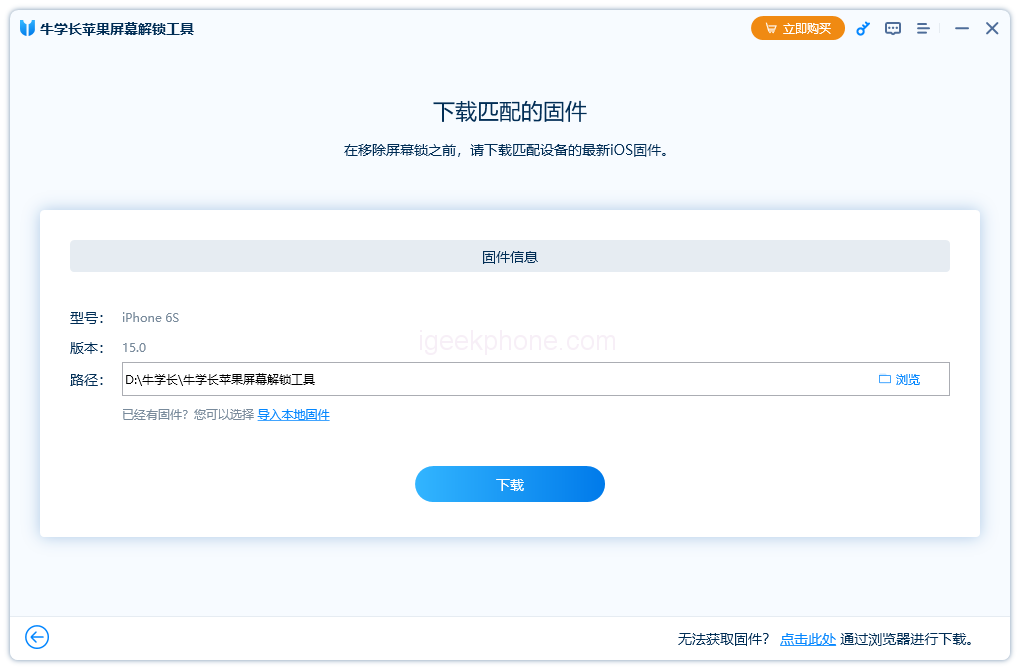
    • Download Firmware Package: Download the latest firmware package to your desired location. After downloading, click “Start Removal.”
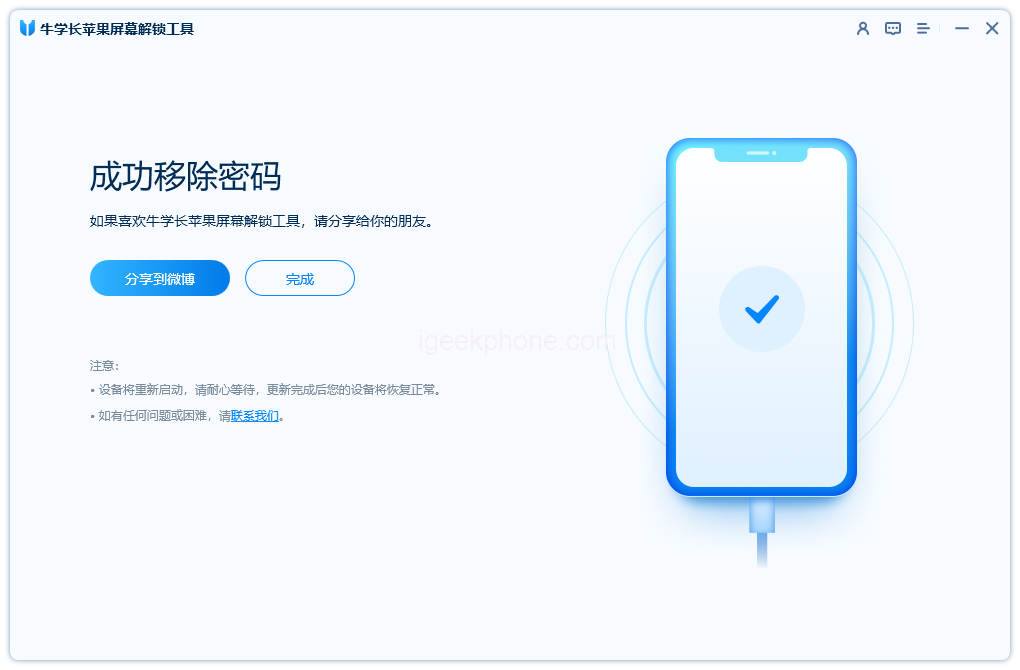
    • Unlocking Process: Allow the Niu Xuechang Apple Screen Unlock Tool to complete the unlocking process. Your iPhone X will reboot within minutes.

    Method 2: Unlock a Disabled iPhone X Using iTunes
    An alternate method involves utilizing iTunes to unlock your disabled iPhone X. This method necessitates having the latest iTunes version installed on your computer and access to a USB cable. You can effortlessly unlock your disabled iPhone by connecting it to iTunes and initiating the restoration process. Additionally, recovery mode can be employed for unlocking if iTunes encounters connectivity issues.

    Here’s how this method plays out:

    • Synced iPhone X: If your iPhone X is synced with iTunes, the process is straightforward. Connect your iPhone X to your synced computer.
    • Synchronization and Backup: Once synchronization and backup are complete, select the “Restore” option when prompted.
    • Restore from iTunes Backup: During the restore process, when you reach the Settings screen, opt to “Restore from iTunes Backup.”
    • In cases where syncing with iTunes isn’t feasible, and connectivity problems arise, follow these steps:
    • Connect iPhone X and Open iTunes: Link your iPhone X to the computer and launch iTunes.
    • Force Restart: Perform a force restart on your iPhone X: Briefly press the volume up button, then the volume down button, and finally, hold the sleep/wake button until the recovery mode screen emerges.
    • iTunes Prompt: iTunes will display a dialog box indicating an issue with your iPhone. Choose the “Restore” option.
    • Agree and Restore: Accept the terms for recovery software download. iTunes will proceed to wipe your device.

    Method 3: Unlocking a Disabled iPhone X Using iCloud

    Another effective approach to unlocking a disabled iPhone X entails utilizing iCloud. This method streamlines the process and only requires your Apple ID and password linked to your iPhone X iCloud account. Keep in mind that this method erases all data, necessitating a backup before restoration. It’s essential that you’ve set up Find My iPhone on your iPhone X for this method to work.

    Here’s how to proceed:

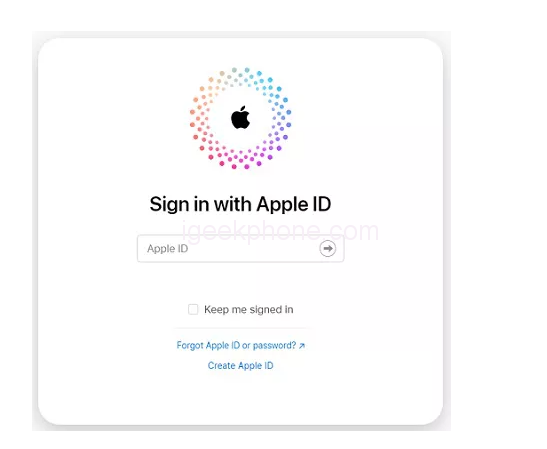
    • Access iCloud: Open your computer’s browser and navigate to www.icloud.com.
    • Sign In: Enter your Apple ID and corresponding password to log in to your iCloud account.
    • Choose Device: Click on “All Devices” and select your iPhone X from the list.
    • Erase iPhone: Opt for “Erase iPhone.”
    • Security Verification: If prompted, answer security questions or enter verification codes sent to another device.
    • Trust: If using a computer, you can click “Trust” to skip verification steps in the future.
    • Unlocking Complete: Your disabled iPhone X is now unlocked through iCloud.
    • Method 4: Unlock a Disabled iPhone X without a PC (iOS 15.2)

    Recent iOS updates, like iOS 15.2, have introduced a groundbreaking method to unlock a locked iPhone without requiring a PC. This process is especially convenient for individuals who have updated their iPhone X to iOS 15.2 and remember their Apple ID password. As long as your device is connected to a Wi-Fi or mobile data network, you can directly unlock your disabled iPhone X.

    Here’s a step-by-step guide:

    Initiate Erasure: When your iPhone X is locked due to multiple incorrect passcode attempts, and it enters secure lock mode, you’ll encounter two options at the screen’s bottom. Select “Erase iPhone.”

    • Confirm Erasure: If you’re comfortable with the deletion of all iPhone data, confirm “Erase iPhone.”
    • Apple ID Verification: Input your Apple ID password to log out of your device.
    • Wipe Completion: Wait for the device to complete the wiping process. Your fresh iPhone X is now ready for use.

    In conclusion, this guide has provided a comprehensive walkthrough of four effective methods to unlock a disabled iPhone X. Depending on your circumstances, you can select the most suitable method for your situation. The Niu Xuechang Apple Screen Unlock Tool stands out as a particularly reliable solution for resolving this issue. Don’t hesitate to try it out and experience the convenience of regaining access to your disabled iPhone X, and feel free to share your success with friends and acquaintances.

    Read Also: iPhone 12 Black Screen: Is It a Software or Hardware Issue?

    Do not forget to follow us on our Facebook group and page to keep you always aware of the latest advances, News, Updates, reviews, and giveaways on smartphones, tablets, gadgets, and more from the technology world of the future.

    Share. Facebook Twitter Pinterest LinkedIn Tumblr Email

    Related Posts

    Rendering images of Sony Xperia 1 VIII flagship phone have been released: a punch-hole display and a square-shaped camera module on the rear.

    Motorola Razr 70 small foldable phone leak: 3 colors, 50 million main camera

    OPPO Enco Clip2 is scheduled for Release on April 21st: It Supports LHDC and is claimed to be ‘the industry’s first Denon-tuned open-air headphones’.

    Leave A Reply Cancel Reply

    You must be logged in to post a comment.

    voopoo drag 6
    oxva xlim 3 ultra
    sp2s sen x disposable vape
    • Popular
    • 3D Printer REVIEW
    • XIAOMI
    March 16, 2026

    OXVA Slimstick VS OXVA Slimstick X Vape Hands-on Review

    March 5, 2026

    OXVA XLIM PRO 3 vs XLIM Pro 2 DNA: Hands-On Review

    March 5, 2026

    OXVA XLIM PRO 3 vs XLIM GO 2: Hands-On Review

    March 2, 2026

    OXVA XLIM PRO 3 vs XLIM 3 ULTRA: Hands-On Review

    December 26, 2025

    ACMER ASCARVA 4S: Precision CNC Power for Makers, DIYers & Small Workshops

    June 23, 2024

    ACMER P2 20W Laser Engraver Fixed Focus Engraving: Hands on Review

    May 30, 2024

    xTool F1 Ultra Review: World’s First 20W Fiber & 20W Diode Laser Engraver

    May 30, 2024

    Anycubic Kobra 3 Combo Review: The Multicolor Masterpiece?

    April 1, 2026

    Xiaomi Smart Camera 4 Max AI Zoom Edition Released: 12x zoom, supports elderly/children/pet monitoring at 799 yuan!

    March 29, 2026

    Xiaomi Watch S5 Review: 316L Stainless Steel, Ultra-Long Battery Life

    March 26, 2026

    The Telephoto Lens of Xiaomi 18 Ultra has Undergone a Comprehensive Upgrade: with an Ultra-Large Sensor, LOFIC Technology

    March 26, 2026

    Xiaomi Redmi Pad 2 Pro 5G Edition is available for purchase: Supports 5G all-network and China Unicom eSIM, 8G + 256G priced at 2599 yuan.

    fc 26 coins
    New Arrivals
    • Vivo V70 Vivo V70
    • Waspe Bar 60K Disposable Vape Waspe Bar 60K Disposable Vape
    • Dojo Purex 60K Disposable Vape Dojo Purex 60K Disposable Vape
    • Geekvape Kloud Refillable Disposable Vape Geekvape Kloud Refillable Disposable Vape
    • Suonon Amber 80K Disposable Vape Kit Suonon Amber 80K Disposable Vape Kit
    • iJOY XP50000 Zero Nicotine Disposable Vape iJOY XP50000 Zero Nicotine Disposable Vape
    • OXBAR ROVOTA DTL 40K Disposable Vape OXBAR ROVOTA DTL 40K Disposable Vape
    • Pachamama 75K Disposable Vape Pachamama 75K Disposable Vape
    • Pillow Talk 50K Patriotic Edition Disposable Vape Pillow Talk 50K Patriotic Edition Disposable Vape
    About
  • Igeekphone.com provides the first global tech news and reviews about smartphone, vapes, e-cigar, smart home, 3D printers, e-bike,tablets, RC drones, VR headset, and other accessories. It's the best platform to improve your brand and product.
  • Contact us: info@igeekphone.com
  • Check Our Privacy Policy Here.
  • Note: *Right now we have US editor and EU editors for review, especially for Amazon US and EU.
  • *Shop and Compare Price Here*
  • Facebook
  • Youtube
  • OUR BEST VAPE PARTNERS
  • VAPE ONLINE STORE
  • HAYATI PRO MAX PLUS
  • VAPORESSO
  • VOOPOO
  • OXVA
  • NEXA
  • MASKKING
  • TODOO
  • SP2S
  • VEIIK
  • OTHER BEST PARTNERS
  • SVBONY
  • Chuwi
  • Blackview
  • Fossibot
  • Unihertz
  • Flsun
  • Anycubic
  • Xtool
  • Oukitel
  • Mukkpet Ebike
  • Ugreen
  • Copyright © 2026 igeekphone

    Type above and press Enter to search. Press Esc to cancel.