







Facebook Twitter Instagram
    Trending
    • Lenovo Googlebook 15: What the 120Hz OLED and Core Ultra 5 325 Mean for Users
    • Xiaomi Watch S5 41mm: 14-Day Battery, 36g Body and HyperOS 4 Features
    • MONSTER M100 Earbuds Review: Earclip Fit, 23-Hour Battery and Bluetooth 5.4
    • How to Turn Off Location Services for Apps on iPhone
    • GOKEEP F5 Review: 52V 20Ah Battery, 1000W Motor and 11-Inch Tires Explained
    • Mouse X2 12.2-Inch Laptop Launches at Just 981g With AMD Ryzen AI 7 350
    • HONOR MagicOS 11 Launches With Liquid Glass Design and 60GB Storage Savings
    • Russia Begins Mandatory Digital Labeling for Reusable Vape Devices
    Facebook YouTube
    IGeeKphone China Phone, Tablet PC, VR, RC Drone News, Reviews
    • HOME
    • BREAKING NEWS
      • AI NEWS
    • Amazon
    • PHONE
      • Top Phones For Your First Choice
      • Phone Comparison
      • Xiaomi
      • Blackview
      • Doogee
      • Black Shark
      • Geekbuying
      • Banggood
      • TEMU
      • TikTok
      • Aliexpress
      • Walmart
      • MercadoLibre
      • Lazada
    • TOP VAPE Awards for 2026
    • VAPES
      • E-CIGAR Upcoming
      • Vape News
      • Vape Deals
      • Vape Comparison
      • Vape Guide
      • VAPE LAWS
      • Giveaway
    • BEST VAPE
      • Best Vape Stores
      • Best Starter Vape Kits
      • Best Vapes for Beginners
      • Best Disposable Vapes
      • Best Pod Systems
      • Best Pod Mod Vapes
      • Best Mods
      • Best Nicotine Pouches
      • Best Clearomizers/Tanks
      • Best E-Liquid
      • Best EGO/Pens
      • Best Vapes for Nic Salt E-Juice
      • Best Vapes to Quit Smoking
      • RDA vs. RDTA vs. RTA
    • Best Vape Brand 2026
      • VAPORESSO
      • VOOPOO
      • OXVA
      • NEXA BAR
      • MASKKING VAPE
      • SP2S
      • IPLAY
      • TODOO
      • MRFOG
      • LOSTVAPE
      • VEIIK
    • REVIEW
      • E-cigar Review
      • Phones
      • Tablet PC
      • TV Box
      • RC Drone
      • Wearables
      • Camera
      • Accessories
      • VR Headset
    • MORE
      • TABLET
        • Chuwi
        • INNOCN
        • Teclast
        • Top Tablet for Your First Choice
        • Tablet/Laptop Comparison
      • RC DRONE
      • CAMERA
      • WEARABLES
        • OneOdio
        • BlitzWolf
        • Top Smartwatch for First Choice
      • 3D PRINTER
        • 3D Printer Review
        • Anycubic
        • FLSUN
        • Xtool
        • LONGER
        • Top 3D printer to Choose First
      • POWER STATION
        • Oukitel
        • FOSSIBOT
      • GAMING
        • Top Gaming Products
      • E-BIKE
        • Samebike
        • Happyrun
        • ENGWE
      • SMART HOME
      • TV BOX
      • ACCESSORIES
      • VR HEADSET
      • CLOTHES
      • AUTO CAR
    • DEAL
    • Shop
    IGeeKphone China Phone, Tablet PC, VR, RC Drone News, Reviews
    You are at:Home»Guide»How to Remove MDM from iPhone without Jailbreaking
    Guide

    How to Remove MDM from iPhone without Jailbreaking

    HabibBy HabibApril 11, 2025
    Facebook Twitter Pinterest LinkedIn Tumblr Email

    Once mobile device management (MDM) software is installed on a device, it inherently restricts the installation and usage of apps, manages data consumption, and more. However, there might be reasons to reverse this configuration. In most cases, achieving this entails jailbreaking your device. But is such a step truly necessary? Let’s delve into how you can eliminate MDM from either a jailbroken or non-jailbroken iPhone or iPad.

    Q: Does jailbreaking effectively remove MDM?

    Yes, absolutely. Jailbreaking is commonly adopted by numerous individuals to gain unrestricted access to their iPhones or iPads. True to its name, jailbreaking emancipates your iDevice from the constraints set by the manufacturer, offering you the freedom to wield your device as you see fit. Consequently, by jailbreaking your iPhone or iPad, you can successfully eradicate the MDM configuration.

    Guidelines for Removing MDM via Jailbreaking an iPhone/iPad
    Should you choose to jailbreak your iPhone or iPad for the purpose of eliminating MDM, you’ll require SSH, the checkra1n software, and a computer.

    With these elements in hand, proceed as follows:

    Start by downloading and installing Checkra1n on your computer.
    Following the installation, the Checkra1n software should appear on your device’s home screen. If it’s not readily visible, a thorough search might be necessary.
    Utilize iProxy to expose ports on your iPhone or iPad, facilitating SSH access.
    Establish an SSH connection.
    Continue the process by executing the command “cd ../../” to navigate to your device’s root directory.
    Next, run the command “cd /private/var/containers/Shared/SystemGroup/” to access the folder housing the MDM files.
    Conclude by executing the command “rm -rf systemgroup.com.apple.configurationprofiles/”. This step effectively removes all MDM profiles from your iPhone or iPad.
    Subsequently, restart your device, which should lead you to the welcome screen. Once the reboot is complete, return to remote management and install the new configuration file, devoid of any restrictions, enabling an MDM-free device experience.

    The Approach’s Limitations and an Alternative Solution

    Certainly, jailbreaking an iPhone or iPad stands out as the most prevalent means of eradicating an MDM profile. However, is this avenue the optimal choice? No, it’s not. The reason is that jailbreaking poses the risk of bricking your device, a software malfunction necessitating expensive hardware replacement for restoration.

    Moreover, jailbreaking renders your iPhone or iPad extremely susceptible to a plethora of malware, viruses, and other malicious content frequently exploited by hackers. Beyond these concerns, jailbreaking also nullifies your device’s official warranty.

    Is there a more viable way to eliminate MDM without resorting to jailbreaking?

    Given the manifold drawbacks of jailbreaking, it falls short of being the most advisable route for MDM removal. Yet, does that imply that you’re compelled to tolerate an MDM profile on your iDevice? Certainly not. An effective alternative exists—utilizing the Niu Xuechang Apple Screen Unlock Tool for hassle-free MDM removal from your iPad or iPhone in just one click.

    Advantages of this approach include:

    • Bypassing the MDM login screen on any iPhone or iPad sans jailbreaking.
    • Unlocking iPhone/iPad/iPod Touch without a passcode.
    • Swift removal of Apple ID.
    • Eliminating screen time passcodes without data loss.
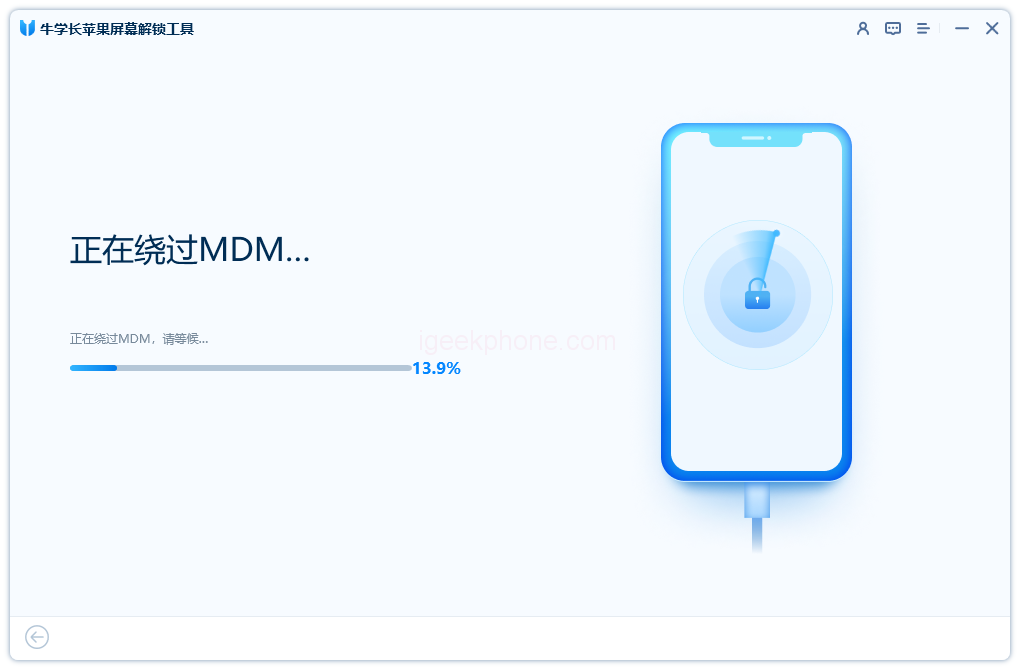
    • Embark on the process by downloading the Niu Xuechang Apple Screen Unlock Tool onto your computer, then install and launch it. Opt for the “Bypass MDM” mode.
    • Install the Apple Screen Unlock Tool.
    • Establish a connection between your iPod touch, iPhone, or iPad and your Mac or Windows computer via a USB cable.
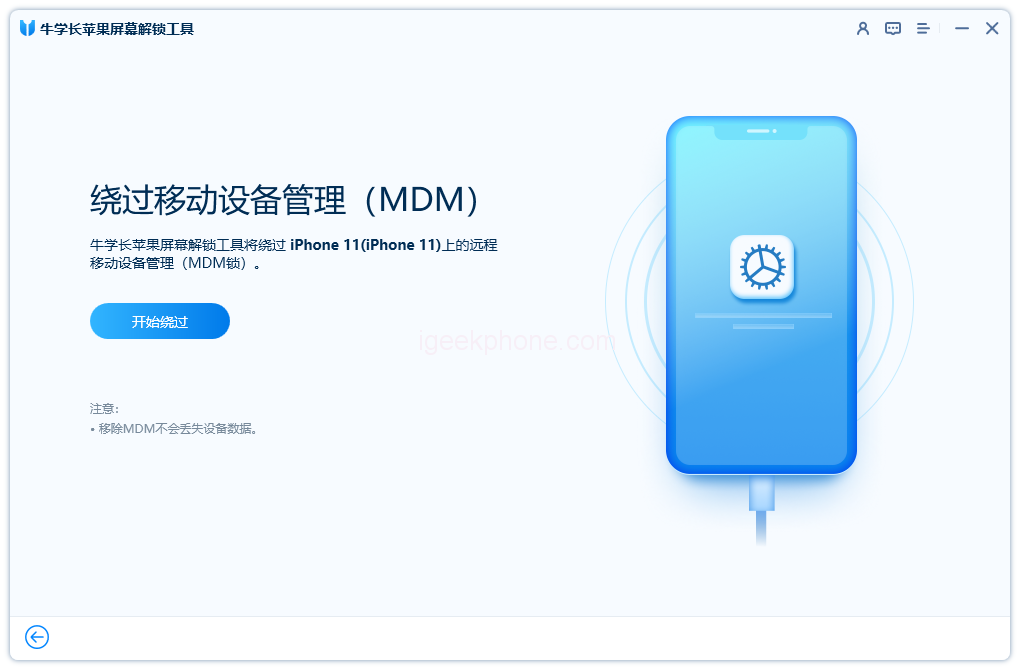
    • Choose “Start Bypass” to proceed with bypassing an iOS device locked on the MDM lock screen.
    • Ensure your iPhone, iPod touch, or iPad is on the MDM lock screen before initiating the MDM bypass.
      For devices running iOS 13.4 or later, automatic preparation for MDM bypass begins.
    • The Niu Xuechang Apple Screen Unlock Tool promptly bypasses the MDM on your device.
    • Your iDevice is now ready for use, unencumbered by MDM restrictions.

    As aforementioned, while employing jailbreak might remove MDM restrictions from your iPhone or iPad, the associated risks make it a questionable long-term solution. Instead, the Niu Xuechang Apple Screen Unlock Tool stands out as a secure and top-tier alternative. Unlike jailbreaking, this dependable tool doesn’t necessitate device manipulation and is suitable for anyone seeking to eliminate MDM profiles on any iOS device.

    Read Also: iPhone 12 Black Screen: Is It a Software or Hardware Issue?

    Do not forget to follow us on our Facebook group and page to keep you always aware of the latest advances, News, Updates, reviews, and giveaways on smartphones, tablets, gadgets, and more from the technology world of the future.

    Share. Facebook Twitter Pinterest LinkedIn Tumblr Email

    Related Posts

    Lenovo Googlebook 15: What the 120Hz OLED and Core Ultra 5 325 Mean for Users

    Xiaomi Watch S5 41mm: 14-Day Battery, 36g Body and HyperOS 4 Features

    How to Turn Off Location Services for Apps on iPhone

    Leave A Reply Cancel Reply

    You must be logged in to post a comment.

    voopoopintch
    oxva nexlim 2
    shopify
    • Popular
    • 3D Printer REVIEW
    • XIAOMI
    July 13, 2026

    OXVA Nexlim 2 Mini Pod Vape Hands on Review

    July 13, 2026

    OXVA Nexlim 2 Pod Vape Hands on Review

    June 21, 2026

    iPlay LUMO 8K Review – A Compact Prefilled Pod Kit with Big Flavor and Everyday Convenience

    June 21, 2026

    iPlay HOOLA 150K Review – A Cloud-Chasing Giant with Music, Modes & Massive Longevity

    December 26, 2025

    ACMER ASCARVA 4S: Precision CNC Power for Makers, DIYers & Small Workshops

    June 23, 2024

    ACMER P2 20W Laser Engraver Fixed Focus Engraving: Hands on Review

    May 30, 2024

    xTool F1 Ultra Review: World’s First 20W Fiber & 20W Diode Laser Engraver

    May 30, 2024

    Anycubic Kobra 3 Combo Review: The Multicolor Masterpiece?

    September 16, 2026

    Xiaomi Watch S5 41mm: 14-Day Battery, 36g Body and HyperOS 4 Features

    September 15, 2026

    Xiaomi 18 Pro Series Launch Confirmed for September With Major Upgrades

    September 14, 2026

    Xiaomi Smart Door Lock 5 Max Starts Pre-Sale at 3,699 Yuan With AI and UWB Unlocking

    September 14, 2026

    Mijia Mop and Vacuum Robot 7 Max Uses AI to Recognize Dirt and Adjust Cleaning Automatically

    fc 26 coins
    New Arrivals
    • iPhone 18 Pro iPhone 18 Pro
    • Apple iPhone 18 Pro Max Apple iPhone 18 Pro Max
    • Apple iPhone Fold Apple iPhone Fold
    • WASPE 10-in-1 Quinton 500K Disposable Vape WASPE 10-in-1 Quinton 500K Disposable Vape
    • Google Pixel 11 Pro Fold Google Pixel 11 Pro Fold
    • Google Pixel 11 Pro XL Google Pixel 11 Pro XL
    • EVO Switch Pro 50K Disposable Vape EVO Switch Pro 50K Disposable Vape
    • Lost Mary MT35000 Turbo Disposable Vape Lost Mary MT35000 Turbo Disposable Vape
    • Lost Vape Centaurus M120 S Vape Mod Kit Lost Vape Centaurus M120 S Vape Mod Kit
    About
  • Igeekphone.com provides the first global tech news and reviews about smartphone, vapes, e-cigar, smart home, 3D printers, e-bike,tablets, RC drones, VR headset, and other accessories. It's the best platform to improve your brand and product.
  • Contact us: info@igeekphone.com
  • Check Our Privacy Policy Here.
  • Note: *Right now we have US editor and EU editors for review, especially for Amazon US and EU.
  • *Shop and Compare Price Here*
  • Facebook
  • Youtube
  • OUR BEST VAPE PARTNERS
  • VAPE ONLINE STORE
  • VAPORESSO
  • VOOPOO
  • OXVA
  • NEXA
  • MASKKING
  • SP2S
  • IPLAY
  • TODOO
  • OTHER BEST PARTNERS
  • SVBONY
  • Chuwi
  • Blackview
  • Fossibot
  • Unihertz
  • Flsun
  • Anycubic
  • Xtool
  • Oukitel
  • Mukkpet Ebike
  • Ugreen
  • Copyright © 2026 igeekphone

    Type above and press Enter to search. Press Esc to cancel.