




Facebook Twitter Instagram
    Trending
    • Srihome SH028 8MP 4K Outdoor Security Camera Review: High-Definition, Smart Security for Your Home
    • ICEBOMB 18K Disposable Vape Review: A Game-Changer in the World of Disposable Vapes
    • WHICH DIET DOES NOT WORK
    • Will JNR Falcon X vs MASKKING Roki X: Which 18K Puff Vape Stands Out?
    • Affordable Servers for Capture the Flag Events
    • How to Evaluate an NFT Project for high growth rate
    • The reason to Choose Biamp Systems for the Best AV Solutions?
    • SJCAM SJ6 Ultra Action Camera Review: Capture Your Adventures in Stunning 4K
    Facebook YouTube
    Login Register
    IGeeKphone China Phone, Tablet PC, VR, RC Drone News, Reviews
    • HOME
      • NEWS
        • DeepSeek
        • ChatGPT
        • Minecraft
    • Amazon
    • PHONE
      • Top Phones For Your First Choice
      • Phone Comparison
      • Xiaomi
      • Blackview
      • Doogee
      • Black Shark
      • Geekbuying
      • Banggood
      • TEMU
      • TikTok
      • Aliexpress
      • Walmart
      • MercadoLibre
      • Lazada
    • TOP VAPE Awards for 2026
    • VAPES
      • E-CIGAR Upcoming
      • Vape News
      • Vape Deals
      • Vape Comparison
      • Vape Guide
      • Giveaway
    • BEST VAPE
      • Best Vape Stores
      • Best Starter Vape Kits
      • Best Vapes for Beginners
      • Best Disposable Vapes
      • Best Pod Systems
      • Best Pod Mod Vapes
      • Best Mods
      • Best Nicotine Pouches
      • Best Clearomizers/Tanks
      • Best E-Liquid
      • Best EGO/Pens
      • Best Vapes for Nic Salt E-Juice
      • Best Vapes to Quit Smoking
      • RDA vs. RDTA vs. RTA
    • Best Vape Brand 2026
      • VAPORESSO
      • VOOPOO
      • OXVA
      • NEXA BAR
      • ORIONBARTECH
      • MASKKING VAPE
      • MEMERS
      • SP2S
      • JNR
      • TODOO
      • MRFOG
      • VEIIK
    • REVIEW
      • E-cigar Review
      • Phones
      • Tablet PC
      • TV Box
      • RC Drone
      • Wearables
      • Camera
      • Accessories
      • VR Headset
    • MORE
      • TABLET
        • Chuwi
        • INNOCN
        • Teclast
        • Top Tablet for Your First Choice
        • Tablet/Laptop Comparison
      • RC DRONE
      • CAMERA
      • WEARABLES
        • OneOdio
        • BlitzWolf
        • Top Smartwatch for First Choice
      • 3D PRINTER
        • 3D Printer Review
        • Anycubic
        • FLSUN
        • Xtool
        • LONGER
        • Top 3D printer to Choose First
      • POWER STATION
        • Oukitel
        • FOSSIBOT
      • GAMING
        • Top Gaming Products
      • E-BIKE
        • Samebike
        • Happyrun
        • ENGWE
      • SMART HOME
      • TV BOX
      • ACCESSORIES
      • VR HEADSET
      • CLOTHES
      • AUTO CAR
    • DEAL
    • VAPE LAWS
    • Shop
    IGeeKphone China Phone, Tablet PC, VR, RC Drone News, Reviews
    You are at:Home»Apple»Wondering how to Unlink Your iPhone from your Apple ID
    Apple

    Wondering how to Unlink Your iPhone from your Apple ID

    HabibBy HabibAugust 9, 2023
    Facebook Twitter Pinterest LinkedIn Tumblr Email

    The iPhone is one of Apple’s most beloved devices, captivating a vast user base. Specific queries and uncertainties have arisen in this user community while navigating this device. A user has recently shared a specific scenario that encapsulates this issue. To provide resolutions for such predicaments, this article outlines a series of solutions designed to assist users in unlinking iPhones from their associated Apple IDs.

    Segment 1: Understanding the Concept of Detaching an iPhone from an Apple ID without a Passcode
    Segment 2: Managing Forgotten Apple ID Passwords and Dissociating Apple IDs from iPhones
    Segment 3: Common Approaches to Separating an iPhone from an Apple ID Using a Passcode

    Segment 1: Exploring the Concept of Unlinking an iPhone from an Apple ID without a Passcode

    An Apple ID is established on your iOS device upon its initial setup. This unique identifier grants access to the App Store, Apple services, and other features. Since each iPhone is linked to a distinct Apple ID, unlinking your iPhone can be approached in one of two scenarios: when you recall your Apple ID and when you have forgotten it. The following sections delve into the methods for disentangling iPhones and iPads in both circumstances.

    Segment 2: Addressing Forgotten Apple ID Passwords and Detaching Apple IDs from iPhones
    Should you encounter the predicament of an overlooked Apple ID and password, a viable solution presents itself in the form of Niu Xuechang’s Apple screen unlock tool. Esteemed for its effectiveness, this tool proves invaluable in unlocking iPhones and iPads lacking the passcode—the ensuing steps detail how to employ this tool for device unlocking and subsequent iPhone unlinking. Safeguarding your files through backup before initiating this procedure is imperative. Given Apple’s two-factor authentication, the tool extends support solely to iPhones operating on iOS up to 11.4.

    Begin by installing the program on your system and selecting “Unlock Apple ID” from the main interface. 
    Install Niu Xuechang Toolspicture. Unlock Apple ID
    Establish a connection between your iPhone and the system using a USB cable.

    Click to initiate the ID unlocking process picture. connect device

    Note 1: When “Find My iPhone” is disabled
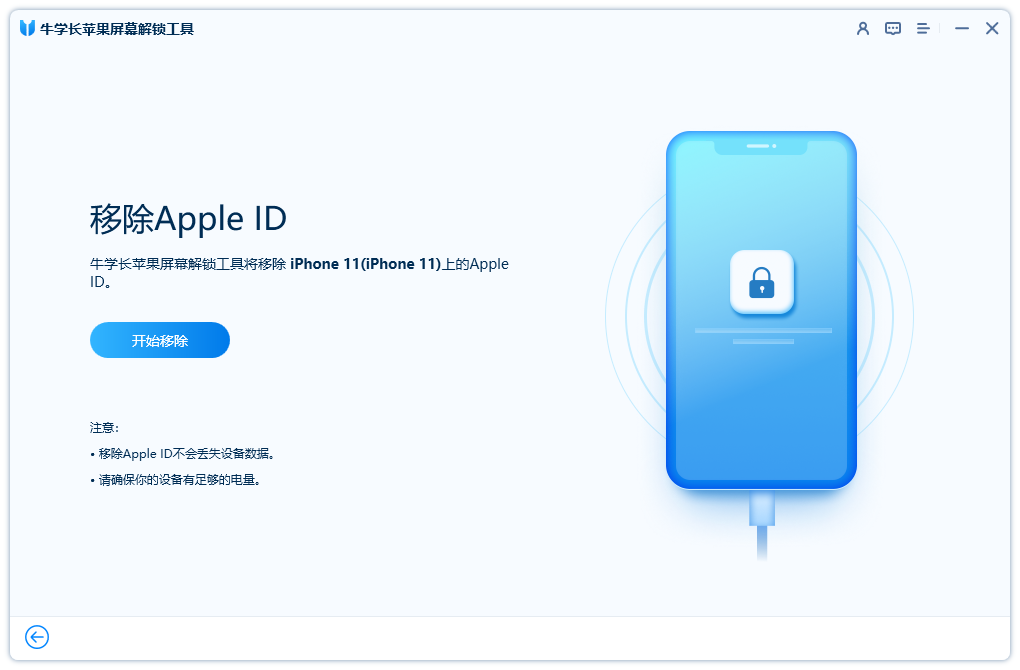
    Initiate the unlocking process by clicking “Start.”

    Click to commence unlocking the picture. start unlocking

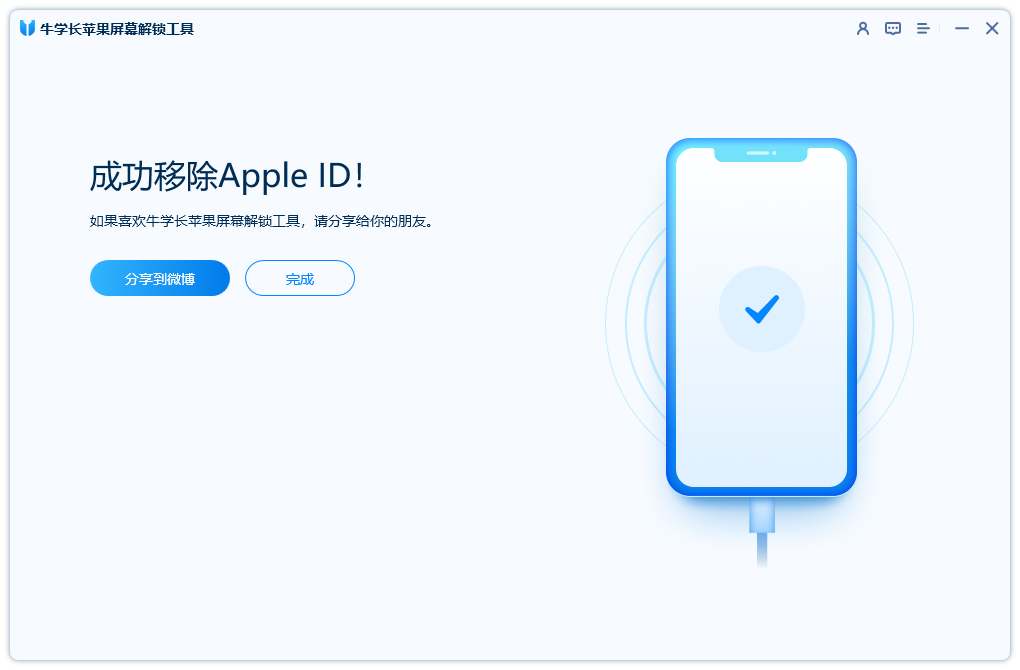
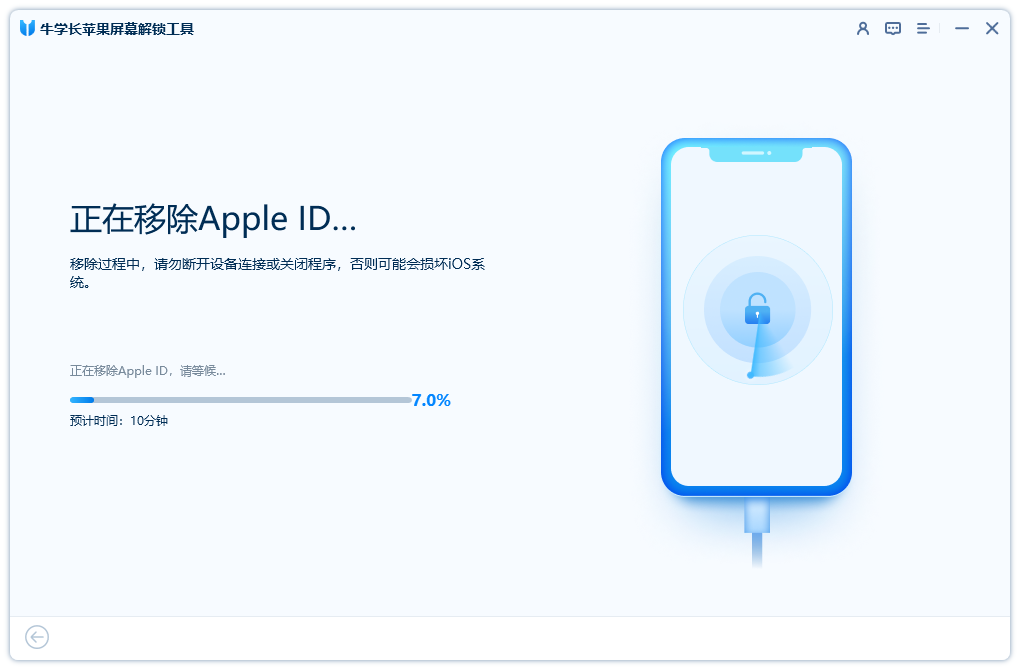
    Await the program’s completion of Apple ID removal; within moments, the process culminates, revealing the subsequent interface.

    Apple ID was successfully removed pictures. Delete Apple ID

    It is imperative not to employ the original Apple ID for logging into this device.
    For devices with iOS versions below 10.2, data loss is imminent post-successful Apple ID removal.
    Non-activated devices operating on iOS 11.4 are not supported.

    This tool extends its capabilities to unlocking iCloud-locked iPhones.

    Segment 3: Conventional Approaches to Unlinking an iPhone from an Apple ID via a Passcode
    If your Apple ID and password are retrievable, or if you’ve already bypassed the iPhone’s security using the methods above, the ensuing guidelines elucidate how to dissociate your iPhone from its associated Apple ID.

    Approach 1: Detaching Your iPhone from the Remove Apple ID by Removing the Device
    Contemplating the method to unlink an iPhone, the solution is found in deleting the linked iPhone from settings. The ensuing steps guide you through the process:

    Within Settings, access the uppermost section by tapping on your name.
    The next screen unveils your Apple ID particulars.
    Scroll to the bottom, where the devices associated with your Apple ID are listed. Choose the devices you wish to detach.
    Opt for one of the devices and proceed to “Remove from Account,” at the bottom.

    Visualize the process of device removal from the account within Settings
    The first avenue to sever the connection between your iPhone and Apple ID is elucidated.

    Approach 2: Disassociating the iPhone Using the Same Apple ID through iTunes

    An analogous disconnection can be achieved through iTunes, accessible via either a Mac system or a Windows PC. Follow these steps to detach your iPhone from your Apple ID via iTunes:

    Launch iTunes on your Mac or Windows system.
    Access your account by selecting “Account” and then “View My Account.”
    If prompted, sign in using your Remove Apple ID and corresponding password.
    Within the Cloud segment, navigate to iTunes and select “Manage Devices.”
    Opt to “Remove” to sever the link with any device you choose.
    Should this avenue yield no success, proceed to the subsequent step.

    Approach 3: Unlinking an iPhone from an Apple ID via Find My iPhone

    An additional path to unlinking involves utilizing the Find My iPhone feature. These steps outline how to perform this action:

    Select “All Devices” and designate the device earmarked for unlinking.
    Initiate the unlinking process by selecting the “Remove from Account” option.

    Option for device unlinkingpicture. Delete iPhone from iCloud.com
    This method provides a streamlined route to sever the connection between your Apple iPhone and its associated Apple ID.

    In Conclusion

    This article has been meticulously crafted to assist Apple iPhone users in the seamless process of unlinking iPhones. When recalling your Apple ID and password, detaching an iPhone from its associated Remove Apple ID is relatively straightforward. In contrast, encountering forgotten Apple ID details necessitates seeking avenues for device unlocking. The recommended approach is utilizing Xuechang Niu’s Apple screen unlock tool.

    Read Also: How to Fix iOS System Failure: A Step-by-Step Guide

    Do not forget to follow us on our Facebook group and page to keep you always aware of the latest advances, News, Updates, review, and giveaway on smartphones, tablets, gadgets, and more from the technology world of the future.

    Share. Facebook Twitter Pinterest LinkedIn Tumblr Email

    Related Posts

    Do Cigarette Filters Reduce the Risk of Lung Cancer?

    Blackview ROCK 2 Pro AI 5G Smartphone Review: The Ultimate Rugged Phone for Outdoor Adventures

    Countdown Begins: FOSSiBOT F116 Pro Smartphone Launching on Kickstarter March 17

    Leave A Reply Cancel Reply

    You must be logged in to post a comment.

    voopoo drag 6
    oxva xlim 3 ultra
    sp2s sen x disposable vape
    jnr 100k
    • Popular
    • 3D Printer REVIEW
    • XIAOMI
    March 5, 2026

    OXVA XLIM PRO 3 vs XLIM Pro 2 DNA: Hands-On Review

    March 5, 2026

    OXVA XLIM PRO 3 vs XLIM GO 2: Hands-On Review

    March 2, 2026

    OXVA XLIM PRO 3 vs XLIM 3 ULTRA: Hands-On Review

    February 23, 2026

    Voopoo DRAG S3 vs DRAG X3 Review – Which One Fits Your Vaping Lifestyle?

    December 26, 2025

    ACMER ASCARVA 4S: Precision CNC Power for Makers, DIYers & Small Workshops

    June 23, 2024

    ACMER P2 20W Laser Engraver Fixed Focus Engraving: Hands on Review

    May 30, 2024

    xTool F1 Ultra Review: World’s First 20W Fiber & 20W Diode Laser Engraver

    May 30, 2024

    Anycubic Kobra 3 Combo Review: The Multicolor Masterpiece?

    March 13, 2026

    Xiaomi Watch S5 has been officially announced to be released this month! It features a new integrated bezel design and offers an impressive 21-day battery life

    March 13, 2026

    Xiaomi Notebook Pro 14 is equipped with a 72Wh large battery: it comes with a standard 100W nitrogen-gallium adapter

    March 12, 2026

    The three color options for Xiaomi Notebook Pro 14 have been announced: white, elegant gray, and soft mist blue.

    March 10, 2026

    Xiaomi 18 Pro Max leaks out: First to Feature Snapdragon 8E6 Pro with a 6.9-inch Large Screen

    fc 26 coins
    New Arrivals
    • ICEBOMB 18K Disposable Vape ICEBOMB 18K Disposable Vape
    • Juice Head iFlex Nixodine 50K Disposable Vape Juice Head iFlex Nixodine 50K Disposable Vape
    • MASKKING CAMO Disposable Vape MASKKING CAMO Disposable Vape
    • Pod Salt Air 40K Disposable Vape Pod Salt Air 40K Disposable Vape
    • OXVA Xlim Go Lite Pod System Kit OXVA Xlim Go Lite Pod System Kit
    • OXVA ARTIO 2 Vape OXVA ARTIO 2 Vape
    • Wala Yo 50000 Disposable Vape Wala Yo 50000 Disposable Vape
    • BD Vape Mod Rayden 220 Box Mod BD Vape Mod Rayden 220 Box Mod
    • Airmez Lux 60K Disposable Vape Airmez Lux 60K Disposable Vape
    About
  • Igeekphone.com provides the first global tech news and reviews about smartphone, vapes, e-cigar, smart home, 3D printers, e-bike,tablets, RC drones, VR headset, and other accessories. It's the best platform to improve your brand and product.
  • Contact us: info@igeekphone.com
  • Check Our Privacy Policy Here.
  • Note: *Right now we have US editor and EU editors for review, especially for Amazon US and EU.
  • *Shop and Compare Price Here*
  • Facebook
  • Youtube
  • OUR BEST VAPE PARTNERS
  • VAPE ONLINE STORE
  • HAYATI PRO MAX PLUS
  • VAPORESSO
  • VOOPOO
  • OXVA
  • NEXA
  • MASKKING
  • LOSTVAPE ORIONBAR
  • MEMERS
  • TODOO
  • SP2S
  • JNR
  • VEIIK
  • OTHER BEST PARTNERS
  • SVBONY
  • Chuwi
  • Blackview
  • Fossibot
  • Unihertz
  • Flsun
  • Anycubic
  • Xtool
  • Oukitel
  • Mukkpet Ebike
  • Ugreen
  • Copyright © 2026 igeekphone

    Type above and press Enter to search. Press Esc to cancel.