





Facebook Twitter Instagram
    Trending
    • EDIFIER X Clip AI Translation Earbuds Review: The Future of Multilingual Communication
    • VB801 Wireless Baby Monitor Review: The Ultimate Solution for Monitoring Your Baby’s Safety and Comfort
    • TRASPED HG4-210 RTR 1/16 2.4G 4WD RC Car Review: Ultimate Off-Road Adventure
    • OXBAR ROVOTA DTL 40K Disposable Vape Review-Long-Lasting Power Meets Deep DTL Flavor
    • MINILOONG Pocket 1 Review: The Ultimate Modular Retro Gaming Console
    • Pachamama 75K Disposable Vape Review: Long‑Lasting Performance Meets Premium Flavor
    • VOOPOO ARGUS G3 Mini vs ARGUS Matrix: Which Pod Vape Is Right for You?
    • Z67 Gulfstream G700 RC Airplane Review: The Ultimate Fixed-Wing Glider Experience
    Facebook YouTube
    IGeeKphone China Phone, Tablet PC, VR, RC Drone News, Reviews
    • HOME
      • NEWS
        • DeepSeek
        • ChatGPT
        • Minecraft
    • Amazon
    • PHONE
      • Top Phones For Your First Choice
      • Phone Comparison
      • Xiaomi
      • Blackview
      • Doogee
      • Black Shark
      • Geekbuying
      • Banggood
      • TEMU
      • TikTok
      • Aliexpress
      • Walmart
      • MercadoLibre
      • Lazada
    • TOP VAPE Awards for 2026
    • VAPES
      • E-CIGAR Upcoming
      • Vape News
      • Vape Deals
      • Vape Comparison
      • Vape Guide
      • Giveaway
    • BEST VAPE
      • Best Vape Stores
      • Best Starter Vape Kits
      • Best Vapes for Beginners
      • Best Disposable Vapes
      • Best Pod Systems
      • Best Pod Mod Vapes
      • Best Mods
      • Best Nicotine Pouches
      • Best Clearomizers/Tanks
      • Best E-Liquid
      • Best EGO/Pens
      • Best Vapes for Nic Salt E-Juice
      • Best Vapes to Quit Smoking
      • RDA vs. RDTA vs. RTA
    • Best Vape Brand 2026
      • VAPORESSO
      • VOOPOO
      • OXVA
      • NEXA BAR
      • ORIONBARTECH
      • MASKKING VAPE
      • MEMERS
      • SP2S
      • TODOO
      • MRFOG
      • VEIIK
    • REVIEW
      • E-cigar Review
      • Phones
      • Tablet PC
      • TV Box
      • RC Drone
      • Wearables
      • Camera
      • Accessories
      • VR Headset
    • MORE
      • TABLET
        • Chuwi
        • INNOCN
        • Teclast
        • Top Tablet for Your First Choice
        • Tablet/Laptop Comparison
      • RC DRONE
      • CAMERA
      • WEARABLES
        • OneOdio
        • BlitzWolf
        • Top Smartwatch for First Choice
      • 3D PRINTER
        • 3D Printer Review
        • Anycubic
        • FLSUN
        • Xtool
        • LONGER
        • Top 3D printer to Choose First
      • POWER STATION
        • Oukitel
        • FOSSIBOT
      • GAMING
        • Top Gaming Products
      • E-BIKE
        • Samebike
        • Happyrun
        • ENGWE
      • SMART HOME
      • TV BOX
      • ACCESSORIES
      • VR HEADSET
      • CLOTHES
      • AUTO CAR
    • DEAL
    • VAPE LAWS
    • Shop
    IGeeKphone China Phone, Tablet PC, VR, RC Drone News, Reviews
    You are at:Home»Guide»How to Solve the Issue of Huawei mobile phone Stuck?
    Guide

    How to Solve the Issue of Huawei mobile phone Stuck?

    Brady CottonBy Brady CottonJune 4, 2024
    Facebook Twitter Pinterest LinkedIn Tumblr Email

    With the popularity of smart phones, almost everyone of us can not live without this small palm treasure. But have you found that the new mobile phone bought home, after using it for a period of time, it began to become congested, and even serious fever? Don’t worry, today the tech bear will give you some tips to let your Huawei mobile phone return to the peak state of smooth power saving!

    Step 1: Optimize the animation scaling to make the phone smooth as flying

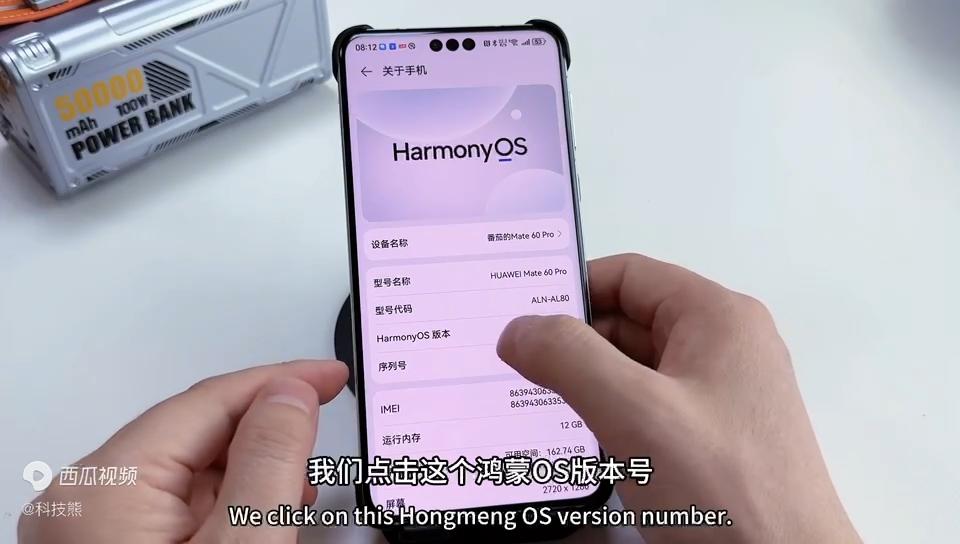
    Open the “Settings” option on your phone and tap “About your Phone.” Here, there is a hidden “developer option” that can be easily unlocked by clicking “Hongmeng OS Version number” 6 times in a row. Next, go to “System and Updates” and open “Developer Options.”
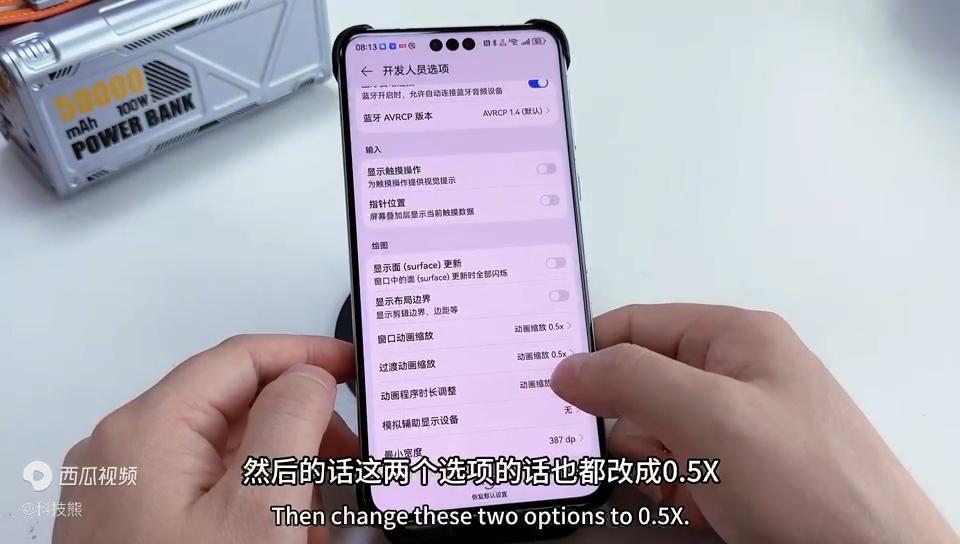
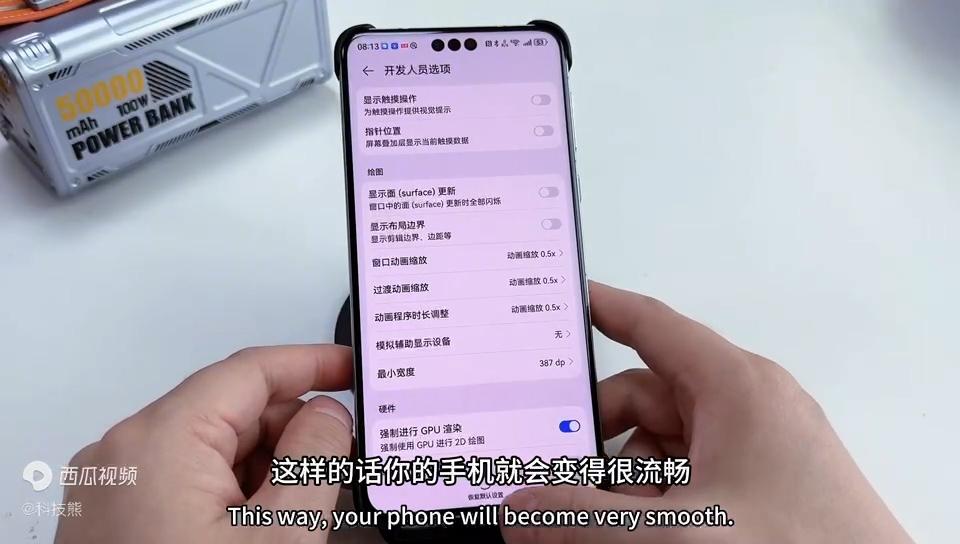
    Here, we focus on the “animation zoom” setting. The default “Window animation scaling” is 1X, we changed it to 0.5X, and the other two animation scaling options are also adjusted to 0.5X. After setting this up, you will find that the interface of the phone becomes faster and smoother.
    Also, don’t forget to turn on the “Force GPU rendering” option. This setting allows the GPU to render the phone interface, reducing the burden on the CPU and further improving the smoothness of the phone.
    Step 2: Turn off the advertising push and say goodbye to annoying interruptions
    AD feeds are not only annoying, they also eat up your phone’s memory and traffic. Search for “Ads” in “Settings” to find the options for “Huawei Ads” and “Personalized Ads.” First, turn off “Intelligent Recommendation Service” in “Huawei Ads”, then go back to the previous level, click on “Personalized ads” to turn off all advertising options.
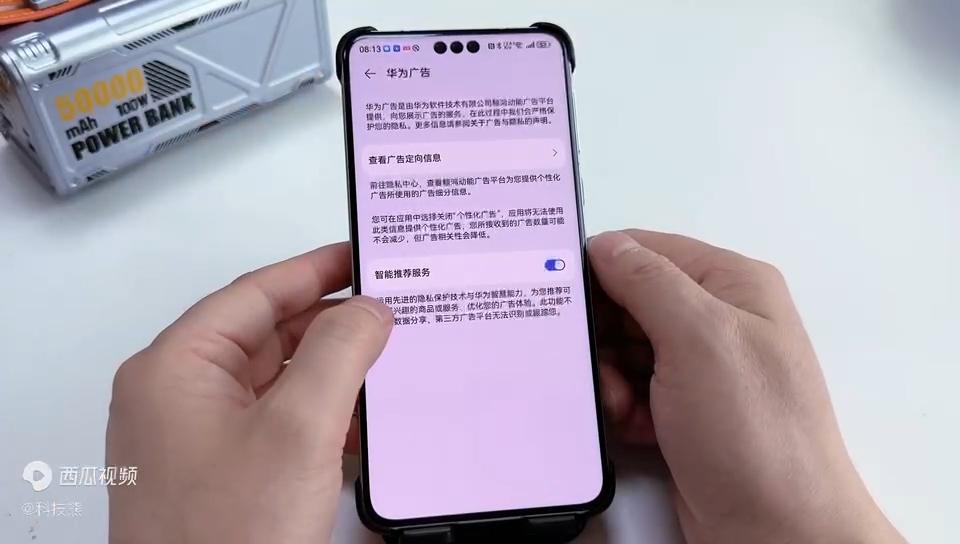
    In this way, your phone says goodbye to the annoying advertising push and is more refreshing to use.

    Step 3: Manage application startup to save memory resources
    Open the “mobile Butler” app on your phone and click “App Startup Management”. Here, you’ll find that many apps are turned on automatically by default. These apps start automatically when the phone is turned on or unlocked, taking up memory and CPU resources.
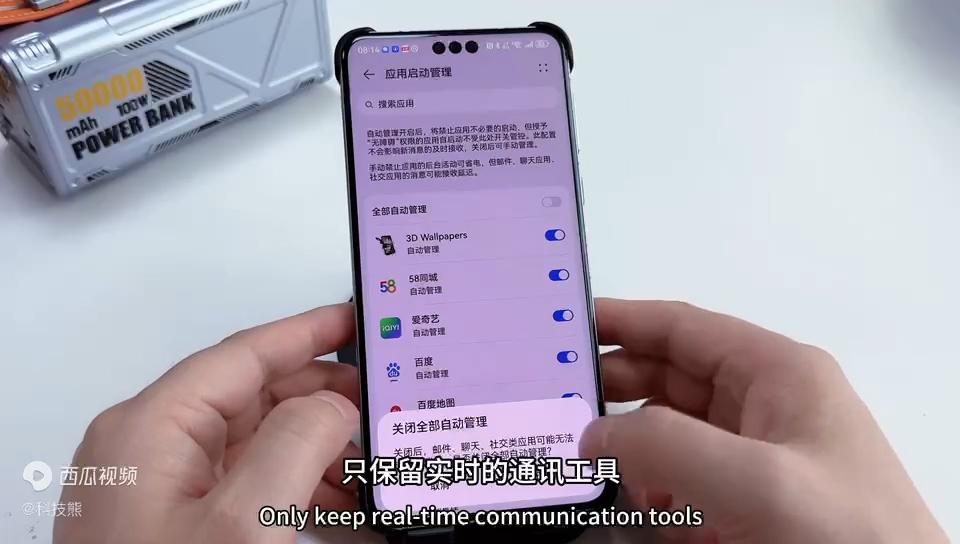
    In order to save resources, we can selectively turn off automatic startup for some applications. Keep only those applications that require real-time notification, such as messaging tools, social software, etc. Other applications can be set to start manually or disable.

    Bonus tip: Turn on smart charging mode to protect battery health

    Find the “Battery” option in “Settings” and click on “Battery Health.” Here, turn on “Smart Charging Mode”. This mode can intelligently adjust the charging strategy of the mobile phone to reduce battery loss and aging. At the same time, it can also reduce the heat of the phone while charging, extending the battery life.

    Conclusion
    After the above three steps, your Huawei mobile phone will be able to take on a new look and return to the peak state of smooth power saving. Whether it is a new phone or an old phone, as long as you follow these steps to set up and optimize, you can make your phone better. Come and try it!

    Share. Facebook Twitter Pinterest LinkedIn Tumblr Email

    Related Posts

    Blackview OSCAL PILOT 6 Review: A Rugged Smartphone with Cutting-Edge Features

    The evolution of AI in video games

    The Data Operations Advantage: Gaining an Edge in the Digital Landscape

    Leave A Reply Cancel Reply

    You must be logged in to post a comment.

    voopoo drag 6
    oxva xlim 3 ultra
    sp2s sen x disposable vape
    • Popular
    • 3D Printer REVIEW
    • XIAOMI
    March 16, 2026

    OXVA Slimstick VS OXVA Slimstick X Vape Hands-on Review

    March 5, 2026

    OXVA XLIM PRO 3 vs XLIM Pro 2 DNA: Hands-On Review

    March 5, 2026

    OXVA XLIM PRO 3 vs XLIM GO 2: Hands-On Review

    March 2, 2026

    OXVA XLIM PRO 3 vs XLIM 3 ULTRA: Hands-On Review

    December 26, 2025

    ACMER ASCARVA 4S: Precision CNC Power for Makers, DIYers & Small Workshops

    June 23, 2024

    ACMER P2 20W Laser Engraver Fixed Focus Engraving: Hands on Review

    May 30, 2024

    xTool F1 Ultra Review: World’s First 20W Fiber & 20W Diode Laser Engraver

    May 30, 2024

    Anycubic Kobra 3 Combo Review: The Multicolor Masterpiece?

    April 4, 2026

    Xiaomi Watch S5 Review: 316L Stainless Steel, Ultra-Long Battery Life

    April 1, 2026

    Xiaomi Smart Camera 4 Max AI Zoom Edition Released: 12x zoom, supports elderly/children/pet monitoring at 799 yuan!

    March 26, 2026

    The Telephoto Lens of Xiaomi 18 Ultra has Undergone a Comprehensive Upgrade: with an Ultra-Large Sensor, LOFIC Technology

    March 26, 2026

    Xiaomi Redmi Pad 2 Pro 5G Edition is available for purchase: Supports 5G all-network and China Unicom eSIM, 8G + 256G priced at 2599 yuan.

    fc 26 coins
    New Arrivals
    • Dotmod dotBox V2 Vape Mod Kit Dotmod dotBox V2 Vape Mod Kit
    • Valaya Amp 60K By Uwell Disposable Vape Valaya Amp 60K By Uwell Disposable Vape
    • Vivo V70 Vivo V70
    • Waspe Bar 60K Disposable Vape Waspe Bar 60K Disposable Vape
    • Dojo Purex 60K Disposable Vape Dojo Purex 60K Disposable Vape
    • Geekvape Kloud Refillable Disposable Vape Geekvape Kloud Refillable Disposable Vape
    • Suonon Amber 80K Disposable Vape Kit Suonon Amber 80K Disposable Vape Kit
    • iJOY XP50000 Zero Nicotine Disposable Vape iJOY XP50000 Zero Nicotine Disposable Vape
    • OXBAR ROVOTA DTL 40K Disposable Vape OXBAR ROVOTA DTL 40K Disposable Vape
    About
  • Igeekphone.com provides the first global tech news and reviews about smartphone, vapes, e-cigar, smart home, 3D printers, e-bike,tablets, RC drones, VR headset, and other accessories. It's the best platform to improve your brand and product.
  • Contact us: info@igeekphone.com
  • Check Our Privacy Policy Here.
  • Note: *Right now we have US editor and EU editors for review, especially for Amazon US and EU.
  • *Shop and Compare Price Here*
  • Facebook
  • Youtube
  • OUR BEST VAPE PARTNERS
  • VAPE ONLINE STORE
  • HAYATI PRO MAX PLUS
  • VAPORESSO
  • VOOPOO
  • OXVA
  • NEXA
  • MASKKING
  • TODOO
  • SP2S
  • VEIIK
  • OTHER BEST PARTNERS
  • SVBONY
  • Chuwi
  • Blackview
  • Fossibot
  • Unihertz
  • Flsun
  • Anycubic
  • Xtool
  • Oukitel
  • Mukkpet Ebike
  • Ugreen
  • Copyright © 2026 igeekphone

    Type above and press Enter to search. Press Esc to cancel.