




Facebook Twitter Instagram
    Trending
    • Srihome SH028 8MP 4K Outdoor Security Camera Review: High-Definition, Smart Security for Your Home
    • ICEBOMB 18K Disposable Vape Review: A Game-Changer in the World of Disposable Vapes
    • WHICH DIET DOES NOT WORK
    • Will JNR Falcon X vs MASKKING Roki X: Which 18K Puff Vape Stands Out?
    • Affordable Servers for Capture the Flag Events
    • How to Evaluate an NFT Project for high growth rate
    • The reason to Choose Biamp Systems for the Best AV Solutions?
    • SJCAM SJ6 Ultra Action Camera Review: Capture Your Adventures in Stunning 4K
    Facebook YouTube
    Login Register
    IGeeKphone China Phone, Tablet PC, VR, RC Drone News, Reviews
    • HOME
      • NEWS
        • DeepSeek
        • ChatGPT
        • Minecraft
    • Amazon
    • PHONE
      • Top Phones For Your First Choice
      • Phone Comparison
      • Xiaomi
      • Blackview
      • Doogee
      • Black Shark
      • Geekbuying
      • Banggood
      • TEMU
      • TikTok
      • Aliexpress
      • Walmart
      • MercadoLibre
      • Lazada
    • TOP VAPE Awards for 2026
    • VAPES
      • E-CIGAR Upcoming
      • Vape News
      • Vape Deals
      • Vape Comparison
      • Vape Guide
      • Giveaway
    • BEST VAPE
      • Best Vape Stores
      • Best Starter Vape Kits
      • Best Vapes for Beginners
      • Best Disposable Vapes
      • Best Pod Systems
      • Best Pod Mod Vapes
      • Best Mods
      • Best Nicotine Pouches
      • Best Clearomizers/Tanks
      • Best E-Liquid
      • Best EGO/Pens
      • Best Vapes for Nic Salt E-Juice
      • Best Vapes to Quit Smoking
      • RDA vs. RDTA vs. RTA
    • Best Vape Brand 2026
      • VAPORESSO
      • VOOPOO
      • OXVA
      • NEXA BAR
      • ORIONBARTECH
      • MASKKING VAPE
      • MEMERS
      • SP2S
      • JNR
      • TODOO
      • MRFOG
      • VEIIK
    • REVIEW
      • E-cigar Review
      • Phones
      • Tablet PC
      • TV Box
      • RC Drone
      • Wearables
      • Camera
      • Accessories
      • VR Headset
    • MORE
      • TABLET
        • Chuwi
        • INNOCN
        • Teclast
        • Top Tablet for Your First Choice
        • Tablet/Laptop Comparison
      • RC DRONE
      • CAMERA
      • WEARABLES
        • OneOdio
        • BlitzWolf
        • Top Smartwatch for First Choice
      • 3D PRINTER
        • 3D Printer Review
        • Anycubic
        • FLSUN
        • Xtool
        • LONGER
        • Top 3D printer to Choose First
      • POWER STATION
        • Oukitel
        • FOSSIBOT
      • GAMING
        • Top Gaming Products
      • E-BIKE
        • Samebike
        • Happyrun
        • ENGWE
      • SMART HOME
      • TV BOX
      • ACCESSORIES
      • VR HEADSET
      • CLOTHES
      • AUTO CAR
    • DEAL
    • VAPE LAWS
    • Shop
    IGeeKphone China Phone, Tablet PC, VR, RC Drone News, Reviews
    You are at:Home»NEWS»How to Track Your Family Members’ Location on Android
    NEWS

    How to Track Your Family Members’ Location on Android

    Brady CottonBy Brady CottonDecember 6, 2022
    Facebook Twitter Pinterest LinkedIn Tumblr Email

    Introduction

    As a parent, one of your biggest concerns is probably keeping track of your kids. After all, it can be incredibly difficult to keep an eye on them at all times.

    Luckily, there are a number of ways that you can use technology to track their location. If you have an Android device, there are a few different methods that you can use.

    Part 1: 3 Reasons To Track Your Family Members’ Location

    Kids are notoriously bad at staying put. It can be difficult to keep track of them. Fortunately, there are now several apps and devices that allow you to track your family members’ location. Here are three reasons why you should consider doing so:

    1. Kids are more likely to get lost when they’re out in unfamiliar territory. By tracking their location, you can quickly and easily find them if they wander off.
    2. In the event of an emergency, knowing your family members’ whereabouts can be critical. If there’s a fire or another type of disaster, being able to locate everyone can help ensure that everyone makes it out safely.
    3. Tracking your family members’ location can also be helpful when it comes to planning activities and outings. If you know where everyone is, you can better coordinate meet-ups and avoid overlap in plans.

    So if you’re looking for peace of mind (and a little bit of extra help), consider tracking your family members’ location. It could end up being a lifesaver.

    Part 2: 3 Ways to Track an Android Cell Phone Location

    The following are three ways to track the Android cell phone location of your family members:

    2.1 Use the location tracker app: FamiGuard Pro for Android

    FamiGuard Pro for AndroidΒ is a parental monitoring app for Android that includes features like location tracking and various app monitoring. With this app, you can read and check WhatsApp, Snapchat, Instagram, Facebook, and other popular social media messages without them knowing.

    You can also see what they are viewing, posting, and sharing. All of this can be done without having to root the device. This is a great way to keep track of your child’s online activity and make sure they are not being bullied or harassed.

    FamiGuard Pro for Android is also a powerful location-tracking tool that can help you keep tabs on your loved ones. The best feature of it is to track the location of your family members, which makes it easy to track your children when they are not with you, so you can find out where they are going and who they are with, which also means you can easily track a cell phone location without them knowing.

    If you are thinking about how to check location history on Android, this app is your best option.

    The following are some additional features of FamiGuard Pro for Android:

    Trace Location

    Thanks to the built-in GPS and Wi-Fi location tracking technology, you can track the real-time location of the target device, so you will always know where they are. You can also set up geofences, which will send you alerts if the target enters or leaves a selected area. This is an extremely useful feature if you want to make sure your loved ones are safe at all times.

    View File Anytime

    With FamiGuard Pro for Android, you can also access your child’s call logs, SMS messages, and other data on their phone. This gives you a clear picture of what they are up to, so you can make sure that they aren’t being contacted by strangers or engaging in unsafe behaviors.

    Control Your Family’s Phone

    FamiGuard Pro for Android also makes it easy to remotely control your child’s phone usage. You can secretly record phones, take photos, or capture screenshots without them knowing.

    Step-by-step guide

    Famiguard is a convenient and straightforward android spy tool. There are only three basic steps required to get started with ease.

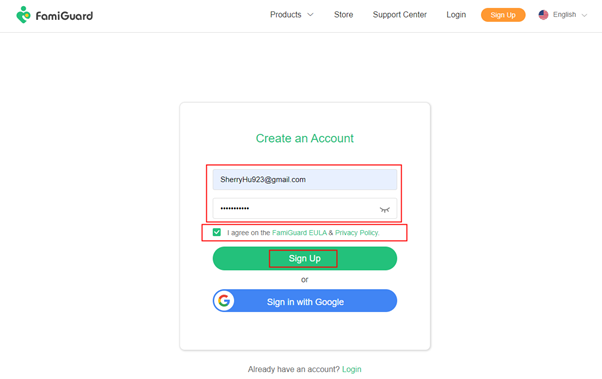
    Step 1: Create a user account on FamiGuard Pro for Android.

    First type in your email address and password. After reading the terms of service and privacy statement, choose the right boxes before entering the code. Finally, click the signup button.
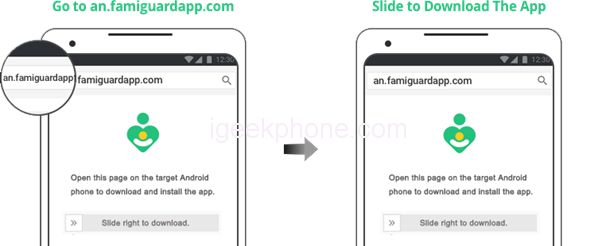
    Step 2: Prepare the target Android device

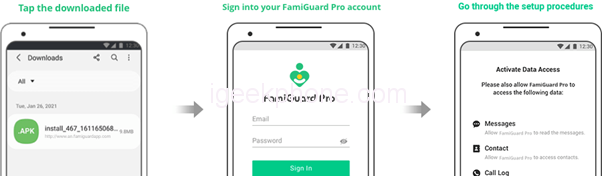
    After downloading and installing the Famiguard mobile phone monitoring program, you will now configure the target android device.
    Step 3: Start monitoring the target account

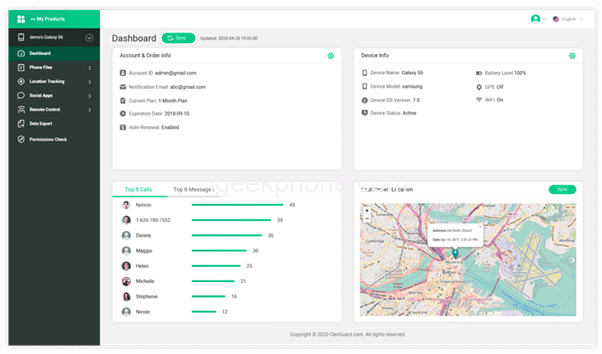
    After completing Step1 and 2, log into your account on the website. Just click on Dashboard to monitor the phone activities and data.
    2.2 Google Map

    The Google Maps service is a web-based tool for monitoring one’s physical position. Its primary function is that of navigational aid for use while driving or otherwise traveling to unfamiliar territory.

    For the purpose of using Google Maps as a locator;

    1. To begin, you’ll need to have your Gmail address added to the Google contacts of the desired phone.
    2. Launch the mobile app and log in.
    3. To access your Google profile, select the gear icon in the upper right corner.
    4. Select Location sharing and New share.
    5. Pick the time frame “Until you turn this off” to share.
    6. You can add yourself to the list.
    7. Simply click the “Share” button to finish.

    2.3 Find My Device

    You can also use Google’s free Find My Device app to monitor a phone’s whereabouts. It’s exclusive to Android smartphones and only works on them. Most Google-powered tracking applications are meant to help find misplaced phones, but they also provide highly accurate location data.

    1. Get the app from the app store and install it on the desired device.
    2. Start the app and turn on the location services.
    3. Visit FindMyDevice.com from your mobile browser.
    4. Put their Gmail address into the search bar and you’ll be able to track them down.
    5. Providing their phone is active and connected to Wi-Fi or mobile data, you may track their whereabouts.

    Part 3: Pros and Cons of the 3 ways

    FamiGuard Pro for Android

    Pros

    • Once you get the hang of it, the Famiguard app is a breeze to use.
    • It’s loaded with features that let you keep tabs on what your kids are up to while they use their phones.
    • There are no problems with the application load times.

    Cons

    • Not available on iOS devices.

    Google Map

    Pros

    • Simple and easy to use.
    • Good for knowing the destinations.
    • Live location features like available routes.

    Cons

    • Not good for tracking mobile phones.

    Find My Device

    Pros

    • It’s simple to set up and utilize.
    • Good for tracking lost devices.
    • The data on a locked phone can be erased.
    • To prevent the device from functioning, you can disable it.

    Cons

    • Needs stable internet connections

    Conclusion

    We recommend you use FamiGuard Pro to check the location and keep track of the mobile phone activity of your family members. It is especially useful when it comes to kids. You can track their every move on their mobile phone.

    Share. Facebook Twitter Pinterest LinkedIn Tumblr Email

    Related Posts

    Do Cigarette Filters Reduce the Risk of Lung Cancer?

    OPPO Find N6’s Panoramic Free Window Feature is First Revealed, Launched on March 17th

    Xiaomi Watch S5 has been officially announced to be released this month! It features a new integrated bezel design and offers an impressive 21-day battery life

    Comments are closed.

    voopoo drag 6
    oxva xlim 3 ultra
    sp2s sen x disposable vape
    jnr 100k
    • Popular
    • 3D Printer REVIEW
    • XIAOMI
    March 5, 2026

    OXVA XLIM PRO 3 vs XLIM Pro 2 DNA: Hands-On Review

    March 5, 2026

    OXVA XLIM PRO 3 vs XLIM GO 2: Hands-On Review

    March 2, 2026

    OXVA XLIM PRO 3 vs XLIM 3 ULTRA: Hands-On Review

    February 23, 2026

    Voopoo DRAG S3 vs DRAG X3 Review – Which One Fits Your Vaping Lifestyle?

    December 26, 2025

    ACMER ASCARVA 4S: Precision CNC Power for Makers, DIYers & Small Workshops

    June 23, 2024

    ACMER P2 20W Laser Engraver Fixed Focus Engraving: Hands on Review

    May 30, 2024

    xTool F1 Ultra Review: World’s First 20W Fiber & 20W Diode Laser Engraver

    May 30, 2024

    Anycubic Kobra 3 Combo Review: The Multicolor Masterpiece?

    March 13, 2026

    Xiaomi Watch S5 has been officially announced to be released this month! It features a new integrated bezel design and offers an impressive 21-day battery life

    March 13, 2026

    Xiaomi Notebook Pro 14 is equipped with a 72Wh large battery: it comes with a standard 100W nitrogen-gallium adapter

    March 12, 2026

    The three color options for Xiaomi Notebook Pro 14 have been announced: white, elegant gray, and soft mist blue.

    March 10, 2026

    Xiaomi 18 Pro Max leaks out: First to Feature Snapdragon 8E6 Pro with a 6.9-inch Large Screen

    fc 26 coins
    New Arrivals
    • ICEBOMB 18K Disposable Vape ICEBOMB 18K Disposable Vape
    • Juice Head iFlex Nixodine 50K Disposable Vape Juice Head iFlex Nixodine 50K Disposable Vape
    • MASKKING CAMO Disposable Vape MASKKING CAMO Disposable Vape
    • Pod Salt Air 40K Disposable Vape Pod Salt Air 40K Disposable Vape
    • OXVA Xlim Go Lite Pod System Kit OXVA Xlim Go Lite Pod System Kit
    • OXVA ARTIO 2 Vape OXVA ARTIO 2 Vape
    • Wala Yo 50000 Disposable Vape Wala Yo 50000 Disposable Vape
    • BD Vape Mod Rayden 220 Box Mod BD Vape Mod Rayden 220 Box Mod
    • Airmez Lux 60K Disposable Vape Airmez Lux 60K Disposable Vape
    About
  • Igeekphone.com provides the first global tech news and reviews about smartphone, vapes, e-cigar, smart home, 3D printers, e-bike,tablets, RC drones, VR headset, and other accessories. It's the best platform to improve your brand and product.
  • Contact us: info@igeekphone.com
  • Check Our Privacy Policy Here.
  • Note: *Right now we have US editor and EU editors for review, especially for Amazon US and EU.
  • *Shop and Compare Price Here*
  • Facebook
  • Youtube
  • OUR BEST VAPE PARTNERS
  • VAPE ONLINE STORE
  • HAYATI PRO MAX PLUS
  • VAPORESSO
  • VOOPOO
  • OXVA
  • NEXA
  • MASKKING
  • LOSTVAPE ORIONBAR
  • MEMERS
  • TODOO
  • SP2S
  • JNR
  • VEIIK
  • OTHER BEST PARTNERS
  • SVBONY
  • Chuwi
  • Blackview
  • Fossibot
  • Unihertz
  • Flsun
  • Anycubic
  • Xtool
  • Oukitel
  • Mukkpet Ebike
  • Ugreen
  • Copyright © 2026 igeekphone

    Type above and press Enter to search. Press Esc to cancel.